

Commerce Studio
Search Results Layout Settings
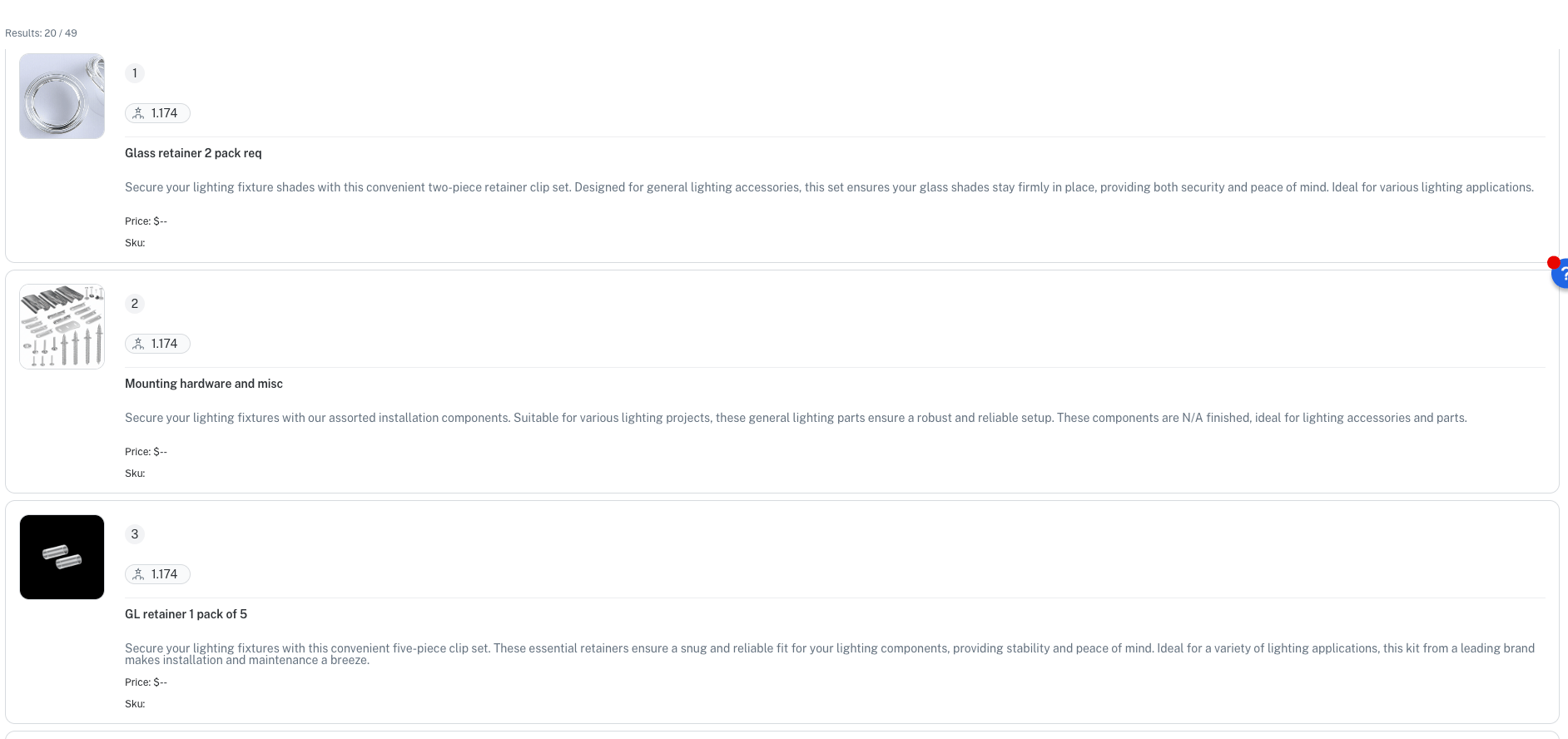
The Commerce Studio Settings feature now provides the option to display search results in a list, or in the current default grid pattern.The Layout section lets you select to display search results in a vertical list or a grid pattern.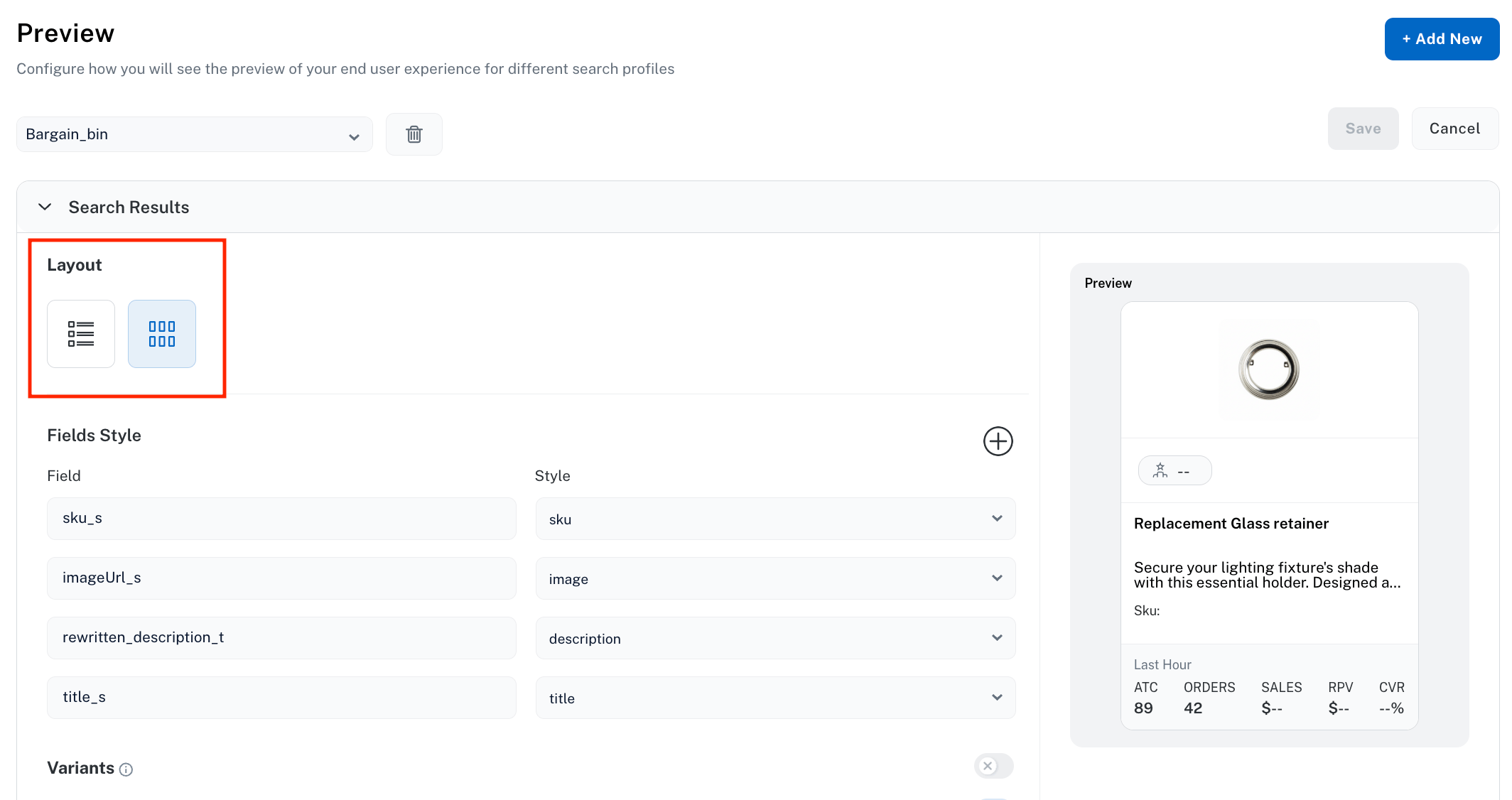
Lucidworks Platform Core Settings
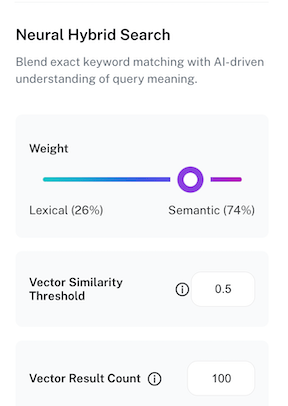
Configure the Vector Similarity Threshold and Vector Result Count of Neural Hybrid Search
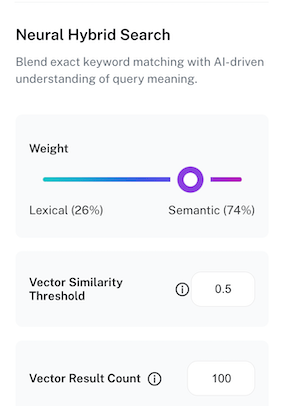
The Lucidworks Platform Core Settings Relevance option has been enhanced with two new fields:-
Vector Similarity Threshold lets you set the minimum of how closely a document must match your query’s meaning to be included in results. Enter a decimal value between
0and1. A higher minimum value returns only results that strongly match the query’s meaning. A lower minimum value returns more results because results do not have to match the query’s meaning as closely. -
Vector Result Count specifies how many candidate results the vector (semantic) search retrieves before the results are merged and re-ranked with the lexical results. Enter an integer between
0and2000. A higher value assesses more semantic candidate results, which improves relevant results. A lower value assesses fewer semantic candidate results, which may decrease relevant results.
Commerce Studio
Exclude rules from Commerce Studio Editor results preview
The Execute section of the Commerce Studio Editor screen now gives you the option to include or exclude a rule from the query being previewed. This lets you test to see the search results if the rule is removed from a query without actually deleting the rule.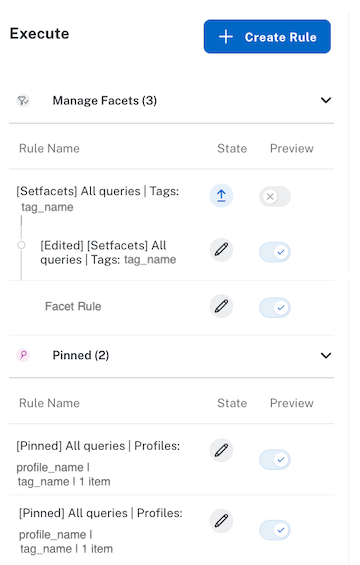
on to execute that rule in the query, or click Preview off to exclude it from the query. The query results display based on the rules included in the query.Your live site is never affected by setting the Preview toggle to
off.UI Studio
Customize the UI Studio composition canvas
The Customize Section option of UI Studio lets you set a background color and size for a composition that matches your organization’s branding or for a specific search experience.When you access UI Studio, click Builder, and select the composition to customize, the Composition Editor screen displays.
Composition Editor screen

Customize canvas properties
UI Studio
Add a UI Studio composition
The Create New UI feature of UI Studio lets you add a new composition to build a new search experience page for your users. This UI option is a user-friendly method to add a search page customized to your organization and doesn’t require engineering resources.When you access UI Studio and click Builder, the Create New UI option lets you name the new composition.
The Compositions screen, where you create, manage, and publish your UI Studio compositions.

Add a new composition.
Lucidworks Platform
Unified Platform Login
If you’re using Lucidworks Search, you can now access Fusion instances and Grafana dashboards directly from Lucidworks Platform using single sign-on (SSO) authentication. Unified Platform Login eliminates the need to log in separately to each system and provides a seamless, secure authentication experience powered by Okta.When you click the Managed button from Lucidworks Platform’s Indexes tab, you’re authenticated automatically and redirected to your Fusion instance without entering additional credentials. The same SSO experience extends to Grafana dashboards accessed with the View Metrics option.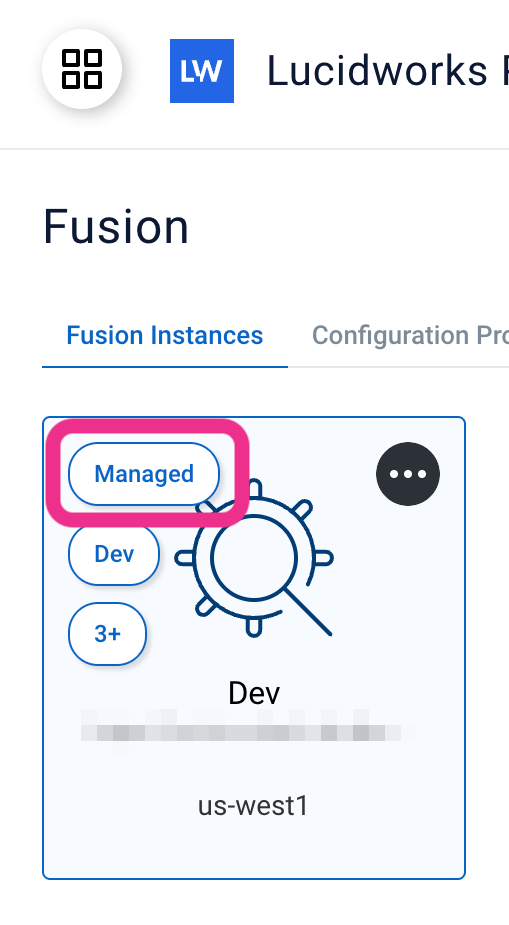
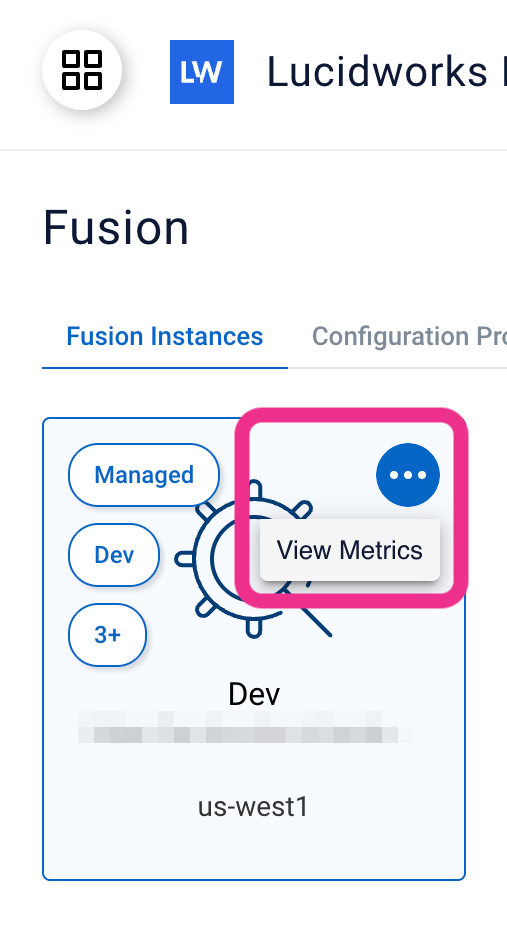
Unified Platform Login works with Lucidworks Search.
It does not apply to self-hosted Fusion.
Commerce Studio
Draft edits for all rule types in Commerce Studio
Commerce Studio now supports draft edits for every rule type, so merchandisers can update a published rule without taking it offline. When you open a published rule for editing, the published version stays active on your site and your changes are captured as a draft. You can then Publish the changes immediately, Save as Draft to preview the impact in the Editor, or Cancel to discard the edits.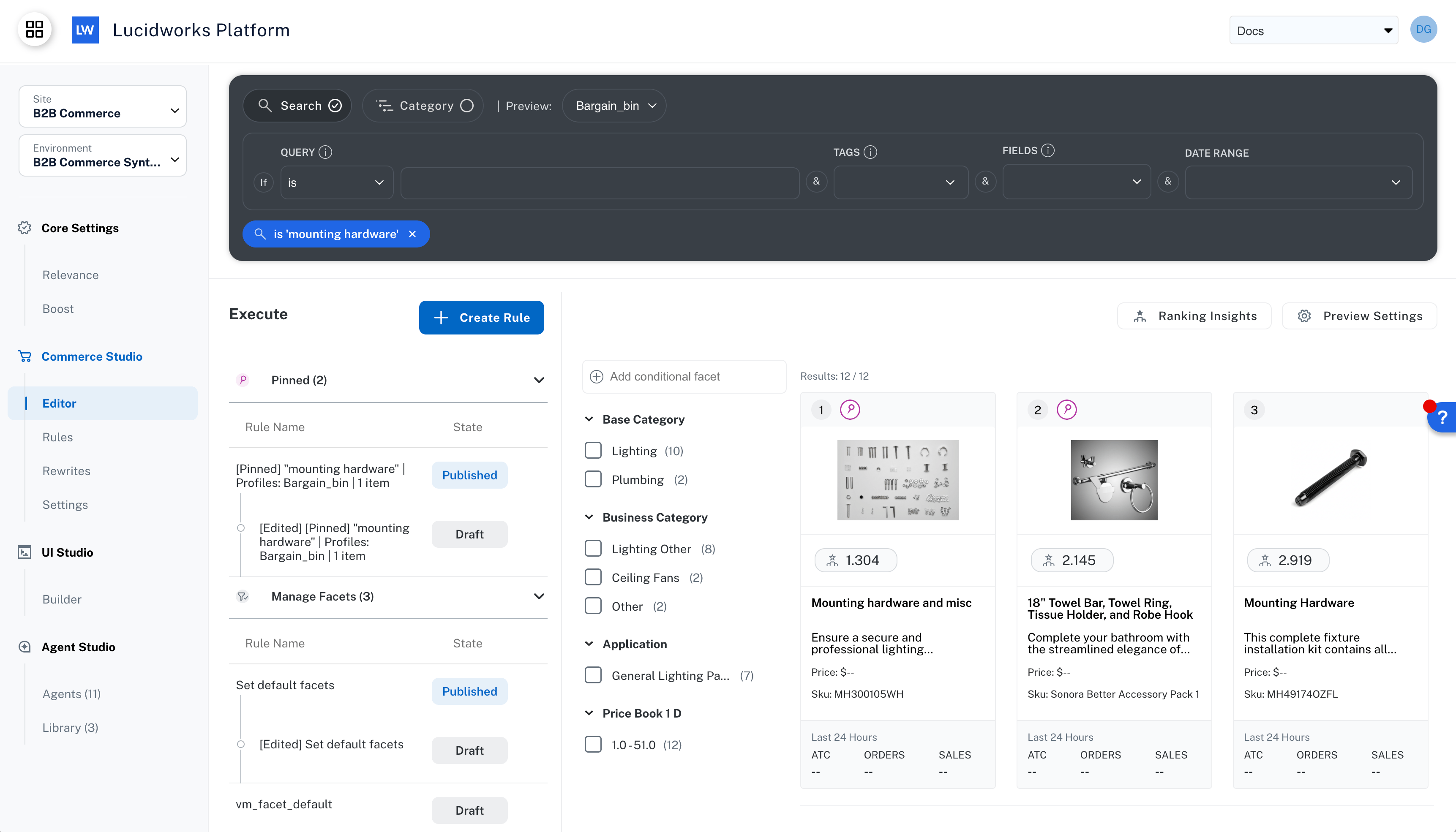
Draft edit for a pin rule in Commerce Studio Editor
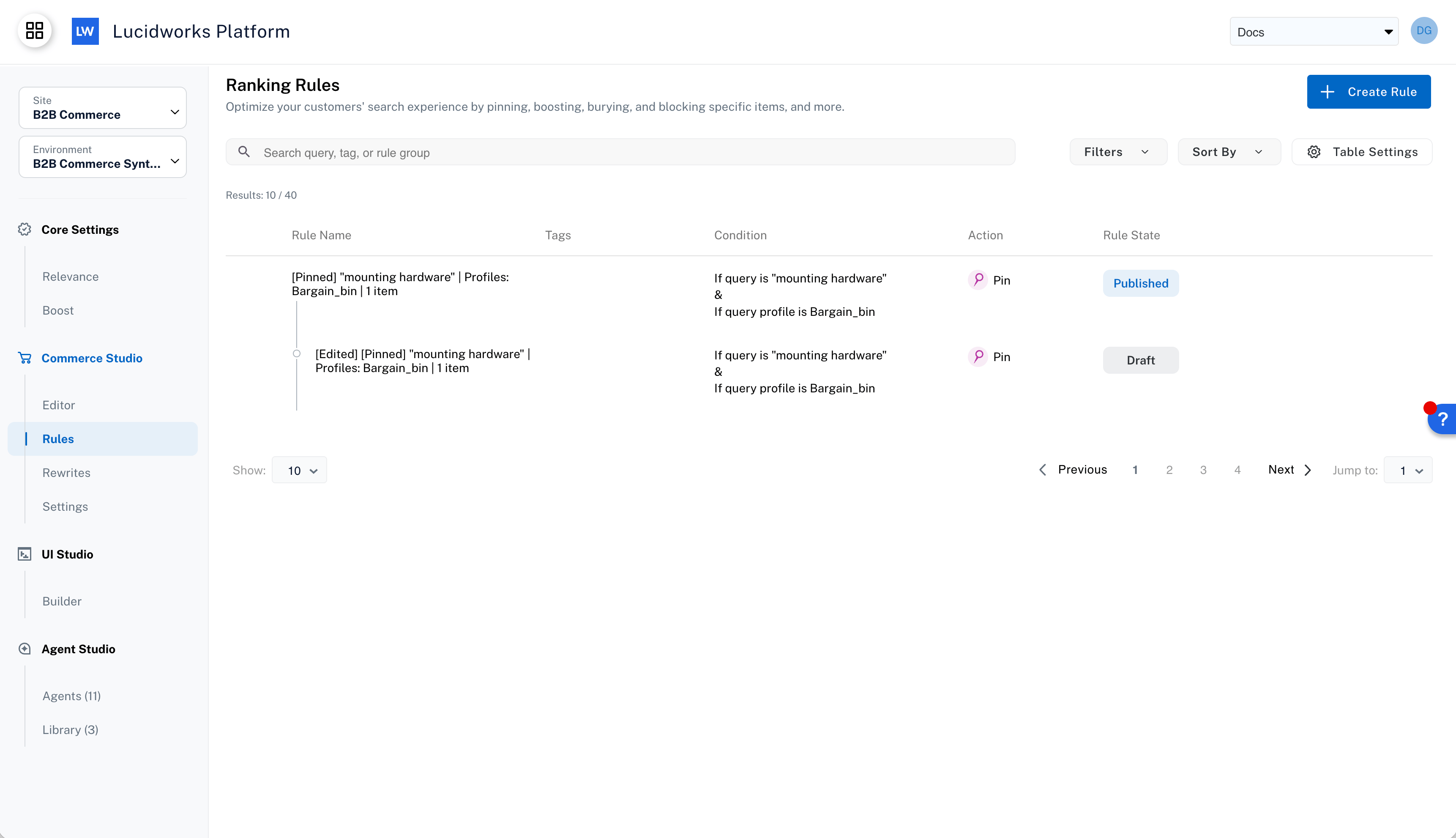
Draft edit for a pin rule in Commerce Studio Rules screen
FusionLucidworks SearchLucidworks AI
Part Number detection
The Part number detection feature is a specialized query processing feature that automatically detects part number patterns in search queries, and then optimizes search behavior to balance lexical precision with semantic understanding.In part number searches, lexical matching is the more dominant function and highly accurate, lexically focused results are returned. Semantic matching is minimized for part number searches, but is not impacted for general queries.Part number detection employs a Fusion LWAI Prediction stage you create. You must configure the stage to use the Part Number Classification custom-trained model.To further optimize part number searches, you can complete the following actions:- Configure any other Fusion stage with conditional statements that return the boolean from part number detection (if applicable to your business).
- Tune the Neural Hybrid Query stage to give more weight to lexical search.
Use cases
- Business-to-consumer organizations that offer products identified with model or part numbers can use part number detection to accurately return results to help users select the correct item, which increases customer satisfaction and reduces product returns.
- Business-to-business organizations that rely heavily on part numbers, SKUs, or product codes, use part number detection to identify the products they distribute. The correct selection of products is essential to their customers, and enable targeted purchases, encourage repeat orders, and build the long-term customer relationships that help B2B organizations thrive.
- Knowledge management searches use part number detection to return results from your company’s knowledge bases, technical documents, inventory catalogs, and other documents. Easy and fast access to this information increases productivity and access to accurate, up-to-date information.
Examples
When the stages are configured, the part number detection feature can be used in Fusion or in Lucidworks AI.The following example reflects when a part number is detected (true):
Part number detected
false):
Part number not detected
UI Studio
Introducing UI Studio
Lucidworks UI Studio is a no-code visual experience builder for creating and launching enterprise-grade, AI-powered search applications on the Lucidworks Platform. Teams can design branded, multi-page search experiences using drag-and-drop components, live previews, and configurable search integrations without relying on engineering resources.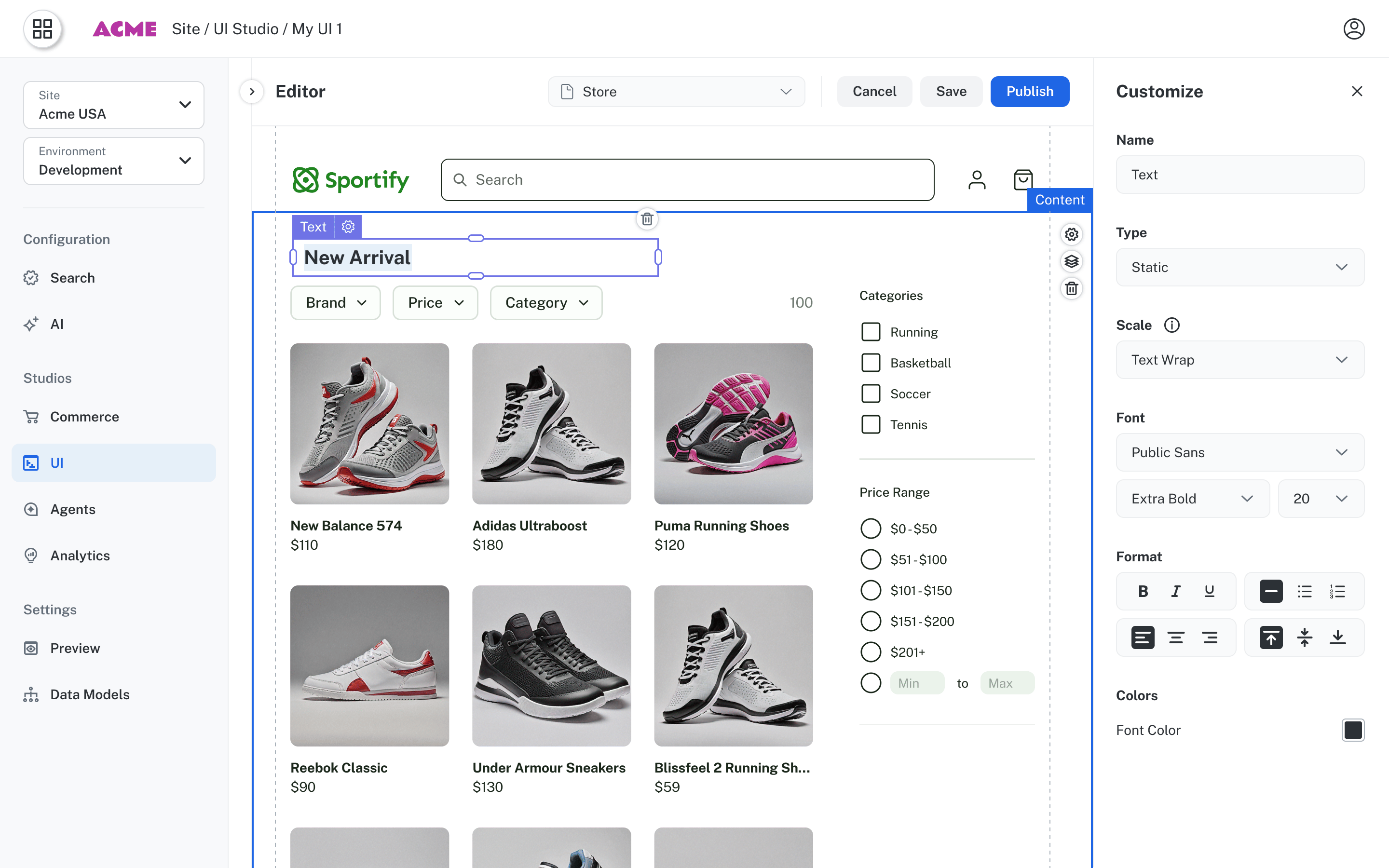
Build a search UI in minutes
Search Bar
Accept user queries and trigger search across your datastore.
Results
Display search results in List, Grid, or Table views with sorting and pagination.
Facets
Let users narrow results by filtering on field values.
Button
Add navigation, export, or action buttons to your pages.
Image
Display images with optional links, borders, and fallback support.
Text
Add static or dynamic text content with rich styling options.
Key capabilities
- Drag-and-drop creation of branded, multi-page search applications
- Built-in integration with Lucidworks Search, AI-powered relevance, and typeahead
- Live preview with real production data during configuration
- Visual theming and branding controls for consistent enterprise design
- Secure publishing to Lucidworks-managed hosting in minutes
- Version control and rollback for safe iteration
- Enterprise authentication support including SSO-secured experiences
Use cases
B2B commerce
B2B commerce
B2B buyers work with large, complex product catalogs and require precise access to technical specifications, parts, and contract terms. UI Studio enables B2B organizations to rapidly deploy branded search experiences without dedicating frontend engineering resources. Search administrators can configure facets, sorting, and relevance tuning to match complex procurement workflows and publish updates independently. This reduces implementation friction, shortens time-to-value, and allows engineering teams to focus on higher-priority initiatives.
B2C commerce
B2C commerce
B2C customers expect fast, intuitive, and visually consistent search experiences. UI Studio allows ecommerce and digital teams to create branded product discovery experiences with configurable search bars, facets, typeahead, and results pages. Teams can preview changes against live data, iterate quickly without code, and publish confidently with built-in version control. This improves product findability, reduces cart abandonment, and accelerates time-to-launch for new storefronts and campaigns.
Knowledge management
Knowledge management
Enterprise knowledge management programs often span multiple portals: employee search, technical documentation, supplier resources, and customer support. UI Studio enables organizations to launch and maintain each of these experiences independently, without parallel frontend development projects. Search administrators can manage layouts, components, and pages through a visual interface while automatically capturing behavioral signals to improve relevance over time.
Dive in
UI Studio
Explore the UI Studio documentation to learn how to build, customize, and publish enterprise-grade search experiences without writing code.
Request a UI Studio demo
See UI Studio in action and learn how your team can launch enterprise search experiences faster without frontend development.
Commerce Studio
Bulk operations API for Commerce Studio
The Rules and Rewrites API for Commerce Studio now supports bulk operations, so you can publish, unpublish, edit, delete, or migrate multiple rules in a single request instead of calling the API once per rule.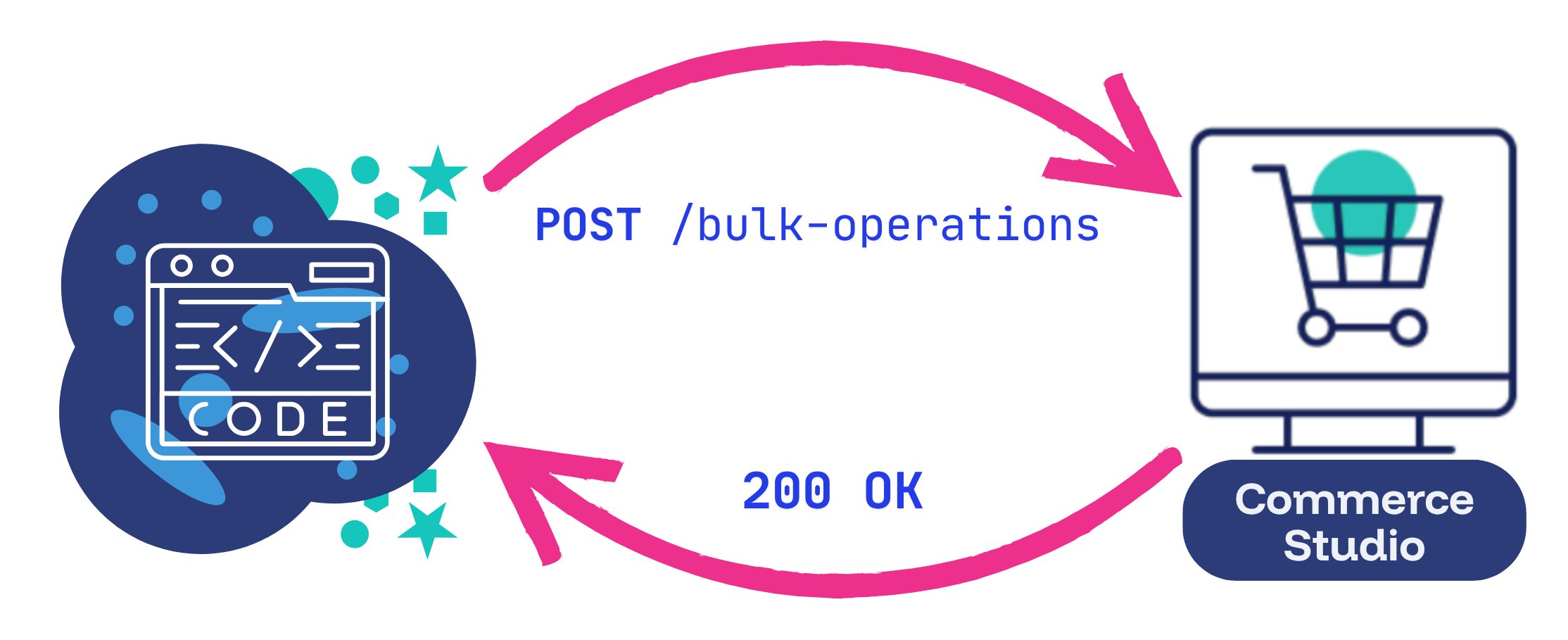
- Publishing or unpublishing large sets of rules for a seasonal campaign
- Applying the same edit across every rule that shares a tag
- Deleting obsolete rules in a single batch
- Migrating a rule set to another Commerce Studio instance
commercestudio.bulkoperations scope.See Bulk operations for usage instructions and example requests.
For complete endpoint specifications, see the Bulk Operations API reference.Analytics StudioCommerce Studio
Product Impressions Metrics
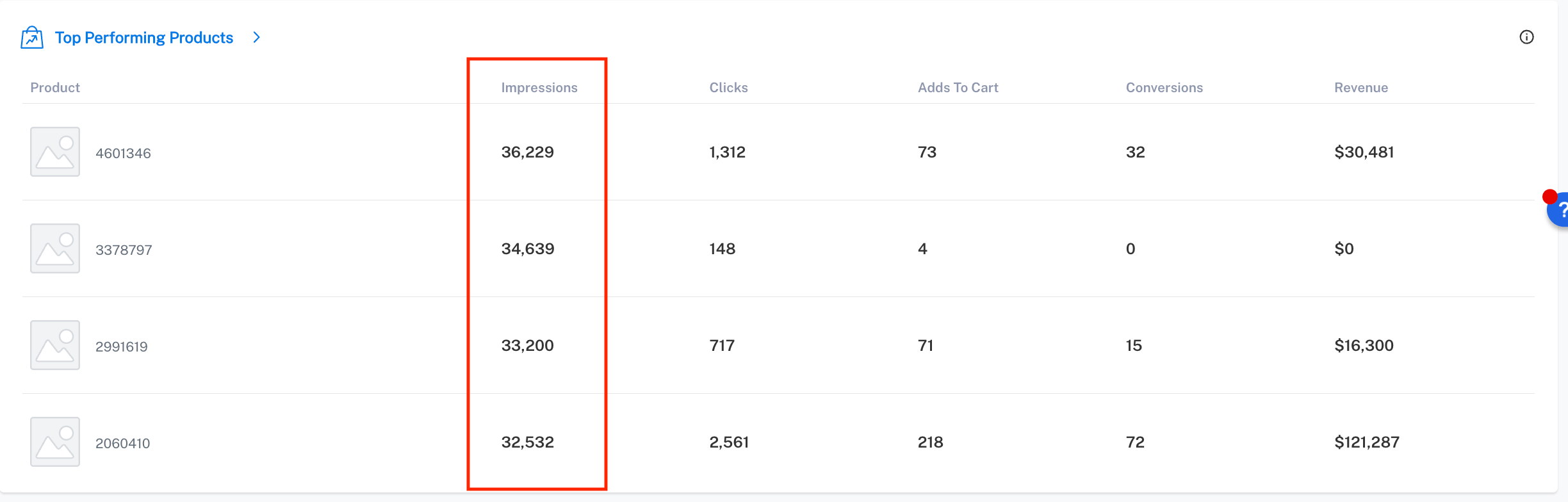
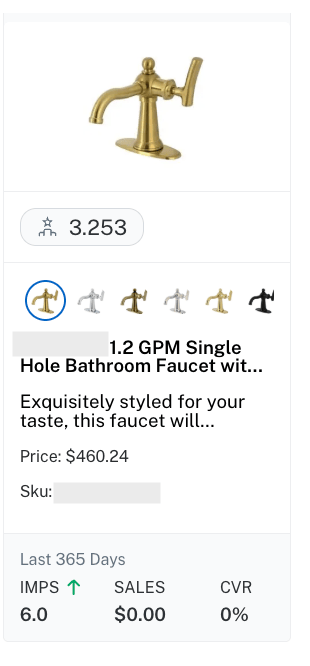
Product impressions measure the number of times a product displays in search results in response to user queries. The product is counted each time it displays, even if users do not interact further with the product.You can use impressions metrics to help your organization perform these important functions:- Track impression changes after merchandising updates or catalog modifications to monitor trends over time
- Analyze impressions for different search categories or product types and segment by query type
- Identify high-impression products that may need pricing or promotion adjustments
- Include impression analysis in regular merchandising reviews to maintain optimal product exposure
Commerce Studio
AND logic for attribute rules in Commerce Studio
Commerce Studio now supports AND logic across attribute field value conditions in Boost by Attribute, Bury by Attribute, and Block by Attribute rules, enabling precise targeting of specific product combinations.Previously, attribute rules could only use OR logic between different attributes. For example,Color = Black OR Type = Pants would affect all black items and all pants, even if the items didn’t meet both conditions.Now you can create rules that require multiple attributes to match simultaneously in one rule:(Color: Black, Red) AND (Type: Shirt)— Boost only shirts that are black or red(Brand: Nike) AND (Gender: Women) AND (Category: Running)— Boost women’s Nike running shoes(Clearance: True) AND (Available: 0)— Bury out-of-stock clearance items
- Boosting seasonal product combinations like winter coats or summer dresses across multiple brands or colors
- Burying clearance items that are out of stock to reduce customer frustration
- Promoting new arrivals within specific high-margin categories
- Burying products that do not meet a product speficiation in the query
This feature requires Fusion or Lucidworks Search 5.17.1 or later.
Commerce Studio
Numeric field operators for Commerce Studio rules
Commerce Studio now supports numeric comparison operators for field value conditions in Boost by Attribute, Bury by Attribute, and Block by Attribute rules.The Commerce Studio UI now provides operators for creating attribute-based rules with numerical field comparisons. Previously, configuring numeric conditions required writing Solr queries directly.This enhancement enables merchandising scenarios such as:- Boosting products with inventory levels that exceed a threshold
- Burying items with low customer ratings
- Blocking products priced outside acceptable ranges
- Promoting items within specific price brackets during sales
This feature requires Fusion or Lucidworks Search 5.17.1 or later.
FusionLucidworks Search
Platform Signals integration
The Boost with Signals query pipeline stage in Fusion and Lucidworks Search now supports Platform Signals as a data source, enabling you to use the Signals Beacon or Platform Signals API to feed behavioral data directly into search relevance boosting. Previously, only native signals were supported, requiring more cumbersome parallel signal infrastructure to influence search ranking.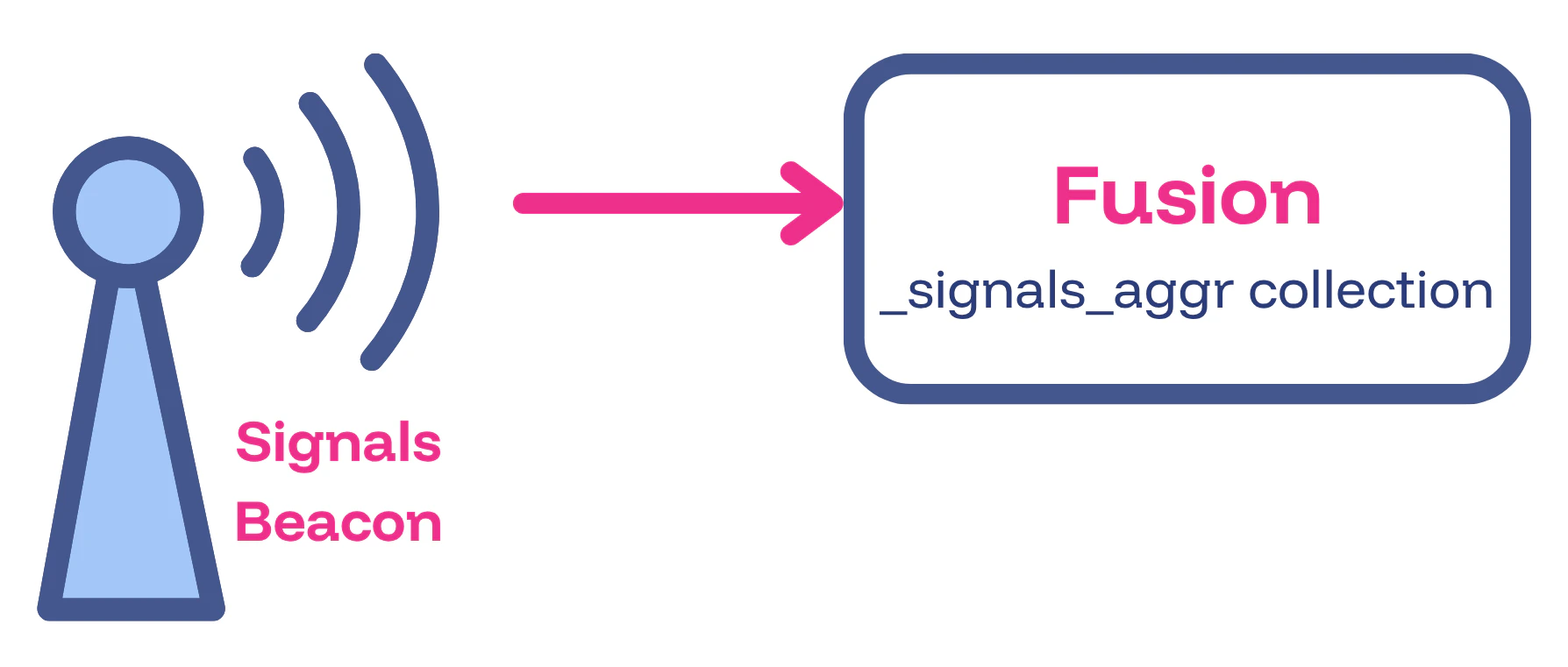
Commerce Studio
Form Builder for rules
Commerce Studio now includes a Form Builder for creating rules directly on the Rules screen, without opening the Editor. When you know exactly what rule you want to create and do not need to see search results in context, the Form Builder is faster than the Visual Builder workflow.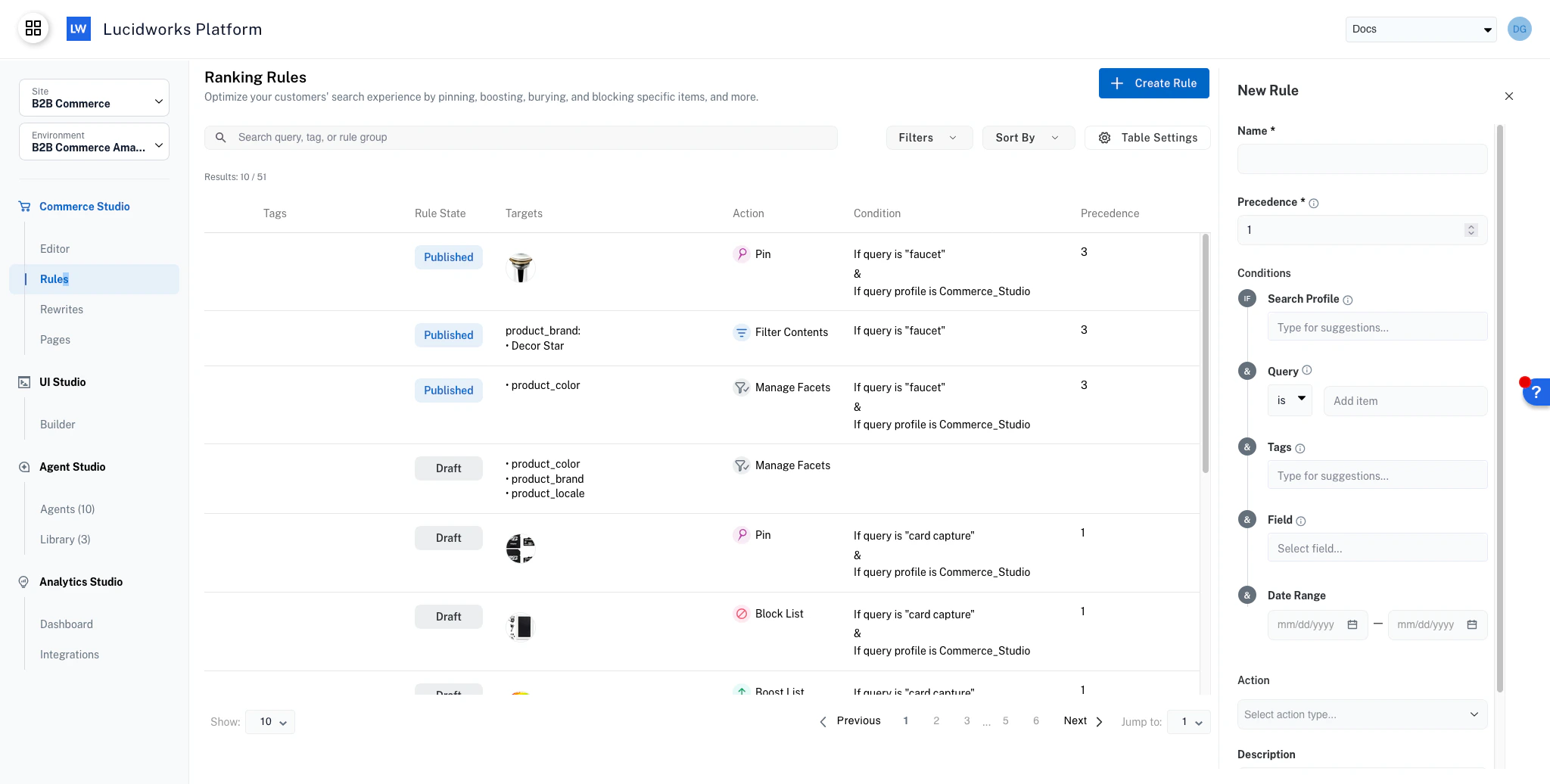
Form Builder in Commerce Studio
Agent Studio
Conversational Q&A and FAQ agents
Two new Agent Studio agents are now available. Both the Conversational Q&A agent and the Conversational Q&A FAQ agent are AI-powered and live on your organization’s product detail pages. Customers can ask natural-language questions about a product, and the agent responds with accurate, real-time answers grounded in that product’s own documentation, such as datasheets, manuals, specifications, and other supporting PDF technical content.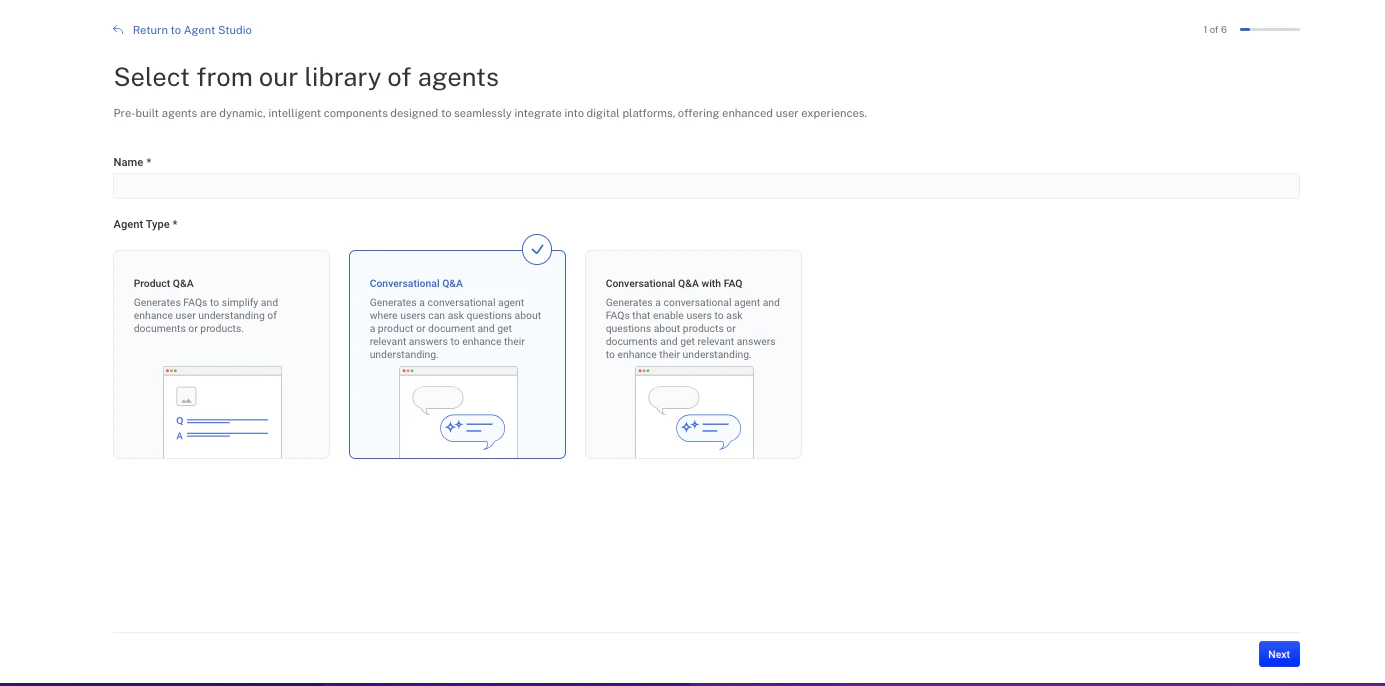
You can quickly and easily create multiple agents that enhance your ability to provide information 24/7 to customers and internal purposes. For example, you may have one agent for customers about product information, and another for employees to get information about organization policies.
Core Settings
Core Settings for multiple query profiles
Core Settings now supports managing multiple query profiles within a single site, enabling you to configure and maintain distinct search experiences for different use cases.When your site has multiple query profiles, a query profile selector appears at the top of the Core Settings interface. You can switch between profiles to configure each search experience independently without affecting other profiles.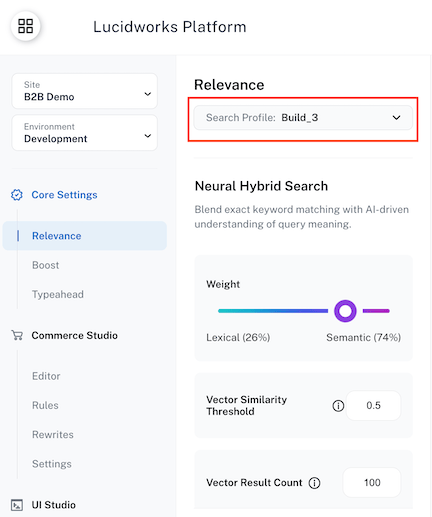
- Separate search configurations for different websites or applications
- Different ranking strategies for various content types
- Dedicated search behaviors for internal versus public users
- Distinct search experiences for multiple audiences or regions
The query profile selector only appears when your site has multiple query profiles configured.
Sites with a single query profile continue to work exactly as before with no interface changes.
Commerce Studio
Rules and Rewrites API
Commerce Studio now provides a public-facing Rules and Rewrites API that enables programmatic management of merchandising rules and query rewrites. This API supports enterprise automation workflows, enabling you to create, update, and synchronize rules across multiple environments through CI/CD pipelines, internal tools, and custom integrations.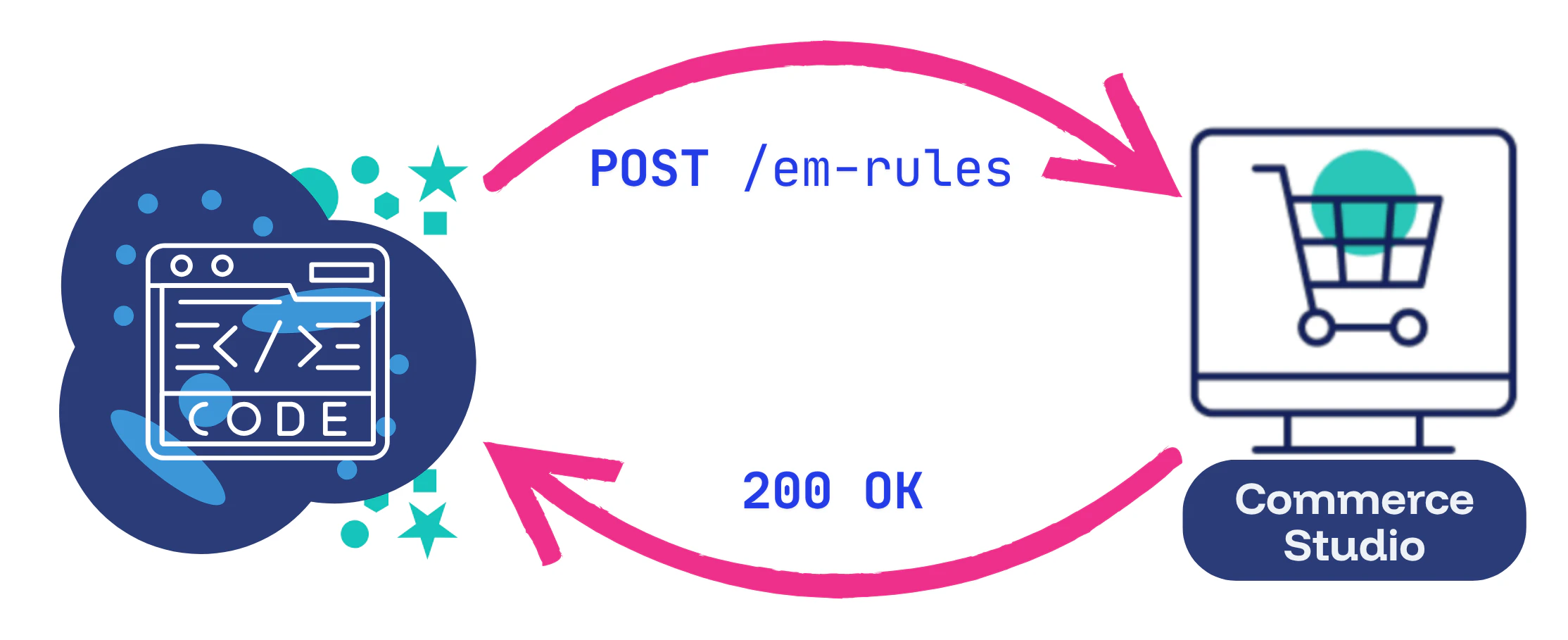
summer-promo-2026 in development, then deploy the same rule to QA and production using that identifier to ensure changes propagate correctly across all environments.These capabilities address enterprise use cases where manual UI-based rule management does not scale:- Automated deployments: Integrate rule management into CI/CD workflows for consistent, repeatable deployments.
- Cross-environment synchronization: Maintain identical rule sets across development, QA, and production.
- Internal system integration: Connect Commerce Studio to merchandising platforms, promotion systems, or custom tooling.
- Large-scale rule management: Efficiently manage rule sets that are impractical to maintain manually.
Commerce StudioAnalytics Studio
Average Click Position
Commerce Studio and Analytics Studio now display the average ranking position of products in the search results when the customer clicks those products.A lower average click position is better, because that means customers are finding the product near the top of the results, which provides the following benefits:- Increased customer satisfaction with the search experience
- Enhanced conversion rates
- Minimized cart abandonment and loss of sales to competitors
Average click position graph in Commerce Studio
The Ranking Insights panel in Commerce Studio displays average click position of the query specified in the Conditions Manager section of the Editor screen.The metric is calculated by dividing the sum of all clicked positions by the total number of clicks for the current query and time period selected in the Editor screen.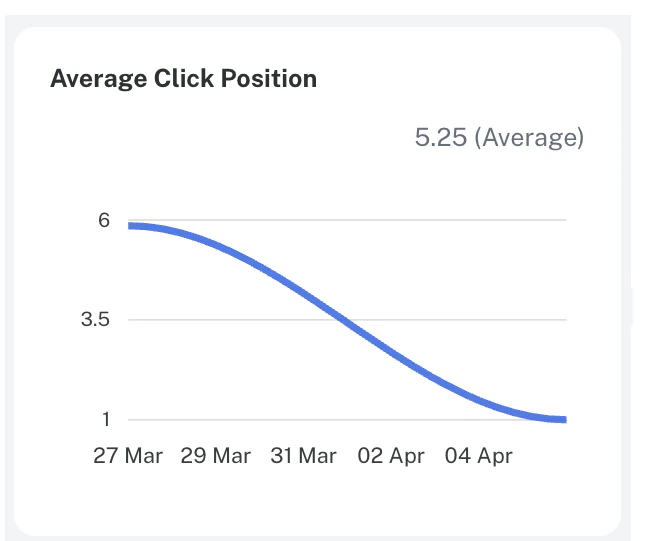
Average click position graph in Analytics Studio
The Analytics Studio Signals Analytics screen displays an average click position graph that measures the average ranking position for all products for the designated time period.The metric is calculated by dividing the sum of all clicked positions by the total number of clicks for the time period displayed.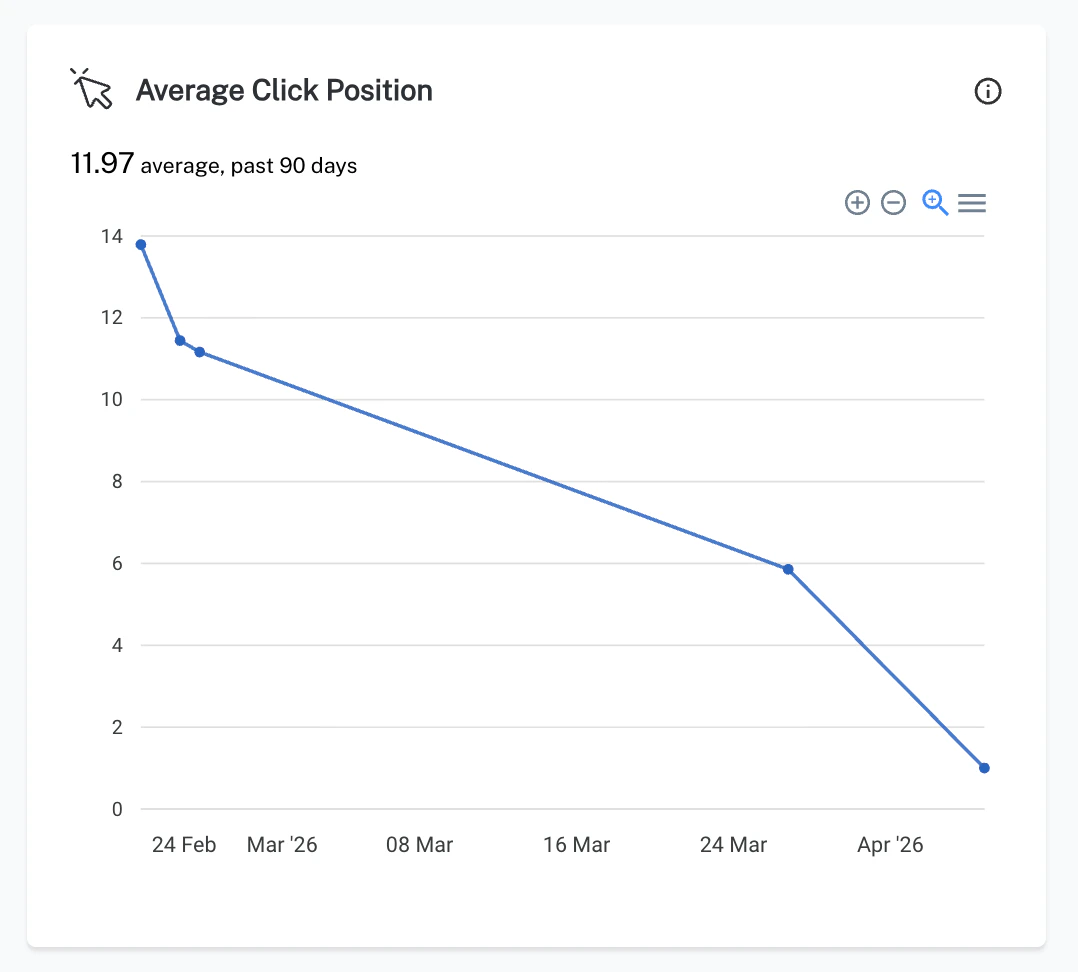
Commerce Studio
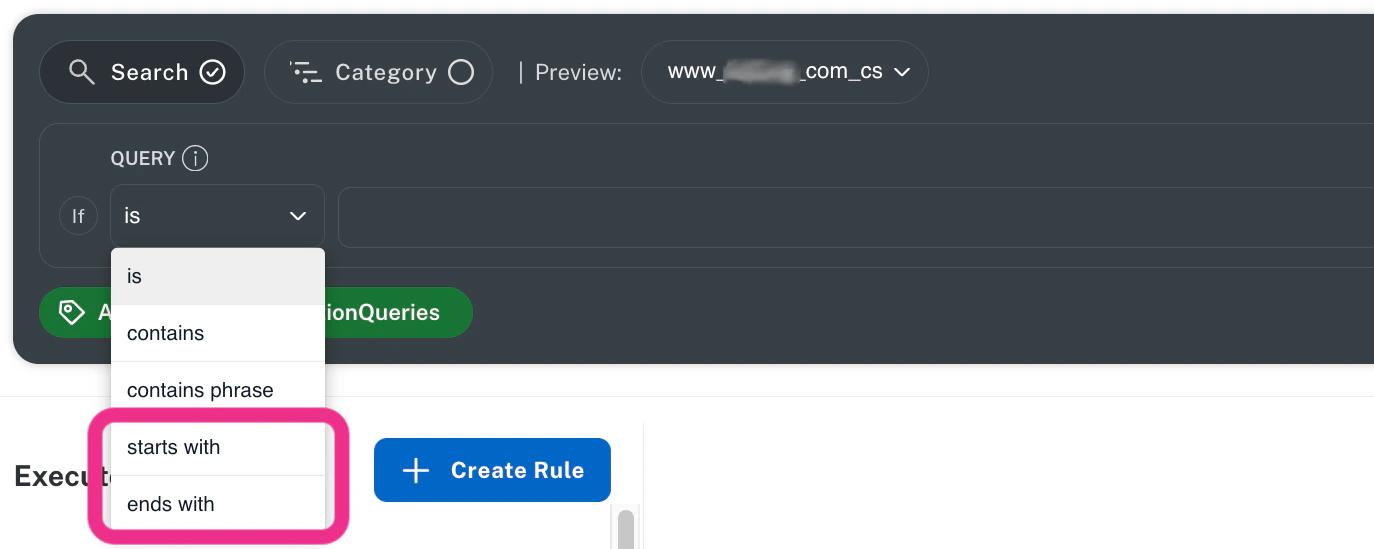
Starts With and Ends With query matching
Commerce Studio now supports Starts With and Ends With query matching methods, giving you more precise control over when rules trigger. These new matching options complement the existing Is, Contains, and Contains Phrase methods by enabling prefix- and suffix-based targeting strategies.These enhancements enable the following capabilities:- Target branded searches when queries begin with specific brand names.
- Apply location-specific logic when queries end with “near me”.
- Trigger help content when queries end with “manual,” “pdf,” or “replacement”.
- Reduce rule sprawl by creating precise, structured query patterns instead of multiple broader rules.
This feature requires Fusion or Lucidworks Search 5.17.0 or later.
Lucidworks AI
Generative AI using Lucidworks-managed keys
Lucidworks now offers the option to execute generative AI models using Lucidworks-managed API keys, which eliminates the need for your organization to manage third-party credentials across multiple large language model (LLM) providers such as OpenAI, Anthropic, Google, and Azure.This business option delivers significant operational and strategic advantages in a simplified deployment that eliminates complex third-party integrations and allows your teams to focus on business goals rather than credential management.Your organization benefits from reduced costs with predictable, fixed pricing instead of unpredictable per-token charges across multiple vendors. This lowers administrative overhead for managing vendor relationships and billing accounts.This Lucidworks-managed service handles the complete lifecycle of Gen-AI model execution through the Lucidworks AI Gateway for Gen-AI use cases in the Prediction API and Async Prediction API.Your organization will configure dedicated Fusion pipelines using LWAI Prediction index and query stages withUse Case and Model values provided by Lucidworks, while Lucidworks manages the underlying infrastructure, API key lifecycle, and model routing.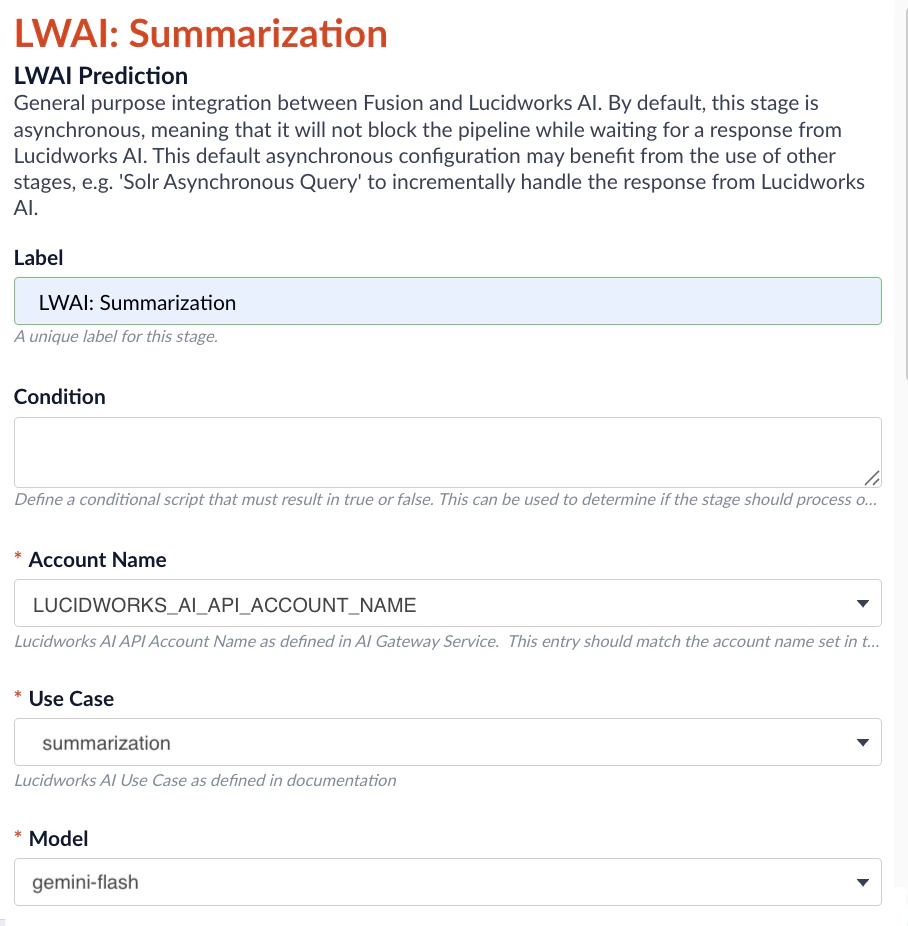
Commerce Studio
Advanced grouping
Commerce Studio now supports advanced grouping, a conditional, rule-based approach to product variant grouping that gives you dynamic control over how products are grouped in search results.Unlike standard variants that apply uniformly across all products and queries, advanced grouping uses rules to trigger different grouping parameters based on conditions such as queries, categories, or other criteria. For example, you can group products by color for fashion queries while grouping by product ID for electronics queries.This dynamic capability enables you to create context-aware grouping strategies that adapt to different search scenarios, improving product discovery and the customer experience.See Advanced grouping in the Rules documentation for complete configuration details.Commerce Studio
Category management for Commerce Studio
Because category-level optimization plays a critical role in guiding product discovery and driving conversion, Commerce Studio now includes a dedicated Category Management workspace that lets merchandisers easily curate and optimize category pages without complex Fusion configuration. You can select categories using both readable names and IDs, apply category-level rules and conditions, preview changes before publishing, and measure performance with integrated analytics. This streamlined experience empowers your merchandising team to manage browse experiences with the same speed, control, and insight available for search—reducing reliance on engineering and accelerating time to impact.You can configure the category field on the Settings screen, then use category conditions in the Editor to access the available categories and optimize the results for each one: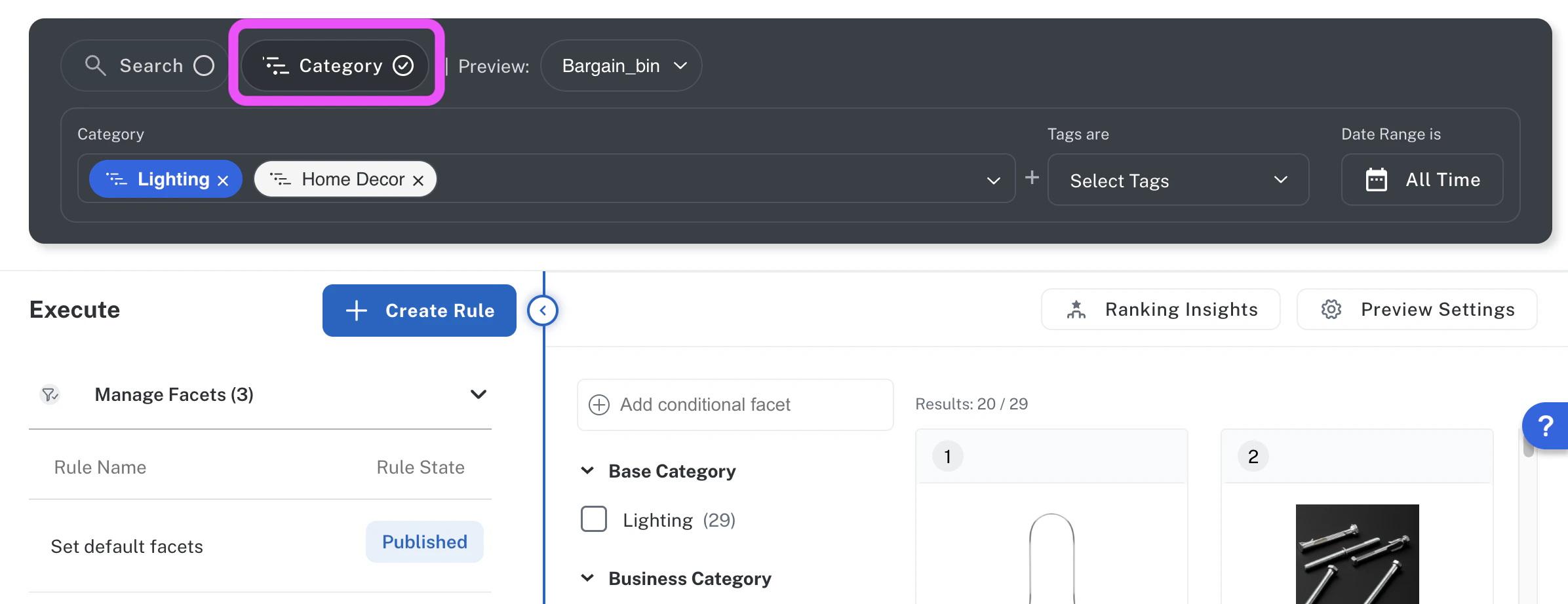
Lucidworks Platform
Typeahead
The new Typeahead feature is now available in Lucidworks Platform Core Settings to help customers find results faster with real-time query suggestions as they type.The feature supports Included and Excluded suggestion lists to control which typeahead suggestions appear as customers type. Users can manually add terms to both lists while the Platform automatically populates the table with the most popular terms from a linked Signals Store.As your customer enters text into the search box on your site, the Typeahead feature uses the Included suggestions list to predict possible customer queries and displays suggestions in real time. When the customer clicks on the suggestion, results for the selected term display.This function helps customers find relevant results faster by predicting what they are trying to search.See Typeahead for information to enter and manage suggestions. To retrieve a full or partial list of suggestions for your organization, see Typeahead Service API.Commerce Studio
AI Ranking Insights
AI Ranking Insights is a new Commerce Studio feature that displays a clear, business-friendly explanation about why a product or content is ranked in a given position.When you click a search result, and then click AI Ranking Insights, this feature uses a large language model (LLM) to interpret primary ranking drivers, such as text relevance, rules, boosts, rewrites, and AI-driven signals like Neural Hybrid Search (NHS), in Fusion’s debug response. Specifically, AI Ranking Insights identifies key relevancy influencers including merchandising rules, matching fields, and matching logic, and then returns the reasoning in a readable format so merchandisers and search managers can quickly identify the key factors influencing a search result’s relevancy.For example, if you click on a bathroom faucet handle pinned as first in a search for “bathroom faucet”, the response is:“Bathroom Faucet Handle ranks #1 out of 12550 total results because of a pin rule that explicitly places this specific product at the top of the results for the query bathroom faucets. This merchandising rule overrides the organic search ranking to ensure the product appears in the first position.”Using this information, the merchandiser or search manager can modify the factors of this and other search results, if needed, to rank other results higher than the bathroom faucet handle.See AI Ranking Insights for complete details and instructions to use this feature.Lucidworks AI
Image Data Enrichment
The new Image Data Enrichment feature in Lucidworks AI automatically enhances product catalogs with richer attributes by analyzing each item’s images and text fields to infer relevant details. By enriching your catalog’s categories, keywords, and synonyms, you make it easier for customers to find what they’re looking for—driving higher conversions and reducing search abandonment. This feature is especially powerful when your product catalog is too large for manually adding details to every item.See Image Data Enrichment for complete details and instructions for enabling the feature. You can use this feature with or without Fusion.Lucidworks AI
Streaming responses for the LWAI Prediction API
The LWAI Prediction API now supports streaming responses, enabling applications to receive model output as it is generated. This improves responsiveness for interactive workloads such as chat experiences and real-time content generation. Clients can enable streaming by adding theAccept: text/event-stream header to synchronous prediction requests, which returns model output as a sequence of Server-Sent Events (SSE).Streaming is available only when calling the LWAI Prediction API directly as Fusion does not yet support streaming responses.See the Prediction API for examples of curl calls and streaming output.Lucidworks AI
Accelerated indexing with Lucidworks AI batch vectorization
Lucidworks AI continues to advance the performance of vector-based indexing. The latest release introduces new batch vectorization capability that significantly improves embedding throughput. Fusion 5.9.15 now supports this capability through the LWAI Batch Vectorize Index Stage, enabling faster and more scalable document processing. This integration shows how Fusion and Lucidworks AI evolve together to deliver higher performance for AI-driven indexing.Fusion
Upgrade to Fusion 5.9.15 to take advantage of the new LWAI Batch Vectorize Index Stage and achieve faster, more scalable indexing performance. Follow the Fusion upgrade guide to complete your upgrade.
Lucidworks Search
Lucidworks Search customers can request an upgrade to Fusion 5.9.15 to enable the new LWAI Batch Vectorize Index Stage and benefit from significantly improved indexing performance. Contact your Lucidworks representative to initiate the upgrade process.
Performance improvements
Benchmark testing shows that using theLWAI Batch Vectorize Index Stage achieved indexing speeds up to 10 times faster than the single-document approach. Indexing rates reached as high as 95 documents per second, compared to fewer than 8 documents per second previously. Even with larger embeddings, throughput consistently exceeded 80 documents per second.How it works
The LWAI Batch Vectorize Index Stage buffers documents until either the maximum batch size or the maximum wait time is reached. The batch is then sent to the Lucidworks AI embedding service in a single API call, reducing overhead and enabling more consistent scaling.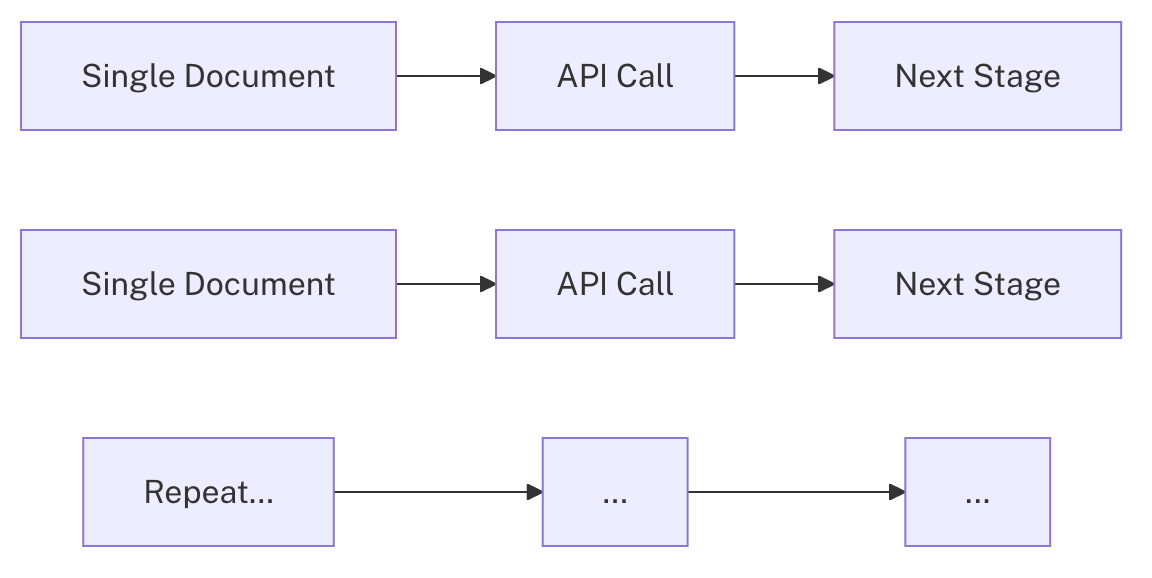
Flowchart for single document processing

Flowchart for batch document processing
Integrated product development
This release demonstrates how Lucidworks AI innovations directly influence Fusion’s evolution. The LWAI Batch Vectorize Index Stage enables Fusion users to take advantage of Lucidworks AI’s optimized batching and embedding capabilities without changing existing configurations.This release highlights how Fusion and Lucidworks AI are being developed in parallel to deliver practical improvements. By adopting the new Batch Vectorize stage, Lucidworks AI users benefit from faster indexing and greater scalability without needing to change their embedding configuration.For details on setup and configuration, see the LWAI Batch Vectorize Index Stage documentation.Agent Studio
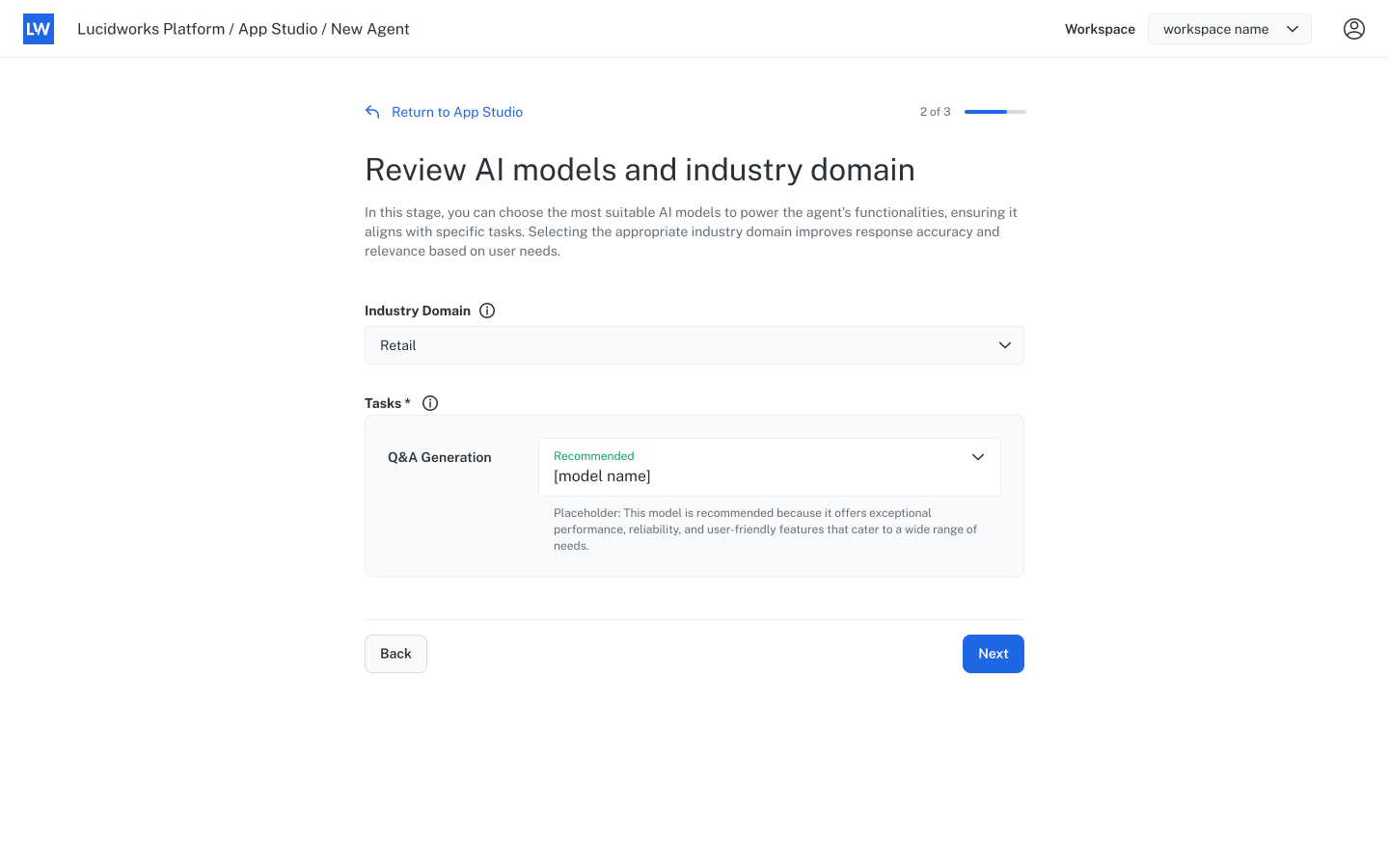
Introducing Agent StudioLucidworks is pleased to announce the launch of Agent Studio, a new capability on Lucidworks Platform that enables organizations to create and deploy AI-powered virtual agents for their websites. These prebuilt, customizable agents address a wide range of use cases, including product question-and-answer experiences and generative AI summarization.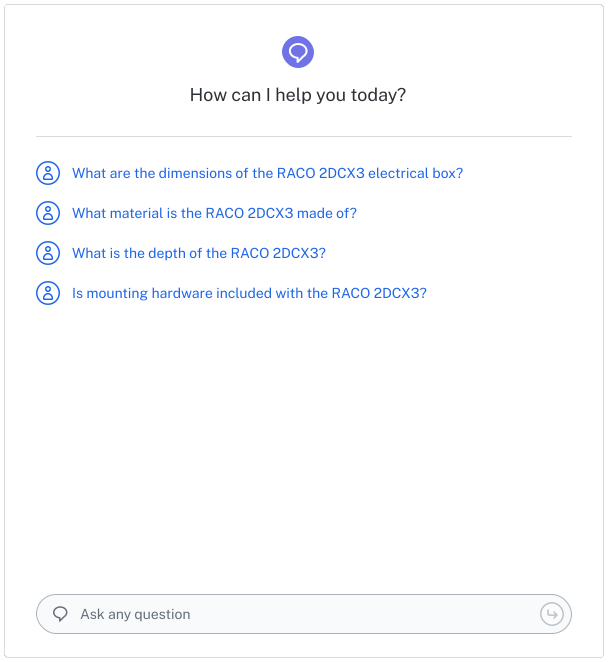
Designed for B2B and B2C
Agent Studio supports both B2B and B2C commerce strategies. For B2B organizations, virtual agents can guide customers through complex product specifications, compatibility requirements, and contract terms, helping shorten sales cycles. For B2C retailers, agents can answer product-specific questions about features, ingredients, or usage guidelines, giving customers the confidence to complete purchases.Business impact
Virtual agents are available 24/7 to handle high inquiry volumes, reducing wait times and live interaction demands. This enables staff to focus on resolving complex cases, accelerating transaction completion, and improving customer satisfaction. By integrating directly into product pages, agents deliver accurate, contextual information without requiring customers to search multiple documents.Key features
- Library of prebuilt agent types, including Product Q&A agents optimized for industry and use case.
- Integration with Google Cloud Platform (GCP) datasources for secure, cloud-based data ingestion.
- Simple deployment with a script and HTML snippet.
- Multiple options for product ID extraction to ensure accurate, product-specific answers.
- Customizable layout through CSS to match website branding.
Get started
Agent Studio is available now in Lucidworks Platform. Select an agent type from the library, connect your datasource, choose an AI model for your industry, and implement the agent with a few lines of code. You can preview and refine the agent before it goes live, ensuring accurate, optimized responses.Agent Studio
Explore the Agent Studio documentation to discover how to create, customize, and deploy AI-powered virtual agents for your business.
Core Settings
Core Settings is a new capability that simplifies how organizations design and manage search experiences. It provides a single place to configure critical elements of search, including relevance, boost, and typeahead, without requiring code or infrastructure changes.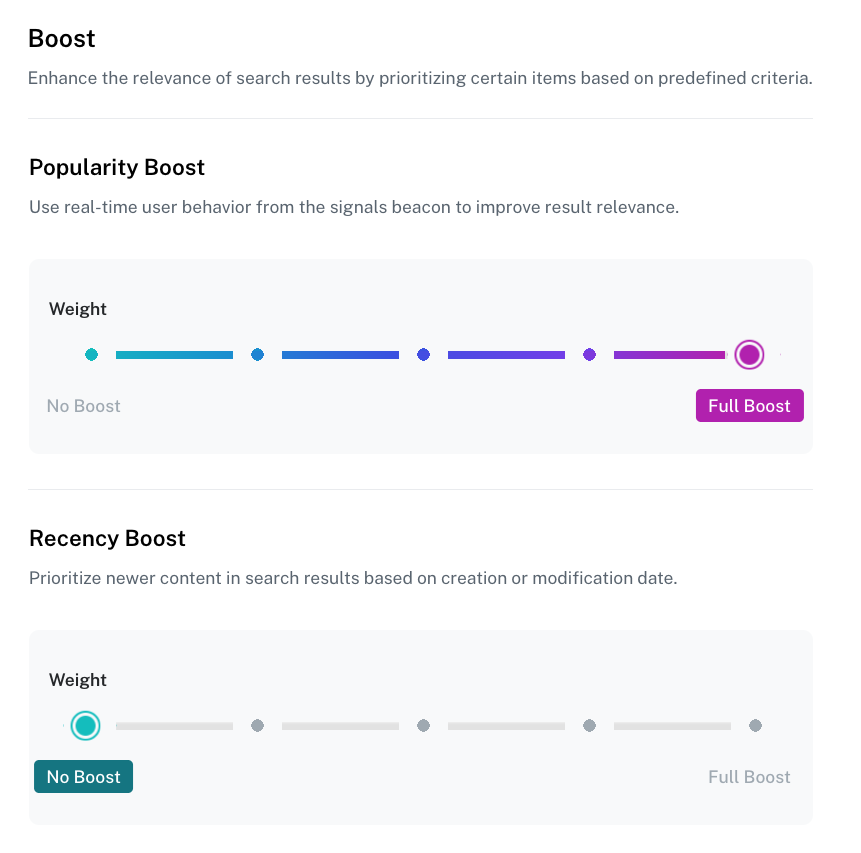
Core Settings enables organizations to move faster, align teams around a unified search strategy, and deliver improved experiences to both business buyers and consumers.
Benefits for B2B commerce
Benefits for B2B commerce
B2B buyers often work with large, complex catalogs and need precise access to products or parts. Core Settings enables fine control over relevance, making it easier to surface the right items quickly. Boosting rules and typeahead help reduce friction in product discovery and speed up workflows, which supports efficiency for procurement teams and sales operations.
Benefits for B2C commerce
Benefits for B2C commerce
B2C customers expect fast, personalized experiences that feel intuitive. Core Settings allows merchandising and digital teams to tune search in ways that highlight trending products, balance semantic understanding with exact keyword matches, and provide responsive typeahead suggestions. These adjustments improve product findability, reduce abandonment, and support higher conversion rates across retail and consumer channels.
Core Settings
Use Core Settings to quickly define how search works across your applications. Adjust relevance, apply boosting rules, enable typeahead, and fine tune Neural Hybrid Search with no coding necessary.
Lucidworks AI
Lucidworks AI now supports chunkingLucidworks AI now uses document chunking to deliver more precise search results and AI-generated responses from large files. Chunking breaks documents into smaller, meaningful sections so the system can identify and return the most relevant part, rather than the entire document. This capability is available in Fusion 5.9.12 and later.This delivers:Five chunking strategies are available:
- More accurate answers: Generative AI uses the most relevant sections, improving accuracy and reducing irrelevant output.
- Better context: Responses are grounded in the specific parts of a document that match the prompt.
- Fresher content: Updates and removals apply at the section level, ensuring AI uses current information.
- Improved ranking: Search and AI results can prioritize the best-matching chunks instead of entire documents.
- dynamic-newline: Breaks text at newline characters, adjusting chunk size automatically.
- dynamic-sentence: Groups sentences together with flexible chunk length based on context.
- regex-splitter: Uses a custom regular expression to define chunk boundaries.
- semantic: Organizes content into sections based on meaning and related ideas.
- sentence: Creates chunks from single sentences or a set number of sentences, based on configuration.
Chunking in Fusion 5.9
Discover how to use Lucidworks AI to chunk documents for improved retrieval, relevance, and ranking in Fusion 5.9.