

Implicit signals vs explicit signals
Signals can reveal a user’s level of interest in an item in two main ways:- Implicit
The user shows interest by engaging with the item/document through clicks, searches, and so on. Since this type of interaction requires no additional effort on the user’s part, these types of signals tend to be plentiful. They can be used to infer a measurable value of interest in order to build an accurate recommender system. - Explicit
An explicit signal is created when a user intentionally assigns a clear, measurable value to an item, such as by giving it a rating. This value can be used to rank items, for example. Since this requires the user to invest extra time to provide the information, the number of ratings tends to be small compared to the total number of users interacting with the item.
Built-in signal types
There are five built-in signal types:Annotation signals
Annotation signals are generated when a user bookmarks, likes, or comments on a document. Annotation signals are likewise generated when the user removes a bookmark, like, or comment.Annotation signals are generated by App Studio. If you are not using App Studio, this type of signal is not relevant to your search application.
Login signals
Login signals record information about specific users when they log in to an application. This includes a time stamp and various session details.Request signals
A request signal is generated by a front-end search app and captures the raw user query and other contextual information about a user and their journey through the search app. The request signal contains no information about the documents the user searched for. A request signal should have the following fields:params object. Optional fields are as follows:
Response signals
Response signals are automatically generated when a query pipeline receives a search request and that request is processed. This occurs only when the signals feature is enabled for a collection.Front-end search applications should not send response signals to Fusion directly, as those would conflict with the auto-generated signals.
fusion-query-id to each response signal. This is used to correlate the downstream click signals with the original search request. After a user receives the results from their search, they can interact with the documents. In order to know which results (if any) were shown to the user, we use the response signals correlated with the unique fusion-query-id.
A response signal has the following explicit fields, plus any additional query parameters sent by the search application for a query:
Fusion’s experiment framework relies heavily on response signals and the linking between response and clicks signals using the
fusion_query_id.
Click signals
Click signals are explicit events that capture any type of user interaction that the business is interested in keeping track of. The basic click signal records the action of a user clicking an item in a context, whether that context is within search results, category browse, type ahead suggestions, or other locations. Each unique action receives a name such as click2pdp, add2cart or purchase. When a user clicks a search result, your search app should send a click signal to Fusion. All click signals should include afusion_query_id field pulled from the query response header x-fusion-query-id.
In addition, click signals should include the following fields:
params object. Optional fields are as follows:
Custom signal types
The signaltype parameter can also take arbitrary values for custom signal types. For example, these custom events are important for e-commerce sites:
- Add-to-favorites
- Add-to-cart
- Remove-from-cart
- Purchase
- Hover/quick-view
type field. Custom signals should also include the fields described below in order to get the best results from aggregation and recommendation jobs.
To use custom signals in recommendations, you must add them to the value of the signalTypeWeights parameter in the configuration for the COLLECTION_NAME_user_item_preferences_aggregation job and the COLLECTION_NAME_user_query_history_aggregation job.
Custom signals can be analyzed in App Insights just like pre-defined signal types.
Required signal fields
Depending on how you use signals, certain fields are required. These are signals collection field names and not the JSON field names in the in-bound signals document. An example is when sending the user id, write it asparams.user_id.
The fields mentioned in this section are defined as follows:
Some signal types, including custom signal types, may include additional fields.
Required fields by use case
Aggregations, recommendations, and App Insights work best when certain fields are present in your signals. See these topics for details:Required fields by signal type
The following table describes which fields are required for annotation, click, login, and request signals.Requests (or queries) can also require additional, available user data for the search.
Field name suffixes
Fusion can add suffixes when fields are indexed. This table lists common suffix values.Signal field count analysis
Lucidworks recommends performing signal field count analysis to determine whether any of the fields above are missing from some of your signals. The table below shows how to query for specific fields using the Query Workbench in order to compare the number of results for each field with the total number of documents in the signals collection. In the examples in the third column, some fields appear in all 33,477,919 signals documents, while others appear in fewer documents.
You can also get the number of signals documents that contain all of the required fields by using the following query:
The query_id field
For each incoming signal, Fusion calculates a value for the query_id field.
App Insights uses to create group-by-query reports like the one shown below:
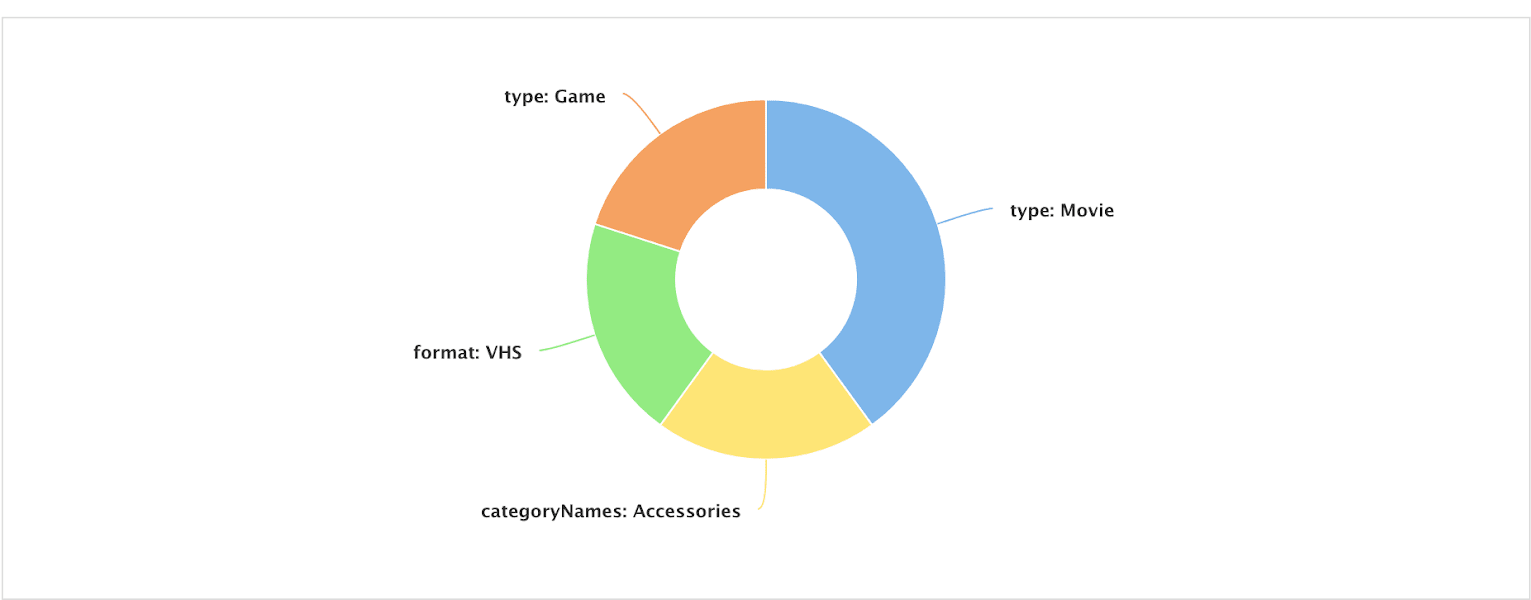
The
query_id field should not be confused with the fusion_query_id, which is a unique ID for each query processed by a Fusion query pipeline, or with query_s which is the query string.session, query, and filter fields, then saves it into the query_id field.
The filter field can either be passed in by the search app,
or computed by the SignalFormatterStage (the first stage in the _signals_ingest pipeline) using the raw filter queries. For instance, on a response signal that is generated by a query pipeline, the following fq query params get translated into the multi-valued filter field:
-
Raw query parameters:
-
filters_sfield (created by the SearchLogger component): -
filterfield:
filter field to generate various reports.