

- There are many microservices involved in query execution. This illustrates the value and importance of having a robust orchestration layer like Kubernetes.
- Fusion comes pre-configured. You don’t need to configure all details depicted below.
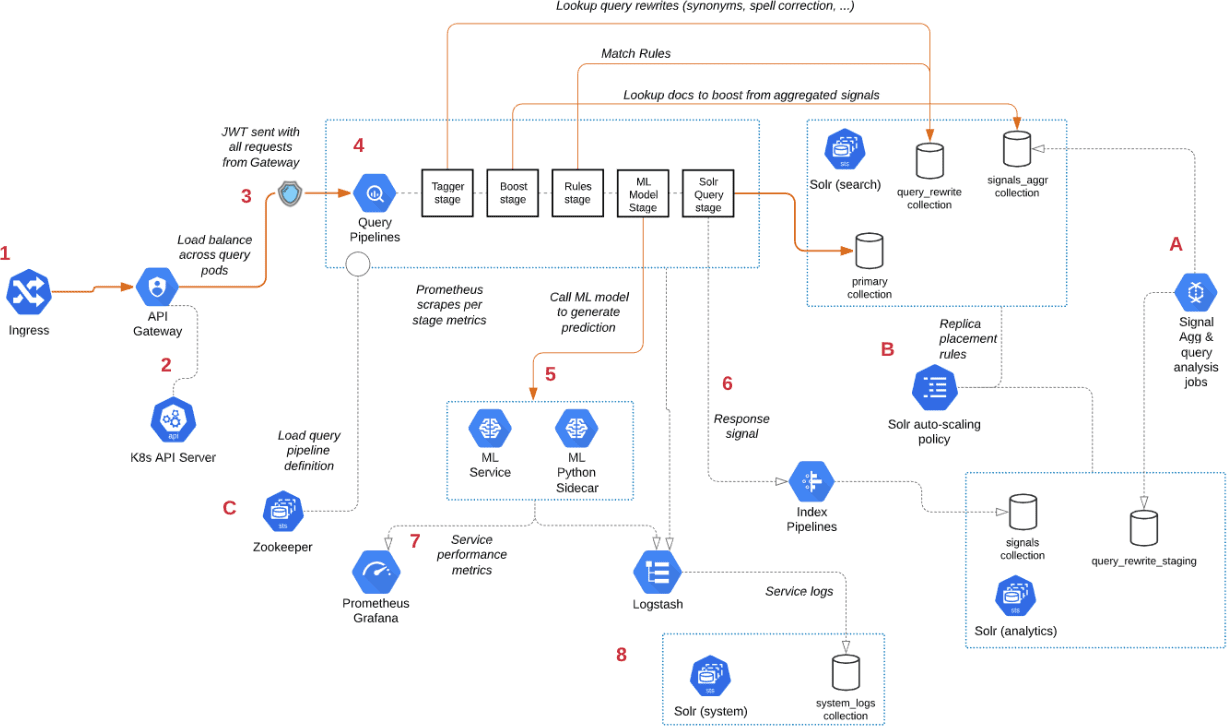
- Point A - Background Spark jobs aggregate signals—which powers the signal boosting stage—and analyzes signals for query rewriting operations. This includes head/tail, synonym detection, and misspelling detection.
- Point B - Fusion uses a Solr auto-scaling policy in conjunction with Kubernetes node pools to govern replica placement for various Fusion collections. For example, to support high performance query traffic, place the primary collection with sidecar collections for query rewriting, signal boosting, and rules matching. Solr pods supporting high volume, low-latency reads are backed by an HPA linked to CPU or custom metrics in Prometheus. Fusion services store configurations, such as query pipeline definitions, in ZooKeeper (Point C).
- Point 1 - A query request comes into the cluster from a Kubernetes Ingress. The Ingress routes requests to the Fusion API Gateway service. The gateway performs authentication and authorization to ensure the user has the correct permissions to execute the query. The Fusion API Gateway load-balances requests across multiple query pipeline services using native Kubernetes service discovery (Point 2).
- Point 3 - The gateway issues a JWT, which is sent to downstream services. An internal JWT has identifying information about a user, including their roles and permissions, to allow Fusion services to perform fine-grained authorization. The JWT is returned as a Set-Cookie header to improve performance of later requests. Alternatively, API requests can use the
/oauth2/tokenendpoint in the gateway to retrieve the JWT using OAuth2 semantics. - Point 4 - The query service executes the pipeline stages to enrich the query, before sending it to the primary collection. Typically, this involves multiple lookups to sidecar collections—such as the
APP_NAME_query_rewritecollection—to perform spell correction, synonym expansion, and rules matching. The query pipeline may also call out to the Fusion ML Model service to generate predictions, such as deciding query intent. The ML Model service may also use an HPA tied to CPU, to scale out and support the desired queries per second (Point 5). - Point 6 - After executing the query in the primary collection, Fusion generates a response signal to track query request parameters and Solr response metrics, such as
numFoundandqTime. Fusion stores raw signals in the signals collection, which typically runs in the analytics partition to support high-volume writes. - Point 7 - Every Fusion microservice exposes detailed metrics. Prometheus scrapes the metrics using pod annotations. The query microservice exposes stage-specific metrics to help you understand query performance.
- Point 8 - Every Fusion microservice sends logs to Logstash. You can configure Logstash to index log messages into the
system_logscollection in Solr or to an external service like Elastic.
Solr autoscaling limitations
Use fixed Solr pod counts for each node pool. Lucidworks doesn’t recommend an HPA for Solr unless you have your own process for managing replicas and a safeminReplicas value.
Fusion doesn’t manage Solr replicas for you.
You can enable an HPA for Solr pods with solr.autoscaling, or per node pool with solr.nodePools[].autoscaling.
The HPA scales Solr pods, not Solr collections.
When the HPA adds a pod, Solr doesn’t automatically create shards or replicas, move existing replicas to the new pod, or change the collection topology.
To use new pods, do one of the following:
- Add replicas with the Collections API
ADDREPLICAcommand. PULL replicas are the lowest-cost way to add query capacity, because they copy the index from the shard leader instead of indexing documents. You can add a PULL replica only to a shard that already has a TLOG replica, so a collection with only NRT replicas can’t use PULL replicas. Don’t mix NRT replicas with TLOG and PULL replicas in the same collection. Use either all NRT replicas, or TLOG replicas plus PULL replicas. PULL replicas can’t become leaders and lag slightly behind the leader. - Move existing replicas with the Balance Replicas API (
POST /api/cluster/replicas/balance).
- Queries that need the shard fail, or return partial results if the request sets
shards.tolerant=true. - Indexing to the shard fails, because the shard has no leader.
- Keep at least two NRT or TLOG replicas per shard.
- Set
minReplicasso that every shard has at least one NRT or TLOG replica on a pod below that number. Pods are numbered from0, so the pods that stay are0tominReplicas - 1. For example, if a shard’s only NRT or TLOG replica is on pod-3, setminReplicasto4or higher. If a shard has replicas on pods-1and-3,minReplicasof2keeps pod-1. This works only if you control where replicas are placed, such as with replica placement plugins. - Recheck
minReplicasevery time you create a collection or add replicas while the node pool is scaled out.
Autoscaling in Fusion
The course for Autoscaling in Fusion focuses on understanding how autoscaling works in Fusion.