

The JavaScript engine used by Lucidworks Search
The default JavaScript engine used by Lucidworks Search is the Nashorn engine from Oracle. See The Nashorn Java API for details. In Lucidworks Search 5.9.6 and up, you also have the option to select OpenJDK Nashorn. While Nashorn is the default option, it is in the process of being deprecated and will eventually be removed, so it is recommended to use OpenJDK Nashorn when possible. You can select the JavaScript engine in the pipeline views or in the workbenches. Your JavaScript pipeline stages are interpreted by the selected engine.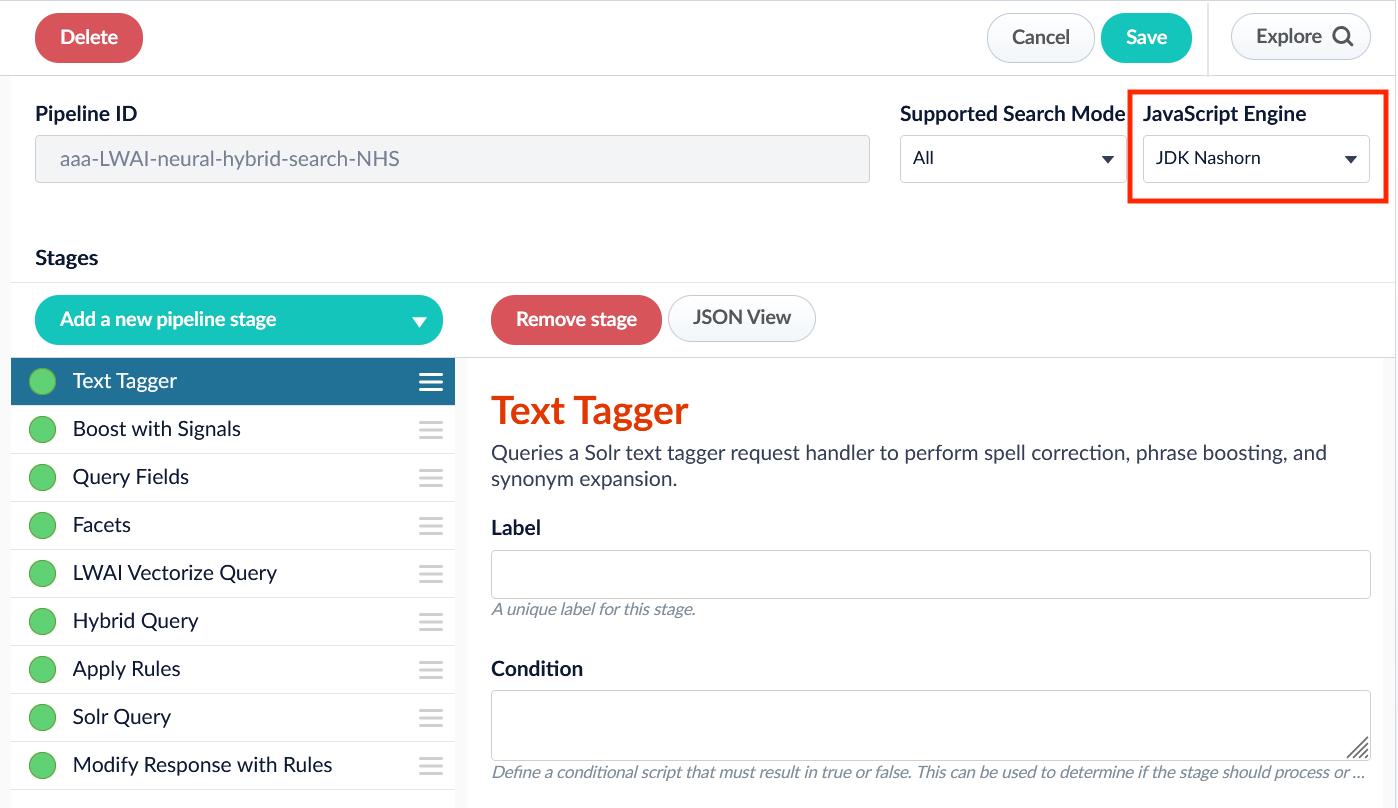
JavaScript Query Stage global variables
JavaScript is a lightweight scripting language. In a JavaScript stage, Fusion uses the Nashorn engine, which implements ECMAScript version 5.1. Although Nashorn does include some ECMAScript 6 (ES6) features such aslet, const, or template strings, Fusion does not enable ES6 by default, so ES6 support is not guaranteed.
What a JavaScript program can do depends on the container in which it runs.
For a JavaScript Query stage, the container is a Lucidworks Search query pipeline.
Global pipeline variables
Global pipeline variables
Request for a Regular Query The
request variable contains Solr query information and is referred to as a regular request. A regular query request does not include Search DSL (domain specific language) parameters.DSL RequestThe
request variable is also used when the query contains parameters for a Search DSL (domain specific language) request. See Domain Specific Language for more information.
Response for a Regular Query The
response variable contains Solr response information, and is used to return information from a regular request. Because a regular request does not include Search DSL parameters, the response will not return DSL results.DSL ResponseThe
response variable is also used to return information from a Search DSL request. See Domain Specific Language for more information.
ContextA map that stores miscellaneous data created by each stage of the pipeline.The
ctx variable is used to:- Pass data from one stage to another
- Store data that needs to be passed from one custom stage to a later custom stage
- If the previous stage changes the data
- Based on the configuration of each stage
If the data is modified in one stage, it may cause a later stage to function irregularly.
StringThe name of the Lucidworks Search collection being indexed or queried.
BufferingSolrServer The Solr server instance that manages the pipeline’s default Lucidworks Search collection. All indexing and query requests are done by calls to methods on this object. See solrClient for details.
SolrClusterComponentThe SolrCluster server used for lookups by collection name which returns a Solr server instance for that collection, e.g.,
var productsSolr = solrServerFactory.getSolrServer("products");QueryRequestAndResponse Used to create query pipeline requests and responses.
JSONResponse Returns list of info as a string.
See Custom JavaScript Query Stage examples for more information.
Syntax variants
JavaScript stages can be written using legacy syntax or function syntax. The key difference between these syntax variants is how the “global variables” are used and interpreted. While using legacy syntax, these variables are used as global variables. With function syntax, however, these variables are passed as function parameters.Support for legacy syntax was removed in Fusion 5.8.
Function syntax
Global variable logger
The logs are output to the query service logs for custom query stages. Access the Log Viewer and filter on this service to view the information.
Query pipeline stage condition examples
Stages can be triggered conditionally when a script in the Condition field evaluates to true. Some examples are shown below. Run this stage only for mobile clients:JavaScript examples
Set up a reusable library
This is an example of a reusable JavaScript library that provides various utility functions for string processing, date handling, and type conversion. To reuse Javascript functions, create a stage like this one that defines them, then place it before any of the stages that use it.Call reusable JavaScript functions
This example demonstrates how to call reusable JavaScript functions from a library like the one in the example above. A JavaScript stage that calls these functions must be placed after the one that loads the library into the context. This example also adds debug logging to the context so that it can be appended to the response and viewed in Query Workbench.Bury documents in search results
This example enables aproductsToBury parameter that allows you to specify a list of product IDs to “bury” or demote in search results.
Manipulate the response object
This example demonstrates how to add a new field to the response that contains the lowercase version of an existing field. It uses theAbstractResponse class to manipulate response documents, which works for both XML and JSON responses for versatility.
Boost the products in a list
This example demonstrates how to boost specific products in search results based on a comma-separated list of product IDs. It uses thebq parameter to apply boosts, which allows for precise ranking control in search results.
The boost values are linearly distributed between a maximum and minimum value, allowing for a smooth decrease in boost as the list progresses.
This is useful for merchandising control, promotional campaigns, or A/B testing different product arrangements.
Boost products using Solr’s Query Elevation Component (QEC)
This example demonstrates how to elevate specific products in search results using the Query Elevation Component (QEC) in Solr. It converts a comma-separated list of product IDs into theelevateIds parameter format required by Solr’s QEC, allowing specific documents to be promoted to the top of search results.
This is useful for merchandising control, promotional campaigns, or editorial control over search result ranking.