> ## Documentation Index
> Fetch the complete documentation index at: https://doc.lucidworks.com/llms.txt
> Use this file to discover all available pages before exploring further.
# Integrations
export const LwTemplate = ({title = "Key questions to get you started", icon = "sparkles", cta = "Powered by Agent Studio", linkHref = "https://lucidworks.com/demo/?utm_source=docs&utm_medium=referral&utm_campaign=docs_cta_ai"}) => {
const [isLoaded, setIsLoaded] = useState(false);
useEffect(() => {
const timer = setTimeout(() => {
setIsLoaded(true);
}, 500);
return () => clearTimeout(timer);
}, []);
return
{isLoaded && `
}} />}
Powered by Lucidworks Agent Studio
;
};
[old doc.lw link]: https://doc.lucidworks.com/lw-platform/ai/gvatbb
[localhost link]: http://localhost:3000/docs/lw-platform/lw-ai/integrations
[mintlify link]: https://doc.lucidworks.com/docs/lw-platform/lw-ai/integrations
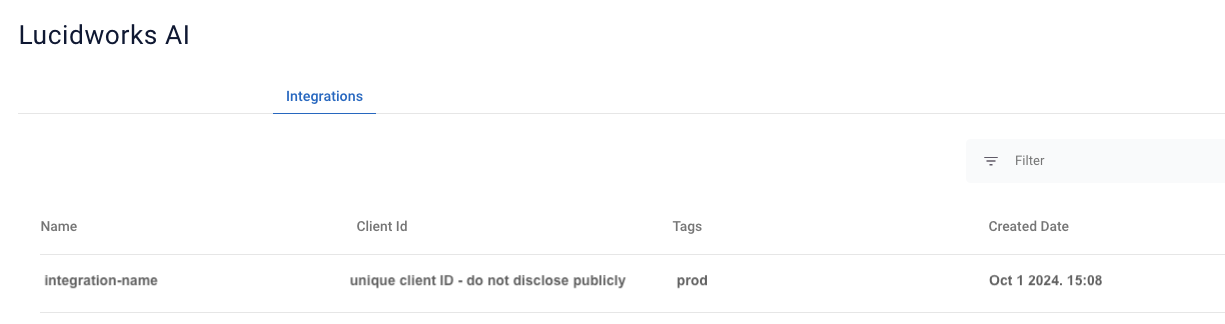
Lucidworks AI integrations connect to your Fusion application. Integrations are view-only and are currently created and configured by Lucidworks.
Navigate to the megamenu and click **Models > Integrations**.
## Integration details screen
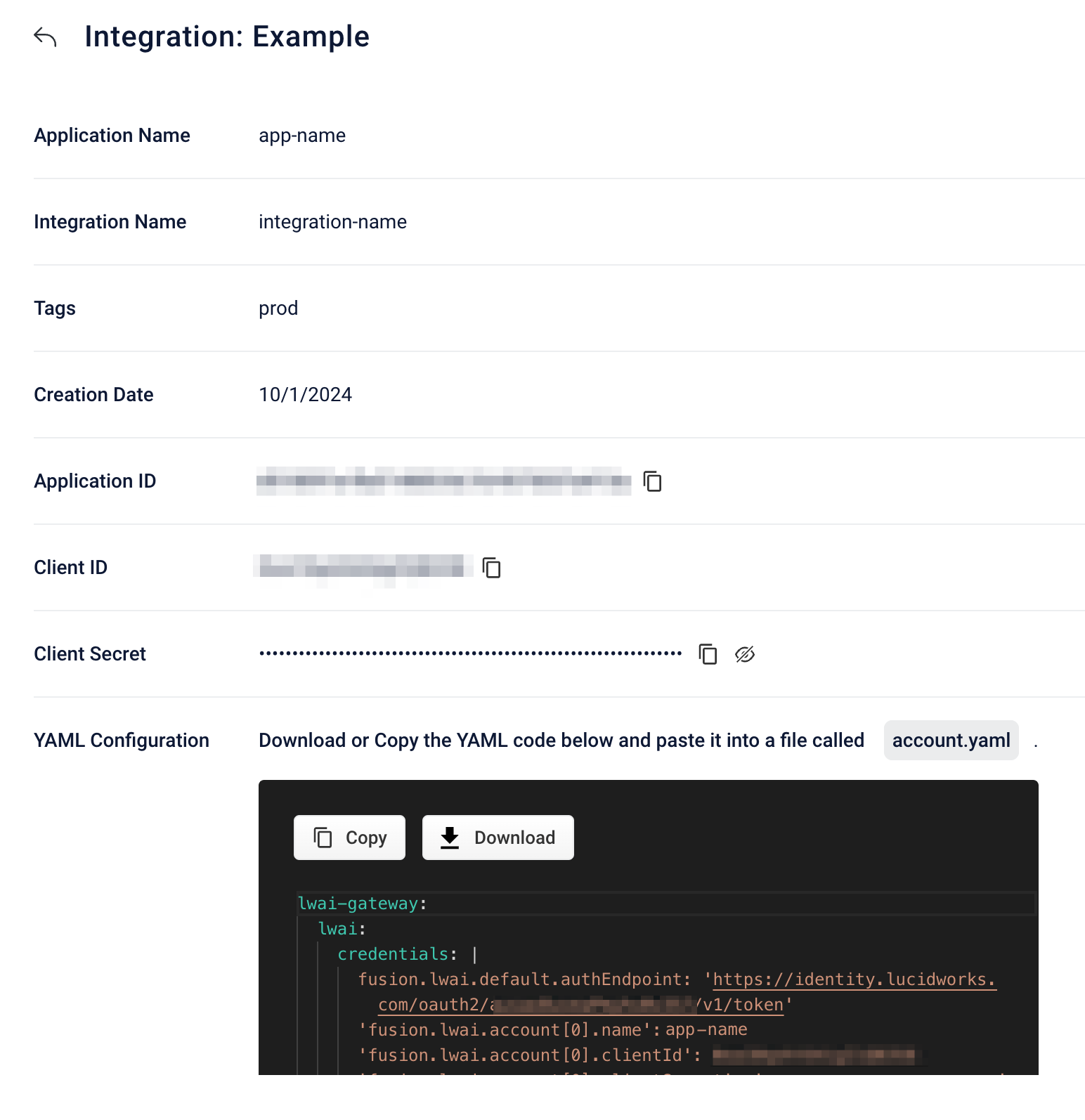
If you click an integration instance from the list, the details screen displays.
| Field | Description |
| ---------------------- | ------------------------------------------------------------------------------------------------------------------------------------------------------------------------------------------------------------------------------------------------------------------------------------------------------------------------- |
| **Application Name** | The name of the Lucidworks AI application. |
| **Integration Name** | The name of the Lucidworks AI integration. |
| **Tags** | Optional text that identifies the integration instance. |
| **Creation Date** | The date the integration was created. |
| **Application ID** | The unique Lucidworks AI application identifier generated when the application is created. |
| **Client ID** | Your organization’s unique identifier. For a self-hosted Fusion client integration, this value is unique to the specific integration. For more information, see [Credentials](/docs/lw-platform/lw-platform/authentication-api#fetch-the-access-token). |
| **Client Secret** | The private client value that is part of the information required to obtain OAuth 2.0 authorization. You must keep this value secret. Do not use it in public clients such as client-side applications. For more information, see [Credentials](/docs/lw-platform/lw-platform/authentication-api#fetch-the-access-token). |
| **YAML Configuration** | The specific information about the integration instance that you must copy into your `account.yaml` file to configure the integration. You can copy or download the YAML. |
 | Field | Description |
| ---------------------- | ------------------------------------------------------------------------------------------------------------------------------------------------------------------------------------------------------------------------------------------------------------------------------------------------------------------------- |
| **Application Name** | The name of the Lucidworks AI application. |
| **Integration Name** | The name of the Lucidworks AI integration. |
| **Tags** | Optional text that identifies the integration instance. |
| **Creation Date** | The date the integration was created. |
| **Application ID** | The unique Lucidworks AI application identifier generated when the application is created. |
| **Client ID** | Your organization’s unique identifier. For a self-hosted Fusion client integration, this value is unique to the specific integration. For more information, see [Credentials](/docs/lw-platform/lw-platform/authentication-api#fetch-the-access-token). |
| **Client Secret** | The private client value that is part of the information required to obtain OAuth 2.0 authorization. You must keep this value secret. Do not use it in public clients such as client-side applications. For more information, see [Credentials](/docs/lw-platform/lw-platform/authentication-api#fetch-the-access-token). |
| **YAML Configuration** | The specific information about the integration instance that you must copy into your `account.yaml` file to configure the integration. You can copy or download the YAML. |
| Field | Description |
| ---------------------- | ------------------------------------------------------------------------------------------------------------------------------------------------------------------------------------------------------------------------------------------------------------------------------------------------------------------------- |
| **Application Name** | The name of the Lucidworks AI application. |
| **Integration Name** | The name of the Lucidworks AI integration. |
| **Tags** | Optional text that identifies the integration instance. |
| **Creation Date** | The date the integration was created. |
| **Application ID** | The unique Lucidworks AI application identifier generated when the application is created. |
| **Client ID** | Your organization’s unique identifier. For a self-hosted Fusion client integration, this value is unique to the specific integration. For more information, see [Credentials](/docs/lw-platform/lw-platform/authentication-api#fetch-the-access-token). |
| **Client Secret** | The private client value that is part of the information required to obtain OAuth 2.0 authorization. You must keep this value secret. Do not use it in public clients such as client-side applications. For more information, see [Credentials](/docs/lw-platform/lw-platform/authentication-api#fetch-the-access-token). |
| **YAML Configuration** | The specific information about the integration instance that you must copy into your `account.yaml` file to configure the integration. You can copy or download the YAML. |