> ## Documentation Index
> Fetch the complete documentation index at: https://doc.lucidworks.com/llms.txt
> Use this file to discover all available pages before exploring further.

# Managed JavaScript

> Query pipeline stage configuration specifications

export const schema = {
  "type": "object",
  "title": "Managed JavaScript",
  "description": "Executes version-controlled JavaScript from Fusion's managed script store to transform the query or response.",
  "required": ["ref"],
  "properties": {
    "skip": {
      "type": "boolean",
      "title": "Skip This Stage",
      "description": "Controls whether this stage executes during pipeline processing at runtime. When set to `true`, the stage is completely bypassed and documents pass through unchanged to the next stage. Useful for A/B testing, gradual rollouts, or temporarily disabling a stage without removing it from the pipeline.",
      "default": false,
      "hints": ["advanced"]
    },
    "label": {
      "type": "string",
      "title": "Label",
      "description": "Human-readable identifier displayed in the Fusion Admin UI, monitoring dashboards, and log messages. Use descriptive labels like `Parse Product PDFs` to aid debugging and team collaboration. Labels appear in performance metrics and error reports, making it easier to identify which stage failed.",
      "hints": ["advanced"],
      "maxLength": 255
    },
    "condition": {
      "type": "string",
      "title": "Condition",
      "description": "JavaScript expression evaluated at runtime on each document to conditionally execute this stage. The expression must return `true` to execute or `false` to skip. Access document fields using `doc.getFieldValue('fieldName')` and request parameters via `request.getFirstParam('paramName')`. For example, `doc.getFieldValue('type') === 'premium'` executes this stage only for premium content.",
      "hints": ["code", "code/javascript", "advanced"]
    },
    "legacy": {
      "type": "boolean",
      "title": "Legacy",
      "description": "When `true`, this stage operates in legacy mode only.",
      "hints": ["readonly", "hidden"]
    },
    "shareState": {
      "type": "boolean",
      "title": "Share state",
      "description": "When enabled, all instances of this stage share global JavaScript state, which improves performance but requires all variables to be declared with `var` to avoid unexpected behavior.",
      "default": true
    },
    "ref": {
      "type": "string",
      "title": "Script Reference",
      "description": "Specifies the reference to a managed JavaScript blob of type `file:js-query`.",
      "reference": "blob",
      "blobType": "file:js-query"
    }
  },
  "category": "Advanced",
  "categoryPriority": 3,
  "unsafe": false
};

export const SchemaParamFields = ({schema}) => {
  const sanitize = str => {
    if (typeof str !== "string") return str;
    return str.replace(/^"(.*)"$/s, "$1").replace(/\\/g, "").replace(/"/g, "'");
  };
  const renderMd = str => {
    const s = sanitize(str);
    const text = (/[.!?]\)*$/).test(s) ? s : `${s}.`;
    return text.split(/(\*\*[^*]+\*\*|_[^_]+_|`[^`]+`)/g).map((part, i) => {
      if (part.startsWith("**")) return <strong key={i}>{part.slice(2, -2)}</strong>;
      if (part.startsWith("_")) return <em key={i}>{part.slice(1, -1)}</em>;
      if (part.startsWith("`")) return <code key={i}>{part.slice(1, -1)}</code>;
      return part;
    });
  };
  const {description, properties = {}, required: requiredProps = []} = schema;
  const visibleProps = useMemo(() => Object.entries(properties).filter(([, prop]) => !prop.hints?.includes("hidden")), [properties]);
  const renderProp = ([name, prop]) => {
    const isRequired = requiredProps.includes(name);
    const hasDefault = prop.default !== undefined;
    const rawDefault = prop.default;
    const hints = prop.hints || [];
    const isComplexDefault = hasDefault && (typeof rawDefault === "object" || typeof rawDefault === "string" && (rawDefault.length > 20 || rawDefault.includes('"')));
    const postBadges = [];
    if (prop.title) {
      postBadges.push(<><span className="text-stone-400 dark:text-stone-500">API property: </span>{name}</>);
    }
    const constraints = [];
    if (prop.minimum !== undefined && prop.maximum !== undefined) {
      constraints.push(`Range: ${prop.minimum} – ${prop.maximum}`);
    } else if (prop.minimum !== undefined) {
      constraints.push(`Min: ${prop.minimum}`);
    } else if (prop.maximum !== undefined) {
      constraints.push(`Max: ${prop.maximum}`);
    }
    if (prop.minLength !== undefined && prop.maxLength !== undefined) {
      constraints.push(`Length: ${prop.minLength} – ${prop.maxLength}`);
    } else if (prop.minLength !== undefined) {
      constraints.push(`Min length: ${prop.minLength}`);
    } else if (prop.maxLength !== undefined) {
      constraints.push(`Max length: ${prop.maxLength}`);
    }
    const fieldProps = {
      key: name,
      body: prop.title || name,
      type: prop.type,
      ...postBadges.length > 0 && ({
        post: postBadges
      }),
      ...isRequired && ({
        required: true
      }),
      ...!isComplexDefault && hasDefault ? {
        default: sanitize(String(rawDefault))
      } : {}
    };
    const isObject = prop.type === "object" && prop.properties;
    const isArrayOfObjects = prop.type === "array" && prop.items?.type === "object" && prop.items.properties;
    return <ParamField {...fieldProps}>
        {prop.description && <p>{renderMd(prop.description)}</p>}

        {prop.enum && <p>
            Allowed values: 
            {prop.enum.map((v, i) => <>{i > 0 && ", "}<code key={i}>{String(v)}</code></>)}
          </p>}

        {constraints.length > 0 && <p className="text-stone-500 dark:text-stone-400 text-sm">
            {constraints.join(" · ")}
          </p>}

        {isComplexDefault && <div className="flex">
            <p>
              <strong>Default:</strong>
            </p>
            <pre className="!my-0">
              <code>
                {JSON.stringify(rawDefault, null, 2)}
              </code>
            </pre>
          </div>}

        {isArrayOfObjects && <Expandable title="item properties">
            <SchemaParamFields schema={{
      properties: prop.items.properties,
      required: prop.items.required
    }} />
          </Expandable>}

        {isObject && <Expandable title="properties">
            <SchemaParamFields schema={{
      properties: prop.properties,
      required: prop.required
    }} />
          </Expandable>}
      </ParamField>;
  };
  return <div>
      {description && <p>{renderMd(description)}</p>}

      {visibleProps.map(renderProp)}
    </div>;
};

export const LwTemplate = ({title = "Key questions to get you started", icon = "sparkles", cta = "Powered by Agent Studio", linkHref = "https://lucidworks.com/demo/?utm_source=docs&utm_medium=referral&utm_campaign=docs_cta_ai"}) => {
  const [isLoaded, setIsLoaded] = useState(false);
  useEffect(() => {
    const timer = setTimeout(() => {
      setIsLoaded(true);
    }, 500);
    return () => clearTimeout(timer);
  }, []);
  return <div className="lw-template-container">
      <Card title={title} icon={icon}>
        {isLoaded && <span dangerouslySetInnerHTML={{
    __html: `<lw-template id="a029c1a9-28be-427e-b0e1-5d918920246a"></lw-template
            >`
  }} />}
        <Link href={linkHref} className="agent-studio-link text-left text-gray-600 gap-2 dark:text-gray-400 text-sm font-medium flex flex-row items-center hover:text-primary dark:hover:text-primary-light group-hover:text-primary group-hover:dark:text-primary-light">Powered by Lucidworks Agent Studio</Link>
      </Card>
    </div>;
};

[localhost link]: http://localhost:3000/docs/lucidworks-search/09-developer-documentation/config-specs/query-pipeline-stages/managed-javascript-query

[mintlify link]: https://doc.lucidworks.com/docs/lucidworks-search/09-developer-documentation/config-specs/query-pipeline-stages/managed-javascript-query

[old doc.lw link]: https://doc.lucidworks.com/managed-fusion/5.9/zfwfyr

This stage manipulates a query using a script from the [blob store](/docs/lucidworks-search/04-move-data-in/blob-storage/overview). The script must have the blob type `file:js-query`.

**See also: [Custom JavaScript Stages For Query Pipelines](/docs/lucidworks-search/05-move-data-out/query-pipeline/custom-js-query-stages).**

<LwTemplate />

## Uploading a JavaScript blob

In Lucidworks Search 5.9, JavaScript blobs must be uploaded using the [Blob Store API](/api-reference/blobs/get-blob-store-service-status), like this:

```bash wrap  theme={"dark"}
curl -u USERNAME:PASSWORD -X PUT -H 'Content-Type: text/javascript' --data-binary @query-pipeline-js-stage.js http://EXAMPLE_COMPANY.lucidworks.cloud/api/apps/APP_NAME/blobs/query-pipeline-js-stage.js?resourceType=file:js-query
```

<Note>
  Replace `EXAMPLE_COMPANY` with the name provided by your Lucidworks representative.
</Note>

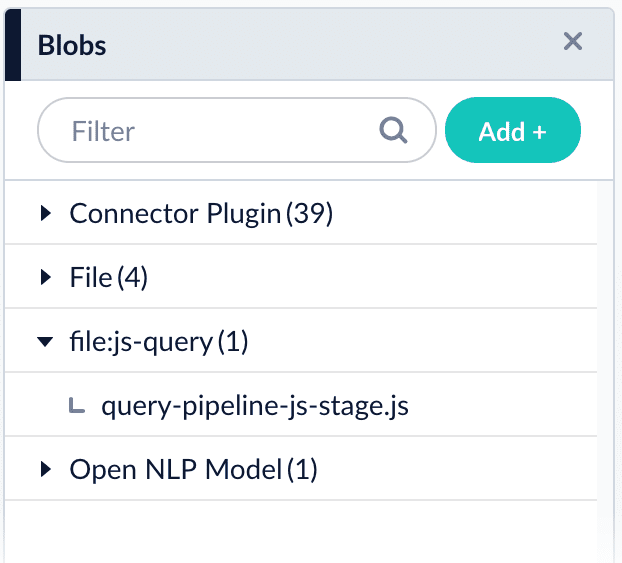
Open the [blob manager](/docs/lucidworks-search/04-move-data-in/blob-storage/overview) to verify that the new blob is present:

<img src="https://mintcdn.com/lucidworks/qCaM85k6rX7hs1DP/assets/images/4.1/known-issue-APOLLO-15672-query.png?fit=max&auto=format&n=qCaM85k6rX7hs1DP&q=85&s=519a545d56c02167555a5f8a8a66414b" alt="Uploaded JavaScript blob in the blob manager" width="622" height="563" data-path="assets/images/4.1/known-issue-APOLLO-15672-query.png" />

## Referencing a JavaScript blob

Use any of the following formats for the `ref`/**Script Reference** configuration field:

```bash wrap  theme={"dark"}
query-pipeline-js-stage.js
```

```bash wrap  theme={"dark"}
blob:query-pipeline-js-stage.js
```

```bash wrap  theme={"dark"}
urn:x-fusion:blob:query-pipeline-js-stage.js
```

<Note>
  The examples above use `query-pipeline-js-stage.js` as the blob ID.
</Note>

### Edit JavaScript

Select **Edit** in the **Script Reference** field to edit JavaScript directly in the Lucidworks Search UI.

## Configuration

<Tip>
  When entering configuration values in the UI, use *unescaped* characters, such as `\t` for the tab character. When entering configuration values in the API, use *escaped* characters, such as `\\t` for the tab character.
</Tip>

<SchemaParamFields schema={schema} />
