> ## Documentation Index
> Fetch the complete documentation index at: https://doc.lucidworks.com/llms.txt
> Use this file to discover all available pages before exploring further.
# Apache Tika Container
> Parser stage configuration specifications
export const schema = {
"type": "object",
"title": "Apache Tika Container Parser",
"description": "Parses documents using the containerized Apache Tika server, which runs as a persistent service for high-throughput parsing. Sends documents to the Tika container's REST API and receives extracted text, metadata, and structure. Supports a wide range of formats including Office documents, PDFs, images, and HTML.",
"required": ["type"],
"properties": {
"id": {
"type": "string",
"title": "Parser ID",
"default": "2b065379-53db-4008-90d0-c3df8cc4f755"
},
"label": {
"type": "string",
"title": "Label",
"description": "Human-readable identifier displayed in the Fusion Admin UI, monitoring dashboards, and log messages. Use descriptive labels like `Parse Product PDFs` to aid debugging and team collaboration. Labels appear in performance metrics and error reports, making it easier to identify which stage failed.",
"maxLength": 255
},
"enabled": {
"type": "boolean",
"title": "Enable this Parser Stage",
"default": true,
"description": "Controls whether this parser stage is active and available for use. When `false`, the stage is completely inactive regardless of other settings. When `true`, the stage runs according to its other configuration options."
},
"mediaTypes": {
"type": "array",
"title": "Media Types to match",
"description": "Specifies the media types this parser stage handles. Documents with a matching media type are routed to this stage for parsing. See `inheritMediaTypes` to combine this list with the stage's built-in defaults.",
"items": {
"type": "string",
"pattern": "^[^\\/]+\\/[^\\/]+$",
"format": "rfc2646"
}
},
"inheritMediaTypes": {
"type": "boolean",
"title": "Match default media types in this Parser Stage",
"description": "Controls whether this stage combines its built-in default media types with those in `mediaTypes`. When `true`, both lists are merged. When `false`, only the `mediaTypes` list is used and must contain at least one entry. Set to `false` to override the default media types entirely.",
"default": true
},
"ignoredMediaTypes": {
"type": "array",
"title": "Media Types to ignore",
"description": "Specifies media types this parser stage excludes from processing. Documents matching an ignored media type are skipped even if they match `mediaTypes`. Use this to carve out exceptions from a broadly matched media type set.",
"items": {
"type": "string",
"pattern": "^[^\\/]+\\/[^\\/]+$",
"format": "rfc2646"
}
},
"pathPatterns": {
"type": "array",
"title": "File names to parse",
"description": "Restricts this parser stage to files whose names match the specified pattern. Use forward slashes (`/`) to join archive names with entry names when matching files inside archives. If no pattern is specified, the stage applies to all matching media types.",
"items": {
"type": "object",
"properties": {
"syntax": {
"type": "string",
"title": "Pattern type",
"description": "glob uses bash shell-style wildcards and regex uses Java (PCRE-style) regex.",
"enum": ["glob", "regex"],
"default": "glob"
},
"pattern": {
"type": "string",
"title": "File name or pattern",
"description": "glob examples are \"z.txt\" or \"*.md\" or \"/a/*/b/f.txt\". regex examples are \"z.txt$\" or \".*\\.txt$\" or \"^/a/[^\\/]*/b/f.txt$\"."
}
}
}
},
"errorHandling": {
"type": "string",
"title": "Error Handling",
"enum": ["ignore", "log", "fail", "mark"],
"default": "mark"
},
"outputFieldPrefix": {
"type": "string",
"title": "Prefix parsed fields with",
"description": "Sets a string prefix applied to all fields extracted by this parser, useful for namespacing or avoiding field name collisions. For example, `tika_` produces fields like `tika_title` and `tika_author`. Leave empty to apply no prefix.",
"maxLength": 20,
"pattern": "^$|^[A-Za-z_][A-Za-z0-9_\\-\\.]+$"
},
"includeImages": {
"type": "boolean",
"title": "Include images",
"default": false
},
"excludeContentTypes": {
"type": "array",
"title": "Content types to exclude",
"description": "Specifies MIME content types this stage excludes from parsing. Documents matching these types are skipped even if they otherwise match `mediaTypes`. Use this to block specific formats within a broad media type pattern.",
"items": {
"type": "string",
"minLength": 1
}
},
"embeddedDocumentHandling": {
"type": "string",
"title": "Embedded document handling",
"description": "Determines how the parser handles embedded documents within container files such as email attachments, embedded objects in Office documents, or files within PDFs. Use `split_documents` to create a separate indexed document for each embedded file, `merge_documents` to combine all embedded content into the parent document, or `skip_embedded_documents` to ignore embedded files entirely. Choose `split_documents` when embedded files need independent searchability.",
"enum": ["split_documents", "merge_documents", "skip_embedded_documents"],
"default": "split_documents"
},
"addImageOriginalContent": {
"type": "boolean",
"title": "Add original image content (raw bytes)",
"description": "Controls whether the original raw image bytes are stored in the indexed document alongside extracted metadata and OCR text. When `true`, the binary image data is also stored. When `false`, only metadata and extracted text are indexed. Enable this when you need to retrieve or display the original image from the index.",
"default": false
},
"type": {
"type": "string",
"enum": ["tika-container"],
"default": "tika-container"
}
},
"additionalProperties": false,
"category": "Other",
"categoryPriority": 1,
"unsafe": false
};
export const SchemaParamFields = ({schema}) => {
const sanitize = str => {
if (typeof str !== "string") return str;
return str.replace(/^"(.*)"$/s, "$1").replace(/\\/g, "").replace(/"/g, "'");
};
const renderMd = str => {
const s = sanitize(str);
const text = (/[.!?]\)*$/).test(s) ? s : `${s}.`;
return text.split(/(\*\*[^*]+\*\*|_[^_]+_|`[^`]+`)/g).map((part, i) => {
if (part.startsWith("**")) return {part.slice(2, -2)};
if (part.startsWith("_")) return {part.slice(1, -1)};
if (part.startsWith("`")) return {part.slice(1, -1)};
return part;
});
};
const {description, properties = {}, required: requiredProps = []} = schema;
const visibleProps = useMemo(() => Object.entries(properties).filter(([, prop]) => !prop.hints?.includes("hidden")), [properties]);
const renderProp = ([name, prop]) => {
const isRequired = requiredProps.includes(name);
const hasDefault = prop.default !== undefined;
const rawDefault = prop.default;
const hints = prop.hints || [];
const isComplexDefault = hasDefault && (typeof rawDefault === "object" || typeof rawDefault === "string" && (rawDefault.length > 20 || rawDefault.includes('"')));
const postBadges = [];
if (prop.title) {
postBadges.push(<>API property: {name});
}
const constraints = [];
if (prop.minimum !== undefined && prop.maximum !== undefined) {
constraints.push(`Range: ${prop.minimum} – ${prop.maximum}`);
} else if (prop.minimum !== undefined) {
constraints.push(`Min: ${prop.minimum}`);
} else if (prop.maximum !== undefined) {
constraints.push(`Max: ${prop.maximum}`);
}
if (prop.minLength !== undefined && prop.maxLength !== undefined) {
constraints.push(`Length: ${prop.minLength} – ${prop.maxLength}`);
} else if (prop.minLength !== undefined) {
constraints.push(`Min length: ${prop.minLength}`);
} else if (prop.maxLength !== undefined) {
constraints.push(`Max length: ${prop.maxLength}`);
}
const fieldProps = {
key: name,
body: prop.title || name,
type: prop.type,
...postBadges.length > 0 && ({
post: postBadges
}),
...isRequired && ({
required: true
}),
...!isComplexDefault && hasDefault ? {
default: sanitize(String(rawDefault))
} : {}
};
const isObject = prop.type === "object" && prop.properties;
const isArrayOfObjects = prop.type === "array" && prop.items?.type === "object" && prop.items.properties;
return
{prop.description &&
{isLoaded && `
}} />}
Powered by Lucidworks Agent Studio
;
};
[localhost link]: http://localhost:3000/docs/lucidworks-search/09-developer-documentation/config-specs/parsers/apache-tika-container
[mintlify link]: https://doc.lucidworks.com/docs/lucidworks-search/09-developer-documentation/config-specs/parsers/apache-tika-container
[old doc.lw link]: https://doc.lucidworks.com/managed-fusion/5.9/fi9zfy
This feature is available starting in Lucidworks Search 5.9.11 and in all subsequent Lucidworks Search 5.9 releases.
Apache Tika Container is a versatile parser that supports many types of unstructured document formats, such as HTML, PDF, Microsoft Office, OpenOffice, RTF, audio, video, images, and more. A complete list of supported formats is available at [Apache Tika](http://tika.apache.org/).
See **Use Tika asynchronous parsing** for detailed steps to set up asynchronous parsing.
This document describes how to set up your application to use Tika asynchronous parsing.
Unlike synchronous Tika parsing, which uses a parser stage, asynchronous Tika parsing is configured in the datasource and index pipeline. For more information, see [Asynchronous Tika Parsing](/docs/lucidworks-search/04-move-data-in/parsers/asynchronous-tika-parsing).
**Field names change with asynchronous Tika parsing.**
{/* // The code sample `\_lw_*` uses a backslash to escape the underscore character to prevent italics. */} In contrast to synchronous parsing, asynchronous Tika parsing prepends `parser_` to fields added to a document. System fields, which start with `\_lw_`, are not prepended with `parser_`. If you are migrating to asynchronous Tika parsing, and your search application configuration relies on specific field names, update your search application to use the new fields.
## Configure the connectors datasource
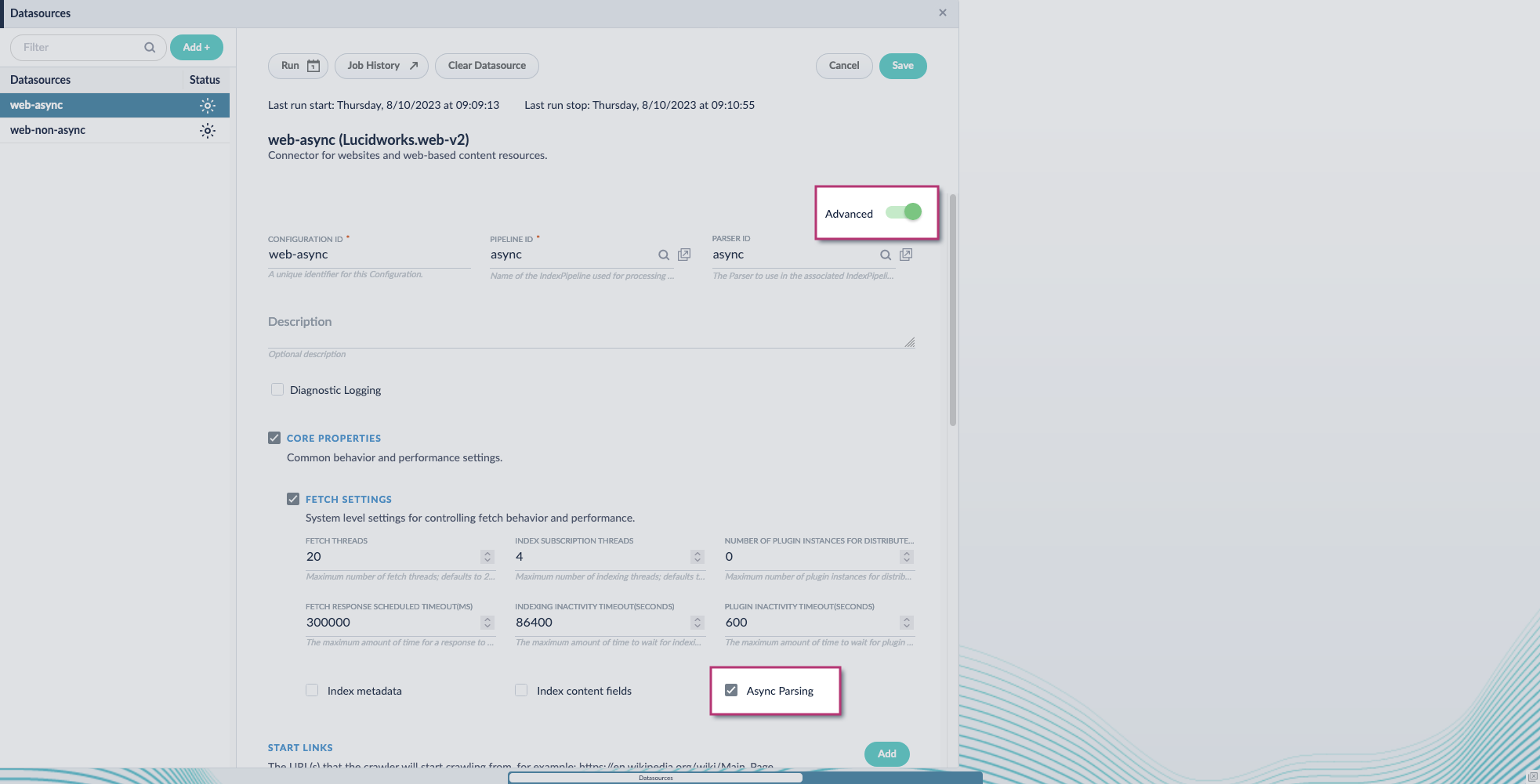
1. Navigate to your datasource.
2. Enable the **Advanced** view.
3. Enable the **Async Parsing** option.
**Lucidworks Search 5.9.11 and later uses your parser configuration when using asynchronous parsing.**
The asynchronous parsing service performs Tika parsing using Apache Tika Server. In Lucidworks Search 5.8 through 5.9.10, other parsers, such as HTML and JSON, are not supported by the asynchronous parsing service. By enabling asynchronous parsing, the parser configuration linked to your datasource is ignored. In Lucidworks Search 5.9.11 and later, other parsers, such as HTML and JSON, are supported by the asynchronous parsing service. By enabling asynchronous parsing, the parser configuration linked to your datasource is used.
4. Save the datasource configuration.
## Configure the parser stage
You must do this step in Lucidworks Search 5.9.11 and later.
1. Navigate to **Parsers**.
2. Select the parser, or create a new parser.
3. From the **Add a parser stage** menu, select **Apache Tika Container Parser**.
4. (Optional) Enter a label for this stage. This label changes the names from Apache Tika Container Parser to the value you enter in this field.
5. If the Apache Tika Container Parser stage is not already the first stage, drag and drop the stage to the top of the stage list so it is the first stage that runs.
## Configure the index pipeline
1. Go to the **Index Pipeline** screen.
2. Add the **Solr Partial Update Indexer** stage.
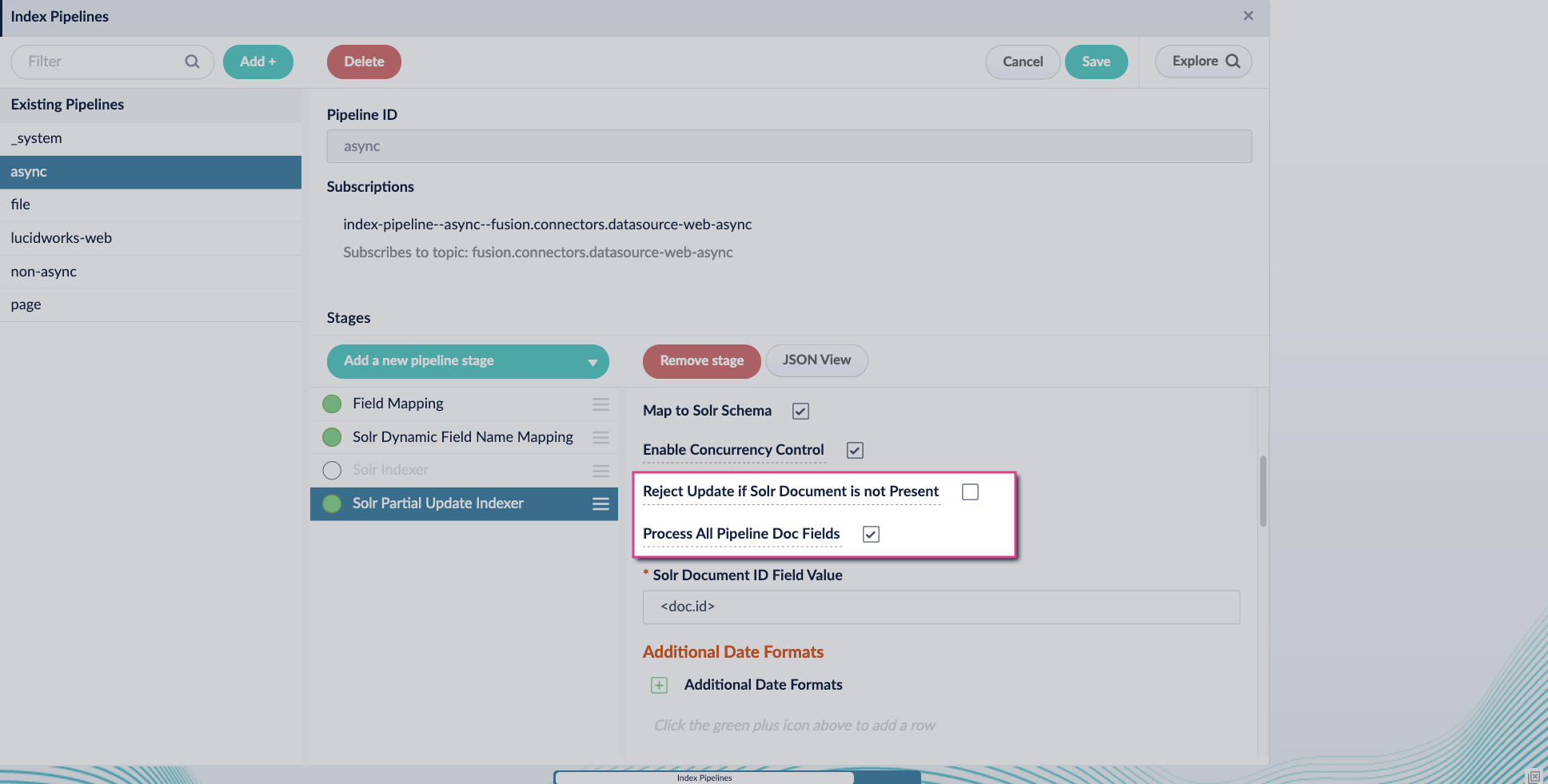
3. Turn off the **Reject Update if Solr Document is not Present** option and turn on the **Process All Pipeline Doc Fields** option:
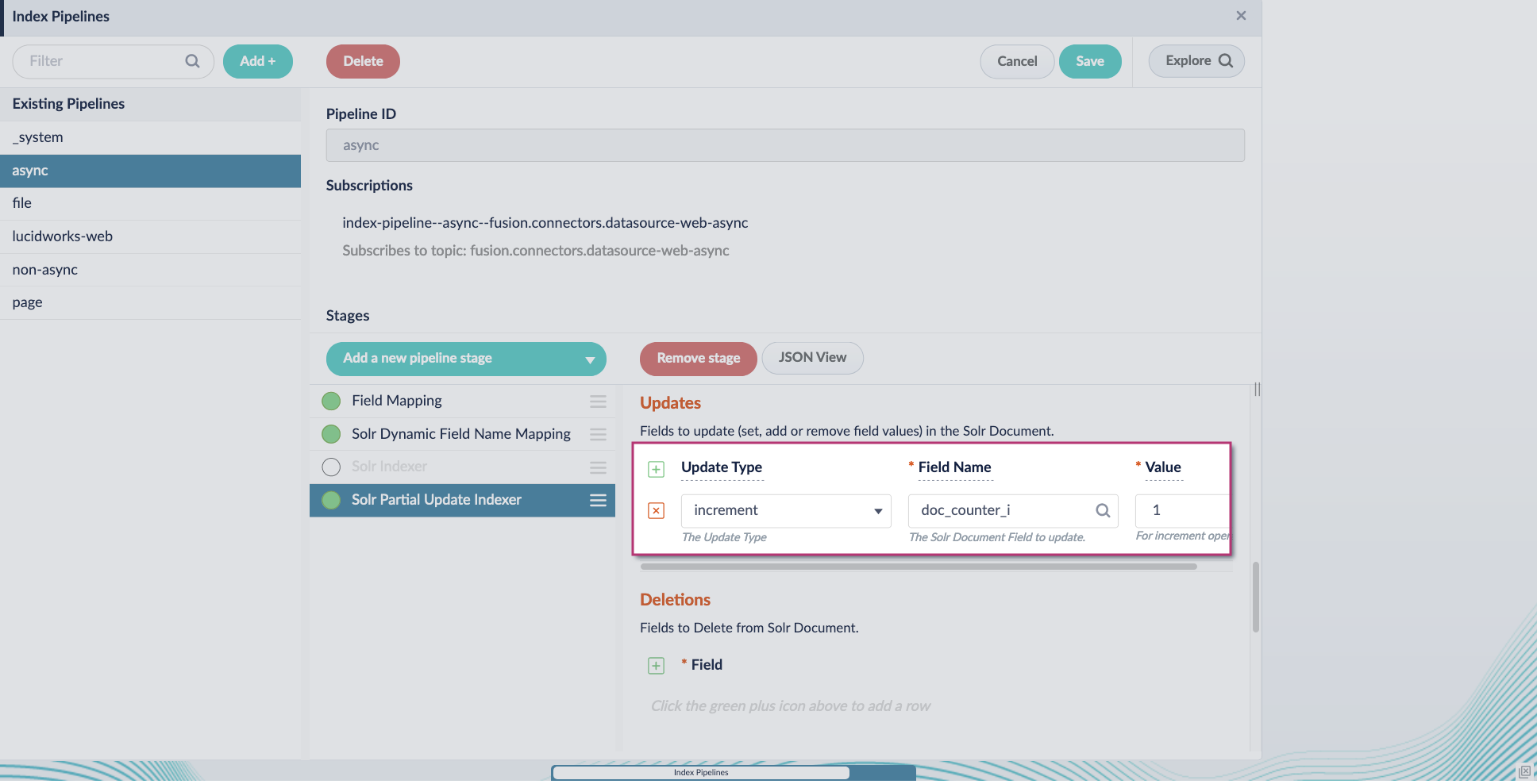
4. Include an extra update field in the stage configuration using any update type and field name. In this example, an incremental field `docs_counter_i` with an increment value of `1` is added:
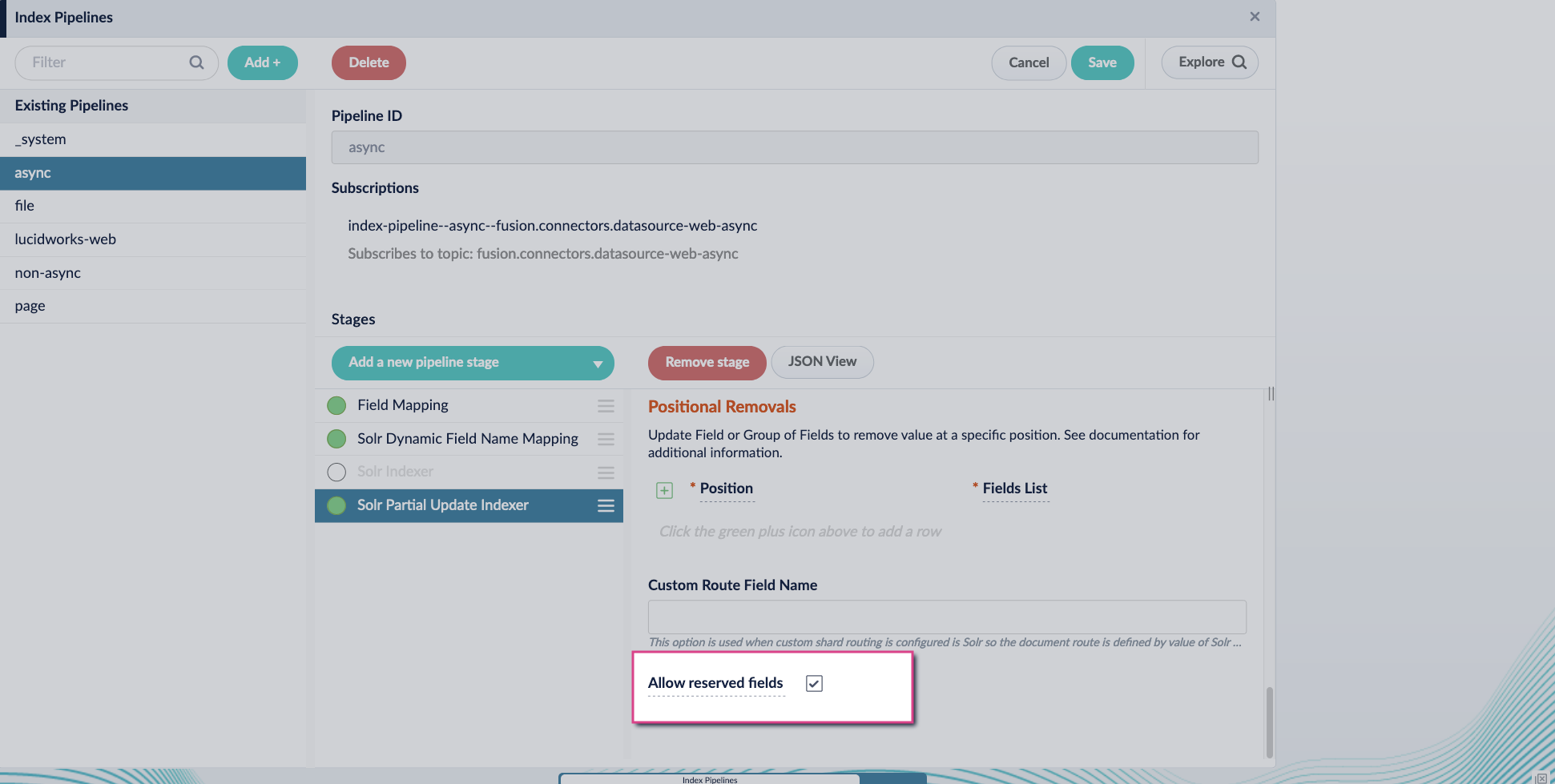
5. Enable the **Allow reserved fields** option:
6. Click **Save**.
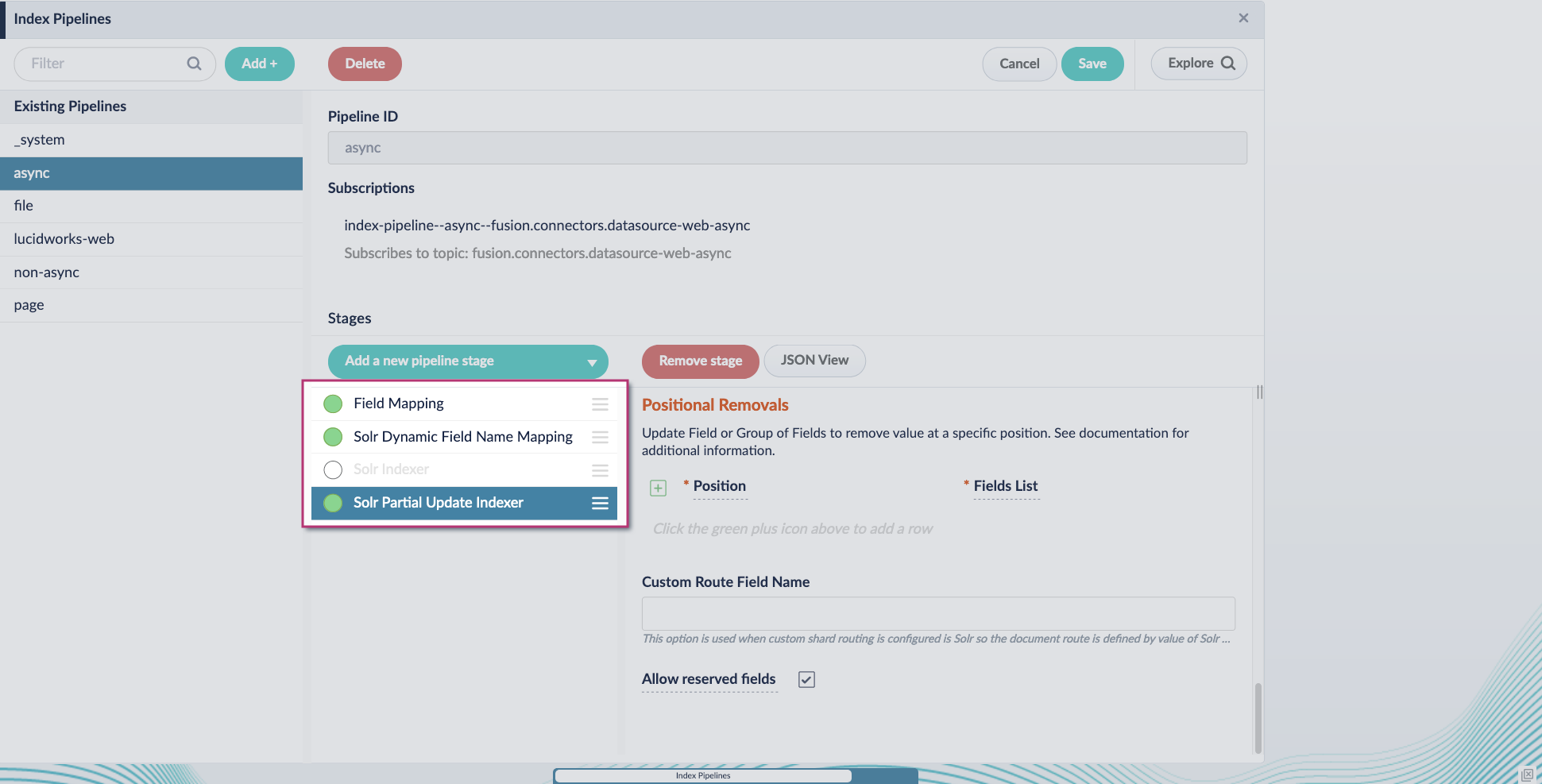
7. Turn off or remove the **Solr Indexer stage**, and move the **Solr Partial Update Indexer stage** to be the last stage in the pipeline.
Asynchronous Tika parsing setup is now complete. Run the datasource indexing job and monitor the results.
When entering configuration values in the UI, use *unescaped* characters, such as `\t` for the tab character. When entering configuration values in the API, use *escaped* characters, such as `\\t` for the tab character.
 4. Include an extra update field in the stage configuration using any update type and field name. In this example, an incremental field `docs_counter_i` with an increment value of `1` is added:
 5. Enable the **Allow reserved fields** option:
 6. Click **Save**.
7. Turn off or remove the **Solr Indexer stage**, and move the **Solr Partial Update Indexer stage** to be the last stage in the pipeline.
6. Click **Save**.
7. Turn off or remove the **Solr Indexer stage**, and move the **Solr Partial Update Indexer stage** to be the last stage in the pipeline.
 Asynchronous Tika parsing setup is now complete. Run the datasource indexing job and monitor the results.