> ## Documentation Index
> Fetch the complete documentation index at: https://doc.lucidworks.com/llms.txt
> Use this file to discover all available pages before exploring further.

# Smart Answers Evaluate Pipeline

> Job configuration specifications

export const schema = {
  "type": "object",
  "title": "Smart Answers Evaluate Pipeline",
  "description": "Evaluates the performance of a configured Fusion query pipeline against labeled ground truth data and writes metrics to an output collection.",
  "required": ["id", "inputEvaluationCollection", "trainingFormat", "outputEvaluationCollection", "outputFormat", "appName", "queryPipelineName", "collectionName", "returnFields", "type"],
  "properties": {
    "id": {
      "type": "string",
      "title": "Job ID",
      "description": "The ID for this job. Used in the API to reference this job. Allowed characters: a-z, A-Z, dash (-) and underscore (_).",
      "maxLength": 63,
      "pattern": "[a-zA-Z][_\\-a-zA-Z0-9]*[a-zA-Z0-9]?"
    },
    "sparkConfig": {
      "type": "array",
      "title": "Additional parameters",
      "description": "Provide additional key/value pairs to be injected into the training JSON map at runtime. Values will be inserted as-is, so use \" to surround string values.",
      "hints": ["advanced"],
      "items": {
        "type": "object",
        "required": ["key"],
        "properties": {
          "key": {
            "type": "string",
            "title": "Parameter Name"
          },
          "value": {
            "type": "string",
            "title": "Parameter Value"
          }
        }
      }
    },
    "writeOptions": {
      "type": "array",
      "title": "Write Options",
      "description": "Sets additional key-value options passed to the Spark writer when writing output to Solr or other sinks.",
      "hints": ["advanced"],
      "items": {
        "type": "object",
        "required": ["key"],
        "properties": {
          "key": {
            "type": "string",
            "title": "Parameter Name"
          },
          "value": {
            "type": "string",
            "title": "Parameter Value"
          }
        }
      }
    },
    "readOptions": {
      "type": "array",
      "title": "Read Options",
      "description": "Sets additional key-value options passed to the Spark reader when loading input from Solr or other sources.",
      "hints": ["advanced"],
      "items": {
        "type": "object",
        "required": ["key"],
        "properties": {
          "key": {
            "type": "string",
            "title": "Parameter Name"
          },
          "value": {
            "type": "string",
            "title": "Parameter Value"
          }
        }
      }
    },
    "inputEvaluationCollection": {
      "type": "string",
      "title": "Input Evaluation Data Path",
      "description": "Specifies the cloud storage path or Solr collection containing labeled evaluation data.",
      "minLength": 1
    },
    "trainingFormat": {
      "type": "string",
      "title": "Input data format",
      "description": "Specifies the format of the input evaluation data, such as `solr` or `parquet`.",
      "default": "solr",
      "minLength": 1
    },
    "outputEvaluationCollection": {
      "type": "string",
      "title": "Output Evaluation Data Path",
      "description": "Specifies the cloud storage path or Solr collection where evaluation results are stored.",
      "minLength": 1
    },
    "partitionFields": {
      "type": "string",
      "title": "Partition fields",
      "description": "Specifies document fields used to partition the output.",
      "hints": ["advanced"]
    },
    "batchSize": {
      "type": "string",
      "title": "Output Batch Size",
      "description": "Sets the number of documents processed per batch during evaluation.",
      "hints": ["advanced"]
    },
    "outputFormat": {
      "type": "string",
      "title": "Output format",
      "description": "Specifies the format of the output evaluation results, such as `solr` or `parquet`.",
      "default": "solr",
      "minLength": 1
    },
    "secretName": {
      "type": "string",
      "title": "Cloud storage secret name",
      "description": "Specifies the name of the Kubernetes secret used to access cloud storage.",
      "hints": ["advanced"],
      "minLength": 1
    },
    "trainingDataFilterQuery": {
      "type": "string",
      "title": "Training Data Filter Query",
      "description": "Specifies a Solr query or SQL expression to filter training data. Use a Solr query when reading from a Solr collection.",
      "hints": ["code/sql", "advanced"]
    },
    "trainingSampleFraction": {
      "type": "number",
      "title": "Sampling proportion",
      "description": "Sets the proportion of data sampled from the full dataset. Use a value between `0` and `1`.",
      "hints": ["advanced"]
    },
    "seed": {
      "type": "integer",
      "title": "Sampling Seed",
      "description": "Sets the random seed for reproducible sampling.",
      "default": 12345,
      "hints": ["advanced"]
    },
    "testQuestionFieldInFile": {
      "type": "string",
      "title": "Test Question Field",
      "description": "Specifies the evaluation collection field containing the test question.",
      "default": "question"
    },
    "matchFieldInFile": {
      "type": "string",
      "title": "Ground Truth Field",
      "description": "Specifies the evaluation collection field containing the ID or text of the ground truth answer.",
      "default": "answer_id"
    },
    "matchFieldInFusion": {
      "type": "string",
      "title": "Answer or id Field in Fusion",
      "description": "Specifies the Fusion collection field used to match ground truth answer IDs or text.",
      "default": "doc_id"
    },
    "appName": {
      "type": "string",
      "title": "App name",
      "description": "Specifies the Fusion application where indexed documents or QA pairs are stored."
    },
    "queryPipelineName": {
      "type": "string",
      "title": "Fusion Query Pipeline",
      "description": "Specifies the Fusion query pipeline used for evaluation."
    },
    "collectionName": {
      "type": "string",
      "title": "Main Collection",
      "description": "Specifies the Fusion collection where indexed documents or QA pairs are stored."
    },
    "additionalParams": {
      "type": "string",
      "title": "Additional query parameters",
      "description": "Specifies additional query parameters passed to Fusion when retrieving results. Use dictionary format.",
      "hints": ["advanced"]
    },
    "returnFields": {
      "type": "string",
      "title": "Return fields",
      "description": "Specifies the fields returned from Fusion query results."
    },
    "rankingScoreField": {
      "type": "string",
      "title": "Ranking score",
      "description": "Specifies the field used as the ranking score during evaluation.",
      "default": "ensemble_score",
      "hints": ["advanced"]
    },
    "metricsList": {
      "type": "string",
      "title": "Metrics list",
      "description": "Specifies the list of metrics to compute, such as `recall`, `precision`, `map`, and `mrr`.",
      "default": "[\"recall\",\"map\",\"mrr\"]",
      "hints": ["advanced"]
    },
    "kList": {
      "type": "string",
      "title": "Metrics@k list",
      "description": "Specifies the retrieval positions K at which metrics are computed.",
      "default": "[1,3,5]",
      "hints": ["advanced"]
    },
    "doWeightsSelection": {
      "type": "boolean",
      "title": "Perform weights selection",
      "description": "When enabled, computes optimal weights for combining scores in the query pipeline.",
      "default": false,
      "hints": ["advanced"]
    },
    "solrScaleFunc": {
      "type": "string",
      "title": "Solr scale function",
      "description": "Specifies the function used to scale Solr scores during ensemble ranking, such as `max` to scale by the maximum score.",
      "default": "max"
    },
    "scoreListForWeights": {
      "type": "string",
      "title": "List of ranking scores for ensemble",
      "description": "Specifies comma-separated ranking scores used for ensemble weighting in the pipeline's Compute Mathematical Expression stage.",
      "default": "score,vectors_distance"
    },
    "targetRankingMetric": {
      "type": "string",
      "title": "Target metric to use for weight selection",
      "description": "Specifies the target ranking metric to optimize during weight selection.",
      "default": "mrr@3"
    },
    "fetcherType": {
      "type": "string",
      "title": "Fetcher Type to use with query evaluation",
      "default": "query-service",
      "hints": ["hidden"]
    },
    "useLabelingResolution": {
      "type": "boolean",
      "title": "Use Labeling Resolution",
      "description": "When enabled, identifies similar questions and answers using labeling resolution and graph connectivity. Does not work well with noisy data.",
      "default": false,
      "hints": ["advanced"]
    },
    "useConcurrentQuerying": {
      "type": "boolean",
      "title": "Use Concurrent Querying",
      "description": "When enabled, makes concurrent queries to Fusion to speed up evaluation.",
      "default": false,
      "hints": ["advanced"]
    },
    "type": {
      "type": "string",
      "title": "Spark Job Type",
      "enum": ["argo-qna-evaluate"],
      "default": "argo-qna-evaluate",
      "hints": ["readonly"]
    }
  },
  "additionalProperties": true,
  "category": "Other",
  "categoryPriority": 1,
  "propertyGroups": [{
    "label": "Input / Output Parameters",
    "properties": ["inputEvaluationCollection", "trainingFormat", "outputEvaluationCollection", "outputFormat", "trainingDataFilterQuery", "testQuestionFieldInFile", "matchFieldInFile", "trainingSampleFraction", "seed", "useLabelingResolution", "partitionFields", "batchSize", "secretName"]
  }, {
    "label": "Query Pipeline Input / Output Parameters",
    "properties": ["appName", "collectionName", "queryPipelineName", "matchFieldInFusion", "additionalParams", "returnFields", "useConcurrentQuerying"]
  }, {
    "label": "Metrics",
    "properties": ["rankingScoreField", "metricsList", "kList", "doWeightsSelection", "solrScaleFunc", "scoreListForWeights", "targetRankingMetric"]
  }]
};

export const SchemaParamFields = ({schema}) => {
  const sanitize = str => {
    if (typeof str !== "string") return str;
    return str.replace(/^"(.*)"$/s, "$1").replace(/\\/g, "").replace(/"/g, "'");
  };
  const renderMd = str => {
    const s = sanitize(str);
    const text = (/[.!?]\)*$/).test(s) ? s : `${s}.`;
    return text.split(/(\*\*[^*]+\*\*|_[^_]+_|`[^`]+`)/g).map((part, i) => {
      if (part.startsWith("**")) return <strong key={i}>{part.slice(2, -2)}</strong>;
      if (part.startsWith("_")) return <em key={i}>{part.slice(1, -1)}</em>;
      if (part.startsWith("`")) return <code key={i}>{part.slice(1, -1)}</code>;
      return part;
    });
  };
  const {description, properties = {}, required: requiredProps = []} = schema;
  const visibleProps = useMemo(() => Object.entries(properties).filter(([, prop]) => !prop.hints?.includes("hidden")), [properties]);
  const renderProp = ([name, prop]) => {
    const isRequired = requiredProps.includes(name);
    const hasDefault = prop.default !== undefined;
    const rawDefault = prop.default;
    const hints = prop.hints || [];
    const isComplexDefault = hasDefault && (typeof rawDefault === "object" || typeof rawDefault === "string" && (rawDefault.length > 20 || rawDefault.includes('"')));
    const postBadges = [];
    if (prop.title) {
      postBadges.push(<><span className="text-stone-400 dark:text-stone-500">API property: </span>{name}</>);
    }
    const constraints = [];
    if (prop.minimum !== undefined && prop.maximum !== undefined) {
      constraints.push(`Range: ${prop.minimum} – ${prop.maximum}`);
    } else if (prop.minimum !== undefined) {
      constraints.push(`Min: ${prop.minimum}`);
    } else if (prop.maximum !== undefined) {
      constraints.push(`Max: ${prop.maximum}`);
    }
    if (prop.minLength !== undefined && prop.maxLength !== undefined) {
      constraints.push(`Length: ${prop.minLength} – ${prop.maxLength}`);
    } else if (prop.minLength !== undefined) {
      constraints.push(`Min length: ${prop.minLength}`);
    } else if (prop.maxLength !== undefined) {
      constraints.push(`Max length: ${prop.maxLength}`);
    }
    const fieldProps = {
      key: name,
      body: prop.title || name,
      type: prop.type,
      ...postBadges.length > 0 && ({
        post: postBadges
      }),
      ...isRequired && ({
        required: true
      }),
      ...!isComplexDefault && hasDefault ? {
        default: sanitize(String(rawDefault))
      } : {}
    };
    const isObject = prop.type === "object" && prop.properties;
    const isArrayOfObjects = prop.type === "array" && prop.items?.type === "object" && prop.items.properties;
    return <ParamField {...fieldProps}>
        {prop.description && <p>{renderMd(prop.description)}</p>}

        {prop.enum && <p>
            Allowed values: 
            {prop.enum.map((v, i) => <>{i > 0 && ", "}<code key={i}>{String(v)}</code></>)}
          </p>}

        {constraints.length > 0 && <p className="text-stone-500 dark:text-stone-400 text-sm">
            {constraints.join(" · ")}
          </p>}

        {isComplexDefault && <div className="flex">
            <p>
              <strong>Default:</strong>
            </p>
            <pre className="!my-0">
              <code>
                {JSON.stringify(rawDefault, null, 2)}
              </code>
            </pre>
          </div>}

        {isArrayOfObjects && <Expandable title="item properties">
            <SchemaParamFields schema={{
      properties: prop.items.properties,
      required: prop.items.required
    }} />
          </Expandable>}

        {isObject && <Expandable title="properties">
            <SchemaParamFields schema={{
      properties: prop.properties,
      required: prop.required
    }} />
          </Expandable>}
      </ParamField>;
  };
  return <div>
      {description && <p>{renderMd(description)}</p>}

      {visibleProps.map(renderProp)}
    </div>;
};

export const LwTemplate = ({title = "Key questions to get you started", icon = "sparkles", cta = "Powered by Agent Studio", linkHref = "https://lucidworks.com/demo/?utm_source=docs&utm_medium=referral&utm_campaign=docs_cta_ai"}) => {
  const [isLoaded, setIsLoaded] = useState(false);
  useEffect(() => {
    const timer = setTimeout(() => {
      setIsLoaded(true);
    }, 500);
    return () => clearTimeout(timer);
  }, []);
  return <div className="lw-template-container">
      <Card title={title} icon={icon}>
        {isLoaded && <span dangerouslySetInnerHTML={{
    __html: `<lw-template id="a029c1a9-28be-427e-b0e1-5d918920246a"></lw-template
            >`
  }} />}
        <Link href={linkHref} className="agent-studio-link text-left text-gray-600 gap-2 dark:text-gray-400 text-sm font-medium flex flex-row items-center hover:text-primary dark:hover:text-primary-light group-hover:text-primary group-hover:dark:text-primary-light">Powered by Lucidworks Agent Studio</Link>
      </Card>
    </div>;
};

[localhost link]: http://localhost:3000/docs/lucidworks-search/09-developer-documentation/config-specs/jobs/smart-answers-evaluate-pipeline

[mintlify link]: https://doc.lucidworks.com/docs/lucidworks-search/09-developer-documentation/config-specs/jobs/smart-answers-evaluate-pipeline

[old doc.lw link]: https://doc.lucidworks.com/managed-fusion/5.9/uznt4n

Evaluate the performance of a [Smart Answers](/docs/lucidworks-search/10-machine-learning/smart-answers/overview) pipeline.

See **Evaluate a Smart Answers Query Pipeline** for configuration instructions.

<Accordion title="Evaluate a Smart Answers Query Pipeline">
  The [Smart Answers Evaluate Pipeline job](/docs/lucidworks-search/09-developer-documentation/config-specs/jobs/smart-answers-evaluate-pipeline) evaluates the rankings of results from any [Smart Answers](/docs/lucidworks-search/10-machine-learning/smart-answers/overview) pipeline and finds the best set of weights in the ensemble score.  This topic explains how to set up the job.

  Before beginning this procedure, prepare a machine learning model using either the Supervised method or the Cold start method, or by selecting one of the pre-trained cold start models, then Configure your pipelines.

  The input for this job is a set of test queries and the text or ID of the correct responses. At least 100 entries are needed to obtain useful results. The job compares the test data with Lucidworks Search’s actual results and computes variety of the ranking metrics to provide insights of how well the pipeline works. It is also useful to use to compare with other setups or pipelines.

  <LwTemplate />

  ## Prepare test data

  1. Format your test data as query/response pairs, that is, a query and its corresponding answer in each row.

     You can do this in any format that Lucidworks Search supports, but parquet file would be preferable to reduce the amount of possible encoding issues.
     The response value can be either the document ID of the correct answer in your Lucidworks Search index (preferable), or the text of the correct answer.

     <Note>   If you use answer text instead of an ID, make sure that the answer text in the evaluation file is formatted identically to the answer text in Lucidworks Search.</Note>

     If there are multiple possible answers for a unique question, then repeat the questions and put the pair into different rows to make sure each row has exactly one query and one response.
  2. If you wish to index test data into Lucidworks Search, create a collection for your test data, such as `sa_test_input` and index the test data into that collection.

  ## Configure the evaluation job

  1. If you wish to save the job output in Lucidworks Search, create a collection for your evaluation data such as `sa_test_output`.
  2. Navigate to **Collections** > **Jobs**.
  3. Select **New** > **Smart Answers Evaluate Pipeline**.
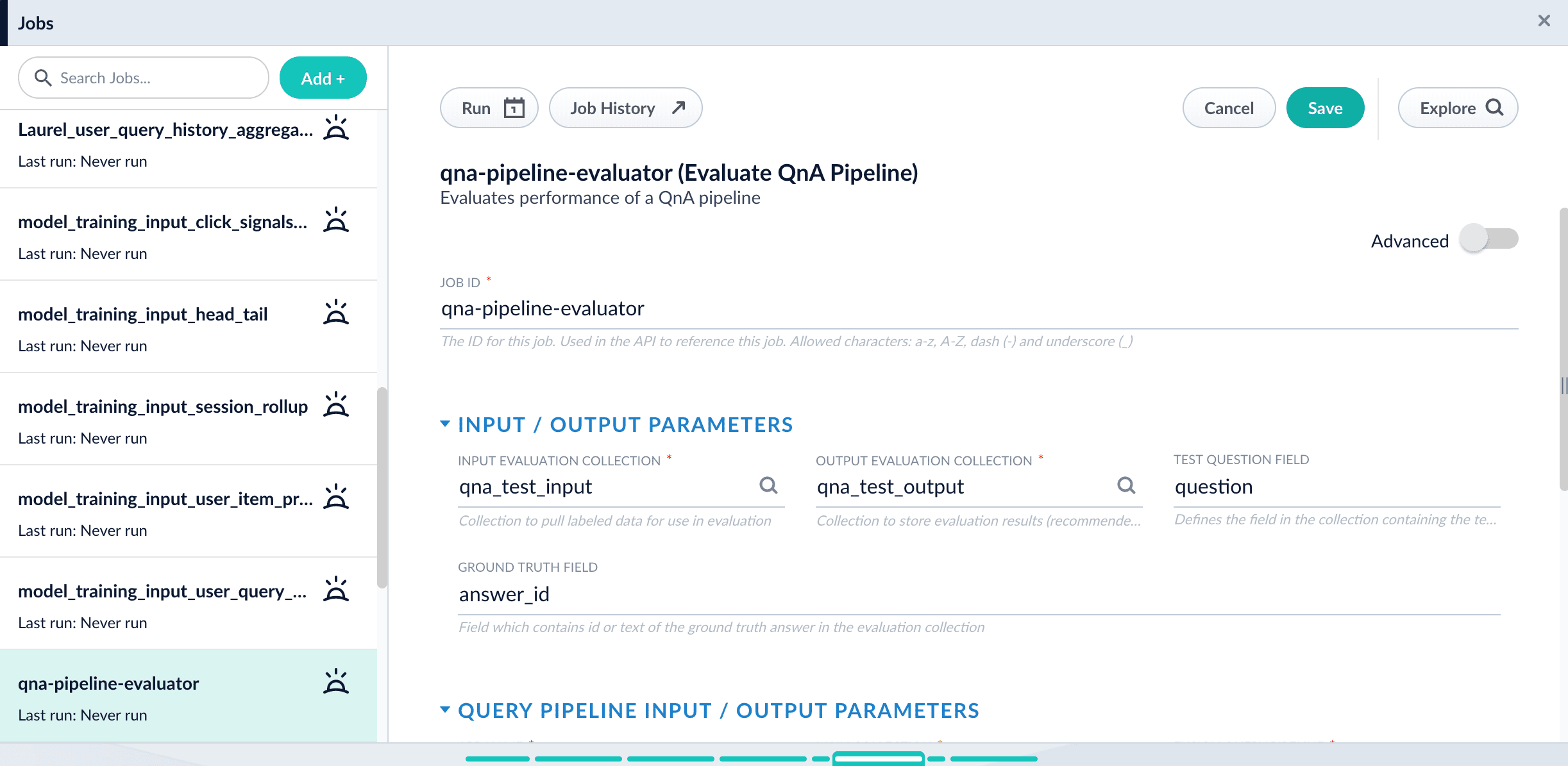
  4. Enter a **Job ID**, such as `sa-pipeline-evaluator`.
  5. Enter the name of your test data collection (such as `sa_test_input`) in the **Input Evaluation Collection** field.
  6. Enter the name of your output collection (such as `sa_test_output`) in the **Output Evaluation Collection** field.
  7. Enter the name of the **Test Question Field** in the input collection.
  8. Enter the name of the answer field as the **Ground Truth Field**.
  9. Enter the **App Name** of the Lucidworks Search app where the main Smart Answers content is indexed.
  10. In the **Main Collection** field, enter the name of the Lucidworks Search collection that contains your Smart Answers content.
  11. In the **Fusion Query Pipeline** field, enter the name of the Smart Answers query pipeline you want to evaluate.
  12. In the **Answer Or ID Field In Fusion** field, enter the name of the field that Lucidworks Search will return containing the answer text or answer ID.
  13. Optionally, you can configure the **Return Fields** to pass from Smart Answers collection into the evaluation output.

  <Tip>   Check the Query Workbench to see which fields are available to be returned.</Tip>

  14. Configure the **Metrics** parameters:

  * **Solr Scale Function**

    Specify the function used in the Compute Mathematical Expression stage of the query pipeline, one of the following:

    * `max`
    * `log10`
    * `pow0.5`
  * **List of Ranking Scores For Ensemble**

    To find the best weights for different ranking scores, list the names of the ranking score fields, separated by commas.  Different ranking scores might include Solr score, query-to-question distance, or query-to-answer distance from the Compute Mathematical Expression pipeline stage.
  * **Target Metric To Use For Weight Selection**

    The target ranking metric to optimize during weights selection.  The default is `mrr@3`.

  15. Optionally, [read about the advanced parameters](/docs/lucidworks-search/09-developer-documentation/config-specs/jobs/smart-answers-evaluate-pipeline) and consider whether to configure them as well.

  For example, **Sampling proportion** and **Sampling seed** provide a way to run the job only on a sample of the test data.
  16\. Click **Save**.

  <img src="https://mintcdn.com/lucidworks/1FfsxYVDR4XL56q9/assets/images/5.1/evaluate-qna-pipeline-job1.png?fit=max&auto=format&n=1FfsxYVDR4XL56q9&q=85&s=c28481fb669ec17bcbf3ca4a2c14a567" alt="The configured Smart Answers Evaluate Pipeline job" width="2445" height="1195" data-path="assets/images/5.1/evaluate-qna-pipeline-job1.png" />

  17\. Click **Run** > **Start**.

  ## Examine the output

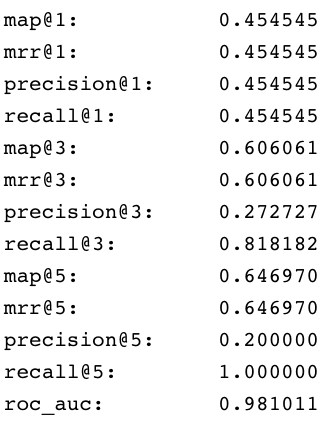
  The job provides a variety of metrics (controlled by the **Metrics list** advanced parameter) at different positions (controlled by the **Metrics\@k list** advanced parameter) for the chosen final ranking score (specified in **Ranking score** parameter).

  **Example: Pipeline evaluation metrics**
  <img src="https://mintcdn.com/lucidworks/hRHvA40l_Bej4D7e/assets/images/5.1/smart-answers-metrics1.png?fit=max&auto=format&n=hRHvA40l_Bej4D7e&q=85&s=e3a8a3511c7f27515483bafb2d0fd232" alt="Pipeline evaluation metrics" width="333" height="423" data-path="assets/images/5.1/smart-answers-metrics1.png" />

  **Example: recall\@1,3,5 for different weights and distances**

  <img src="https://mintcdn.com/lucidworks/hRHvA40l_Bej4D7e/assets/images/5.1/smart-answers-metrics1.png?fit=max&auto=format&n=hRHvA40l_Bej4D7e&q=85&s=e3a8a3511c7f27515483bafb2d0fd232" alt="Pipeline evaluation metrics" width="333" height="423" data-path="assets/images/5.1/smart-answers-metrics1.png" />

  In addition to metrics, a results evaluation file is indexed to the specified output evaluation collection. It provides the correct answer position for each test question as well as the top returned results for each field specified in **Return fields** parameter.
</Accordion>

## Configuration properties

<SchemaParamFields schema={schema} />