> ## Documentation Index
> Fetch the complete documentation index at: https://doc.lucidworks.com/llms.txt
> Use this file to discover all available pages before exploring further.
# Smart Answers Coldstart Training
> Job configuration specifications
export const schema = {
"type": "object",
"title": "Smart Answers Coldstart Training",
"description": "Trains a Smart Answers model on an unsupervised cold-start basis using pre-trained or custom embeddings and deploys it to the ML Model Service.",
"required": ["id", "trainingCollection", "trainingFormat", "textColName", "deployModelName", "modelBase", "type"],
"properties": {
"id": {
"type": "string",
"title": "Job ID",
"description": "The ID for this job. Used in the API to reference this job. Allowed characters: a-z, A-Z, dash (-) and underscore (_).",
"maxLength": 63,
"pattern": "[a-zA-Z][_\\-a-zA-Z0-9]*[a-zA-Z0-9]?"
},
"sparkConfig": {
"type": "array",
"title": "Additional parameters",
"description": "Provide additional key/value pairs to be injected into the training JSON map at runtime. Values will be inserted as-is, so use \" to surround string values.",
"hints": ["advanced"],
"items": {
"type": "object",
"required": ["key"],
"properties": {
"key": {
"type": "string",
"title": "Parameter Name"
},
"value": {
"type": "string",
"title": "Parameter Value"
}
}
}
},
"writeOptions": {
"type": "array",
"title": "Write Options",
"description": "Sets additional key-value options passed to the Spark writer when writing output to Solr or other sinks.",
"hints": ["advanced"],
"items": {
"type": "object",
"required": ["key"],
"properties": {
"key": {
"type": "string",
"title": "Parameter Name"
},
"value": {
"type": "string",
"title": "Parameter Value"
}
}
}
},
"readOptions": {
"type": "array",
"title": "Read Options",
"description": "Sets additional key-value options passed to the Spark reader when loading input from Solr or other sources.",
"hints": ["advanced"],
"items": {
"type": "object",
"required": ["key"],
"properties": {
"key": {
"type": "string",
"title": "Parameter Name"
},
"value": {
"type": "string",
"title": "Parameter Value"
}
}
}
},
"trainingCollection": {
"type": "string",
"title": "Training data path",
"description": "Specifies the Solr collection or cloud storage path where training data is stored.",
"minLength": 1
},
"trainingFormat": {
"type": "string",
"title": "Training data format",
"description": "Specifies the format of the training data, such as `solr` or `parquet`.",
"default": "solr",
"minLength": 1
},
"secretName": {
"type": "string",
"title": "Cloud storage secret name",
"description": "Specifies the name of the Kubernetes secret used to access cloud storage.",
"hints": ["advanced"],
"minLength": 1
},
"trainingDataFilterQuery": {
"type": "string",
"title": "Training Data Filter Query",
"description": "Specifies a Solr query or SQL expression to filter training data. Use a Solr query when reading from a Solr collection.",
"hints": ["code/sql", "advanced"]
},
"textColName": {
"type": "string",
"title": "Field which contains the content documents",
"description": "Specifies the field containing documents used to learn vocabulary. Separate multiple fields with commas."
},
"deployModelName": {
"type": "string",
"title": "Model Deployment Name",
"description": "Specifies the model name used for deployment. Must be a valid lowercased DNS subdomain with no underscores.",
"maxLength": 30,
"pattern": "^[a-z0-9]([-a-z0-9]*[a-z0-9])?(\\.[a-z0-9]([-a-z0-9]*[a-z0-9])?)*$"
},
"modelBase": {
"type": "string",
"title": "Model base",
"description": "Specifies the embedding type: choose `word_custom` or `bpe_custom` for custom embeddings, or a pre-trained embedding model.",
"enum": ["word_custom", "bpe_custom", "word_en_300d_2M", "bpe_en_300d_10K", "bpe_en_300d_200K", "bpe_ja_300d_100K", "bpe_ko_300d_100K", "bpe_zh_300d_50K", "bpe_multi_300d_320K", "distilbert_en", "distilbert_multi", "biobert_v1.1"],
"default": "word_en_300d_2M"
},
"testMode": {
"type": "boolean",
"title": "Test Mode",
"description": "When enabled, exits training after the first iteration. Use this to verify configuration before a full training run.",
"default": false,
"hints": ["hidden"]
},
"modelReplicas": {
"type": "integer",
"title": "Model replicas",
"description": "Sets the number of Seldon Core replicas to deploy for the trained model.",
"default": 1
},
"w2vEpochs": {
"type": "integer",
"title": "Word2Vec training epochs",
"description": "Sets the number of epochs for training custom Word2Vec embeddings.",
"default": 15,
"hints": ["advanced"]
},
"w2vVectorSize": {
"type": "integer",
"title": "Size of word vectors",
"description": "Sets the dimensionality of Word2Vec word vectors. Suggested range is 100–300.",
"default": 150,
"hints": ["advanced"]
},
"w2vWindowSize": {
"type": "integer",
"title": "Word2Vec window size",
"description": "Sets the context window size for Word2Vec training.",
"default": 8,
"hints": ["advanced"]
},
"trainingSampleFraction": {
"type": "number",
"title": "Training Data Sampling Fraction",
"description": "Sets the proportion of data sampled from the full dataset. Use a value between `0` and `1`.",
"hints": ["advanced"]
},
"seed": {
"type": "integer",
"title": "Seed",
"description": "Sets the random seed for reproducible sampling.",
"default": 12345,
"hints": ["hidden"]
},
"minTokensNum": {
"type": "integer",
"title": "Minimum number of words in doc",
"description": "Sets the minimum number of tokens a document must have. Documents with fewer tokens are dropped.",
"default": 1,
"hints": ["advanced"],
"minimum": 1,
"exclusiveMinimum": false
},
"maxTokensNum": {
"type": "integer",
"title": "Maximum number of words in doc",
"description": "Sets the maximum number of tokens allowed. Documents exceeding this length are dropped.",
"default": 5000,
"hints": ["advanced"],
"minimum": 1,
"exclusiveMinimum": false
},
"lowerCases": {
"type": "boolean",
"title": "Lower case all words",
"description": "When enabled, converts all words to lowercase during training so that case-variant terms are treated identically.",
"default": true
},
"maxVocabSize": {
"type": "integer",
"title": "Maximum vocabulary size",
"description": "Sets the maximum vocabulary size. Low-frequency words are trimmed to enforce this limit.",
"default": 100000,
"hints": ["advanced"],
"minimum": 1,
"exclusiveMinimum": false
},
"extraTrainingArgs": {
"type": "string",
"title": "Extra training args for Python scripts",
"description": "Specifies additional arguments passed to the Python training script.",
"hints": ["hidden"]
},
"maxLen": {
"type": "integer",
"title": "Max Length",
"description": "Sets the maximum input length in tokens. Texts longer than this are truncated."
},
"infBatch": {
"type": "integer",
"title": "Inference batch size",
"description": "Sets the batch size used for encoding during training.",
"hints": ["advanced"]
},
"numClusters": {
"type": "integer",
"title": "Number of clusters",
"description": "Deprecated. Use Milvus for vector similarity search instead. Sets the number of clusters used during retrieval.",
"default": 0,
"hints": ["advanced"]
},
"topKClusters": {
"type": "integer",
"title": "Top k of clusters to return",
"description": "Sets the number of nearest clusters the model searches at retrieval time. All answers in those clusters are returned as candidates.",
"default": 10,
"hints": ["advanced"]
},
"unidecode": {
"type": "boolean",
"title": "Apply unicode decoding",
"description": "When enabled, uses the Unidecode library to convert Unicode input into ASCII transliterations. Only used for custom embeddings.",
"default": true
},
"globalPoolType": {
"type": "string",
"title": "Global Pool Type",
"description": "Specifies how token vectors are aggregated into a single content vector. Must be one of `avg`, `max`, or `cls`.",
"enum": ["avg", "max"],
"default": "avg",
"hints": ["advanced"]
},
"type": {
"type": "string",
"title": "Spark Job Type",
"enum": ["argo-qna-coldstart"],
"default": "argo-qna-coldstart",
"hints": ["readonly"]
}
},
"additionalProperties": true,
"category": "Other",
"categoryPriority": 1,
"propertyGroups": [{
"label": "Input/Output Parameters",
"properties": ["trainingCollection", "trainingFormat", "textColName", "deployModelName", "modelReplicas", "secretName", "testMode"]
}, {
"label": "Data Preprocessing",
"properties": ["trainingDataFilterQuery", "trainingSampleFraction", "seed", "minTokensNum", "maxTokensNum", "lowerCases", "unidecode", "maxVocabSize"]
}, {
"label": "Custom Embeddings Initialization",
"properties": ["w2vEpochs", "w2vVectorSize", "w2vWindowSize"]
}, {
"label": "Model Tuning Parameters",
"properties": ["maxLen", "infBatch", "numClusters", "topKClusters", "globalPoolType"]
}]
};
export const SchemaParamFields = ({schema}) => {
const sanitize = str => {
if (typeof str !== "string") return str;
return str.replace(/^"(.*)"$/s, "$1").replace(/\\/g, "").replace(/"/g, "'");
};
const renderMd = str => {
const s = sanitize(str);
const text = (/[.!?]\)*$/).test(s) ? s : `${s}.`;
return text.split(/(\*\*[^*]+\*\*|_[^_]+_|`[^`]+`)/g).map((part, i) => {
if (part.startsWith("**")) return {part.slice(2, -2)} ;
if (part.startsWith("_")) return {part.slice(1, -1)} ;
if (part.startsWith("`")) return {part.slice(1, -1)};
return part;
});
};
const {description, properties = {}, required: requiredProps = []} = schema;
const visibleProps = useMemo(() => Object.entries(properties).filter(([, prop]) => !prop.hints?.includes("hidden")), [properties]);
const renderProp = ([name, prop]) => {
const isRequired = requiredProps.includes(name);
const hasDefault = prop.default !== undefined;
const rawDefault = prop.default;
const hints = prop.hints || [];
const isComplexDefault = hasDefault && (typeof rawDefault === "object" || typeof rawDefault === "string" && (rawDefault.length > 20 || rawDefault.includes('"')));
const postBadges = [];
if (prop.title) {
postBadges.push(<>API property: {name});
}
const constraints = [];
if (prop.minimum !== undefined && prop.maximum !== undefined) {
constraints.push(`Range: ${prop.minimum} – ${prop.maximum}`);
} else if (prop.minimum !== undefined) {
constraints.push(`Min: ${prop.minimum}`);
} else if (prop.maximum !== undefined) {
constraints.push(`Max: ${prop.maximum}`);
}
if (prop.minLength !== undefined && prop.maxLength !== undefined) {
constraints.push(`Length: ${prop.minLength} – ${prop.maxLength}`);
} else if (prop.minLength !== undefined) {
constraints.push(`Min length: ${prop.minLength}`);
} else if (prop.maxLength !== undefined) {
constraints.push(`Max length: ${prop.maxLength}`);
}
const fieldProps = {
key: name,
body: prop.title || name,
type: prop.type,
...postBadges.length > 0 && ({
post: postBadges
}),
...isRequired && ({
required: true
}),
...!isComplexDefault && hasDefault ? {
default: sanitize(String(rawDefault))
} : {}
};
const isObject = prop.type === "object" && prop.properties;
const isArrayOfObjects = prop.type === "array" && prop.items?.type === "object" && prop.items.properties;
return
{prop.description && {renderMd(prop.description)}
}
{prop.enum &&
Allowed values:
{prop.enum.map((v, i) => <>{i > 0 && ", "}{String(v)})}
}
{constraints.length > 0 &&
{constraints.join(" · ")}
}
{isComplexDefault &&
Default:
{JSON.stringify(rawDefault, null, 2)}
}
{isArrayOfObjects &&
}
{isObject &&
}
;
};
return
{description &&
{renderMd(description)}
}
{visibleProps.map(renderProp)}
{isLoaded && `
}} />}
;
};
[localhost link]: http://localhost:3000/docs/lucidworks-search/09-developer-documentation/config-specs/jobs/smart-answers-coldstart-training
[mintlify link]: https://doc.lucidworks.com/docs/lucidworks-search/09-developer-documentation/config-specs/jobs/smart-answers-coldstart-training
[old doc.lw link]: https://doc.lucidworks.com/managed-fusion/5.9/8dacf9
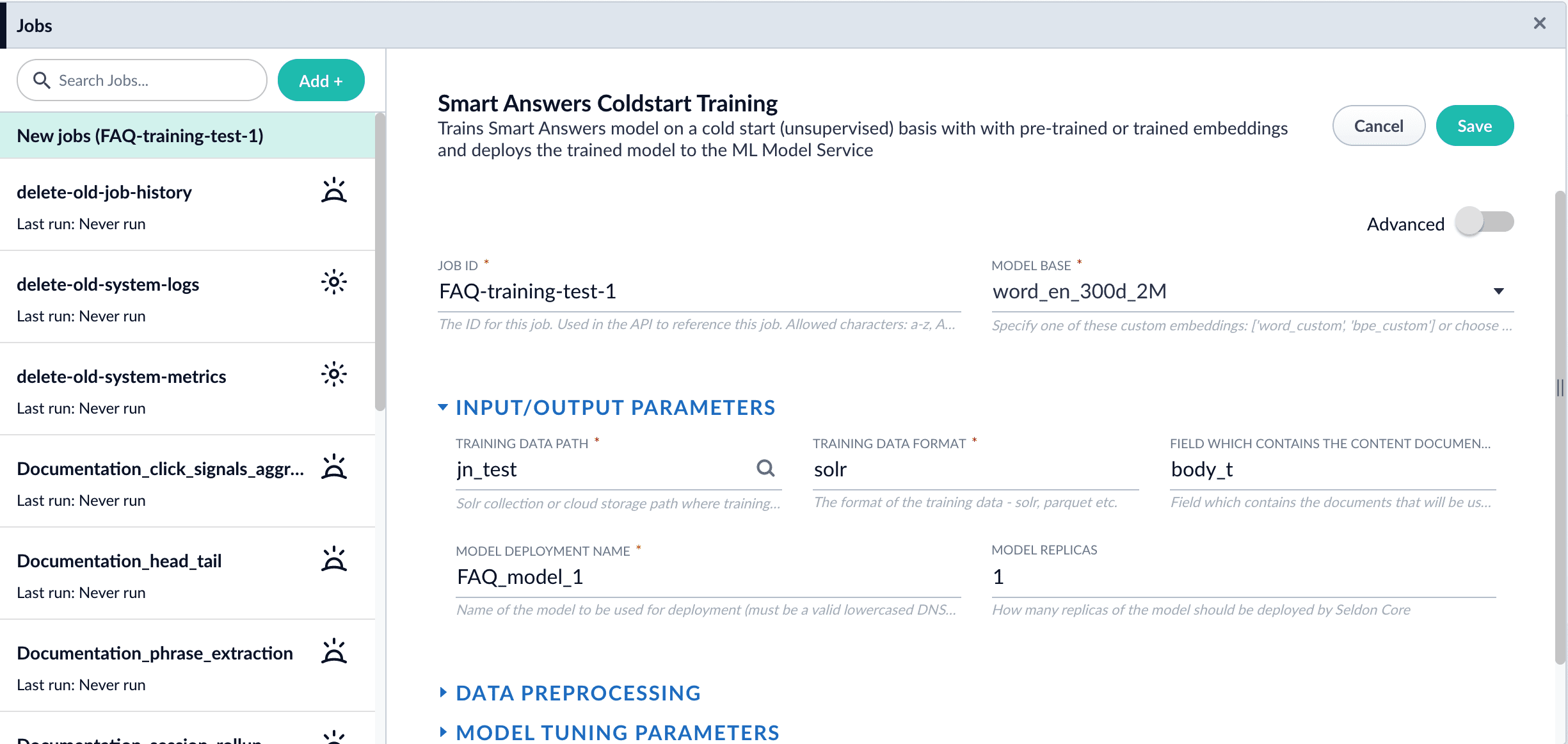
Train a [Smart Answers](/docs/lucidworks-search/10-machine-learning/smart-answers/overview) model on a [cold start](/docs/lucidworks-search/10-machine-learning/smart-answers/cold-start-solution) (unsupervised) basis, with pre-trained or trained embeddings, and deploy the trained model to the ML Model Service.
See **Train a Smart Answers cold start model** for configuration instructions.
The Smart Answers Cold Start Training job is deprecated in Fusion 5.12.
The [cold start solution for Smart Answers](/docs/lucidworks-search/10-machine-learning/smart-answers/cold-start-solution) begins with training a model using your existing content. To do this, you run the [Smart Answers Coldstart Training](/docs/lucidworks-search/09-developer-documentation/config-specs/jobs/smart-answers-coldstart-training) job. This job uses variety of word embeddings, including custom via Word2Vec training, to learn about the vocabulary that you want to search against.
Smart Answers comes with two pre-trained cold-start models. If your data does not have many domain-specific words, then consider using a pre-trained model.
During a cold start, we suggest capturing user feedback such as document clicks, likes, and downloads on the website. After accumulating feedback data and at least 3,000 query/response pairs, the feedback can be used to train a model using the Supervised method.
If using solr as the training data source ensure that the source collection contains the `random_*` dynamic field defined in its `managed-schema.xml`. This field is required for sampling the data. If it is not present, add the following entry to the `managed-schema.xml` alongside other dynamic fields `
8. Click **Run** > **Start**.
After training is finished the model is deployed into the cluster and can be used in index and query pipelines.
## Next steps
1. Configure The Smart Answers Pipelines
2. Evaluate a Smart Answers Query Pipeline
## Configuration properties