> ## Documentation Index
> Fetch the complete documentation index at: https://doc.lucidworks.com/llms.txt
> Use this file to discover all available pages before exploring further.

# Connectors

export const connectors = [{
  "Icon": "file-import",
  "Name": "AEM V2",
  "Description": "This connector retrieves data from an Adobe Experience Manager (AEM) repository. The AEM V2 connector is compatible with AEM version 6.5.",
  "Fusion versions": ["5.9.4"],
  "Docs title": "AEM V2",
  "Docs link": "/docs/fusion-connectors/connectors/aem",
  "Platform": "V2",
  "Popular": false,
  "Pinned": 0,
  "Deprecated": false,
  "Security trimming": "graph",
  "Downloads": [{
    "Version": "1.3.0",
    "Release date": "July 31, 2024",
    "Download link": "#"
  }, {
    "Version": "1.2.0",
    "Release date": "May 15, 2024",
    "Download link": "#"
  }, {
    "Version": "1.1.0",
    "Release date": "November 7, 2023",
    "Download link": "#"
  }],
  "Tags": []
}, {
  "Icon": "folder-open",
  "Name": "Active Directory for ACLs V1",
  "Description": "The Active Directory Connector for ACLs indexes Access Control List (ACL) information into a configured sidecar Solr collection, so that it can be used by other connectors.",
  "Fusion versions": ["4.2.6", "4.2.6"],
  "Docs title": "Active Directory for ACLs V1",
  "Docs link": "/docs/fusion-connectors/connectors/v1/ad-acl",
  "Platform": "V1",
  "Popular": false,
  "Pinned": 0,
  "Deprecated": true,
  "Security trimming": "none",
  "Downloads": [{
    "Version": "",
    "Release date": "",
    "Download link": "#"
  }],
  "Tags": []
}, {
  "Icon": "file-import",
  "Name": "Alfresco V1",
  "Description": "The Alfresco Connector is a crawler for the Alfresco server, which adheres to the Content Management Interoperability Services (CMIS) standard.",
  "Fusion versions": ["4.1.0", "5.12.0"],
  "Docs title": "Alfresco V1",
  "Docs link": "/docs/fusion-connectors/connectors/v1/alfresco",
  "Platform": "V1",
  "Popular": false,
  "Pinned": 0,
  "Deprecated": true,
  "Security trimming": "standard",
  "Downloads": [{
    "Version": "",
    "Release date": "",
    "Download link": "#"
  }],
  "Tags": []
}, {
  "Icon": "file-import",
  "Name": "Apache Hadoop 2 V1",
  "Description": "The Apache Hadoop 2 Connector is a MapReduce-enabled crawler that is compatible with Apache Hadoop v2.x.",
  "Fusion versions": ["4.0.0", "4.2.6"],
  "Docs title": "Apache Hadoop 2 V1",
  "Docs link": "/docs/fusion-connectors/connectors/v1/hadoop-apache2",
  "Platform": "V1",
  "Popular": false,
  "Pinned": 0,
  "Deprecated": true,
  "Security trimming": "none",
  "Downloads": [{
    "Version": "",
    "Release date": "",
    "Download link": "#"
  }],
  "Tags": []
}, {
  "Icon": "aws",
  "Name": "AWS S3 V2",
  "Description": "The AWS S3 V2 connector crawls items in a single bucket. You must specify the bucket name and AWS region in which that bucket is located. You may crawl specific items in a bucket. If no items are specified, the entire bucket will be crawled.",
  "Fusion versions": ["5.9.0"],
  "Docs title": "AWS S3 V2",
  "Docs link": "/docs/fusion-connectors/connectors/amazon-aws-s3-v2",
  "Platform": "V2",
  "Popular": true,
  "Pinned": 0,
  "Deprecated": false,
  "Security trimming": "none",
  "Downloads": [{
    "Version": "1.5.0",
    "Release date": "August 4, 2025",
    "Download link": "#"
  }, {
    "Version": "1.4.2",
    "Release date": "April 9, 2025",
    "Download link": "#"
  }, {
    "Version": "1.4.1",
    "Release date": "September 11, 2024",
    "Download link": "#"
  }, {
    "Version": "1.4.0",
    "Release date": "August 21, 2024",
    "Download link": "#"
  }],
  "Tags": []
}, {
  "Icon": "file-import",
  "Name": "AWS S3 V1",
  "Description": "The AWS S3 V1 Connector can access AWS S3 buckets in native format.",
  "Fusion versions": ["4.0.0", "5.3.5"],
  "Docs title": "AWS S3 V1",
  "Docs link": "/docs/fusion-connectors/connectors/v1/s3",
  "Platform": "V1",
  "Popular": false,
  "Pinned": 0,
  "Deprecated": true,
  "Security trimming": "none",
  "Downloads": [{
    "Version": "",
    "Release date": "",
    "Download link": "#"
  }],
  "Tags": []
}, {
  "Icon": "file-import",
  "Name": "Azure V1",
  "Description": "The Azure connector is used to crawl an Azure instance. Its connector type is lucid.azure and its plugin type is azure.",
  "Fusion versions": ["4.0.0", "5.12.0"],
  "Docs title": "Azure V1",
  "Docs link": "/docs/fusion-connectors/connectors/v1/azure",
  "Platform": "V1",
  "Popular": false,
  "Pinned": 0,
  "Deprecated": true,
  "Security trimming": "none",
  "Downloads": [{
    "Version": "",
    "Release date": "",
    "Download link": "#"
  }],
  "Tags": []
}, {
  "Icon": "box",
  "Name": "Box.com V1",
  "Description": "The Box connector retrieves data from a Box.com cloud-based data repository. To fetch content from multiple Box users, you must create a Box app that uses OAuth 2.0 with JWT server authentication. For limited testing using a single user account, you can create a Box app that uses Standard OAuth 2.0 authentication",
  "Fusion versions": ["4.0.0", "5.2.2"],
  "Docs title": "Box.com V1",
  "Docs link": "/docs/fusion-connectors/connectors/v1/box.com",
  "Platform": "V1",
  "Popular": false,
  "Pinned": 0,
  "Deprecated": true,
  "Security trimming": "standard",
  "Downloads": [{
    "Version": "",
    "Release date": "",
    "Download link": "#"
  }],
  "Tags": []
}, {
  "Icon": "box",
  "Name": "Box.com V2",
  "Description": "The Box connector retrieves data from a Box.com cloud-based data repository. To fetch content from multiple Box users, you must create a Box app that uses OAuth 2.0 with JWT server authentication. For limited testing using a single user account, you can create a Box app that uses Standard OAuth 2.0 authentication",
  "Fusion versions": ["5.9.4"],
  "Docs title": "Box.com V2",
  "Docs link": "/docs/fusion-connectors/connectors/box.com-v2",
  "Platform": "V2",
  "Popular": false,
  "Pinned": 0,
  "Deprecated": false,
  "Security trimming": "graph",
  "Downloads": [{
    "Version": "2.2.0",
    "Release date": "July 17, 2024",
    "Download link": "#"
  }],
  "Tags": []
}, {
  "Icon": "file-import",
  "Name": "Cloudera V1",
  "Description": "The Cloudera Connector is a MapReduce-enabled crawler that is compatible with Cloudera CDH v4.x and v5.x.",
  "Fusion versions": ["4.0.0", "4.2.6"],
  "Docs title": "Cloudera V1",
  "Docs link": "/docs/fusion-connectors/connectors/v1/hadoop-cloudera",
  "Platform": "V1",
  "Popular": false,
  "Pinned": 0,
  "Deprecated": true,
  "Security trimming": "none",
  "Downloads": [{
    "Version": "",
    "Release date": "",
    "Download link": "#"
  }],
  "Tags": []
}, {
  "Icon": "confluence",
  "Name": "Confluence V1",
  "Description": "Retrieve data from the Atlassian Confluence Wiki CMS. You can configure this datasource to crawl pages, spaces, blog posts, comments, and attachments.",
  "Fusion versions": ["4.0.0", "5.12.0"],
  "Docs title": "Confluence V1",
  "Docs link": "/docs/fusion-connectors/connectors/v1/confluence",
  "Platform": "V1",
  "Popular": false,
  "Pinned": 0,
  "Deprecated": true,
  "Security trimming": "standard",
  "Downloads": [{
    "Version": "",
    "Release date": "",
    "Download link": "#"
  }],
  "Tags": []
}, {
  "Icon": "file-import",
  "Name": "Couchbase V1",
  "Description": "The Couchbase V1 connector uses the Couchbase Java client to retrieve data stored in Couchbase.",
  "Fusion versions": ["4.0.0", "4.2.6"],
  "Docs title": "Couchbase V1",
  "Docs link": "/docs/fusion-connectors/connectors/v1/couchbase",
  "Platform": "V1",
  "Popular": false,
  "Pinned": 0,
  "Deprecated": true,
  "Security trimming": "none",
  "Downloads": [{
    "Version": "",
    "Release date": "",
    "Download link": "#"
  }],
  "Tags": []
}, {
  "Icon": "file-import",
  "Name": "Couchbase V2",
  "Description": "The Couchbase V2 connector uses the Couchbase Java client to retrieve data stored in Couchbase",
  "Fusion versions": ["5.1.0"],
  "Docs title": "Couchbase V2",
  "Docs link": "/docs/fusion-connectors/connectors/couchbase-v2",
  "Platform": "V2",
  "Popular": false,
  "Pinned": 0,
  "Deprecated": false,
  "Security trimming": "none",
  "Downloads": [{
    "Version": "3.1.0",
    "Release date": "April 22, 2021",
    "Download link": "#"
  }],
  "Tags": []
}, {
  "Icon": "dropbox",
  "Name": "Dropbox V1",
  "Description": "The Dropbox connector retrieves data from a Dropbox cloud-based data repository.",
  "Fusion versions": ["4.0.0", "5.12.0"],
  "Docs title": "Dropbox V1",
  "Docs link": "/docs/fusion-connectors/connectors/v1/dropbox",
  "Platform": "V1",
  "Popular": false,
  "Pinned": 0,
  "Deprecated": true,
  "Security trimming": "none",
  "Downloads": [{
    "Version": "",
    "Release date": "",
    "Download link": "#"
  }],
  "Tags": []
}, {
  "Icon": "dropbox",
  "Name": "Drupal V1",
  "Description": "The Drupal connector requires Drupal's Services 7.x3.11 Module REST API. Refer to this page to install the necessary packages: www.drupal.org/node/783236",
  "Fusion versions": ["4.0.0", "5.12.0"],
  "Docs title": "Drupal V1",
  "Docs link": "/docs/fusion-connectors/connectors/v1/drupal-7.x",
  "Platform": "V1",
  "Popular": false,
  "Pinned": 0,
  "Deprecated": true,
  "Security trimming": "none",
  "Downloads": [{
    "Version": "",
    "Release date": "",
    "Download link": "x"
  }],
  "Tags": []
}, {
  "Icon": "file-import",
  "Name": "File Upload V1",
  "Description": "The File Upload connector provides a convenient way to quickly ingest data from your local filesystem.",
  "Fusion versions": ["4.0.0", "5.12.0"],
  "Docs title": "File Upload V1",
  "Docs link": "/docs/fusion-connectors/connectors/v1/fileupload",
  "Platform": "V1",
  "Popular": false,
  "Pinned": 0,
  "Deprecated": true,
  "Security trimming": "none",
  "Downloads": [{
    "Version": "",
    "Release date": "",
    "Download link": "x"
  }],
  "Tags": []
}, {
  "Icon": "file-import",
  "Name": "File Upload Pro",
  "Description": "The File Upload Pro connector provides a convenient way to quickly ingest data from your local filesystem.",
  "Fusion versions": ["5.9.0"],
  "Docs title": "File Upload Pro",
  "Docs link": "/docs/fusion-connectors/connectors/fileupload-pro",
  "Platform": "Pro",
  "Popular": true,
  "Pinned": 0,
  "Deprecated": false,
  "Security trimming": "none",
  "Downloads": [{
    "Version": "1.1.0",
    "Release date": "April 15, 2026",
    "Download link": "#"
  }, {
    "Version": "1.0.0",
    "Release date": "July 24, 2024",
    "Download link": "#"
  }],
  "Tags": []
}, {
  "Icon": "file-import",
  "Name": "FTP Pro",
  "Description": "The FTP Pro connector retrieves documents using the File Transfer Protocol (FTP), FTPS, and SFTP.",
  "Fusion versions": ["5.9.0"],
  "Docs title": "FTP Pro",
  "Docs link": "/docs/fusion-connectors/connectors/ftp-pro",
  "Platform": "Pro",
  "Popular": false,
  "Pinned": 0,
  "Deprecated": false,
  "Security trimming": "none",
  "Downloads": [{
    "Version": "1.0.0",
    "Release date": "May 7, 2026",
    "Download link": "#"
  }],
  "Tags": []
}, {
  "Icon": "file-import",
  "Name": "FTP V1",
  "Description": "Retrieves documents using the File Transfer Protocol (FTP).",
  "Fusion versions": ["4.0.0", "5.12.0"],
  "Docs title": "FTP V1",
  "Docs link": "/docs/fusion-connectors/connectors/v1/ftp",
  "Platform": "V1",
  "Popular": false,
  "Pinned": 0,
  "Deprecated": true,
  "Security trimming": "none",
  "Downloads": [{
    "Version": "",
    "Release date": "",
    "Download link": "#"
  }],
  "Tags": []
}, {
  "Icon": "github",
  "Name": "GitHub V1",
  "Description": "The GitHub connector retrieves data from GitHub repositories using the GitHub REST API.",
  "Fusion versions": ["4.0.0", "5.12.0"],
  "Docs title": "GitHub V1",
  "Docs link": "/docs/fusion-connectors/connectors/v1/github",
  "Platform": "V1",
  "Popular": false,
  "Pinned": 0,
  "Deprecated": true,
  "Security trimming": "none",
  "Downloads": [{
    "Version": "",
    "Release date": "",
    "Download link": "#"
  }],
  "Tags": []
}, {
  "Icon": "google-drive",
  "Name": "Google Drive V1",
  "Description": "The Google Drive connector is used to index the documents in a Google Drive account.",
  "Fusion versions": ["4.0.0", "5.12.0"],
  "Docs title": "Google Drive V1",
  "Docs link": "/docs/fusion-connectors/connectors/v1/googledrive",
  "Platform": "V1",
  "Popular": false,
  "Pinned": 0,
  "Deprecated": true,
  "Security trimming": "standard",
  "Downloads": [{
    "Version": "",
    "Release date": "",
    "Download link": "#"
  }],
  "Tags": []
}, {
  "Icon": "google",
  "Name": "Google Cloud Storage V2",
  "Description": "The Fusion Google Cloud Storage (GCS) V2 connector enables indexing datasets from GCS buckets into Fusion 5. The connector leverages the Google Cloud API for authentication and fetching content and metadata.",
  "Fusion versions": ["5.2.0"],
  "Docs title": "Google Cloud Storage V2",
  "Docs link": "/docs/fusion-connectors/connectors/google-cloud-storage",
  "Platform": "V2",
  "Popular": false,
  "Pinned": 0,
  "Deprecated": false,
  "Security trimming": "none",
  "Downloads": [{
    "Version": "2.1.0",
    "Release date": "Apr 22, 2021",
    "Download link": "#"
  }],
  "Tags": []
}, {
  "Icon": "file-import",
  "Name": "HDFS V1",
  "Description": "Hadoop Distributed File System (HDFS). It traverses the Hadoop file system as it would a regular Unix filesystem.",
  "Fusion versions": ["4.0.0", "5.12.0"],
  "Docs title": "HDFS V1",
  "Docs link": "/docs/fusion-connectors/connectors/v1/hdfs",
  "Platform": "V1",
  "Popular": false,
  "Pinned": 0,
  "Deprecated": true,
  "Security trimming": "none",
  "Downloads": [{
    "Version": "",
    "Release date": "",
    "Download link": "#"
  }],
  "Tags": []
}, {
  "Icon": "file-import",
  "Name": "Hortonworks V1",
  "Description": "The Hortonworks Connector is a MapReduce-enabled crawler that is compatible with Hortonworks Data Platform v2.x.",
  "Fusion versions": ["4.0.0", "4.2.6"],
  "Docs title": "Hortonworks V1",
  "Docs link": "/docs/fusion-connectors/connectors/v1/hadoop-hortonworks",
  "Platform": "V1",
  "Popular": false,
  "Pinned": 0,
  "Deprecated": true,
  "Security trimming": "none",
  "Downloads": [{
    "Version": "",
    "Release date": "",
    "Download link": "#"
  }],
  "Tags": []
}, {
  "Icon": "file-import",
  "Name": "JDBC V1",
  "Description": "The JDBC connector fetches documents from a relational database via SQL queries. Under the hood, this connector implements the Solr DataImportHandler (DIH) plugin.",
  "Fusion versions": ["4.0.0", "5.3.5"],
  "Docs title": "JDBC V1",
  "Docs link": "/docs/fusion-connectors/connectors/v1/jdbc",
  "Platform": "V1",
  "Popular": false,
  "Pinned": 0,
  "Deprecated": true,
  "Security trimming": "none",
  "Downloads": [{
    "Version": "",
    "Release date": "",
    "Download link": "#"
  }],
  "Tags": []
}, {
  "Icon": "file-import",
  "Name": "JDBC V2",
  "Description": "The JDBC V2 connector fetches documents from a relational database via SQL queries. Under the hood, this connector implements the Solr DataImportHandler (DIH) plugin.",
  "Fusion versions": ["5.9.0"],
  "Docs title": "JDBC V2",
  "Docs link": "/docs/fusion-connectors/connectors/jdbc-v2",
  "Platform": "V2",
  "Popular": true,
  "Pinned": 0,
  "Deprecated": false,
  "Security trimming": "none",
  "Downloads": [{
    "Version": "2.7.0",
    "Release date": "December 8, 2025",
    "Download link": "#"
  }, {
    "Version": "2.6.3",
    "Release date": "September 23, 2025",
    "Download link": "#"
  }, {
    "Version": "2.6.2",
    "Release date": "March 3, 2025",
    "Download link": "#"
  }, {
    "Version": "2.6.1",
    "Release date": "April 9, 2024",
    "Download link": "#"
  }, {
    "Version": "2.6.0",
    "Release date": "February 20, 2024",
    "Download link": "#"
  }, {
    "Version": "2.5.0",
    "Release date": "January 3, 2024",
    "Download link": "#"
  }, {
    "Version": "2.4.0",
    "Release date": "September 12, 2023",
    "Download link": "#"
  }, {
    "Version": "2.3.0",
    "Release date": "May 11, 2023",
    "Download link": "#"
  }, {
    "Version": "2.2.0",
    "Release date": "April 20, 2023",
    "Download link": "#"
  }, {
    "Version": "2.1.0",
    "Release date": "April 10, 2023",
    "Download link": "#"
  }],
  "Tags": []
}, {
  "Icon": "jira",
  "Name": "JIRA V1",
  "Description": "The JIRA connector retrieves data from an instance of Atlassian's JIRA issue tracking system.",
  "Fusion versions": ["4.0.0", "5.12.0"],
  "Docs title": "JIRA V1",
  "Docs link": "/docs/fusion-connectors/connectors/v1/jira",
  "Platform": "V1",
  "Popular": false,
  "Pinned": 0,
  "Deprecated": true,
  "Security trimming": "standard",
  "Downloads": [{
    "Version": "",
    "Release date": "",
    "Download link": "#"
  }],
  "Tags": []
}, {
  "Icon": "file-import",
  "Name": "Jive V1",
  "Description": "Retrieve content from a Jive instance.",
  "Fusion versions": ["4.0.0", "5.12.0"],
  "Docs title": "Jive V1",
  "Docs link": "/docs/fusion-connectors/connectors/v1/jive",
  "Platform": "V1",
  "Popular": false,
  "Pinned": 0,
  "Deprecated": true,
  "Security trimming": "standard",
  "Downloads": [{
    "Version": "",
    "Release date": "",
    "Download link": "#"
  }],
  "Tags": []
}, {
  "Icon": "file-import",
  "Name": "Kaltura V2",
  "Description": "The Kaltura V2 connector uses the Kaltura Java API client to retrieve data stored in Kaltura.",
  "Fusion versions": ["5.9.4"],
  "Docs title": "Kaltura V2",
  "Docs link": "/docs/fusion-connectors/connectors/kaltura",
  "Platform": "V2",
  "Popular": false,
  "Pinned": 0,
  "Deprecated": false,
  "Security trimming": "graph",
  "Downloads": [{
    "Version": "1.4.1",
    "Release date": "September 23, 2025",
    "Download link": "#"
  }, {
    "Version": "1.4.0",
    "Release date": "September 10, 2024",
    "Download link": "#"
  }, {
    "Version": "1.3.0",
    "Release date": "November 22, 2023",
    "Download link": "#"
  }, {
    "Version": "1.2.0",
    "Release date": "May 30, 2023",
    "Download link": "#"
  }, {
    "Version": "1.1.0",
    "Release date": "May 11, 2023",
    "Download link": "#"
  }],
  "Tags": []
}, {
  "Icon": "files",
  "Name": "Local Filesystem V1",
  "Description": "This connector traverses a network file system (NFS), where a shared drive is mounted to the same location on all hosts in the cluster that are running this connector.",
  "Fusion versions": ["4.0.0", "5.1.5"],
  "Docs title": "Local Filesystem V1",
  "Docs link": "/docs/fusion-connectors/connectors/v1/local-filesystem-v1",
  "Platform": "V1",
  "Popular": false,
  "Pinned": 0,
  "Deprecated": true,
  "Security trimming": "none",
  "Downloads": [{
    "Version": "",
    "Release date": "",
    "Download link": "#"
  }],
  "Tags": []
}, {
  "Icon": "files",
  "Name": "Local Filesystem V2",
  "Description": "This connector traverses a network file system (NFS), where a shared drive is mounted to the same location on all hosts in the cluster that are running this connector.",
  "Fusion versions": ["5.1.0"],
  "Docs title": "Local Filesystem V2",
  "Docs link": "/docs/fusion-connectors/connectors/local-filesystem-v2",
  "Platform": "V2",
  "Popular": false,
  "Pinned": 0,
  "Deprecated": false,
  "Security trimming": "none",
  "Downloads": [{
    "Version": "3.1.0",
    "Release date": "April 22, 2021",
    "Download link": "#"
  }],
  "Tags": []
}, {
  "Icon": "file-import",
  "Name": "MapR V1",
  "Description": "The MapR Connector is a MapReduce-enabled crawler that is compatible with MapR 4.x and 5.x.",
  "Fusion versions": ["4.0.0", "4.2.6"],
  "Docs title": "MapR V1",
  "Docs link": "/docs/fusion-connectors/connectors/v1/hadoop-mapr",
  "Platform": "V1",
  "Popular": false,
  "Pinned": 0,
  "Deprecated": true,
  "Security trimming": "none",
  "Downloads": [{
    "Version": "",
    "Release date": "",
    "Download link": "#"
  }],
  "Tags": []
}, {
  "Icon": "file-import",
  "Name": "MongoDB V1",
  "Description": "Retrieve data from a MongoDB instance.",
  "Fusion versions": ["4.0.0", "5.12.0"],
  "Docs title": "MongoDB V1",
  "Docs link": "/docs/fusion-connectors/connectors/v1/mongodb",
  "Platform": "V1",
  "Popular": false,
  "Pinned": 0,
  "Deprecated": true,
  "Security trimming": "none",
  "Downloads": [{
    "Version": "",
    "Release date": "",
    "Download link": "#"
  }],
  "Tags": []
}, {
  "Icon": "hard-drive",
  "Name": "OneDrive V2",
  "Description": "OneDrive is a file hosting service that is part of the Microsoft Office Online services. The Fusion OneDrive connector crawls a OneDrive for Business instance and retrieves data from it for indexing within Fusion.",
  "Fusion versions": ["4.2.0"],
  "Docs title": "OneDrive V2",
  "Docs link": "/docs/fusion-connectors/connectors/onedrive",
  "Platform": "V2",
  "Popular": false,
  "Pinned": 0,
  "Deprecated": false,
  "Security trimming": "standard",
  "Downloads": [{
    "Version": "3.1.0",
    "Release date": "April 22, 2021",
    "Download link": "#"
  }],
  "Tags": []
}, {
  "Icon": "share-nodes",
  "Name": "REST V2",
  "Description": "The REST V2 connector enables users to crawl content by exposing its data through a REST API. It can be configured to communicate with a wide selection of external datasources by making API calls and indexing the responses. As an out-of-the-box V2 connector, it provides a low-code user experience for indexing data from REST API-compatible sources.",
  "Fusion versions": ["5.9.0"],
  "Docs title": "REST V2",
  "Docs link": "/docs/fusion-connectors/connectors/rest-v2/overview",
  "Platform": "V2",
  "Popular": false,
  "Pinned": 0,
  "Deprecated": false,
  "Security trimming": "none",
  "Downloads": [{
    "Version": "1.1.0",
    "Release date": "January 30, 2025",
    "Download link": "#"
  }, {
    "Version": "1.0.0",
    "Release date": "December 20, 2024",
    "Download link": "#"
  }],
  "Tags": []
}, {
  "Icon": "salesforce",
  "Name": "Salesforce V1",
  "Description": "Use the Salesforce REST API to extract data from a Salesforce repository via a Salesforce Connected App.",
  "Fusion versions": ["4.0.0", "5.12.0"],
  "Docs title": "Salesforce V1",
  "Docs link": "/docs/fusion-connectors/connectors/v1/salesforce",
  "Platform": "V1",
  "Popular": false,
  "Pinned": 0,
  "Deprecated": true,
  "Security trimming": "standard",
  "Downloads": [{
    "Version": "",
    "Release date": "",
    "Download link": "#"
  }],
  "Tags": []
}, {
  "Icon": "file-import",
  "Name": "ServiceNow V1",
  "Description": "The ServiceNow Datasource retrieves data from the ServiceNow repository.",
  "Fusion versions": ["4.0.0", "5.12.0"],
  "Docs title": "ServiceNow V1",
  "Docs link": "/docs/fusion-connectors/connectors/v1/servicenow",
  "Platform": "V1",
  "Popular": false,
  "Pinned": 0,
  "Deprecated": true,
  "Security trimming": "standard",
  "Downloads": [{
    "Version": "",
    "Release date": "",
    "Download link": "#"
  }],
  "Tags": []
}, {
  "Icon": "microsoft",
  "Name": "SharePoint V1",
  "Description": "The SharePoint connector retrieves content and metadata from an on-premises SharePoint repository.",
  "Fusion versions": ["4.0.0", "5.4.5"],
  "Docs title": "SharePoint V1",
  "Docs link": "/docs/fusion-connectors/connectors/v1/sharepoint",
  "Platform": "V1",
  "Popular": false,
  "Pinned": 0,
  "Deprecated": true,
  "Security trimming": "standard",
  "Downloads": [{
    "Version": "",
    "Release date": "",
    "Download link": "#"
  }],
  "Tags": []
}, {
  "Icon": "microsoft",
  "Name": "SharePoint Online V1 Optimized",
  "Description": "The SharePoint Online V1 Optimized connector retrieves data from cloud-based SharePoint repositories. Authentication requires a Sharepoint user who has permissions to access Sharepoint via the SOAP API. This user must be registered with the Sharepoint Online authentication server; it is not necessarily the same as the user in Active Directory or LDAP.",
  "Fusion versions": ["4.2.4", "4.2.6"],
  "Docs title": "SharePoint Online V1 Optimized",
  "Docs link": "/docs/fusion-connectors/connectors/v1/sharepoint-online-v1-optimized",
  "Platform": "V1",
  "Popular": false,
  "Pinned": 0,
  "Deprecated": true,
  "Security trimming": "standard",
  "Downloads": [{
    "Version": "",
    "Release date": "",
    "Download link": "#"
  }],
  "Tags": []
}, {
  "Icon": "microsoft",
  "Name": "SharePoint V1 Optimized",
  "Description": "The SharePoint V1 Optimized connector retrieves data from cloud-based SharePoint repositories. Authentication requires a Sharepoint user who has permissions to access Sharepoint via the SOAP API. This user must be registered with the Sharepoint Online authentication server; it is not necessarily the same as the user in Active Directory or LDAP. VERIFY THIS SINCE IT'S FROM SP ON OP C",
  "Fusion versions": ["4.2.4", "4.2.6"],
  "Docs title": "SharePoint V1 Optimized",
  "Docs link": "/docs/fusion-connectors/connectors/v1/sharepoint-v1-optimized",
  "Platform": "V1",
  "Popular": false,
  "Pinned": 0,
  "Deprecated": true,
  "Security trimming": "none",
  "Downloads": [{
    "Version": "",
    "Release date": "",
    "Download link": "#"
  }],
  "Tags": []
}, {
  "Icon": "microsoft",
  "Name": "SharePoint Online V1",
  "Description": "The SharePoint Online V1 connector retrieves data from cloud-based SharePoint repositories. Authentication requires a Sharepoint user who has permissions to access Sharepoint via the SOAP API. This user must be registered with the Sharepoint Online authentication server; it is not necessarily the same as the user in Active Directory or LDAP.",
  "Fusion versions": ["4.0.0", "5.3.5"],
  "Docs title": "SharePoint Online V1",
  "Docs link": "/docs/fusion-connectors/connectors/v1/sharepoint-online",
  "Platform": "V1",
  "Popular": false,
  "Pinned": 0,
  "Deprecated": true,
  "Security trimming": "standard",
  "Downloads": [{
    "Version": "",
    "Release date": "",
    "Download link": "#"
  }],
  "Tags": []
}, {
  "Icon": "microsoft",
  "Name": "SharePoint Optimized V2",
  "Description": "The SharePoint Optimized V2 connector retrieves content and metadata from an on-premises SharePoint repository and cloud-based SharePoint repositories.",
  "Fusion versions": ["5.9.1"],
  "Docs title": "SharePoint Optimized V2",
  "Docs link": "/docs/fusion-connectors/connectors/sharepoint-v2-optimized",
  "Platform": "V2",
  "Popular": true,
  "Pinned": 0,
  "Deprecated": false,
  "Security trimming": "graph",
  "Downloads": [{
    "Version": "2.1.0",
    "Release date": "April 16, 2024",
    "Download link": "#"
  }, {
    "Version": "2.0.0",
    "Release date": "November 7, 2023",
    "Download link": "#"
  }, {
    "Version": "1.6.0",
    "Release date": "June 28, 2023",
    "Download link": "#"
  }, {
    "Version": "1.5.0",
    "Release date": "May 3, 2023",
    "Download link": "#"
  }, {
    "Version": "1.4.0",
    "Release date": "April 5, 2023",
    "Download link": "#"
  }, {
    "Version": "1.3.0",
    "Release date": "March 9, 2023",
    "Download link": "#"
  }, {
    "Version": "1.2.0",
    "Release date": "February 9, 2023",
    "Download link": "#"
  }, {
    "Version": "1.1.0",
    "Release date": "January 6, 2023",
    "Download link": "#"
  }],
  "Tags": []
}, {
  "Icon": "file-import",
  "Name": "Sitecore V2",
  "Description": "This connector provides full crawl and incremental crawl support for Sitecore versions 8.x and 9.x. It indexes document content and all metadata.",
  "Fusion versions": ["4.2.0"],
  "Docs title": "Sitecore V2",
  "Docs link": "/docs/fusion-connectors/connectors/sitecore",
  "Platform": "V2",
  "Popular": false,
  "Pinned": 0,
  "Deprecated": false,
  "Security trimming": "none",
  "Downloads": [{
    "Version": "3.1.0",
    "Release date": "April 22, 2021",
    "Download link": "#"
  }],
  "Tags": []
}, {
  "Icon": "slack",
  "Name": "Slack V2",
  "Description": "The Slack V2 connector allows you to index Slack channels and messages.",
  "Fusion versions": ["5.4.0"],
  "Docs title": "Slack V2",
  "Docs link": "/docs/fusion-connectors/connectors/slack-v2",
  "Platform": "V2",
  "Popular": false,
  "Pinned": 0,
  "Deprecated": false,
  "Security trimming": "standard",
  "Downloads": [{
    "Version": "1.0.0",
    "Release date": "May 3, 2021",
    "Download link": "#"
  }],
  "Tags": []
}, {
  "Icon": "file-import",
  "Name": "Solr Index V1",
  "Description": "A Solr connector pulls documents from an external standalone Solr instance or SolrCloud cluster using Solr's javabin response type and streaming response parser.",
  "Fusion versions": ["4.0.0", "5.12.0"],
  "Docs title": "Solr Index V1",
  "Docs link": "/docs/fusion-connectors/connectors/v1/solr",
  "Platform": "V1",
  "Popular": false,
  "Pinned": 0,
  "Deprecated": true,
  "Security trimming": "none",
  "Downloads": [{
    "Version": "",
    "Release date": "",
    "Download link": "#"
  }],
  "Tags": []
}, {
  "Icon": "file-import",
  "Name": "Solr Pro",
  "Description": "The Solr Pro connector pulls documents from an external standalone Apache Solr instance or Apache SolrCloud cluster using Solr's javabin response type and streaming response parser.",
  "Fusion versions": ["5.9.0"],
  "Docs title": "Solr Pro",
  "Docs link": "/docs/fusion-connectors/connectors/solr-pro",
  "Platform": "Pro",
  "Popular": true,
  "Pinned": 0,
  "Deprecated": false,
  "Security trimming": "none",
  "Downloads": [{
    "Version": "1.0.1",
    "Release date": "April 15, 2026",
    "Download link": "#"
  }, {
    "Version": "1.1.0",
    "Release date": "February 25, 2026",
    "Download link": "#"
  }],
  "Tags": []
}, {
  "Icon": "file-import",
  "Name": "Solr Push Endpoint V2",
  "Description": "The Solr Push Endpoint accepts documents and pushes them to Solr using the Fusion index pipelines. You might use this, for example, if you are indexing Solr XML documents from a content management system that natively integrates with Solr, for example using SolrJ.",
  "Fusion versions": ["4.2.0", "5.1.5"],
  "Docs title": "Solr Push Endpoint V2",
  "Docs link": "/docs/fusion-connectors/connectors/solr-push",
  "Platform": "V2",
  "Popular": true,
  "Pinned": 0,
  "Deprecated": true,
  "Security trimming": "none",
  "Downloads": [{
    "Version": "",
    "Release date": "",
    "Download link": "#"
  }],
  "Tags": []
}, {
  "Icon": "file-import",
  "Name": "Solr XML V1",
  "Description": "The SolrXML connector indexes XML files formatted according to Solr's XML structure. It is not a generic XML file crawler; it can only index SolrXML-formatted documents.",
  "Fusion versions": ["4.0.0", "4.2.6"],
  "Docs title": "Solr XML V1",
  "Docs link": "/docs/fusion-connectors/connectors/v1/solrxml",
  "Platform": "V1",
  "Popular": false,
  "Pinned": 0,
  "Deprecated": true,
  "Security trimming": "none",
  "Downloads": [{
    "Version": "",
    "Release date": "",
    "Download link": "#"
  }],
  "Tags": []
}, {
  "Icon": "browsert",
  "Name": "Web V1",
  "Description": "The Web connector V1 retrieves data from a Web site using HTTP and starting from a specified URL.",
  "Fusion versions": ["4.0.0", "5.12.0"],
  "Docs title": "Web V1",
  "Docs link": "/docs/fusion-connectors/connectors/v1/web",
  "Platform": "V1",
  "Popular": false,
  "Pinned": 0,
  "Deprecated": true,
  "Security trimming": "none",
  "Downloads": [{
    "Version": "",
    "Release date": "",
    "Download link": "#"
  }],
  "Tags": []
}, {
  "Icon": "browser",
  "Name": "Web V2",
  "Description": "The Web connector V2 retrieves data from a Web site using HTTP and starting from a specified URL.",
  "Fusion versions": ["5.9.11"],
  "Docs title": "Web V2",
  "Docs link": "/docs/fusion-connectors/connectors/web-v2",
  "Platform": "V2",
  "Popular": true,
  "Pinned": 0,
  "Deprecated": false,
  "Security trimming": "none",
  "Downloads": [{
    "Version": "2.2.2",
    "Release date": "February 3, 2026",
    "Download link": "#"
  }, {
    "Version": "2.2.1",
    "Release date": "November 13, 2025",
    "Download link": "#"
  }, {
    "Version": "2.1.1",
    "Release date": "August 7, 2025",
    "Download link": "#"
  }, {
    "Version": "2.1.0",
    "Release date": "July 9, 2025",
    "Download link": "#"
  }, {
    "Version": "2.0.1",
    "Release date": "April 24, 2025",
    "Download link": "#"
  }, {
    "Version": "2.0.0",
    "Release date": "March 31, 2025",
    "Download link": "#"
  }, {
    "Version": "1.4.0",
    "Release date": "September 25, 2024",
    "Download link": "#"
  }, {
    "Version": "1.3.0",
    "Release date": "May 3, 2023",
    "Download link": "#"
  }, {
    "Version": "1.2.0",
    "Release date": "February 27, 2023",
    "Download link": "#"
  }, {
    "Version": "1.1.0",
    "Release date": "January 19, 2023",
    "Download link": "#"
  }],
  "Tags": []
}, {
  "Icon": "windows",
  "Name": "Windows Share V1",
  "Description": "The Windows Share connector can access content in a Windows Share or Server Message Block (SMB)/Common Internet File System (CIFS) filesystem.",
  "Fusion versions": ["4.0.0", "4.2.6"],
  "Docs title": "Windows Share V1",
  "Docs link": "/docs/fusion-connectors/connectors/v1/windows-share",
  "Platform": "V1",
  "Popular": false,
  "Pinned": 0,
  "Deprecated": true,
  "Security trimming": "none",
  "Downloads": [{
    "Version": "",
    "Release date": "",
    "Download link": "#"
  }],
  "Tags": []
}, {
  "Icon": "windows",
  "Name": "Windows Share SMB2/3 V1",
  "Description": "The Windows Share connector can access content in a Windows Share or Server Message Block (SMB 2 and 3 protocols)/Common Internet File System (CIFS) filesystem. Available in Fusion 5.x.x releases.",
  "Fusion versions": ["4.0.0", "5.12.0"],
  "Docs title": "Windows Share SMB2/3 V1",
  "Docs link": "/docs/fusion-connectors/connectors/v1/windows-share-smb-2-3",
  "Platform": "V1",
  "Popular": false,
  "Pinned": 0,
  "Deprecated": true,
  "Security trimming": "standard",
  "Downloads": [{
    "Version": "",
    "Release date": "",
    "Download link": "#"
  }],
  "Tags": []
}, {
  "Icon": "windows",
  "Name": "Windows Share SMB2/3 V2",
  "Description": "The Windows Share connector can access content in a Windows Share or Server Message Block (SMB 2 and 3 protocols)/Common Internet File System (CIFS) filesystem.",
  "Fusion versions": ["5.9.4"],
  "Docs title": "Windows Share SMB2/3 V2",
  "Docs link": "/docs/fusion-connectors/connectors/windows-share-smb-2-3-v2",
  "Platform": "V2",
  "Popular": false,
  "Pinned": 0,
  "Deprecated": false,
  "Security trimming": "graph",
  "Downloads": [{
    "Version": "2.0.0",
    "Release date": "July 17, 2024",
    "Download link": "#"
  }],
  "Tags": []
}, {
  "Icon": "file-import",
  "Name": "Zendesk V1",
  "Description": "The Zendesk connector uses the Zendesk REST API to retrieve tickets and their associated comments and attachments from a Zendesk repository.",
  "Fusion versions": ["4.0.0", "5.12.0"],
  "Docs title": "Zendesk V1",
  "Docs link": "/docs/fusion-connectors/connectors/v1/zendesk",
  "Platform": "V1",
  "Popular": false,
  "Pinned": 0,
  "Deprecated": true,
  "Security trimming": "standard",
  "Downloads": [{
    "Version": "",
    "Release date": "",
    "Download link": "#"
  }],
  "Tags": []
}];

export const ConnectorPicker = ({connectors}) => {
  if (!connectors || !Array.isArray(connectors)) {
    return <p className="text-red-600">Connector data failed to load.</p>;
  }
  const [filtered, setFiltered] = useState(connectors);
  const [search, setSearch] = useState("");
  const [platformFilter, setPlatformFilter] = useState([]);
  const [fusionVersion, setFusionVersion] = useState("");
  const [tagFilter, setTagFilter] = useState([]);
  const [isTagDropdownOpen, setIsTagDropdownOpen] = useState(false);
  const [isPlatformDropdownOpen, setIsPlatformDropdownOpen] = useState(false);
  const [currentPage, setCurrentPage] = useState(1);
  const itemsPerPage = 5;
  const dropdownRef = useRef(null);
  const platformDropdownRef = useRef(null);
  const parseVersion = versionString => {
    const parts = versionString.split('.').map(Number);
    return {
      major: parts[0] || 0,
      minor: parts[1] || 0,
      patch: parts[2] || 0
    };
  };
  const compareVersions = (v1, v2) => {
    const version1 = parseVersion(v1);
    const version2 = parseVersion(v2);
    if (version1.major !== version2.major) {
      return version1.major - version2.major;
    }
    if (version1.minor !== version2.minor) {
      return version1.minor - version2.minor;
    }
    return version1.patch - version2.patch;
  };
  const isVersionInRange = (inputVersion, connectorVersions) => {
    if (!connectorVersions || connectorVersions.length === 0) {
      return true;
    }
    const startVersion = connectorVersions[0];
    const endVersion = connectorVersions[1];
    if (compareVersions(inputVersion, startVersion) < 0) {
      return false;
    }
    if (endVersion && compareVersions(inputVersion, endVersion) > 0) {
      return false;
    }
    return true;
  };
  const allTags = [];
  connectors.forEach(conn => {
    if (conn.Popular && !allTags.includes("Popular")) {
      allTags.push("Popular");
    }
    if (conn.Deprecated && !allTags.includes("Deprecated")) {
      allTags.push("Deprecated");
    }
    if (conn["Security trimming"] === "standard" && !allTags.includes("Security trimming")) {
      allTags.push("Security trimming");
    }
    if (conn["Security trimming"] === "graph" && !allTags.includes("Graph security trimming")) {
      allTags.push("Graph security trimming");
    }
    if (conn.Tags) {
      conn.Tags.forEach(tag => {
        const tagText = tag["Tag text"];
        if (tagText && !allTags.includes(tagText)) {
          allTags.push(tagText);
        }
      });
    }
  });
  useEffect(() => {
    const handleClickOutside = event => {
      if (dropdownRef.current && !dropdownRef.current.contains(event.target)) {
        setIsTagDropdownOpen(false);
      }
      if (platformDropdownRef.current && !platformDropdownRef.current.contains(event.target)) {
        setIsPlatformDropdownOpen(false);
      }
    };
    document.addEventListener('mousedown', handleClickOutside);
    return () => {
      document.removeEventListener('mousedown', handleClickOutside);
    };
  }, []);
  useEffect(() => {
    let results = connectors;
    if (platformFilter.length > 0) {
      results = results.filter(c => platformFilter.includes(c.Platform));
    }
    if (fusionVersion) {
      const cleanVersion = fusionVersion.replace(/[^0-9.]/g, '');
      results = results.filter(c => isVersionInRange(cleanVersion, c["Fusion versions"]));
    }
    if (tagFilter.length > 0) {
      results = results.filter(c => {
        return tagFilter.some(tag => {
          if (c.Tags && c.Tags.some(t => t["Tag text"] === tag)) return true;
          if (tag === "Popular" && c.Popular) return true;
          if (tag === "Deprecated" && c.Deprecated) return true;
          if (tag === "Security trimming" && c["Security trimming"] === "standard") return true;
          if (tag === "Graph security trimming" && c["Security trimming"] === "graph") return true;
          return false;
        });
      });
    }
    if (search) {
      const lower = search.toLowerCase();
      results = results.filter(c => c.Name.toLowerCase().includes(lower));
    }
    const pinned = results.filter(c => (c.Pinned || 0) > 0);
    const unpinned = results.filter(c => !(c.Pinned || 0));
    unpinned.sort((a, b) => {
      if (a.Popular === b.Popular) {
        return a.Name.localeCompare(b.Name);
      }
      return a.Popular ? -1 : 1;
    });
    const finalResults = [...unpinned];
    pinned.forEach(item => {
      const position = (item.Pinned || 0) - 1;
      finalResults.splice(position, 0, item);
    });
    results = finalResults;
    setFiltered(results);
    setCurrentPage(1);
  }, [search, platformFilter, fusionVersion, tagFilter]);
  const totalPages = Math.ceil(filtered.length / itemsPerPage);
  const startIndex = (currentPage - 1) * itemsPerPage;
  const paginatedResults = filtered.slice(startIndex, startIndex + itemsPerPage);
  return <div className="p-4 border dark:border-white/10 rounded-2xl space-y-4 bg-white dark:bg-gray-900">
      <div className="flex flex-wrap gap-2">
        <input type="text" placeholder="Find by name" value={search} onChange={e => setSearch(e.target.value)} className="flex-1 min-w-[200px] px-3 py-2 border border-zinc-950/20 dark:border-white/20 rounded-md bg-white dark:bg-gray-800 text-sm" />
        <div className="relative" ref={platformDropdownRef}>
          <button onClick={() => setIsPlatformDropdownOpen(!isPlatformDropdownOpen)} className="px-3 py-2 border border-zinc-950/20 dark:border-white/20 rounded-md bg-white dark:bg-gray-800 text-sm min-w-[150px] text-left flex justify-between items-center hover:border-zinc-950/30 dark:hover:border-white/30 transition-colors">
            <span className={platformFilter.length === 0 ? "text-zinc-950/70 dark:text-white/70" : ""}>
              {platformFilter.length === 0 ? "Filter by platform" : `${platformFilter.length} platform${platformFilter.length > 1 ? 's' : ''} selected`}
            </span>
            <span className={`transition-transform ${isPlatformDropdownOpen ? 'rotate-180' : ''}`}>▼</span>
          </button>
          {isPlatformDropdownOpen && <div className="absolute z-10 mt-1 min-w-[150px] bg-white dark:bg-gray-800 border border-zinc-950/20 dark:border-white/20 rounded-md shadow-xl">
              {["V2", "V1"].map(option => <label key={option} className="flex items-center px-3 py-2 hover:bg-zinc-100 dark:hover:bg-gray-700 cursor-pointer transition-colors">
                  <input type="checkbox" checked={platformFilter.includes(option)} onChange={e => {
    if (e.target.checked) {
      setPlatformFilter([...platformFilter, option]);
    } else {
      setPlatformFilter(platformFilter.filter(p => p !== option));
    }
  }} className="w-4 h-4 rounded border-zinc-950/30 dark:border-white/30 flex-shrink-0" />
                  <span className="pl-1 text-sm text-zinc-950 dark:text-white whitespace-nowrap">{option}</span>
                </label>)}
            </div>}
        </div>
        <div className="relative" ref={dropdownRef}>
          <button onClick={() => setIsTagDropdownOpen(!isTagDropdownOpen)} className="px-3 py-2 border border-zinc-950/20 dark:border-white/20 rounded-md bg-white dark:bg-gray-800 text-sm min-w-[150px] text-left flex justify-between items-center hover:border-zinc-950/30 dark:hover:border-white/30 transition-colors">
            <span className={tagFilter.length === 0 ? "text-zinc-950/70 dark:text-white/70" : ""}>
              {tagFilter.length === 0 ? "Filter by tag" : `${tagFilter.length} tag${tagFilter.length > 1 ? 's' : ''} selected`}
            </span>
            <span className={`transition-transform ${isTagDropdownOpen ? 'rotate-180' : ''}`}>▼</span>
          </button>
          {isTagDropdownOpen && <div className="absolute z-10 mt-1 min-w-[250px] bg-white dark:bg-gray-800 border border-zinc-950/20 dark:border-white/20 rounded-md shadow-xl max-h-60 overflow-auto">
              {allTags.map(tag => <label key={tag} className="flex items-center px-3 py-2 hover:bg-zinc-100 dark:hover:bg-gray-700 cursor-pointer transition-colors">
                  <input type="checkbox" checked={tagFilter.includes(tag)} onChange={e => {
    if (e.target.checked) {
      setTagFilter([...tagFilter, tag]);
    } else {
      setTagFilter(tagFilter.filter(t => t !== tag));
    }
  }} className="w-4 h-4 rounded border-zinc-950/30 dark:border-white/30 flex-shrink-0" />
                  <span className="pl-1 text-sm text-zinc-950 dark:text-white whitespace-nowrap">{tag}</span>
                </label>)}
            </div>}
        </div>
        <input type="text" placeholder="Fusion version" value={fusionVersion} onChange={e => setFusionVersion(e.target.value)} className="flex-1 min-w-[200px] px-3 py-2 border border-zinc-950/20 dark:border-white/20 rounded-md bg-white dark:bg-gray-800 text-sm" />
      </div>

      <div className="space-y-2">
        {filtered.length === 0 && <p className="text-sm text-zinc-950/70 dark:text-white/70">
            No connectors match your filters.
          </p>}
        {paginatedResults.map((conn, idx) => <Card key={idx} title={conn.Name} icon={conn.Icon}>
            <p>{conn.Description}</p>

            {conn["Fusion versions"] && conn["Fusion versions"].length > 0 && <p>Compatible with Fusion {conn["Fusion versions"][0]}{conn["Fusion versions"].length > 1 ? ` to ${conn["Fusion versions"][1]}` : ' and later'}.</p>}

            <p><Icon icon="file-lines" /> <a href={conn["Docs link"]}>Read the documentation.</a></p>

            <div>
              {conn.Popular && <><Tooltip tip="This connector is frequently used by the community."><Badge icon="fire" color="purple">Popular</Badge></Tooltip> </>}
              {conn.Downloads && conn.Downloads.length > 0 && conn.Downloads[0].Version && <><Tooltip tip="Current release number."><Badge icon="star" color="yellow" stroke>v{conn.Downloads[0].Version}</Badge></Tooltip> </>}
              {conn.Platform === "Pro" && <><Tooltip headline="What does Pro mean?" tip="Pro connectors are V2 connectors that have reached a level of exceptional quality, elevating performance and stability." cta="Read about Pro" href="/docs/fusion-connectors/overview#pro"><Badge icon="crown" color="blue" stroke>Pro</Badge></Tooltip> </>}
              {conn.Platform === "V2" && <><Tooltip headline="What does V2 mean?" tip="V2 connectors are built for speed, flexibility, and easy updates." cta="Read about V2" href="/docs/fusion-connectors/overview#v2"><Badge icon="gem" color="green" stroke>V2</Badge></Tooltip> </>}
              {conn.Platform === "V1" && <><Tooltip headline="What does V1 mean?" tip="V1 connectors are included with Fusion and built on our original framework." cta="Read about V1" href="/docs/fusion-connectors/overview#v1"><Badge icon="clock-rotate-left" color="orange" stroke>V1</Badge></Tooltip> </>}
              {false && conn.Downloads && conn.Downloads.length > 0 && conn.Downloads[0]["Download link"] && <><Tooltip tip="Click to get the latest connector release."><Badge icon="download" color="gray"><a className="badge-link" href={conn.Downloads[0]["Download link"]}>Download</a></Badge></Tooltip> </>}
              {conn.Deprecated && <><Tooltip tip="This connector will be removed in a future release."><Badge icon="circle-xmark" color="red">Deprecated</Badge></Tooltip> </>}
              {conn["Security trimming"] === "standard" && <><Tooltip tip="Respects item level access controls during indexing."><Badge icon="lock" color="gray" stroke>Security trimming</Badge></Tooltip> </>}
              {conn["Security trimming"] === "graph" && <><Tooltip tip="Respects graph based relationship permissions during indexing."><Badge icon="binary-lock" color="gray" stroke>Graph security trimming</Badge></Tooltip> </>}
              {conn.Tags && conn.Tags.length > 0 && conn.Tags.map((tag, tagIdx) => <><Badge key={tagIdx} icon={tag["Tag icon"] || "bell"} color={tag["Tag color"] || "green"} stroke>{tag["Tag text"]}</Badge> </>)}
            </div>
          </Card>)}
      </div>

      {totalPages > 1 && <div className="flex justify-center items-center gap-2 mt-4">
          <button onClick={() => setCurrentPage(currentPage - 1)} disabled={currentPage === 1} className="px-3 py-1 text-sm border border-zinc-950/20 dark:border-white/20 rounded-md bg-white dark:bg-gray-800 disabled:opacity-50 disabled:cursor-not-allowed">
            Previous
          </button>
          
          {Array.from({
    length: totalPages
  }, (_, i) => i + 1).map(page => <button key={page} onClick={() => setCurrentPage(page)} className={`px-3 py-1 text-sm border border-zinc-950/20 dark:border-white/20 rounded-md ${page === currentPage ? "bg-blue-100 text-blue-800 dark:bg-blue-900 dark:text-blue-300" : "bg-white dark:bg-gray-800"}`}>
              {page}
            </button>)}
          
          <button onClick={() => setCurrentPage(currentPage + 1)} disabled={currentPage === totalPages} className="px-3 py-1 text-sm border border-zinc-950/20 dark:border-white/20 rounded-md bg-white dark:bg-gray-800 disabled:opacity-50 disabled:cursor-not-allowed">
            Next
          </button>
        </div>}
    </div>;
};

export const LwTemplate = ({title = "Key questions to get you started", icon = "sparkles", cta = "Powered by Agent Studio", linkHref = "https://lucidworks.com/demo/?utm_source=docs&utm_medium=referral&utm_campaign=docs_cta_ai"}) => {
  const [isLoaded, setIsLoaded] = useState(false);
  useEffect(() => {
    const timer = setTimeout(() => {
      setIsLoaded(true);
    }, 500);
    return () => clearTimeout(timer);
  }, []);
  return <div className="lw-template-container">
      <Card title={title} icon={icon}>
        {isLoaded && <span dangerouslySetInnerHTML={{
    __html: `<lw-template id="a029c1a9-28be-427e-b0e1-5d918920246a"></lw-template
            >`
  }} />}
        <Link href={linkHref} className="agent-studio-link text-left text-gray-600 gap-2 dark:text-gray-400 text-sm font-medium flex flex-row items-center hover:text-primary dark:hover:text-primary-light group-hover:text-primary group-hover:dark:text-primary-light">Powered by Lucidworks Agent Studio</Link>
      </Card>
    </div>;
};

[localhost link]: http://localhost:3000/docs/fusion-connectors/overview

[mintlify link]: https://doc.lucidworks.com/docs/fusion-connectors/overview

[old doc.lw link]: https://doc.lucidworks.com/fusion-connectors/2

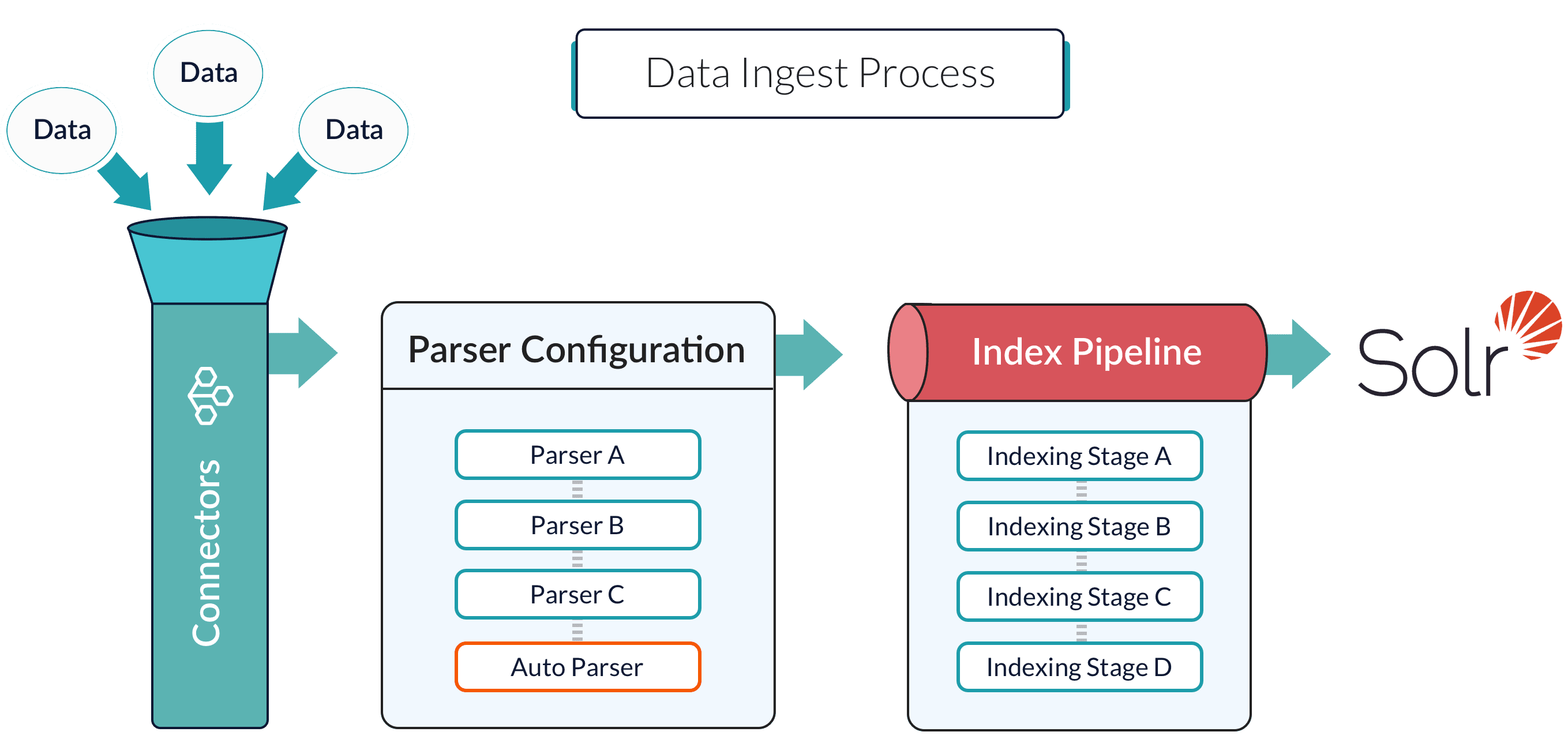
Connectors are components that act as bridges between your data and Fusion. They pull data from various sources and ingest it into Fusion for searching. Although connectors are not datasources, they work together for ingesting and indexing operations.

<Columns cols={2}>
  <Card title="Connector" description="" icon="chart-network">
    A connector fetches and processes data according to the datasource configuration.
  </Card>

  <Card title="Datasource" description="" icon="arrow-progress">
    A datasource is a Fusion object that configures how connectors ingest data and routes that data through parsers, index pipelines, and into collections.
  </Card>
</Columns>

Connectors are built on the following platforms:

<Columns cols={3}>
  <Card title="Pro" icon="crown" href="#pro">
    Pro connectors are V2 connectors that meet the highest standards for reliability and stability, representing the premier tier of Fusion's connector platform.
  </Card>

  <Card title="V2" icon="gem" href="#v2">
    V2 connectors are the current generation built on a Java SDK framework that enables independent updates, horizontal scaling, and custom connector development.
  </Card>

  <Card title="V1" icon="clock-rotate-left" href="#v1">
    V1 connectors are deprecated components built on the Anda crawler framework and included in the Fusion 5 image.

    <Badge color="red" icon="circle-xmark" tip="This connector will be removed in a future release.">Deprecated</Badge>
  </Card>
</Columns>

Lucidworks provides a wide range of connectors, each specializing in a particular data type. There are connectors for databases, filesystems, repositories, social media, and more. To discover the right connector for you, see [Find your connector](#find-your-connector).

<LwTemplate />

## Data ingestion process

<Frame>
  <img src="https://mintcdn.com/lucidworks/pcVooZE8fTjtTbXE/assets/images/common/ingest.png?fit=max&auto=format&n=pcVooZE8fTjtTbXE&q=85&s=12d631b58e25854b83391d3fd5df0d42" alt="Datasources" width="2718" height="1288" data-path="assets/images/common/ingest.png" />
</Frame>

<Steps>
  <Step title="Fusion connects to your data" icon="chart-network">
    Connectors fetch data from your source systems based on the datasource configuration.
  </Step>

  <Step title="Data is processed according to your datasource configuration" icon="arrow-progress">
    The datasource configuration determines which parser stages and index pipeline stages process the ingested data.

    Parser stages transform raw data into structured documents with defined fields and values.

    Index pipeline stages prepare documents for search by normalizing values, enriching content, applying transformations, and filtering unwanted data.
  </Step>

  <Step title="Documents are indexed to a collection" icon="database">
    Documents that complete the index pipeline are written to a collection where they become searchable.
  </Step>
</Steps>

## Find your connector

<ConnectorPicker connectors={connectors} />

## Platforms

### Pro

Pro connectors are V2 connectors that have been built to a notably high standard of quality, ensuring exceptional reliability and stability. They represent the premier tier of Fusion's data integration platform, tested and validated to meet rigorous performance criteria.

Lucidworks prioritizes development efforts to elevate V2 connectors to Pro status. When a connector achieves this quality threshold, the promotion is announced in the [release notes](/docs/fusion-connectors/latest-changes).

<Tip>
  Every Pro connector is a V2 connector, but not every V2 connector is a Pro connector.
</Tip>

### V2

V2 connectors represent the current generation of Fusion's data integration platform. They are built on a Java SDK framework and replace the deprecated V1 connector architecture.

#### Why V2 exists

The V2 platform addresses fundamental limitations in the original V1 connector design. V1 connectors were tightly coupled to Fusion releases, making updates slow and requiring full Fusion upgrades to get connector improvements. Security models mixed content and access controls together. Scaling required complex configuration rather than simply adding resources.

V2 solves these problems. Connectors now update independently from Fusion itself, so you can deploy the [latest plugin version](/docs/fusion-connectors/downloads/v2-connectors-downloads) without upgrading Fusion. Access controls are separated from content through standalone [Security Access-control Lists (ACL)](/docs/fusion-connectors/connectors/ad-acl-ldap). V2 also supports horizontal scaling, which lets you add more connector instances to work on the same job.

The V2 platform also opens custom connector development through the Java SDK framework, giving you the tools to integrate any data source. For more information, see [Build your own](#build-your-own).

#### Technical architecture

The V2 platform is built on Google's gRPC framework, a high-performance RPC system. gRPC provides HTTP/2 transport, protocol buffer serialization for efficient data handling, and support for bi-directional and multiplexed streams. This foundation enables the flexible service definitions, efficient communication, and distributed architecture that power the V2 platform.

#### Remote connectors

V2 connectors support two deployment models. Hosted connectors run inside the Fusion environment itself, with each node running independent connector instances. Remote connectors run outside Fusion as lightweight client processes that communicate back to the platform using efficient messaging.

The remote model gives you deployment flexibility. Place connectors wherever your data lives, whether that's for performance reasons, security requirements, or network access constraints. Learn more about [remote deployment](/docs/fusion-connectors/developers/remote-v2-connectors).

### V1

V1 connectors are developed with a general-purpose crawler framework called Anda, created by Lucidworks. Anda helps simplify and streamline crawler development, reducing the task of developing a new crawler to gain access to your data.

In Fusion 5, V1 connectors are included in the Fusion image.

<Warning>
  In Fusion 5.9, all V1 connectors are deprecated. This means they are no longer being actively developed and will be removed in a future release.

  Some V1 connectors already have a direct replacement available. For other V1 connectors, a replacement is still under development. We will update the documentation when the replacement is available. See the connector reference page for details.

  We recommend migrating to the replacement connector as soon as possible to avoid any disruption to your workflows.

  For more information, see [Deprecations and Removals](/docs/fusion-connectors/deprecations-and-removals).
</Warning>

## Install and manage

Learn how to install, update, and manage V2 connectors in Fusion.

<Tip>
  V1 connectors are pre-installed according to your Fusion version.
</Tip>

<AccordionGroup>
  <Accordion title="Install the latest version" description="" icon="box-open" defaultOpen="true">
    1. Navigate to **Indexing > Datasources**.
    2. Click **Add**.
    3. Select the connector from the list. It will install the latest version automatically.

    <Note>
      It may take several minutes before the connector appears in the list of installed connectors.
    </Note>
  </Accordion>

  <Accordion title="Update to the latest version" description="" icon="wrench" defaultOpen="false">
    <Note>
      This process always installs the latest version of the connector. Check the documentation for compatibility and release notes for key changes.
    </Note>

    1. Navigate to **System > Blobs**.
    2. Expand the **Connector Plugin** accordion.
    3. Select and delete the current connector version.
    4. Reinstall the connector using the instructions found in [Install a Connector](#install-a-connector).
  </Accordion>

  <Accordion title="Install a specific version" description="" icon="bullseye" defaultOpen="false">
    <Tip>
      Lucidworks recommends you always use the latest version, but there may be cases where a specific version is preferred.
    </Tip>

    1. Download the V2 connector Zip file.
    2. Navigate to **System > Blobs**.
    3. Expand the **Connector Plugin** accordion.
    4. Select and delete the current connector version.
    5. Click **Add**.
    6. Upload the Zip file containing the specific connector version.
  </Accordion>
</AccordionGroup>

## Build your own

The Fusion Connectors SDK empowers developers to build custom connectors tailored to their specific data sources. While Fusion ships with a comprehensive library of pre-built connectors, the SDK enables you to create Java-based connectors that can integrate with proprietary systems, legacy databases, or any unique data repositories not covered by existing connectors.

Using the SDK's high-level interfaces and base classes, you can define custom configuration schemas, implement fetching logic, and leverage Fusion's built-in features for state management, scheduling, and distributed processing without dealing directly with low-level gRPC code. You can develop locally, connect to a remote Fusion instance for testing, and then deploy the same artifact directly into Fusion for production use.

To get started, refer to [Connectors SDK](/docs/fusion-connectors/developers/connectors-sdk-4x).