> ## Documentation Index
> Fetch the complete documentation index at: https://doc.lucidworks.com/llms.txt
> Use this file to discover all available pages before exploring further.
# Latest changes
> Fusion Connectors
export const ImageComparisonSlider = ({beforeImage, afterImage, beforeLabel = "Before", afterLabel = "After", initialPosition = 50, height}) => {
const [sliderPosition, setSliderPosition] = useState(initialPosition);
const [isDragging, setIsDragging] = useState(false);
const [containerHeight, setContainerHeight] = useState(height || 'auto');
const containerRef = useRef(null);
const beforeImageRef = useRef(null);
const afterImageRef = useRef(null);
const handleMove = clientX => {
if (!containerRef.current) return;
const rect = containerRef.current.getBoundingClientRect();
const x = clientX - rect.left;
const percentage = x / rect.width * 100;
setSliderPosition(Math.max(0, Math.min(100, percentage)));
};
const handleMouseDown = () => {
setIsDragging(true);
};
const handleMouseUp = () => {
setIsDragging(false);
};
const handleMouseMove = e => {
if (!isDragging) return;
handleMove(e.clientX);
};
const handleTouchMove = e => {
if (!isDragging) return;
handleMove(e.touches[0].clientX);
};
const handleImageLoad = () => {
if (!height && containerRef.current) {
const beforeImg = beforeImageRef.current;
const afterImg = afterImageRef.current;
if (beforeImg && afterImg) {
const containerWidth = containerRef.current.offsetWidth;
const beforeHeight = beforeImg.naturalHeight / beforeImg.naturalWidth * containerWidth;
const afterHeight = afterImg.naturalHeight / afterImg.naturalWidth * containerWidth;
const maxHeight = Math.max(beforeHeight, afterHeight);
setContainerHeight(`${maxHeight}px`);
}
}
};
useEffect(() => {
if (isDragging) {
document.addEventListener('mousemove', handleMouseMove);
document.addEventListener('mouseup', handleMouseUp);
document.addEventListener('touchmove', handleTouchMove);
document.addEventListener('touchend', handleMouseUp);
return () => {
document.removeEventListener('mousemove', handleMouseMove);
document.removeEventListener('mouseup', handleMouseUp);
document.removeEventListener('touchmove', handleTouchMove);
document.removeEventListener('touchend', handleMouseUp);
};
}
}, [isDragging, sliderPosition]);
return

{afterLabel}

{beforeLabel}
;
};
[localhost link]: http://localhost:3000/docs/fusion-connectors/latest-changes
[mintlify link]: https://doc.lucidworks.com/docs/fusion-connectors/latest-changes
[old doc.lw link]: https://doc.lucidworks.com/fusion-connectors/4
Fusion Connectors are continuously improving with new features, updated functionality, performance upgrades, and bug fixes. This article summarizes these changes.
Two recipes are now available for the [REST V2 connector](/docs/fusion-connectors/connectors/rest-v2/overview): a new GitHub recipe and an updated Confluence recipe that migrates to the Confluence v2 API.
These recipes require REST V2 connector version 1.1.0 or later and Fusion 5.9.x or later.
Both recipes use the REST V2 connector capabilities introduced in version 1.1.0, including hierarchical request structures for multi-level crawling, recursive requests for automatic depth traversal, skip indexation for cleaner indexes, cursor-based pagination, and content filtering by regular expressions and file size.
You can access both recipes in the [public GitHub repository](https://github.com/lucidworks/rest-configurations). Recipes are treated as an open source resource where contributions are welcome.
#### New GitHub recipe
The [GitHub REST datasource configuration](/docs/fusion-connectors/connectors/rest-v2/recipes/rest-github) makes code, issues, pull requests, and commit history searchable. This connector helps teams find existing solutions before rebuilding them, accelerates developer onboarding, and surfaces decisions documented in pull requests and issues.
The connector indexes 15 entity types per repository:
* Repositories, issues, and pull requests
* Branches, commits, and commit diffs
* Tags, milestones, and releases
* Collaborators
* Comments for issues, pull requests, and commits
* File contents: Folders and Blobs
Key features include per-branch commit crawling using the `sha` query parameter and recursive directory traversal through a three-stage pattern, as illustrated:
```mermaid theme={"dark"}
flowchart LR
BRANCH["Branch (sha)"] --> CONTENT
CONTENT --> FOLDER
CONTENT --> BLOB
FOLDER -.->|"recurse"| CONTENT
BLOB --> TIKA["Tika (binary)"]
```
The GitHub connector also supports binary content download with Tika parsing and pagination on 10 of 15 of its entity types.
##### Known limitations
* Commits that are reachable from multiple branches are indexed once per branch. There is no cross-branch deduplication.
* This connector does not support incremental crawls. Every crawl is a full crawl.
* To index multiple repositories, create a new datasource and recipe for each repository.
#### Updated Confluence recipe
Atlassian removed the Confluence v1 REST API from service on March 31, 2025. The previous recipe named `confluence-v1.json` uses the older API and does not work. All users must migrate to `confluence.json`.
The [updated Confluence REST datasource configuration](/docs/fusion-connectors/connectors/rest-v2/recipes/rest-confluence) migrates to the Confluence v2 REST API, ensuring continued access to your knowledge base following Atlassian's v1 REST API deprecation. The connector indexes comments and threaded replies alongside pages, capturing the discussions where context and decisions often live.
The connector indexes 5 content types with full hierarchy preservation:
* Spaces
* Pages and blog posts
* Page comments (footer and inline)
* Blog comments (footer and inline)
* Comment replies with threading
The updated recipe features 11 request configurations covering the full content hierarchy, hierarchical crawling up to four levels deep, as illustrated:
```mermaid theme={"dark"}
flowchart LR
SPACE --> PAGE
SPACE --> BLOG
PAGE --> COMMENT
BLOG --> COMMENT
COMMENT --> REPLY
```
The updated recipe also features granular comment crawling with separate endpoints for footer and inline comments, recursive reply threading on footer comments, and cursor-based pagination via Confluence's `_links.next`.
The updated recipe uses the current `/wiki/api/v2` Confluence endpoints instead of the deprecated `/wiki/rest/api/content` endpoints. It crawls spaces as root objects, distinguishes between footer and inline comments with dedicated endpoints, supports comment reply crawling with recursive requests, and uses cursor-based pagination instead of offset-based pagination.
**Known limitations:**
* This connector does not support incremental crawls. Every crawl is a full crawl.
* 8 of 11 request configurations are dedicated to comment retrieval due to API structure
* Only footer comment replies use recursive crawling. Inline replies retrieve direct replies only.
The [FTP Pro connector](/docs/fusion-connectors/connectors/ftp-pro) is introduced as a powerful, modern replacement to the FTP V1 connector. Built on the V2 connector framework, it offers full feature parity with the FTP V1 connector while delivering enhanced security, improved configuration validation, and better resource management.
This connector enables Fusion to ingest content from FTP, FTPS, and SFTP servers into Fusion.
This connector is compatible with Fusion 5.9.0 or later.
#### What are Pro connectors?
Pro connectors are built on the same framework as V2 connectors but meet higher internal standards for stability, reliability, and production readiness. If you're currently using other V2 connectors, the process for installing and upgrading a Pro connector remains the same.
More V2 connectors will be upgraded to Pro connectors in the future.
#### Release highlights
The FTP Pro connector brings enhanced security options, advanced filtering, improved connection management, and explicit protocol selection in addition to maintaining parity with the FTP V1 connector.
##### Enhanced authentication for SFTP
The FTP Pro connector introduces improved authentication methods, particularly for SFTP connections. You can now add an SSH private key, passphrase, and SSH host key fingerprint to verify the server identity for SFTP connections.

 ##### Advanced document filtering
The Pro connector adds new filtering capabilities to provide both allow-list and deny-list capabilities. You can now exclude files by file type with the **Excluded file extensions** field, or you can filter by file size with the new **Minimum file size** field.
##### Connection and retry management
New connection management fields provide better control over timeouts and error handling. The FTP Pro connector automatically detects and retries the connection when transient errors happen (for example, 4xx connection errors or timeouts) and does not attempt a retry in the case of permanent errors (for example, 5xx connection errors or permission failures).
##### Advanced document filtering
The Pro connector adds new filtering capabilities to provide both allow-list and deny-list capabilities. You can now exclude files by file type with the **Excluded file extensions** field, or you can filter by file size with the new **Minimum file size** field.
##### Connection and retry management
New connection management fields provide better control over timeouts and error handling. The FTP Pro connector automatically detects and retries the connection when transient errors happen (for example, 4xx connection errors or timeouts) and does not attempt a retry in the case of permanent errors (for example, 5xx connection errors or permission failures).

 Click the **Advanced** toggle to expose the retry properties.
Maximum time (in milliseconds) to establish a connection to the server. Range: 1 to 300000 (5 minutes).
Maximum time (in milliseconds) to wait for a server response or data during operations. Range: 1 to 900000 (15 minutes).
Number of attempts a request will be retried. Set to 0 to disable retrying. Maximum: 36 attempts.
The maximum wait time in milliseconds between retries. Range: 1000 to 300000 (5 minutes).
##### Restructured server configuration
The FTP Pro connector has restructured the server configuration settings. In the V1 connector, you provided a single **Start link** URL, and the connector used the URL scheme to detect the connection type. The Pro connector separates the connection settings into discrete fields, and you now explicitly select the connection type.
Click the **Advanced** toggle to expose the retry properties.
Maximum time (in milliseconds) to establish a connection to the server. Range: 1 to 300000 (5 minutes).
Maximum time (in milliseconds) to wait for a server response or data during operations. Range: 1 to 900000 (15 minutes).
Number of attempts a request will be retried. Set to 0 to disable retrying. Maximum: 36 attempts.
The maximum wait time in milliseconds between retries. Range: 1000 to 300000 (5 minutes).
##### Restructured server configuration
The FTP Pro connector has restructured the server configuration settings. In the V1 connector, you provided a single **Start link** URL, and the connector used the URL scheme to detect the connection type. The Pro connector separates the connection settings into discrete fields, and you now explicitly select the connection type.
 ##### Support for multiple paths
The FTP Pro connector adds support for crawling multiple paths as start points. In the V1 connector, you could only specify one starting path in the URL for the connector to crawl. The Pro connector allows multiple starting paths, so one connector can crawl all the documents you need.
##### More exposed fetch settings
Some fetch settings that were previously hardcoded into the V1 connector are now exposed and configurable in the Pro connector. These fetch settings provide configuration options at the system level to control fetch behavior and performance. Click the **Advanced** toggle to expose these settings. Then select the checkbox next to **Core Properties**, and select the checkbox next to **Fetch Settings**.
The default number of fetch threads has changed from 1 in the V1 connector to 5 in the Pro connector. This means the Pro connector creates 5 concurrent connections to your FTP server by default. Review your FTP server's connection limits and adjust the **Fetch Threads** setting if necessary to avoid connection errors or rate limiting.
#### Migrate from the V1 connector
If you are currently using the FTP V1 connector, we encourage you to migrate to the FTP Pro connector. See the [general migration guide](/docs/fusion-connectors/migration-guide) for full instructions and the [FTP-specific guide](/docs/fusion-connectors/migration-ftp-pro) for considerations specific for the FTP connector.
The [File Upload Pro](/docs/fusion-connectors/connectors/fileupload-pro) has been updated to version 1.1.0 and has earned the Pro designation, showing that this connector meets higher internal standards for stability, reliability, and production readiness.
#### What are Pro connectors?
Pro connectors are built on the same framework as V2 connectors but meet higher internal standards for stability, reliability, and production readiness. If you're currently using other V2 connectors, the process for installing and upgrading a Pro connector remains the same.
More V2 connectors will be upgraded to Pro connectors in the future.
#### Release highlights
In all Fusion versions, the connector now installs as **File Upload Pro** instead of **File Upload V2**. If you are using Fusion versions earlier than 5.17.0, the Fusion UI lists the installed connector version as **File Upload V2**, but the File Upload Pro connector is still installed.
##### Simplified connector configuration
This release removes unused core property settings from the Fetch Setting section of the File Upload Pro connector's configuration screen. Only the **Async Parsing** setting remains visible in the Fetch Settings section, making the configuration process more straightforward by no longer displaying settings that this connector does not use.
The [Solr Pro connector](/docs/fusion-connectors/connectors/solr-pro) has been updated to version 1.0.1.
#### Release highlights
In all Fusion versions, the connector now installs as **Solr Pro** instead of **Solr V2**. If you are using Fusion versions earlier than 5.17.0, the Fusion UI lists the installed connector version as **Solr V2**, but the Solr Pro connector is still installed.
#### Bug fixes
This release resolves a resource leak issue where the SolrClient instance did not close after indexing jobs completed. The connector now properly closes the SolrClient after each job, preventing resource leaks in long-running environments. This improves stability and resource management for production environments using the Solr Pro connector.
The [Solr Pro connector](/docs/fusion-connectors/connectors/solr-pro) is introduced as a powerful, modern replacement to the Solr V1 connector. Built on the V2 connector framework, it offers full feature parity with the Solr V1 connector while delivering improved configuration validation, resource management, and user experience.
This connector enables Fusion to ingest content from an external Solr cloud or standalone instance into Fusion.
The Solr Pro connector maintains all parity with the V1 connector while adding new features and an improved user experience.
This connector is compatible with Solr 8 or 9 and Fusion 5.9.0 or later.
The Solr Pro connector indexes content from external Solr collections into Fusion. It does **not** support indexing content from Fusion.
#### What are Pro connectors?
Pro connectors are built on the same framework as V2 connectors but meet higher internal standards for stability, reliability, and production readiness. If you’re currently using other V2 connectors, the process for installing and upgrading a Pro connector remains the same.
More V2 connectors will be upgraded to Pro connectors in the future.
#### Release highlights
The Solr Pro connector brings field and pre-query validation, multi-field sorting, faster pagination, and reliability improvements in addition to maintaining existing Solr V1 connector features.
##### Comprehensive field validation
The Solr Pro connector now includes comprehensive field validation to prevent common configuration errors.
The **Query** and **Request Handler** fields are now required and are populated with default values to prevent empty crawls.
The unique key field, typically `id`, is now automatically included in the field list.
The Solr Pro connector now validates the relationship between sort fields, field lists, and filter queries before beginning a crawl.
##### Pre-query validation system
The Solr Pro v1.0.0 connector introduces a pre-query validation system, allowing you to identify query syntax errors and connectivity issues before a crawl begins.
The Solr Pro connector now executes your actual configured query against your Solr environment during validation and provides immediate feedback on configuration issues before starting a crawl. If the query generates an error from the server in the validation process, the connector includes more detailed and actionable error messages than the Solr V1 connector so you can troubleshoot and resolve issues quickly.
The pre-query validation feature uses a strict 10-second timeout, which prevents the Fusion UI from hanging on unreachable endpoints.
##### Multi-field sorting
The Solr V1 connector supported sorting by a single field. The Pro connector now supports sorting by multiple fields in the Filter Queries section, enabling robust and specific filtering of your Solr environment. Select **Add** in the Filter Queries section to add each new filter query.
##### Support for multiple paths
The FTP Pro connector adds support for crawling multiple paths as start points. In the V1 connector, you could only specify one starting path in the URL for the connector to crawl. The Pro connector allows multiple starting paths, so one connector can crawl all the documents you need.
##### More exposed fetch settings
Some fetch settings that were previously hardcoded into the V1 connector are now exposed and configurable in the Pro connector. These fetch settings provide configuration options at the system level to control fetch behavior and performance. Click the **Advanced** toggle to expose these settings. Then select the checkbox next to **Core Properties**, and select the checkbox next to **Fetch Settings**.
The default number of fetch threads has changed from 1 in the V1 connector to 5 in the Pro connector. This means the Pro connector creates 5 concurrent connections to your FTP server by default. Review your FTP server's connection limits and adjust the **Fetch Threads** setting if necessary to avoid connection errors or rate limiting.
#### Migrate from the V1 connector
If you are currently using the FTP V1 connector, we encourage you to migrate to the FTP Pro connector. See the [general migration guide](/docs/fusion-connectors/migration-guide) for full instructions and the [FTP-specific guide](/docs/fusion-connectors/migration-ftp-pro) for considerations specific for the FTP connector.
The [File Upload Pro](/docs/fusion-connectors/connectors/fileupload-pro) has been updated to version 1.1.0 and has earned the Pro designation, showing that this connector meets higher internal standards for stability, reliability, and production readiness.
#### What are Pro connectors?
Pro connectors are built on the same framework as V2 connectors but meet higher internal standards for stability, reliability, and production readiness. If you're currently using other V2 connectors, the process for installing and upgrading a Pro connector remains the same.
More V2 connectors will be upgraded to Pro connectors in the future.
#### Release highlights
In all Fusion versions, the connector now installs as **File Upload Pro** instead of **File Upload V2**. If you are using Fusion versions earlier than 5.17.0, the Fusion UI lists the installed connector version as **File Upload V2**, but the File Upload Pro connector is still installed.
##### Simplified connector configuration
This release removes unused core property settings from the Fetch Setting section of the File Upload Pro connector's configuration screen. Only the **Async Parsing** setting remains visible in the Fetch Settings section, making the configuration process more straightforward by no longer displaying settings that this connector does not use.
The [Solr Pro connector](/docs/fusion-connectors/connectors/solr-pro) has been updated to version 1.0.1.
#### Release highlights
In all Fusion versions, the connector now installs as **Solr Pro** instead of **Solr V2**. If you are using Fusion versions earlier than 5.17.0, the Fusion UI lists the installed connector version as **Solr V2**, but the Solr Pro connector is still installed.
#### Bug fixes
This release resolves a resource leak issue where the SolrClient instance did not close after indexing jobs completed. The connector now properly closes the SolrClient after each job, preventing resource leaks in long-running environments. This improves stability and resource management for production environments using the Solr Pro connector.
The [Solr Pro connector](/docs/fusion-connectors/connectors/solr-pro) is introduced as a powerful, modern replacement to the Solr V1 connector. Built on the V2 connector framework, it offers full feature parity with the Solr V1 connector while delivering improved configuration validation, resource management, and user experience.
This connector enables Fusion to ingest content from an external Solr cloud or standalone instance into Fusion.
The Solr Pro connector maintains all parity with the V1 connector while adding new features and an improved user experience.
This connector is compatible with Solr 8 or 9 and Fusion 5.9.0 or later.
The Solr Pro connector indexes content from external Solr collections into Fusion. It does **not** support indexing content from Fusion.
#### What are Pro connectors?
Pro connectors are built on the same framework as V2 connectors but meet higher internal standards for stability, reliability, and production readiness. If you’re currently using other V2 connectors, the process for installing and upgrading a Pro connector remains the same.
More V2 connectors will be upgraded to Pro connectors in the future.
#### Release highlights
The Solr Pro connector brings field and pre-query validation, multi-field sorting, faster pagination, and reliability improvements in addition to maintaining existing Solr V1 connector features.
##### Comprehensive field validation
The Solr Pro connector now includes comprehensive field validation to prevent common configuration errors.
The **Query** and **Request Handler** fields are now required and are populated with default values to prevent empty crawls.
The unique key field, typically `id`, is now automatically included in the field list.
The Solr Pro connector now validates the relationship between sort fields, field lists, and filter queries before beginning a crawl.
##### Pre-query validation system
The Solr Pro v1.0.0 connector introduces a pre-query validation system, allowing you to identify query syntax errors and connectivity issues before a crawl begins.
The Solr Pro connector now executes your actual configured query against your Solr environment during validation and provides immediate feedback on configuration issues before starting a crawl. If the query generates an error from the server in the validation process, the connector includes more detailed and actionable error messages than the Solr V1 connector so you can troubleshoot and resolve issues quickly.
The pre-query validation feature uses a strict 10-second timeout, which prevents the Fusion UI from hanging on unreachable endpoints.
##### Multi-field sorting
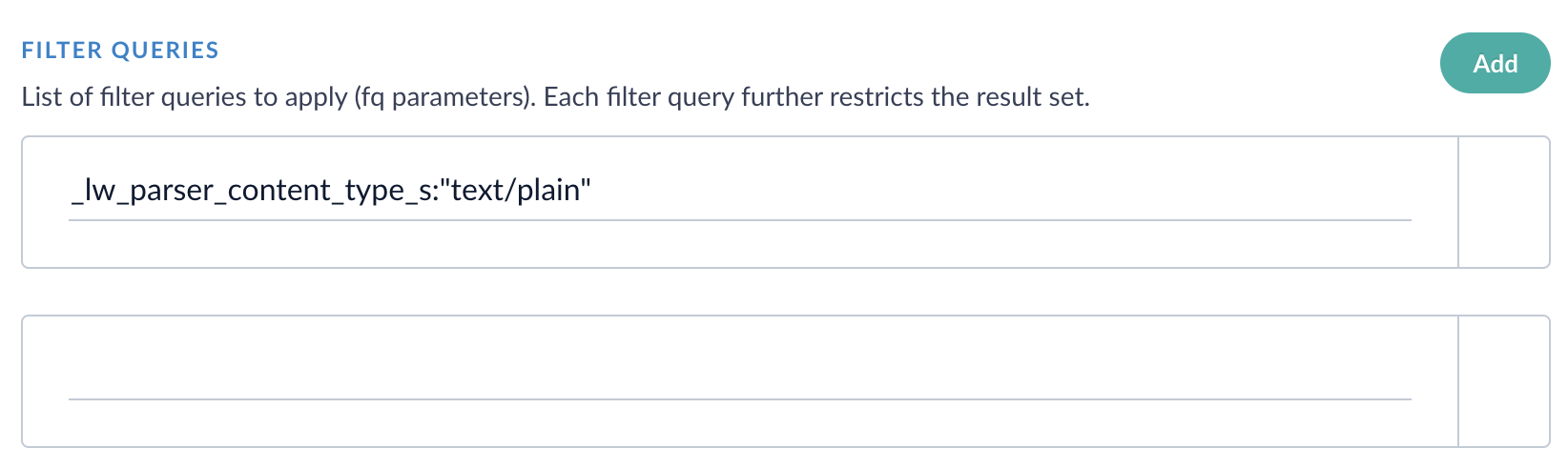
The Solr V1 connector supported sorting by a single field. The Pro connector now supports sorting by multiple fields in the Filter Queries section, enabling robust and specific filtering of your Solr environment. Select **Add** in the Filter Queries section to add each new filter query.
 ##### Simplified and faster pagination
This release simplifies the logic used to traverse large Solr collections by introducing a new cursor mark option. By moving to a consistent, single-strategy pagination approach, the connector behaves more predictably and reduces the likelihood of missing documents when processing large Solr collections.
To enable cursor mark pagination, select **Use cursor mark** in the Solr Pro connector’s advanced settings.
Enable or disable the cursor mark, which is used for pagination. This field is enabled by default and results in faster deep paging. If this field is not enabled, then offset-based pagination is used, which was built into the V1 connector.
Note: Cursor mark pagination and offset pagination are distinct. An indexing job cannot be resumed if the pagination type is changed during a job.
##### More exposed connection and fetch settings
Some advanced connection and fetch settings that were hard-coded into the V1 connector are now exposed and configurable in the Solr Pro connector so you can configure the connector to meet your organization's needs.
You can access these settings by clicking the **Advanced** toggle.
##### Simplified and faster pagination
This release simplifies the logic used to traverse large Solr collections by introducing a new cursor mark option. By moving to a consistent, single-strategy pagination approach, the connector behaves more predictably and reduces the likelihood of missing documents when processing large Solr collections.
To enable cursor mark pagination, select **Use cursor mark** in the Solr Pro connector’s advanced settings.
Enable or disable the cursor mark, which is used for pagination. This field is enabled by default and results in faster deep paging. If this field is not enabled, then offset-based pagination is used, which was built into the V1 connector.
Note: Cursor mark pagination and offset pagination are distinct. An indexing job cannot be resumed if the pagination type is changed during a job.
##### More exposed connection and fetch settings
Some advanced connection and fetch settings that were hard-coded into the V1 connector are now exposed and configurable in the Solr Pro connector so you can configure the connector to meet your organization's needs.
You can access these settings by clicking the **Advanced** toggle.
 The time for the connector to wait before the connection times out, listed in milliseconds. The maximum value is 300000 (5 minutes).
Controls the wait time for data packets.
Controls the connection pool size for high-concurrency environments.
Additionally, some system-level fetch settings that control behavior and performance are now configurable. These fetch settings are accessible by selecting the **Advanced** toggle, then selecting the checkboxes next to **Core Properties** and **Fetch Settings**.
The time for the connector to wait before the connection times out, listed in milliseconds. The maximum value is 300000 (5 minutes).
Controls the wait time for data packets.
Controls the connection pool size for high-concurrency environments.
Additionally, some system-level fetch settings that control behavior and performance are now configurable. These fetch settings are accessible by selecting the **Advanced** toggle, then selecting the checkboxes next to **Core Properties** and **Fetch Settings**.
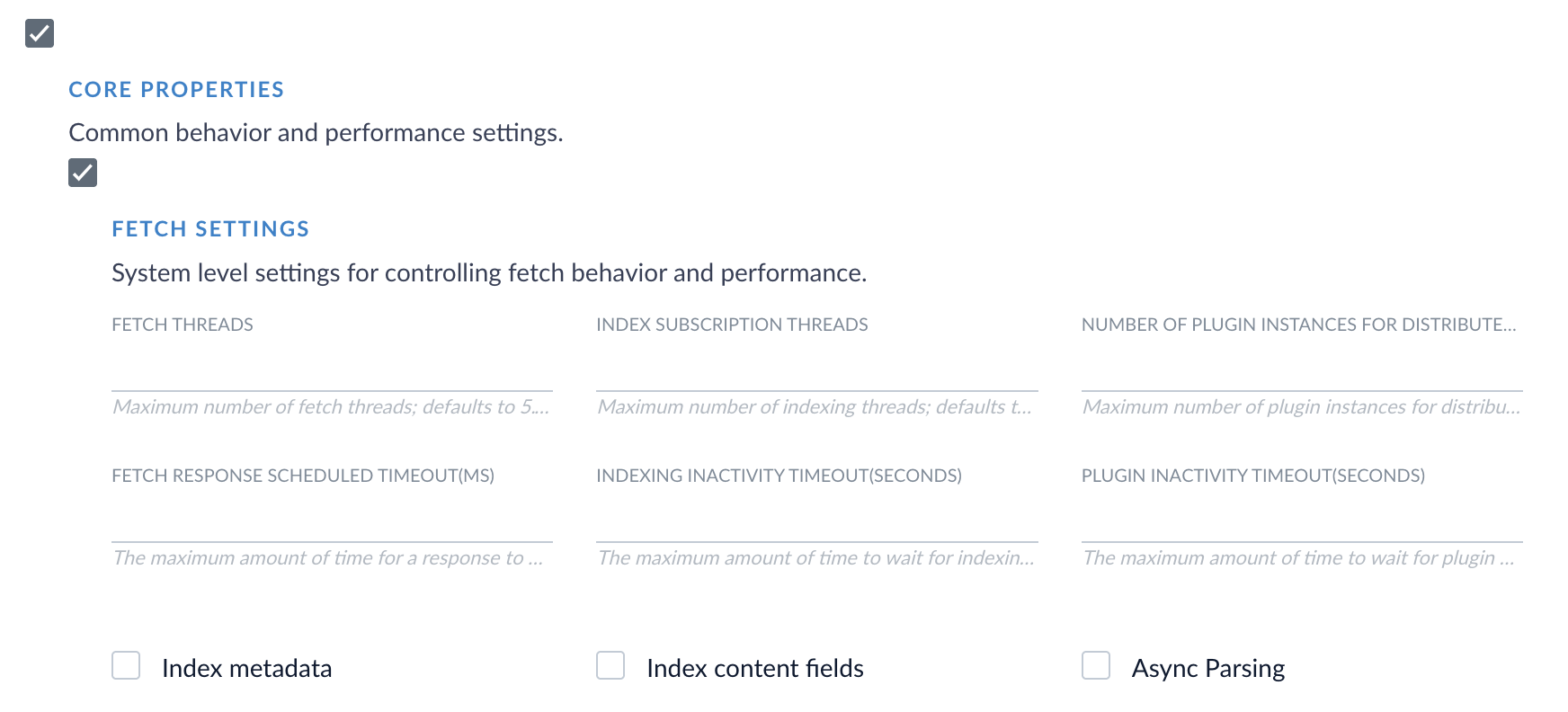 None of the fetch settings are required fields. If you do not configure these fields, the Solr Pro connector uses its default values.
##### Reliability improvements
The Solr Pro connector introduces built-in fault tolerance to ensure that your production environment is stable and secure.
Automatic retry patterns now detect when brief, temporary network disruptions occur between your Solr and Fusion environments. In these situations, the Solr connector can retry a job after a brief network interruption. If your Solr environment reports consistent connection failures, the connector can now temporarily stop requests, which prevents cascade failures in your Fusion environment.
A new field, **Query timeout**, is available to configure how long an individual query request retries before timing out.
The individual query timeout, set in milliseconds. If you're downloading large files, or if your network or firewall rules may cause slower connections to your Solr environment, consider setting this value higher to prevent query timeouts.
#### Migrate from the V1 connector
If you are currently using the Solr V1 connector, we encourage you to migrate to the Solr Pro connector. See the [general migration guide](/docs/fusion-connectors/migration-guide) for full instructions and the [Solr-specific guide](/docs/fusion-connectors/migration-solr-pro) for considerations specific for the Solr connector.
The [Web V2 connector](/docs/fusion-connectors/connectors/web-v2) has been updated to version 2.2.2.
#### Release highlights
This release simplifies infinite timeout configuration to a single checkbox, so you can test crawl performance without modifying a production-relevant setting.
This release also fixes bugs related to duplicate content from canonical URLs and respecting `robots.txt` instructions.
#### Infinite timeout configuration
Previously, the Web connector improperly handled the request-response cycle, which led to connection pool exhaustion over time when large file downloads exceeded the time set in the **Connection Timeout** field. Users who wanted to use infinite timeout to download large files had to edit the **Connection Timeout** value to `-1`, which overwrote the existing value and did not provide an intuitive experience.
Version 2.2.2 adds a new field called **Enable infinite timeout settings**. When this checkbox is selected, the existing **Connection Timeout** value is ignored, and infinite timeout settings are active. To turn off infinite timeout settings, deselect the checkbox, and the Web connector uses the **Connection Timeout** value.
#### Canonical URL bug fix
This improvement requires Fusion 5.9.16 or later in addition to version 2.2.2 of the Web V2 connector.
Previous versions of the Web V2 connector created duplicate documents in Fusion collections when websites use canonical URL tags. This releases fixes the duplication issue, resulting in more reliable document counts and accurate search results.
#### Robots directive bug fix
Previous versions of the Web V2 connector ignored the **Obey robots meta tags and headers** field, and the connector respected `robots.txt` directives even when the setting wasn't active.
This bug has been fixed, and now the **Obey robots meta tags and headers** field disregards robots meta tags and headers when the setting is inactive.
#### Non-breaking space parsing bug fix
When processing XML files, previous versions of the Web V2 connector parsed non-breaking spaces to the HTML entity ` `, which was then processed as XML. This caused the connector to throw an error because ` ` is not a valid XML entity.
This has been fixed, and the connector now processes non-breaking spaces in XML files correctly.
#### Fetch Threads configuration property fix
In version 2.2.1 of the web connector, the **Fetch Threads** property in the Crawl Performance Properties section was removed because it reproduced the **Fetch Threads** property in the Fetch Settings section. This change caused datasource errors after upgrading from a previous version of the connector. Version 2.2.2 resolves this issue.
The [JDBC V2 connector](/docs/fusion-connectors/connectors/jdbc-v2) has been updated to version 2.7.0.
This release includes binary content support, enabling full-text search of documents, images, and other binary data stored in database BINARY, VARBINARY, IMAGE, or BLOB columns. This release also fixes `StackOverflowError` messages related to crawls not starting and eliminates the need to manually restart your pods as a workaround.
#### How to upgrade
Updating your connector to the latest version is fast and simple. Before you begin, download the [connector update file](https://plugins.lucidworks.com/4.2.0/lucidworks.connector.jdbc/2.7.0/lucidworks.connector.jdbc-2.7.0.zip) Then, use the following instructions:
1. Open the Fusion UI and navigate to **System > Blobs**.
2. Expand the Connector Plugin section, then select **lucidworks.jdbc**.
3. Locate **Replace Blob**, click **Choose File**, and upload the downloaded zip file. Wait for the upload to finish.
4. Click **Replace**.
Confirm the version shown for the JDBC connector now reflects the updated file.
#### Support for binary content indexing
Many organizations rely on binary content, which includes PDF files, Word documents, spreadsheets, and images. To address the challenges of indexing text and non-text content, the JDBC V2 connector now supports [indexing of binary content](/docs/fusion-connectors/connectors/jdbc-v2#binary-content-indexing). Binary content is now streamed directly to Fusion's indexing pipeline, enabling full-text extraction and search across multiple file formats.
In previous versions of the JDBC connector, attempting to index files containing binary content results in an error similar to `Metadata with key=Content, type=class [B not added`. This error happened because the connector treated binary content as an unsupported metadata type and excluded it from indexing.
To support binary content indexing, two new fields are available. Check the box next to **Binary Content Settings** in the connector's settings to display and configure these fields.
None of the fetch settings are required fields. If you do not configure these fields, the Solr Pro connector uses its default values.
##### Reliability improvements
The Solr Pro connector introduces built-in fault tolerance to ensure that your production environment is stable and secure.
Automatic retry patterns now detect when brief, temporary network disruptions occur between your Solr and Fusion environments. In these situations, the Solr connector can retry a job after a brief network interruption. If your Solr environment reports consistent connection failures, the connector can now temporarily stop requests, which prevents cascade failures in your Fusion environment.
A new field, **Query timeout**, is available to configure how long an individual query request retries before timing out.
The individual query timeout, set in milliseconds. If you're downloading large files, or if your network or firewall rules may cause slower connections to your Solr environment, consider setting this value higher to prevent query timeouts.
#### Migrate from the V1 connector
If you are currently using the Solr V1 connector, we encourage you to migrate to the Solr Pro connector. See the [general migration guide](/docs/fusion-connectors/migration-guide) for full instructions and the [Solr-specific guide](/docs/fusion-connectors/migration-solr-pro) for considerations specific for the Solr connector.
The [Web V2 connector](/docs/fusion-connectors/connectors/web-v2) has been updated to version 2.2.2.
#### Release highlights
This release simplifies infinite timeout configuration to a single checkbox, so you can test crawl performance without modifying a production-relevant setting.
This release also fixes bugs related to duplicate content from canonical URLs and respecting `robots.txt` instructions.
#### Infinite timeout configuration
Previously, the Web connector improperly handled the request-response cycle, which led to connection pool exhaustion over time when large file downloads exceeded the time set in the **Connection Timeout** field. Users who wanted to use infinite timeout to download large files had to edit the **Connection Timeout** value to `-1`, which overwrote the existing value and did not provide an intuitive experience.
Version 2.2.2 adds a new field called **Enable infinite timeout settings**. When this checkbox is selected, the existing **Connection Timeout** value is ignored, and infinite timeout settings are active. To turn off infinite timeout settings, deselect the checkbox, and the Web connector uses the **Connection Timeout** value.
#### Canonical URL bug fix
This improvement requires Fusion 5.9.16 or later in addition to version 2.2.2 of the Web V2 connector.
Previous versions of the Web V2 connector created duplicate documents in Fusion collections when websites use canonical URL tags. This releases fixes the duplication issue, resulting in more reliable document counts and accurate search results.
#### Robots directive bug fix
Previous versions of the Web V2 connector ignored the **Obey robots meta tags and headers** field, and the connector respected `robots.txt` directives even when the setting wasn't active.
This bug has been fixed, and now the **Obey robots meta tags and headers** field disregards robots meta tags and headers when the setting is inactive.
#### Non-breaking space parsing bug fix
When processing XML files, previous versions of the Web V2 connector parsed non-breaking spaces to the HTML entity ` `, which was then processed as XML. This caused the connector to throw an error because ` ` is not a valid XML entity.
This has been fixed, and the connector now processes non-breaking spaces in XML files correctly.
#### Fetch Threads configuration property fix
In version 2.2.1 of the web connector, the **Fetch Threads** property in the Crawl Performance Properties section was removed because it reproduced the **Fetch Threads** property in the Fetch Settings section. This change caused datasource errors after upgrading from a previous version of the connector. Version 2.2.2 resolves this issue.
The [JDBC V2 connector](/docs/fusion-connectors/connectors/jdbc-v2) has been updated to version 2.7.0.
This release includes binary content support, enabling full-text search of documents, images, and other binary data stored in database BINARY, VARBINARY, IMAGE, or BLOB columns. This release also fixes `StackOverflowError` messages related to crawls not starting and eliminates the need to manually restart your pods as a workaround.
#### How to upgrade
Updating your connector to the latest version is fast and simple. Before you begin, download the [connector update file](https://plugins.lucidworks.com/4.2.0/lucidworks.connector.jdbc/2.7.0/lucidworks.connector.jdbc-2.7.0.zip) Then, use the following instructions:
1. Open the Fusion UI and navigate to **System > Blobs**.
2. Expand the Connector Plugin section, then select **lucidworks.jdbc**.
3. Locate **Replace Blob**, click **Choose File**, and upload the downloaded zip file. Wait for the upload to finish.
4. Click **Replace**.
Confirm the version shown for the JDBC connector now reflects the updated file.
#### Support for binary content indexing
Many organizations rely on binary content, which includes PDF files, Word documents, spreadsheets, and images. To address the challenges of indexing text and non-text content, the JDBC V2 connector now supports [indexing of binary content](/docs/fusion-connectors/connectors/jdbc-v2#binary-content-indexing). Binary content is now streamed directly to Fusion's indexing pipeline, enabling full-text extraction and search across multiple file formats.
In previous versions of the JDBC connector, attempting to index files containing binary content results in an error similar to `Metadata with key=Content, type=class [B not added`. This error happened because the connector treated binary content as an unsupported metadata type and excluded it from indexing.
To support binary content indexing, two new fields are available. Check the box next to **Binary Content Settings** in the connector's settings to display and configure these fields.
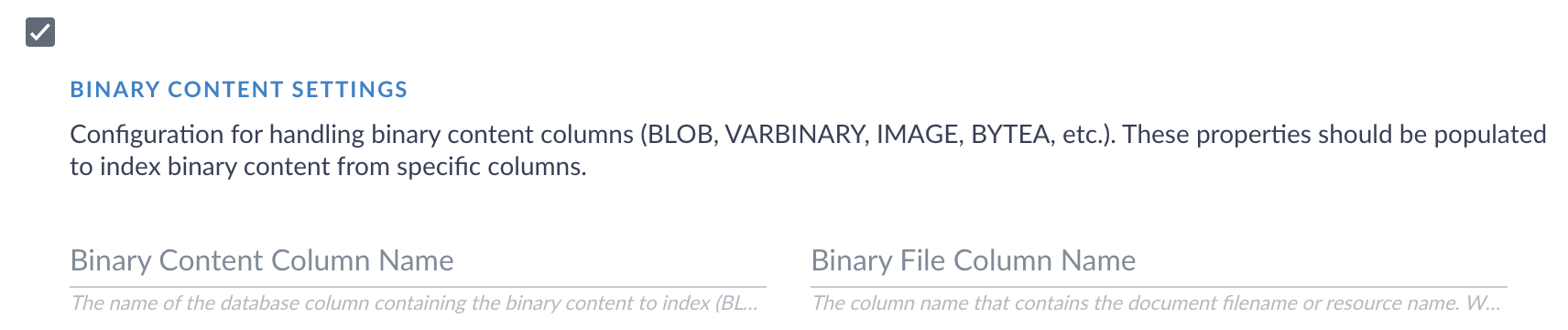 The name of the database column containing binary content (VARBINARY, BINARY, BLOB, IMAGE, etc.). A value is required in order to use binary content indexing.
The name of the database column containing the file name or resource name for the binary content. If a value is not specified, the connector attempts to automatically detect the column name from common naming practices.
Existing content configurations will continue to work without modifications.
Binary content indexing is currently available for MSSQL and Oracle databases using the JDBC V2 connector.
#### StackOverflowError bug fix
Previously, the JDBC V2 connector experienced periodic failures where crawls failed to start with the error message "Start response was not received". This issue has been resolved, and users no longer have to manually restart connector pods to prevent this issue.
The [Web V2 connector](/docs/fusion-connectors/connectors/web-v2) has been updated to version 2.2.1.
#### Release highlights
The Web V2 v2.2.1 release delivers exciting improvements to JavaScript evaluation. These updates benefit users indexing sites with heavy JavaScript usage, long load times, or inconsistent indexing behavior such as missing fields or messages indicating that JavaScript is required.
The release also adds automated Selenium service management. This removes the need for manual installation.
#### How to upgrade
Updating your connector to the latest version is fast and simple. Before you begin, download the [connector update file](https://plugins.lucidworks.com/4.2.0/lucidworks.connector.web-v2/2.2.1/lucidworks.connector.web-v2-2.2.1.zip). Then, use the following instructions:
1. Open the Fusion UI and navigate to **System > Blobs**.
2. Expand the Connector Plugin section, then select **lucidworks.web-v2**.
3. Locate **Replace Blob**, click **Choose File**, and upload the downloaded zip file. Wait for the upload to finish.
4. Click **Replace**.
Confirm the version shown for the web connector now reflects the updated file.
#### Improvements to JavaScript evaluation
Some sites take substantial time to load resources, execute JavaScript, and render elements. If the connector begins indexing before the page is fully ready, it may fail to index the page or certain elements. This behavior can vary from one page to another, which makes it difficult to determine the ideal configuration.
To address these challenges, the Web V2 connector now includes enhanced controls for JavaScript evaluation.
These changes also address common indexing issues with missing fields or error messages, such as `You need to enable JavaScript to run this app`.
##### AJAX request completion
A new option allows AJAX requests to finish before indexing proceeds. This gives content additional time to render and reduces the likelihood of missing data.
##### AJAX timing controls
A new property, **AJAX timeout**, defines how long an individual AJAX request is considered when determining whether AJAX activity has completed. Requests that exceed this limit are ignored.
**Request counter min wait** and **Request counter max wait** define how long the connector waits when checking for pending AJAX requests. For example, a minimum of 500 milliseconds causes the connector to wait one half second before checking for pending AJAX requests. It continues checking until the defined maximum wait time is reached.
##### Updated defaults
**Timeout**, **Script Timeout**, and **Implicit Wait Timeout** default values are updated to reflect the latest field data across many real world use cases. If you have customized configurations for these fields, your configurations remain unchanged.
Specifies how long the connector waits for a page to finish loading, measured in milliseconds. A value of -1 allows the load process to continue without limit.
Specifies how long the connector waits for JavaScript execution to complete, measured in milliseconds. This defines the limit for script processing during page interactions.
Specifies how long the connector waits for elements to appear on the page, measured in milliseconds. This value applies when locating elements during automation tasks. Increasing this timeout may improve reliability on pages with slow or deferred JavaScript content.
These enhancements improve JavaScript execution reliability for dynamic content and resolve inconsistent crawling behavior on JavaScript heavy sites. They offer more precise control over how the Web V2 connector processes and indexes complex pages.
#### Selenium service management
The Lucidworks Fusion Web V2 connector uses Selenium Grid to evaluate JavaScript and render client-side content during crawling and document extraction. This allows Fusion to accurately index web pages that rely on JavaScript for content.
Previously, Selenium had to be installed manually to use with the Web V2 connector. In Web V2 v2.2.1 in Fusion 5.9.15 and later, the Selenium service is now automatically installed with the Web V2 connector and is automatically uninstalled when the connector is removed.
Manual installation of Selenium is still required in Fusion 5.9.14 or earlier, even if you use Web V2 v2.2.1. For details, see [Selenium Grid setup](/docs/fusion-connectors/connectors/web-v2#selenium-grid-setup).
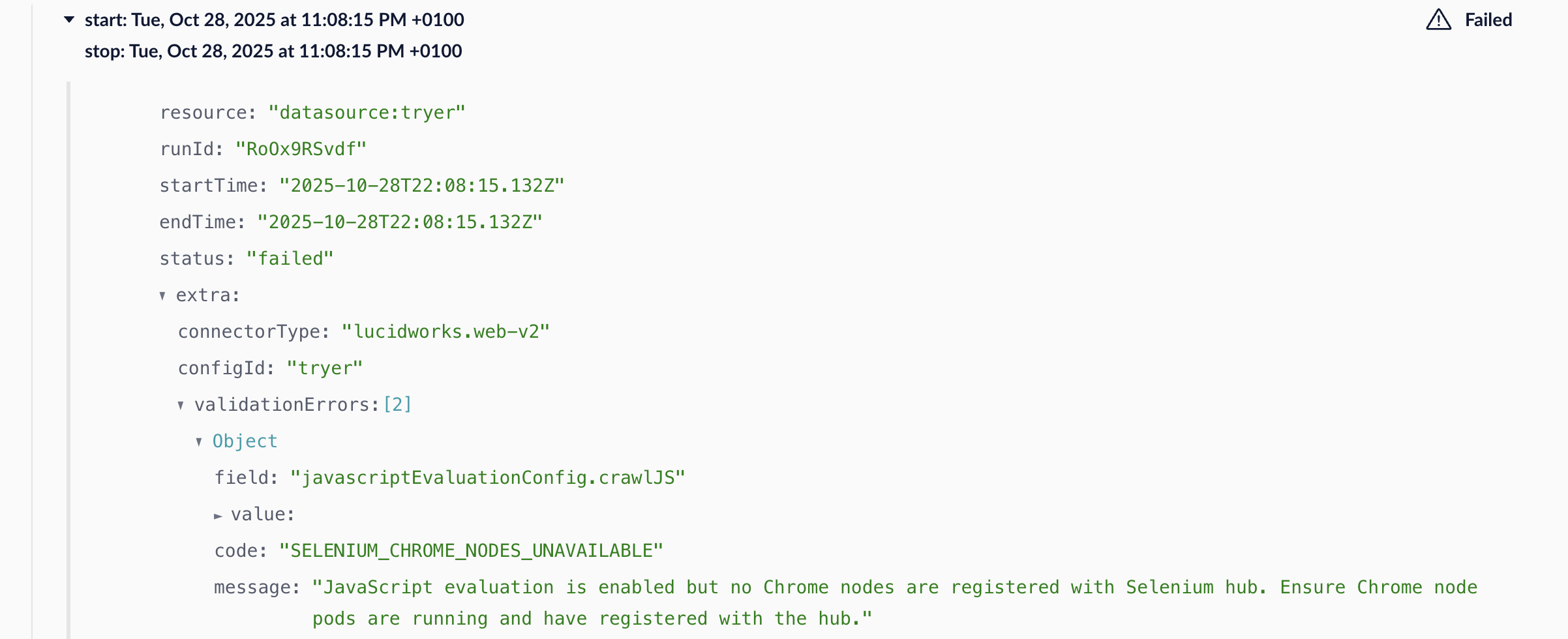
A verification check is added to ensure the Selenium service is running whenever JavaScript evaluation is enabled, improving stability and preventing runtime errors. If the verification check fails, you will see a `SELENIUM_CHROME_NODES_UNAVAILABLE` error with a message that states:
> JavaScript evaluation is enabled but no Chrome nodes are registered with Selenium hub. Ensure Chrome node pods are running and have registered with the hub.
The name of the database column containing binary content (VARBINARY, BINARY, BLOB, IMAGE, etc.). A value is required in order to use binary content indexing.
The name of the database column containing the file name or resource name for the binary content. If a value is not specified, the connector attempts to automatically detect the column name from common naming practices.
Existing content configurations will continue to work without modifications.
Binary content indexing is currently available for MSSQL and Oracle databases using the JDBC V2 connector.
#### StackOverflowError bug fix
Previously, the JDBC V2 connector experienced periodic failures where crawls failed to start with the error message "Start response was not received". This issue has been resolved, and users no longer have to manually restart connector pods to prevent this issue.
The [Web V2 connector](/docs/fusion-connectors/connectors/web-v2) has been updated to version 2.2.1.
#### Release highlights
The Web V2 v2.2.1 release delivers exciting improvements to JavaScript evaluation. These updates benefit users indexing sites with heavy JavaScript usage, long load times, or inconsistent indexing behavior such as missing fields or messages indicating that JavaScript is required.
The release also adds automated Selenium service management. This removes the need for manual installation.
#### How to upgrade
Updating your connector to the latest version is fast and simple. Before you begin, download the [connector update file](https://plugins.lucidworks.com/4.2.0/lucidworks.connector.web-v2/2.2.1/lucidworks.connector.web-v2-2.2.1.zip). Then, use the following instructions:
1. Open the Fusion UI and navigate to **System > Blobs**.
2. Expand the Connector Plugin section, then select **lucidworks.web-v2**.
3. Locate **Replace Blob**, click **Choose File**, and upload the downloaded zip file. Wait for the upload to finish.
4. Click **Replace**.
Confirm the version shown for the web connector now reflects the updated file.
#### Improvements to JavaScript evaluation
Some sites take substantial time to load resources, execute JavaScript, and render elements. If the connector begins indexing before the page is fully ready, it may fail to index the page or certain elements. This behavior can vary from one page to another, which makes it difficult to determine the ideal configuration.
To address these challenges, the Web V2 connector now includes enhanced controls for JavaScript evaluation.
These changes also address common indexing issues with missing fields or error messages, such as `You need to enable JavaScript to run this app`.
##### AJAX request completion
A new option allows AJAX requests to finish before indexing proceeds. This gives content additional time to render and reduces the likelihood of missing data.
##### AJAX timing controls
A new property, **AJAX timeout**, defines how long an individual AJAX request is considered when determining whether AJAX activity has completed. Requests that exceed this limit are ignored.
**Request counter min wait** and **Request counter max wait** define how long the connector waits when checking for pending AJAX requests. For example, a minimum of 500 milliseconds causes the connector to wait one half second before checking for pending AJAX requests. It continues checking until the defined maximum wait time is reached.
##### Updated defaults
**Timeout**, **Script Timeout**, and **Implicit Wait Timeout** default values are updated to reflect the latest field data across many real world use cases. If you have customized configurations for these fields, your configurations remain unchanged.
Specifies how long the connector waits for a page to finish loading, measured in milliseconds. A value of -1 allows the load process to continue without limit.
Specifies how long the connector waits for JavaScript execution to complete, measured in milliseconds. This defines the limit for script processing during page interactions.
Specifies how long the connector waits for elements to appear on the page, measured in milliseconds. This value applies when locating elements during automation tasks. Increasing this timeout may improve reliability on pages with slow or deferred JavaScript content.
These enhancements improve JavaScript execution reliability for dynamic content and resolve inconsistent crawling behavior on JavaScript heavy sites. They offer more precise control over how the Web V2 connector processes and indexes complex pages.
#### Selenium service management
The Lucidworks Fusion Web V2 connector uses Selenium Grid to evaluate JavaScript and render client-side content during crawling and document extraction. This allows Fusion to accurately index web pages that rely on JavaScript for content.
Previously, Selenium had to be installed manually to use with the Web V2 connector. In Web V2 v2.2.1 in Fusion 5.9.15 and later, the Selenium service is now automatically installed with the Web V2 connector and is automatically uninstalled when the connector is removed.
Manual installation of Selenium is still required in Fusion 5.9.14 or earlier, even if you use Web V2 v2.2.1. For details, see [Selenium Grid setup](/docs/fusion-connectors/connectors/web-v2#selenium-grid-setup).
A verification check is added to ensure the Selenium service is running whenever JavaScript evaluation is enabled, improving stability and preventing runtime errors. If the verification check fails, you will see a `SELENIUM_CHROME_NODES_UNAVAILABLE` error with a message that states:
> JavaScript evaluation is enabled but no Chrome nodes are registered with Selenium hub. Ensure Chrome node pods are running and have registered with the hub.
 #### Additional improvements
* Introduced a WebDriver pool to improve resource management efficiency and overall performance during crawl execution.
* Added enhanced logging for HTTP connection pools, enabling better debugging, performance analysis, and monitoring.
* Updated system behavior to properly respect JVM system properties, ensuring consistent configuration handling.
* Added data mapping support for `parent` and `fetchedDate` fields.
#### Bug fixes
Overall performance and system stability is improved by fixing an issue that caused increasing thread counts due to a memory leak.
#### Known issues
Version 2.2.1 removes the **Fetch Threads** property in the Crawl Performance Properties section, a property that is reproduced in the Core Properties section. This change causes datasource errors after upgrading from a previous version of the connector. Upgrade to Web V2 v2.2.2 to resolve the datasource errors.
The [Kaltura V2 connector](/docs/fusion-connectors/connectors/kaltura) has been updated to version 1.4.1.
This release resolves a critical JDK 17 compatibility issue affecting the Kaltura V2 connector that was causing Gson JSON serialization failures and preventing successful crawls in production environments.
The connector would timeout with plugin activity errors due to Gson JSON serialization issues when processing API error responses.
Version 1.4.1 implements JDK 17 compatibility fixes for Gson serialization:
* Enhanced exception handling with updated error response parsing to work within JDK 17's module system constraints.
* Gson configuration updates to handle restricted field access appropriately.
* Maintain compatibility with earlier JDK versions for backward compatiblilty.
The [JDBC V2 connector](/docs/fusion-connectors/connectors/jdbc-v2) has been updated to version 2.6.3.
This release addresses a critical stack overflow issue affecting the JDBC V2 connector that was causing intermittent crawl failures and requiring periodic pod restarts.
Version 2.6.3 resolves an infinite recursion issue in the class loading subsystem, eliminating the stack overflow errors and ensuring stable connector operation.
The [Web V2 connector](/docs/fusion-connectors/connectors/web-v2) has been updated to version 2.1.1.
This release delivers feature enhancements and stability improvements to strengthen functionality, streamline configuration, and improve the user experience.
Fixes and improvements:
* Fixed an authentication regression introduced in v2.0.0 that caused certain authenticated datasources to fail with a “Username may not be null” error, even when credentials were configured. Authentication now works as expected for these datasources.
* Restored support for viewport-related configuration properties used during JavaScript evaluation when indexing pages. Viewport width, viewport height, and device screen factor settings are now applied correctly by passing the configured values as command-line arguments to the browser.
* Updated the configuration UI to hide unused properties. Only relevant options are now visible, reducing clutter.
These updates ensure smoother authentication, simplify configuration workflows, and provide greater flexibility for tailored crawling.
The [Amazon Web Services (AWS) S3 V2 connector](/docs/fusion-connectors/connectors/amazon-aws-s3-v2) has been updated to version 1.5.0.
This release adds support for the AWS S3 Object Lambda Access Point that lets you customize how data is processed when it is retrieved from AWS S3 buckets.
The Lambda function associated with the access point can perform functions such as decrypting files and redacting personal information from files. For example, if you invoke the AWS S3 V2 connector using the access point and fetch encrypted files, the encrypted files are decrypted and returned to the connector.
In the Fusion UI, the datasource includes the `Object Lambda Access Point ARN - GET OBJECT` field where you enter its `Amazon Resource Name (ARN)`. This access point needs to be associated with the Lambda function on AWS S3 that supports the `get-object` API call. The connector fetches objects using the access point and triggers the corresponding Lambda function on AWS S3. If the `Object Lambda Access Point ARN - GET OBJECT` field does not contain a value, the AWS S3 V2 connector retrieves objects normally and the Lambda function is not invoked.
The [Web V2 connector](/docs/fusion-connectors/connectors/web-v2) has been updated to version 2.1.0.
This release adds JavaScript evaluation for the Web V2 connector, which allows the connector to extract content from a website that is only available after JavaScript has been rendered. The release also rebuilds some of the connector’s capabilities in Selenium Grid, which offers non-headless browser mode and concurrent processing. Additionally, this release restores features from the Web V1 connector.
**Important**
If you are using Web V2 2.1.0 or later, you must use Selenium Grid as part of your Web V2 connector setup.
#### JavaScript evaluation
JavaScript evaluation is available for remote and hosted connectors and supports authentication and headless browsing. The capabilities of a browser are essential, and this release introduces Selenium Grid to implement browser-based rendering.
For hosted connectors, Selenium Grid support is available through Kubernetes. For remote connectors, Selenium Grid support is available through Docker Compose. See [the Web V2 remote support repository](https://github.com/lucidworks/web-v2-remote-support/) for setup instructions and YAML files.
The Selenium services require an x86 architecture to run properly. Running the Selenium services on an ARM-based system such as Apple Silicon is not supported.
**Important**
Up to three Web V2 connectors can run simultaneously in a single cluster. This prevents reaching a max concurrency limit per Web V2 connector, which affects how much data can be sent to Selenium Grid at one time.
If you are authenticating to your website when crawling it, you can evaluate JavaScript while crawling websites. Select **Evaluate JavaScript during SmartForms/SAML Login**.
The headless browsing setting in the Web V2 connector lets you runs browsers without actually seeing the browser. For websites that render pages on the server, the **Headless browser** field must be unchecked for the crawl to work correctly and retrieve links. For websites that render pages on the client side, the **Headless browser** field should be checked.
#### Improvements
The `depth` property has been restored, allowing you to control the scope of your web crawl. The default value is `-1`, which does not limit the scope of the crawl. Configure this value in the **Limit Document Properties** section of the Web V2 connector.
If a crawl fails because the start link is invalid, the Web V2 connector now marks the crawl as failed and Fusion logs an exception. This restores functionality from the Web V1 connector.
#### Bug fix
Previously, the Port field for Basic Authentication did not accept `-1` as a value to accept any port. This is now resolved, and `-1` is an accepted value.
The [Web V2 connector](/docs/fusion-connectors/connectors/web-v2) has been updated to version 2.0.1.
* Fixed a bug where Web V2 v2.0.0 failed to handle non-HTML responses such as JSON. When a JSON response was returned, the connector would complete with a success response but without indexing any data due to a premature stream closure error. This issue occurred only with Web V2 v2.0.0 on Fusion 5.9.11 and did not affect Web V2 v1.4.0.
* Compatibility for this connector is extended to include all versions of Fusion 5.9.x.
The [AWS S3 V2 connector](/docs/fusion-connectors/connectors/amazon-aws-s3-v2) is updated to v1.4.2.
This release resolves a bug where recrawls failed to fetch data from folders. This occurred when a previous crawl saved errors in Crawldb and the **datasourceConfig** had:
* `objectKeys` configured
* `enableStrayContent` set to `false`
The [Web V2 connector](/docs/fusion-connectors/connectors/web-v2) has been updated to version 2.0.0. This release resolves a critical issue where the **Restrict crawl to start-link** checkbox appeared unchecked in the UI, while the setting was enabled in the backend. This discrepancy caused the option to be enforced even when the UI indicated it was disabled, potentially resulting in the indexing job failing silently.
This release also includes general performance and compatibility improvements.
Known issues in version 2.0.0:
* The **Link rewrite script** option, which allows JavaScript to modify document links before fetching, is currently non-functional. A fix is planned for a future release.
* The **Max items** setting enforces a limit that is one less than the configured value. For example, if set to 10,000, only 9,999 documents are fetched. A fix is planned for a future release.
**Important**
Starting with Fusion 5.9.11, you must upgrade to the Web V2 connector v2.0.0 or later. Previous versions (e.g. 1.4.0) are incompatible with Fusion 5.9.11 and later versions of Fusion 5.9 due to changes introduced by the upgraded JDK in Fusion. If you are using an earlier version of Fusion, use Web V2 v1.4.0 instead.
The [JDBC V2 Connector](/docs/fusion-connectors/connectors/jdbc-v2) is updated to v2.6.2.
This release resolves a bug that caused some updated or newly added records to be missed during delta indexing.
Previously, the connector only looked at the end time of the last indexing job to find new data. This behavior meant any records added or changed during that job could be skipped during delta indexing.
With this fix, the connector now looks at both the start and end times of the last job, ensuring that no records are missed when running a delta indexing job.
The [REST V2 connector](/docs/fusion-connectors/connectors/rest-v2/overview) is upgraded to v1.1.0.
#### Summary
A recipe is added for Alfresco to enhance the search experience by implementing a hierarchical request feature that traverses multiple storage levels to locate and index file content. Several new features are added, including introducing a retry mechanism to reattempt requests failing due to server-side errors based on configurable retry counts and delay times. Additionally, this release features a skip indexation option that prevents indexing parent objects when they are only used to discover child objects. The connector now supports recursive requests to automatically retrieve nested objects regardless of depth. This release also allows for limiting documents through exclusion by regular expressions and file size constraints, and includes improvements like enhanced logging with query parameters and the addition of an index field to track the number of documents indexed per request configuration.
#### New recipe
* A new recipe is included as part of this release: [Alfresco](/docs/fusion-connectors/connectors/rest-v2/recipes/rest-alfresco).
* This new recipe integrates with the Alfresco information management software improve to improve the search experience.
* The recipe implements the new hierarchical request feature to locate and index file content at multiple storage levels.
#### New features
##### Hierarchical request feature:
* Hierarchical object discovery allows requests to traverse multiple levels by following the natural structure of the data under the source.
Retry feature is added to enable retrying requests if they fail due to a server-side error:
* Retry Count: The number of attempts a request will be retried.
* Max Delay Time: The maximum wait time in milliseconds between retries.
##### Skip indexation of objects feature
* When enabled, the response is not indexed. This is useful when objects are requested only to discover their child objects without indexing the parent object.
* Example indexing a list of files with their binary content:
* Given a parent request (`objectType=FILE`), retrieve a list of file metadata. This request helps discover the IDs of files to be downloaded in a follow-up request.
* Given a child request (`objectType=FILE-DOWNLOAD` with `parentObjectType=FILE`), download the binary content from previously discovered file metadata.
* The indexed documents will include file metadata (from the `FILE` request) joined with binary content (from the `FILE-DOWNLOAD` request).
* Enable **Skip Indexation** in `FILE` request to prevent indexing file metadata objects.
##### Recursive requests
* Enables recursive retrieval of nested objects of the same `ObjectType` using the same request configuration. This is useful when the depth of nesting is unknown, automating the retrieval of all nested objects.
* Example: Detect all nested folders from a system path where the depth of nested folders is unknown. Enable **Recursive Requests** to retrieve all levels automatically.
##### Limit documents
* **Exclude by RegEx** allows specifying a list of key-value pairs to exclude objects from indexing.
* **Key** references the field name of the object to exclude and supports `JsonPath` expressions for navigating nested objects (for example, `objects.nested.path`).
* **Value** is a regular expression matched against the field value in the object. If the match succeeds, then the entire object is excluded.
* **Exclude by File Size** allows setting minimum and maximum file sizes (in bytes) to exclude files outside the specified range.
* **Key** references the field name of the object containing the file size and supports `JsonPath` expressions (for example, `objects.nested.path`).
* **Minimum File Size**: Files smaller than this value will be excluded.
* **Maximum File Size**: Files larger than this value will be excluded. (Set to `-1` for no limit.)
#### Improvements
* Improved logging to include query parameters in requests.
* Added index field `_lw_rest_object_type_s` to store the value of the `ObjectType` configuration property, which represents the name of the request. This helps track the number of documents indexed per request configuration.
#### Deprecation
* Property `Service Endpoints` used for object discovery through two-level requests is deprecated. Instead, use `List of Requests Configuration` for configuring multiple request levels.
The [REST V2 connector](/docs/fusion-connectors/connectors/rest-v2/overview) is introduced as a way to enable users to crawl content by exposing its data through a REST API. It can be configured to communicate with a wide selection of external datasources by making API calls and indexing the responses. As an out-of-the-box V2 connector, it provides a low-code user experience for indexing data from REST API-compatible sources.
The REST V2 connector expedites setting up and indexing various datasources using premade configurations, called recipes. These recipes are templates that include all required parameters for datasource integration and can be easily adjusted to suit your specific needs. Unlike single-purpose connectors, the REST V2 connector can index data from any datasource supported by a corresponding recipe.
* The REST V2 Connector relies on a [public GitHub repository](https://github.com/lucidworks/rest-configurations) to store and manage recipes. Recipes are open-source and accessible to the community for use and contribution.
* Two recipes are included in the initial release: [Jira](/docs/fusion-connectors/connectors/rest-v2/recipes/rest-jira) and [Confluence](/docs/fusion-connectors/connectors/rest-v2/recipes/rest-confluence). Additional recipes are being developed and will be released as they are finalized.
* This release also includes two forms of authentication: [OAuth](/docs/fusion-connectors/connectors/rest-v2/rest-v2-oauth) and Basic Auth.
The REST connector supports crawl and recrawl:
* Full crawl retrieves all objects from the datasource.
* Recrawl relies on the `strayContentDeletion` feature from the `connectors-service` to ensure deleted objects from the source are also removed from the index.
Two-level object discovery:
* Allows defining a root request to retrieve first-level objects.
* Supports a list of child requests (children of the main request) to retrieve second-level objects.
* By default, objects retrieved with the root request and child requests are indexed as individual Solr documents.
The REST connector supports two types of pagination:
* Next page URL uses a URL to fetch the next page of results.
* Batch size and index start use a batch size and starting index to paginate through results.
Parsing can be done in one of two ways:
* When parsing within the plugin, the response is parsed as a JSON object structure using JSONPath. This is the default behavior.
* When parsing with Fusion, the response is emitted directly to Fusion, where Fusion parsers handle the binary data. Enable this feature by setting the property `Send as Binary Data`.
By default, parent and child objects are indexed as individual Solr documents. To merge child objects into the parent object instead of indexing them separately, configure the property `Child Response Mapping → Custom Solr Field`. This feature works only when both parent and child objects are parsed as JSON objects.
The following variables are used when configuring a datasource:
* `${LW_BATCH_SIZE}`: Used with pagination by batch size. This variable represents the `size` query parameter defined in the property, `Pagination By BatchSize → BatchSize`.
* `${LW_INDEX_START}`: Used with pagination by batch size. This variable represents the `start-point` query parameter defined in the property `Pagination By BatchSize → IndexStart`, which is used to traverse the pagination.
* `${LW_PARENT_DATA_KEY}`: Used with the child request configuration. This variable is replaced with the `id` extracted from the root object using the property `Parent Data Key`.
This connector is compatible with Fusion 5.9.0 and later.
An improvement is made to the [LDAP ACLs V2 connector](/docs/fusion-connectors/connectors/ad-acl-ldap).
* The timeout limit to retrieve ACLs from LDAP services is extended.
This version of the connector is compatible with Fusion 5.9.1 and later.
The [Web V2 Connector](/docs/fusion-connectors/connectors/web-v2) is upgraded to v1.4.0.
* Incorporates OAuth for compatibility with Ping Identity and Azure.
* Fixes a bug where links listed under **BULK START LINKS** were not being indexed.
The [AWS S3 V2 connector](/docs/fusion-connectors/connectors/amazon-aws-s3-v2) is updated to v1.4.1.
* A new property, retry count, has been introduced to the S3 connector. This property value is passed in the AWS SDK, determining the number of retry attempts for retrieving the file from the AWS S3 bucket. The configurability of this property enhances the effectiveness of the connector, especially in situations of network instability.
The [Kaltura V2 connector](/docs/fusion-connectors/connectors/kaltura) is updated to v1.4.0.
This version of the connector is compatible with Fusion 5.9.4 and later.
* Adds validation to establish a connection with Kaltura before commencing the crawling process.
* Updates the plugin to replace static Security Trimming with Graph Security Trimming, improving performance.
The [AWS S3 V2 connector](/docs/fusion-connectors/connectors/amazon-aws-s3-v2) is updated to v1.4.0.
* Adds an **Enable Stray Content Deletion** property in the Fusion UI for the S3 connector to toggle stray content deletion on or off. When stray content deletion is enabled, content that was removed from the datasource is deleted from the index in Fusion. When stray content deletion is disabled, content that was removed from the datasource is not deleted from the index in Fusion. This property is enabled by default.
The [AEM V2 connector](/docs/fusion-connectors/connectors/aem) is updated to v1.3.0.
This version of the connector is compatible with Fusion 5.9.4 and later.
* Updates the plugin to replace static Security Trimming with Graph Security Trimming, improving performance.
* Fixed an issue where security trimming was enabled by default.
The [File Upload V2 connector](/docs/fusion-connectors/connectors/fileupload-v2) replaces the File Upload V1 connector for indexing local file contents.
* Provides a convenient way to quickly ingest data from your local filesystem.
* Constructed using the V2 framework and serves as a replacement for the classic version.
The [Box.com V2 connector](/docs/fusion-connectors/connectors/box.com-v2) is updated to version 2.2.0.
This version of the connector is compatible with Fusion 5.9.4 and later.
* Updates the plugin to replace static Security Trimming with Graph Security Trimming, improving performance.
* Fixes the invalid RegEx implementation that adjusts the Box URL to retrieve data from the Box datasource so the connector now accepts dashes (`-`) in Box start URLs.
* Corrects relative path field data when indexing documents that are of type 'File' in nested folders.
* Fixes a bug where new documents were not being indexed upon incremental crawls.
* Migrates the Box-Java-SDK to version 4.8.0.
An improvement is made to the [LDAP ACLs V2 connector](/docs/fusion-connectors/connectors/ad-acl-ldap).
* When the maximum number of referrals is reached, an exception is now thrown to handle the situation while ensuring the connector does not stop functioning.
The [Windows Share SMB 2/3 V2 connector](/docs/fusion-connectors/connectors/windows-share-smb-2-3-v2) is updated to version 2.0.0.
This version of the connector is compatible with Fusion 5.9.4 and later.
* Upgrades the plugin to use the latest SDK version.
* Updates the plugin to replace static Security Trimming with Graph Security Trimming, improving performance.
* Fixes a bug where an "Error validating datasource" message displayed after trying to save a datasource with the `Enable DFS` connection property.
The [AEM V2 connector](/docs/fusion-connectors/connectors/aem) is updated to version 1.2.0.
* Now you can configure the AEM connector to include child paths when indexing fields.\
This option is off by default; enable it by selecting **Index metadata by child path** in your AEM datasource configuration.
* Fixes a bug that prevented running the connector on Windows.
* The basic authentication username and password fields have moved under **Authentication Settings** > **Login Settings**.
The [LDAP ACLs V2 connector](/docs/fusion-connectors/connectors/ad-acl-ldap) is updated to version 2.1.0.
* Fixes Graph security trimming not working with `Everyone except external` access.
* Allows connector to reach maximum referral. The connector will throw the exception but will not stop.
The [SharePoint Optimized V2 connector](/docs/fusion-connectors/connectors/sharepoint-v2-optimized) is updated to v2.1.0.
SharePoint Optimized V2 v2.1.0 is compatible with Fusion 5.9.1 and later. See the configuration reference page for the latest version and compatibility details.
* Added the Events Reducer feature, which prevents performing multiple requests to the same SharePoint object and ensures index integrity. Specifically, if multiple change events are made over the same SharePoint object, the connector detects and requests the most relevant event and crawls it correctly.
* Fixed Graph Security Trimming when using custom-level permissions.
* Fixed an issue to reindex restored lists.
* Errors from item/attachment are deleted from crawlDB after being successfully retried.
The [JDBC V2 Connector](/docs/fusion-connectors/connectors/jdbc-v2) is updated to v2.6.1.
* Fixed a pagination issue that limited the number of records returned.
* Added support for pagination of IBM Db2 (version 11 and earlier) by using a template sub-query:
```sql theme={"dark"}
-- add any WHERE, ORDER BY clauses as needed following your_table\
SELECT * FROM ( SELECT *, ROW_NUMBER() OVER () AS row_num FROM your_table ) AS subquery WHERE row_num BETWEEN :offset + 1 AND (:offset + :limit)
```
* Fixed an issue where UTF-8 characters stored as CLOB data types didn’t index properly.
The [JDBC V2 Connector](/docs/fusion-connectors/connectors/jdbc-v2) is updated to v2.6.0 and implements a pagination feature. This allow the JDBC connector to ingest a specified number of rows during the crawl process.
This feature is controlled by following newly added properties:
* `LIMIT` - specifies the number of rows returned in the results.
* `OFFSET` - dictates the number of rows to skip from the beginning of the returned data before presenting the results.
* `disableAutomaticPagination` - disables automatic pagination to ignore limit and offset fields.
The [LDAP ACLs V2 connector](/docs/fusion-connectors/connectors/ad-acl-ldap) v1.5.1 release includes backported fixes.
* Indexes the **all-users** acl document when indexing from AzureAD.
* Fixes Graph Security Trimming with `Everyone except external` access in SharePoint Online.
The [JDBC V2 Connector](/docs/fusion-connectors/connectors/jdbc-v2) is updated to v2.5.0.
* Exposes configuration options for the validation timeout.
* Resolves an issue where documents were deleted on incremental crawls when stray delete was enabled.
The [Kaltura V2 connector](/docs/fusion-connectors/connectors/kaltura) is updated to v1.3.0.
* This adds back in the Kaltura External Media Entry Compare Attribute fields.
The [SharePoint Optimized V2 connector](/docs/fusion-connectors/connectors/sharepoint-v2-optimized) is updated to v2.0.0.
SharePoint Optimized V2 v2.0.0 is compatible with Fusion 5.9.1 and later. See the configuration reference page for the latest version and compatibility details.
* The connector supports remote configurations.
The [LDAP ACLs V2 connector](/docs/fusion-connectors/connectors/ad-acl-ldap) is updated to v2.0.0.
LDAP ACLs V2 connector v2.0.0 is compatible with Fusion 5.9.1 and later. See the configuration reference page for the latest version and compatibility details.
The updated connector:
* Supports remote configurations.
* Uses the SDK that correctly processes the NOT-EQUAL phrase in delete-by-query.
* Supports unauthenticated proxy.
The [AEM V2 connector](/docs/fusion-connectors/connectors/aem) is updated to v1.1.0.
* The connector allows OAuth 2 support for JWT token.
The [JDBC V2 Connector](/docs/fusion-connectors/connectors/jdbc-v2) is upgraded to v2.4.0.
* This release expands the types of character large objects (CLOBs) which can be indexed to include IBM CLOBs.
The [SharePoint Optimized V2 connector](/docs/fusion-connectors/connectors/sharepoint-v2-optimized) is upgraded to v1.6.0.
If you are on Fusion 5.9.0 or later, you must use the SharePoint Optimized V2 v1.6.0 connector or later.
* For SharePoint Online connector OAuth authentication and NTLM authentication, an issue with the SharePoint Optimized V2 connector crawl was fixed. Now the crawl fails if the data source is configured with incorrect credentials.
* When the moderation status of a published document moves to unpublished, the document is deleted from the index.
* The URL that requests folder metadata is now properly encoded and retrieves requested files correctly.
The [LDAP ACLs V2 connector](/docs/fusion-connectors/connectors/ad-acl-ldap) is upgraded to v1.5.0.
If you are on Fusion 5.9.0 or later, you must use the LDAP ACLs V2 connector v1.5.0 or later.
* The datasource indexing job will now return an error when invalid access credentials are provided instead of reporting a success.
* The `Security` parameter is now set to `enabled` by default.
The [Kaltura V2 connector](/docs/fusion-connectors/connectors/kaltura) is upgraded to v1.2.0.
* Fixed an issue that occurred when reaching Kaltura’s API limit of 10,000 documents. Indexing over 10,000 documents should now work as expected.
The [JDBC V2 Connector](/docs/fusion-connectors/connectors/jdbc-v2) is upgraded to v2.3.0.
* The JDBC V2 connector now supports indexing character large objects (CLOBs).
The [Kaltura V2 connector](/docs/fusion-connectors/connectors/kaltura) is upgraded to v1.1.0.
* A `NoClassDefFound` error in the connector has been fixed.
The [SharePoint Optimized V2 Connector](/docs/fusion-connectors/connectors/sharepoint-v2-optimized) is upgraded to v1.5.0.
* MapDB tables that are no longer needed after indexing are now automatically removed when the indexing job completes.
* The connector no longer uses the index pipeline client when the `onlyMetadata` property is set to `true` or when Tika async parsing is enabled. Instead, documents are processed using the Connectors SDK’s `.newDocument` method.
The [Web V2 Connector](/docs/fusion-connectors/connectors/web-v2) is upgraded to v1.3.0.
* A bug with the **Rewrite URI** configuration option that prevented the configuration from being applied during the indexing job has been fixed.
* The **SAML**, **Form**, and **NTML** authorization form fields are updated to match those present in the Web V1 connector.
The [JDBC V2 Connector](/docs/fusion-connectors/connectors/jdbc-v2) is upgraded to v2.2.0.
* A bug that affected JDBC datasources with large document sizes has been fixed. Previously, the indexing job would fail and produce a Solr error message similar to the following:
```
Document contains at least one immense term in field="FIELD_NAME"
```
This bug has been fixed and indexing large documents should now work as expected.
The [LDAP ACLs V2 Connector](/docs/fusion-connectors/connectors/ad-acl-ldap) is upgraded to v1.4.0.
* Added support for the graph security trimming stage for Active Directory in Azure.
This describes how to migrate your pre-Fusion 5.8 Graph Security Trimming query pipeline stage setup to Fusion 5.8 or later. It applies to deployments using:
* SharePoint Optimized V2 connector v1.1.0 or later
* LDAP ACLs V2 connector v1.4.0 or later to crawl Active Directory in Azure
* The LDAP ACLs V2 connector v1.2.0 or later to crawl Active Directory in LDAP
## Migration
To migrate a deployment that is crawling Active Directory to Fusion 5.8 or later, follow these steps.
### Update the datasource configurations
The SharePoint Optimized V2 and LDAP ACLs V2 datasources must index the content documents and ACL documents to the same collection. Ensure both datasources use the same value, `contentCollection`, for the field **ACL Collection ID**.
#### If using SharePoint-Optimized and LDAP ACLs \< v2.0.0
Update the **ACL Collection Id** in the datasource configuration.
The SharePoint-Optimized and LDAP ACLs datasources must index their `content_documents` and `acl_documents` to the same collection. Make sure the property **Security** -> **ACL Collection** in both datasources have the same value. In both datasources, SharePoint-Optimized and LDAP ACLs, check the property **Security** -> **ACL Collection Id** and make sure it points to the same content-collection.
1. Navigate to **Indexing > Datasources**.
2. Open your SharePoint Optimized V2 or LDAP ACLs V2 datasource.
3. Under **Security**, update the configuration to use `contentCollection` as the **ACL Collection ID**. The **Security** checkbox must be checked for this field to appear.
4. Save the configuration.\
Repeat this process for all required datasources.
#### If using SharePoint-Optimized and LDAP ACLs >= v2.0.0
Recreate or update the datasources. If only updated, it is not possible to go back to the configuration of a previous plugin version.\
By default, the LDAP ACLs and SharePoint-Optimized V2 datasources will index the `content_documents` and `acl_documents` to the same collection.
1. Navigate to **Indexing > Datasources**.
2. Open your SharePoint Optimized V2 or LDAP ACLs V2 datasource.
3. Under **Graph Security Filtering Configuration**, select **Enable security trimming**.\
Repeat this process for all required datasources.
### Clear the datasources and perform a full crawl
1. Navigate to **Indexing > Datasources**.
2. Open your SharePoint Optimized V2 or LDAP ACLs V2 datasource.
3. Click the **Clear Datasource** button, and choose yes.
4. Navigate to **Collections > Collections Manager**.
5. Verify that the `job_state` collection is empty.
6. Return to your datasource.
7. Click **Run > Start** to reindex your data.\
Repeat this process for all required datasources.
* A bug that prevented the connector from retrying after a connection error has been fixed.
The [JDBC V2 Connector](/docs/fusion-connectors/connectors/jdbc-v2) is upgraded to v2.1.0.
* The `statement.setMaxRows()` field was added to resolve a timeout error for large queries on a JDBC data source.
The [SharePoint Optimized V2 Connector](/docs/fusion-connectors/connectors/sharepoint-v2-optimized) is upgraded to v1.4.0.
* A new field, `_lw_document_type_s`, has been added to differentiate between document types. SharePoint content documents use the value `contentDocument`. ACL documents use the value `aclDocument`.
* A bug that caused a `NullPointerException` error when the `listDefaultDisplayFormUrl` value is null has been fixed.
* A bug that prevented the connector from indexing SharePoint Online URLs containing certain special characters, such as `+`, `&`, and `#`, has been fixed.
* A bug that stopped the indexing job unexpectedly when the `digestValue` request fails has been fixed.
The [LDAP ACLs connector](/docs/fusion-connectors/connectors/ad-acl-ldap) is upgraded to v1.3.0.
* Fixed a memory leak that resulted in an `OutOfMemoryError` runtime error, causing recrawls to quickly fail.
The [SharePoint Optimized V2 Connector](/docs/fusion-connectors/connectors/sharepoint-v2-optimized) is upgraded to v1.3.0.
* Fixed an issue where sometimes the connector did not index all attachments in full crawls.
* Fixed an error related to OAuth authentication where the body would not return the expected value.
* Folders with unique permissions no longer inherit list permissions instead of their own.
The [Web V2 Connector](/docs/fusion-connectors/connectors/web-v2) is upgraded to v1.2.0.
* Fixed a bug that sometimes resulted in an `OutOfMemory: Java Heap Space` error when the connector was run remotely.
* Fixed a dependency issue that sometimes resulted in a `Error starting controllers` error that caused the job to fail.
The [LDAP ACLs V2 Connector](/docs/fusion-connectors/connectors/ad-acl-ldap) is upgraded to v1.2.0.
* Fixed a bug that removed access control lists (ACLs) during incremental crawls in Azure Active Directory. This bug resulted from a deviation from the LDAP ACLs V2 connector’s [unique incremental crawl behavior](/docs/fusion-connectors/connectors/ad-acl-ldap) for Azure Active Directory.
* Fixed a bug that sometimes deleted ACLs that the indexing job failed to update during its previous run.
* Known issue: The job may complete with a "Successful" status even when a network communication error occurred.
The [SharePoint Optimized V2 Connector](/docs/fusion-connectors/connectors/sharepoint-v2-optimized) is upgraded to v1.2.0.
* Fixed a bug that sometimes generated a "User cannot be found" error statement and prevented the connector from indexing files.
* Updated the description of the **Item size limit** property to clarify its behavior.
The [Web V2 connector](/docs/fusion-connectors/connectors/web-v2) is upgraded to v1.1.0.
* Fixed a bug that sometimes prevented the connector from parsing PDF, Word, Excel, and other file types.
* Some conflicting dependencies were removed to resolve errors.
* A missing dependency, guava-retrying, was added to resolve a `NoClassDefFoundError` error.
* A bug was fixed that resulted in the connector performing full crawls instead of recrawling as expected.
* Known issue: JavaScript evaluation is not functional at this time.
* Known issue: The counter values in the **Datasources > DATASOURCE\_NAME > Job History** view do not reflect actual values, when the datasource uses the Web V2 connector.
The [SharePoint Optimized V2 connector](/docs/fusion-connectors/connectors/sharepoint-v2-optimized) is upgraded to v1.1.0. This upgrade includes several bug fixes.
* A bug that sometimes prevented files from being deleted as expected when the datasource was recrawled was fixed.
* A bug that prevented the connector from indexing data within certain lists was fixed.
* When indexing data to the `MetaInfo_s` field, an error could occur that prevented indexing data when the data was too large. Now, data larger than 32,766 bytes is indexed to the `MetaInfo_txt` field instead.
* The connector now accepts URLs with spaces.
#### Additional improvements
* Introduced a WebDriver pool to improve resource management efficiency and overall performance during crawl execution.
* Added enhanced logging for HTTP connection pools, enabling better debugging, performance analysis, and monitoring.
* Updated system behavior to properly respect JVM system properties, ensuring consistent configuration handling.
* Added data mapping support for `parent` and `fetchedDate` fields.
#### Bug fixes
Overall performance and system stability is improved by fixing an issue that caused increasing thread counts due to a memory leak.
#### Known issues
Version 2.2.1 removes the **Fetch Threads** property in the Crawl Performance Properties section, a property that is reproduced in the Core Properties section. This change causes datasource errors after upgrading from a previous version of the connector. Upgrade to Web V2 v2.2.2 to resolve the datasource errors.
The [Kaltura V2 connector](/docs/fusion-connectors/connectors/kaltura) has been updated to version 1.4.1.
This release resolves a critical JDK 17 compatibility issue affecting the Kaltura V2 connector that was causing Gson JSON serialization failures and preventing successful crawls in production environments.
The connector would timeout with plugin activity errors due to Gson JSON serialization issues when processing API error responses.
Version 1.4.1 implements JDK 17 compatibility fixes for Gson serialization:
* Enhanced exception handling with updated error response parsing to work within JDK 17's module system constraints.
* Gson configuration updates to handle restricted field access appropriately.
* Maintain compatibility with earlier JDK versions for backward compatiblilty.
The [JDBC V2 connector](/docs/fusion-connectors/connectors/jdbc-v2) has been updated to version 2.6.3.
This release addresses a critical stack overflow issue affecting the JDBC V2 connector that was causing intermittent crawl failures and requiring periodic pod restarts.
Version 2.6.3 resolves an infinite recursion issue in the class loading subsystem, eliminating the stack overflow errors and ensuring stable connector operation.
The [Web V2 connector](/docs/fusion-connectors/connectors/web-v2) has been updated to version 2.1.1.
This release delivers feature enhancements and stability improvements to strengthen functionality, streamline configuration, and improve the user experience.
Fixes and improvements:
* Fixed an authentication regression introduced in v2.0.0 that caused certain authenticated datasources to fail with a “Username may not be null” error, even when credentials were configured. Authentication now works as expected for these datasources.
* Restored support for viewport-related configuration properties used during JavaScript evaluation when indexing pages. Viewport width, viewport height, and device screen factor settings are now applied correctly by passing the configured values as command-line arguments to the browser.
* Updated the configuration UI to hide unused properties. Only relevant options are now visible, reducing clutter.
These updates ensure smoother authentication, simplify configuration workflows, and provide greater flexibility for tailored crawling.
The [Amazon Web Services (AWS) S3 V2 connector](/docs/fusion-connectors/connectors/amazon-aws-s3-v2) has been updated to version 1.5.0.
This release adds support for the AWS S3 Object Lambda Access Point that lets you customize how data is processed when it is retrieved from AWS S3 buckets.
The Lambda function associated with the access point can perform functions such as decrypting files and redacting personal information from files. For example, if you invoke the AWS S3 V2 connector using the access point and fetch encrypted files, the encrypted files are decrypted and returned to the connector.
In the Fusion UI, the datasource includes the `Object Lambda Access Point ARN - GET OBJECT` field where you enter its `Amazon Resource Name (ARN)`. This access point needs to be associated with the Lambda function on AWS S3 that supports the `get-object` API call. The connector fetches objects using the access point and triggers the corresponding Lambda function on AWS S3. If the `Object Lambda Access Point ARN - GET OBJECT` field does not contain a value, the AWS S3 V2 connector retrieves objects normally and the Lambda function is not invoked.
The [Web V2 connector](/docs/fusion-connectors/connectors/web-v2) has been updated to version 2.1.0.
This release adds JavaScript evaluation for the Web V2 connector, which allows the connector to extract content from a website that is only available after JavaScript has been rendered. The release also rebuilds some of the connector’s capabilities in Selenium Grid, which offers non-headless browser mode and concurrent processing. Additionally, this release restores features from the Web V1 connector.
**Important**
If you are using Web V2 2.1.0 or later, you must use Selenium Grid as part of your Web V2 connector setup.
#### JavaScript evaluation
JavaScript evaluation is available for remote and hosted connectors and supports authentication and headless browsing. The capabilities of a browser are essential, and this release introduces Selenium Grid to implement browser-based rendering.
For hosted connectors, Selenium Grid support is available through Kubernetes. For remote connectors, Selenium Grid support is available through Docker Compose. See [the Web V2 remote support repository](https://github.com/lucidworks/web-v2-remote-support/) for setup instructions and YAML files.
The Selenium services require an x86 architecture to run properly. Running the Selenium services on an ARM-based system such as Apple Silicon is not supported.
**Important**
Up to three Web V2 connectors can run simultaneously in a single cluster. This prevents reaching a max concurrency limit per Web V2 connector, which affects how much data can be sent to Selenium Grid at one time.
If you are authenticating to your website when crawling it, you can evaluate JavaScript while crawling websites. Select **Evaluate JavaScript during SmartForms/SAML Login**.
The headless browsing setting in the Web V2 connector lets you runs browsers without actually seeing the browser. For websites that render pages on the server, the **Headless browser** field must be unchecked for the crawl to work correctly and retrieve links. For websites that render pages on the client side, the **Headless browser** field should be checked.
#### Improvements
The `depth` property has been restored, allowing you to control the scope of your web crawl. The default value is `-1`, which does not limit the scope of the crawl. Configure this value in the **Limit Document Properties** section of the Web V2 connector.
If a crawl fails because the start link is invalid, the Web V2 connector now marks the crawl as failed and Fusion logs an exception. This restores functionality from the Web V1 connector.
#### Bug fix
Previously, the Port field for Basic Authentication did not accept `-1` as a value to accept any port. This is now resolved, and `-1` is an accepted value.
The [Web V2 connector](/docs/fusion-connectors/connectors/web-v2) has been updated to version 2.0.1.
* Fixed a bug where Web V2 v2.0.0 failed to handle non-HTML responses such as JSON. When a JSON response was returned, the connector would complete with a success response but without indexing any data due to a premature stream closure error. This issue occurred only with Web V2 v2.0.0 on Fusion 5.9.11 and did not affect Web V2 v1.4.0.
* Compatibility for this connector is extended to include all versions of Fusion 5.9.x.
The [AWS S3 V2 connector](/docs/fusion-connectors/connectors/amazon-aws-s3-v2) is updated to v1.4.2.
This release resolves a bug where recrawls failed to fetch data from folders. This occurred when a previous crawl saved errors in Crawldb and the **datasourceConfig** had:
* `objectKeys` configured
* `enableStrayContent` set to `false`
The [Web V2 connector](/docs/fusion-connectors/connectors/web-v2) has been updated to version 2.0.0. This release resolves a critical issue where the **Restrict crawl to start-link** checkbox appeared unchecked in the UI, while the setting was enabled in the backend. This discrepancy caused the option to be enforced even when the UI indicated it was disabled, potentially resulting in the indexing job failing silently.
This release also includes general performance and compatibility improvements.
Known issues in version 2.0.0:
* The **Link rewrite script** option, which allows JavaScript to modify document links before fetching, is currently non-functional. A fix is planned for a future release.
* The **Max items** setting enforces a limit that is one less than the configured value. For example, if set to 10,000, only 9,999 documents are fetched. A fix is planned for a future release.
**Important**
Starting with Fusion 5.9.11, you must upgrade to the Web V2 connector v2.0.0 or later. Previous versions (e.g. 1.4.0) are incompatible with Fusion 5.9.11 and later versions of Fusion 5.9 due to changes introduced by the upgraded JDK in Fusion. If you are using an earlier version of Fusion, use Web V2 v1.4.0 instead.
The [JDBC V2 Connector](/docs/fusion-connectors/connectors/jdbc-v2) is updated to v2.6.2.
This release resolves a bug that caused some updated or newly added records to be missed during delta indexing.
Previously, the connector only looked at the end time of the last indexing job to find new data. This behavior meant any records added or changed during that job could be skipped during delta indexing.
With this fix, the connector now looks at both the start and end times of the last job, ensuring that no records are missed when running a delta indexing job.
The [REST V2 connector](/docs/fusion-connectors/connectors/rest-v2/overview) is upgraded to v1.1.0.
#### Summary
A recipe is added for Alfresco to enhance the search experience by implementing a hierarchical request feature that traverses multiple storage levels to locate and index file content. Several new features are added, including introducing a retry mechanism to reattempt requests failing due to server-side errors based on configurable retry counts and delay times. Additionally, this release features a skip indexation option that prevents indexing parent objects when they are only used to discover child objects. The connector now supports recursive requests to automatically retrieve nested objects regardless of depth. This release also allows for limiting documents through exclusion by regular expressions and file size constraints, and includes improvements like enhanced logging with query parameters and the addition of an index field to track the number of documents indexed per request configuration.
#### New recipe
* A new recipe is included as part of this release: [Alfresco](/docs/fusion-connectors/connectors/rest-v2/recipes/rest-alfresco).
* This new recipe integrates with the Alfresco information management software improve to improve the search experience.
* The recipe implements the new hierarchical request feature to locate and index file content at multiple storage levels.
#### New features
##### Hierarchical request feature:
* Hierarchical object discovery allows requests to traverse multiple levels by following the natural structure of the data under the source.
Retry feature is added to enable retrying requests if they fail due to a server-side error:
* Retry Count: The number of attempts a request will be retried.
* Max Delay Time: The maximum wait time in milliseconds between retries.
##### Skip indexation of objects feature
* When enabled, the response is not indexed. This is useful when objects are requested only to discover their child objects without indexing the parent object.
* Example indexing a list of files with their binary content:
* Given a parent request (`objectType=FILE`), retrieve a list of file metadata. This request helps discover the IDs of files to be downloaded in a follow-up request.
* Given a child request (`objectType=FILE-DOWNLOAD` with `parentObjectType=FILE`), download the binary content from previously discovered file metadata.
* The indexed documents will include file metadata (from the `FILE` request) joined with binary content (from the `FILE-DOWNLOAD` request).
* Enable **Skip Indexation** in `FILE` request to prevent indexing file metadata objects.
##### Recursive requests
* Enables recursive retrieval of nested objects of the same `ObjectType` using the same request configuration. This is useful when the depth of nesting is unknown, automating the retrieval of all nested objects.
* Example: Detect all nested folders from a system path where the depth of nested folders is unknown. Enable **Recursive Requests** to retrieve all levels automatically.
##### Limit documents
* **Exclude by RegEx** allows specifying a list of key-value pairs to exclude objects from indexing.
* **Key** references the field name of the object to exclude and supports `JsonPath` expressions for navigating nested objects (for example, `objects.nested.path`).
* **Value** is a regular expression matched against the field value in the object. If the match succeeds, then the entire object is excluded.
* **Exclude by File Size** allows setting minimum and maximum file sizes (in bytes) to exclude files outside the specified range.
* **Key** references the field name of the object containing the file size and supports `JsonPath` expressions (for example, `objects.nested.path`).
* **Minimum File Size**: Files smaller than this value will be excluded.
* **Maximum File Size**: Files larger than this value will be excluded. (Set to `-1` for no limit.)
#### Improvements
* Improved logging to include query parameters in requests.
* Added index field `_lw_rest_object_type_s` to store the value of the `ObjectType` configuration property, which represents the name of the request. This helps track the number of documents indexed per request configuration.
#### Deprecation
* Property `Service Endpoints` used for object discovery through two-level requests is deprecated. Instead, use `List of Requests Configuration` for configuring multiple request levels.
The [REST V2 connector](/docs/fusion-connectors/connectors/rest-v2/overview) is introduced as a way to enable users to crawl content by exposing its data through a REST API. It can be configured to communicate with a wide selection of external datasources by making API calls and indexing the responses. As an out-of-the-box V2 connector, it provides a low-code user experience for indexing data from REST API-compatible sources.
The REST V2 connector expedites setting up and indexing various datasources using premade configurations, called recipes. These recipes are templates that include all required parameters for datasource integration and can be easily adjusted to suit your specific needs. Unlike single-purpose connectors, the REST V2 connector can index data from any datasource supported by a corresponding recipe.
* The REST V2 Connector relies on a [public GitHub repository](https://github.com/lucidworks/rest-configurations) to store and manage recipes. Recipes are open-source and accessible to the community for use and contribution.
* Two recipes are included in the initial release: [Jira](/docs/fusion-connectors/connectors/rest-v2/recipes/rest-jira) and [Confluence](/docs/fusion-connectors/connectors/rest-v2/recipes/rest-confluence). Additional recipes are being developed and will be released as they are finalized.
* This release also includes two forms of authentication: [OAuth](/docs/fusion-connectors/connectors/rest-v2/rest-v2-oauth) and Basic Auth.
The REST connector supports crawl and recrawl:
* Full crawl retrieves all objects from the datasource.
* Recrawl relies on the `strayContentDeletion` feature from the `connectors-service` to ensure deleted objects from the source are also removed from the index.
Two-level object discovery:
* Allows defining a root request to retrieve first-level objects.
* Supports a list of child requests (children of the main request) to retrieve second-level objects.
* By default, objects retrieved with the root request and child requests are indexed as individual Solr documents.
The REST connector supports two types of pagination:
* Next page URL uses a URL to fetch the next page of results.
* Batch size and index start use a batch size and starting index to paginate through results.
Parsing can be done in one of two ways:
* When parsing within the plugin, the response is parsed as a JSON object structure using JSONPath. This is the default behavior.
* When parsing with Fusion, the response is emitted directly to Fusion, where Fusion parsers handle the binary data. Enable this feature by setting the property `Send as Binary Data`.
By default, parent and child objects are indexed as individual Solr documents. To merge child objects into the parent object instead of indexing them separately, configure the property `Child Response Mapping → Custom Solr Field`. This feature works only when both parent and child objects are parsed as JSON objects.
The following variables are used when configuring a datasource:
* `${LW_BATCH_SIZE}`: Used with pagination by batch size. This variable represents the `size` query parameter defined in the property, `Pagination By BatchSize → BatchSize`.
* `${LW_INDEX_START}`: Used with pagination by batch size. This variable represents the `start-point` query parameter defined in the property `Pagination By BatchSize → IndexStart`, which is used to traverse the pagination.
* `${LW_PARENT_DATA_KEY}`: Used with the child request configuration. This variable is replaced with the `id` extracted from the root object using the property `Parent Data Key`.
This connector is compatible with Fusion 5.9.0 and later.
An improvement is made to the [LDAP ACLs V2 connector](/docs/fusion-connectors/connectors/ad-acl-ldap).
* The timeout limit to retrieve ACLs from LDAP services is extended.
This version of the connector is compatible with Fusion 5.9.1 and later.
The [Web V2 Connector](/docs/fusion-connectors/connectors/web-v2) is upgraded to v1.4.0.
* Incorporates OAuth for compatibility with Ping Identity and Azure.
* Fixes a bug where links listed under **BULK START LINKS** were not being indexed.
The [AWS S3 V2 connector](/docs/fusion-connectors/connectors/amazon-aws-s3-v2) is updated to v1.4.1.
* A new property, retry count, has been introduced to the S3 connector. This property value is passed in the AWS SDK, determining the number of retry attempts for retrieving the file from the AWS S3 bucket. The configurability of this property enhances the effectiveness of the connector, especially in situations of network instability.
The [Kaltura V2 connector](/docs/fusion-connectors/connectors/kaltura) is updated to v1.4.0.
This version of the connector is compatible with Fusion 5.9.4 and later.
* Adds validation to establish a connection with Kaltura before commencing the crawling process.
* Updates the plugin to replace static Security Trimming with Graph Security Trimming, improving performance.
The [AWS S3 V2 connector](/docs/fusion-connectors/connectors/amazon-aws-s3-v2) is updated to v1.4.0.
* Adds an **Enable Stray Content Deletion** property in the Fusion UI for the S3 connector to toggle stray content deletion on or off. When stray content deletion is enabled, content that was removed from the datasource is deleted from the index in Fusion. When stray content deletion is disabled, content that was removed from the datasource is not deleted from the index in Fusion. This property is enabled by default.
The [AEM V2 connector](/docs/fusion-connectors/connectors/aem) is updated to v1.3.0.
This version of the connector is compatible with Fusion 5.9.4 and later.
* Updates the plugin to replace static Security Trimming with Graph Security Trimming, improving performance.
* Fixed an issue where security trimming was enabled by default.
The [File Upload V2 connector](/docs/fusion-connectors/connectors/fileupload-v2) replaces the File Upload V1 connector for indexing local file contents.
* Provides a convenient way to quickly ingest data from your local filesystem.
* Constructed using the V2 framework and serves as a replacement for the classic version.
The [Box.com V2 connector](/docs/fusion-connectors/connectors/box.com-v2) is updated to version 2.2.0.
This version of the connector is compatible with Fusion 5.9.4 and later.
* Updates the plugin to replace static Security Trimming with Graph Security Trimming, improving performance.
* Fixes the invalid RegEx implementation that adjusts the Box URL to retrieve data from the Box datasource so the connector now accepts dashes (`-`) in Box start URLs.
* Corrects relative path field data when indexing documents that are of type 'File' in nested folders.
* Fixes a bug where new documents were not being indexed upon incremental crawls.
* Migrates the Box-Java-SDK to version 4.8.0.
An improvement is made to the [LDAP ACLs V2 connector](/docs/fusion-connectors/connectors/ad-acl-ldap).
* When the maximum number of referrals is reached, an exception is now thrown to handle the situation while ensuring the connector does not stop functioning.
The [Windows Share SMB 2/3 V2 connector](/docs/fusion-connectors/connectors/windows-share-smb-2-3-v2) is updated to version 2.0.0.
This version of the connector is compatible with Fusion 5.9.4 and later.
* Upgrades the plugin to use the latest SDK version.
* Updates the plugin to replace static Security Trimming with Graph Security Trimming, improving performance.
* Fixes a bug where an "Error validating datasource" message displayed after trying to save a datasource with the `Enable DFS` connection property.
The [AEM V2 connector](/docs/fusion-connectors/connectors/aem) is updated to version 1.2.0.
* Now you can configure the AEM connector to include child paths when indexing fields.\
This option is off by default; enable it by selecting **Index metadata by child path** in your AEM datasource configuration.
* Fixes a bug that prevented running the connector on Windows.
* The basic authentication username and password fields have moved under **Authentication Settings** > **Login Settings**.
The [LDAP ACLs V2 connector](/docs/fusion-connectors/connectors/ad-acl-ldap) is updated to version 2.1.0.
* Fixes Graph security trimming not working with `Everyone except external` access.
* Allows connector to reach maximum referral. The connector will throw the exception but will not stop.
The [SharePoint Optimized V2 connector](/docs/fusion-connectors/connectors/sharepoint-v2-optimized) is updated to v2.1.0.
SharePoint Optimized V2 v2.1.0 is compatible with Fusion 5.9.1 and later. See the configuration reference page for the latest version and compatibility details.
* Added the Events Reducer feature, which prevents performing multiple requests to the same SharePoint object and ensures index integrity. Specifically, if multiple change events are made over the same SharePoint object, the connector detects and requests the most relevant event and crawls it correctly.
* Fixed Graph Security Trimming when using custom-level permissions.
* Fixed an issue to reindex restored lists.
* Errors from item/attachment are deleted from crawlDB after being successfully retried.
The [JDBC V2 Connector](/docs/fusion-connectors/connectors/jdbc-v2) is updated to v2.6.1.
* Fixed a pagination issue that limited the number of records returned.
* Added support for pagination of IBM Db2 (version 11 and earlier) by using a template sub-query:
```sql theme={"dark"}
-- add any WHERE, ORDER BY clauses as needed following your_table\
SELECT * FROM ( SELECT *, ROW_NUMBER() OVER () AS row_num FROM your_table ) AS subquery WHERE row_num BETWEEN :offset + 1 AND (:offset + :limit)
```
* Fixed an issue where UTF-8 characters stored as CLOB data types didn’t index properly.
The [JDBC V2 Connector](/docs/fusion-connectors/connectors/jdbc-v2) is updated to v2.6.0 and implements a pagination feature. This allow the JDBC connector to ingest a specified number of rows during the crawl process.
This feature is controlled by following newly added properties:
* `LIMIT` - specifies the number of rows returned in the results.
* `OFFSET` - dictates the number of rows to skip from the beginning of the returned data before presenting the results.
* `disableAutomaticPagination` - disables automatic pagination to ignore limit and offset fields.
The [LDAP ACLs V2 connector](/docs/fusion-connectors/connectors/ad-acl-ldap) v1.5.1 release includes backported fixes.
* Indexes the **all-users** acl document when indexing from AzureAD.
* Fixes Graph Security Trimming with `Everyone except external` access in SharePoint Online.
The [JDBC V2 Connector](/docs/fusion-connectors/connectors/jdbc-v2) is updated to v2.5.0.
* Exposes configuration options for the validation timeout.
* Resolves an issue where documents were deleted on incremental crawls when stray delete was enabled.
The [Kaltura V2 connector](/docs/fusion-connectors/connectors/kaltura) is updated to v1.3.0.
* This adds back in the Kaltura External Media Entry Compare Attribute fields.
The [SharePoint Optimized V2 connector](/docs/fusion-connectors/connectors/sharepoint-v2-optimized) is updated to v2.0.0.
SharePoint Optimized V2 v2.0.0 is compatible with Fusion 5.9.1 and later. See the configuration reference page for the latest version and compatibility details.
* The connector supports remote configurations.
The [LDAP ACLs V2 connector](/docs/fusion-connectors/connectors/ad-acl-ldap) is updated to v2.0.0.
LDAP ACLs V2 connector v2.0.0 is compatible with Fusion 5.9.1 and later. See the configuration reference page for the latest version and compatibility details.
The updated connector:
* Supports remote configurations.
* Uses the SDK that correctly processes the NOT-EQUAL phrase in delete-by-query.
* Supports unauthenticated proxy.
The [AEM V2 connector](/docs/fusion-connectors/connectors/aem) is updated to v1.1.0.
* The connector allows OAuth 2 support for JWT token.
The [JDBC V2 Connector](/docs/fusion-connectors/connectors/jdbc-v2) is upgraded to v2.4.0.
* This release expands the types of character large objects (CLOBs) which can be indexed to include IBM CLOBs.
The [SharePoint Optimized V2 connector](/docs/fusion-connectors/connectors/sharepoint-v2-optimized) is upgraded to v1.6.0.
If you are on Fusion 5.9.0 or later, you must use the SharePoint Optimized V2 v1.6.0 connector or later.
* For SharePoint Online connector OAuth authentication and NTLM authentication, an issue with the SharePoint Optimized V2 connector crawl was fixed. Now the crawl fails if the data source is configured with incorrect credentials.
* When the moderation status of a published document moves to unpublished, the document is deleted from the index.
* The URL that requests folder metadata is now properly encoded and retrieves requested files correctly.
The [LDAP ACLs V2 connector](/docs/fusion-connectors/connectors/ad-acl-ldap) is upgraded to v1.5.0.
If you are on Fusion 5.9.0 or later, you must use the LDAP ACLs V2 connector v1.5.0 or later.
* The datasource indexing job will now return an error when invalid access credentials are provided instead of reporting a success.
* The `Security` parameter is now set to `enabled` by default.
The [Kaltura V2 connector](/docs/fusion-connectors/connectors/kaltura) is upgraded to v1.2.0.
* Fixed an issue that occurred when reaching Kaltura’s API limit of 10,000 documents. Indexing over 10,000 documents should now work as expected.
The [JDBC V2 Connector](/docs/fusion-connectors/connectors/jdbc-v2) is upgraded to v2.3.0.
* The JDBC V2 connector now supports indexing character large objects (CLOBs).
The [Kaltura V2 connector](/docs/fusion-connectors/connectors/kaltura) is upgraded to v1.1.0.
* A `NoClassDefFound` error in the connector has been fixed.
The [SharePoint Optimized V2 Connector](/docs/fusion-connectors/connectors/sharepoint-v2-optimized) is upgraded to v1.5.0.
* MapDB tables that are no longer needed after indexing are now automatically removed when the indexing job completes.
* The connector no longer uses the index pipeline client when the `onlyMetadata` property is set to `true` or when Tika async parsing is enabled. Instead, documents are processed using the Connectors SDK’s `.newDocument` method.
The [Web V2 Connector](/docs/fusion-connectors/connectors/web-v2) is upgraded to v1.3.0.
* A bug with the **Rewrite URI** configuration option that prevented the configuration from being applied during the indexing job has been fixed.
* The **SAML**, **Form**, and **NTML** authorization form fields are updated to match those present in the Web V1 connector.
The [JDBC V2 Connector](/docs/fusion-connectors/connectors/jdbc-v2) is upgraded to v2.2.0.
* A bug that affected JDBC datasources with large document sizes has been fixed. Previously, the indexing job would fail and produce a Solr error message similar to the following:
```
Document contains at least one immense term in field="FIELD_NAME"
```
This bug has been fixed and indexing large documents should now work as expected.
The [LDAP ACLs V2 Connector](/docs/fusion-connectors/connectors/ad-acl-ldap) is upgraded to v1.4.0.
* Added support for the graph security trimming stage for Active Directory in Azure.
This describes how to migrate your pre-Fusion 5.8 Graph Security Trimming query pipeline stage setup to Fusion 5.8 or later. It applies to deployments using:
* SharePoint Optimized V2 connector v1.1.0 or later
* LDAP ACLs V2 connector v1.4.0 or later to crawl Active Directory in Azure
* The LDAP ACLs V2 connector v1.2.0 or later to crawl Active Directory in LDAP
## Migration
To migrate a deployment that is crawling Active Directory to Fusion 5.8 or later, follow these steps.
### Update the datasource configurations
The SharePoint Optimized V2 and LDAP ACLs V2 datasources must index the content documents and ACL documents to the same collection. Ensure both datasources use the same value, `contentCollection`, for the field **ACL Collection ID**.
#### If using SharePoint-Optimized and LDAP ACLs \< v2.0.0
Update the **ACL Collection Id** in the datasource configuration.
The SharePoint-Optimized and LDAP ACLs datasources must index their `content_documents` and `acl_documents` to the same collection. Make sure the property **Security** -> **ACL Collection** in both datasources have the same value. In both datasources, SharePoint-Optimized and LDAP ACLs, check the property **Security** -> **ACL Collection Id** and make sure it points to the same content-collection.
1. Navigate to **Indexing > Datasources**.
2. Open your SharePoint Optimized V2 or LDAP ACLs V2 datasource.
3. Under **Security**, update the configuration to use `contentCollection` as the **ACL Collection ID**. The **Security** checkbox must be checked for this field to appear.
4. Save the configuration.\
Repeat this process for all required datasources.
#### If using SharePoint-Optimized and LDAP ACLs >= v2.0.0
Recreate or update the datasources. If only updated, it is not possible to go back to the configuration of a previous plugin version.\
By default, the LDAP ACLs and SharePoint-Optimized V2 datasources will index the `content_documents` and `acl_documents` to the same collection.
1. Navigate to **Indexing > Datasources**.
2. Open your SharePoint Optimized V2 or LDAP ACLs V2 datasource.
3. Under **Graph Security Filtering Configuration**, select **Enable security trimming**.\
Repeat this process for all required datasources.
### Clear the datasources and perform a full crawl
1. Navigate to **Indexing > Datasources**.
2. Open your SharePoint Optimized V2 or LDAP ACLs V2 datasource.
3. Click the **Clear Datasource** button, and choose yes.
4. Navigate to **Collections > Collections Manager**.
5. Verify that the `job_state` collection is empty.
6. Return to your datasource.
7. Click **Run > Start** to reindex your data.\
Repeat this process for all required datasources.
* A bug that prevented the connector from retrying after a connection error has been fixed.
The [JDBC V2 Connector](/docs/fusion-connectors/connectors/jdbc-v2) is upgraded to v2.1.0.
* The `statement.setMaxRows()` field was added to resolve a timeout error for large queries on a JDBC data source.
The [SharePoint Optimized V2 Connector](/docs/fusion-connectors/connectors/sharepoint-v2-optimized) is upgraded to v1.4.0.
* A new field, `_lw_document_type_s`, has been added to differentiate between document types. SharePoint content documents use the value `contentDocument`. ACL documents use the value `aclDocument`.
* A bug that caused a `NullPointerException` error when the `listDefaultDisplayFormUrl` value is null has been fixed.
* A bug that prevented the connector from indexing SharePoint Online URLs containing certain special characters, such as `+`, `&`, and `#`, has been fixed.
* A bug that stopped the indexing job unexpectedly when the `digestValue` request fails has been fixed.
The [LDAP ACLs connector](/docs/fusion-connectors/connectors/ad-acl-ldap) is upgraded to v1.3.0.
* Fixed a memory leak that resulted in an `OutOfMemoryError` runtime error, causing recrawls to quickly fail.
The [SharePoint Optimized V2 Connector](/docs/fusion-connectors/connectors/sharepoint-v2-optimized) is upgraded to v1.3.0.
* Fixed an issue where sometimes the connector did not index all attachments in full crawls.
* Fixed an error related to OAuth authentication where the body would not return the expected value.
* Folders with unique permissions no longer inherit list permissions instead of their own.
The [Web V2 Connector](/docs/fusion-connectors/connectors/web-v2) is upgraded to v1.2.0.
* Fixed a bug that sometimes resulted in an `OutOfMemory: Java Heap Space` error when the connector was run remotely.
* Fixed a dependency issue that sometimes resulted in a `Error starting controllers` error that caused the job to fail.
The [LDAP ACLs V2 Connector](/docs/fusion-connectors/connectors/ad-acl-ldap) is upgraded to v1.2.0.
* Fixed a bug that removed access control lists (ACLs) during incremental crawls in Azure Active Directory. This bug resulted from a deviation from the LDAP ACLs V2 connector’s [unique incremental crawl behavior](/docs/fusion-connectors/connectors/ad-acl-ldap) for Azure Active Directory.
* Fixed a bug that sometimes deleted ACLs that the indexing job failed to update during its previous run.
* Known issue: The job may complete with a "Successful" status even when a network communication error occurred.
The [SharePoint Optimized V2 Connector](/docs/fusion-connectors/connectors/sharepoint-v2-optimized) is upgraded to v1.2.0.
* Fixed a bug that sometimes generated a "User cannot be found" error statement and prevented the connector from indexing files.
* Updated the description of the **Item size limit** property to clarify its behavior.
The [Web V2 connector](/docs/fusion-connectors/connectors/web-v2) is upgraded to v1.1.0.
* Fixed a bug that sometimes prevented the connector from parsing PDF, Word, Excel, and other file types.
* Some conflicting dependencies were removed to resolve errors.
* A missing dependency, guava-retrying, was added to resolve a `NoClassDefFoundError` error.
* A bug was fixed that resulted in the connector performing full crawls instead of recrawling as expected.
* Known issue: JavaScript evaluation is not functional at this time.
* Known issue: The counter values in the **Datasources > DATASOURCE\_NAME > Job History** view do not reflect actual values, when the datasource uses the Web V2 connector.
The [SharePoint Optimized V2 connector](/docs/fusion-connectors/connectors/sharepoint-v2-optimized) is upgraded to v1.1.0. This upgrade includes several bug fixes.
* A bug that sometimes prevented files from being deleted as expected when the datasource was recrawled was fixed.
* A bug that prevented the connector from indexing data within certain lists was fixed.
* When indexing data to the `MetaInfo_s` field, an error could occur that prevented indexing data when the data was too large. Now, data larger than 32,766 bytes is indexed to the `MetaInfo_txt` field instead.
* The connector now accepts URLs with spaces.