> ## Documentation Index
> Fetch the complete documentation index at: https://doc.lucidworks.com/llms.txt
> Use this file to discover all available pages before exploring further.

# Configuration Reference

export const connectors = [{
  "Icon": "file-import",
  "Name": "AEM V2",
  "Description": "This connector retrieves data from an Adobe Experience Manager (AEM) repository. The AEM V2 connector is compatible with AEM version 6.5.",
  "Fusion versions": ["5.9.4"],
  "Docs title": "AEM V2",
  "Docs link": "/docs/fusion-connectors/connectors/aem",
  "Platform": "V2",
  "Popular": false,
  "Pinned": 0,
  "Deprecated": false,
  "Security trimming": "graph",
  "Downloads": [{
    "Version": "1.3.0",
    "Release date": "July 31, 2024",
    "Download link": "#"
  }, {
    "Version": "1.2.0",
    "Release date": "May 15, 2024",
    "Download link": "#"
  }, {
    "Version": "1.1.0",
    "Release date": "November 7, 2023",
    "Download link": "#"
  }],
  "Tags": []
}, {
  "Icon": "folder-open",
  "Name": "Active Directory for ACLs V1",
  "Description": "The Active Directory Connector for ACLs indexes Access Control List (ACL) information into a configured sidecar Solr collection, so that it can be used by other connectors.",
  "Fusion versions": ["4.2.6", "4.2.6"],
  "Docs title": "Active Directory for ACLs V1",
  "Docs link": "/docs/fusion-connectors/connectors/v1/ad-acl",
  "Platform": "V1",
  "Popular": false,
  "Pinned": 0,
  "Deprecated": true,
  "Security trimming": "none",
  "Downloads": [{
    "Version": "",
    "Release date": "",
    "Download link": "#"
  }],
  "Tags": []
}, {
  "Icon": "file-import",
  "Name": "Alfresco V1",
  "Description": "The Alfresco Connector is a crawler for the Alfresco server, which adheres to the Content Management Interoperability Services (CMIS) standard.",
  "Fusion versions": ["4.1.0", "5.12.0"],
  "Docs title": "Alfresco V1",
  "Docs link": "/docs/fusion-connectors/connectors/v1/alfresco",
  "Platform": "V1",
  "Popular": false,
  "Pinned": 0,
  "Deprecated": true,
  "Security trimming": "standard",
  "Downloads": [{
    "Version": "",
    "Release date": "",
    "Download link": "#"
  }],
  "Tags": []
}, {
  "Icon": "file-import",
  "Name": "Apache Hadoop 2 V1",
  "Description": "The Apache Hadoop 2 Connector is a MapReduce-enabled crawler that is compatible with Apache Hadoop v2.x.",
  "Fusion versions": ["4.0.0", "4.2.6"],
  "Docs title": "Apache Hadoop 2 V1",
  "Docs link": "/docs/fusion-connectors/connectors/v1/hadoop-apache2",
  "Platform": "V1",
  "Popular": false,
  "Pinned": 0,
  "Deprecated": true,
  "Security trimming": "none",
  "Downloads": [{
    "Version": "",
    "Release date": "",
    "Download link": "#"
  }],
  "Tags": []
}, {
  "Icon": "aws",
  "Name": "AWS S3 V2",
  "Description": "The AWS S3 V2 connector crawls items in a single bucket. You must specify the bucket name and AWS region in which that bucket is located. You may crawl specific items in a bucket. If no items are specified, the entire bucket will be crawled.",
  "Fusion versions": ["5.9.0"],
  "Docs title": "AWS S3 V2",
  "Docs link": "/docs/fusion-connectors/connectors/amazon-aws-s3-v2",
  "Platform": "V2",
  "Popular": true,
  "Pinned": 0,
  "Deprecated": false,
  "Security trimming": "none",
  "Downloads": [{
    "Version": "1.5.0",
    "Release date": "August 4, 2025",
    "Download link": "#"
  }, {
    "Version": "1.4.2",
    "Release date": "April 9, 2025",
    "Download link": "#"
  }, {
    "Version": "1.4.1",
    "Release date": "September 11, 2024",
    "Download link": "#"
  }, {
    "Version": "1.4.0",
    "Release date": "August 21, 2024",
    "Download link": "#"
  }],
  "Tags": []
}, {
  "Icon": "file-import",
  "Name": "AWS S3 V1",
  "Description": "The AWS S3 V1 Connector can access AWS S3 buckets in native format.",
  "Fusion versions": ["4.0.0", "5.3.5"],
  "Docs title": "AWS S3 V1",
  "Docs link": "/docs/fusion-connectors/connectors/v1/s3",
  "Platform": "V1",
  "Popular": false,
  "Pinned": 0,
  "Deprecated": true,
  "Security trimming": "none",
  "Downloads": [{
    "Version": "",
    "Release date": "",
    "Download link": "#"
  }],
  "Tags": []
}, {
  "Icon": "file-import",
  "Name": "Azure V1",
  "Description": "The Azure connector is used to crawl an Azure instance. Its connector type is lucid.azure and its plugin type is azure.",
  "Fusion versions": ["4.0.0", "5.12.0"],
  "Docs title": "Azure V1",
  "Docs link": "/docs/fusion-connectors/connectors/v1/azure",
  "Platform": "V1",
  "Popular": false,
  "Pinned": 0,
  "Deprecated": true,
  "Security trimming": "none",
  "Downloads": [{
    "Version": "",
    "Release date": "",
    "Download link": "#"
  }],
  "Tags": []
}, {
  "Icon": "box",
  "Name": "Box.com V1",
  "Description": "The Box connector retrieves data from a Box.com cloud-based data repository. To fetch content from multiple Box users, you must create a Box app that uses OAuth 2.0 with JWT server authentication. For limited testing using a single user account, you can create a Box app that uses Standard OAuth 2.0 authentication",
  "Fusion versions": ["4.0.0", "5.2.2"],
  "Docs title": "Box.com V1",
  "Docs link": "/docs/fusion-connectors/connectors/v1/box.com",
  "Platform": "V1",
  "Popular": false,
  "Pinned": 0,
  "Deprecated": true,
  "Security trimming": "standard",
  "Downloads": [{
    "Version": "",
    "Release date": "",
    "Download link": "#"
  }],
  "Tags": []
}, {
  "Icon": "box",
  "Name": "Box.com V2",
  "Description": "The Box connector retrieves data from a Box.com cloud-based data repository. To fetch content from multiple Box users, you must create a Box app that uses OAuth 2.0 with JWT server authentication. For limited testing using a single user account, you can create a Box app that uses Standard OAuth 2.0 authentication",
  "Fusion versions": ["5.9.4"],
  "Docs title": "Box.com V2",
  "Docs link": "/docs/fusion-connectors/connectors/box.com-v2",
  "Platform": "V2",
  "Popular": false,
  "Pinned": 0,
  "Deprecated": false,
  "Security trimming": "graph",
  "Downloads": [{
    "Version": "2.2.0",
    "Release date": "July 17, 2024",
    "Download link": "#"
  }],
  "Tags": []
}, {
  "Icon": "file-import",
  "Name": "Cloudera V1",
  "Description": "The Cloudera Connector is a MapReduce-enabled crawler that is compatible with Cloudera CDH v4.x and v5.x.",
  "Fusion versions": ["4.0.0", "4.2.6"],
  "Docs title": "Cloudera V1",
  "Docs link": "/docs/fusion-connectors/connectors/v1/hadoop-cloudera",
  "Platform": "V1",
  "Popular": false,
  "Pinned": 0,
  "Deprecated": true,
  "Security trimming": "none",
  "Downloads": [{
    "Version": "",
    "Release date": "",
    "Download link": "#"
  }],
  "Tags": []
}, {
  "Icon": "confluence",
  "Name": "Confluence V1",
  "Description": "Retrieve data from the Atlassian Confluence Wiki CMS. You can configure this datasource to crawl pages, spaces, blog posts, comments, and attachments.",
  "Fusion versions": ["4.0.0", "5.12.0"],
  "Docs title": "Confluence V1",
  "Docs link": "/docs/fusion-connectors/connectors/v1/confluence",
  "Platform": "V1",
  "Popular": false,
  "Pinned": 0,
  "Deprecated": true,
  "Security trimming": "standard",
  "Downloads": [{
    "Version": "",
    "Release date": "",
    "Download link": "#"
  }],
  "Tags": []
}, {
  "Icon": "file-import",
  "Name": "Couchbase V1",
  "Description": "The Couchbase V1 connector uses the Couchbase Java client to retrieve data stored in Couchbase.",
  "Fusion versions": ["4.0.0", "4.2.6"],
  "Docs title": "Couchbase V1",
  "Docs link": "/docs/fusion-connectors/connectors/v1/couchbase",
  "Platform": "V1",
  "Popular": false,
  "Pinned": 0,
  "Deprecated": true,
  "Security trimming": "none",
  "Downloads": [{
    "Version": "",
    "Release date": "",
    "Download link": "#"
  }],
  "Tags": []
}, {
  "Icon": "file-import",
  "Name": "Couchbase V2",
  "Description": "The Couchbase V2 connector uses the Couchbase Java client to retrieve data stored in Couchbase",
  "Fusion versions": ["5.1.0"],
  "Docs title": "Couchbase V2",
  "Docs link": "/docs/fusion-connectors/connectors/couchbase-v2",
  "Platform": "V2",
  "Popular": false,
  "Pinned": 0,
  "Deprecated": false,
  "Security trimming": "none",
  "Downloads": [{
    "Version": "3.1.0",
    "Release date": "April 22, 2021",
    "Download link": "#"
  }],
  "Tags": []
}, {
  "Icon": "dropbox",
  "Name": "Dropbox V1",
  "Description": "The Dropbox connector retrieves data from a Dropbox cloud-based data repository.",
  "Fusion versions": ["4.0.0", "5.12.0"],
  "Docs title": "Dropbox V1",
  "Docs link": "/docs/fusion-connectors/connectors/v1/dropbox",
  "Platform": "V1",
  "Popular": false,
  "Pinned": 0,
  "Deprecated": true,
  "Security trimming": "none",
  "Downloads": [{
    "Version": "",
    "Release date": "",
    "Download link": "#"
  }],
  "Tags": []
}, {
  "Icon": "dropbox",
  "Name": "Drupal V1",
  "Description": "The Drupal connector requires Drupal's Services 7.x3.11 Module REST API. Refer to this page to install the necessary packages: www.drupal.org/node/783236",
  "Fusion versions": ["4.0.0", "5.12.0"],
  "Docs title": "Drupal V1",
  "Docs link": "/docs/fusion-connectors/connectors/v1/drupal-7.x",
  "Platform": "V1",
  "Popular": false,
  "Pinned": 0,
  "Deprecated": true,
  "Security trimming": "none",
  "Downloads": [{
    "Version": "",
    "Release date": "",
    "Download link": "x"
  }],
  "Tags": []
}, {
  "Icon": "file-import",
  "Name": "File Upload V1",
  "Description": "The File Upload connector provides a convenient way to quickly ingest data from your local filesystem.",
  "Fusion versions": ["4.0.0", "5.12.0"],
  "Docs title": "File Upload V1",
  "Docs link": "/docs/fusion-connectors/connectors/v1/fileupload",
  "Platform": "V1",
  "Popular": false,
  "Pinned": 0,
  "Deprecated": true,
  "Security trimming": "none",
  "Downloads": [{
    "Version": "",
    "Release date": "",
    "Download link": "x"
  }],
  "Tags": []
}, {
  "Icon": "file-import",
  "Name": "File Upload Pro",
  "Description": "The File Upload Pro connector provides a convenient way to quickly ingest data from your local filesystem.",
  "Fusion versions": ["5.9.0"],
  "Docs title": "File Upload Pro",
  "Docs link": "/docs/fusion-connectors/connectors/fileupload-pro",
  "Platform": "Pro",
  "Popular": true,
  "Pinned": 0,
  "Deprecated": false,
  "Security trimming": "none",
  "Downloads": [{
    "Version": "1.1.0",
    "Release date": "April 15, 2026",
    "Download link": "#"
  }, {
    "Version": "1.0.0",
    "Release date": "July 24, 2024",
    "Download link": "#"
  }],
  "Tags": []
}, {
  "Icon": "file-import",
  "Name": "FTP Pro",
  "Description": "The FTP Pro connector retrieves documents using the File Transfer Protocol (FTP), FTPS, and SFTP.",
  "Fusion versions": ["5.9.0"],
  "Docs title": "FTP Pro",
  "Docs link": "/docs/fusion-connectors/connectors/ftp-pro",
  "Platform": "Pro",
  "Popular": false,
  "Pinned": 0,
  "Deprecated": false,
  "Security trimming": "none",
  "Downloads": [{
    "Version": "1.0.0",
    "Release date": "May 7, 2026",
    "Download link": "#"
  }],
  "Tags": []
}, {
  "Icon": "file-import",
  "Name": "FTP V1",
  "Description": "Retrieves documents using the File Transfer Protocol (FTP).",
  "Fusion versions": ["4.0.0", "5.12.0"],
  "Docs title": "FTP V1",
  "Docs link": "/docs/fusion-connectors/connectors/v1/ftp",
  "Platform": "V1",
  "Popular": false,
  "Pinned": 0,
  "Deprecated": true,
  "Security trimming": "none",
  "Downloads": [{
    "Version": "",
    "Release date": "",
    "Download link": "#"
  }],
  "Tags": []
}, {
  "Icon": "github",
  "Name": "GitHub V1",
  "Description": "The GitHub connector retrieves data from GitHub repositories using the GitHub REST API.",
  "Fusion versions": ["4.0.0", "5.12.0"],
  "Docs title": "GitHub V1",
  "Docs link": "/docs/fusion-connectors/connectors/v1/github",
  "Platform": "V1",
  "Popular": false,
  "Pinned": 0,
  "Deprecated": true,
  "Security trimming": "none",
  "Downloads": [{
    "Version": "",
    "Release date": "",
    "Download link": "#"
  }],
  "Tags": []
}, {
  "Icon": "google-drive",
  "Name": "Google Drive V1",
  "Description": "The Google Drive connector is used to index the documents in a Google Drive account.",
  "Fusion versions": ["4.0.0", "5.12.0"],
  "Docs title": "Google Drive V1",
  "Docs link": "/docs/fusion-connectors/connectors/v1/googledrive",
  "Platform": "V1",
  "Popular": false,
  "Pinned": 0,
  "Deprecated": true,
  "Security trimming": "standard",
  "Downloads": [{
    "Version": "",
    "Release date": "",
    "Download link": "#"
  }],
  "Tags": []
}, {
  "Icon": "google",
  "Name": "Google Cloud Storage V2",
  "Description": "The Fusion Google Cloud Storage (GCS) V2 connector enables indexing datasets from GCS buckets into Fusion 5. The connector leverages the Google Cloud API for authentication and fetching content and metadata.",
  "Fusion versions": ["5.2.0"],
  "Docs title": "Google Cloud Storage V2",
  "Docs link": "/docs/fusion-connectors/connectors/google-cloud-storage",
  "Platform": "V2",
  "Popular": false,
  "Pinned": 0,
  "Deprecated": false,
  "Security trimming": "none",
  "Downloads": [{
    "Version": "2.1.0",
    "Release date": "Apr 22, 2021",
    "Download link": "#"
  }],
  "Tags": []
}, {
  "Icon": "file-import",
  "Name": "HDFS V1",
  "Description": "Hadoop Distributed File System (HDFS). It traverses the Hadoop file system as it would a regular Unix filesystem.",
  "Fusion versions": ["4.0.0", "5.12.0"],
  "Docs title": "HDFS V1",
  "Docs link": "/docs/fusion-connectors/connectors/v1/hdfs",
  "Platform": "V1",
  "Popular": false,
  "Pinned": 0,
  "Deprecated": true,
  "Security trimming": "none",
  "Downloads": [{
    "Version": "",
    "Release date": "",
    "Download link": "#"
  }],
  "Tags": []
}, {
  "Icon": "file-import",
  "Name": "Hortonworks V1",
  "Description": "The Hortonworks Connector is a MapReduce-enabled crawler that is compatible with Hortonworks Data Platform v2.x.",
  "Fusion versions": ["4.0.0", "4.2.6"],
  "Docs title": "Hortonworks V1",
  "Docs link": "/docs/fusion-connectors/connectors/v1/hadoop-hortonworks",
  "Platform": "V1",
  "Popular": false,
  "Pinned": 0,
  "Deprecated": true,
  "Security trimming": "none",
  "Downloads": [{
    "Version": "",
    "Release date": "",
    "Download link": "#"
  }],
  "Tags": []
}, {
  "Icon": "file-import",
  "Name": "JDBC V1",
  "Description": "The JDBC connector fetches documents from a relational database via SQL queries. Under the hood, this connector implements the Solr DataImportHandler (DIH) plugin.",
  "Fusion versions": ["4.0.0", "5.3.5"],
  "Docs title": "JDBC V1",
  "Docs link": "/docs/fusion-connectors/connectors/v1/jdbc",
  "Platform": "V1",
  "Popular": false,
  "Pinned": 0,
  "Deprecated": true,
  "Security trimming": "none",
  "Downloads": [{
    "Version": "",
    "Release date": "",
    "Download link": "#"
  }],
  "Tags": []
}, {
  "Icon": "file-import",
  "Name": "JDBC V2",
  "Description": "The JDBC V2 connector fetches documents from a relational database via SQL queries. Under the hood, this connector implements the Solr DataImportHandler (DIH) plugin.",
  "Fusion versions": ["5.9.0"],
  "Docs title": "JDBC V2",
  "Docs link": "/docs/fusion-connectors/connectors/jdbc-v2",
  "Platform": "V2",
  "Popular": true,
  "Pinned": 0,
  "Deprecated": false,
  "Security trimming": "none",
  "Downloads": [{
    "Version": "2.7.0",
    "Release date": "December 8, 2025",
    "Download link": "#"
  }, {
    "Version": "2.6.3",
    "Release date": "September 23, 2025",
    "Download link": "#"
  }, {
    "Version": "2.6.2",
    "Release date": "March 3, 2025",
    "Download link": "#"
  }, {
    "Version": "2.6.1",
    "Release date": "April 9, 2024",
    "Download link": "#"
  }, {
    "Version": "2.6.0",
    "Release date": "February 20, 2024",
    "Download link": "#"
  }, {
    "Version": "2.5.0",
    "Release date": "January 3, 2024",
    "Download link": "#"
  }, {
    "Version": "2.4.0",
    "Release date": "September 12, 2023",
    "Download link": "#"
  }, {
    "Version": "2.3.0",
    "Release date": "May 11, 2023",
    "Download link": "#"
  }, {
    "Version": "2.2.0",
    "Release date": "April 20, 2023",
    "Download link": "#"
  }, {
    "Version": "2.1.0",
    "Release date": "April 10, 2023",
    "Download link": "#"
  }],
  "Tags": []
}, {
  "Icon": "jira",
  "Name": "JIRA V1",
  "Description": "The JIRA connector retrieves data from an instance of Atlassian's JIRA issue tracking system.",
  "Fusion versions": ["4.0.0", "5.12.0"],
  "Docs title": "JIRA V1",
  "Docs link": "/docs/fusion-connectors/connectors/v1/jira",
  "Platform": "V1",
  "Popular": false,
  "Pinned": 0,
  "Deprecated": true,
  "Security trimming": "standard",
  "Downloads": [{
    "Version": "",
    "Release date": "",
    "Download link": "#"
  }],
  "Tags": []
}, {
  "Icon": "file-import",
  "Name": "Jive V1",
  "Description": "Retrieve content from a Jive instance.",
  "Fusion versions": ["4.0.0", "5.12.0"],
  "Docs title": "Jive V1",
  "Docs link": "/docs/fusion-connectors/connectors/v1/jive",
  "Platform": "V1",
  "Popular": false,
  "Pinned": 0,
  "Deprecated": true,
  "Security trimming": "standard",
  "Downloads": [{
    "Version": "",
    "Release date": "",
    "Download link": "#"
  }],
  "Tags": []
}, {
  "Icon": "file-import",
  "Name": "Kaltura V2",
  "Description": "The Kaltura V2 connector uses the Kaltura Java API client to retrieve data stored in Kaltura.",
  "Fusion versions": ["5.9.4"],
  "Docs title": "Kaltura V2",
  "Docs link": "/docs/fusion-connectors/connectors/kaltura",
  "Platform": "V2",
  "Popular": false,
  "Pinned": 0,
  "Deprecated": false,
  "Security trimming": "graph",
  "Downloads": [{
    "Version": "1.4.1",
    "Release date": "September 23, 2025",
    "Download link": "#"
  }, {
    "Version": "1.4.0",
    "Release date": "September 10, 2024",
    "Download link": "#"
  }, {
    "Version": "1.3.0",
    "Release date": "November 22, 2023",
    "Download link": "#"
  }, {
    "Version": "1.2.0",
    "Release date": "May 30, 2023",
    "Download link": "#"
  }, {
    "Version": "1.1.0",
    "Release date": "May 11, 2023",
    "Download link": "#"
  }],
  "Tags": []
}, {
  "Icon": "files",
  "Name": "Local Filesystem V1",
  "Description": "This connector traverses a network file system (NFS), where a shared drive is mounted to the same location on all hosts in the cluster that are running this connector.",
  "Fusion versions": ["4.0.0", "5.1.5"],
  "Docs title": "Local Filesystem V1",
  "Docs link": "/docs/fusion-connectors/connectors/v1/local-filesystem-v1",
  "Platform": "V1",
  "Popular": false,
  "Pinned": 0,
  "Deprecated": true,
  "Security trimming": "none",
  "Downloads": [{
    "Version": "",
    "Release date": "",
    "Download link": "#"
  }],
  "Tags": []
}, {
  "Icon": "files",
  "Name": "Local Filesystem V2",
  "Description": "This connector traverses a network file system (NFS), where a shared drive is mounted to the same location on all hosts in the cluster that are running this connector.",
  "Fusion versions": ["5.1.0"],
  "Docs title": "Local Filesystem V2",
  "Docs link": "/docs/fusion-connectors/connectors/local-filesystem-v2",
  "Platform": "V2",
  "Popular": false,
  "Pinned": 0,
  "Deprecated": false,
  "Security trimming": "none",
  "Downloads": [{
    "Version": "3.1.0",
    "Release date": "April 22, 2021",
    "Download link": "#"
  }],
  "Tags": []
}, {
  "Icon": "file-import",
  "Name": "MapR V1",
  "Description": "The MapR Connector is a MapReduce-enabled crawler that is compatible with MapR 4.x and 5.x.",
  "Fusion versions": ["4.0.0", "4.2.6"],
  "Docs title": "MapR V1",
  "Docs link": "/docs/fusion-connectors/connectors/v1/hadoop-mapr",
  "Platform": "V1",
  "Popular": false,
  "Pinned": 0,
  "Deprecated": true,
  "Security trimming": "none",
  "Downloads": [{
    "Version": "",
    "Release date": "",
    "Download link": "#"
  }],
  "Tags": []
}, {
  "Icon": "file-import",
  "Name": "MongoDB V1",
  "Description": "Retrieve data from a MongoDB instance.",
  "Fusion versions": ["4.0.0", "5.12.0"],
  "Docs title": "MongoDB V1",
  "Docs link": "/docs/fusion-connectors/connectors/v1/mongodb",
  "Platform": "V1",
  "Popular": false,
  "Pinned": 0,
  "Deprecated": true,
  "Security trimming": "none",
  "Downloads": [{
    "Version": "",
    "Release date": "",
    "Download link": "#"
  }],
  "Tags": []
}, {
  "Icon": "hard-drive",
  "Name": "OneDrive V2",
  "Description": "OneDrive is a file hosting service that is part of the Microsoft Office Online services. The Fusion OneDrive connector crawls a OneDrive for Business instance and retrieves data from it for indexing within Fusion.",
  "Fusion versions": ["4.2.0"],
  "Docs title": "OneDrive V2",
  "Docs link": "/docs/fusion-connectors/connectors/onedrive",
  "Platform": "V2",
  "Popular": false,
  "Pinned": 0,
  "Deprecated": false,
  "Security trimming": "standard",
  "Downloads": [{
    "Version": "3.1.0",
    "Release date": "April 22, 2021",
    "Download link": "#"
  }],
  "Tags": []
}, {
  "Icon": "share-nodes",
  "Name": "REST V2",
  "Description": "The REST V2 connector enables users to crawl content by exposing its data through a REST API. It can be configured to communicate with a wide selection of external datasources by making API calls and indexing the responses. As an out-of-the-box V2 connector, it provides a low-code user experience for indexing data from REST API-compatible sources.",
  "Fusion versions": ["5.9.0"],
  "Docs title": "REST V2",
  "Docs link": "/docs/fusion-connectors/connectors/rest-v2/overview",
  "Platform": "V2",
  "Popular": false,
  "Pinned": 0,
  "Deprecated": false,
  "Security trimming": "none",
  "Downloads": [{
    "Version": "1.1.0",
    "Release date": "January 30, 2025",
    "Download link": "#"
  }, {
    "Version": "1.0.0",
    "Release date": "December 20, 2024",
    "Download link": "#"
  }],
  "Tags": []
}, {
  "Icon": "salesforce",
  "Name": "Salesforce V1",
  "Description": "Use the Salesforce REST API to extract data from a Salesforce repository via a Salesforce Connected App.",
  "Fusion versions": ["4.0.0", "5.12.0"],
  "Docs title": "Salesforce V1",
  "Docs link": "/docs/fusion-connectors/connectors/v1/salesforce",
  "Platform": "V1",
  "Popular": false,
  "Pinned": 0,
  "Deprecated": true,
  "Security trimming": "standard",
  "Downloads": [{
    "Version": "",
    "Release date": "",
    "Download link": "#"
  }],
  "Tags": []
}, {
  "Icon": "file-import",
  "Name": "ServiceNow V1",
  "Description": "The ServiceNow Datasource retrieves data from the ServiceNow repository.",
  "Fusion versions": ["4.0.0", "5.12.0"],
  "Docs title": "ServiceNow V1",
  "Docs link": "/docs/fusion-connectors/connectors/v1/servicenow",
  "Platform": "V1",
  "Popular": false,
  "Pinned": 0,
  "Deprecated": true,
  "Security trimming": "standard",
  "Downloads": [{
    "Version": "",
    "Release date": "",
    "Download link": "#"
  }],
  "Tags": []
}, {
  "Icon": "microsoft",
  "Name": "SharePoint V1",
  "Description": "The SharePoint connector retrieves content and metadata from an on-premises SharePoint repository.",
  "Fusion versions": ["4.0.0", "5.4.5"],
  "Docs title": "SharePoint V1",
  "Docs link": "/docs/fusion-connectors/connectors/v1/sharepoint",
  "Platform": "V1",
  "Popular": false,
  "Pinned": 0,
  "Deprecated": true,
  "Security trimming": "standard",
  "Downloads": [{
    "Version": "",
    "Release date": "",
    "Download link": "#"
  }],
  "Tags": []
}, {
  "Icon": "microsoft",
  "Name": "SharePoint Online V1 Optimized",
  "Description": "The SharePoint Online V1 Optimized connector retrieves data from cloud-based SharePoint repositories. Authentication requires a Sharepoint user who has permissions to access Sharepoint via the SOAP API. This user must be registered with the Sharepoint Online authentication server; it is not necessarily the same as the user in Active Directory or LDAP.",
  "Fusion versions": ["4.2.4", "4.2.6"],
  "Docs title": "SharePoint Online V1 Optimized",
  "Docs link": "/docs/fusion-connectors/connectors/v1/sharepoint-online-v1-optimized",
  "Platform": "V1",
  "Popular": false,
  "Pinned": 0,
  "Deprecated": true,
  "Security trimming": "standard",
  "Downloads": [{
    "Version": "",
    "Release date": "",
    "Download link": "#"
  }],
  "Tags": []
}, {
  "Icon": "microsoft",
  "Name": "SharePoint V1 Optimized",
  "Description": "The SharePoint V1 Optimized connector retrieves data from cloud-based SharePoint repositories. Authentication requires a Sharepoint user who has permissions to access Sharepoint via the SOAP API. This user must be registered with the Sharepoint Online authentication server; it is not necessarily the same as the user in Active Directory or LDAP. VERIFY THIS SINCE IT'S FROM SP ON OP C",
  "Fusion versions": ["4.2.4", "4.2.6"],
  "Docs title": "SharePoint V1 Optimized",
  "Docs link": "/docs/fusion-connectors/connectors/v1/sharepoint-v1-optimized",
  "Platform": "V1",
  "Popular": false,
  "Pinned": 0,
  "Deprecated": true,
  "Security trimming": "none",
  "Downloads": [{
    "Version": "",
    "Release date": "",
    "Download link": "#"
  }],
  "Tags": []
}, {
  "Icon": "microsoft",
  "Name": "SharePoint Online V1",
  "Description": "The SharePoint Online V1 connector retrieves data from cloud-based SharePoint repositories. Authentication requires a Sharepoint user who has permissions to access Sharepoint via the SOAP API. This user must be registered with the Sharepoint Online authentication server; it is not necessarily the same as the user in Active Directory or LDAP.",
  "Fusion versions": ["4.0.0", "5.3.5"],
  "Docs title": "SharePoint Online V1",
  "Docs link": "/docs/fusion-connectors/connectors/v1/sharepoint-online",
  "Platform": "V1",
  "Popular": false,
  "Pinned": 0,
  "Deprecated": true,
  "Security trimming": "standard",
  "Downloads": [{
    "Version": "",
    "Release date": "",
    "Download link": "#"
  }],
  "Tags": []
}, {
  "Icon": "microsoft",
  "Name": "SharePoint Optimized V2",
  "Description": "The SharePoint Optimized V2 connector retrieves content and metadata from an on-premises SharePoint repository and cloud-based SharePoint repositories.",
  "Fusion versions": ["5.9.1"],
  "Docs title": "SharePoint Optimized V2",
  "Docs link": "/docs/fusion-connectors/connectors/sharepoint-v2-optimized",
  "Platform": "V2",
  "Popular": true,
  "Pinned": 0,
  "Deprecated": false,
  "Security trimming": "graph",
  "Downloads": [{
    "Version": "2.1.0",
    "Release date": "April 16, 2024",
    "Download link": "#"
  }, {
    "Version": "2.0.0",
    "Release date": "November 7, 2023",
    "Download link": "#"
  }, {
    "Version": "1.6.0",
    "Release date": "June 28, 2023",
    "Download link": "#"
  }, {
    "Version": "1.5.0",
    "Release date": "May 3, 2023",
    "Download link": "#"
  }, {
    "Version": "1.4.0",
    "Release date": "April 5, 2023",
    "Download link": "#"
  }, {
    "Version": "1.3.0",
    "Release date": "March 9, 2023",
    "Download link": "#"
  }, {
    "Version": "1.2.0",
    "Release date": "February 9, 2023",
    "Download link": "#"
  }, {
    "Version": "1.1.0",
    "Release date": "January 6, 2023",
    "Download link": "#"
  }],
  "Tags": []
}, {
  "Icon": "file-import",
  "Name": "Sitecore V2",
  "Description": "This connector provides full crawl and incremental crawl support for Sitecore versions 8.x and 9.x. It indexes document content and all metadata.",
  "Fusion versions": ["4.2.0"],
  "Docs title": "Sitecore V2",
  "Docs link": "/docs/fusion-connectors/connectors/sitecore",
  "Platform": "V2",
  "Popular": false,
  "Pinned": 0,
  "Deprecated": false,
  "Security trimming": "none",
  "Downloads": [{
    "Version": "3.1.0",
    "Release date": "April 22, 2021",
    "Download link": "#"
  }],
  "Tags": []
}, {
  "Icon": "slack",
  "Name": "Slack V2",
  "Description": "The Slack V2 connector allows you to index Slack channels and messages.",
  "Fusion versions": ["5.4.0"],
  "Docs title": "Slack V2",
  "Docs link": "/docs/fusion-connectors/connectors/slack-v2",
  "Platform": "V2",
  "Popular": false,
  "Pinned": 0,
  "Deprecated": false,
  "Security trimming": "standard",
  "Downloads": [{
    "Version": "1.0.0",
    "Release date": "May 3, 2021",
    "Download link": "#"
  }],
  "Tags": []
}, {
  "Icon": "file-import",
  "Name": "Solr Index V1",
  "Description": "A Solr connector pulls documents from an external standalone Solr instance or SolrCloud cluster using Solr's javabin response type and streaming response parser.",
  "Fusion versions": ["4.0.0", "5.12.0"],
  "Docs title": "Solr Index V1",
  "Docs link": "/docs/fusion-connectors/connectors/v1/solr",
  "Platform": "V1",
  "Popular": false,
  "Pinned": 0,
  "Deprecated": true,
  "Security trimming": "none",
  "Downloads": [{
    "Version": "",
    "Release date": "",
    "Download link": "#"
  }],
  "Tags": []
}, {
  "Icon": "file-import",
  "Name": "Solr Pro",
  "Description": "The Solr Pro connector pulls documents from an external standalone Apache Solr instance or Apache SolrCloud cluster using Solr's javabin response type and streaming response parser.",
  "Fusion versions": ["5.9.0"],
  "Docs title": "Solr Pro",
  "Docs link": "/docs/fusion-connectors/connectors/solr-pro",
  "Platform": "Pro",
  "Popular": true,
  "Pinned": 0,
  "Deprecated": false,
  "Security trimming": "none",
  "Downloads": [{
    "Version": "1.0.1",
    "Release date": "April 15, 2026",
    "Download link": "#"
  }, {
    "Version": "1.1.0",
    "Release date": "February 25, 2026",
    "Download link": "#"
  }],
  "Tags": []
}, {
  "Icon": "file-import",
  "Name": "Solr Push Endpoint V2",
  "Description": "The Solr Push Endpoint accepts documents and pushes them to Solr using the Fusion index pipelines. You might use this, for example, if you are indexing Solr XML documents from a content management system that natively integrates with Solr, for example using SolrJ.",
  "Fusion versions": ["4.2.0", "5.1.5"],
  "Docs title": "Solr Push Endpoint V2",
  "Docs link": "/docs/fusion-connectors/connectors/solr-push",
  "Platform": "V2",
  "Popular": true,
  "Pinned": 0,
  "Deprecated": true,
  "Security trimming": "none",
  "Downloads": [{
    "Version": "",
    "Release date": "",
    "Download link": "#"
  }],
  "Tags": []
}, {
  "Icon": "file-import",
  "Name": "Solr XML V1",
  "Description": "The SolrXML connector indexes XML files formatted according to Solr's XML structure. It is not a generic XML file crawler; it can only index SolrXML-formatted documents.",
  "Fusion versions": ["4.0.0", "4.2.6"],
  "Docs title": "Solr XML V1",
  "Docs link": "/docs/fusion-connectors/connectors/v1/solrxml",
  "Platform": "V1",
  "Popular": false,
  "Pinned": 0,
  "Deprecated": true,
  "Security trimming": "none",
  "Downloads": [{
    "Version": "",
    "Release date": "",
    "Download link": "#"
  }],
  "Tags": []
}, {
  "Icon": "browsert",
  "Name": "Web V1",
  "Description": "The Web connector V1 retrieves data from a Web site using HTTP and starting from a specified URL.",
  "Fusion versions": ["4.0.0", "5.12.0"],
  "Docs title": "Web V1",
  "Docs link": "/docs/fusion-connectors/connectors/v1/web",
  "Platform": "V1",
  "Popular": false,
  "Pinned": 0,
  "Deprecated": true,
  "Security trimming": "none",
  "Downloads": [{
    "Version": "",
    "Release date": "",
    "Download link": "#"
  }],
  "Tags": []
}, {
  "Icon": "browser",
  "Name": "Web V2",
  "Description": "The Web connector V2 retrieves data from a Web site using HTTP and starting from a specified URL.",
  "Fusion versions": ["5.9.11"],
  "Docs title": "Web V2",
  "Docs link": "/docs/fusion-connectors/connectors/web-v2",
  "Platform": "V2",
  "Popular": true,
  "Pinned": 0,
  "Deprecated": false,
  "Security trimming": "none",
  "Downloads": [{
    "Version": "2.2.2",
    "Release date": "February 3, 2026",
    "Download link": "#"
  }, {
    "Version": "2.2.1",
    "Release date": "November 13, 2025",
    "Download link": "#"
  }, {
    "Version": "2.1.1",
    "Release date": "August 7, 2025",
    "Download link": "#"
  }, {
    "Version": "2.1.0",
    "Release date": "July 9, 2025",
    "Download link": "#"
  }, {
    "Version": "2.0.1",
    "Release date": "April 24, 2025",
    "Download link": "#"
  }, {
    "Version": "2.0.0",
    "Release date": "March 31, 2025",
    "Download link": "#"
  }, {
    "Version": "1.4.0",
    "Release date": "September 25, 2024",
    "Download link": "#"
  }, {
    "Version": "1.3.0",
    "Release date": "May 3, 2023",
    "Download link": "#"
  }, {
    "Version": "1.2.0",
    "Release date": "February 27, 2023",
    "Download link": "#"
  }, {
    "Version": "1.1.0",
    "Release date": "January 19, 2023",
    "Download link": "#"
  }],
  "Tags": []
}, {
  "Icon": "windows",
  "Name": "Windows Share V1",
  "Description": "The Windows Share connector can access content in a Windows Share or Server Message Block (SMB)/Common Internet File System (CIFS) filesystem.",
  "Fusion versions": ["4.0.0", "4.2.6"],
  "Docs title": "Windows Share V1",
  "Docs link": "/docs/fusion-connectors/connectors/v1/windows-share",
  "Platform": "V1",
  "Popular": false,
  "Pinned": 0,
  "Deprecated": true,
  "Security trimming": "none",
  "Downloads": [{
    "Version": "",
    "Release date": "",
    "Download link": "#"
  }],
  "Tags": []
}, {
  "Icon": "windows",
  "Name": "Windows Share SMB2/3 V1",
  "Description": "The Windows Share connector can access content in a Windows Share or Server Message Block (SMB 2 and 3 protocols)/Common Internet File System (CIFS) filesystem. Available in Fusion 5.x.x releases.",
  "Fusion versions": ["4.0.0", "5.12.0"],
  "Docs title": "Windows Share SMB2/3 V1",
  "Docs link": "/docs/fusion-connectors/connectors/v1/windows-share-smb-2-3",
  "Platform": "V1",
  "Popular": false,
  "Pinned": 0,
  "Deprecated": true,
  "Security trimming": "standard",
  "Downloads": [{
    "Version": "",
    "Release date": "",
    "Download link": "#"
  }],
  "Tags": []
}, {
  "Icon": "windows",
  "Name": "Windows Share SMB2/3 V2",
  "Description": "The Windows Share connector can access content in a Windows Share or Server Message Block (SMB 2 and 3 protocols)/Common Internet File System (CIFS) filesystem.",
  "Fusion versions": ["5.9.4"],
  "Docs title": "Windows Share SMB2/3 V2",
  "Docs link": "/docs/fusion-connectors/connectors/windows-share-smb-2-3-v2",
  "Platform": "V2",
  "Popular": false,
  "Pinned": 0,
  "Deprecated": false,
  "Security trimming": "graph",
  "Downloads": [{
    "Version": "2.0.0",
    "Release date": "July 17, 2024",
    "Download link": "#"
  }],
  "Tags": []
}, {
  "Icon": "file-import",
  "Name": "Zendesk V1",
  "Description": "The Zendesk connector uses the Zendesk REST API to retrieve tickets and their associated comments and attachments from a Zendesk repository.",
  "Fusion versions": ["4.0.0", "5.12.0"],
  "Docs title": "Zendesk V1",
  "Docs link": "/docs/fusion-connectors/connectors/v1/zendesk",
  "Platform": "V1",
  "Popular": false,
  "Pinned": 0,
  "Deprecated": true,
  "Security trimming": "standard",
  "Downloads": [{
    "Version": "",
    "Release date": "",
    "Download link": "#"
  }],
  "Tags": []
}];

export const ConnectorPicker = ({connectors}) => {
  if (!connectors || !Array.isArray(connectors)) {
    return <p className="text-red-600">Connector data failed to load.</p>;
  }
  const [filtered, setFiltered] = useState(connectors);
  const [search, setSearch] = useState("");
  const [platformFilter, setPlatformFilter] = useState([]);
  const [fusionVersion, setFusionVersion] = useState("");
  const [tagFilter, setTagFilter] = useState([]);
  const [isTagDropdownOpen, setIsTagDropdownOpen] = useState(false);
  const [isPlatformDropdownOpen, setIsPlatformDropdownOpen] = useState(false);
  const [currentPage, setCurrentPage] = useState(1);
  const itemsPerPage = 5;
  const dropdownRef = useRef(null);
  const platformDropdownRef = useRef(null);
  const parseVersion = versionString => {
    const parts = versionString.split('.').map(Number);
    return {
      major: parts[0] || 0,
      minor: parts[1] || 0,
      patch: parts[2] || 0
    };
  };
  const compareVersions = (v1, v2) => {
    const version1 = parseVersion(v1);
    const version2 = parseVersion(v2);
    if (version1.major !== version2.major) {
      return version1.major - version2.major;
    }
    if (version1.minor !== version2.minor) {
      return version1.minor - version2.minor;
    }
    return version1.patch - version2.patch;
  };
  const isVersionInRange = (inputVersion, connectorVersions) => {
    if (!connectorVersions || connectorVersions.length === 0) {
      return true;
    }
    const startVersion = connectorVersions[0];
    const endVersion = connectorVersions[1];
    if (compareVersions(inputVersion, startVersion) < 0) {
      return false;
    }
    if (endVersion && compareVersions(inputVersion, endVersion) > 0) {
      return false;
    }
    return true;
  };
  const allTags = [];
  connectors.forEach(conn => {
    if (conn.Popular && !allTags.includes("Popular")) {
      allTags.push("Popular");
    }
    if (conn.Deprecated && !allTags.includes("Deprecated")) {
      allTags.push("Deprecated");
    }
    if (conn["Security trimming"] === "standard" && !allTags.includes("Security trimming")) {
      allTags.push("Security trimming");
    }
    if (conn["Security trimming"] === "graph" && !allTags.includes("Graph security trimming")) {
      allTags.push("Graph security trimming");
    }
    if (conn.Tags) {
      conn.Tags.forEach(tag => {
        const tagText = tag["Tag text"];
        if (tagText && !allTags.includes(tagText)) {
          allTags.push(tagText);
        }
      });
    }
  });
  useEffect(() => {
    const handleClickOutside = event => {
      if (dropdownRef.current && !dropdownRef.current.contains(event.target)) {
        setIsTagDropdownOpen(false);
      }
      if (platformDropdownRef.current && !platformDropdownRef.current.contains(event.target)) {
        setIsPlatformDropdownOpen(false);
      }
    };
    document.addEventListener('mousedown', handleClickOutside);
    return () => {
      document.removeEventListener('mousedown', handleClickOutside);
    };
  }, []);
  useEffect(() => {
    let results = connectors;
    if (platformFilter.length > 0) {
      results = results.filter(c => platformFilter.includes(c.Platform));
    }
    if (fusionVersion) {
      const cleanVersion = fusionVersion.replace(/[^0-9.]/g, '');
      results = results.filter(c => isVersionInRange(cleanVersion, c["Fusion versions"]));
    }
    if (tagFilter.length > 0) {
      results = results.filter(c => {
        return tagFilter.some(tag => {
          if (c.Tags && c.Tags.some(t => t["Tag text"] === tag)) return true;
          if (tag === "Popular" && c.Popular) return true;
          if (tag === "Deprecated" && c.Deprecated) return true;
          if (tag === "Security trimming" && c["Security trimming"] === "standard") return true;
          if (tag === "Graph security trimming" && c["Security trimming"] === "graph") return true;
          return false;
        });
      });
    }
    if (search) {
      const lower = search.toLowerCase();
      results = results.filter(c => c.Name.toLowerCase().includes(lower));
    }
    const pinned = results.filter(c => (c.Pinned || 0) > 0);
    const unpinned = results.filter(c => !(c.Pinned || 0));
    unpinned.sort((a, b) => {
      if (a.Popular === b.Popular) {
        return a.Name.localeCompare(b.Name);
      }
      return a.Popular ? -1 : 1;
    });
    const finalResults = [...unpinned];
    pinned.forEach(item => {
      const position = (item.Pinned || 0) - 1;
      finalResults.splice(position, 0, item);
    });
    results = finalResults;
    setFiltered(results);
    setCurrentPage(1);
  }, [search, platformFilter, fusionVersion, tagFilter]);
  const totalPages = Math.ceil(filtered.length / itemsPerPage);
  const startIndex = (currentPage - 1) * itemsPerPage;
  const paginatedResults = filtered.slice(startIndex, startIndex + itemsPerPage);
  return <div className="p-4 border dark:border-white/10 rounded-2xl space-y-4 bg-white dark:bg-gray-900">
      <div className="flex flex-wrap gap-2">
        <input type="text" placeholder="Find by name" value={search} onChange={e => setSearch(e.target.value)} className="flex-1 min-w-[200px] px-3 py-2 border border-zinc-950/20 dark:border-white/20 rounded-md bg-white dark:bg-gray-800 text-sm" />
        <div className="relative" ref={platformDropdownRef}>
          <button onClick={() => setIsPlatformDropdownOpen(!isPlatformDropdownOpen)} className="px-3 py-2 border border-zinc-950/20 dark:border-white/20 rounded-md bg-white dark:bg-gray-800 text-sm min-w-[150px] text-left flex justify-between items-center hover:border-zinc-950/30 dark:hover:border-white/30 transition-colors">
            <span className={platformFilter.length === 0 ? "text-zinc-950/70 dark:text-white/70" : ""}>
              {platformFilter.length === 0 ? "Filter by platform" : `${platformFilter.length} platform${platformFilter.length > 1 ? 's' : ''} selected`}
            </span>
            <span className={`transition-transform ${isPlatformDropdownOpen ? 'rotate-180' : ''}`}>▼</span>
          </button>
          {isPlatformDropdownOpen && <div className="absolute z-10 mt-1 min-w-[150px] bg-white dark:bg-gray-800 border border-zinc-950/20 dark:border-white/20 rounded-md shadow-xl">
              {["V2", "V1"].map(option => <label key={option} className="flex items-center px-3 py-2 hover:bg-zinc-100 dark:hover:bg-gray-700 cursor-pointer transition-colors">
                  <input type="checkbox" checked={platformFilter.includes(option)} onChange={e => {
    if (e.target.checked) {
      setPlatformFilter([...platformFilter, option]);
    } else {
      setPlatformFilter(platformFilter.filter(p => p !== option));
    }
  }} className="w-4 h-4 rounded border-zinc-950/30 dark:border-white/30 flex-shrink-0" />
                  <span className="pl-1 text-sm text-zinc-950 dark:text-white whitespace-nowrap">{option}</span>
                </label>)}
            </div>}
        </div>
        <div className="relative" ref={dropdownRef}>
          <button onClick={() => setIsTagDropdownOpen(!isTagDropdownOpen)} className="px-3 py-2 border border-zinc-950/20 dark:border-white/20 rounded-md bg-white dark:bg-gray-800 text-sm min-w-[150px] text-left flex justify-between items-center hover:border-zinc-950/30 dark:hover:border-white/30 transition-colors">
            <span className={tagFilter.length === 0 ? "text-zinc-950/70 dark:text-white/70" : ""}>
              {tagFilter.length === 0 ? "Filter by tag" : `${tagFilter.length} tag${tagFilter.length > 1 ? 's' : ''} selected`}
            </span>
            <span className={`transition-transform ${isTagDropdownOpen ? 'rotate-180' : ''}`}>▼</span>
          </button>
          {isTagDropdownOpen && <div className="absolute z-10 mt-1 min-w-[250px] bg-white dark:bg-gray-800 border border-zinc-950/20 dark:border-white/20 rounded-md shadow-xl max-h-60 overflow-auto">
              {allTags.map(tag => <label key={tag} className="flex items-center px-3 py-2 hover:bg-zinc-100 dark:hover:bg-gray-700 cursor-pointer transition-colors">
                  <input type="checkbox" checked={tagFilter.includes(tag)} onChange={e => {
    if (e.target.checked) {
      setTagFilter([...tagFilter, tag]);
    } else {
      setTagFilter(tagFilter.filter(t => t !== tag));
    }
  }} className="w-4 h-4 rounded border-zinc-950/30 dark:border-white/30 flex-shrink-0" />
                  <span className="pl-1 text-sm text-zinc-950 dark:text-white whitespace-nowrap">{tag}</span>
                </label>)}
            </div>}
        </div>
        <input type="text" placeholder="Fusion version" value={fusionVersion} onChange={e => setFusionVersion(e.target.value)} className="flex-1 min-w-[200px] px-3 py-2 border border-zinc-950/20 dark:border-white/20 rounded-md bg-white dark:bg-gray-800 text-sm" />
      </div>

      <div className="space-y-2">
        {filtered.length === 0 && <p className="text-sm text-zinc-950/70 dark:text-white/70">
            No connectors match your filters.
          </p>}
        {paginatedResults.map((conn, idx) => <Card key={idx} title={conn.Name} icon={conn.Icon}>
            <p>{conn.Description}</p>

            {conn["Fusion versions"] && conn["Fusion versions"].length > 0 && <p>Compatible with Fusion {conn["Fusion versions"][0]}{conn["Fusion versions"].length > 1 ? ` to ${conn["Fusion versions"][1]}` : ' and later'}.</p>}

            <p><Icon icon="file-lines" /> <a href={conn["Docs link"]}>Read the documentation.</a></p>

            <div>
              {conn.Popular && <><Tooltip tip="This connector is frequently used by the community."><Badge icon="fire" color="purple">Popular</Badge></Tooltip> </>}
              {conn.Downloads && conn.Downloads.length > 0 && conn.Downloads[0].Version && <><Tooltip tip="Current release number."><Badge icon="star" color="yellow" stroke>v{conn.Downloads[0].Version}</Badge></Tooltip> </>}
              {conn.Platform === "Pro" && <><Tooltip headline="What does Pro mean?" tip="Pro connectors are V2 connectors that have reached a level of exceptional quality, elevating performance and stability." cta="Read about Pro" href="/docs/fusion-connectors/overview#pro"><Badge icon="crown" color="blue" stroke>Pro</Badge></Tooltip> </>}
              {conn.Platform === "V2" && <><Tooltip headline="What does V2 mean?" tip="V2 connectors are built for speed, flexibility, and easy updates." cta="Read about V2" href="/docs/fusion-connectors/overview#v2"><Badge icon="gem" color="green" stroke>V2</Badge></Tooltip> </>}
              {conn.Platform === "V1" && <><Tooltip headline="What does V1 mean?" tip="V1 connectors are included with Fusion and built on our original framework." cta="Read about V1" href="/docs/fusion-connectors/overview#v1"><Badge icon="clock-rotate-left" color="orange" stroke>V1</Badge></Tooltip> </>}
              {false && conn.Downloads && conn.Downloads.length > 0 && conn.Downloads[0]["Download link"] && <><Tooltip tip="Click to get the latest connector release."><Badge icon="download" color="gray"><a className="badge-link" href={conn.Downloads[0]["Download link"]}>Download</a></Badge></Tooltip> </>}
              {conn.Deprecated && <><Tooltip tip="This connector will be removed in a future release."><Badge icon="circle-xmark" color="red">Deprecated</Badge></Tooltip> </>}
              {conn["Security trimming"] === "standard" && <><Tooltip tip="Respects item level access controls during indexing."><Badge icon="lock" color="gray" stroke>Security trimming</Badge></Tooltip> </>}
              {conn["Security trimming"] === "graph" && <><Tooltip tip="Respects graph based relationship permissions during indexing."><Badge icon="binary-lock" color="gray" stroke>Graph security trimming</Badge></Tooltip> </>}
              {conn.Tags && conn.Tags.length > 0 && conn.Tags.map((tag, tagIdx) => <><Badge key={tagIdx} icon={tag["Tag icon"] || "bell"} color={tag["Tag color"] || "green"} stroke>{tag["Tag text"]}</Badge> </>)}
            </div>
          </Card>)}
      </div>

      {totalPages > 1 && <div className="flex justify-center items-center gap-2 mt-4">
          <button onClick={() => setCurrentPage(currentPage - 1)} disabled={currentPage === 1} className="px-3 py-1 text-sm border border-zinc-950/20 dark:border-white/20 rounded-md bg-white dark:bg-gray-800 disabled:opacity-50 disabled:cursor-not-allowed">
            Previous
          </button>
          
          {Array.from({
    length: totalPages
  }, (_, i) => i + 1).map(page => <button key={page} onClick={() => setCurrentPage(page)} className={`px-3 py-1 text-sm border border-zinc-950/20 dark:border-white/20 rounded-md ${page === currentPage ? "bg-blue-100 text-blue-800 dark:bg-blue-900 dark:text-blue-300" : "bg-white dark:bg-gray-800"}`}>
              {page}
            </button>)}
          
          <button onClick={() => setCurrentPage(currentPage + 1)} disabled={currentPage === totalPages} className="px-3 py-1 text-sm border border-zinc-950/20 dark:border-white/20 rounded-md bg-white dark:bg-gray-800 disabled:opacity-50 disabled:cursor-not-allowed">
            Next
          </button>
        </div>}
    </div>;
};

export const LwTemplate = ({title = "Key questions to get you started", icon = "sparkles", cta = "Powered by Agent Studio", linkHref = "https://lucidworks.com/demo/?utm_source=docs&utm_medium=referral&utm_campaign=docs_cta_ai"}) => {
  const [isLoaded, setIsLoaded] = useState(false);
  useEffect(() => {
    const timer = setTimeout(() => {
      setIsLoaded(true);
    }, 500);
    return () => clearTimeout(timer);
  }, []);
  return <div className="lw-template-container">
      <Card title={title} icon={icon}>
        {isLoaded && <span dangerouslySetInnerHTML={{
    __html: `<lw-template id="a029c1a9-28be-427e-b0e1-5d918920246a"></lw-template
            >`
  }} />}
        <Link href={linkHref} className="agent-studio-link text-left text-gray-600 gap-2 dark:text-gray-400 text-sm font-medium flex flex-row items-center hover:text-primary dark:hover:text-primary-light group-hover:text-primary group-hover:dark:text-primary-light">Powered by Lucidworks Agent Studio</Link>
      </Card>
    </div>;
};

[localhost link]: http://localhost:3000/docs/fusion-connectors/connectors/overview

[mintlify link]: https://doc.lucidworks.com/docs/fusion-connectors/connectors/overview

[old doc.lw link]: https://doc.lucidworks.com/fusion-connectors/63

Connectors are the conduit between Fusion and your external data sources. Connectors retrieve your data and import it into Fusion.

To ensure compatibility between the connector and your Fusion version, please refer to the Fusion compatibility declaration located at the beginning of each connector configuration reference article. For example:

* **Latest version.** This is the latest version of the connector. To check the connector version you’re using, navigate to **System > Blobs**, open the **Connector Plugin** directory, and select the connector. The version value is declared in the **connectorVersion** field.
* **Compatible with Fusion version.** This provides the versions of Fusion that are compatible with the latest version of the connector.

Any additional information about compatibility is included in the body of the connector configuration reference article.

<LwTemplate />

## Find your connector

<ConnectorPicker connectors={connectors} />

## Installation instructions

Fusion includes all available connectors in **Indexing > Datasources**. Some connectors come pre-installed, but you must install others manually. See the following resources for your version of Fusion:

<AccordionGroup>
  <Accordion title="Install or update a connector - Fusion 5">
    When you create a new datasource that requires an uninstalled connector, Fusion releases 5.2 and later automatically download and install the connector using the [Datasources dropdown](#install-a-connector-using-the-datasources-dropdown). You can also update the connector using the [Blob Store UI](#install-or-update-a-connector-using-the-blob-store-ui) or via the [Connector API](#install-or-update-a-connector-using-the-connector-api).

    ## Install a connector using the Datasources dropdown

    1. In your Fusion app, navigate to **Indexing** > **Datasources**.
    2. Click **Add**.
    3. In the list of connectors, scroll down to the connectors marked **Not Installed** and select the one you want to install.\
       Fusion automatically downloads it and moves it to the list of installed connectors.

    After you install a connector, you can Configure a New Datasource.

    <Tip>You can view and download all current and previous V2 connector releases at [Download Connectors](/docs/fusion-connectors/downloads/v2-connectors-downloads).</Tip>

    ## Install or update a connector using the Blob Store UI

    1. Download the connector zip file from [Download V2 connectors](/docs/fusion-connectors/downloads/v2-connectors-downloads).
       <Note>   Do not expand the archive; Fusion consumes it as-is.</Note>
    2. In your Fusion app, navigate to **System** > **Blobs**.
    3. Click **Add**.
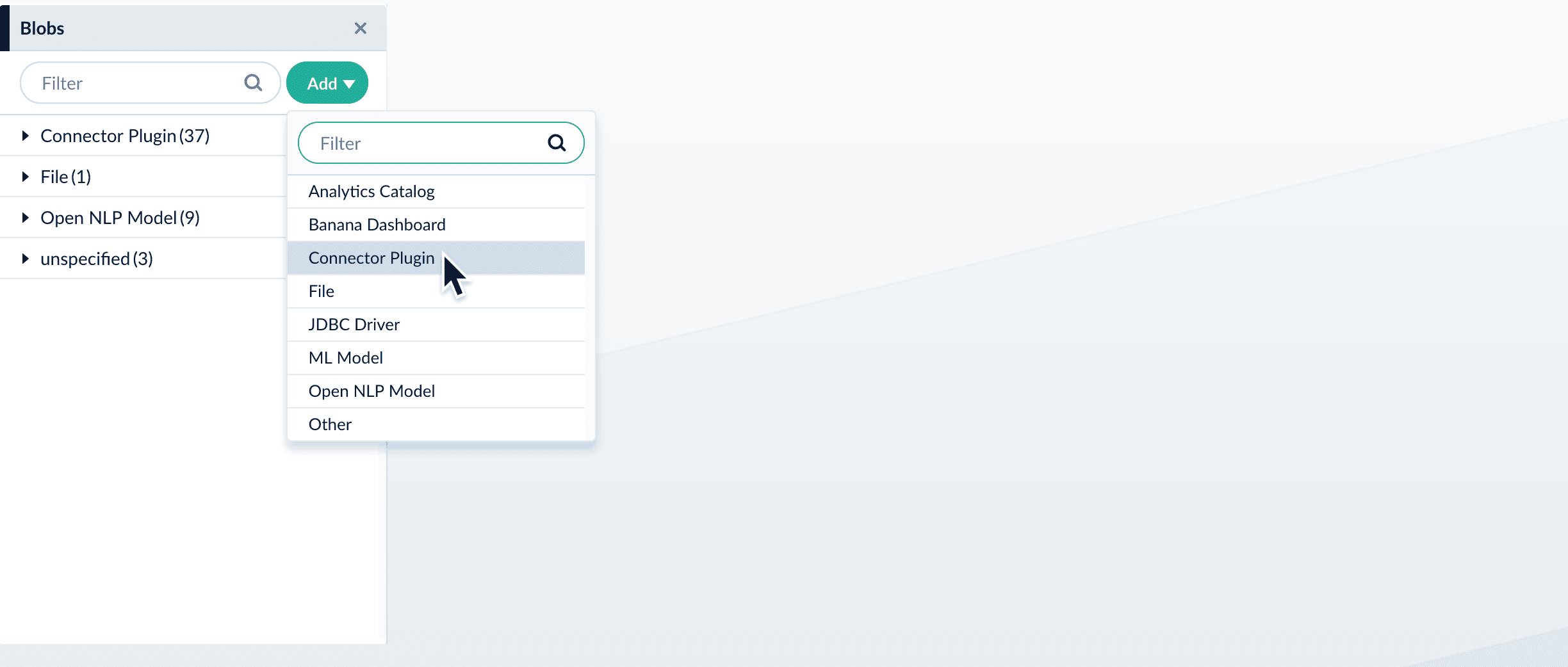
    4. Select **Connector Plugin**.
           <img src="https://mintcdn.com/lucidworks/5yWZ-KtZuBe4Y_Fg/assets/images/4.0/blobs-add-connector.png?fit=max&auto=format&n=5yWZ-KtZuBe4Y_Fg&q=85&s=c021b250a83011d5f0af0dacd2d9a2fb" alt="Add a connector" width="2448" height="1042" data-path="assets/images/4.0/blobs-add-connector.png" />
       The "New Connector Plugin Upload" panel appears.
    5. Click **Choose File** and select the downloaded zip file from your file system.
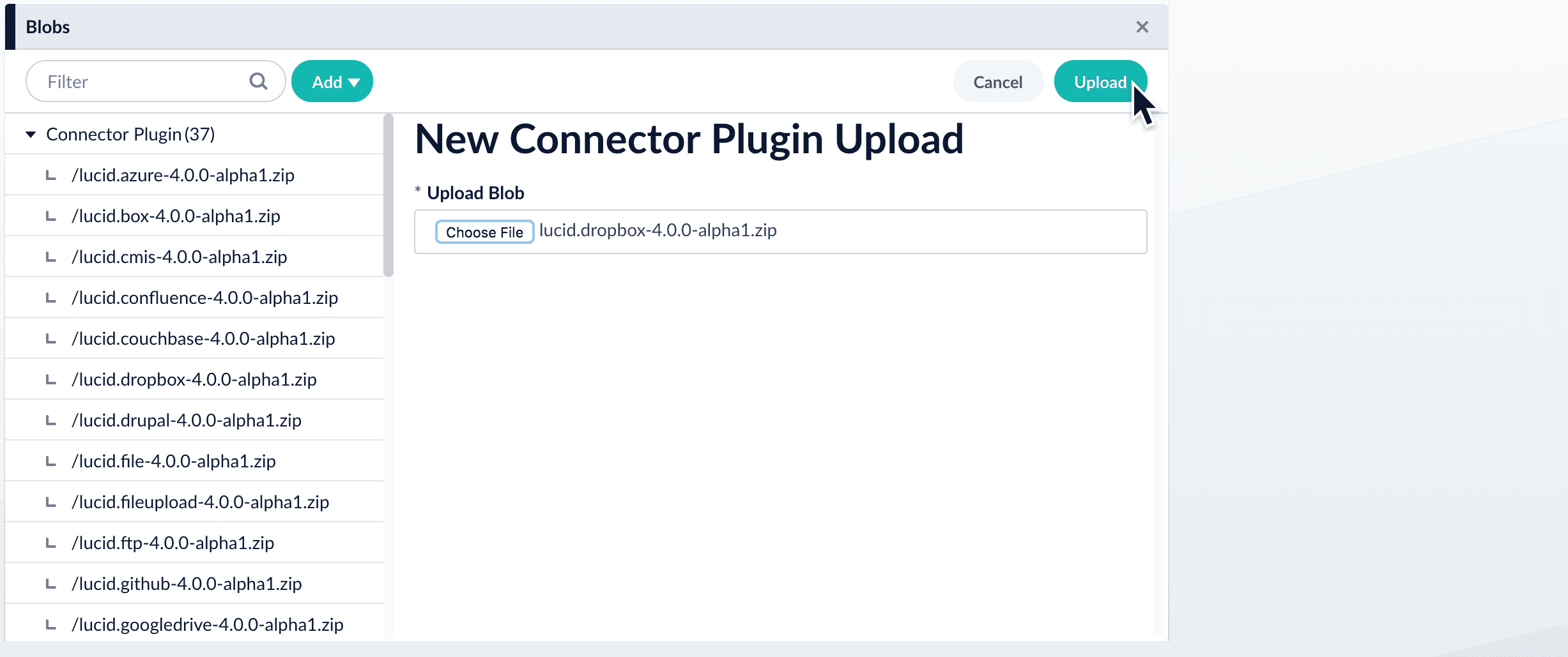
           <img src="https://mintcdn.com/lucidworks/5yWZ-KtZuBe4Y_Fg/assets/images/4.0/blobs-connector-upload.png?fit=max&auto=format&n=5yWZ-KtZuBe4Y_Fg&q=85&s=8088bf62ac29e56ec5d67192a9a5b474" alt="Upload a connector" width="2454" height="1029" data-path="assets/images/4.0/blobs-connector-upload.png" />
    6. Click **Upload**.
       The new connector’s blob manifest appears.
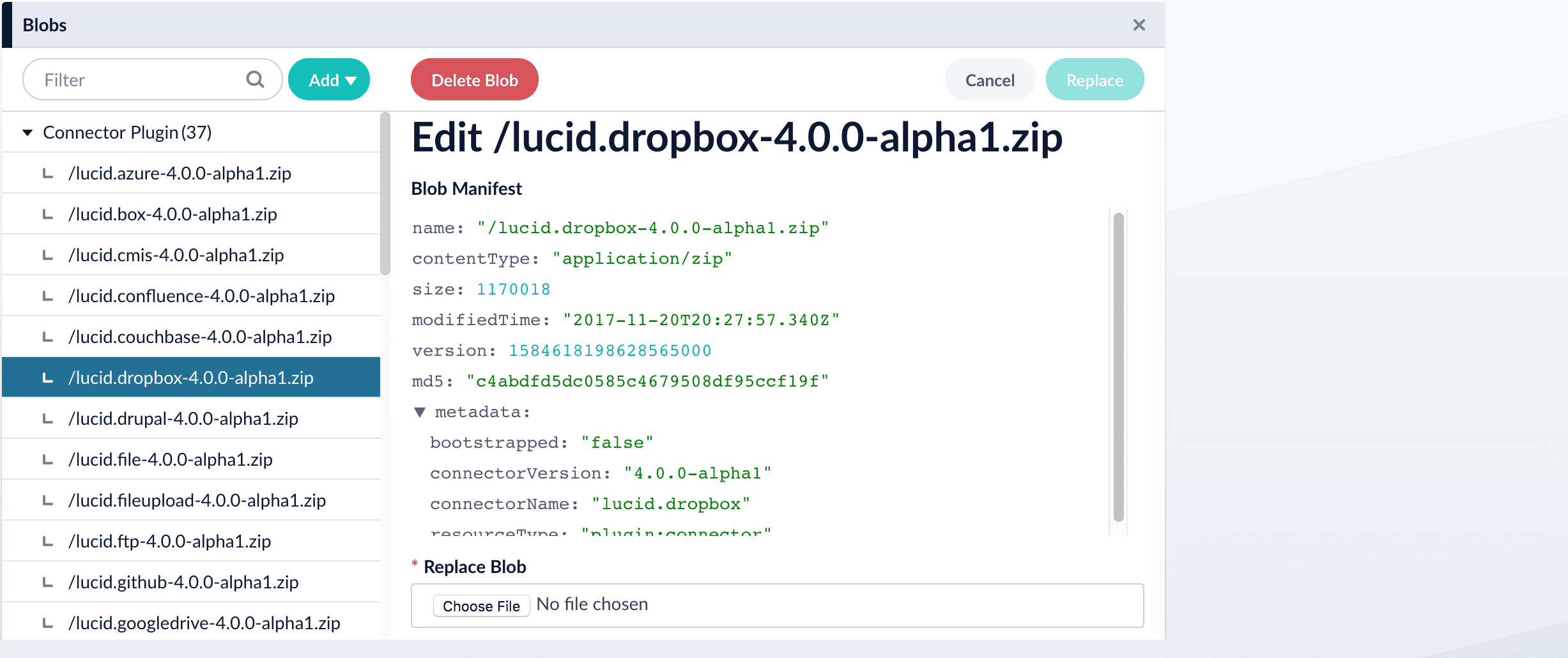
           <img src="https://mintcdn.com/lucidworks/5yWZ-KtZuBe4Y_Fg/assets/images/4.0/blobs-edit.png?fit=max&auto=format&n=5yWZ-KtZuBe4Y_Fg&q=85&s=3e9922a16d5c702f2efa9cb8be63cb0e" alt="Uploaded connector" width="2454" height="1030" data-path="assets/images/4.0/blobs-edit.png" />
       From this screen you can also delete or replace the connector.

    <Warning>
      Wait several minutes for the connector to finish uploading to the blob store before installing the connector using the [Datasources dropdown](#install-a-connector-using-the-datasources-dropdown).
    </Warning>

    ## Install or update a connector using the Connector API

    1. Download the connector zip file from [Download V2 connectors](/docs/fusion-connectors/downloads/v2-connectors-downloads).

       <Note>   Do not expand the archive; Fusion consumes it as-is.</Note>
    2. Upload the connector zip file to Fusion’s plugins.
       Specify a `pluginId` as in this example:
       ```
       curl -H 'content-type:application/zip' -u USERNAME:PASSWORD -X PUT 'https://FUSION_HOST:FUSION_PORT/api/connectors/plugins?id=lucidworks.{pluginId}' --data-binary @{plugin_path}.zip
       ```
       Fusion automatically publishes the event to the cluster, and the listeners perform the connector installation process on each node.
           <Tip>
             If the `pluginId` is identical to an existing one, the old connector will be uninstalled and the new connector will be installed in its place. To get the list of existing plugin IDs, run: `curl -u USERNAME:PASSWORD https://FUSION_HOST:FUSION_PORT/api/connectors/plugins`
           </Tip>
    3. Look in `https://FUSION_HOST:FUSION_PORT/apps/connectors/plugins/` to verify the new connector is installed.

    ## Reinstall a connector

    To reinstall a connector for any reason, first delete the connector then use the preceding steps to install it again. This may take a few minutes to complete depending on how quickly the pods are deleted and recreated.
  </Accordion>

  <Accordion title="Install a Connector - Fusion 4.x">
    In Fusion 4.x, connectors are installed by uploading them to the blob store. You can use any of these methods to install a connector:

    * By installing connectors [as "bootstrap plugins"](#install-a-connector-as-a-bootstrap-plugin), that is, by putting them in the `bootstrap-plugins` directory during initial installation or an upgrade
    * By using the [Blob Store UI](#install-or-update-a-connector-using-the-blob-store-ui) after installation or an upgrade
    * By using the [Blob Store API](#install-or-update-a-connector-using-the-blob-store-api) after installation or an upgrade.

    <Note>During upgrades, the migrator handles some aspects of installing connectors. Depending on the target version and the presence or absence of an Internet connection, there might be manual steps. Installing connectors during upgrades is explained where needed in the upgrade procedures.</Note>

    After you install a connector, you can Configure A New Datasource.

    <Tip>You can view and download all current and previous V2 connector releases at [plugins.lucidworks.com](https://plugins.lucidworks.com/).</Tip>

    ## Install a connector as a bootstrap plugin

    Fusion can install connectors as "bootstrap plugins." All this means is that you put the connector `zip` files in a specific directory named `bootstrap-plugins`, and Fusion installs the connectors the first time it starts during initial installation or an upgrade.

    1. Download the connector zip file from [Fusion 4.x Connector Downloads](/docs/fusion-connectors/downloads/fusion-4-x-connector-downloads).\
       Do not expand the archive; Fusion consumes it as-is. Also, do not start Fusion until instructed to do so by the installation or upgrade instructions.
    2. Under the version-numbered Fusion directory, place the connector in the directory `apps/connectors/bootstrap-plugins/` (on Unix) or `\apps\connectors\bootstrap-plugins\` (on Windows).
    3. Start Fusion when instructed to do so in the installation or upgrade procedure.

    ## Install or update a connector using the Blob Store UI

    1. Download the connector zip file from [Fusion 4.x Connector Downloads](/docs/fusion-connectors/downloads/fusion-4-x-connector-downloads).

       <Note>   Do not expand the archive; Fusion consumes it as-is.</Note>
    2. In the Fusion workspace, navigate to **System** > **Blobs**.
    3. Click **Add**.
    4. Select **Connector Plugin**.

           <img src="https://mintcdn.com/lucidworks/5yWZ-KtZuBe4Y_Fg/assets/images/4.0/blobs-add-connector.png?fit=max&auto=format&n=5yWZ-KtZuBe4Y_Fg&q=85&s=c021b250a83011d5f0af0dacd2d9a2fb" alt="Add a connector" width="2448" height="1042" data-path="assets/images/4.0/blobs-add-connector.png" />

       The "New Connector Plugin Upload" panel appears.
    5. Click **Choose File** and select the downloaded zip file from your file system.

           <img src="https://mintcdn.com/lucidworks/5yWZ-KtZuBe4Y_Fg/assets/images/4.0/blobs-connector-upload.png?fit=max&auto=format&n=5yWZ-KtZuBe4Y_Fg&q=85&s=8088bf62ac29e56ec5d67192a9a5b474" alt="Upload a connector" width="2454" height="1029" data-path="assets/images/4.0/blobs-connector-upload.png" />
    6. Click **Upload**.\
       The new connector’s blob manifest appears.

           <img src="https://mintcdn.com/lucidworks/5yWZ-KtZuBe4Y_Fg/assets/images/4.0/blobs-edit.png?fit=max&auto=format&n=5yWZ-KtZuBe4Y_Fg&q=85&s=3e9922a16d5c702f2efa9cb8be63cb0e" alt="Uploaded connector" width="2454" height="1030" data-path="assets/images/4.0/blobs-edit.png" />

       From this screen you can also delete or replace the connector.

    ## Install or update a connector using the Blob Store API

    1. Download the connector zip file from [Fusion 4.x Connector Downloads](/docs/fusion-connectors/downloads/fusion-4-x-connector-downloads).

       <Note>   Do not expand the archive; Fusion consumes it as-is.</Note>
    2. Upload the connector zip file to Fusion’s blob store.\
       Specify an arbitrary blob ID, and a `resourceType` value of `plugin:connector`, as in this example:

       ```
       curl -H 'content-type:application/zip' -X PUT 'localhost:8764/api/blobs/myplugin?resourceType=plugin:connector' --data-binary @myplugin.zip
       ```

       Fusion automatically publishes the event to the cluster, and the listeners perform the connector installation process on each node.

       <Tip>   If the blob ID is identical to an existing one, the old connector will be uninstalled and the new connector will installed in its place. To get the list of existing blob IDs, run: `curl -u USERNAME:PASSWORD localhost:8764/api/blobs`</Tip>
    3. Look in `https://FUSION_HOST:FUSION_PORT/apps/connectors/plugins/` to verify the new connector is installed.

    ## Reinstall a connector

    To reinstall a connector for any reason, first delete the connector then use the preceding steps to install it again. This may take a few minutes to complete depending on how quickly the pods are deleted and recreated.
  </Accordion>
</AccordionGroup>

<Tip>
  **Important**

  Check the connector reference page linked in the table for Fusion compatibility information.
</Tip>