> ## Documentation Index
> Fetch the complete documentation index at: https://doc.lucidworks.com/llms.txt
> Use this file to discover all available pages before exploring further.

# Call Pipeline Stage

export const schema = {
  "type": "object",
  "title": "Call Pipeline",
  "description": "Calls another Fusion query pipeline from within the current pipeline, enabling modular and reusable pipeline designs.",
  "required": ["pipelineToRun"],
  "properties": {
    "skip": {
      "type": "boolean",
      "title": "Skip This Stage",
      "description": "Controls whether this stage executes during pipeline processing at runtime. When set to `true`, the stage is completely bypassed and documents pass through unchanged to the next stage. Useful for A/B testing, gradual rollouts, or temporarily disabling a stage without removing it from the pipeline.",
      "default": false,
      "hints": ["advanced"]
    },
    "label": {
      "type": "string",
      "title": "Label",
      "description": "Human-readable identifier displayed in the Fusion Admin UI, monitoring dashboards, and log messages. Use descriptive labels like `Parse Product PDFs` to aid debugging and team collaboration. Labels appear in performance metrics and error reports, making it easier to identify which stage failed.",
      "hints": ["advanced"],
      "maxLength": 255
    },
    "condition": {
      "type": "string",
      "title": "Condition",
      "description": "JavaScript expression evaluated at runtime on each document to conditionally execute this stage. The expression must return `true` to execute or `false` to skip. Access document fields using `doc.getFieldValue('fieldName')` and request parameters via `request.getFirstParam('paramName')`. For example, `doc.getFieldValue('type') === 'premium'` executes this stage only for premium content.",
      "hints": ["code", "code/javascript", "advanced"]
    },
    "legacy": {
      "type": "boolean",
      "title": "Legacy",
      "description": "When `true`, this stage operates in legacy mode only.",
      "hints": ["readonly", "hidden"]
    },
    "pipelineToRun": {
      "type": "string",
      "title": "Query Pipeline to Call"
    },
    "collection": {
      "type": "string",
      "title": "Collection to Query",
      "description": "Specifies the Solr collection the called pipeline operates on. Must exactly match an existing collection name."
    },
    "solrHandler": {
      "type": "string",
      "title": "Solr Handler to Use"
    }
  },
  "category": "Other",
  "categoryPriority": 1,
  "unsafe": false
};

export const SchemaParamFields = ({schema}) => {
  const sanitize = str => {
    if (typeof str !== "string") return str;
    return str.replace(/^"(.*)"$/s, "$1").replace(/\\/g, "").replace(/"/g, "'");
  };
  const renderMd = str => {
    const s = sanitize(str);
    const text = (/[.!?]\)*$/).test(s) ? s : `${s}.`;
    return text.split(/(\*\*[^*]+\*\*|_[^_]+_|`[^`]+`)/g).map((part, i) => {
      if (part.startsWith("**")) return <strong key={i}>{part.slice(2, -2)}</strong>;
      if (part.startsWith("_")) return <em key={i}>{part.slice(1, -1)}</em>;
      if (part.startsWith("`")) return <code key={i}>{part.slice(1, -1)}</code>;
      return part;
    });
  };
  const {description, properties = {}, required: requiredProps = []} = schema;
  const visibleProps = useMemo(() => Object.entries(properties).filter(([, prop]) => !prop.hints?.includes("hidden")), [properties]);
  const renderProp = ([name, prop]) => {
    const isRequired = requiredProps.includes(name);
    const hasDefault = prop.default !== undefined;
    const rawDefault = prop.default;
    const hints = prop.hints || [];
    const isComplexDefault = hasDefault && (typeof rawDefault === "object" || typeof rawDefault === "string" && (rawDefault.length > 20 || rawDefault.includes('"')));
    const postBadges = [];
    if (prop.title) {
      postBadges.push(<><span className="text-stone-400 dark:text-stone-500">API property: </span>{name}</>);
    }
    const constraints = [];
    if (prop.minimum !== undefined && prop.maximum !== undefined) {
      constraints.push(`Range: ${prop.minimum} – ${prop.maximum}`);
    } else if (prop.minimum !== undefined) {
      constraints.push(`Min: ${prop.minimum}`);
    } else if (prop.maximum !== undefined) {
      constraints.push(`Max: ${prop.maximum}`);
    }
    if (prop.minLength !== undefined && prop.maxLength !== undefined) {
      constraints.push(`Length: ${prop.minLength} – ${prop.maxLength}`);
    } else if (prop.minLength !== undefined) {
      constraints.push(`Min length: ${prop.minLength}`);
    } else if (prop.maxLength !== undefined) {
      constraints.push(`Max length: ${prop.maxLength}`);
    }
    const fieldProps = {
      key: name,
      body: prop.title || name,
      type: prop.type,
      ...postBadges.length > 0 && ({
        post: postBadges
      }),
      ...isRequired && ({
        required: true
      }),
      ...!isComplexDefault && hasDefault ? {
        default: sanitize(String(rawDefault))
      } : {}
    };
    const isObject = prop.type === "object" && prop.properties;
    const isArrayOfObjects = prop.type === "array" && prop.items?.type === "object" && prop.items.properties;
    return <ParamField {...fieldProps}>
        {prop.description && <p>{renderMd(prop.description)}</p>}

        {prop.enum && <p>
            Allowed values: 
            {prop.enum.map((v, i) => <>{i > 0 && ", "}<code key={i}>{String(v)}</code></>)}
          </p>}

        {constraints.length > 0 && <p className="text-stone-500 dark:text-stone-400 text-sm">
            {constraints.join(" · ")}
          </p>}

        {isComplexDefault && <div className="flex">
            <p>
              <strong>Default:</strong>
            </p>
            <pre className="!my-0">
              <code>
                {JSON.stringify(rawDefault, null, 2)}
              </code>
            </pre>
          </div>}

        {isArrayOfObjects && <Expandable title="item properties">
            <SchemaParamFields schema={{
      properties: prop.items.properties,
      required: prop.items.required
    }} />
          </Expandable>}

        {isObject && <Expandable title="properties">
            <SchemaParamFields schema={{
      properties: prop.properties,
      required: prop.required
    }} />
          </Expandable>}
      </ParamField>;
  };
  return <div>
      {description && <p>{renderMd(description)}</p>}

      {visibleProps.map(renderProp)}
    </div>;
};

export const LwTemplate = ({title = "Key questions to get you started", icon = "sparkles", cta = "Powered by Agent Studio", linkHref = "https://lucidworks.com/demo/?utm_source=docs&utm_medium=referral&utm_campaign=docs_cta_ai"}) => {
  const [isLoaded, setIsLoaded] = useState(false);
  useEffect(() => {
    const timer = setTimeout(() => {
      setIsLoaded(true);
    }, 500);
    return () => clearTimeout(timer);
  }, []);
  return <div className="lw-template-container">
      <Card title={title} icon={icon}>
        {isLoaded && <span dangerouslySetInnerHTML={{
    __html: `<lw-template id="a029c1a9-28be-427e-b0e1-5d918920246a"></lw-template
            >`
  }} />}
        <Link href={linkHref} className="agent-studio-link text-left text-gray-600 gap-2 dark:text-gray-400 text-sm font-medium flex flex-row items-center hover:text-primary dark:hover:text-primary-light group-hover:text-primary group-hover:dark:text-primary-light">Powered by Lucidworks Agent Studio</Link>
      </Card>
    </div>;
};

[localhost link]: http://localhost:3000/docs/5/fusion/reference/config-ref/pipeline-stages/query-stages/call-pipeline-query-stage

[mintlify link]: https://doc.lucidworks.com/docs/5/fusion/reference/config-ref/pipeline-stages/query-stages/call-pipeline-query-stage

[old doc.lw link]: https://doc.lucidworks.com/fusion/5.9/261

The Call Pipeline query stage calls another query pipeline.
You can use this stage to reuse pipeline logic across multiple pipelines.
You can also use it to check for null results, look up related queries, perform fallback queries, and so on.

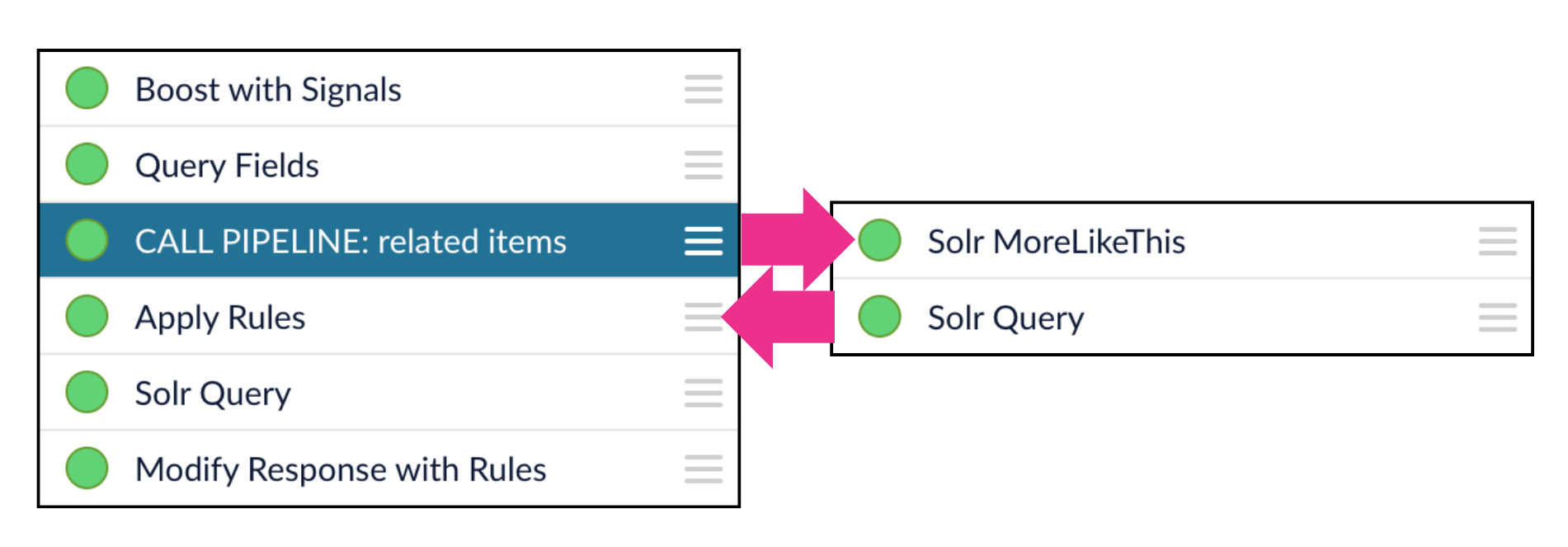
In the context of a query pipeline, the Call Pipeline stage creates a "subroutine" that pauses the main pipeline while the called pipeline completes its operations.
The called pipeline returns its output to the pipeline that called it, as input for the next pipeline stage.
Note that this is different than Call Pipeline stages in index pipelines, where the called pipeline does *not* return its output to the pipeline that called it.

In the example illustrated below, a Call Pipeline stage invokes a query pipeline that looks up related items and returns those results to the main pipeline as the input to the next pipeline stage:

<img src="https://mintcdn.com/lucidworks/pcVooZE8fTjtTbXE/assets/images/diagrams/call-pipeline-query1.png?fit=max&auto=format&n=pcVooZE8fTjtTbXE&q=85&s=2761d4d4799c919c9deaaef5173d6912" alt="A Call Pipeline stage in a query pipeline" width="1901" height="663" data-path="assets/images/diagrams/call-pipeline-query1.png" />

The main pipeline then continues processing the query.

<Tip>
  Use a naming convention for your pipelines that lets you easily differentiate between your main pipelines and the ones you are using as call pipelines.
  For example, you can add a suffix like `_cpl` to differentiate your call pipelines from other pipelines.
</Tip>

<Card title="Using Call Pipelines" class="note-image" href="https://academy.lucidworks.com/using-call-pipelines" cta="Take this course on the LucidAcademy." icon="graduation-cap" iconType="duotone">
  The quick learning for **Using Call Pipelines** focuses on how the Call Pipeline stage works differently in index pipelines versus query pipelines and how to use it in both.
</Card>

<Card title="Call Pipelines" class="note-image" href="https://academy.lucidworks.com/call-pipelines" cta="Take this course on the LucidAcademy." icon="graduation-cap" iconType="duotone">
  The course for **Call Pipelines** focuses on how to implement reusable pipelines and call them from other pipelines.
</Card>

<LwTemplate />

## Query pipeline stage condition examples

Stages can be triggered conditionally when a script in the **Condition** field evaluates to true.
Some examples are shown below.

Run this stage only for mobile clients:

```js wrap  theme={"dark"}
params.deviceType === "mobile"
```

Run this stage when debugging is enabled:

```js wrap  theme={"dark"}
params.debug === "true"
```

Run this stage when the query includes a specific term:

```js wrap  theme={"dark"}
params.q && params.q.includes("sale")
```

Run this stage when multiple conditions are met:

```js wrap  theme={"dark"}
request.hasParam("fusion-user-name") && request.getFirstParam("fusion-user-name").equals("SuperUser");
!request.hasParam("isFusionPluginQuery")
```

The first condition checks that the request parameter "fusion-user-name" is present and has the value "SuperUser".
The second condition checks that the request parameter "isFusionPluginQuery" is not present.

## Configuration

<Tip>
  When entering configuration values in the UI, use *unescaped* characters, such as `\t` for the tab character. When entering configuration values in the API, use *escaped* characters, such as `\\t` for the tab character.
</Tip>

<SchemaParamFields schema={schema} />
