> ## Documentation Index
> Fetch the complete documentation index at: https://doc.lucidworks.com/llms.txt
> Use this file to discover all available pages before exploring further.
# JDBC Index Stage
export const schema = {
"type": "object",
"title": "JDBC Lookup",
"description": "Connects to a database via JDBC, executes a parameterized query, and injects the result values into the document or pipeline context. Use this stage to enrich documents with data from relational databases at index time.",
"required": ["driver", "connection", "username", "password", "preparedStatement"],
"properties": {
"skip": {
"type": "boolean",
"title": "Skip This Stage",
"description": "Controls whether this stage executes during pipeline processing at runtime. When set to `true`, the stage is completely bypassed and documents pass through unchanged to the next stage. Useful for A/B testing, gradual rollouts, or temporarily disabling a stage without removing it from the pipeline.",
"default": false,
"hints": ["advanced"]
},
"label": {
"type": "string",
"title": "Label",
"description": "Human-readable identifier displayed in the Fusion Admin UI, monitoring dashboards, and log messages. Use descriptive labels like `Parse Product PDFs` to aid debugging and team collaboration. Labels appear in performance metrics and error reports, making it easier to identify which stage failed.",
"hints": ["advanced"],
"maxLength": 255
},
"condition": {
"type": "string",
"title": "Condition",
"description": "JavaScript expression evaluated at runtime on each document to conditionally execute this stage. The expression must return `true` to execute or `false` to skip. Access document fields using `doc.getFieldValue('fieldName')` and request parameters via `request.getFirstParam('paramName')`. For example, `doc.getFieldValue('type') === 'premium'` executes this stage only for premium content.",
"hints": ["code", "code/javascript", "advanced"]
},
"driver": {
"type": "string",
"title": "JDBC Driver",
"description": "Specifies the fully qualified Java class name of the JDBC driver to use for the database connection, such as `com.mysql.cj.jdbc.Driver` for MySQL."
},
"connection": {
"type": "string",
"title": "Connection URI",
"description": "Specifies the JDBC connection string for the target database, including host, port, and database name. For example, `jdbc:postgresql://localhost:5432/mydb`."
},
"username": {
"type": "string",
"title": "Username",
"description": "Specifies the username for authenticating the JDBC database connection."
},
"password": {
"type": "string",
"title": "Password",
"description": "Specifies the password for authenticating the JDBC database connection.",
"hints": ["secret"]
},
"preparedStatement": {
"type": "string",
"title": "SQL Prepared Statement",
"description": "Specifies the SQL prepared statement to execute, with `?` placeholders for bound parameters. For example, `SELECT category FROM products WHERE id = ?` looks up a product by ID.",
"hints": ["lengthy"]
},
"rows": {
"type": "integer",
"title": "Rows",
"description": "Sets the maximum number of rows returned by the query. Use `-1` to return all rows. Use with caution for queries that may return large result sets.",
"default": -1,
"hints": ["advanced"]
},
"fetchSize": {
"type": "integer",
"title": "Fetch Size",
"description": "Sets the JDBC fetch size hint for the database driver, controlling how many rows are retrieved per network round-trip. Use `-1` to accept the driver's default fetch size.",
"default": -1,
"hints": ["advanced"]
},
"join": {
"type": "boolean",
"title": "Join With Document",
"description": "Controls how query results are added to the document. When `true`, results are added using the configured prefix and row ID as field name components. When `false`, results are stored in the pipeline context.",
"default": true,
"hints": ["advanced"]
},
"preparedStatementKeys": {
"type": "array",
"title": "Prepared Statement Keys",
"description": "Specifies the pipeline context keys used to supply values for the prepared statement's `?` placeholders. Keys are mapped positionally to the placeholders in the order listed.",
"hints": ["advanced"],
"items": {
"type": "string"
}
},
"prefix": {
"type": "string",
"title": "Result Prefix Key",
"description": "Sets a string prefix applied to field names derived from query result column names. For example, `db_` produces fields like `db_category` and `db_price`.",
"hints": ["advanced"]
},
"validationQueryTimeout": {
"type": "integer",
"title": "Validation Query Timeout",
"description": "Sets the maximum time in seconds to wait for a connection validation query response. Connections that fail to validate within this timeout are considered invalid and retried or failed.",
"default": -1,
"hints": ["advanced"]
}
},
"category": "Document Filtering and Enrichment",
"categoryPriority": 8,
"unsafe": false
};
export const SchemaParamFields = ({schema}) => {
const sanitize = str => {
if (typeof str !== "string") return str;
return str.replace(/^"(.*)"$/s, "$1").replace(/\\/g, "").replace(/"/g, "'");
};
const renderMd = str => {
const s = sanitize(str);
const text = (/[.!?]\)*$/).test(s) ? s : `${s}.`;
return text.split(/(\*\*[^*]+\*\*|_[^_]+_|`[^`]+`)/g).map((part, i) => {
if (part.startsWith("**")) return {part.slice(2, -2)};
if (part.startsWith("_")) return {part.slice(1, -1)};
if (part.startsWith("`")) return {part.slice(1, -1)};
return part;
});
};
const {description, properties = {}, required: requiredProps = []} = schema;
const visibleProps = useMemo(() => Object.entries(properties).filter(([, prop]) => !prop.hints?.includes("hidden")), [properties]);
const renderProp = ([name, prop]) => {
const isRequired = requiredProps.includes(name);
const hasDefault = prop.default !== undefined;
const rawDefault = prop.default;
const hints = prop.hints || [];
const isComplexDefault = hasDefault && (typeof rawDefault === "object" || typeof rawDefault === "string" && (rawDefault.length > 20 || rawDefault.includes('"')));
const postBadges = [];
if (prop.title) {
postBadges.push(<>API property: {name});
}
const constraints = [];
if (prop.minimum !== undefined && prop.maximum !== undefined) {
constraints.push(`Range: ${prop.minimum} – ${prop.maximum}`);
} else if (prop.minimum !== undefined) {
constraints.push(`Min: ${prop.minimum}`);
} else if (prop.maximum !== undefined) {
constraints.push(`Max: ${prop.maximum}`);
}
if (prop.minLength !== undefined && prop.maxLength !== undefined) {
constraints.push(`Length: ${prop.minLength} – ${prop.maxLength}`);
} else if (prop.minLength !== undefined) {
constraints.push(`Min length: ${prop.minLength}`);
} else if (prop.maxLength !== undefined) {
constraints.push(`Max length: ${prop.maxLength}`);
}
const fieldProps = {
key: name,
body: prop.title || name,
type: prop.type,
...postBadges.length > 0 && ({
post: postBadges
}),
...isRequired && ({
required: true
}),
...!isComplexDefault && hasDefault ? {
default: sanitize(String(rawDefault))
} : {}
};
const isObject = prop.type === "object" && prop.properties;
const isArrayOfObjects = prop.type === "array" && prop.items?.type === "object" && prop.items.properties;
return
{prop.description &&
{isLoaded && `
}} />}
Powered by Lucidworks Agent Studio
;
};
[localhost link]: http://localhost:3000/docs/5/fusion/reference/config-ref/pipeline-stages/index-stages/jdbc-index-stage
[mintlify link]: https://doc.lucidworks.com/docs/5/fusion/reference/config-ref/pipeline-stages/index-stages/jdbc-index-stage
[old doc.lw link]: https://doc.lucidworks.com/fusion/5.9/215
The JDBC Index Stage is used to connect to a database, lookup one or more values, and then inject them into the context.
The properties for setting stage are identical to the [JDBC Query Stage](/docs/5/fusion/reference/config-ref/pipeline-stages/query-stages/jdbc-query-stage), except for the "rows" property, which defaults to **-1** for the index stage (which returns all rows in the database), and defaults to **10** returned rows for the query stage.
You must first upload a JDBC Driver to Fusion.
The JDBC V2 connector is supported, and fetches documents from a relational database via SQL queries. Under the hood, this connector implements the Solr [DataImportHandler (DIH)](https://wiki.apache.org/solr/DataImportHandler) plugin.
Fusion stores JDBC drivers in the blob store. You can upload a driver using the Fusion UI or the Blob Store API.
## How to upload a JDBC driver using the Fusion UI
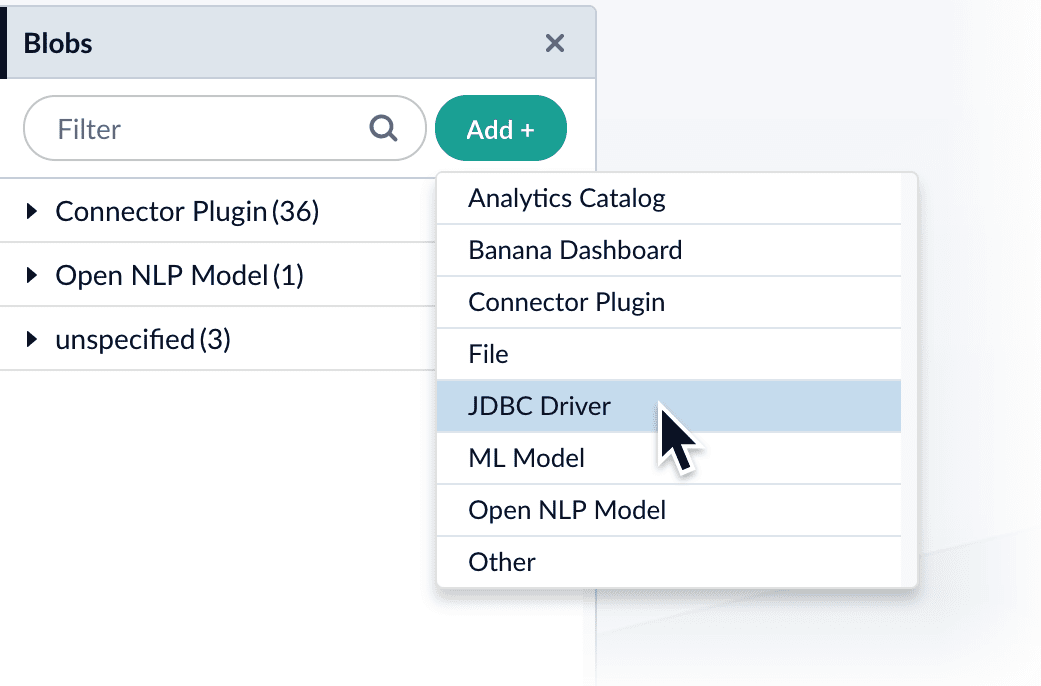
1. In the Fusion UI, navigate to **System** > **Blobs**.
2. Click **Add**.
3. Select **JDBC Driver**.\
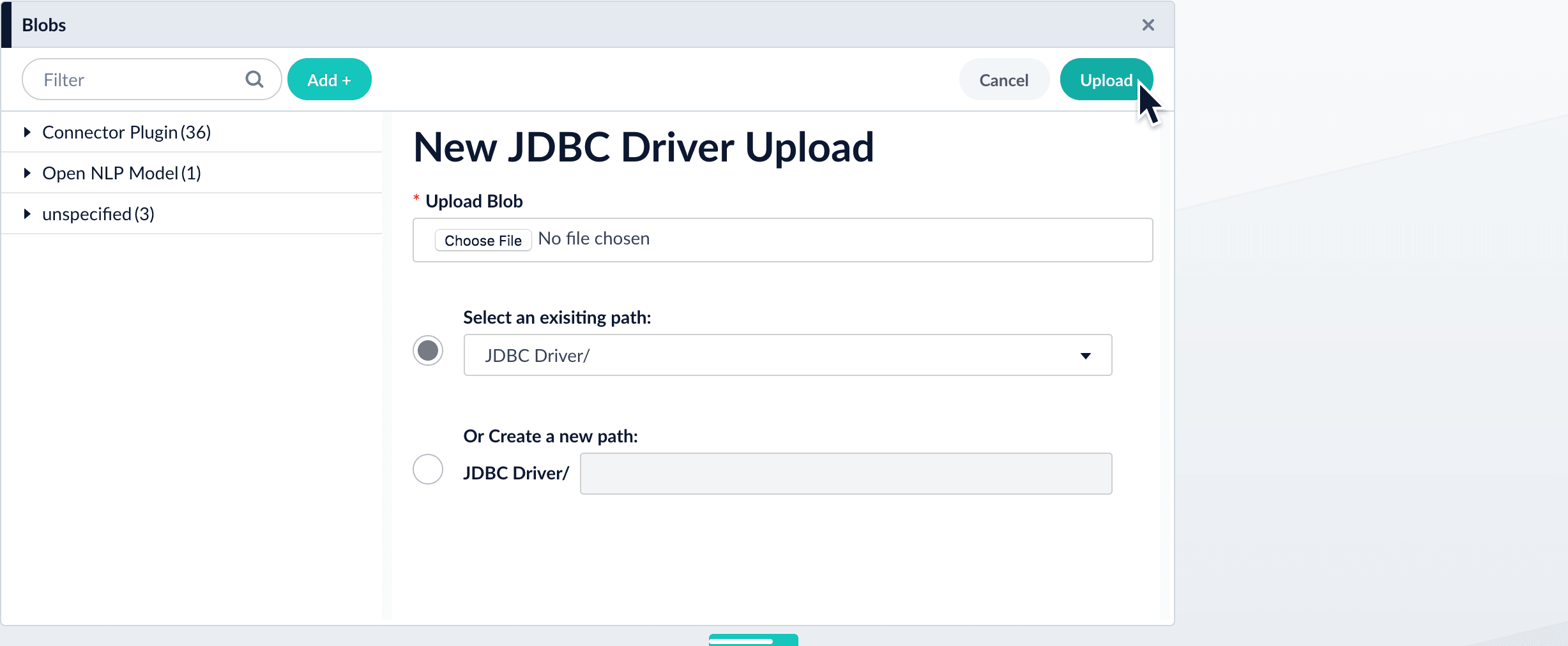
The "New 'JDBC Driver' Upload" panel appears.
4. Click **Choose File** and select the .jar file from your file system.
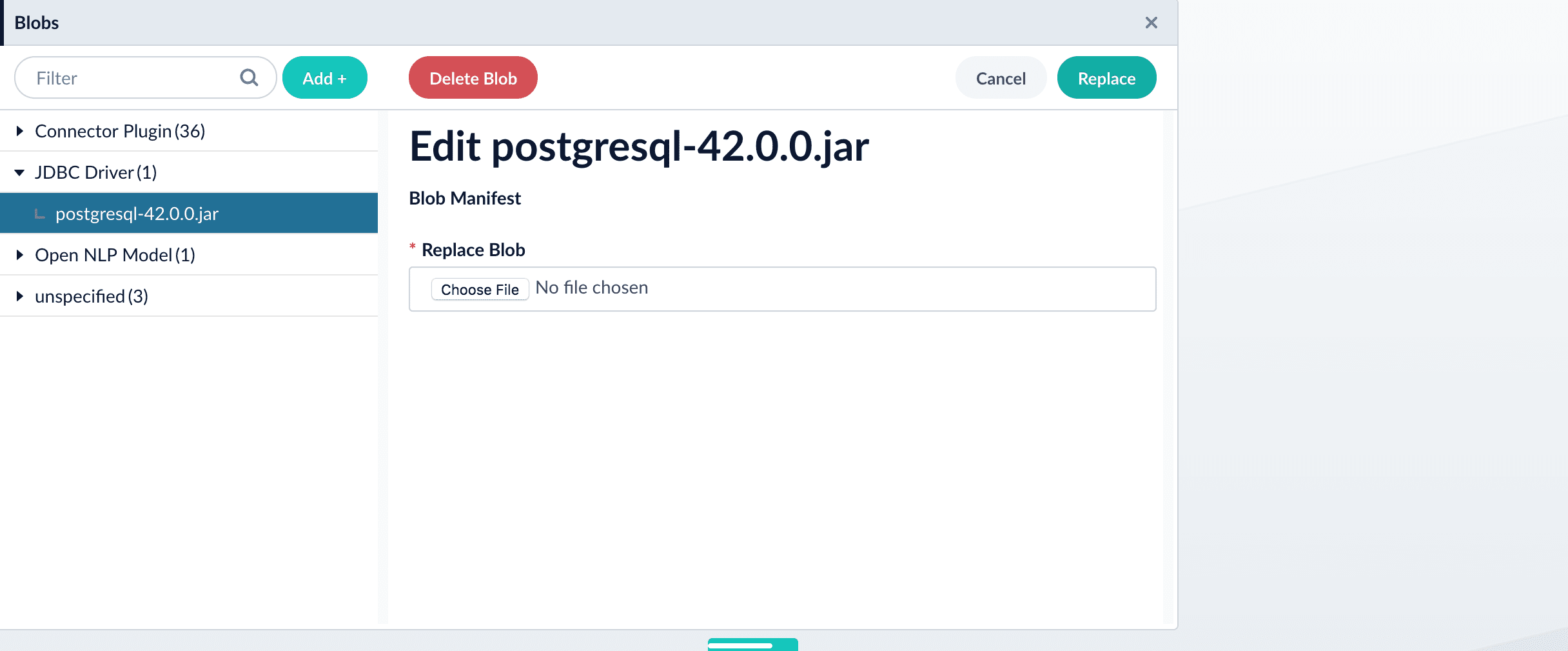
5. Click **Upload**.\
The new driver’s blob manifest appears.
From this screen you can also delete or replace the driver.
## How to install a JDBC driver using the API
1. Upload the JAR file to Fusion’s blob store using the [`/blobs/{id}` endpoint](/api-reference/blobs/upload-a-blob).
Specify an arbitrary blob ID, and a `resourceType` value of `plugin:connector`, as in this example:
```bash theme={"dark"}
curl -u USERNAME:PASSWORD -H "content-type:application/java-archive" -H "content-length:707261" -X PUT --data-binary @postgresql-42.0.0.jar http://localhost:8764/api/blobs/mydriver?resourceType=driver:jdbc
```
Success response:
```json theme={"dark"}
{
"name" : "mydriver",
"contentType" : "application/java-archive",
"size" : 707261,
"modifiedTime" : "2017-06-09T19:00:48.919Z",
"version" : 0,
"md5" : "c67163ca764bfe632f28229c142131b5",
"metadata" : {
"subtype" : "driver:jdbc",
"drivers" : "org.postgresql.Driver",
"resourceType" : "driver:jdbc"
}
}
```
Fusion automatically publishes the event to the cluster, and the listeners perform the driver installation process on each node.
If the blob ID is identical to an existing one, the old driver will be uninstalled and the new driver will installed in its place. To get the list of existing blob IDs, run: `curl -u USERNAME:PASSWORD https://FUSION_HOST:FUSION_PORT/api/blobs`
2. To verify the uploaded driver, run:
```bash theme={"dark"}
curl -u USERNAME:PASSWORD https://FUSION_HOST:FUSION_PORT/api/blobs/BLOB_ID/manifest
```
Where the `BLOB_ID` is the name specified during upload, such as "mydriver" above. A success response looks like this:
```json theme={"dark"}
{
"name" : "mydriver",
"contentType" : "application/java-archive",
"size" : 707261,
"modifiedTime" : "2017-06-09T19:05:17.897Z",
"version" : 1569755095787110400,
"md5" : "c67163ca764bfe632f28229c142131b5",
"metadata" : {
"subtype" : "driver:jdbc",
"drivers" : "org.postgresql.Driver",
"resourceType" : "driver:jdbc"
}
}
```
## Example
An example of a JDBC Index Stage setup
*Upload stage config via POST to Fusion REST API endpoint `api/index-stages/instances`*
```bash wrap theme={"dark"}
curl -u USERNAME:PASSWORD -X POST -H "Content-Type: application/json" -d '{"id": "jdbc-index-test","type":"jdbc-index-lookup","driver":"postgresql-9.3-1101-jdbc4.jar","connection":"jdbc:postgresql:database","username":"user","password":"password1","preparedStatement":"select ID as id from DATABASE;"}' http://FUSION_HOST:FUSION_PORT/api/index-stages/instances
```
*Response*
```json wrap theme={"dark"}
{
"type" : "jdbc-index-lookup",
"id" : "jdbc-index-test",
"driver" : "postgresql-9.3-1101-jdbc4.jar",
"connection" : "jdbc:postgresql:database",
"username" : "user",
"password" : "password1",
"preparedStatement" : "select ID as id from DATABASE;",
"fetchSize" : -1,
"join" : true,
"rows" : -1,
"skip" : false,
"label" : "jdbc-index-lookup",
"type" : "jdbc-index-lookup"
}
```
## Configuration
When entering configuration values in the UI, use *unescaped* characters, such as `\t` for the tab character. When entering configuration values in the API, use *escaped* characters, such as `\\t` for the tab character.
 4. Click **Choose File** and select the .jar file from your file system.
 5. Click **Upload**.\
The new driver’s blob manifest appears.
5. Click **Upload**.\
The new driver’s blob manifest appears.
 From this screen you can also delete or replace the driver.
## How to install a JDBC driver using the API
1. Upload the JAR file to Fusion’s blob store using the [`/blobs/{id}` endpoint](/api-reference/blobs/upload-a-blob).
Specify an arbitrary blob ID, and a `resourceType` value of `plugin:connector`, as in this example:
```bash theme={"dark"}
curl -u USERNAME:PASSWORD -H "content-type:application/java-archive" -H "content-length:707261" -X PUT --data-binary @postgresql-42.0.0.jar http://localhost:8764/api/blobs/mydriver?resourceType=driver:jdbc
```
Success response:
```json theme={"dark"}
{
"name" : "mydriver",
"contentType" : "application/java-archive",
"size" : 707261,
"modifiedTime" : "2017-06-09T19:00:48.919Z",
"version" : 0,
"md5" : "c67163ca764bfe632f28229c142131b5",
"metadata" : {
"subtype" : "driver:jdbc",
"drivers" : "org.postgresql.Driver",
"resourceType" : "driver:jdbc"
}
}
```
Fusion automatically publishes the event to the cluster, and the listeners perform the driver installation process on each node.
From this screen you can also delete or replace the driver.
## How to install a JDBC driver using the API
1. Upload the JAR file to Fusion’s blob store using the [`/blobs/{id}` endpoint](/api-reference/blobs/upload-a-blob).
Specify an arbitrary blob ID, and a `resourceType` value of `plugin:connector`, as in this example:
```bash theme={"dark"}
curl -u USERNAME:PASSWORD -H "content-type:application/java-archive" -H "content-length:707261" -X PUT --data-binary @postgresql-42.0.0.jar http://localhost:8764/api/blobs/mydriver?resourceType=driver:jdbc
```
Success response:
```json theme={"dark"}
{
"name" : "mydriver",
"contentType" : "application/java-archive",
"size" : 707261,
"modifiedTime" : "2017-06-09T19:00:48.919Z",
"version" : 0,
"md5" : "c67163ca764bfe632f28229c142131b5",
"metadata" : {
"subtype" : "driver:jdbc",
"drivers" : "org.postgresql.Driver",
"resourceType" : "driver:jdbc"
}
}
```
Fusion automatically publishes the event to the cluster, and the listeners perform the driver installation process on each node.