> ## Documentation Index
> Fetch the complete documentation index at: https://doc.lucidworks.com/llms.txt
> Use this file to discover all available pages before exploring further.

# Apache Tika Container parser stage

export const schema = {
  "type": "object",
  "title": "Apache Tika Container Parser",
  "description": "Parse documents using the tika-server container 'only when async-parsing is configured.' This parser is a wrapper around the tika-server REST API. It sends the document to the tika-server container and receives the parsed content.",
  "required": ["type"],
  "properties": {
    "id": {
      "type": "string",
      "title": "Parser ID",
      "default": "2b065379-53db-4008-90d0-c3df8cc4f755"
    },
    "label": {
      "type": "string",
      "title": "Label",
      "description": "A label for this Parser Stage",
      "maxLength": 255
    },
    "enabled": {
      "type": "boolean",
      "title": "Enable this Parser Stage",
      "default": true
    },
    "mediaTypes": {
      "type": "array",
      "title": "Media Types to match",
      "description": "Documents with a media type on this list will be matched by this parser stage. See inheritMediaTypes / use default media types for more.",
      "items": {
        "type": "string",
        "pattern": "^[^\\/]+\\/[^\\/]+$",
        "format": "rfc2646"
      }
    },
    "inheritMediaTypes": {
      "type": "boolean",
      "title": "Match default media types in this Parser Stage",
      "description": "Each parser stage has a built-in list of media types it handles by default. If this setting is true, that list will be used along with any optional additional types provided in the mediaTypes list. If this setting is false, this stage will only be selected for media types in the mediaTypes list, and the mediaTypes list becomes a mandatory property which must have at least one valid media type.",
      "default": true
    },
    "ignoredMediaTypes": {
      "type": "array",
      "title": "Media Types to ignore",
      "description": "Documents with a media type on this list will be not be processed by this parser stage.",
      "items": {
        "type": "string",
        "pattern": "^[^\\/]+\\/[^\\/]+$",
        "format": "rfc2646"
      }
    },
    "pathPatterns": {
      "type": "array",
      "title": "File names to parse",
      "description": "Specify a file name or pattern that must be matched for this parser stage to run. Forward slashes (\"/\") are used to join names of files inside archives with the archive name.",
      "items": {
        "type": "object",
        "properties": {
          "syntax": {
            "type": "string",
            "title": "Pattern type",
            "description": "glob uses bash shell-style wildcards; regex uses Java (PCRE-style) regex",
            "enum": ["glob", "regex"],
            "default": "glob"
          },
          "pattern": {
            "type": "string",
            "title": "File name or pattern",
            "description": "e.g.: \"z.txt\" or \"*.md\" or \"/a/*/b/f.txt\" for glob; \"z.txt$\" or \".*\\.txt$\" or \"^/a/[^\\/]*/b/f.txt$\" for regex"
          }
        }
      }
    },
    "errorHandling": {
      "type": "string",
      "title": "Error Handling",
      "enum": ["ignore", "log", "fail", "mark"],
      "default": "mark"
    },
    "outputFieldPrefix": {
      "type": "string",
      "title": "Prefix parsed fields with",
      "description": "Fields extracted by this parser will be prefixed with this string. The remainder of the field name will be as detected in the stream",
      "maxLength": 20,
      "pattern": "^$|^[A-Za-z_][A-Za-z0-9_\\-\\.]+$"
    },
    "includeImages": {
      "type": "boolean",
      "title": "Include images",
      "default": false
    },
    "excludeContentTypes": {
      "type": "array",
      "title": "Content types to exclude",
      "description": "List of content types to exclude from parsing",
      "items": {
        "type": "string",
        "minLength": 1
      }
    },
    "embeddedDocumentHandling": {
      "type": "string",
      "title": "Embedded document handling",
      "description": "Controls the handling of embedded documents: generate a different one each time, merge all in a single document or skip embedded documents",
      "enum": ["split_documents", "merge_documents", "skip_embedded_documents"],
      "default": "split_documents"
    },
    "addImageOriginalContent": {
      "type": "boolean",
      "title": "Add original image content (raw bytes)",
      "description": "For images only. When true, the original image content is added to the document. Default is false.",
      "default": false
    },
    "type": {
      "type": "string",
      "enum": ["tika-container"],
      "default": "tika-container"
    }
  },
  "additionalProperties": false,
  "category": "Other",
  "categoryPriority": 1,
  "unsafe": false
};

export const SchemaParamFields = ({schema}) => {
  const sanitize = str => {
    if (typeof str !== "string") return str;
    return str.replace(/^"(.*)"$/s, "$1").replace(/\\/g, "").replace(/"/g, "'");
  };
  const formatDescription = str => {
    const s = sanitize(str);
    return (/[.!?]\)*$/).test(s) ? s : `${s}.`;
  };
  const {description, properties = {}, required: requiredProps = []} = schema;
  const visibleProps = useMemo(() => Object.entries(properties).filter(([, prop]) => !prop.hints?.includes("hidden")), [properties]);
  return <div>
      {description && <p>{formatDescription(description)}</p>}

      {visibleProps.map(([name, prop]) => {
    const isRequired = requiredProps.includes(name);
    const hasDefault = prop.default !== undefined;
    const rawDefault = prop.default;
    const isComplexDefault = hasDefault && (typeof rawDefault === "object" || typeof rawDefault === "string" && (rawDefault.length > 20 || rawDefault.includes('"')));
    const fieldProps = {
      key: name,
      body: prop.title || name,
      type: prop.type,
      ...prop.title && ({
        post: [<><span className="text-stone-400 dark:text-stone-500">API property: </span>{name}</>]
      }),
      ...isRequired && ({
        required: true
      }),
      ...!isComplexDefault && hasDefault ? {
        default: sanitize(String(rawDefault))
      } : {}
    };
    const isObject = prop.type === "object" && prop.properties;
    const isArrayOfObjects = prop.type === "array" && prop.items?.type === "object" && prop.items.properties;
    return <ParamField {...fieldProps}>
            {prop.description && <p>{formatDescription(prop.description)}</p>}

            {isComplexDefault && <div className="flex">
                <p>
                  <strong>Default:</strong>
                </p>
                <pre className="!my-0">
                  <code>
                    {JSON.stringify(rawDefault, null, 2)}
                  </code>
                </pre>
              </div>}

            {isArrayOfObjects && <div className="flex">
              <p>
                <strong>Object attributes:</strong>
              </p>
              <pre className="!my-0">
                <code>
                  {'{\n'}
                  {Object.entries(prop.items.properties).map(([iname, iprop]) => <>
                      {`  ${iname}`}
                      {prop.items?.required?.includes(iname) && <span style={{
      color: 'red'
    }}> required</span>}
                      {`: {\n    display name: ${sanitize(iprop.title || '')}\n    type: ${iprop.type}\n  }\n`}
                    </>)}
                  {'}'}
                </code>
              </pre>
              </div>}

            {isObject && <Expandable title="properties">
                <SchemaParamFields schema={{
      properties: prop.properties,
      required: prop.required
    }} />
              </Expandable>}
          </ParamField>;
  })}
    </div>;
};

export const LwTemplate = ({title = "Key questions to get you started", icon = "sparkles", cta = "Powered by Agent Studio", linkHref = "https://lucidworks.com/demo/?utm_source=docs&utm_medium=referral&utm_campaign=docs_cta_ai"}) => {
  const [isLoaded, setIsLoaded] = useState(false);
  useEffect(() => {
    const timer = setTimeout(() => {
      setIsLoaded(true);
    }, 500);
    return () => clearTimeout(timer);
  }, []);
  return <div className="lw-template-container">
      <Card title={title} icon={icon}>
        {isLoaded && <span dangerouslySetInnerHTML={{
    __html: `<lw-template id="a029c1a9-28be-427e-b0e1-5d918920246a"></lw-template
            >`
  }} />}
        <Link href={linkHref} className="agent-studio-link text-left text-gray-600 gap-2 dark:text-gray-400 text-sm font-medium flex flex-row items-center hover:text-primary dark:hover:text-primary-light group-hover:text-primary group-hover:dark:text-primary-light">Powered by Lucidworks Agent Studio</Link>
      </Card>
    </div>;
};

[localhost link]: http://localhost:3000/docs/5/fusion/reference/config-ref/parser-stages/apache-tika-container

[mintlify link]: https://doc.lucidworks.com/docs/5/fusion/reference/config-ref/parser-stages/apache-tika-container

[old doc.lw link]: https://doc.lucidworks.com/fusion/5.9/0b2upm

<Note>
  This feature is available starting in Fusion 5.9.11 and in all subsequent Fusion 5.9 releases.
</Note>

Apache Tika Container is a versatile parser that supports many types of unstructured document formats, such as HTML, PDF, Microsoft Office, OpenOffice, RTF, audio, video, images, and more. A complete list of supported formats is available at [Apache Tika](http://tika.apache.org/).

See **Use Tika Asynchronous Parsing** for detailed steps to set up asynchronous parsing.

<Accordion title="Use Tika Asynchronous Parsing">
  This document describes how to set up your application to use Tika asynchronous parsing.

  Unlike synchronous Tika parsing, which uses a parser stage, asynchronous Tika parsing is configured in the datasource and index pipeline. For more information, see [Asynchronous Tika Parsing](/docs/5/fusion/getting-data-in/indexing/asynchronous-tika-parsing).

  <Check>
    **Field names change with asynchronous Tika parsing.**

    {/* // The code sample `\_lw_*` uses a backslash to escape the underscore character to prevent italics. */}

    In contrast to synchronous parsing, asynchronous Tika parsing prepends `parser_` to fields added to a document. System fields, which start with `\_lw_`, are not prepended with `parser_`.  If you are migrating to asynchronous Tika parsing, and your search application configuration relies on specific field names, update your search application to use the new fields.
  </Check>

  <LwTemplate />

  ## Configure the connectors datasource

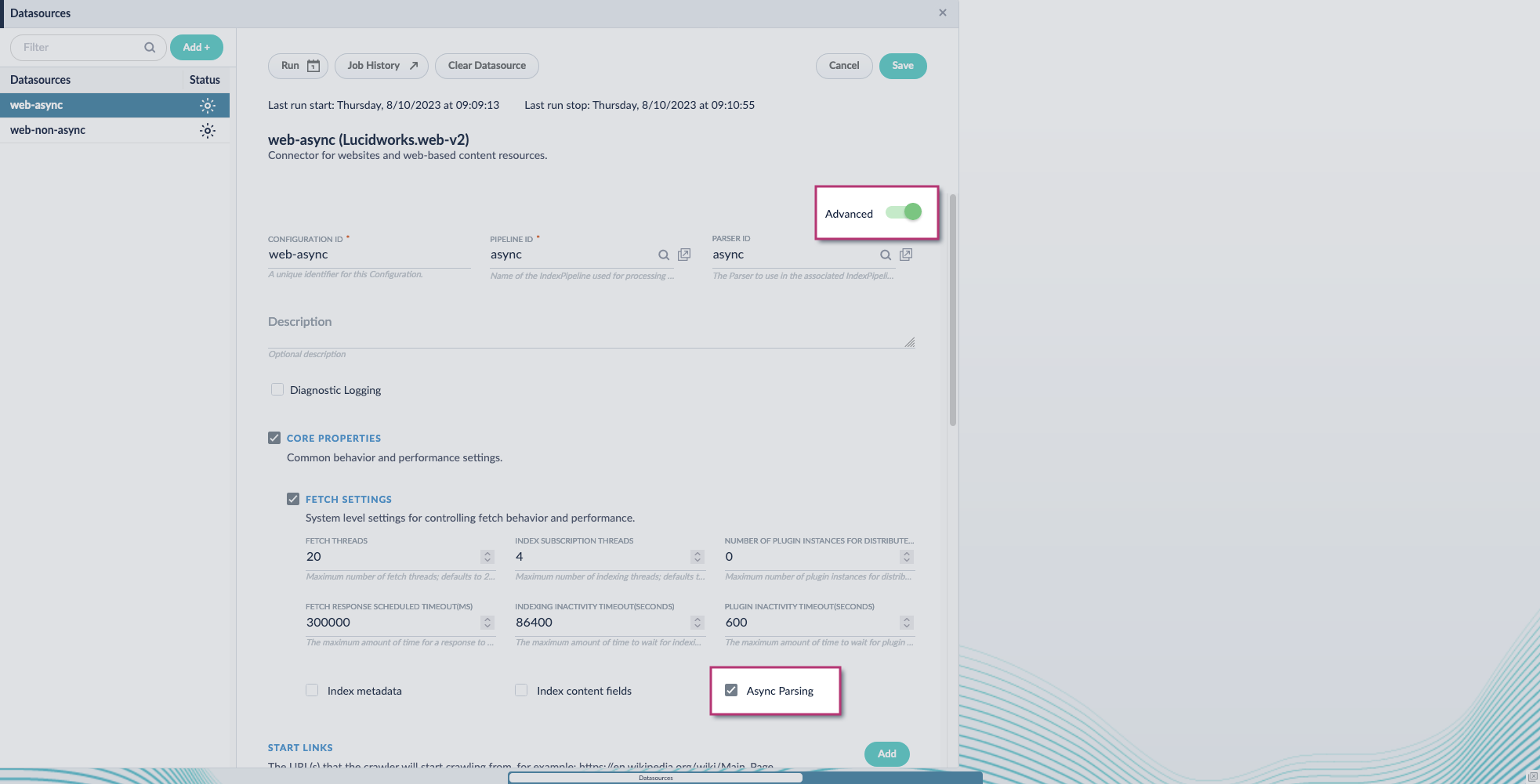
  1. Navigate to your datasource.
  2. Enable the **Advanced** view.
  3. Enable the **Async Parsing** option.

       <img src="https://mintcdn.com/lucidworks/VKnUHJXP6sWH55ak/assets/images/5.8/tika-parser-migration-7.png?fit=max&auto=format&n=VKnUHJXP6sWH55ak&q=85&s=9cfa30dbec1b533642f531001c611859" alt="Enable async option" width="1965" height="1001" data-path="assets/images/5.8/tika-parser-migration-7.png" />

       <Check>
         **Fusion 5.9.11 and later uses your parser configuration when using asynchronous parsing.**

         The asynchronous parsing service performs Tika parsing using Apache Tika Server.     In Fusion 5.8 through 5.9.10, other parsers, such as HTML and JSON, are not supported by the asynchronous parsing service. By enabling asynchronous parsing, the parser configuration linked to your datasource is ignored.     In Fusion 5.9.11 and later, other parsers, such as HTML and JSON, are supported by the asynchronous parsing service. By enabling asynchronous parsing, the parser configuration linked to your datasource is used.
       </Check>
  4. Save the datasource configuration.

  ## Configure the parser stage

  <Check>You must do this step in Fusion 5.9.11 and later.</Check>

  1. Navigate to **Parsers**.
  2. Select the parser, or create a new parser.
  3. From the **Add a parser stage** menu, select **Apache Tika Container Parser**.
  4. (Optional) Enter a label for this stage. This label changes the names from Apache Tika Container Parser to the value you enter in this field.
  5. If the Apache Tika Container Parser stage is not already the first stage, drag and drop the stage to the top of the stage list so it is the first stage that runs.

  ## Configure the index pipeline

  1. Go to the **Index Pipeline** screen.
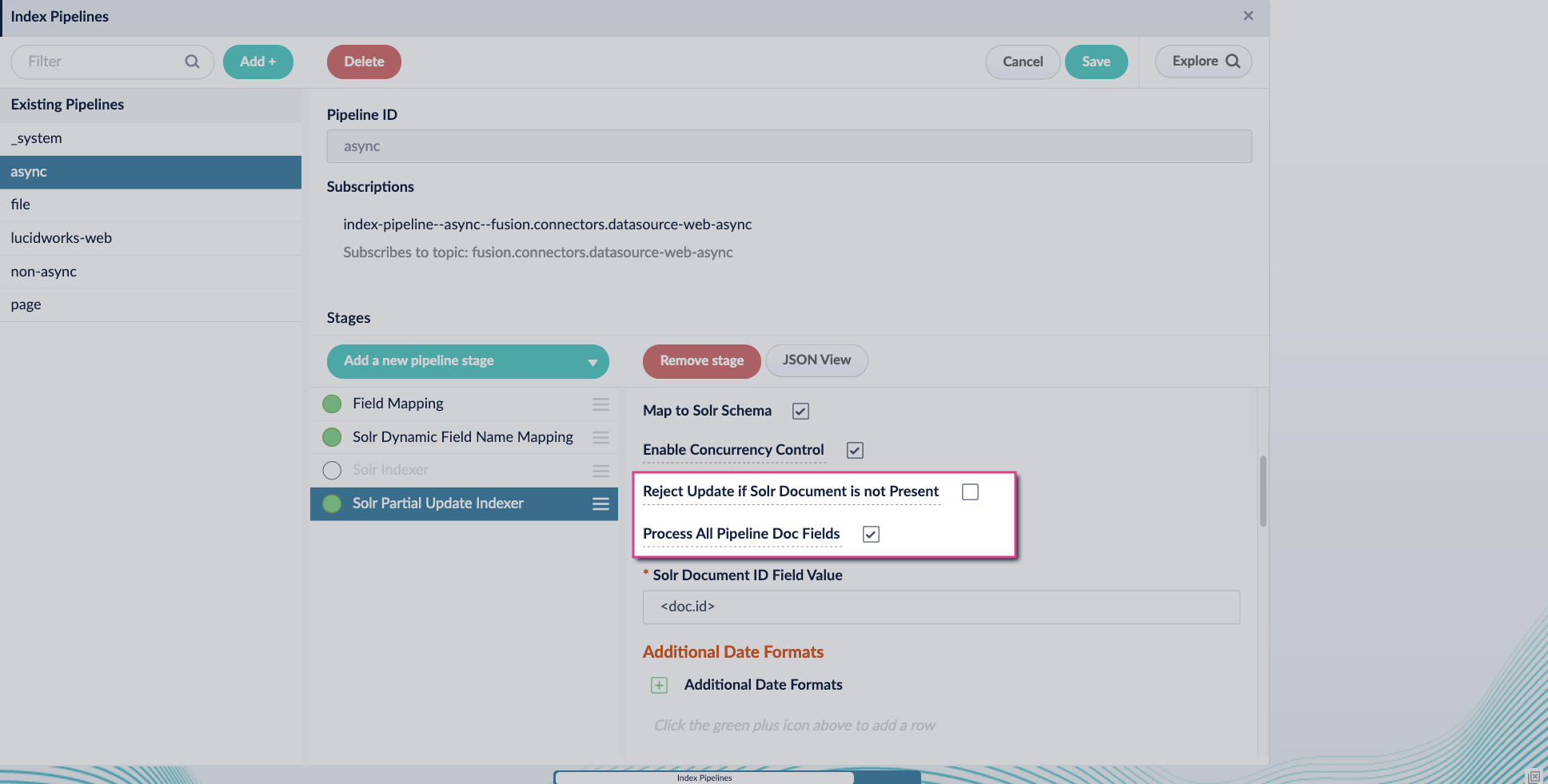
  2. Add the **Solr Partial Update Indexer** stage.
  3. Turn off the **Reject Update if Solr Document is not Present** option and turn on the **Process All Pipeline Doc Fields** option:

       <img src="https://mintcdn.com/lucidworks/VKnUHJXP6sWH55ak/assets/images/5.8/tika-parser-migration-2.png?fit=max&auto=format&n=VKnUHJXP6sWH55ak&q=85&s=19da81f65d2eec57f0f7283e210eb487" alt="Tika config setup" width="1936" height="981" data-path="assets/images/5.8/tika-parser-migration-2.png" />
  4. Include an extra update field in the stage configuration using any update type and field name. In this example, an incremental field `docs_counter_i` with an increment value of `1` is added:
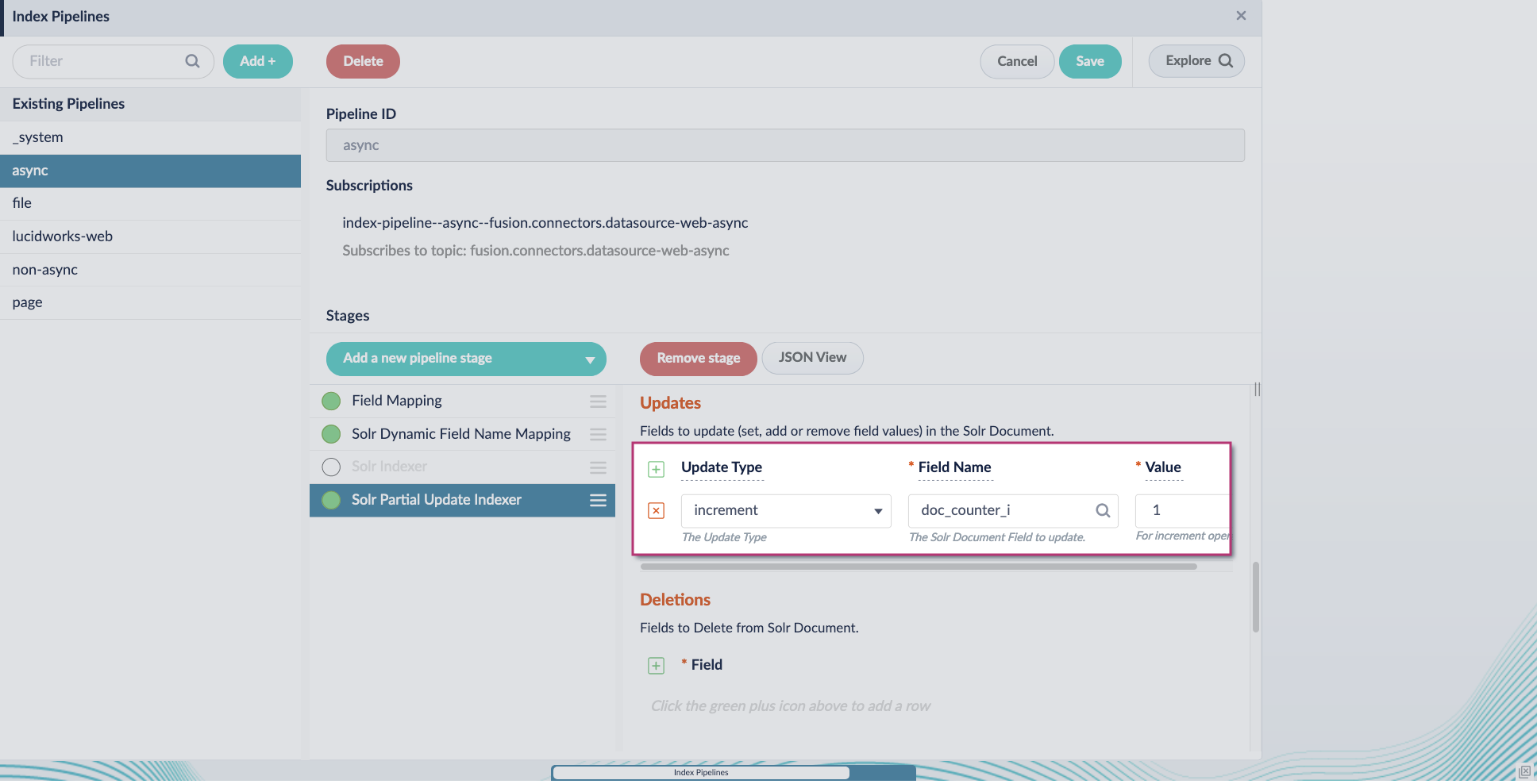
       <img src="https://mintcdn.com/lucidworks/VKnUHJXP6sWH55ak/assets/images/5.8/tika-parser-migration-5.png?fit=max&auto=format&n=VKnUHJXP6sWH55ak&q=85&s=2caeca79dd016fe540d1b7388c2f85f0" alt="Tika config setup" width="1936" height="988" data-path="assets/images/5.8/tika-parser-migration-5.png" />
  5. Enable the **Allow reserved fields** option:
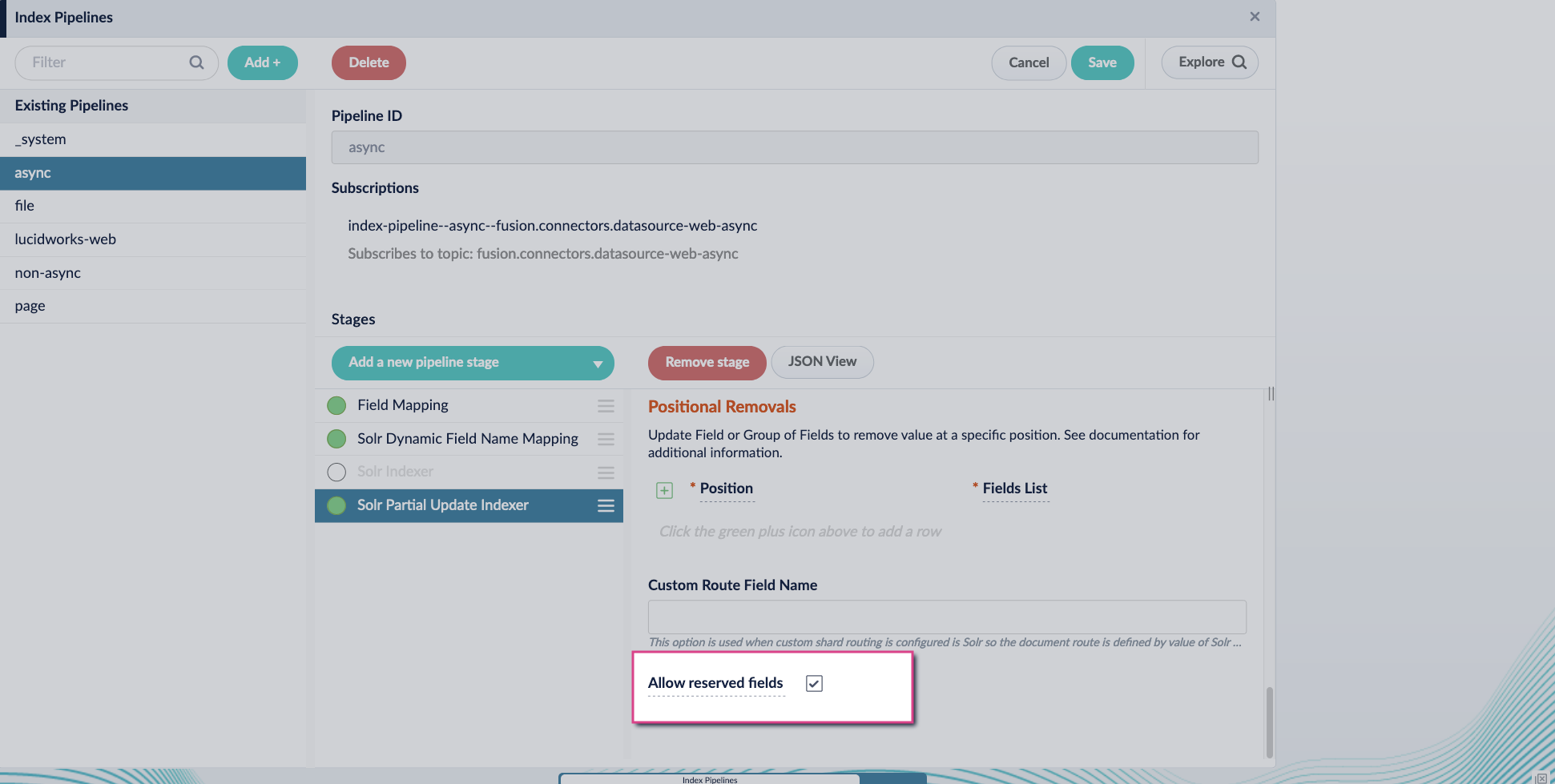
       <img src="https://mintcdn.com/lucidworks/VKnUHJXP6sWH55ak/assets/images/5.8/tika-parser-migration-4.png?fit=max&auto=format&n=VKnUHJXP6sWH55ak&q=85&s=cd9d61870b1d603b5880894f67d3ed48" alt="Tika config setup" width="1941" height="979" data-path="assets/images/5.8/tika-parser-migration-4.png" />
  6. Click **Save**.
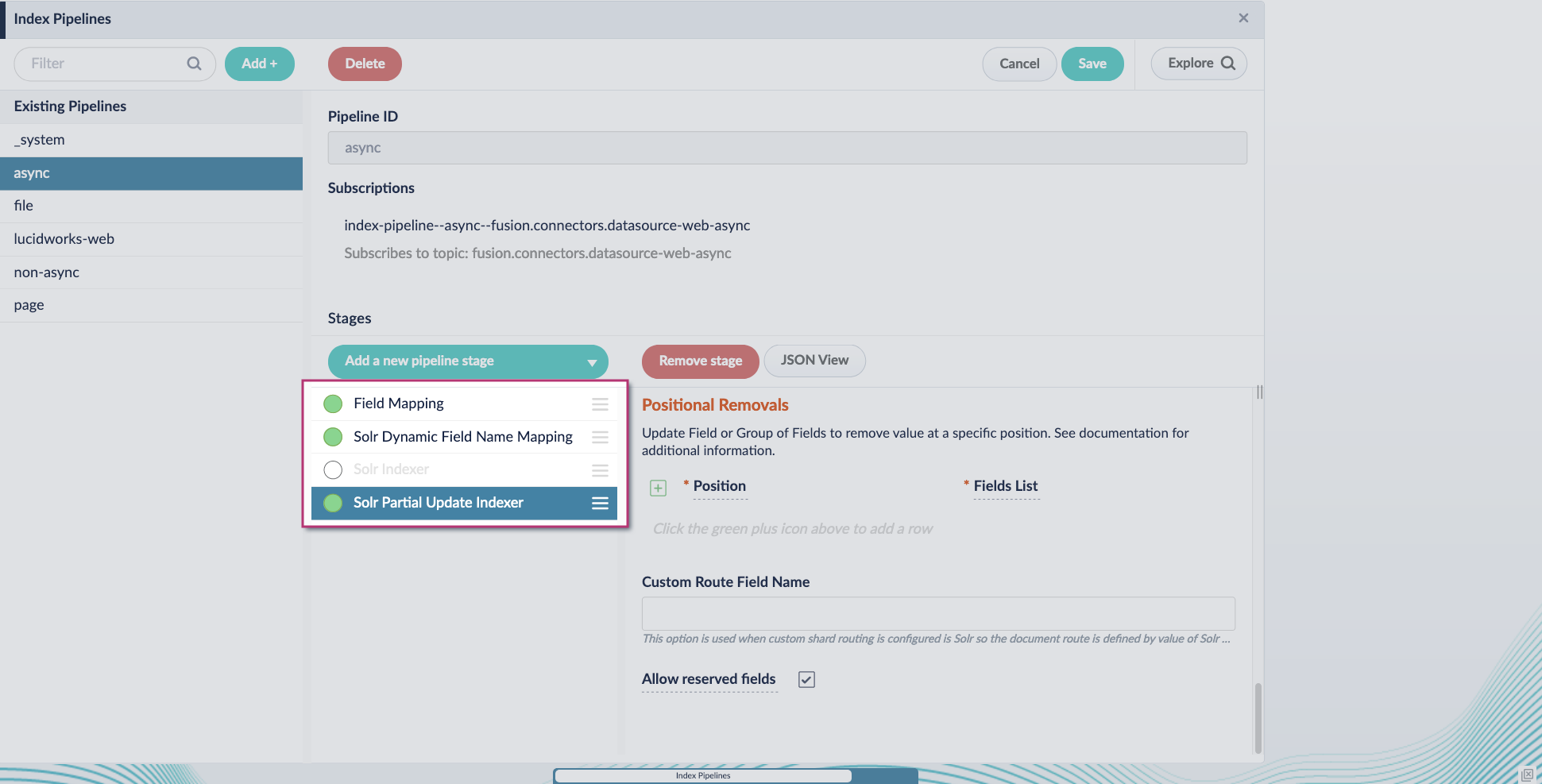
  7. Turn off or remove the **Solr Indexer stage**, and move the **Solr Partial Update Indexer stage** to be the last stage in the pipeline.
       <img src="https://mintcdn.com/lucidworks/VKnUHJXP6sWH55ak/assets/images/5.8/tika-parser-migration-6.png?fit=max&auto=format&n=VKnUHJXP6sWH55ak&q=85&s=d69738f76b005b608d1ac7b948a99675" alt="Tika config setup" width="1941" height="987" data-path="assets/images/5.8/tika-parser-migration-6.png" />

  Asynchronous Tika parsing setup is now complete. Run the datasource indexing job and monitor the results.
</Accordion>

<Tip>
  When entering configuration values in the UI, use *unescaped* characters, such as `\t` for the tab character. When entering configuration values in the API, use *escaped* characters, such as `\\t` for the tab character.
</Tip>

<SchemaParamFields schema={schema} />