> ## Documentation Index
> Fetch the complete documentation index at: https://doc.lucidworks.com/llms.txt
> Use this file to discover all available pages before exploring further.

# Trending Recommender Jobs

export const schema = {
  "type": "object",
  "title": "Trending Recommender",
  "description": "Identifies trending items by comparing signal counts in a reference time window against a target time window and writes ranked trending items to the output collection.",
  "required": ["id", "trainingCollection", "dataFormat", "refTimeRange", "targetTimeRange", "countField", "typeField", "timeField", "docIdField", "types", "recsCount", "type"],
  "properties": {
    "id": {
      "type": "string",
      "title": "Spark Job ID",
      "description": "The ID for this Spark job. Used in the API to reference this job. Allowed characters: a-z, A-Z, dash (-) and underscore (_).",
      "maxLength": 63,
      "pattern": "[a-zA-Z][_\\-a-zA-Z0-9]*[a-zA-Z0-9]?"
    },
    "sparkConfig": {
      "type": "array",
      "title": "Spark Settings",
      "description": "Spark configuration settings.",
      "hints": ["advanced"],
      "items": {
        "type": "object",
        "required": ["key"],
        "properties": {
          "key": {
            "type": "string",
            "title": "Parameter Name"
          },
          "value": {
            "type": "string",
            "title": "Parameter Value"
          }
        }
      }
    },
    "trainingCollection": {
      "type": "string",
      "title": "Training Collection",
      "description": "Specifies the Solr collection or cloud storage path containing training data.",
      "minLength": 1
    },
    "fieldToVectorize": {
      "type": "string",
      "title": "Solr Fields to Read",
      "description": "Specifies the fields to extract from Solr. Not used for non-Solr input formats.",
      "minLength": 1
    },
    "dataFormat": {
      "type": "string",
      "title": "Data format",
      "description": "Specifies the Spark-compatible input data format, such as `solr`, `parquet`, or `orc`.",
      "default": "solr",
      "minLength": 1
    },
    "trainingDataFrameConfigOptions": {
      "type": "object",
      "title": "Dataframe Config Options",
      "description": "Sets additional key-value configuration options passed to the Spark DataFrame reader at load time.",
      "properties": {},
      "additionalProperties": {
        "type": "string"
      },
      "hints": ["advanced"]
    },
    "trainingDataFilterQuery": {
      "type": "string",
      "title": "Training data filter query",
      "description": "Filters training data using a Solr query when reading from Solr, or a SQL expression for other data sources.",
      "default": "*:*",
      "hints": ["advanced"]
    },
    "sparkSQL": {
      "type": "string",
      "title": "Spark SQL filter query",
      "description": "Filters the loaded DataFrame using a Spark SQL query before processing. The input data is registered as a temporary table named `spark_input`.",
      "default": "SELECT * from spark_input",
      "hints": ["code/sql", "advanced"]
    },
    "trainingDataSamplingFraction": {
      "type": "number",
      "title": "Training data sampling fraction",
      "description": "Sets the fraction of training data to sample before processing. Use a value between `0` and `1`. `1.0` uses all available data.",
      "default": 1,
      "hints": ["advanced"],
      "maximum": 1,
      "exclusiveMaximum": false
    },
    "randomSeed": {
      "type": "integer",
      "title": "Random seed",
      "description": "Sets the random seed for deterministic operations including sampling and initialization. Fix this value to reproduce identical results across runs.",
      "default": 1234,
      "hints": ["advanced"]
    },
    "outputCollection": {
      "type": "string",
      "title": "Output Collection",
      "description": "Specifies the Solr collection where output documents are written."
    },
    "overwriteOutput": {
      "type": "boolean",
      "title": "Overwrite Output",
      "description": "When enabled, overwrites the output collection before writing new results.",
      "default": true,
      "hints": ["hidden", "advanced"]
    },
    "dataOutputFormat": {
      "type": "string",
      "title": "Data output format",
      "description": "Specifies the Spark-compatible output format, such as `solr`, `parquet`, or `orc`.",
      "default": "solr",
      "hints": ["advanced"],
      "minLength": 1
    },
    "sourceFields": {
      "type": "string",
      "title": "Fields to Load",
      "description": "Specifies the document fields to load from the input source.",
      "hints": ["advanced"]
    },
    "partitionCols": {
      "type": "string",
      "title": "Partition fields",
      "description": "Specifies a comma-delimited list of column names used to partition output when writing to non-Solr sinks.",
      "hints": ["advanced"]
    },
    "writeOptions": {
      "type": "array",
      "title": "Write Options",
      "description": "Sets additional key-value options passed to the Spark writer when writing output to Solr or other sinks.",
      "hints": ["advanced"],
      "items": {
        "type": "object",
        "required": ["key"],
        "properties": {
          "key": {
            "type": "string",
            "title": "Parameter Name"
          },
          "value": {
            "type": "string",
            "title": "Parameter Value"
          }
        }
      }
    },
    "readOptions": {
      "type": "array",
      "title": "Read Options",
      "description": "Sets additional key-value options passed to the Spark reader when loading input from Solr or other sources.",
      "hints": ["advanced"],
      "items": {
        "type": "object",
        "required": ["key"],
        "properties": {
          "key": {
            "type": "string",
            "title": "Parameter Name"
          },
          "value": {
            "type": "string",
            "title": "Parameter Value"
          }
        }
      }
    },
    "refTimeRange": {
      "type": "integer",
      "title": "Reference Time Days",
      "description": "Sets the number of days used as the baseline reference period for trend comparison, calculated from today."
    },
    "targetTimeRange": {
      "type": "integer",
      "title": "Target Time Days",
      "description": "Sets the number of days used as the target period for trend comparison, calculated from today."
    },
    "numWeeksRef": {
      "type": "number",
      "title": "Num Weeks Reference",
      "description": "Sets the value of `reference days / 7` when using filter queries for time range control.",
      "hints": ["advanced"]
    },
    "sparkPartitions": {
      "type": "integer",
      "title": "Set minimum Spark partitions for input",
      "description": "Sets the number of Spark partitions to repartition input into before processing. Increase for greater parallelism on large datasets.",
      "default": 200,
      "hints": ["advanced"]
    },
    "countField": {
      "type": "string",
      "title": "Event Count Field Name",
      "description": "Specifies the document field containing the event count used for trend comparison.",
      "default": "aggr_count_i",
      "minLength": 1
    },
    "referenceTimeFilterQuery": {
      "type": "string",
      "title": "Reference Filter Time Query",
      "description": "Specifies a Spark SQL filter query for finer control of the reference time range.",
      "hints": ["advanced"]
    },
    "targetFilterTimeQuery": {
      "type": "string",
      "title": "Target Filter Time Query",
      "description": "Specifies a Spark SQL filter query for finer control of the target time range.",
      "hints": ["advanced"]
    },
    "typeField": {
      "type": "string",
      "title": "Type field",
      "description": "Specifies the document field containing the event type.",
      "default": "aggr_type_s"
    },
    "timeField": {
      "type": "string",
      "title": "Time field",
      "description": "Specifies the document field containing the event timestamp.",
      "default": "timestamp_tdt"
    },
    "docIdField": {
      "type": "string",
      "title": "Document ID field",
      "description": "Specifies the document field containing the document ID.",
      "default": "doc_id_s"
    },
    "types": {
      "type": "string",
      "title": "Event types",
      "description": "Specifies a comma-separated list of event types to include in trend analysis.",
      "default": "click,add"
    },
    "recsCount": {
      "type": "integer",
      "title": "Recommendation Count",
      "description": "Sets the maximum number of trending recommendations to generate. Use `-1` for no limit.",
      "default": 500
    },
    "type": {
      "type": "string",
      "title": "Spark Job Type",
      "enum": ["trending-recommender"],
      "default": "trending-recommender",
      "hints": ["readonly"]
    }
  },
  "additionalProperties": true,
  "category": "Other",
  "categoryPriority": 1,
  "propertyGroups": [{
    "label": "Input/Output Parameters",
    "properties": ["trainingCollection", "outputCollection", "dataFormat", "trainingDataFilterQuery", "readOptions", "writeOptions", "trainingDataFrameConfigOptions", "trainingDataSamplingFraction", "randomSeed"]
  }, {
    "label": "Field Parameters",
    "properties": ["fieldToVectorize", "sourceFields", "countField"]
  }]
};

export const SchemaParamFields = ({schema}) => {
  const sanitize = str => {
    if (typeof str !== "string") return str;
    return str.replace(/^"(.*)"$/s, "$1").replace(/\\/g, "").replace(/"/g, "'");
  };
  const renderMd = str => {
    const s = sanitize(str);
    const text = (/[.!?]\)*$/).test(s) ? s : `${s}.`;
    return text.split(/(\*\*[^*]+\*\*|_[^_]+_|`[^`]+`)/g).map((part, i) => {
      if (part.startsWith("**")) return <strong key={i}>{part.slice(2, -2)}</strong>;
      if (part.startsWith("_")) return <em key={i}>{part.slice(1, -1)}</em>;
      if (part.startsWith("`")) return <code key={i}>{part.slice(1, -1)}</code>;
      return part;
    });
  };
  const {description, properties = {}, required: requiredProps = []} = schema;
  const visibleProps = useMemo(() => Object.entries(properties).filter(([, prop]) => !prop.hints?.includes("hidden")), [properties]);
  const renderProp = ([name, prop]) => {
    const isRequired = requiredProps.includes(name);
    const hasDefault = prop.default !== undefined;
    const rawDefault = prop.default;
    const hints = prop.hints || [];
    const isComplexDefault = hasDefault && (typeof rawDefault === "object" || typeof rawDefault === "string" && (rawDefault.length > 20 || rawDefault.includes('"')));
    const postBadges = [];
    if (prop.title) {
      postBadges.push(<><span className="text-stone-400 dark:text-stone-500">API property: </span>{name}</>);
    }
    const constraints = [];
    if (prop.minimum !== undefined && prop.maximum !== undefined) {
      constraints.push(`Range: ${prop.minimum} – ${prop.maximum}`);
    } else if (prop.minimum !== undefined) {
      constraints.push(`Min: ${prop.minimum}`);
    } else if (prop.maximum !== undefined) {
      constraints.push(`Max: ${prop.maximum}`);
    }
    if (prop.minLength !== undefined && prop.maxLength !== undefined) {
      constraints.push(`Length: ${prop.minLength} – ${prop.maxLength}`);
    } else if (prop.minLength !== undefined) {
      constraints.push(`Min length: ${prop.minLength}`);
    } else if (prop.maxLength !== undefined) {
      constraints.push(`Max length: ${prop.maxLength}`);
    }
    const fieldProps = {
      key: name,
      body: prop.title || name,
      type: prop.type,
      ...postBadges.length > 0 && ({
        post: postBadges
      }),
      ...isRequired && ({
        required: true
      }),
      ...!isComplexDefault && hasDefault ? {
        default: sanitize(String(rawDefault))
      } : {}
    };
    const isObject = prop.type === "object" && prop.properties;
    const isArrayOfObjects = prop.type === "array" && prop.items?.type === "object" && prop.items.properties;
    return <ParamField {...fieldProps}>
        {prop.description && <p>{renderMd(prop.description)}</p>}

        {prop.enum && <p>
            Allowed values: 
            {prop.enum.map((v, i) => <>{i > 0 && ", "}<code key={i}>{String(v)}</code></>)}
          </p>}

        {constraints.length > 0 && <p className="text-stone-500 dark:text-stone-400 text-sm">
            {constraints.join(" · ")}
          </p>}

        {isComplexDefault && <div className="flex">
            <p>
              <strong>Default:</strong>
            </p>
            <pre className="!my-0">
              <code>
                {JSON.stringify(rawDefault, null, 2)}
              </code>
            </pre>
          </div>}

        {isArrayOfObjects && <Expandable title="item properties">
            <SchemaParamFields schema={{
      properties: prop.items.properties,
      required: prop.items.required
    }} />
          </Expandable>}

        {isObject && <Expandable title="properties">
            <SchemaParamFields schema={{
      properties: prop.properties,
      required: prop.required
    }} />
          </Expandable>}
      </ParamField>;
  };
  return <div>
      {description && <p>{renderMd(description)}</p>}

      {visibleProps.map(renderProp)}
    </div>;
};

export const LwTemplate = ({title = "Key questions to get you started", icon = "sparkles", cta = "Powered by Agent Studio", linkHref = "https://lucidworks.com/demo/?utm_source=docs&utm_medium=referral&utm_campaign=docs_cta_ai"}) => {
  const [isLoaded, setIsLoaded] = useState(false);
  useEffect(() => {
    const timer = setTimeout(() => {
      setIsLoaded(true);
    }, 500);
    return () => clearTimeout(timer);
  }, []);
  return <div className="lw-template-container">
      <Card title={title} icon={icon}>
        {isLoaded && <span dangerouslySetInnerHTML={{
    __html: `<lw-template id="a029c1a9-28be-427e-b0e1-5d918920246a"></lw-template
            >`
  }} />}
        <Link href={linkHref} className="agent-studio-link text-left text-gray-600 gap-2 dark:text-gray-400 text-sm font-medium flex flex-row items-center hover:text-primary dark:hover:text-primary-light group-hover:text-primary group-hover:dark:text-primary-light">Powered by Lucidworks Agent Studio</Link>
      </Card>
    </div>;
};

[localhost link]: http://localhost:3000/docs/5/fusion/reference/config-ref/jobs/trending-recommender

[mintlify link]: https://doc.lucidworks.com/docs/5/fusion/reference/config-ref/jobs/trending-recommender

[old doc.lw link]: https://doc.lucidworks.com/fusion/5.9/yihzwd

The Trending Recommender job analyzes signals to measure customer engagement over time. Use this job to identify spikes in popularity for specific items or queries, then display those items to your users or analyze the trends for business purposes. You can configure any time window, such as daily, weekly, or monthly.

|            |                                                                                                                                                      |
| ---------- | ---------------------------------------------------------------------------------------------------------------------------------------------------- |
| **Input**  | [signals](/docs/5/fusion/reference/config-ref/jobs/aggregations/built-in-sql-aggregation-jobs) (the `COLLECTION_NAME_signals` collection by default) |
| **Output** | Trending items or queries                                                                                                                            |

|                          | query           | count\_i | type | timestamp\_tdt | user\_id | doc\_id | session\_id | fusion\_query\_id |
| ------------------------ | --------------- | -------- | ---- | -------------- | -------- | ------- | ----------- | ----------------- |
| Required signals fields: | See note below. | ✅        | ✅    | ✅              |          | ✅       |             |                   |

**Note:** Required when identifying trending queries instead of trending items.

For detailed steps to configure this job, see **Identify Trending Items or Queries**.

<Accordion title="Identify Trending Items or Queries">
  The Trending Recommender job analyzes signals to measure customer engagement over time.  Use this job to identify spikes in popularity for specific items or queries, then display those items to your users or analyze the trends for business purposes.  You can configure any time window, such as daily, weekly, or monthly.

  For complete details about the job’s configuration options, see [Trending Recommender Jobs](/docs/5/fusion/reference/config-ref/jobs/trending-recommender).

  **How to identify trending items or queries**

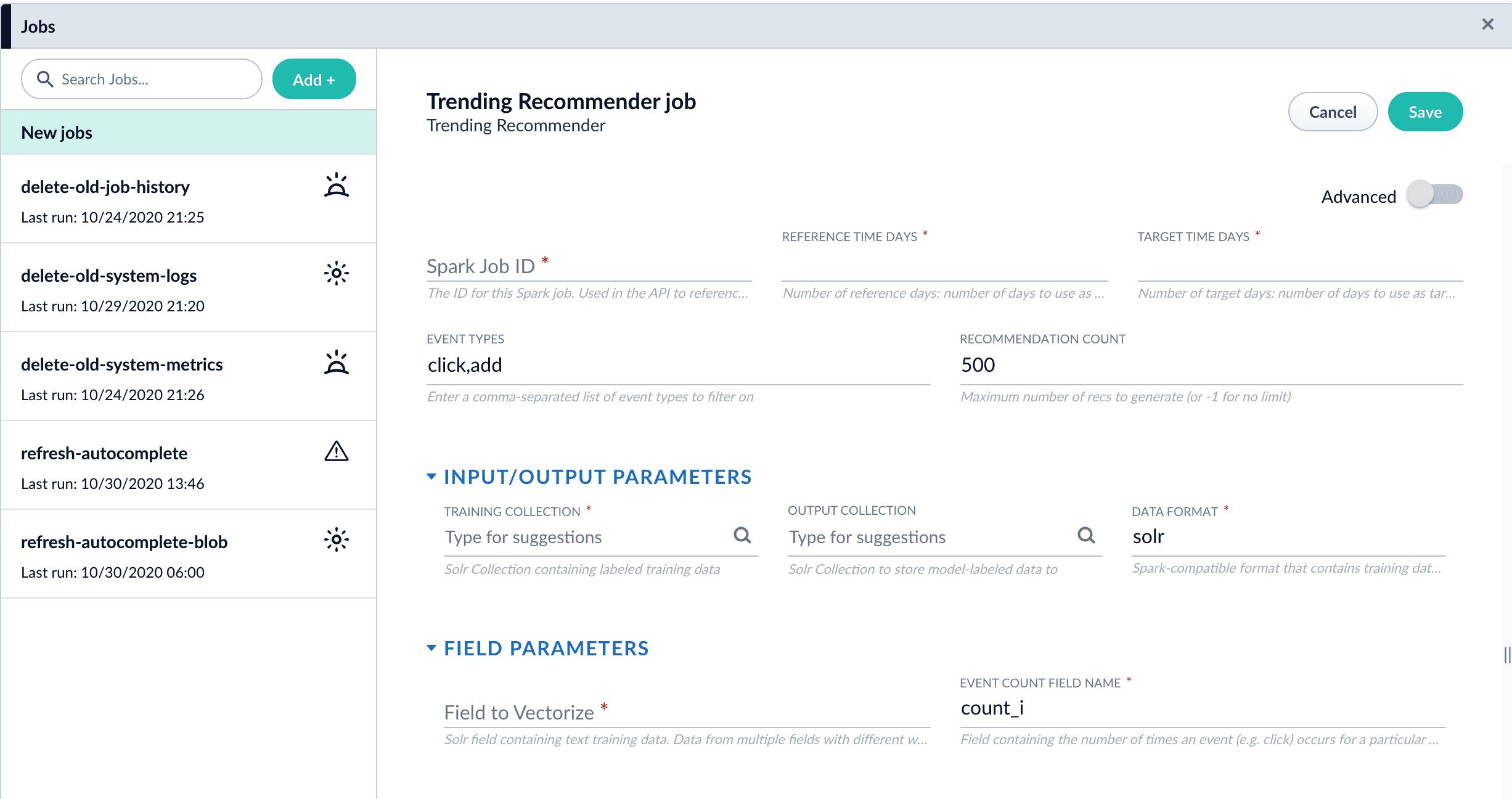
  1. Navigate to **Collections** > **Jobs** > **Add +** > **Trending Recommender**.
       <img src="https://mintcdn.com/lucidworks/tklssWuUmNaxlF0b/assets/images/5.3/trending-recommender-job.png?fit=max&auto=format&n=tklssWuUmNaxlF0b&q=85&s=c3fdb9781de1852568066a3458f04ae3" alt="Trending Recommender job configuration panel" width="2453" height="1296" data-path="assets/images/5.3/trending-recommender-job.png" />
  2. Configure the job:
     1. Enter an ID for this job.
     2. In the **Reference Time Days** field, enter the number of days to use as a *baseline* for identifying trends, starting from today.\
        For example, enter 21 days to analyze three weeks of signals data to use as a baseline.
     3. In the **Target Time Days** field, enter the number of days to use as a *target* for identifying trends, starting from today.\
        For example, enter 7 days to get documents or products whose popularity has spiked in the past week.
        <Tip>      **Reference Time Days** and **Target Time Days** do not overlap.  For example, with the values suggested above, a total of 28 days of signals are analyzed, and the first 21 days are compared to the last 7 days.</Tip>
     4. If you want to identify trending queries instead of trending items, change the value of the **Document ID Field** from `doc_id_s` to `query_s`.
        <Note>      This field must be present in your signals. See the required signals fields in the [Trending Recommender Jobs](/docs/5/fusion/reference/config-ref/jobs/trending-recommender) reference topic.</Note>
     5. In the **Training Collection** field, enter the Solr collection or cloud path where signals are stored (the `COLLECTION_NAME_signals` collection by default).
     6. In the **Output Collection** field, enter the Solr collection or cloud path where trend analysis data will be stored.
     7. If you are using a format other than `solr`, enter it in the **Data Format** field.
     8. In the **Solr Fields to Read** field, enter one or more field names containing text training data.
        <Tip>      You can enter multiple field names with weights, as in `field1:weight1,field2:weight2...`.</Tip>
     9. In the **Event Count Field Name** field, enter the name of the event count field in your training data, usually `count_i`.
  3. Click **Save**.
  4. Click **Run** > **Start** to run the job.
     The job outputs documents similar to this example:

  ```json theme={"dark"}
      {
             "doc_id":250,
             "ref_hits":1,
             "ref_rank":1,
             "trgt_hits":1,
             "trgt_rank":1,
             "vol_diff":0.5,
             "average_weekly_vol":0.5,
             "hit_vol_ratio":2.0,
             "combine_score":1.0,
             "vol_diff_ratio":1.0,
             "ref_wt_vol_diff_ratio":1.0,
             "vol_diff_wt_vol_diff_ratio":0.5,
             "log_diff_wt_ratio":1.3068528194400546,
             "trend-type":"prds_weekly",
             "id":"284f930d-d750-49a2-90ac-be4692bddda9",
             "_version_":1682995654191742976
       }
  ```

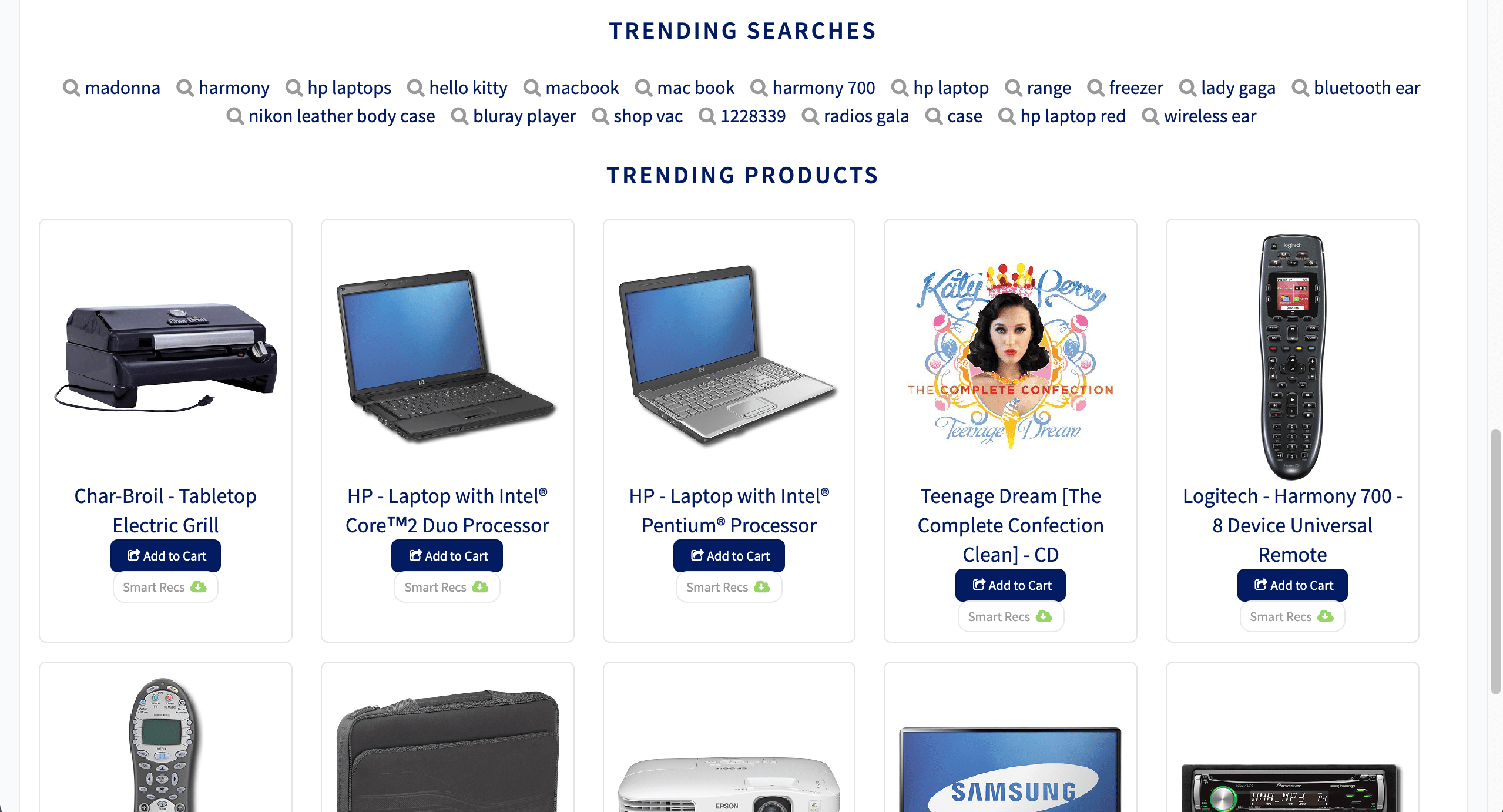
  5. Configure a query pipeline to retrieve trending items from the job’s output collection for display or further analysis. For information about pipelines created when recommendations are enabled, see [enable recommendations](/docs/5/fusion/getting-data-out/query-enhancement/recommendations/getting-started).

     <Tip>   Search on the `log_diff_wt_ratio` field to find the top trending items in the output collection.</Tip>

  <img src="https://mintcdn.com/lucidworks/L5PMnIeZ03zhv8Ti/assets/images/5.4/trending-recommender-display.png?fit=max&auto=format&n=L5PMnIeZ03zhv8Ti&q=85&s=47772693e815217729602815cec3bb51" alt="Trending queries and products" width="2558" height="1382" data-path="assets/images/5.4/trending-recommender-display.png" />
</Accordion>

<LwTemplate />

## Configuration properties

<SchemaParamFields schema={schema} />