{isLoaded && `
}} />}
Powered by Lucidworks Agent Studio
;
};
export const InlineImage = ({src, alt = '', height = '2em'}) => {
return ;
};
[localhost link]: http://localhost:3000/docs/5/fusion/reference/config-ref/jobs/token-and-phrase-spell-correction
[mintlify link]: https://doc.lucidworks.com/docs/5/fusion/reference/config-ref/jobs/token-and-phrase-spell-correction
[old doc.lw link]: https://doc.lucidworks.com/fusion/5.9/566
Detect misspellings in queries or documents using the numbers of occurrences of words and phrases.
This job is deprecated in Fusion 5.9.15 and will be removed in a future release.
Lucidworks recommends migrating to [Neural Hybrid Search](/docs/5/fusion/hybrid-search/overview), which achieves superior relevance compared to legacy machine learning methods.
The course for **Resolving Underperforming Queries** focuses on tips for tuning, running, and cleaning up Fusion’s query rewrite jobs.
| | |
| -------------------- | ---------------------------------------------------------------------------- |
| **Default job name** | `COLLECTION_NAME_spell_correction` |
| **Input** | Raw signals (the `COLLECTION_NAME_signals` collection by default) |
| **Output** | Synonyms (the `COLLECTION_NAME_query_rewrite_staging` collection by default) |
| | query | count\_i | type | timestamp\_tdt | user\_id | doc\_id | session\_id | fusion\_query\_id |
| ------------------------ | ----- | -------- | ---- | -------------- | -------- | ------- | ----------- | ----------------- |
| Required signals fields: | ✅ | ✅ | ✅ | | | | | |
This job extracts tail tokens (one word) and phrases (two words) and finds similarly-spelled head tokens and phrases. For example, if two queries are spelled similarly, but one leads to a lot of traffic (head) and the other leads to a little or zero traffic (tail), then it is likely that the tail query is misspelled and the head query is its correction.
If several matching head tokens are found for each tail token, the job can pick the best correction using multiple configurable criteria.
You can review, edit, deploy, or delete output from this job using the [Query Rewriting UI](/docs/5/fusion/getting-data-out/query-enhancement/query-rewriting).
Misspelled terms are completely replaced by their corrected terms. If you want to expand the query to include all alternative terms, set the synonyms to bi-directional. See [Synonym Detection](/docs/5/fusion/reference/config-ref/jobs/synonym-detection) for more information.
This job’s output, and output from the [Phrase Extraction job](/docs/5/fusion/reference/config-ref/jobs/phrase-extraction), can be used as input for the [Synonym Detection job](/docs/5/fusion/reference/config-ref/jobs/synonym-detection).
Solr treats spelling corrections as synonyms. See the blog post [Multi-Word Synonyms: Solr Adds Query-Time Support](https://lucidworks.com/post/multi-word-synonyms-solr-adds-query-time-support//) for more details.
## 1. Create a job
Create a Token and Phrase Spell Correction job in the Jobs Manager.
**How to create a new job**
1. In the Fusion workspace, navigate to > **Jobs**.
2. Click **Add** and select the job type **Token and phrase spell correction**.\
The New Job Configuration panel appears.
## 2. Configure the job
Use the information in this section to configure the Token and Phrase Spell Correction job.
### Required configuration
The configuration must specify:
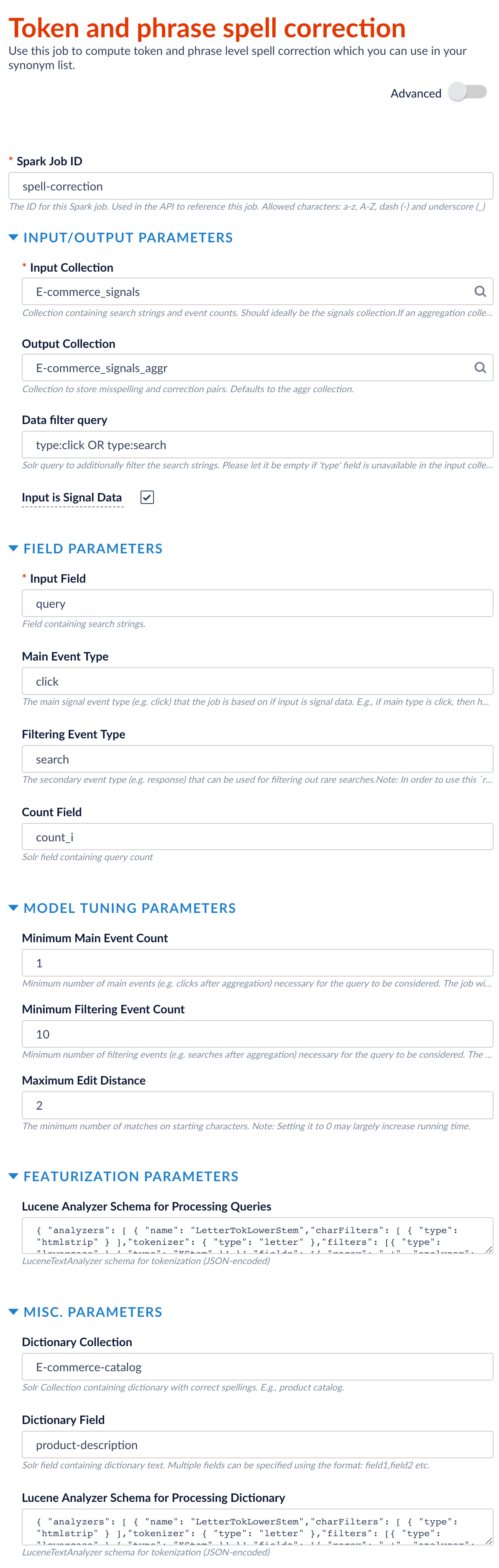
* **Spark Job ID.** Used in the API to reference the job. Maximum 63 alphabetic characters, hyphen (-), and underscore (\_).
* **INPUT COLLECTION.** The `trainingCollection` parameter that can contain signal data or non-signal data. For signal data, select **Input is Signal Data** (`signalDataIndicator`). Signals can be raw (from the `_signals` collection) aggregated (from the `_signals_aggr` collection).
* **INPUT FIELD.** The `fieldToVectorize` parameter.
* **COUNT FIELD**
For example, if signal data follows the default Fusion setup, then `count_i` is the field that records the count of raw signals and `aggr_count_i` is the field that records the count after aggregation.
See [Configuration properties](#configuration-properties) for more information.
### Event types
The spell correction job lets you analyze query performance based on two different events:
* The main event (the **Main Event Type**/`mainType` parameter)
* The filtering/secondary event (the **Filtering Event Type**/`filterType` parameter)\
If you only have one event type, leave this parameter empty.
For example, if you specify the main event type to be `click` with a minimum count of 0 and the filtering event type to be `query` with a minimum count of 20, then the job:
* Filters on the queries that get searched at least 20 times.
* Checks among those popular queries to determine which ones didn’t get clicked at all, or were only clicked a few times.
### Spell check documents
If you unselect the **Input is Signal Data** checkbox to indicate finding misspellings from content documents rather than signals, then you do not need to specify the following parameters:
* Count Field
* Main Event Field
* Filtering Event Type
* Field Name of Signal Type
* Minimum Main Event Count
* Minimum Filtering Event Count
### Use a custom dictionary
You can upload a custom dictionary of terms that are specific to your data, and specify it using the **Dictionary Collection** (`dictionaryCollection`) and **Dictionary Field** (`dictionaryField`) parameters. For example, in an e-commerce use case, you can use the catalog terms as the custom dictionary by specifying the product catalog collection as the dictionary collection and the product description field as the dictionary field.
### Example configuration
This is an example configuration:
When you have configured the job, click **Save** to save the configuration.
## 3. Run the job
If you are finding spelling corrections in aggregated data, you need to run an aggregation job before running the Token and Phrase Spelling Correction job. You *do not* need to run a Head/Tail Analysis job. The Token and Phrase Spell Correction job does the head/tail processing it requires.
**How to run the job**
1. In the Fusion workspace, navigate to > **Jobs**.
2. Select the job from the job list.
3. Click **Run**.
4. Click **Start**.
## 4. Analyze job output
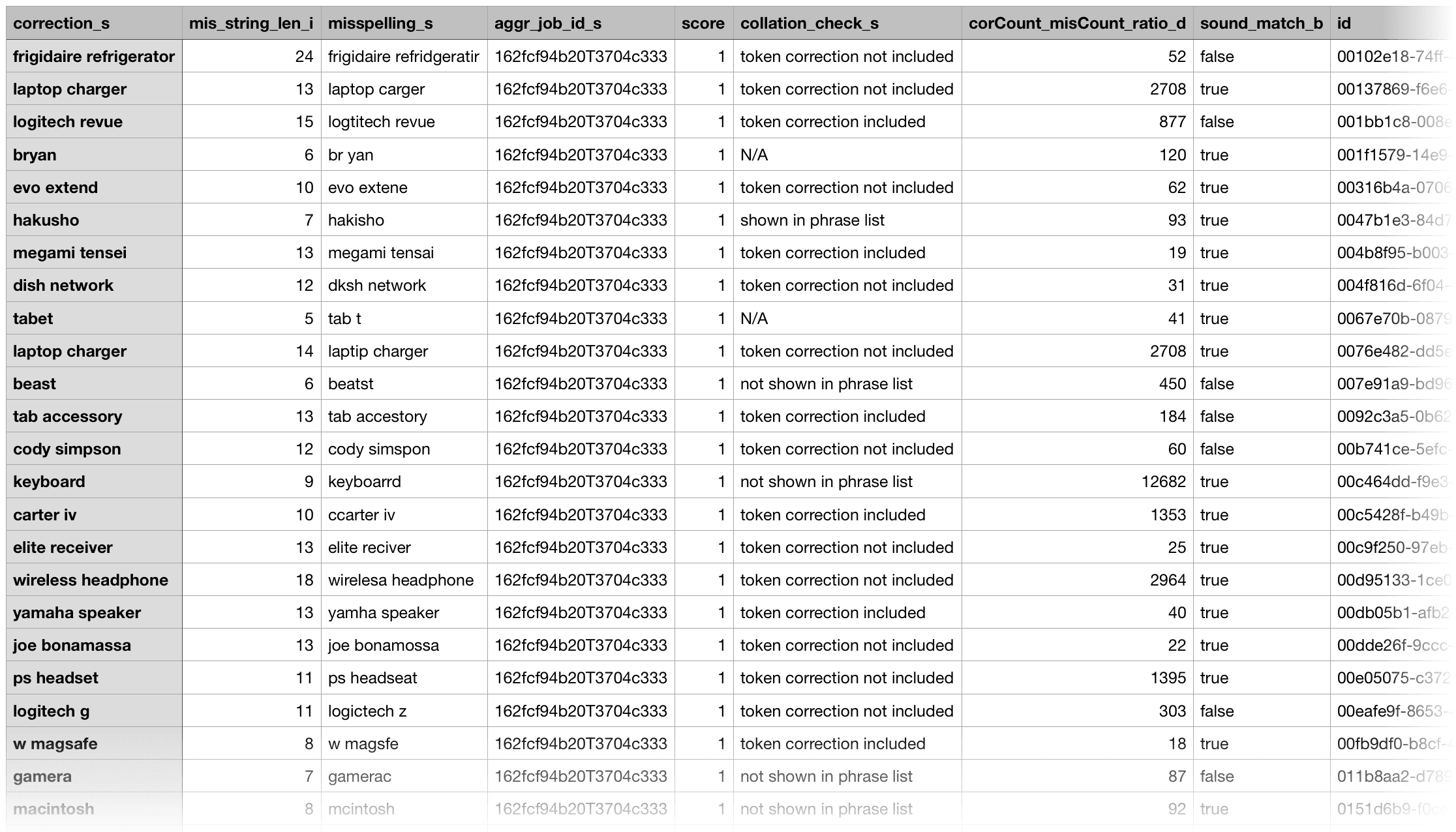
After the job finishes, misspellings and corrections are output into the
`query_rewrite_staging`
collection by default; you can change this by setting the `outputCollection`.
An example record is as follows:
```txt theme={"dark"}
correction_s laptop battery
mis_string_len_i 14
misspelling_s laptop baytery
aggr_job_id_s 162fcf94b20T3704c333
score 1
collation_check_s token correction included
corCount_misCount_ratio_d 2095
sound_match_b true
id bf79c43b-fc6d-43a7-931e-185fdac5b624
aggr_type_s tokenPhraseSpellCorrection
aggr_id_s ecom_spell_check
correction_types_s phrase => phrase
cor_count_i 68648960
suggested_correction_s baytery=>battery
cor_string_len_i 14
token_wise_correction_s baytery=>battery
cor_token_size_i 2
edit_dist_i 1
timestamp_tdt 2018-04-25T13:23:40.728Z
mis_count_i 32768
lastChar_match_b true
mis_token_size_i 2
token_corr_for_phrase_cnt_i 1
```
For easy evaluation, you can export the result output to a CSV file.
## 5. Use spell correction results
You can use the resulting corrections in various ways. For example:
* Put misspellings into the synonym list to perform auto-correction.
* Help evaluate and guide the Solr spellcheck configuration.
* Put misspellings into typeahead or autosuggest lists.
* Perform document cleansing (for example, clean a product catalog or medical records) by mapping misspellings to corrections.
### Useful output fields
In the job output, you generally only need to analyze the `suggested_corrections` field, which provides suggestions about using token correction or whole-phrase correction. If the confidence of the correction is not high, then the job labels the pair as "review" in this field. Pay special attention to the output records with the "review" labels.
With the output in a CSV file, you can sort by `mis_string_len` (descending) and `edit_dist` (ascending) to position more probable corrections at the top. You can also sort by the ratio of correction traffic over misspelling traffic (the `corCount_misCount_ratio` field) to only keep high-traffic boosting corrections.
For phrase misspellings, the misspelled tokens are separated out and put in the `token_wise_correction` field. If the associated token correction is already included in the one-word correction list, then the `collation_check` field is labeled as "token correction include." You can choose to drop those phrase misspellings to reduce duplications.
Fusion counts how many phrase corrections can be solved by the same token correction and puts the number into the `token_corr_for_phrase_cnt` field. For example, if both "outdoor surveillance" and "surveillance camera" can be solved by correcting "surveillance" to "surveillance", then this number is 2, which provides some confidence for dropping such phrase corrections and further confirms that correcting "surveillance" to "surveillance" is legitimate.
You might also see cases where the token-wise correction is not included in the list. For example, "xbow" to "xbox" is not included in the list because it can be dangerous to allow an edit distance of 1 in a word of length 4. But if multiple phrase corrections can be made by changing this token, then you can add this token correction to the list.
Phrase corrections with a value of 1 for `token_corr_for_phrase_cnt` and with `collation_check` labeled as "token correction not included" could be potentially-problematic corrections.
Fusion labels misspellings due to misplaced whitespaces with "combine/break words" in the `correction_types` field. If there is a user-provided dictionary to check against, and both spellings are in the dictionary with and without whitespace in the middle, we can treat these pairs as bi-directional synonyms ("combine/break words (bi-direction)" in the `correction_types` field).
The `sound_match` and `lastChar_match` fields also provide useful information.
## Job tuning
The job’s default configuration is a conservative, designed for higher accuracy and lower output. To produce a higher volume of output, you can consider giving more permissive values to the parameters below. Likewise, give them more restrictive values if you are getting too many results with low accuracy.
When tuning these values, always test the new configuration in a non-production environment before deploying it in production.
| |
| --------------------------------------------------------------------------------------------------------------------------------------------------------------- |
| `trainingDataFilterQuery`/**Data filter query** |
| See [Event types](#event-types) above, then adjust this value to reflect the secondary event for your search application. To query all data, set this to `*:*`. |
| `minCountFilter`/**Minimum Filtering Event Count** |
| Lower this value to include less-frequent misspellings based on the data filter query. |
| `maxDistance`/**Maximum Edit Distance** |
| Raise this value to increase the number of potentially-related tokens and phrases detected. |
| `minMispellingLen`/**Minimum Length of Misspelling** |
| Lower this value to include shorter misspellings (which are harder to correct accurately). |
## Query rewrite jobs post-processing cleanup
To perform more extensive cleanup of query rewrites, complete the procedures in **Query Rewrite Jobs Post-processing Cleanup**.
The Synonym Detection job uses the output of the Misspelling Detection job and Phrase Extraction job. Therefore, post processing *must* occur in the order specified in this topic for the [Synonym detection job cleanup](#synonym-detection-job-cleanup), [Phrase extraction job cleanup](#phrase-extraction-job-cleanup), and [Misspelling detection job cleanup](#misspelling-detection-job-cleanup) procedures. The [Head-Tail Analysis job cleanup](#head-tail-analysis-job-cleanup) can occur in any order.
## Synonym detection job cleanup
Use this job to remove low confidence synonyms.
### Prerequisites
Complete this:
* **AFTER** the Misspelling Detection and Phrase Extraction jobs have successfully completed.
* **BEFORE** removing low confidence synonym suggestions generated in the *post processing* phrase extraction cleanup and misspelling detection cleanup procedures detailed later in this topic.
### Remove low confidence synonym suggestions
Use either a [Synonym cleanup method 1 - API call](#synonym-cleanup-method-1-api-call) or the [Synonym cleanup method 2 - Fusion Admin UI](#synonym-cleanup-method-2-fusion-admin-ui) to remove low confidence synonym suggestions.
#### Synonym cleanup method 1 - API call
1. Open the `delete_lowConf_synonyms.json` file.
```json theme={"dark"}
{
"type" : "rest-call",
"id" : "DC_Large_QR_DELETE_LOW_CONFIDENCE_SYNONYMS",
"callParams" : {
"uri" : "solr://DC_Large_query_rewrite_staging/update",
"method" : "post",
"queryParams" : {
"wt" : "json"
},
"headers" : { },
"entity" : "type:synonym AND confidence:[0 TO 0.0005]"
},
"type" : "rest-call",
"type" : "rest-call"
}
```
**REQUEST ENTITY** specifies the threshold for low confidence synonyms. Edit the upper range from 0.0005 to increase or decrease the threshold based on your data.
2. Enter `` in the **uri** field. An example URI value for an app called `DC_Large` would be `DC_Large_query_rewrite_staging/update`.
3. Change the `id` field if applicable.
4. Specify the **upper confidence level** in the **entity** field.
The **entity** field specifies the threshold for low confidence synonyms. Edit the upper range to increase or decrease the threshold based on your data.
#### Synonym cleanup method 2 - Fusion Admin UI
1. Log in to Fusion and select **Collections > Jobs**.
2. Select **Add+ > Custom and Other Jobs > REST Call**.
3. Enter **delete-low-confidence-synonyms** in the **ID** field.
4. Enter `` in the **ENDPOINT URI** field. An example URI value for an app called `DC_Large` would be `DC_Large_query_rewrite_staging/update`.
5. Enter **POST** in the **CALL METHOD** field.
6. In the **QUERY PARAMETERS** section, select **+** to add a property.
7. Enter **wt** in the **Property Name** field.
8. Enter **json** in the **Property Value** field.
9. In the **REQUEST PROTOCOL HEADERS** section, select **+** to add a property.
10. Enter the following as a **REQUEST ENTITY (AS STRING)**
`type:synonym AND confidence: [0 TO 0.0005]`
**REQUEST ENTITY** specifies the threshold for low confidence synonyms. Edit the upper range from 0.0005 to increase or decrease the threshold based on your data.
### Delete all synonym suggestions
To delete *all* of the synonym suggestions, enter the following in the **REQUEST ENTITY** section:
`type:synonym`
This entry may be helpful when tuning the synonym detection job and testing different configuration parameters.
## Phrase extraction job cleanup
Use this job to remove low confidence phrase suggestions.
### Prerequisites
Complete this:
* **AFTER** you complete [Synonym detection job cleanup](#synonym-detection-job-cleanup)
### Remove low confidence phrase suggestions
Use either a [Phrase cleanup method 1 - API call](#phrase-cleanup-method-1-api-call) or the [Phrase cleanup method 2 - Fusion Admin UI](#phrase-cleanup-method-2-fusion-admin-ui) to remove low confidence phrase suggestions.
#### Phrase cleanup method 1 - API call
1. Open the `delete_lowConf_phrases.json` file.
```json theme={"dark"}
{
"type" : "rest-call",
"id" : "DC_Large_QR_DELETE_LOW_CONFIDENCE_PHRASES",
"callParams" : {
"uri" : "solr://DC_Large_query_rewrite_staging/update",
"method" : "post",
"queryParams" : {
"wt" : "json"
},
"headers" : { },
"entity" : " type:phrase AND confidence:[0 TO ]"
},
"type" : "rest-call",
"type" : "rest-call"
}
```
2. Enter `` in the **uri** field. An example URI value for an app called `DC_Large` would be `DC_Large_query_rewrite_staging/update`.
3. Change the **id** field if applicable.
4. Specify the **upper confidence level** in the **entity** field.
The **entity** field specifies the threshold for low confidence phrases. Edit the upper range to increase or decrease the threshold based on your data.
#### Phrase cleanup method 2 - Fusion Admin UI
1. Log in to Fusion and select **Collections > Jobs**.
2. Select **Add+ > Custom and Other Jobs > REST Call**.
3. Enter **remove-low-confidence-phrases** in the **ID** field.
4. Enter `` in the **ENDPOINT URI** field. An example URI value for an app called `DC_Large` would be `DC_Large_query_rewrite_staging/update`.
5. Enter **POST** in the **CALL METHOD** field.
6. In the **QUERY PARAMETERS** section, select **+** to add a property.
7. Enter **wt** in the **Property Name** field.
8. Enter **json** in the **Property Value** field.
9. In the **REQUEST PROTOCOL HEADERS** section, select **+** to add a property.
10. Enter the following as a **REQUEST ENTITY (AS STRING)**
`type:phrase AND confidence: [0 TO ]`
**REQUEST ENTITY** specifies the threshold for low confidence phrases. Edit the upper range to increase or decrease the threshold based on your data.
### Delete all phrase suggestions
To delete *all* of the phrase suggestions, enter the following in the **REQUEST ENTITY** section:
`type:phrase`
This entry may be helpful when tuning the phrase extraction job and testing different configuration parameters.
## Misspelling detection job cleanup
Use this job to remove low confidence spellings (also referred to as misspellings).
### Prerequisites
Complete this:
* **AFTER** you complete [Synonym detection job cleanup](#synonym-detection-job-cleanup) and [Phrase extraction job cleanup](#phrase-extraction-job-cleanup)
### Remove misspelling suggestions
Use either a [Misspelling cleanup method 1 - API call](#misspelling-cleanup-method-1-api-call) or the [Misspelling cleanup method 2 - Fusion Admin UI](#misspelling-cleanup-method-2-fusion-admin-ui) to remove misspelling suggestions.
#### Misspelling cleanup method 1 - API call
1. Open the `delete_lowConf_misspellings.json` file.
```json theme={"dark"}
{
"type" : "rest-call",
"id" : "DC_Large_QR_DELETE_LOW_CONFIDENCE_MISSPELLINGS",
"callParams" : {
"uri" : "solr://DC_Large_query_rewrite_staging",
"method" : "post",
"queryParams" : {
"wt" : "json"
},
"headers" : { },
"entity" : "type:spell AND confidence:[0 TO 0.5]"
},
"type" : "rest-call",
"type" : "rest-call"
}
```
2. Enter `` in the **uri** field. An example URI value for an app called `DC_Large` would be `DC_Large_query_rewrite_staging/update`.
3. Change the **id** field if applicable.
4. Specify the **upper confidence level** in the **entity** field.
The **entity** field specifies the threshold for low confidence spellings. Edit the upper range to increase or decrease the threshold based on your data.
#### Misspelling cleanup method 2 - Fusion Admin UI
1. Log in to Fusion and select **Collections > Jobs**.
2. Select **Add+ > Custom and Other Jobs > REST Call**.
3. Enter **remove-low-confidence-spellings** in the **ID** field.
4. Enter `` in the **ENDPOINT URI** field. An example URI value for an app called `DC_Large` would be `DC_Large_query_rewrite_staging/update`.
5. Enter **POST** in the **CALL METHOD** field.
6. In the **QUERY PARAMETERS** section, select **+** to add a property.
7. Enter **wt** in the **Property Name** field.
8. Enter **json** in the **Property Value** field.
9. In the **REQUEST PROTOCOL HEADERS** section, select **+** to add a property.
10. Enter the following as a **REQUEST ENTITY (AS STRING)**
`type:spell AND confidence: [0 TO 0.5]`
**REQUEST ENTITY** specifies the threshold for low confidence spellings. Edit the upper range from 0.5 to increase or decrease the threshold based on your data.
### Delete all misspelling suggestions
To delete *all* of the misspelling suggestions, enter the following in the **REQUEST ENTITY** section:
`type:spell`
This entry may be helpful when tuning the misspelling detection job and testing different configuration parameters.
## Head-tail analysis job cleanup
The head-tail analysis job puts tail queries into one of multiple reason categories. For example, a tail query that includes a number might be assigned to the 'numbers' reason category. If the output in a particular category is not useful, you can remove it from the results. The examples in this section remove the numbers category.
### Prerequisites
The head-tail analysis job cleanup does *not* have to occur in a specific order.
### Remove head-tail analysis query suggestions
Use either a [Head-tail analysis cleanup method 1 - API call](#head-tail-analysis-cleanup-method-1-api-call) or the [Head-tail analysis cleanup method 2 - Fusion Admin UI](#head-tail-analysis-cleanup-method-2-fusion-admin-ui) to remove query category suggestions.
#### Head-tail analysis cleanup method 1 - API call
1. Open the `delete_lowConf_headTail.json` file.
```json theme={"dark"}
{
"type" : "rest-call",
"id" : "DC_Large_QR_HEAD_TAIL_CLEANUP",
"callParams" : {
"uri" : "solr://DC_Large_query_rewrite_staging/update",
"method" : "post",
"queryParams" : {
"wt" : "json"
},
"headers" : { },
"entity" : "reason_code_s:(\"number\" \"number spelling\" \"number rare-term\" \"question number other-specific\" \"number others\" \"number other-specific\" \"number other-extra\" \"product number other-specific\" \"product number other-extra\" \"product number spelling\" \"product number others\" \"product number rare-term\" \"product question number\" \"product number re-wording\" \"question number other-extra\" \"number re-wording\")"
},
"type" : "rest-call",
"type" : "rest-call"
}
```
2. Enter `` in the **uri** field. An example URI value for an app called `DC_Large` would be `DC_Large_query_rewrite_staging/update`.
3. Change the **id** field if applicable.
#### Head-tail analysis cleanup method 2 - Fusion Admin UI
1. Log in to Fusion and select **Collections > Jobs**.
2. Select **Add+ > Custom and Other Jobs > REST Call**.
3. Enter **remove-low-confidence-head-tail** in the **ID** field.
4. Enter `` in the **ENDPOINT URI** field. An example URI value for an app called `DC_Large` would be `DC_Large_query_rewrite_staging/update`.
5. Enter **POST** in the **CALL METHOD** field.
6. In the **QUERY PARAMETERS** section, select **+** to add a property.
7. Enter **wt** in the **Property Name** field.
8. Enter **json** in the **Property Value** field.
9. In the **REQUEST PROTOCOL HEADERS** section, select **+** to add a property.
10. Enter the following as a **REQUEST ENTITY (AS STRING)**
```
reason_code_s:("number" "number spelling" "number rare-term" "question number other-specific" "number others" "number other-specific" "number other-extra" "product number other-specific" "product number other-extra" "product number spelling" "product number others" "product number rare-term" "product question number" "product number re-wording" "question number other-extra" "number re-wording")
```
### Delete all head-tail suggestions
To delete *all* of the head-tail suggestions, enter the following in the **REQUEST ENTITY** section:
`type:tail`
This entry may be helpful when tuning the head-tail job and testing different configuration parameters.
## Configuration properties
 When you have configured the job, click **Save** to save the configuration.
## 3. Run the job
When you have configured the job, click **Save** to save the configuration.
## 3. Run the job
 ## 5. Use spell correction results
You can use the resulting corrections in various ways. For example:
* Put misspellings into the synonym list to perform auto-correction.
* Help evaluate and guide the Solr spellcheck configuration.
* Put misspellings into typeahead or autosuggest lists.
* Perform document cleansing (for example, clean a product catalog or medical records) by mapping misspellings to corrections.
### Useful output fields
In the job output, you generally only need to analyze the `suggested_corrections` field, which provides suggestions about using token correction or whole-phrase correction. If the confidence of the correction is not high, then the job labels the pair as "review" in this field. Pay special attention to the output records with the "review" labels.
With the output in a CSV file, you can sort by `mis_string_len` (descending) and `edit_dist` (ascending) to position more probable corrections at the top. You can also sort by the ratio of correction traffic over misspelling traffic (the `corCount_misCount_ratio` field) to only keep high-traffic boosting corrections.
For phrase misspellings, the misspelled tokens are separated out and put in the `token_wise_correction` field. If the associated token correction is already included in the one-word correction list, then the `collation_check` field is labeled as "token correction include." You can choose to drop those phrase misspellings to reduce duplications.
Fusion counts how many phrase corrections can be solved by the same token correction and puts the number into the `token_corr_for_phrase_cnt` field. For example, if both "outdoor surveillance" and "surveillance camera" can be solved by correcting "surveillance" to "surveillance", then this number is 2, which provides some confidence for dropping such phrase corrections and further confirms that correcting "surveillance" to "surveillance" is legitimate.
You might also see cases where the token-wise correction is not included in the list. For example, "xbow" to "xbox" is not included in the list because it can be dangerous to allow an edit distance of 1 in a word of length 4. But if multiple phrase corrections can be made by changing this token, then you can add this token correction to the list.
## 5. Use spell correction results
You can use the resulting corrections in various ways. For example:
* Put misspellings into the synonym list to perform auto-correction.
* Help evaluate and guide the Solr spellcheck configuration.
* Put misspellings into typeahead or autosuggest lists.
* Perform document cleansing (for example, clean a product catalog or medical records) by mapping misspellings to corrections.
### Useful output fields
In the job output, you generally only need to analyze the `suggested_corrections` field, which provides suggestions about using token correction or whole-phrase correction. If the confidence of the correction is not high, then the job labels the pair as "review" in this field. Pay special attention to the output records with the "review" labels.
With the output in a CSV file, you can sort by `mis_string_len` (descending) and `edit_dist` (ascending) to position more probable corrections at the top. You can also sort by the ratio of correction traffic over misspelling traffic (the `corCount_misCount_ratio` field) to only keep high-traffic boosting corrections.
For phrase misspellings, the misspelled tokens are separated out and put in the `token_wise_correction` field. If the associated token correction is already included in the one-word correction list, then the `collation_check` field is labeled as "token correction include." You can choose to drop those phrase misspellings to reduce duplications.
Fusion counts how many phrase corrections can be solved by the same token correction and puts the number into the `token_corr_for_phrase_cnt` field. For example, if both "outdoor surveillance" and "surveillance camera" can be solved by correcting "surveillance" to "surveillance", then this number is 2, which provides some confidence for dropping such phrase corrections and further confirms that correcting "surveillance" to "surveillance" is legitimate.
You might also see cases where the token-wise correction is not included in the list. For example, "xbow" to "xbox" is not included in the list because it can be dangerous to allow an edit distance of 1 in a word of length 4. But if multiple phrase corrections can be made by changing this token, then you can add this token correction to the list.