> ## Documentation Index
> Fetch the complete documentation index at: https://doc.lucidworks.com/llms.txt
> Use this file to discover all available pages before exploring further.

# Parallel Bulk Loader

export const schema = {
  "type": "object",
  "title": "Parallel Bulk Loader",
  "description": "Use this job when you want to load data into Fusion from a SparkSQL compliant datasource, and send this data to any Spark supported datasource (Solr/Index Pipeline/S3/GCS/...).",
  "required": ["id", "format", "type"],
  "properties": {
    "id": {
      "type": "string",
      "title": "Spark Job ID",
      "description": "The ID for this Spark job. Used in the API to reference this job. Allowed characters: a-z, A-Z, dash (-) and underscore (_). Maximum length: 63 characters.",
      "maxLength": 63,
      "pattern": "[a-zA-Z][_\\-a-zA-Z0-9]*[a-zA-Z0-9]?"
    },
    "sparkConfig": {
      "type": "array",
      "title": "Spark Settings",
      "description": "Spark configuration settings.",
      "hints": ["advanced"],
      "items": {
        "type": "object",
        "required": ["key"],
        "properties": {
          "key": {
            "type": "string",
            "title": "Parameter Name"
          },
          "value": {
            "type": "string",
            "title": "Parameter Value"
          }
        }
      }
    },
    "format": {
      "type": "string",
      "title": "Format",
      "description": "Specifies the input data source format; common examples include: parquet, json, textinputformat"
    },
    "path": {
      "type": "string",
      "title": "Path",
      "description": "Path to load; for data sources that support multiple paths, separate by commas"
    },
    "streaming": {
      "type": "object",
      "title": "Streaming",
      "required": ["enableStreaming"],
      "properties": {
        "enableStreaming": {
          "type": "boolean",
          "title": "Enable Streaming",
          "description": "Stream data from input source to output Solr collection"
        },
        "outputMode": {
          "type": "string",
          "title": "Output mode",
          "description": "Specifies the output mode for streaming. E.g., append (default), complete, update",
          "enum": ["append", "complete", "update"],
          "default": "append"
        }
      }
    },
    "readOptions": {
      "type": "array",
      "title": "Read Options",
      "description": "Options passed to the data source to configure the read operation; options differ for every data source so refer to the documentation for more information.",
      "items": {
        "type": "object",
        "required": ["key"],
        "properties": {
          "key": {
            "type": "string",
            "title": "Parameter Name"
          },
          "value": {
            "type": "string",
            "title": "Parameter Value"
          }
        }
      }
    },
    "outputCollection": {
      "type": "string",
      "title": "Output Collection",
      "description": "Solr Collection to send the documents loaded from the input data source."
    },
    "outputIndexPipeline": {
      "type": "string",
      "title": "Send to Index Pipeline",
      "description": "Send the documents loaded from the input data source to an index pipeline instead of going directly to Solr."
    },
    "outputParser": {
      "type": "string",
      "title": "Send to Parser",
      "description": "Parser to send the documents to while sending to index pipeline. (Defaults to same as index pipeline)",
      "hints": ["advanced"]
    },
    "defineFieldsUsingInputSchema": {
      "type": "boolean",
      "title": "Define Fields in Solr?",
      "description": "If true, define fields in Solr using the input schema; if a SQL transform is defined, the fields to define are based on the transformed DataFrame schema instead of the input.",
      "default": true,
      "hints": ["advanced"]
    },
    "atomicUpdates": {
      "type": "boolean",
      "title": "Send as Atomic Updates?",
      "description": "Send documents to Solr as atomic updates; only applies if sending directly to Solr and not an index pipeline.",
      "default": false,
      "hints": ["advanced"]
    },
    "timestampFieldName": {
      "type": "string",
      "title": "Timestamp Field Name",
      "description": "Name of the field that holds a timestamp for each document; only required if using timestamps to filter new rows from the input source.",
      "hints": ["advanced"]
    },
    "clearDatasource": {
      "type": "boolean",
      "title": "Clear Existing Documents",
      "description": "If true, delete any documents indexed in Solr by previous runs of this job. Default is false.",
      "default": false,
      "hints": ["advanced"]
    },
    "outputPartitions": {
      "type": "integer",
      "title": "Output Partitions",
      "description": "Partition the input DataFrame into partitions before writing out to Solr or Fusion",
      "hints": ["advanced"]
    },
    "optimizeOutput": {
      "type": "integer",
      "title": "Optimize",
      "description": "Optimize the Solr collection down to the specified number of segments after writing to Solr.",
      "hints": ["advanced"]
    },
    "cacheAfterRead": {
      "type": "boolean",
      "title": "Cache After Read",
      "description": "Cache input data in memory (and disk as needed) after reading; default is false, setting to true may help stability of the job by reading all data from the input source first before transforming or writing to Solr. This could make the job run slower as it adds an intermediate write operation.",
      "default": false,
      "hints": ["hidden"]
    },
    "writeOptions": {
      "type": "array",
      "title": "Write Options",
      "description": "Options used when writing output. For output formats other than solr or index-pipeline, format and path options can be specified here",
      "hints": ["advanced"],
      "items": {
        "type": "object",
        "required": ["key"],
        "properties": {
          "key": {
            "type": "string",
            "title": "Parameter Name"
          },
          "value": {
            "type": "string",
            "title": "Parameter Value"
          }
        }
      }
    },
    "transformScala": {
      "type": "string",
      "title": "Transform Scala",
      "description": "Optional Scala script used to transform the results returned by the data source before indexing. You must define your transform script in a method with signature: def transform(inputDF: Dataset[Row]) : Dataset[Row]",
      "hints": ["advanced", "lengthy", "code/scala"]
    },
    "mlModelId": {
      "type": "string",
      "title": "Spark ML PipelineModel ID",
      "description": "The ID of the Spark ML PipelineModel stored in the Fusion blob store.",
      "hints": ["advanced"],
      "reference": "blob",
      "blobType": "model:ml-model"
    },
    "transformSql": {
      "type": "string",
      "title": "Transform SQL",
      "description": "Optional SQL used to transform the results returned by the data source before indexing. The input DataFrame returned from the data source will be registered as a temp table named '_input'. The Scala transform is applied before the SQL transform if both are provided, which allows you to define custom UDFs in the Scala script for use in your transformation SQL.",
      "hints": ["advanced", "lengthy", "code/sql"]
    },
    "shellOptions": {
      "type": "array",
      "title": "Spark Shell Options",
      "description": "Additional options to pass to the Spark shell when running this job.",
      "hints": ["advanced"],
      "items": {
        "type": "object",
        "required": ["key"],
        "properties": {
          "key": {
            "type": "string",
            "title": "Parameter Name"
          },
          "value": {
            "type": "string",
            "title": "Parameter Value"
          }
        }
      }
    },
    "templateParams": {
      "type": "array",
      "title": "Interpreter Params",
      "description": "Bind the key/values to the script interpreter",
      "hints": ["advanced"],
      "items": {
        "type": "object",
        "required": ["key"],
        "properties": {
          "key": {
            "type": "string",
            "title": "Parameter Name"
          },
          "value": {
            "type": "string",
            "title": "Parameter Value"
          }
        }
      }
    },
    "continueAfterFailure": {
      "type": "boolean",
      "title": "Continue after index failure",
      "description": "If set to true, when a failure occurs when sending a document through an index pipeline, the job will continue onto the next document instead of failing",
      "default": false,
      "hints": ["advanced"]
    },
    "type": {
      "type": "string",
      "title": "Spark Job Type",
      "enum": ["parallel-bulk-loader"],
      "default": "parallel-bulk-loader",
      "hints": ["readonly"]
    }
  },
  "additionalProperties": true,
  "category": "Other",
  "categoryPriority": 1
};

export const SchemaParamFields = ({schema}) => {
  const sanitize = str => {
    if (typeof str !== "string") return str;
    return str.replace(/^"(.*)"$/s, "$1").replace(/\\/g, "").replace(/"/g, "'");
  };
  const formatDescription = str => {
    const s = sanitize(str);
    return (/[.!?]\)*$/).test(s) ? s : `${s}.`;
  };
  const {description, properties = {}, required: requiredProps = []} = schema;
  const visibleProps = useMemo(() => Object.entries(properties).filter(([, prop]) => !prop.hints?.includes("hidden")), [properties]);
  return <div>
      {description && <p>{formatDescription(description)}</p>}

      {visibleProps.map(([name, prop]) => {
    const isRequired = requiredProps.includes(name);
    const hasDefault = prop.default !== undefined;
    const rawDefault = prop.default;
    const isComplexDefault = hasDefault && (typeof rawDefault === "object" || typeof rawDefault === "string" && (rawDefault.length > 20 || rawDefault.includes('"')));
    const fieldProps = {
      key: name,
      body: prop.title || name,
      type: prop.type,
      ...prop.title && ({
        post: [<><span className="text-stone-400 dark:text-stone-500">API property: </span>{name}</>]
      }),
      ...isRequired && ({
        required: true
      }),
      ...!isComplexDefault && hasDefault ? {
        default: sanitize(String(rawDefault))
      } : {}
    };
    const isObject = prop.type === "object" && prop.properties;
    const isArrayOfObjects = prop.type === "array" && prop.items?.type === "object" && prop.items.properties;
    return <ParamField {...fieldProps}>
            {prop.description && <p>{formatDescription(prop.description)}</p>}

            {isComplexDefault && <div className="flex">
                <p>
                  <strong>Default:</strong>
                </p>
                <pre className="!my-0">
                  <code>
                    {JSON.stringify(rawDefault, null, 2)}
                  </code>
                </pre>
              </div>}

            {isArrayOfObjects && <div className="flex">
              <p>
                <strong>Object attributes:</strong>
              </p>
              <pre className="!my-0">
                <code>
                  {'{\n'}
                  {Object.entries(prop.items.properties).map(([iname, iprop]) => <>
                      {`  ${iname}`}
                      {prop.items?.required?.includes(iname) && <span style={{
      color: 'red'
    }}> required</span>}
                      {`: {\n    display name: ${sanitize(iprop.title || '')}\n    type: ${iprop.type}\n  }\n`}
                    </>)}
                  {'}'}
                </code>
              </pre>
              </div>}

            {isObject && <Expandable title="properties">
                <SchemaParamFields schema={{
      properties: prop.properties,
      required: prop.required
    }} />
              </Expandable>}
          </ParamField>;
  })}
    </div>;
};

export const LwTemplate = ({title = "Key questions to get you started", icon = "sparkles", cta = "Powered by Agent Studio", linkHref = "https://lucidworks.com/demo/?utm_source=docs&utm_medium=referral&utm_campaign=docs_cta_ai"}) => {
  const [isLoaded, setIsLoaded] = useState(false);
  useEffect(() => {
    const timer = setTimeout(() => {
      setIsLoaded(true);
    }, 500);
    return () => clearTimeout(timer);
  }, []);
  return <div className="lw-template-container">
      <Card title={title} icon={icon}>
        {isLoaded && <span dangerouslySetInnerHTML={{
    __html: `<lw-template id="a029c1a9-28be-427e-b0e1-5d918920246a"></lw-template
            >`
  }} />}
        <Link href={linkHref} className="agent-studio-link text-left text-gray-600 gap-2 dark:text-gray-400 text-sm font-medium flex flex-row items-center hover:text-primary dark:hover:text-primary-light group-hover:text-primary group-hover:dark:text-primary-light">Powered by Lucidworks Agent Studio</Link>
      </Card>
    </div>;
};

[localhost link]: http://localhost:3000/docs/5/fusion/reference/config-ref/jobs/parallel-bulk-loader

[mintlify link]: https://doc.lucidworks.com/docs/5/fusion/reference/config-ref/jobs/parallel-bulk-loader

[old doc.lw link]: https://doc.lucidworks.com/fusion/5.9/557

<LwTemplate />

## Summary

The Parallel Bulk Loader (PBL) job enables bulk ingestion of structured and semi-structured data from big data systems, NoSQL databases, and common file formats like Parquet and Avro.

Datasources the PBL uses include not only common file formats, but Solr databases, JDBC-compliant databases, MongoDB databases and more.

In addition, the PBL distributes the load across the Fusion Spark cluster to optimize performance. And because no parsing is needed, indexing performance is also maximized by writing directly to Solr.

For more information about available datasources and key features of the Parallel Bulk Loader, see [Parallel Bulk Loader concepts](/docs/5/fusion/getting-data-in/parallel-bulk-loader).

## Usage

Use the Parallel Bulk Loader job to load data into Fusion from a SparkSQL-compliant datasource, and then send the data to any Spark-supported datasource such as Solr. index pipeline, etc.

To create a Parallel Bulk Loader job in the Fusion UI, sign in to Fusion and click **Collections > Jobs**. Then click **Add+** and in the Custom and Others Jobs section, select **Parallel Bulk Loader**. You can enter basic and advanced parameters to configure the job. If the field has a default value, it is populated when you click to add the job.

Parallel Bulk Loader can be configured for many different use cases. Two examples are:

* Organizations that need to meet financial/bank-level transactional integrity requirements use SQL databases. Those datasources are structured in relational tables and ensure data integrity even if errors or power failures occur. In addition, these datasources are useful in large-scale operations that employ complex queries for analytics and reporting. For example, if categories and products have various prices, discounts, and offering dates, a SQL datasource is the most efficient option. Lucidworks supports SQL databases such as JDBC-compliant databases.
* In contrast, NoSQL databases are based on documents and allow for more flexibility with structured, semi-structured, and unstructured data. For example, your organization might need information about user product reviews or session data. And if your organization needs to process massive amount of data from multiple systems, NoSQL is an efficient option. Lucidworks supports NoSQL databases such as MongoDB and Apache Cassandra.

### Example configuration

The following is an example configuration. The table after the configuration defines the fields.

```json wrap  theme={"dark"}
{
        "id": "store_typeahead_entity_load",
        "format": "solr",
        "path": "https://example.com/products_database/*.*",
        "streaming": [
            {
                "enableStreaming": true,
                "outputMode": "append"
            }
        ],
        "readOptions": [
            {
                "key": "collection",
                "value": "store"
            }
        ],
        "outputCollection": "store_typeahead",
        "outputIndexPipeline": "store_typeahead",
        "outputParser": "store_typeahead",
        "clearDatasource": true,
        "outputPartitions": 5,
        "optimizeOutput": 2,
        "defineFieldsUsingInputSchema": true,
        "atomicUpdates": false,
        "writeOptions": [
            {
                "key": "write_collection",
                "value": "store2"
            }
        ],
        "transformScala": "import script",
        "mlModelId": "llm_model_id",
        "sparkConfig": [
            {
                "key": "spark.sql.caseSensitive",
                "value": "true"
            },
            {
                "key": "spark.typeField_1",
                "value": "Suggested_Doc, doc_title, url, doc_locale, doc_sector_ss, doc_economic_buyer_ss, doc_topic_ss, title_s"
            }
        ],
        "cacheAfterRead": false,
        "continueAfterFailure": false,
        "type": "parallel-bulk-loader",
        "updates": [
            {
                "userId": "service_account",
                "timestamp": "2024-05-06T09:06:43.739877Z"
            },
            {
                "userId": "power_user",
                "timestamp": "2024-07-30T20:30:31.347930292Z"
            },
            {
                "userId": "power_user",
                "timestamp": "2024-07-30T20:30:31.350243642Z"
            }
        ]
    }
```

#### Additional field information

This section provides more detailed information about some of the configuration fields.

* **format.** Spark scans the job’s `classpath` for a class named `DefaultSource` in the `<format>` package. For the `solr` format, where the `solr.DefaultSource` class is defined in the [`spark-solr` repository](https://github.com/lucidworks/spark-solr/blob/master/src/main/scala/solr/DefaultSource.scala).

* **transformScala.** If the Scala script is not sufficient, you might need the full power of the Spark API to transform data into an indexable form.

  * The `transformScala` option lets you filter and/or transform the input DataFrame any way you would like. You can even define UDFs to use during your transformation. For an example of using Scala to transform the input DataFrame before indexing in Solr, see the **Import with the Bulk Loader** example.
  * Another powerful use of the `transformScala` option is that you can pull in advanced libraries, such as Spark NLP (from John Snow Labs) to do NLP work on your content before indexing. See the **Import with the Bulk Loader** example.
  * Your Scala script can do other things but, at a minimum, it must define the following function that the Parallel Bulk Loader invokes:

    ```py theme={"dark"}
    def transform(inputDF: Dataset[Row]) : Dataset[Row] = {
      // do transformations and/or filter the inputDF here
    }

    Your script can rely on the following vals:
    spark: SparkSession
    sc: SparkContext
    fusionZKConn: ZKConnection // needed to access Fusion API
    solrCollection: SolrCollection // output collection
    jobId: Loader job config ID

    Also, the following classes have already been imported:
    import org.apache.spark.SparkContext._
    import spark.implicits._
    import spark.sql
    import org.apache.spark.sql.functions._
    import com.lucidworks.spark.util.{SparkShellSupport => _lw}
    import com.lucidworks.spark.job.sql.SparkSQLLoader
    import com.lucidworks.spark.ml.recommenders.SolrCollection
    import com.lucidworks.spark.ZKConnection
    import org.apache.spark.sql.{Dataset, Row}
    ```

* **cacheAfterRead.** This hidden field specifies if input data is retained in memory (and on disk as needed) after reading. If set to `true`, it may help stability of the job by reading all data from the input source first before transforming or writing to Solr. This could make the job run slower because it adds an intermediate write operation. For example, false.

* **updates.** This field lists the `userId` accounts that have been updated. The `timestamp` contains the date and time the account was updated. The value is displayed in Unix epoch time in a `yyyy-mm-ddThh:mm:ssZ` format. For example, the power\_user was updated on 2024-07-30T20:30:31.350243642Z.

<Accordion title="Import with the Bulk Loader">
  ## Create and run Parallel Bulk Loader jobs

  Use the [Jobs manager](/docs/5/fusion/operations/jobs-and-scheduling/overview) to create and run Parallel Bulk Loader jobs. You can also use the [Scheduler](/docs/5/fusion/operations/jobs-and-scheduling/schedules) to schedule jobs.

  In the procedures, select **Parallel Bulk Loader** as the job type and configure the job using the following information.

  ## Configuration settings for the Parallel Bulk Loader job

  This section provides configuration settings for the Parallel Bulk Loader job. Also see configuration properties in the [Configuration reference](/docs/5/fusion/reference/config-ref/jobs/parallel-bulk-loader).

  ### Read settings

  | Setting                  | Description                                                                                                                                                                                                                                                                                                                                                                                                                                                                                                                                                                                                                                                                                                                                                                                                                                                                                                                                                                                                                                                                                                                                                                                                                                                                                                  |
  | ------------------------ | ------------------------------------------------------------------------------------------------------------------------------------------------------------------------------------------------------------------------------------------------------------------------------------------------------------------------------------------------------------------------------------------------------------------------------------------------------------------------------------------------------------------------------------------------------------------------------------------------------------------------------------------------------------------------------------------------------------------------------------------------------------------------------------------------------------------------------------------------------------------------------------------------------------------------------------------------------------------------------------------------------------------------------------------------------------------------------------------------------------------------------------------------------------------------------------------------------------------------------------------------------------------------------------------------------------ |
  | `format`                 | Unique identifier of the data source provider. Spark scans the job’s `classpath` for a class named `DefaultSource` in the `<format>` package. For example, for the `solr` format, we provide the `solr.DefaultSource` class in our [`spark-solr` repository](https://github.com/lucidworks/spark-solr/blob/master/src/main/scala/solr/DefaultSource.scala):                                                                                                                                                                                                                                                                                                                                                                                                                                                                                                                                                                                                                                                                                                                                                                                                                                                                                                                                                  |
  | `path` (optional)        | Comma-delimited list of paths to load. Some data sources, such as parquet, require a path. Others, such as Solr, do not. Refer to the documentation for your data source to determine if you need to provide a path.                                                                                                                                                                                                                                                                                                                                                                                                                                                                                                                                                                                                                                                                                                                                                                                                                                                                                                                                                                                                                                                                                         |
  | `readOptions`            | Options passed to the Spark SQL data source to configure the read operation. Options differ for every data source. Refer to the specific data source documentation for more information.                                                                                                                                                                                                                                                                                                                                                                                                                                                                                                                                                                                                                                                                                                                                                                                                                                                                                                                                                                                                                                                                                                                     |
  | `sparkConfig` (optional) | List of Spark configuration settings needed to run the Parallel Bulk Loader.                                                                                                                                                                                                                                                                                                                                                                                                                                                                                                                                                                                                                                                                                                                                                                                                                                                                                                                                                                                                                                                                                                                                                                                                                                 |
  | `shellOptions`           | Behind the scenes, the Parallel Bulk Loader job submits a Scala script to the Fusion Spark shell. The `shellOptions` setting lets you pass any additional options needed by the Spark shell. The two most common options are `--packages` and `--repositories`: `--packages` Comma-separated list of Maven coordinates of JAR files to include on the driver and executor classpaths. Spark searches the local Maven repository, and then Maven central and any additional remote repositories given in the config. The format for the coordinates should be `groupId:artifactId:version`. The HBase example below demonstrates the use of the packages option for loading the `com.hortonworks:shc-core:1.1.1-2.1-s_2.11` package. TIP: Use the `https://spark-packages.org/` site to find interesting packages to add to your Parallel Bulk Loader jobs. `--repositories` Comma-separated list of additional remote Maven repositories to search for the Maven coordinates given in the `packages` config setting. The [Index HBase tables](#index-hbase-tables) example below demonstrates the use of the `repositories` option for loading the `com.hortonworks:shc-core:1.1.1-2.1-s_2.11` package from [this repository](https://mvnrepository.com/artifact/com.hortonworks/shc-core/1.1.1-2.1-s_2.11). |
  | `timestampFieldName`     | For datasources that support time-based filters, the Parallel Bulk Loader computes the timestamp of the last document written to Solr and the current timestamp of the Parallel Bulk Loader job. For example, the HBase data source lets you filter the read between a `MIN_STAMP` and `MAX_STAMP`, for example: `val timeRangeOpts = Map(HBaseRelation.MIN_STAMP -> minStamp.toString, HBaseRelation.MAX_STAMP -> maxStamp.toString)` lets Parallel Bulk Loader jobs run on schedules, and pull only the newest rows from the underlying datasources. To support timestamp based filtering, the Parallel Bulk Loader provides two simple macros: `$lastTimestamp(format)` `$nowTimestamp(format)` The `format` argument is optional. If not supplied, then an ISO-8601 date/time string is used. The `timestampFieldName` setting is used to determine the value of `lastTimestamp`, using a Top 1 query to Solr to get the max timestamp. You can also pass `$lastTimestamp(EPOCH)` or `$lastTimestamp(EPOCH_MS)` to get the timestamp in seconds or milliseconds. See the [Index HBase tables](#index-hbase-tables) example below for an example of using this configuration property.                                                                                                                    |

  ### Transformation settings

  | Setting          | Description                                                                                                                                                                                                                                                                                                                                                                                                                                                                                                                                                                                                                                                                                                                                                                                                                                                                                                                                                                                                                                                                                                                                                                                                                                                                                                                                                                                                                                                                                                                                                                                                                                                                                                                                                                                                                                                                                                                                                                                                                                                                                        |
  | ---------------- | -------------------------------------------------------------------------------------------------------------------------------------------------------------------------------------------------------------------------------------------------------------------------------------------------------------------------------------------------------------------------------------------------------------------------------------------------------------------------------------------------------------------------------------------------------------------------------------------------------------------------------------------------------------------------------------------------------------------------------------------------------------------------------------------------------------------------------------------------------------------------------------------------------------------------------------------------------------------------------------------------------------------------------------------------------------------------------------------------------------------------------------------------------------------------------------------------------------------------------------------------------------------------------------------------------------------------------------------------------------------------------------------------------------------------------------------------------------------------------------------------------------------------------------------------------------------------------------------------------------------------------------------------------------------------------------------------------------------------------------------------------------------------------------------------------------------------------------------------------------------------------------------------------------------------------------------------------------------------------------------------------------------------------------------------------------------------------------------------- |
  | `transformScala` | Sometimes, you can write a small script to transform input data into the correct form for indexing. But at other times, you might need the full power of the Spark API to transform data into an indexable form. The `transformScala` option lets you filter and/or transform the input DataFrame any way you would like. You can even define UDFs to use during your transformation. For an example of using Scala to transform the input DataFrame before indexing in Solr, see the [Read from Parquet](#read-from-parquet) example. Another powerful use of the `transformScala` option is that you can pull in advanced libraries, such as Spark NLP (from John Snow Labs) to do NLP work on your content before indexing. See the [Use NLP during indexing](#use-nlp-during-indexing) example. Your Scala script can do other things but, at a minimum, it must define the function that the Parallel Bulk Loader invokes (see below this table).                                                                                                                                                                                                                                                                                                                                                                                                                                                                                                                                                                                                                                                                                                                                                                                                                                                                                                                                                                                                                                                                                                                                             |
  | `transformSql`   | The `transformSql` option lets you write a SQL query to transform the input DataFrame. The SQL is executed after the `transformScala` script (if both are defined). The input DataFrame is exposed to your SQL as the `_input` view. See the [Clean up data with SQL transformations](#clean-up-data-with-sql-transformations) example below for an example of using SQL to transform the input before indexing in Solr. This option also lets you leverage the UDF/UDAF functions provided by Spark SQL.                                                                                                                                                                                                                                                                                                                                                                                                                                                                                                                                                                                                                                                                                                                                                                                                                                                                                                                                                                                                                                                                                                                                                                                                                                                                                                                                                                                                                                                                                                                                                                                          |
  | `mlModelId`      | If you have a Spark ML PipelineModel loaded into the blob store, you can supply the blob ID to the Parallel Bulk Loader and it will: <br />1. Load the model from the blob store. <br />2. Transform the input DataFrame (after the Scala transform but before the SQL transform). <br />3. Add the predicted output field (specified in the model metadata stored in the blob store) to the projected fields list.  <img className="inline-image" alt="PipelineModel ID" src="https://mintcdn.com/lucidworks/qCaM85k6rX7hs1DP/assets/images/4.1/ml-pipelinemodel.png?fit=max&auto=format&n=qCaM85k6rX7hs1DP&q=85&s=8341720c277666378a3b099569fb1089" width="602" height="81" data-path="assets/images/4.1/ml-pipelinemodel.png" /> This lets you use Spark ML models to make predictions in a more scalable, performant manner than what can be achieved with a Machine Learning index stage. |

  Function for `transformScala`:

  ```scala theme={"dark"}
  def transform(inputDF: Dataset[Row]) : Dataset[Row] = {
  {/*   // do transformations and/or filter the inputDF here */}
  }

  Your script can rely on the following vals:
  spark: SparkSession
  sc: SparkContext
  fusionZKConn: ZKConnection // needed to access Fusion API
  solrCollection: SolrCollection // output collection
  jobId: Loader job config ID

  Also, the following classes have already been imported:
  import org.apache.spark.SparkContext._
  import spark.implicits._
  import spark.sql
  import org.apache.spark.sql.functions._
  import com.lucidworks.spark.util.{SparkShellSupport => _lw}
  import com.lucidworks.spark.job.sql.SparkSQLLoader
  import com.lucidworks.spark.ml.recommenders.SolrCollection
  import com.lucidworks.spark.ZKConnection
  import org.apache.spark.sql.{Dataset, Row}
  ```

  ### Output settings

  | Setting                        | Description                                                                                                                                                                                                                                                                                                                                                                                                                                                                                                                                                                                                                                                                                                                                                                                                                                                                                                                                                                                                                                                                                                                                                                                                                                                                                                                                                                                                                                                                                                                                                                                                                                                                                                                                                                             |
  | ------------------------------ | --------------------------------------------------------------------------------------------------------------------------------------------------------------------------------------------------------------------------------------------------------------------------------------------------------------------------------------------------------------------------------------------------------------------------------------------------------------------------------------------------------------------------------------------------------------------------------------------------------------------------------------------------------------------------------------------------------------------------------------------------------------------------------------------------------------------------------------------------------------------------------------------------------------------------------------------------------------------------------------------------------------------------------------------------------------------------------------------------------------------------------------------------------------------------------------------------------------------------------------------------------------------------------------------------------------------------------------------------------------------------------------------------------------------------------------------------------------------------------------------------------------------------------------------------------------------------------------------------------------------------------------------------------------------------------------------------------------------------------------------------------------------------------------- |
  | `outputCollection`             | Name of the Fusion collection to write to. The Parallel Bulk Loader uses the Collections API to resolve the underlying Solr collection at runtime.                                                                                                                                                                                                                                                                                                                                                                                                                                                                                                                                                                                                                                                                                                                                                                                                                                                                                                                                                                                                                                                                                                                                                                                                                                                                                                                                                                                                                                                                                                                                                                                                                                      |
  | `outputIndexPipeline`          | Name of a Fusion index pipeline to which to send documents, instead of directly indexing to Solr. This option lets you perform additional ETL (extract, transform, and load) processing on the documents before they are indexed in Solr. If you need to write to time-partitioned indexes, then you must use an index pipeline, because writing directly to Solr is not partition aware.                                                                                                                                                                                                                                                                                                                                                                                                                                                                                                                                                                                                                                                                                                                                                                                                                                                                                                                                                                                                                                                                                                                                                                                                                                                                                                                                                                                               |
  | `defineFieldsUsingInputSchema` | Flag to indicate if the Parallel Bulk Loader should use the input schema to create fields in Solr, after applying the Scala and/or SQL transformations. If `false`, then the Parallel Bulk Loader relies on the Fusion index pipeline and/or Solr field guessing to create the fields. If `true`, only fields that do not exist already in Solr are created. Consequently, if there is a type mismatch between an existing field in Solr and the input schema, you will need to use a transformation to rename the field in the input schema.                                                                                                                                                                                                                                                                                                                                                                                                                                                                                                                                                                                                                                                                                                                                                                                                                                                                                                                                                                                                                                                                                                                                                                                                                                           |
  | `clearDatasource`              | If checked, the Parallel Bulk Loader deletes any existing documents in the output collection that match the query `_lw_loader_id_s:<JOB>`. Consequently, the Parallel Bulk Loader adds two metadata fields to each row: `_lw_loader_id_s` and `_lw_loader_job_id_s`.                                                                                                                                                                                                                                                                                                                                                                                                                                                                                                                                                                                                                                                                                                                                                                                                                                                                                                                                                                                                                                                                                                                                                                                                                                                                                                                                                                                                                                                                                                                    |
  | `atomicUpdates`                | Flag to send documents directly to Solr as atomic updates instead of as new documents. This option is not supported when using an index profile. Also note that the Parallel Bulk Loader tracking fields `_lw_loader_id_s` and `_lw_loader_job_id_s` are not sent when using atomic updates, so the clear datasource option does not work with documents created using atomic updates.                                                                                                                                                                                                                                                                                                                                                                                                                                                                                                                                                                                                                                                                                                                                                                                                                                                                                                                                                                                                                                                                                                                                                                                                                                                                                                                                                                                                  |
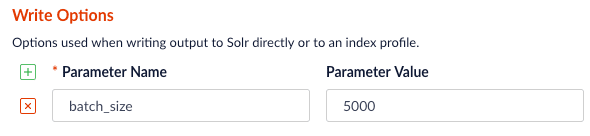
  | `outputOptions`                | Options used when writing directly to Solr. See Spark-Solr: [https://github.com/lucidworks/spark-solr#index-parameters](https://github.com/lucidworks/spark-solr#index-parameters) For example, if your docs are relatively small, you might want to increase the `batch_size` (2000 default) as shown below:  <img className="inline-image" alt="batch_size parameter" src="https://mintcdn.com/lucidworks/qCaM85k6rX7hs1DP/assets/images/4.1/batch-size.png?fit=max&auto=format&n=qCaM85k6rX7hs1DP&q=85&s=a4ccc59ec5f2621dc6fca8849e4b179c" width="590" height="136" data-path="assets/images/4.1/batch-size.png" /> |
  | `outputPartitions`             | Coalesce the DataFrame into N partitions before writing to Solr. This can help spread the indexing work out across more executors that are available in Spark, or limit the parallelism when writing to Solr.                                                                                                                                                                                                                                                                                                                                                                                                                                                                                                                                                                                                                                                                                                                                                                                                                                                                                                                                                                                                                                                                                                                                                                                                                                                                                                                                                                                                                                                                                                                                                                           |

  ## Tune performance

  As the name of the Parallel Bulk Loader job implies, it is designed to ingest large amounts of data into Fusion by parallelizing the work across your Spark cluster. To achieve scalability, you might need to increase the amount of memory and/or CPU resources allocated to the job.

  For Spark configuration information, see Spark operations.

  You can pass these properties in the job configuration to override the default Spark shell options:

  | Parameter Name           | Description and Default                                                                                                                                                                                     |
  | ------------------------ | ----------------------------------------------------------------------------------------------------------------------------------------------------------------------------------------------------------- |
  | `--driver-cores`         | Cores for the driver Default: `1`                                                                                                                                                                           |
  | `--driver-memory`        | Memory for the driver (for example, `1000M` or `2G`) Default: `1024M`                                                                                                                                       |
  | `--executor-cores`       | Cores per executor Default: 1 in YARN mode, or all available cores on the worker in standalone mode                                                                                                         |
  | `--executor-memory`      | Memory per executor (for example, `1000M` or `2G`) Default: `1G`                                                                                                                                            |
  | `--total-executor-cores` | Total cores for all executors Default: Without setting this parameter, the total cores for all executors is the number of executors in YARN mode, or all available cores on all workers in standalone mode. |
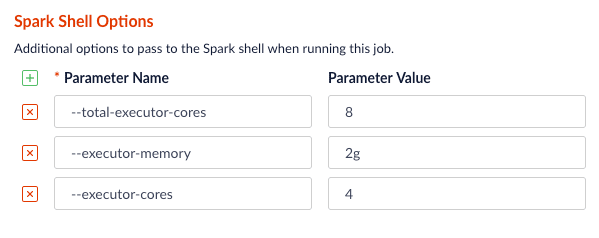
  <img src="https://mintcdn.com/lucidworks/qCaM85k6rX7hs1DP/assets/images/4.1/performance-tuning.png?fit=max&auto=format&n=qCaM85k6rX7hs1DP&q=85&s=09a237fbcd5f3ab4d6296b288279e776" alt="Spark shell options" width="599" height="238" data-path="assets/images/4.1/performance-tuning.png" />

  ## Examples

  Here we provide screenshots and example JSON job definitions to illustrate key points about how to load from different data sources.

  ### Use NLP during indexing

  In this example, we leverage the John Snow labs NLP library during indexing. This is just quick-and-dirty to show the concept.

  Also see:

  * [https://github.com/JohnSnowLabs/spark-nlp](https://github.com/JohnSnowLabs/spark-nlp)
  * [https://databricks.com/blog/2017/10/19/introducing-natural-language-processing-library-apache-spark.html](https://databricks.com/blog/2017/10/19/introducing-natural-language-processing-library-apache-spark.html)
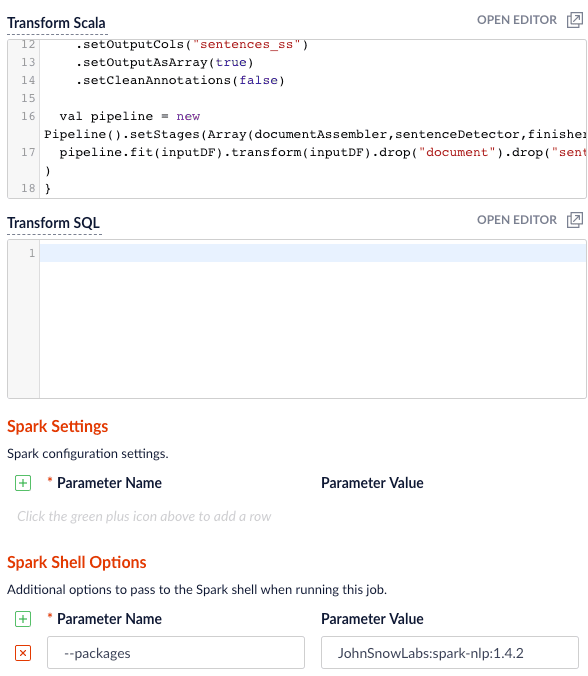
      <img src="https://mintcdn.com/lucidworks/qCaM85k6rX7hs1DP/assets/images/4.1/nlp-during-indexing.png?fit=max&auto=format&n=qCaM85k6rX7hs1DP&q=85&s=db22be5e64015ab27ecd57d82a223359" alt="NLP during indexing" width="588" height="676" data-path="assets/images/4.1/nlp-during-indexing.png" />

  Use this transform Scala script:

  ```scala theme={"dark"}
  import com.johnsnowlabs.nlp._
  import com.johnsnowlabs.nlp.annotators._
  import org.apache.spark.ml.Pipeline
  import com.johnsnowlabs.nlp.annotators.sbd.pragmatic.SentenceDetector

  def transform(inputDF: Dataset[Row]) : Dataset[Row] = {
    val documentAssembler = new DocumentAssembler().setInputCol("plot_txt_en").setOutputCol("document")
    val sentenceDetector = new SentenceDetector().setInputCols(Array("document")).setOutputCol("sentences")

    val finisher = new Finisher()
      .setInputCols("sentences")
      .setOutputCols("sentences_ss")
      .setOutputAsArray(true)
      .setCleanAnnotations(false)

    val pipeline = new Pipeline().setStages(Array(documentAssembler,sentenceDetector,finisher))
    pipeline.fit(inputDF).transform(inputDF).drop("document").drop("sentences")
  }
  ```

  Be sure to add the `JohnSnowLabs:spark-nlp:1.4.2` package using Spark Shell Options.

  ### Clean up data with SQL transformations

  Fusion has a Local Filesystem connector that can handle files such as CSV and JSON files. Using the Parallel Bulk Loader lets you leverage features that are not in the Local Filesystem connector, such as using SQL to clean up the input data.
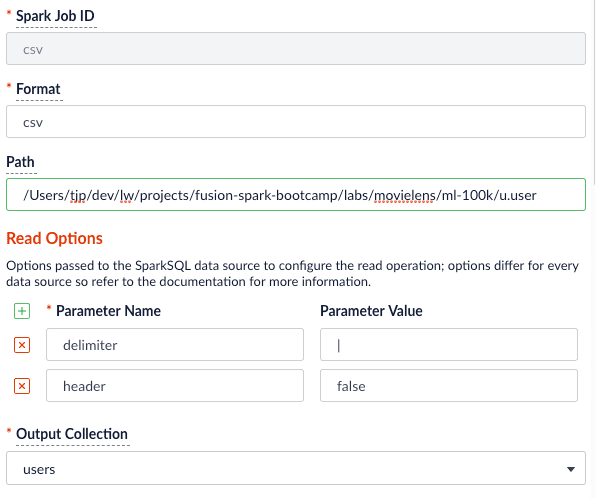
  <img src="https://mintcdn.com/lucidworks/qCaM85k6rX7hs1DP/assets/images/4.1/csv-sql-transform.png?fit=max&auto=format&n=qCaM85k6rX7hs1DP&q=85&s=c4db972916f20cdc162d017485cce09f" alt="SQL transformation of CSV data" width="595" height="498" data-path="assets/images/4.1/csv-sql-transform.png" />

  Use the following SQL to clean up the input data before indexing:

  ```sql theme={"dark"}
  SELECT _c0 as user_id,
         CAST(_c1 as INT) as age,
         _c2 as gender,
         _c3 as occupation,
         _c4 as zip_code
   FROM _input

  Job JSON:
  {
    "type" : "parallel-bulk-loader",
    "id" : "csv",
    "format" : "csv",
    "path" : "/Users/tjp/dev/lw/projects/fusion-spark-bootcamp/labs/movielens/ml-100k/u.user",
    "readOptions" : [ {
      "key" : "delimiter",
      "value" : "|"
    }, {
      "key" : "header",
      "value" : "false"
    } ],
    "outputCollection" : "users",
    "clearDatasource" : false,
    "defineFieldsUsingInputSchema" : true,
    "atomicUpdates" : false,
    "transformSql" : "SELECT _c0 as user_id, \n       CAST(_c1 as INT) as age, \n       _c2 as gender,\n       _c3 as occupation,\n       _c4 as zip_code \n FROM _input"
  }
  ```

  ### Read from S3

  It is easy to read from an S3 bucket without pulling data down to your local workstation first. To avoid exposing your AWS credentials, add them to a file named `core-site.xml` in the `apps/spark-dist/conf` directory, such as:

  ```xml theme={"dark"}
  <configuration>
    <property>
      <name>fs.s3a.access.key</name>
      <value>???</value>
    </property>
    <property>
      <name>fs.s3a.secret.key</name>
      <value>???</value>
    </property>
  </configuration>
  ```

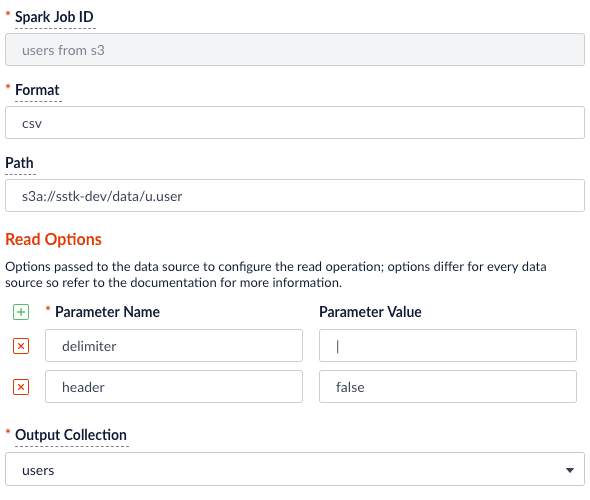
  Then you can load files using the S3a protocol, such as: `s3a://sstk-dev/data/u.user`. If you are running a Fusion cluster then each instance of Fusion will need a `core-site.xml` file. S3a is the preferred protocol for reading data into Spark because it uses Amazon’s libraries to read from S3 instead of the legacy Hadoop libraries. If you need other S3 protocols (for example, s3 or s3n) you will need to add the equivalent properties to `core-site.xml`.

  <img src="https://mintcdn.com/lucidworks/qCaM85k6rX7hs1DP/assets/images/4.1/s3-read-options.png?fit=max&auto=format&n=qCaM85k6rX7hs1DP&q=85&s=baf1bf692e45ee8c7e02e319b7f97cd2" alt="S3 Read Options" width="590" height="500" data-path="assets/images/4.1/s3-read-options.png" />

  You will need to add the `org.apache.hadoop:hadoop-aws:2.7.3` package to the job using the `--packages` Spark option. Also, you will need to exclude the `com.fasterxml.jackson.core:jackson-core,joda-time:joda-time` packages using the `--exclude-packages` option.
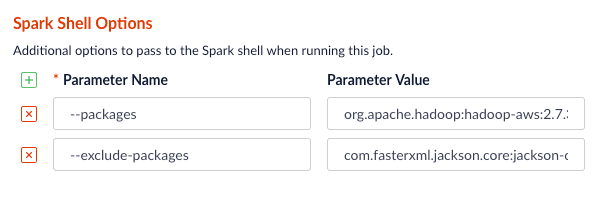
  <img src="https://mintcdn.com/lucidworks/qCaM85k6rX7hs1DP/assets/images/4.1/s3-spark-shell-options.png?fit=max&auto=format&n=qCaM85k6rX7hs1DP&q=85&s=2c59937c52bebe74cb7bee3c4bfcd28a" alt="S3 Spark Shell Options" width="593" height="197" data-path="assets/images/4.1/s3-spark-shell-options.png" />

  You can also read from Google Cloud Storage (GCS), but you will need a few more properties in your `core-site.xml`; see [Installing the Cloud Storage connector](https://cloud.google.com/dataproc/docs/concepts/connectors/install-storage-connector).

  ### Read from Parquet

  Reading from parquet files is built into Spark using the "parquet" format. For additional read options, see
  [Configuration of Parquet](https://spark.apache.org/docs/latest/sql-programming-guide.html#configuration).
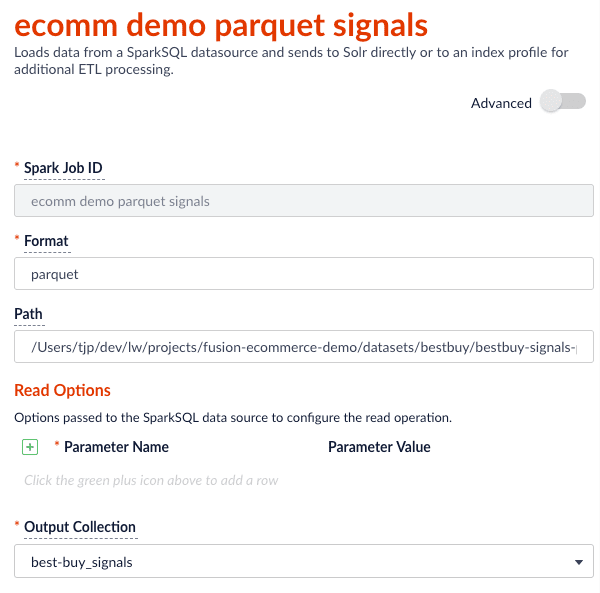
  <img src="https://mintcdn.com/lucidworks/qCaM85k6rX7hs1DP/assets/images/4.1/parquet-signals.png?fit=max&auto=format&n=qCaM85k6rX7hs1DP&q=85&s=4dd845fa1c6b7723fc73951442dce038" alt="Read signals from parquet file" width="600" height="593" data-path="assets/images/4.1/parquet-signals.png" />

  Job JSON:

  ```json theme={"dark"}
  {
    "type" : "parallel-bulk-loader",
    "id" : "ecomm demo parquet signals",
    "format" : "parquet",
    "path" : "./part-00000-c1951958-98ae-4f2a-b7b4-2e3a69fcf403-c000.snappy.parquet",
    "outputCollection" : "best-buy_signals",
    "clearDatasource" : false,
    "defineFieldsUsingInputSchema" : true,
    "atomicUpdates" : false
  }
  ```

  This example also uses the `transformScala` option to filter and transform the input DataFrame into a better form for indexing using the following Scala script:

  ```scala theme={"dark"}
  import java.util.Calendar
  import java.util.Locale
  import java.util.TimeZone

  def transform(inputDF: Dataset[Row]) : Dataset[Row] = {
  {/*   // do transformations and/or filter the inputDF here */}
    val signalsDF =
  inputDF.filter((unix_timestamp($"timestamp_tdt", "MM/dd/yyyy HH:mm:ss.SSS") < 1325376000))
    val now = System.currentTimeMillis()
    val maxDate = signalsDF.agg(max("timestamp_tdt")).take(1)(0).getAs[java.sql.Timestamp](0).getTime
    val diff = now - maxDate
    val add_time =
  udf((t: java.sql.Timestamp, diff : Long) => new java.sql.Timestamp(t.getTime + diff))

    val day_of_week = udf((t: java.sql.Timestamp) => {
      val calendar = Calendar.getInstance(TimeZone.getTimeZone("UTC"))
      calendar.setTimeInMillis(t.getTime)
      calendar.getDisplayName(Calendar.DAY_OF_WEEK, Calendar.LONG, Locale.getDefault)
    })

  {/*   //Remap some columns to bring the timestamps current */}
    signalsDF
        .withColumnRenamed("timestamp_tdt", "orig_timestamp_tdt").withColumn("timestamp_tdt", add_time($"orig_timestamp_tdt", lit(diff)))
        .withColumn("date", $"timestamp_tdt")
        .withColumn("tx_timestamp_txt", date_format($"timestamp_tdt", "E YYYY-MM-d HH:mm:ss.SSS Z"))
        .withColumn("param.query_time_dt", $"timestamp_tdt")
        .withColumn("date_day", date_format(date_sub($"date", 0), "YYYY-MM-d'T'HH:mm:ss.SSS'Z'"))
        .withColumn("date_month", date_format(trunc($"date", "mm"), "YYYY-MM-d'T'HH:mm:ss.SSS'Z'"))
        .withColumn("date_year", date_format(trunc($"date", "yyyy"), "YYYY-MM-d'T'HH:mm:ss.SSS'Z'"))
        .withColumn("day_of_week", day_of_week($"date"))
  }
  ```

  ### Read from JDBC tables

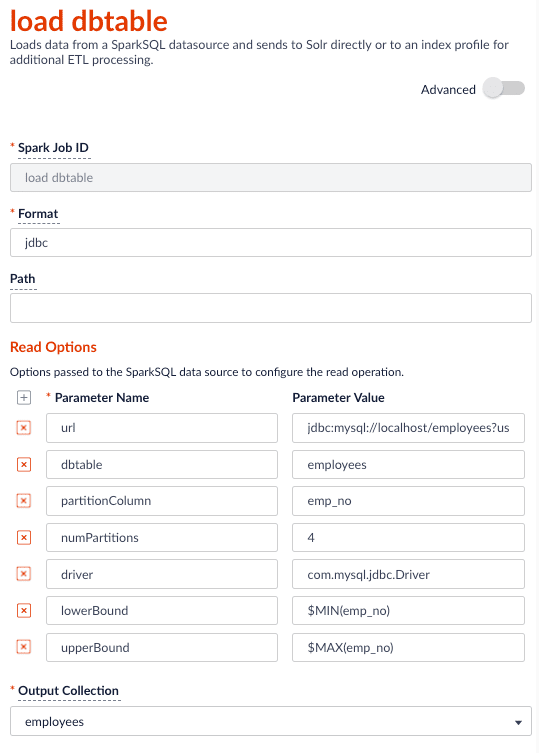
  You can use the Parallel Bulk Loader to parallelize reads from JDBC tables, if the tables have numeric columns that can be partitioned into relatively equal partition sizes. In the example below, we partition the employees table into 4 partitions using the `emp_no` column (`int`). Behind the scenes, Spark sends four separate queries to the database and processes the result sets in parallel.

  #### Load the JDBC driver JAR file into the Blob store

  Before you ingest from a JDBC data source, you need to use the Fusion Admin UI to upload the JDBC driver JAR file into the blob store.

  Alternatively, you can add the JAR file to the Fusion blob store with `resourceType=spark:jar`; for example:

  ```bash wrap theme={"dark"}
  curl -XPUT -H "Content-type:application/octet-stream" "http://<FUSION_HOST>/api/blobs/mysql_jdbc_jar?resourceType=spark:jar" --data-binary @mysql-connector-java-5.1.45-bin.jar
  ```

  At runtime, Fusion’s Spark job management framework knows how to add any JAR files with `resourceType=spark:jar` from the blob store to the appropriate classpaths before running a Parallel Bulk Loader job.

  #### Read from a table

  <img src="https://mintcdn.com/lucidworks/qCaM85k6rX7hs1DP/assets/images/4.1/load-dbtable.png?fit=max&auto=format&n=qCaM85k6rX7hs1DP&q=85&s=566324540310998704349f6775ef03ce" alt="Read from JDBC tables" width="539" height="753" data-path="assets/images/4.1/load-dbtable.png" />

  For more information on reading from JDBC-compliant databases, see:

  * [http://spark.apache.org/docs/latest/sql-programming-guide.html#jdbc-to-other-databases](http://spark.apache.org/docs/latest/sql-programming-guide.html#jdbc-to-other-databases)
  * [https://medium.com/@radek.strnad/tips-for-using-jdbc-in-apache-spark-sql-396ea7b2e3d3](https://medium.com/@radek.strnad/tips-for-using-jdbc-in-apache-spark-sql-396ea7b2e3d3)

  ```json theme={"dark"}
  {
    "type" : "parallel-bulk-loader",
    "id" : "load dbtable",
    "format" : "jdbc",
    "readOptions" : [ {
      "key" : "url",
      "value" : "jdbc:mysql://localhost/employees?user=?&password=?"
    }, {
      "key" : "dbtable",
      "value" : "employees"
    }, {
      "key" : "partitionColumn",
      "value" : "emp_no"
    }, {
      "key" : "numPartitions",
      "value" : "4"
    }, {
      "key" : "driver",
      "value" : "com.mysql.jdbc.Driver"
    }, {
      "key" : "lowerBound",
      "value" : "$MIN(emp_no)"
    }, {
      "key" : "upperBound",
      "value" : "$MAX(emp_no)"
    } ],
    "outputCollection" : "employees",
    "clearDatasource" : false,
    "defineFieldsUsingInputSchema" : true,
    "atomicUpdates" : false
  }
  ```

  Notice the use of the `$MIN(emp_no)` and `$MAX(emp_no)` macros in the read options. These are macros offered by the Parallel Bulk Loader to help configure parallel reads of JDBC tables. Behind the scenes, the macros are translated into SQL queries to get the MAX and MIN values of the specified field, which Spark uses to compute splits for partitioned queries. As mentioned above, the field must be numeric and must have a relatively balanced distribution of values between MAX and MIN; otherwise, you are unlikely to see much performance benefit to partitioning.

  ### Index HBase tables

  To index an HBase table, use the [Hortonworks connector](https://github.com/hortonworks-spark/shc).
  <Note>The Parallel Bulk Loader lets us replace the HBase Indexer.</Note>

  You will need to add an `hbase-site.xml` (and possibly `core-site.xml`) to `apps/spark-dist/conf` in Fusion, for example:

  ```xml theme={"dark"}
  <configuration>
   <property>
      <name>hbase.defaults.for.version.skip</name>
      <value>true</value>
   </property>
   <property>
      <name>hbase.zookeeper.quorum</name>
      <value>localhost:2181</value>
   </property>
   <property>
      <name>zookeeper.znode.parent</name>
      <value>/hbase</value>
   </property>
  </configuration>
  ```

  For this example, we will create a test table in HBase. If you already have a table in HBase, feel free to use that table instead.

  1. Launch the HBase shell and create a table named `fusion_nums` with a single column family named `lw`:
     ```
     create 'fusion_nums', 'lw'
     ```
  2. Do a list command to see your table:
     ```
     hbase(main):002:0> list
     TABLE
     fusion_nums
         1 row(s) in 0.0250 seconds

     => ["fusion_nums"]
     ```
  3. Fill the table with some data:
     ```
     for i in '1'..'100' do for j in '1'..'2' do put 'fusion_nums', "row#{i}", "lw:c#{j}", "#{i}#{j}" end end
     ```
  4. Scan the fusion\_nums table to see your data:
     ```
     scan 'fusion_nums'
     ```

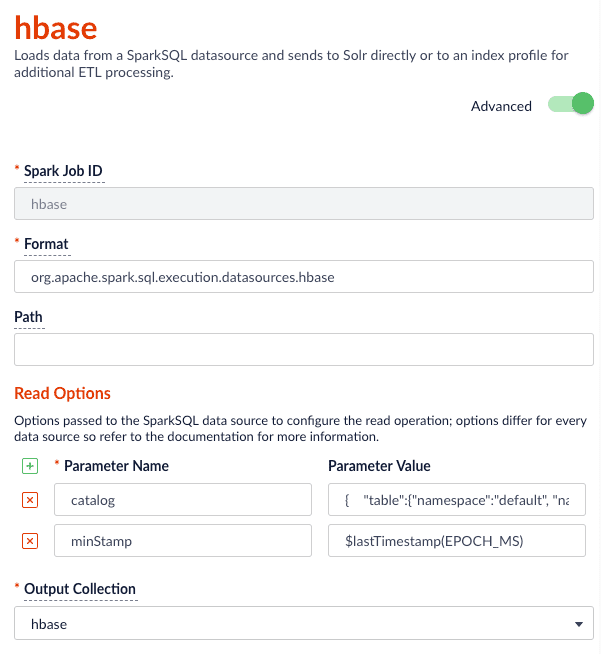
  The HBase connector requires a catalog read option that defines the columns you want to read and how to map them into a Spark DataFrame. For our sample table, the following suffices:

  ```json theme={"dark"}
  {
      "table":{"namespace":"default", "name":"fusion_nums"},
      "rowkey":"key",
      "columns":{
       "id":{"cf":"rowkey", "col":"key", "type":"string"},
       "lw_c1_s":{"cf":"lw", "col":"c1", "type":"string"},
       "lw_c2_s":{"cf":"lw", "col":"c2", "type":"string"}
      }
   }
  ```

  <img src="https://mintcdn.com/lucidworks/qCaM85k6rX7hs1DP/assets/images/4.1/hbase.png?fit=max&auto=format&n=qCaM85k6rX7hs1DP&q=85&s=ba696ffe4d1c1f31e4965b5f4b5d6512" alt="Index HBase tables" width="601" height="654" data-path="assets/images/4.1/hbase.png" />

  Notice the use of the `$lastTimestamp` macro in the read options. This lets us filter rows read from HBase using the timestamp of the last document the Parallel Bulk Loader wrote to Solr, that is, to get the newest updates from HBase only (incremental updates). Most Spark data sources provide a way to filter results based on timestamp.

  Job JSON:

  ```json theme={"dark"}
  {
    "type" : "parallel-bulk-loader",
    "id" : "hbase",
    "format" : "org.apache.spark.sql.execution.datasources.hbase",
    "readOptions" : [ {
      "key" : "catalog",
      "value" : "{    \"table\":{\"namespace\":\"default\", \"name\":\"fusion_nums\"},    \"rowkey\":\"key\",    \"columns\":{      \"id\":{\"cf\":\"rowkey\", \"col\":\"key\", \"type\":\"string\"},      \"lw_c1_s\":{\"cf\":\"lw\", \"col\":\"c1\", \"type\":\"string\"},      \"lw_c2_s\":{\"cf\":\"lw\", \"col\":\"c2\", \"type\":\"string\"}    }  }"
    }, {
      "key" : "minStamp",
      "value" : "$lastTimestamp(EPOCH_MS)"
    } ],
    "outputCollection" : "hbase",
    "timestampFieldName" : "timestamp_tdt",
    "clearDatasource" : false,
    "defineFieldsUsingInputSchema" : true,
    "atomicUpdates" : false,
    "shellOptions" : [ {
      "key" : "--packages",
      "value" : "com.hortonworks:shc-core:1.1.1-2.1-s_2.11"
    }, {
      "key" : "--repositories",
      "value" : "https://mvnrepository.com/repos/hortonworks-releases"
    } ]
  }
  ```

  ### Index Elastic data

  With Elasticsearch 6.2.2 using the `org.elasticsearch:elasticsearch-spark-20_2.11:6.2.1` package, here is a Scala script to run in `bin/spark-shell` to index some test data:

  ```scala theme={"dark"}
  import spark.implicits._

  case class SimpsonCharacter(name: String, actor: String, episodeDebut: String)

  val simpsonsDF = sc.parallelize(
    SimpsonCharacter("Homer", "Dan Castellaneta", "Good Night") ::
    SimpsonCharacter("Marge", "Julie Kavner", "Good Night") ::
    SimpsonCharacter("Bart", "Nancy Cartwright", "Good Night") ::
    SimpsonCharacter("Lisa", "Yeardley Smith", "Good Night") ::
    SimpsonCharacter("Maggie", "Liz Georges and more", "Good Night") ::
    SimpsonCharacter("Sideshow Bob", "Kelsey Grammer", "The Telltale Head") :: Nil).toDF()

  val writeOpts = Map("es.nodes" -> "127.0.0.1",
    "es.port" -> "9200",
    "es.index.auto.create" -> "true",
    "es.resouce.auto.create" -> "shows/simpsons")
  simpsonsDF.write.format("org.elasticsearch.spark.sql").mode("Overwrite").save("shows/simpsons")
  ```
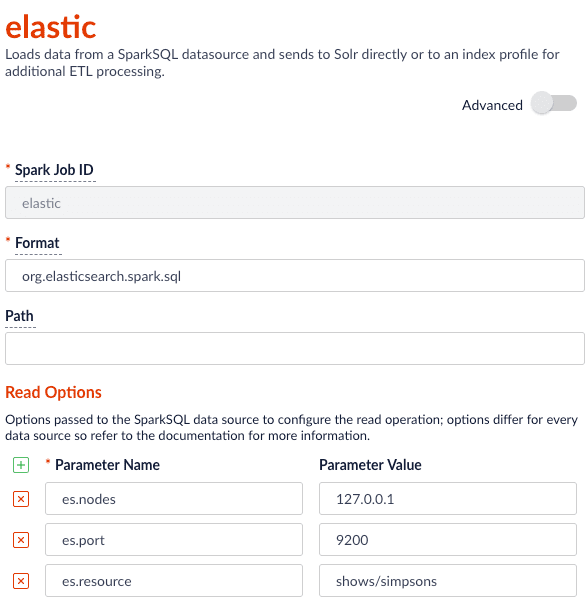
  <img src="https://mintcdn.com/lucidworks/qCaM85k6rX7hs1DP/assets/images/4.1/elastic.png?fit=max&auto=format&n=qCaM85k6rX7hs1DP&q=85&s=1229f8c262936260d080c7860d95b8a6" alt="Elastic" width="588" height="616" data-path="assets/images/4.1/elastic.png" />

  Job JSON:

  ```json theme={"dark"}
  {
    "type" : "parallel-bulk-loader",
    "id" : "elastic",
    "format" : "org.elasticsearch.spark.sql",
    "readOptions" : [ {
      "key" : "es.nodes",
      "value" : "127.0.0.1"
    }, {
      "key" : "es.port",
      "value" : "9200"
    }, {
      "key" : "es.resource",
      "value" : "shows/simpsons"
    } ],
    "outputCollection" : "hbase_signals_aggr",
    "clearDatasource" : false,
    "defineFieldsUsingInputSchema" : true,
    "atomicUpdates" : false,
  "shellOptions" : [ {
      "key" : "--packages",
      "value" : "org.elasticsearch:elasticsearch-spark-20_2.11:6.2.2"
    } ]
  }
  ```

  ### Read from Couchbase

  To index a Couchbase bucket, use the official Couchbase Spark connector found [here](https://spark-packages.org/package/couchbase/couchbase-spark-connector).

  For example, we will create a test bucket in Couchbase.  If you already have a bucket in Couchbase, feel free to use that and skip to the test data setup section.  This test was performed using Couchbase Server 6.0.0.

  1. Create a bucket test in the Couchbase admin UI. Give access to a system account user to use in the Parallel Bulk Loader job config.
  2. Connect to Couchbase using the command line client cbq. For example, `cbq -e=http://<host>:8091 -u <user> -p <password>`. Ensure the provided user is an authorized user of the test bucket.
  3. Create a primary index on the test bucket: `CREATE PRIMARY INDEX 'test-primary-index' ON 'test' USING GSI;`.
  4. Insert some data: `INSERT INTO 'test' ( KEY, VALUE ) VALUES ( "1", { "id": "01", "field1": "a value", "field2": "another value"} ) RETURNING META().id as docid, *;`.
  5. Verify you can query the document just inserted: `select * from 'test';`.

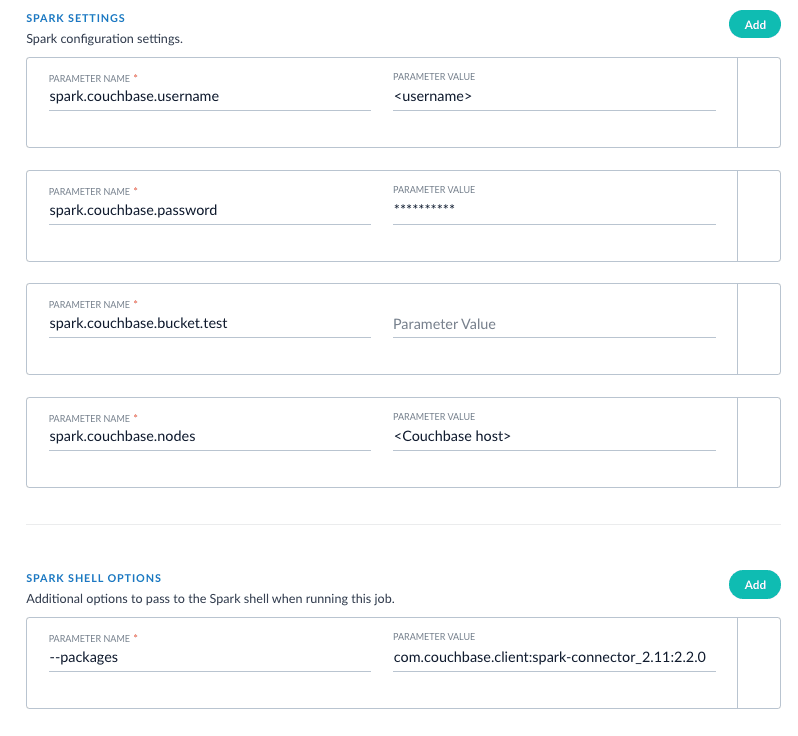
  To ingest from this bucket with the Parallel Bulk Loader, use the Couchbase Spark connector by specifying the format `com.couchbase.spark.sql.DefaultSource`.  Then specify the `com.couchbase.client:spark-connector_2.11:2.2.0` package as the `spark shell --packages` option, as well as a few spark settings that direct the connector to a particular Couchbase server and bucket to connect to using the provided credentials.  See [here](https://docs.couchbase.com/spark-connector/current/getting-started.html) for all of the available Spark configuration settings for the Couchbase Spark connector.

  Putting it all together:

  <img src="https://mintcdn.com/lucidworks/sBy1WWIeb2aVbL1d/assets/images/AI/pbl-couchbase.png?fit=max&auto=format&n=sBy1WWIeb2aVbL1d&q=85&s=49fc86c6fc73c64e20ebe57b5c803d6e" alt="Couchbase" width="798" height="736" data-path="assets/images/AI/pbl-couchbase.png" />

  ### XML setup

  XML is a supported format that requires settings for `format` and `--packages`. In addition, you must specify the filepath in the `readOptions` section. For example:

  ```json theme={"dark"}
  {
      "type": "parallel-bulk-loader",
      "id": "pbl",
      "format": "com.databricks.spark.xml",
      "path": "this-is-ignored",
      "readOptions": [
          {
              "key": "rowTag",
              "value": "tag_name_representing_record"
          },
          {
              "key": "path",
              "value": "/home/user/file.xml.gz"
          }
      ],
      "outputCollection": "output_collection_name",
      "clearDatasource": true,
      "defineFieldsUsingInputSchema": true,
      "atomicUpdates": false,
      "transformScala": "",
      "shellOptions": [
          {
              "key": "--packages",
              "value": "com.databricks:spark-xml_2.11:0.5.0"
          }
      ],
      "cacheAfterRead": false
  }
  ```
</Accordion>

## API usage examples

The following examples include requests and responses for some of the API endpoints.

### Create a parallel bulk loader job

An example request to create a parallel bulk loader job with the REST API is as follows:

```bash wrap  expandable  theme={"dark"}
curl --request POST \
  --url https://FUSION_HOST/api/spark/configurations \
  --header "Accept: */*" \
  --header "Authorization: Basic ACCESS_TOKEN" \
  --header "Content-Type: application/json" \
  --data '{
  "id": "store_typeahead_entity_load",
  "format": "solr",
  "sparkConfig": [
    {
      "key": "spark.sql.caseSensitive",
      "value": "true"
    },
  ],
  "readOptions": [
        {
      "key": "collection",
      "value": "store"
    },
    {
      "key": "zkHost",
      "value": "zookeeper-549"
    },
  ],
  "type": "parallel-bulk-loader"
}
```

The response is a message indicating success or failure.

### Start a parallel bulk loader job

This request starts the `pbl_load` PBL job.

```bash wrap  theme={"dark"}
curl --request POST \
  --url https://FUSION_HOST.com/api/spark/jobs/store_typeahead_entity_load \
  --header "Accept: */*" \
  --header "Authorization: Basic ACCESS_TOKEN" \
  --header "Content-Type: application/json"
```

The response is:

```json wrap  theme={"dark"}
{
    "state": "starting",
    "jobId": "a2b50rrce7",
    "jobConfig": {
        "type": "parallel-bulk-loader",
        "id": "store_typeahead_entity_load",
        "format": "solr",
        "readOptions": [
            {
                "key": "collection",
                "value": "store"
            },
            {
                "key": "zkHost",
                "value": "zookeeper-549"
            }
        ],
        "outputCollection": "store_typeahead",
        "outputIndexPipeline": "store_typeahead",
        "clearDatasource": true,
        "defineFieldsUsingInputSchema": true,
        "atomicUpdates": false,
        "transformScala": "import script",
        "sparkConfig": [
            {
                "key": "spark.sql.caseSensitive",
                "value": "true"
            },
            {
                "key": "spark.typeField_1",
                "value": "Suggested_Doc, doc_title, url, doc_locale, doc_sector_ss, doc_economic_buyer_ss, doc_topic_ss, title_s"
            }
        ],
        "cacheAfterRead": false,
        "continueAfterFailure": false,
        "type": "parallel-bulk-loader",
        "updates": [
            {
                "userId": "service_account",
                "timestamp": "2024-05-06T09:06:43.739877Z"
            },
            {
                "userId": "power_user",
                "timestamp": "2024-07-30T20:30:31.347930292Z"
            },
            {
                "userId": "power_user",
                "timestamp": "2024-07-30T20:30:31.350243642Z"
            }
        ]
    },
    "hostname": "111.111.111.111",
    "result": {
        "jobConfigId": "store_typeahead_entity_load",
        "jobRunId": "b2c50rrde6"
    }
}
```

### POST spark configuration to a parallel bulk loader job

This request posts Spark configuration information to the `store_typeahead_entity_load` PBL job.

```bash wrap  theme={"dark"}
curl --request POST \
  --url https://FUSION_HOST.com/api/spark/configurations \
  --header "Accept: */*" \
  --header "Authorization: Basic ACCESS_TOKEN" \
  --header "Content-Type: application/json" \
  --data '{
  "id": "store_typeahead_entity_load",
  "sparkConfig": [
    {
      "key": "spark.sql.caseSensitive",
      "value": "true",
    },
    {
      "key": "spark.typeField_1",
      "value": "Suggested_Doc, doc_title, url, doc_locale, doc_sector_ss, doc_economic_buyer_ss, doc_topic_ss, title_s",
    }
  ],
  "type": "parallel-bulk-loader"
}'
```

## Configuration properties

<SchemaParamFields schema={schema} />
