> ## Documentation Index
> Fetch the complete documentation index at: https://doc.lucidworks.com/llms.txt
> Use this file to discover all available pages before exploring further.

# Classification Jobs

export const schema = {
  "type": "object",
  "title": "Classification",
  "description": "Trains a classification model to classify text documents by assigning a label to them.",
  "required": ["id", "trainingCollection", "trainingFormat", "textField", "labelField", "deployModelName", "workflowType", "type"],
  "properties": {
    "id": {
      "type": "string",
      "title": "Job ID",
      "description": "The ID for this job. Used in the API to reference this job. Allowed characters: a-z, A-Z, dash (-) and underscore (_)",
      "maxLength": 63,
      "pattern": "[a-zA-Z][_\\-a-zA-Z0-9]*[a-zA-Z0-9]?"
    },
    "sparkConfig": {
      "type": "array",
      "title": "Additional parameters",
      "description": "Provide additional key/value pairs to be injected into the training JSON map at runtime. Values will be inserted as-is, so use \" to surround string values",
      "hints": ["advanced"],
      "items": {
        "type": "object",
        "required": ["key"],
        "properties": {
          "key": {
            "type": "string",
            "title": "Parameter Name"
          },
          "value": {
            "type": "string",
            "title": "Parameter Value"
          }
        }
      }
    },
    "writeOptions": {
      "type": "array",
      "title": "Write Options",
      "description": "Options used when writing output to Solr or other sources",
      "hints": ["advanced"],
      "items": {
        "type": "object",
        "required": ["key"],
        "properties": {
          "key": {
            "type": "string",
            "title": "Parameter Name"
          },
          "value": {
            "type": "string",
            "title": "Parameter Value"
          }
        }
      }
    },
    "readOptions": {
      "type": "array",
      "title": "Read Options",
      "description": "Options used when reading input from Solr or other sources.",
      "hints": ["advanced"],
      "items": {
        "type": "object",
        "required": ["key"],
        "properties": {
          "key": {
            "type": "string",
            "title": "Parameter Name"
          },
          "value": {
            "type": "string",
            "title": "Parameter Value"
          }
        }
      }
    },
    "stopwordsBlobName": {
      "type": "string",
      "title": "Stopwords Blob Store",
      "description": "Name of the stopwords blob resource. This is a .txt file with one stopword per line. By default the file is called stopwords/stopwords_en.txt however a custom file can also be used. Check documentation for more details on format and uploading to blob store.",
      "default": "stopwords/stopwords_en.txt",
      "reference": "blob",
      "blobType": "file:spark"
    },
    "trainingCollection": {
      "type": "string",
      "title": "Training data path",
      "description": "Solr collection or cloud storage path where training data is present.",
      "minLength": 1
    },
    "trainingFormat": {
      "type": "string",
      "title": "Training data format",
      "description": "The format of the training data - solr, parquet etc.",
      "default": "solr",
      "minLength": 1
    },
    "secretName": {
      "type": "string",
      "title": "Cloud storage secret name",
      "description": "Name of the secret used to access cloud storage as defined in the K8s namespace",
      "hints": ["advanced"],
      "minLength": 1
    },
    "textField": {
      "type": "string",
      "title": "Training collection content field",
      "description": "Solr field name containing the text to be classified",
      "minLength": 1
    },
    "labelField": {
      "type": "string",
      "title": "Training collection class field",
      "description": "Solr field name containing the classes/labels for the text",
      "minLength": 1
    },
    "trainingDataFilterQuery": {
      "type": "string",
      "title": "Training Data Filter Query",
      "description": "Solr or SQL query to filter training data. Use solr query when solr collection is specified in Training Path. Use SQL query when cloud storage location is specified. The table name for SQL is `spark_input`.",
      "hints": ["code/sql", "advanced"]
    },
    "randomSeed": {
      "type": "integer",
      "title": "Random Seed",
      "description": "Pseudorandom determinism fixed by keeping this seed constant",
      "default": 12345,
      "hints": ["advanced"]
    },
    "trainingSampleFraction": {
      "type": "number",
      "title": "Training Data Sampling Fraction",
      "description": "Choose a fraction of the data for training.",
      "default": 1,
      "hints": ["advanced"],
      "maximum": 1,
      "exclusiveMaximum": false
    },
    "deployModelName": {
      "type": "string",
      "title": "Model Deployment Name",
      "description": "Name of the model to be used for deployment (must be a valid lowercased DNS subdomain with no underscores).",
      "maxLength": 30,
      "pattern": "^[a-z0-9]([-a-z0-9]*[a-z0-9])?(\\.[a-z0-9]([-a-z0-9]*[a-z0-9])?)*$"
    },
    "workflowType": {
      "type": "string",
      "title": "Method",
      "description": "Method to be used for classification.",
      "enum": ["Logistic Regression", "Starspace"],
      "default": "Logistic Regression"
    },
    "minCharLen": {
      "type": "integer",
      "title": "Minimum No. of Characters",
      "description": "Minimum length, in characters, for the text to be included into training.",
      "default": 2,
      "minimum": 1,
      "exclusiveMinimum": false
    },
    "maxCharLen": {
      "type": "integer",
      "title": "Maximum No. of Characters",
      "description": "Maximum length, in characters, of the training text. Texts longer than this value will be truncated.",
      "default": 100000,
      "minimum": 1,
      "exclusiveMinimum": false
    },
    "lowercaseTexts": {
      "type": "boolean",
      "title": "Lowercase Text",
      "description": "Select if you want the text to be lowercased",
      "default": true
    },
    "unidecodeTexts": {
      "type": "boolean",
      "title": "Unidecode Text",
      "description": "Select if you want the text to be unidecoded",
      "default": true
    },
    "minClassSize": {
      "type": "integer",
      "title": "Minimum no. of examples per class",
      "description": "Minimum number of samples that class should have to be included into training. Otherwise the class and all its samples are dropped.",
      "default": 5,
      "minimum": 2,
      "exclusiveMinimum": false
    },
    "valSize": {
      "type": "number",
      "title": "Validation set size",
      "description": "Size of the validation dataset. Provide a float (0, 1) if you want to sample as a fraction, or an integer >= 1 if you want to sample exact number of records.",
      "default": 0.1
    },
    "topK": {
      "type": "integer",
      "title": "Number of Output classes",
      "description": "Number of most probable output classes to assign to each sample along with their scores.",
      "default": 1,
      "minimum": 1,
      "exclusiveMinimum": false
    },
    "featurizerType": {
      "type": "string",
      "title": "Featurizer",
      "description": "The type of featurizer to use. TFIDF will compute both term-frequency and inverse document-frequency, whereas Count will use only term-frequency",
      "enum": ["tfidf", "count"],
      "default": "tfidf",
      "hints": ["advanced"]
    },
    "useCharacters": {
      "type": "boolean",
      "title": "Use Characters",
      "description": "Whether to use the characters or word analyzer. Use words if the text is long. Using characters on long text can significantly increase vectorization time and memory requirements.",
      "default": true
    },
    "tokenPattern": {
      "type": "string",
      "title": "Token filtering pattern",
      "description": "Regex pattern for filtering tokens.",
      "default": "(?u)\\b\\w\\w+\\b",
      "hints": ["hidden"]
    },
    "minDf": {
      "type": "number",
      "title": "Min Document Frequency",
      "description": "Minimum Df for token to be considered. Provide a float (0,1) if you want to specify as a fraction, otherwise integer >= 1 to specify the exact number of documents in which a token should occur.",
      "default": 1,
      "hints": ["advanced"]
    },
    "maxDf": {
      "type": "number",
      "title": "Max Document Frequency",
      "description": "Maximum Df for token to be considered. Provide a float (0,1) if you want to specify as a fraction, otherwise integer >= 1 to specify the exact number of documents in which a token should occur",
      "default": 0.8,
      "hints": ["advanced"]
    },
    "minNgram": {
      "type": "integer",
      "title": "Min Ngram size",
      "description": "Minimum word or character ngram size to be used.",
      "minimum": 1,
      "exclusiveMinimum": false
    },
    "maxNgram": {
      "type": "integer",
      "title": "Max Ngram size",
      "description": "Maximum word or character ngram size to be used.",
      "minimum": 1,
      "exclusiveMinimum": false
    },
    "maxFeatures": {
      "type": "integer",
      "title": "Maximum Vocab Size",
      "description": "Maximum number of tokens (including word or character ngrams) to consider for the vocabulary. Less frequent tokens will be omitted.",
      "default": 250000,
      "minimum": 1,
      "exclusiveMinimum": false
    },
    "norm": {
      "type": "string",
      "title": "Use Norm",
      "description": "Select the norm method to use.",
      "enum": ["None", "L1", "L2"],
      "default": "None",
      "hints": ["advanced"]
    },
    "smoothIdf": {
      "type": "boolean",
      "title": "Smooth IDF",
      "description": "Smooth IDF weights by adding one to document frequencies. Prevents zero divisions.",
      "default": true,
      "hints": ["advanced"]
    },
    "sublinearTf": {
      "type": "boolean",
      "title": "Sublinear TF",
      "description": "Whether to apply sublinear scaling to TF, i.e. replace tf with 1 + log(tf). It usually helps when characters are used. ",
      "default": true,
      "hints": ["advanced"]
    },
    "scaling": {
      "type": "boolean",
      "title": "Scale Features",
      "description": "Whether to apply Standard Scaling (X - mean(X)) / std(X) for the features. If the feature vector is sparse (no dimensionality reduction is used), then only division on standard deviation will be applied.",
      "default": true
    },
    "dimReduction": {
      "type": "boolean",
      "title": "Perform Dimensionality Reduction",
      "description": "Whether to perform dimensionality reduction or not. Truncated SVD is used to reduce dimensionality. Reduces overfitting and training time. Note that sparse vectors will become dense.",
      "default": false
    },
    "dimReductionSize": {
      "type": "integer",
      "title": "Reduced Dimension Size",
      "description": "The target dimension size of the features after dimensionality reduction.",
      "default": 256,
      "minimum": 1,
      "exclusiveMinimum": false
    },
    "penalty": {
      "type": "string",
      "title": "Penalty",
      "description": "Specify the norm used in the penalization. l2 is supported only by the ‘newton-cg’, ‘sag’ and ‘lbfgs’ solvers. ‘elasticnet’ is only supported by the ‘saga’ solver. Select none, if you don't want to regularize (this is not supported by the `liblinear` solver).",
      "enum": ["l1", "l2", "elsaticnet", "none"],
      "default": "l2",
      "hints": ["advanced"]
    },
    "l1Ratio": {
      "type": "number",
      "title": "L1 penalty ratio",
      "description": "Only used with the `elasticnet` penalty. If its value = 0, l2 penalty will be used. If it's value = 1, l1 penalty will be used. A value in between will use the appropirate ratio of l1 and l2 penalties.",
      "default": 0.5,
      "hints": ["advanced"],
      "maximum": 1,
      "exclusiveMaximum": false
    },
    "tol": {
      "type": "number",
      "title": "Stopping tolerance",
      "description": "Tolerance for stopping criteria.",
      "default": 0.0001
    },
    "reg": {
      "type": "number",
      "title": "Regularization term",
      "description": "This is the inverse of regularization strength. Smaller values result in stronger regularization.",
      "default": 1
    },
    "useClassWeights": {
      "type": "boolean",
      "title": "Use class weights",
      "description": "If true, a weight is applied to each class inversely proportional to its frequency.",
      "default": false
    },
    "solver": {
      "type": "string",
      "title": "Optimization Algorithm",
      "description": "The optimization algorithm to use to fit to the data. LBFGS and SAGA are good initial choices.",
      "enum": ["lbfgs", "newton-cg", "liblinear", "sag", "saga"],
      "default": "lbfgs",
      "hints": ["advanced"]
    },
    "multiClass": {
      "type": "string",
      "title": "Loss Method",
      "description": "Whether to train a binary classifier for each class or use a multinomial loss. ‘auto’ selects ‘ovr’ if the data is binary, or if algorithm=’liblinear’, and otherwise selects ‘multinomial’.",
      "enum": ["auto", "ovr", "multinomial"],
      "default": "auto",
      "hints": ["advanced"]
    },
    "maxIter": {
      "type": "integer",
      "title": "Maximum iterations for algorithm",
      "description": "Maximum number of iterations taken for the optimization algorithm to converge.",
      "default": 200,
      "minimum": 1,
      "exclusiveMinimum": false
    },
    "textLayersSizes": {
      "type": "string",
      "title": "Hidden sizes before text embedding",
      "description": "Sizes of hidden layers before the embedding layer for text. Specify as a list of numbers for multiple layers or a single number for 1 layer. Leave blank if no hidden layers are required.",
      "default": "[256, 128]",
      "pattern": "^(\\[(((\\d)*,\\s*)*(\\d+)+)?\\])?$"
    },
    "labelLayersSizes": {
      "type": "string",
      "title": "Hidden sizes before class embedding",
      "description": "Sizes of hidden layers before the embedding layer for classes. Specify as a list of numbers for multiple layers or a single number for 1 layer. Leave blank if no hidden layers are required.",
      "default": "[]",
      "pattern": "^(\\[(((\\d)*,\\s*)*(\\d+)+)?\\])?$"
    },
    "embeddingsSize": {
      "type": "integer",
      "title": "Embedding size",
      "description": "Dimension size of final embedding vectors for text and class.",
      "default": 100,
      "minimum": 1,
      "exclusiveMinimum": false
    },
    "regTerm": {
      "type": "number",
      "title": "Regularization Term",
      "description": "Scale of L2 regularization",
      "default": 0.002
    },
    "dropout": {
      "type": "number",
      "title": "Dropout",
      "description": "Probability for applying dropout regularization.",
      "default": 0.2
    },
    "embeddingReg": {
      "type": "number",
      "title": "Embedding regularization",
      "description": "The scale of how critical the algorithm should be of minimizing the maximum similarity between embeddings of different classes",
      "default": 0.8,
      "hints": ["advanced"]
    },
    "minBatchSize": {
      "type": "integer",
      "title": "Minimum Batch Size",
      "description": "The smallest batch size with which to start training. Batch size will be increased linearly every epoch, upto the maximum batch size specified.",
      "default": 64,
      "minimum": 1,
      "exclusiveMinimum": false
    },
    "maxBatchSize": {
      "type": "integer",
      "title": "Maximum Batch Size",
      "description": "The largest batch size to use during training. Batch size will be increased linearly every epoch, upto the maximum batch size specified.",
      "default": 128,
      "minimum": 1,
      "exclusiveMinimum": false
    },
    "numEpochs": {
      "type": "integer",
      "title": "Number of training epochs",
      "description": "Number of epochs for which to train the model.",
      "default": 40,
      "minimum": 1,
      "exclusiveMinimum": false
    },
    "muPos": {
      "type": "number",
      "title": "Maximum correct class similarity",
      "description": "How similar algorithm should try to make embedding vectors for correct classes.  The algorithm will try to maximize similarities so that it's higher than the value specified here.",
      "default": 0.8,
      "hints": ["advanced"],
      "maximum": 1,
      "exclusiveMaximum": false
    },
    "muNeg": {
      "type": "number",
      "title": "Maximum negative class similarity",
      "description": "How similar algorithm should try to make embedding vectors for negative classes.  The algorithm will try to minimize similarities so that it's lower than the value specified here.",
      "default": -0.4,
      "hints": ["advanced"],
      "maximum": 1,
      "exclusiveMaximum": false
    },
    "similarityType": {
      "type": "string",
      "title": "Similarity type",
      "description": "Type of similarity to use to compare the embedded vectors.",
      "enum": ["cosine", "inner"],
      "default": "cosine",
      "hints": ["advanced"]
    },
    "numNeg": {
      "type": "integer",
      "title": "Number of negative classes for training",
      "description": "Number of negative classes to use during training to minimize their similarity to the input text. Should be less than the total number of classes.",
      "hints": ["advanced"],
      "minimum": 1,
      "exclusiveMinimum": false
    },
    "useMaxNegSim": {
      "type": "boolean",
      "title": "Only minimize max. negative similarity",
      "description": "If true, only the maximum similarity for negative classes will be minimized. If unchecked, all negative similarities will be used.",
      "default": true,
      "hints": ["advanced"]
    },
    "modelReplicas": {
      "type": "integer",
      "title": "Model replicas",
      "description": "How many replicas of the model should be deployed by Seldon Core",
      "default": 1,
      "minimum": 1,
      "exclusiveMinimum": false
    },
    "type": {
      "type": "string",
      "title": "Spark Job Type",
      "enum": ["argo-classification"],
      "default": "argo-classification",
      "hints": ["readonly"]
    }
  },
  "additionalProperties": true,
  "category": "Other",
  "categoryPriority": 1,
  "propertyGroups": [{
    "label": "Input/Output Parameters",
    "properties": ["deployModelName", "trainingCollection", "trainingFormat", "modelReplicas", "secretName"]
  }, {
    "label": "Training Data Settings",
    "properties": ["trainingDataFilterQuery", "trainingSampleFraction", "randomSeed", "textField", "labelField"]
  }, {
    "label": "Preprocessing Parameters",
    "properties": ["minCharLen", "maxCharLen", "minClassSize", "lowercaseTexts", "unidecodeTexts"]
  }, {
    "label": "Eval and Output Parameters",
    "properties": ["valSize", "topK"]
  }, {
    "label": "Vectorization Parameters",
    "properties": ["featurizerType", "useCharacters", "stopwordsBlobName", "minDf", "maxDf", "minNgram", "maxNgram", "maxFeatures", "norm", "smoothIdf", "sublinearTf", "scaling", "dimReduction", "dimReductionSize"]
  }, {
    "label": "Logistic Regression Parameters",
    "properties": ["penalty", "l1Ratio", "tol", "reg", "useClassWeights", "solver", "multiClass", "maxIter"]
  }, {
    "label": "Starspace Parameters",
    "properties": ["textLayersSizes", "labelLayersSizes", "embeddingsSize", "regTerm", "dropout", "embeddingReg", "minBatchSize", "maxBatchSize", "numEpochs", "muPos", "muNeg", "similarityType", "numNeg", "useMaxNegSim"]
  }]
};

export const SchemaParamFields = ({schema}) => {
  const sanitize = str => {
    if (typeof str !== "string") return str;
    return str.replace(/^"(.*)"$/s, "$1").replace(/\\/g, "").replace(/"/g, "'");
  };
  const formatDescription = str => {
    const s = sanitize(str);
    return (/[.!?]\)*$/).test(s) ? s : `${s}.`;
  };
  const {description, properties = {}, required: requiredProps = []} = schema;
  const visibleProps = useMemo(() => Object.entries(properties).filter(([, prop]) => !prop.hints?.includes("hidden")), [properties]);
  return <div>
      {description && <p>{formatDescription(description)}</p>}

      {visibleProps.map(([name, prop]) => {
    const isRequired = requiredProps.includes(name);
    const hasDefault = prop.default !== undefined;
    const rawDefault = prop.default;
    const isComplexDefault = hasDefault && (typeof rawDefault === "object" || typeof rawDefault === "string" && (rawDefault.length > 20 || rawDefault.includes('"')));
    const fieldProps = {
      key: name,
      body: prop.title || name,
      type: prop.type,
      ...prop.title && ({
        post: [<><span className="text-stone-400 dark:text-stone-500">API property: </span>{name}</>]
      }),
      ...isRequired && ({
        required: true
      }),
      ...!isComplexDefault && hasDefault ? {
        default: sanitize(String(rawDefault))
      } : {}
    };
    const isObject = prop.type === "object" && prop.properties;
    const isArrayOfObjects = prop.type === "array" && prop.items?.type === "object" && prop.items.properties;
    return <ParamField {...fieldProps}>
            {prop.description && <p>{formatDescription(prop.description)}</p>}

            {isComplexDefault && <div className="flex">
                <p>
                  <strong>Default:</strong>
                </p>
                <pre className="!my-0">
                  <code>
                    {JSON.stringify(rawDefault, null, 2)}
                  </code>
                </pre>
              </div>}

            {isArrayOfObjects && <div className="flex">
              <p>
                <strong>Object attributes:</strong>
              </p>
              <pre className="!my-0">
                <code>
                  {'{\n'}
                  {Object.entries(prop.items.properties).map(([iname, iprop]) => <>
                      {`  ${iname}`}
                      {prop.items?.required?.includes(iname) && <span style={{
      color: 'red'
    }}> required</span>}
                      {`: {\n    display name: ${sanitize(iprop.title || '')}\n    type: ${iprop.type}\n  }\n`}
                    </>)}
                  {'}'}
                </code>
              </pre>
              </div>}

            {isObject && <Expandable title="properties">
                <SchemaParamFields schema={{
      properties: prop.properties,
      required: prop.required
    }} />
              </Expandable>}
          </ParamField>;
  })}
    </div>;
};

export const LwTemplate = ({title = "Key questions to get you started", icon = "sparkles", cta = "Powered by Agent Studio", linkHref = "https://lucidworks.com/demo/?utm_source=docs&utm_medium=referral&utm_campaign=docs_cta_ai"}) => {
  const [isLoaded, setIsLoaded] = useState(false);
  useEffect(() => {
    const timer = setTimeout(() => {
      setIsLoaded(true);
    }, 500);
    return () => clearTimeout(timer);
  }, []);
  return <div className="lw-template-container">
      <Card title={title} icon={icon}>
        {isLoaded && <span dangerouslySetInnerHTML={{
    __html: `<lw-template id="a029c1a9-28be-427e-b0e1-5d918920246a"></lw-template
            >`
  }} />}
        <Link href={linkHref} className="agent-studio-link text-left text-gray-600 gap-2 dark:text-gray-400 text-sm font-medium flex flex-row items-center hover:text-primary dark:hover:text-primary-light group-hover:text-primary group-hover:dark:text-primary-light">Powered by Lucidworks Agent Studio</Link>
      </Card>
    </div>;
};

[localhost link]: http://localhost:3000/docs/5/fusion/reference/config-ref/jobs/classification

[mintlify link]: https://doc.lucidworks.com/docs/5/fusion/reference/config-ref/jobs/classification

[old doc.lw link]: https://doc.lucidworks.com/fusion/5.9/8808

This job analyzes how your existing documents are categorized and produces a classification model that can be used to predict the categories of new documents at index time.

For detailed configuration instructions and examples, see **Automatically Classify New Documents at Index Time** or **Automatically Classify New Queries**.

<AccordionGroup>
  <a name="automatically-classify-new-documents-at-index-time" />

  <Accordion title="Automatically Classify New Documents at Index Time">
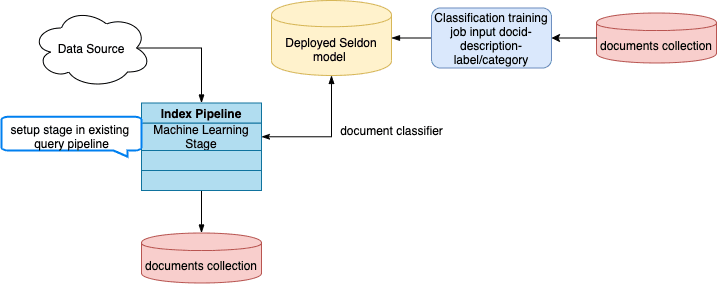
    You can predict the categories of new documents at index time by using the [Classification job](/docs/5/fusion/reference/config-ref/jobs/classification) to analyze previously-classified documents in your index and produce a training model, then referencing the model in the [Machine Learning index stage](/docs/5/fusion/reference/config-ref/pipeline-stages/index-stages/machine-learning-index-stage).

    **Classification job dataflow (documents)**

    <img src="https://mintcdn.com/lucidworks/S4K1ej9-5L4WZcZ9/assets/images/5.2/classification-document-dataflow-diagram.png?fit=max&auto=format&n=S4K1ej9-5L4WZcZ9&q=85&s=5cf2377e6f7fd6b564a5366eb0e38927" alt="Document classification job dataflow" width="717" height="284" data-path="assets/images/5.2/classification-document-dataflow-diagram.png" />

    <LwTemplate />

    ## How to configure new document classification

    1. Navigate to **Collections** > **Jobs** > **Add+** > **Classification** to create a new Classification job.
    2. Configure the job as follows:
       1. In the **Model Deployment Name** field, enter an ID for the new classification model.
       2. In the **Training Data Path** field, enter the collection name or cloud storage path where your main content is stored.
       3. In the **Training Data Format** field, leave the default `solr` value if the **Training Data Path** is a collection.  Otherwise, specify the format of your data in cloud storage.
       4. In the **Training collection content field**, enter the name of the field that contains the content to analyze.\
          The content field that you choose depends on your use case and the types of queries that your users commonly make.\
          For example, you could choose the description field if users tend to make descriptive queries like "4k TV" or "soft waterproof jacket".\
          But if users are more likely to search for specific brands or products, such as "LG TV" or "North Face jacket", then the product name field might be more suitable.
       5. In the **Training collection class field**, enter the name of the field that contains the category data.

          <Tip>      For additional configuration details, see [Best practices](#best-practices-for-configuring-the-classification-job) below.</Tip>
    3. Save the job.
    4. Specify the model’s name in the [Machine Learning stage](/docs/5/fusion/reference/config-ref/pipeline-stages/index-stages/machine-learning-index-stage) of your index pipeline.
    5. In the **Model input transformation script** field, enter the following:

       ```js theme={"dark"}
       /*
       Name of the document field to feed into the model.
       */
       var documentFeatureField = "body_t"

       /*
       Model input construction.
       */
       var modelInput = new java.util.HashMap()
       modelInput.put("text", doc.getFirstFieldValue(documentFeatureField))
       modelInput
       ```
    6. In the **Model output transformation script** field, enter the following:

       ```js theme={"dark"}
       {/* // In case if top_k_predictions are needed */}
       var top1ClassField = "top_1_class_s"
       var top1ScoreField = "top_1_score_d"
       var topKClassesField = "top_k_classes_ss"
       var topKScoresField = "top_k_scores_ds"

       var jsonOutput = JSON.parse(modelOutput.get("_rawJsonResponse"))
       var parsedOutput = {};
       for (var i=0; i<jsonOutput["names"].length;i++){
         parsedOutput[jsonOutput["names"][i]] = jsonOutput["ndarray"][i]
       }

       doc.addField(top1ClassField, parsedOutput["top_1_class"][0])
       doc.addField(top1ScoreField, parsedOutput["top_1_score"][0])
       if ("top_k_classes" in parsedOutput) {
           doc.addField(topKClassesField, new java.util.ArrayList(parsedOutput["top_k_classes"][0]))
           doc.addField(topKScoresField, new java.util.ArrayList(parsedOutput["top_k_scores"][0]))
       }
       ```

       1. Click **Apply**.
    7. Save the query pipeline.

    ## Custom output transformation script example

    ```js theme={"dark"}
    var top1ClassField = "top_1_class_s"
    var top1ScoreField = "top_1_score_d"

    doc.addField(top1ClassField, modelOutput.get("top_1_class")[0])
    doc.addField(top1ScoreField, modelOutput.get("top_1_score")[0])
    ```

    ## Best practices for configuring the Classification job

    This job analyzes how your existing documents are categorized and produces a classification model that can be used to predict the categories of new documents at index time.

    In addition to the information in this topic, see [Automatically classify new queries](#automatically-classify-new-queries) for configuration information and examples.

    This job takes raw text and an associated single class as input. Although it trains on single classes, there is an option to predict the top several classes with their scores.

    At a minimum, you must configure these:

    * An ID for this job
    * A **Method**; Logistic Regression is the default
    * A **Model Deployment Name**
    * The **Training Collection**
    * The **Training collection content field**, the document field containing the raw text
    * The **Training collection class field** containing the classes, labels, or other category data for the text
  </Accordion>

  <Accordion title="Automatically Classify New Queries">
    You can predict the categories most likely to satisfy a new query using this workflow:

    1. Use the [Build Training Data job](/docs/5/fusion/reference/config-ref/jobs/build-training-data) to join your signals data with your catalog data and produce training data in the form of query/class pairs.
    2. Use the [Classification job](/docs/5/fusion/reference/config-ref/jobs/classification) to train a classification model using the output collection of the Build Training Data job as the training collection.

    **Query-time classification workflow**

    <img src="https://mintcdn.com/lucidworks/aGMTh7KKUIwUyuv7/assets/images/5.3/diagrams/AI_Diagrams_DC-QueryClassification.png?fit=max&auto=format&n=aGMTh7KKUIwUyuv7&q=85&s=ad78ab030d062f4d6ef1b75f857ba66c" alt="Query-time classification workflow" width="1705" height="332" data-path="assets/images/5.3/diagrams/AI_Diagrams_DC-QueryClassification.png" />

    See the detailed steps below.

    ## To predict the categories of new queries

    1. Navigate to **Collections** > **Jobs** > **Add+** > **Build Training Data** to create a new Build Training Data job.
    2. Configure the job as follows:
       1. In the **Catalog Path** field, enter the collection name or cloud storage path where your main content is stored.
       2. In the **Catalog Format** field, enter `solr` if you are analyzing a Solr collection, or another format if your content is in the cloud.
       3. In the **Signals Path** field, enter the collection name or cloud storage path where your signals data is stored.
       4. In the **Output Path** field, enter the collection name or cloud storage path where you want to store the training data.
       5. In the **Category Field in Catalog** field, enter the field name for the category data in your main content.
       6. In the **Item ID Field in Catalog** field, enter the field name for the item IDs in your main content.
       7. Check that the values of **Item ID Field in Signals** and **Count Field in Signals** match the field names in your signals data.
    3. Save the job.
    4. Click **Run** > **Start** to run the job.
    5. Navigate to **Collections** > **Jobs** > **Add+** > **Classification** to create a new Classification job.
    6. Configure the job as follows:
       1. In the **Model Deployment Name** field, enter an ID for the new classification model.
       2. In the **Training Data Path** field, enter the collection name or cloud storage path from the Build Training Data job’s **Output Path** field.
       3. In the **Training Data Format** field, leave the default `solr` value if the **Training Data Path** is a collection or if you used the default format in your Build Training Data job configuration. If you configured the Build Training Data job to output a different format, enter it here.
       4. In the **Training collection content field**, enter `query_s`, the default content field name in the Build Training Data job’s output.
       5. In the **Training collection class field**, enter `category_s`, the default category field name in the Build Training Data job’s output.

          <Tip>      For additional configuration details, see [Best practices](#best-practices-for-configuring-the-classification-job) below.</Tip>
    7. Save the job.
    8. Verify that the Build Training Data job has finished successfully.
    9. Click **Run** > **Start** to run the job.
    10. Navigate to **Indexing** > **Query Workbench** > **Load** and select your query pipeline.
    11. Configure the query pipeline as follows:

        1. Add a new Machine Learning stage.
        2. In the **Model ID** field, enter the name from the Classification job’s **Model Deployment Name** field.
        3. In the **Model input transformation script** field, enter the following:

        ```js theme={"dark"}
        var modelInput = new java.util.HashMap()
        modelInput.put("text", request.getFirstParam("q"))
        modelInput
        ```

        4. In the **Model output transformation script** field, enter the following:

        ```js theme={"dark"}
        {/* // In case if top_k_predictions are needed */}
        {/* // To put into response documents (can be done only after Solr Query stage) */}
        var jsonOutput = JSON.parse(modelOutput.get("_rawJsonResponse"))
        var parsedOutput = {};
        for (var i=0; i<jsonOutput["names"].length;i++){
          parsedOutput[jsonOutput["names"][i]] = jsonOutput["ndarray"][i]
        }

        var docs = response.get().getInnerResponse().getDocuments();
        var ndocs = new java.util.ArrayList();
        for (var i=0; i<docs.length;i++){
          var doc = docs[i];
          doc.putField("top_1_class", parsedOutput["top_1_class"][0])
          doc.putField("top_1_score", parsedOutput["top_1_score"][0])
          if ("top_k_classes" in parsedOutput) {
            doc.putField("top_k_classes", new java.util.ArrayList(parsedOutput["top_k_classes"][0]))
            doc.putField("top_k_scores", new java.util.ArrayList(parsedOutput["top_k_scores"][0]))
          }
          ndocs.add(doc);
        }
        response.get().getInnerResponse().updateDocuments(ndocs);
        ```

        5. Click **Apply**.

    {/* // Should the user see something different in the preview at this point?  What can they look for to confirm that the config is working? */}

    12. Save the query pipeline.

    ## Custom output transformation script examples

    ```js theme={"dark"}
    {/* // To put into request */}
    request.putSingleParam("class", modelOutput.get("top_1_class")[0])
    request.putSingleParam("score", modelOutput.get("top_1_score")[0])

    {/* // Or for example to apply Filter Query */}
    request.putSingleParam("fq", "class:" + modelOutput.get("top_1_class")[0])
    ```

    ```js theme={"dark"}
    {/* // To put into query context */}
    context.put("class", modelOutput.get("top_1_class")[0])
    context.put("score", modelOutput.get("top_1_score")[0])
    ```

    ```js theme={"dark"}
    {/* // To put into response documents (can be done only after Solr Query stage) */}
    var docs = response.get().getInnerResponse().getDocuments();
    var ndocs = new java.util.ArrayList();

    for (var i=0; i<docs.length;i++){
      var doc = docs[i];
      doc.putField("query_class", modelOutput.get("top_1_class")[0])
      doc.putField("query_score", modelOutput.get("top_1_score")[0])
      ndocs.add(doc);
    }

    response.get().getInnerResponse().updateDocuments(ndocs);
    ```

    ## Best practices for configuring the Classification job

    This job analyzes how your existing documents are categorized and produces a classification model that can be used to predict the categories of new documents at index time.

    In addition to the information in this topic, see [Automatically classify new documents at index time](#automatically-classify-new-documents-at-index-time) for configuration information and examples.

    This job takes raw text and an associated single class as input. Although it trains on single classes, there is an option to predict the top several classes with their scores.

    At a minimum, you must configure these:

    * An ID for this job
    * A **Method**; Logistic Regression is the default
    * A **Model Deployment Name**
    * The **Training Collection**
    * The **Training collection content field**, the document field containing the raw text
    * The **Training collection class field** containing the classes, labels, or other category data for the text
  </Accordion>
</AccordionGroup>

This job takes raw text and an associated single class as input. Although it trains on single classes, there is an option to predict the top several classes with their scores.

At a minimum, you must configure these:

* An ID for this job
* A **Method**; Logistic Regression is the default
* A **Model Deployment Name**
* The **Training Collection**
* The **Training collection content field**, the document field containing the raw text
* The **Training collection class field** containing the classes, labels, or other category data for the text

<Card title="Classification" class="note-image" href="https://academy.lucidworks.com/scorm/019a5ca6-8ff0-78e3-952f-65c8e592d363" cta="Take this course on the LucidAcademy." icon="graduation-cap" iconType="duotone">
  The course for **Classification** focuses on understanding the different classifier models in Fusion.
</Card>

## Classification at index time

Used at index time, a classification model can be applied to predict the categories of new, incoming documents. To train a model for this use case, use your main content collection as the training collection. The model requires at least 100 examples in the training data for each category predicted.

<Frame caption="Classification job dataflow (documents)">
  <img src="https://mintcdn.com/lucidworks/S4K1ej9-5L4WZcZ9/assets/images/5.2/classification-document-dataflow-diagram.png?fit=max&auto=format&n=S4K1ej9-5L4WZcZ9&q=85&s=5cf2377e6f7fd6b564a5366eb0e38927" alt="Document classification job dataflow" width="717" height="284" data-path="assets/images/5.2/classification-document-dataflow-diagram.png" />
</Frame>

Once you have run the job, you can specify the model name in the [Machine Learning Index Stage](/docs/5/fusion/reference/config-ref/pipeline-stages/index-stages/machine-learning-index-stage).

## Job flow

The first part of the job is *vectorization* which is the same for all available classification algorithms. Mainly it supports two types of featurization:

* **Character-based** - for queries or short texts, like document titles, sentences, and so on.
* **Word-based** - for long texts like paragraphs, documents, and so on.

The second part is *classification algorithms*:

* **Logistic Regression.** A classical algorithm with a good trade-off between training speed and results quality. It provides a robust baseline out of the box. Consider using it as a first choice.
* **StarSpace.** A deep learning algorithm that jointly trains to maximize similarity between text and correct class and minimize similarity between text and incorrect classes. This usually requires more tuning and time for training, but with potentially more accurate results. Consider using it and then tuning it if better results are needed.

The third part of the job deploys the new classification model to Fusion using Seldon Core.

## Best practices

These tips describe how to tune the options under **Vectorization Parameters** for best results with different use cases.

### Query intent / short texts

If you want to train a model to predict query intents or to do short text classification, then enable **Use Characters**.

Another vectorization parameter that can improve model quality is **Max Ngram size**, with reasonable defaults between 3 and 5.

The more character ngrams are used the bigger the vocabulary, so it is worthwhile to tune the **Maximum Vocab Size** parameter that controls how many unique tokens will be used. Lower values will make training faster and will prevent overfitting but might provide lower quality too. It’s important to find a good balance.

Activating the advanced **Sublinear TF** option usually helps if characters are used.

### Documents / long texts

If you want to train a model to predict classes for documents or long texts like one or more paragraphs, then uncheck **Use Characters**.

The reasonable values for word-based **Max Ngram size** are 2-3. Be sure to tune **Maximum Vocab Size** parameter too. Usually it’s better to leave the advanced **Sublinear TF** option deactivated.

### Performance tuning

If the text is very long and **Use Characters** is checked, the job may take a lot of memory and possibly fail if the amount of memory requested by the job is not available. This may result in pods being evicted or failing with OOM errors. If you see this happening, try the following:

* Uncheck **Use Characters**.
* Reduce the vocabulary size and ngram range of the documents.
* Allocate more memory to the pod.

### Algorithm-specific

If you are going to train a model via LogisticRegression algorithm, dimensionality reduction usually doesn’t help so it makes sense to leave **Reduce Dimensionality** unchecked. But scaling seems to improve results, so it’s suggested to activate **Scale Features**.

For models trained by StarSpace algorithm it’s vice-versa. Dimensionality reduction usually helps to get better results as well as much faster model training. But scaling usually doesn’t help or might make results a little bit worse.

## Index pipeline configuration

**Model input transformation script**

```js wrap  theme={"dark"}
/*
Name of the document field to feed into the model.
*/
var documentFeatureField = "body_t"

/*
Model input construction.
*/
var modelInput = new java.util.HashMap()
modelInput.put("text", doc.getFirstFieldValue(documentFeatureField))
modelInput
```

**Model output transformation script**

```js wrap  theme={"dark"}
var top1ClassField = "top_1_class_s"
var top1ScoreField = "top_1_score_d"

doc.addField(top1ClassField, modelOutput.get("top_1_class")[0])
doc.addField(top1ScoreField, modelOutput.get("top_1_score")[0])
```

```js wrap  theme={"dark"}
// In case if top_k_predictions are needed
var top1ClassField = "top_1_class_s"
var top1ScoreField = "top_1_score_d"
var topKClassesField = "top_k_classes_ss"
var topKScoresField = "top_k_scores_ds"

var jsonOutput = JSON.parse(modelOutput.get("_rawJsonResponse"))
var parsedOutput = {};
for (var i=0; i<jsonOutput["names"].length;i++){
  parsedOutput[jsonOutput["names"][i]] = jsonOutput["ndarray"][i]
}

doc.addField(top1ClassField, parsedOutput["top_1_class"][0])
doc.addField(top1ScoreField, parsedOutput["top_1_score"][0])
if ("top_k_classes" in parsedOutput) {
    doc.addField(topKClassesField, new java.util.ArrayList(parsedOutput["top_k_classes"][0]))
    doc.addField(topKScoresField, new java.util.ArrayList(parsedOutput["top_k_scores"][0]))
}
```

## Query pipeline configuration

**Model input transformation script**

```js wrap  theme={"dark"}
var modelInput = new java.util.HashMap()
modelInput.put("text", request.getFirstParam("q"))
modelInput
```

**Model output transformation script**

```js wrap  theme={"dark"}
// To put into request
request.putSingleParam("class", modelOutput.get("top_1_class")[0])
request.putSingleParam("score", modelOutput.get("top_1_score")[0])

// Or for example to apply Filter Query
request.putSingleParam("fq", "class:" + modelOutput.get("top_1_class")[0])
```

```js wrap  theme={"dark"}
// To put into query context
context.put("class", modelOutput.get("top_1_class")[0])
context.put("score", modelOutput.get("top_1_score")[0])
```

```js wrap  theme={"dark"}
// To put into response documents (can be done only after Solr Query stage)
var docs = response.get().getInnerResponse().getDocuments();
var ndocs = new java.util.ArrayList();

for (var i=0; i<docs.length;i++){
  var doc = docs[i];
  doc.putField("query_class", modelOutput.get("top_1_class")[0])
  doc.putField("query_score", modelOutput.get("top_1_score")[0])
  ndocs.add(doc);
}

response.get().getInnerResponse().updateDocuments(ndocs);
```

```js wrap  theme={"dark"}
// In case if top_k_predictions are needed
// To put into response documents (can be done only after Solr Query stage)
var jsonOutput = JSON.parse(modelOutput.get("_rawJsonResponse"))
var parsedOutput = {};
for (var i=0; i<jsonOutput["names"].length;i++){
  parsedOutput[jsonOutput["names"][i]] = jsonOutput["ndarray"][i]
}

var docs = response.get().getInnerResponse().getDocuments();
var ndocs = new java.util.ArrayList();
for (var i=0; i<docs.length;i++){
  var doc = docs[i];
  doc.putField("top_1_class", parsedOutput["top_1_class"][0])
  doc.putField("top_1_score", parsedOutput["top_1_score"][0])
  if ("top_k_classes" in parsedOutput) {
    doc.putField("top_k_classes", new java.util.ArrayList(parsedOutput["top_k_classes"][0]))
    doc.putField("top_k_scores", new java.util.ArrayList(parsedOutput["top_k_scores"][0]))
  }
  ndocs.add(doc);
}
response.get().getInnerResponse().updateDocuments(ndocs);
```

## Configuration properties

<SchemaParamFields schema={schema} />