> ## Documentation Index
> Fetch the complete documentation index at: https://doc.lucidworks.com/llms.txt
> Use this file to discover all available pages before exploring further.
# Cross Data Center Replication
export const LwTemplate = ({title = "Key questions to get you started", icon = "sparkles", cta = "Powered by Agent Studio", linkHref = "https://lucidworks.com/demo/?utm_source=docs&utm_medium=referral&utm_campaign=docs_cta_ai"}) => {
const [isLoaded, setIsLoaded] = useState(false);
useEffect(() => {
const timer = setTimeout(() => {
setIsLoaded(true);
}, 500);
return () => clearTimeout(timer);
}, []);
return
{isLoaded && `
}} />}
Powered by Lucidworks Agent Studio
;
};
Fusion supports uni-directional, multi-region replication of Solr updates between data centers using Solr's CrossDC (Cross Datacenter) framework.
This feature simplifies geo-redundancy and failover by providing a preconfigured Solr plugin (`fusion-crossdc-producer`) and a dedicated consumer application (`fusion-crossdc-consumer`) for replaying updates on the target cluster, helping to ensure high availability and business continuity in distributed or hybrid cloud environments.
This feature is supported in Fusion 5.9.13 and later.
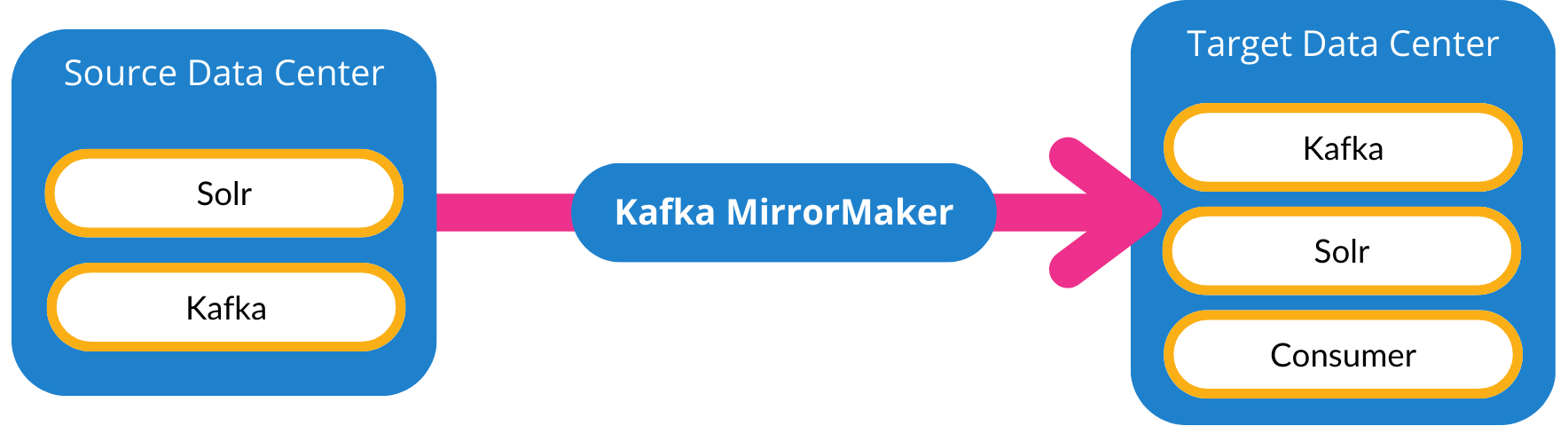
With uni-directional CrossDC, Solr update requests (including indexing, collection, and configset changes) from a primary cluster are mirrored to a secondary cluster using Apache Kafka.
You can configure which collections and actions are mirrored.
Be sure to review the [Limitations](#limitations) section to understand what to expect before you enable this feature.
## CrossDC and ConfigSync
Fusion supports [ConfigSync](/docs/5/fusion/operations/config-sync/overview) in addition to CrossDC.
While CrossDC is designed for data replication, ConfigSync is designed for configuration synchronization.
When you use CrossDC, we recommend also enabling ConfigSync to synchronize the Solr schema.
If you do not enable ConfigSync, you must ensure that the Solr schema is synchronized by some other method.
Here's a comparison of the two features:
| Feature | CrossDC | ConfigSync |
| ------------------------------- | :-------------------------------------------: | :----------------------------------------------------------: |
| Collections data replication | | |
| Solr collection synchronization | | |
| Rules synchronization | | |
| Configuration synchronization | | |
| Blob synchronization | | |
| Version control (Git) | | |
| ZooKeeper data | | |
| Disaster recovery | For search data | For configuration only |
| Latency reduction | Across geo-distributed users | Not applicable |
| Typical use case | Global failover, data center redundancy | DevOps config promotion, disaster recovery for Fusion config |
For complete details about what ConfigSync manages, see [Supported objects](/docs/5/fusion/operations/config-sync/objects/overview) in the ConfigSync documentation.
See below for details about what Solr CrossDC manages.
## Supported objects
These are the objects managed by Solr CrossDC:
* Solr collections, which can optionally include creating and deleting collections. You can also select which collections and commands are synchronized and which ones are ignored.
* Rules stored in `*_query_rewrite` and `*_query_rewrite_staging` collections
* Any other new Solr collection data that you configure to be synchronized, as explained below
## Before you begin
Before you enable Solr CrossDC, your Solr collections must already be in a synchronized state.
After you enable CrossDC, synchronization happens automatically.
The instructions below explain how to synchronize your collections before enabling this feature.
1. **Schedule a maintenance window.**
During this window, ensure that Fusion will not perform any operations that could alter the contents of its Solr collections.
Schedule sufficient time to perform Solr collections backup/restore operations followed by Solr CrossDC enablement.
2. **Back up your Solr collections from the source Fusion cluster**, using your cloud storage provider's repository.
The [Solr documentation](https://solr.apache.org/guide/solr/latest/deployment-guide/backup-restore.html#backuprestore-storage-repositories) has provider-specific instructions for configuring the backup.
An example configuration is shown below:
```xml expandable wrap theme={"dark"}
solrBackups/local/path/to/credential/file/default/gcs/backup/location515001.510000
```
3. **Restore your Solr collections on the Fusion clusters you want to synchronize**, using your newly-created backup.
The [Solr documentation](https://solr.apache.org/guide/solr/latest/deployment-guide/backup-restore.html#backuprestore-storage-repositories) has complete instructions for doing this, too.
4. **Ensure that your Solr schema is synchronized between clusters.**
You can do this using [ConfigSync](/docs/5/fusion/operations/config-sync/overview) or the method of your choice.
Now you're ready to configure CrossDC as explained below.
## Configure CrossDC
CrossDC configuration is done in two data centers: the source and target.
You'll also configure MirrorMaker as the conduit between them.
* In the source data center, you select which collections and commands to mirror.
You can also tune parameters that affect performance and resource consumption.
* In the target data center, you ensure that all of the collections to be mirrored already exist, then set up the Consumer.
Follow the detailed steps below.
1. **In the *source* data center, configure Solr and Kafka.**
This is where you select what to synchronize and tune the performance parameters.
To enable CrossDC for Solr in the source data center, you need to configure the following components:
| Solr class | Where configured | Role in CrossDC |
| -------------------------------------- | ---------------- | ---------------------------------------------------------------------------------------------------------------------------------------------------------------------------------------------------------- |
| fusion-crossdc-producer | `solr.xml` | This module contains the necessary classes. It is included in the `fusion-solr-managed` [Docker image](/docs/5/fusion/reference/docker-images-versions). |
| MirroringUpdateRequestProcessorFactory | `solrconfig.xml` | This processor mirrors Solr indexing updates (such as document additions, updates, or deletions) to the source Kafka instance. |
| MirroringConfigSetsHandler | `solr.xml` | This handler mirrors configset changes to the source Kafka instance. |
| MirroringCollectionsHandler | `solr.xml` | This handler mirrors Solr collection admin commands (such as collection creation or deletion) to the source Kafka instance. |
| FusionCollectionsHandler | `solr.xml` | This extended version of the `MirroringCollectionsHandler` mirrors Solr collection admin commands to the source Kafka instance and adds the ability to filter (whitelist) the commands you want to mirror. |
The steps and examples below show you how to configure your source Solr instance.
In Fusion 5.9.16 and later, you can also fine-tune the Kafka connection using Kafka configuration properties, either as `KAFKA_*` environment properties (such as `KAFKA_MAX_POLL_RECORDS`) or `kafka.*` system properties (such as `kafka.max.poll.records`).
1. Pull and deploy the `fusion-solr-managed` [Docker image](/docs/5/fusion/reference/docker-images-versions).
2. In `solrconfig.xml`, for each collection you want to mirror, add the `MirroringUpdateRequestProcessorFactory` handler to its configset:
```xml wrap theme={"dark"}
${bootstrapServers:}${topicName:}
```
Only collections with `MirroringUpdateRequestProcessorFactory` configured in the `updateRequestProcessorChain` are mirrored; other collections are ignored.
Both `bootstrapServers` and `topicName` are required:
| Parameter | Type | Description |
| ------------------ | ------ | ------------------------------------------------------------------------------------------------ |
| `bootstrapServers` | string | A comma-separated list of servers used to connect to the source Kafka cluster |
| `topicName` | string | The name of the Kafka topic to which Solr updates will be pushed. This topic must already exist. |
These parameters are optional for the `MirroringUpdateRequestProcessorFactory`:
| Parameter | Type | Description |
| ----------------------- | ------- | ------------------------------------------------------------------------------------------------------------------------------------------------------------------------------------------------------------------------------------------------------------------------ |
| `batchSizeBytes` | integer | Maximum batch size in bytes for the Kafka queue. |
| `bufferMemoryBytes` | integer | Memory allocated by the Producer in total for buffering. |
| `lingerMs` | integer | Amount of time that the Producer will wait to add to a batch. |
| `requestTimeout` | integer | Request timeout for the Producer. |
| `enableDataCompression` | boolean | Whether to use compression for data sent over the Kafka queue, one of the following:
• `none` (default) • `gzip` • `snappy` • `lz4` • `zstd` |
| `numRetries` | integer | Setting a value greater than zero will cause the Producer to resend any record whose send fails with a potentially transient error. |
| `retryBackoffMs` | integer | The amount of time to wait before attempting to retry a failed request to a given topic partition. |
| `deliveryTimeoutMS` | integer | Updates sent to the Kafka queue will be failed before the number of retries has been exhausted if the timeout configured by `delivery.timeout.ms` expires first. |
| `maxRequestSizeBytes` | integer | The maximum size of a Kafka queue request in bytes – limits the number of requests that will be sent over the queue in a single batch. |
| `dlqTopicName` | string | If not empty, then requests that failed processing `maxAttempts` times will be sent to a "dead letter queue" topic in Kafka (must exist if configured). |
| `indexUnmirrorableDocs` | boolean | If set to `true`, updates that are too large for the Kafka queue will still be indexed locally into the source collection. |
| `mirrorCommits` | boolean | If `true`, then standalone commit requests will be mirrored as separate requests; otherwise they will be processed only locally. |
| `expandDbq` | enum | If set to `expand` (default), then Delete-By-Query is expanded before mirroring into a series of Delete-By-Id, which may help with correct processing of out-of-order requests on the consumer side. If set to `none`, then Delete-By-Query requests are mirrored as-is. |
3. *If you are not using [ConfigSync](/docs/5/fusion/operations/config-sync/overview)*: Configure configset mirroring in `solr.xml`:
```xml wrap theme={"dark"}
org.apache.solr.handler.admin.MirroringConfigSetsHandler
...
```
4. *If you are not using ConfigSync*: Configure collection admin request mirroring in `solr.xml`.
You can choose one of these handlers to use for this:
* `MirroringCollectionsHandler` is the native Solr handler. It mirrors all admin actions for all collections, or you can select specific collections to mirror.
* `FusionCollectionsHandler` has all the same capabilities and configuration options, plus action whitelisting so you can mirror only selected actions and ignore others.
```xml wrap theme={"dark"}
org.apache.solr.handler.admin.FusionCollectionsHandler
...
```
By default, admin commands are mirrored for all collections.
To mirror admin commands for specific collections only, you can set this system property:
A comma-separated list of collections for which the admin commands will be mirrored.
If this list is empty or the property is not set, then admin commands for all collections mirrored.
This property is supported by both `MirroringCollectionsHandler` and `FusionCollectionsHandler`.
If you are using `FusionCollectionsHandler`, you can also configure action whitelisting by configuring the following system property:
A comma-separated list of actions to mirror.
If it is not empty, then only the listed actions are mirrored; all others are ignored.
See the [Solr documentation](https://solr.apache.org/guide/solr/latest/deployment-guide/collection-management.html) for the list of actions.
In the source data center's Kafka instance, the Kafka topic must already exist and be configured to accept messages from the Solr instance.
Make sure that the `bootstrapServers` you configured in Solr are reachable by Solr and that the configured `topicName` exists.
If you configured Solr to use a Dead-Letter Queue (DLQ) topic (`dlqTopicName`), you must also create that topic in the source Kafka instance.
If you need strict ordering of updates across multiple collections, use a single partition per topic. When a topic has multiple partitions, strict ordering of updates is guaranteed within each collection but not across multiple collections.
When a Kafka topic used for mirroring has multiple partitions, the CrossDC Producer and Consumer guarantee strict ordering of updates (but see also the note above) ONLY within the same collection. In other words, when a multi-partition topic is used for mirroring there's no guarantee of a strict global request ordering across collections, which normally should not be an issue. However, if a strict global ordering across collections is required then the mirroring topic must use a single partition.
See the [Kafka documentation](https://kafka.apache.org/documentation/) for configuration details.
2. **In the *target* data center, configure Solr, Kafka, and the Consumer.**
Because CrossDC only mirrors new commands, the existing collections, documents, and configsets from your source Solr must already exist on the target Solr before mirroring begins.
Create them if needed.
The target collections must have the same names as the source collections, and they must use the same configsets as the source collections.
New collections created on the source Solr are *not* automatically created on the target Solr unless ConfigSync is enabled *or* you have enabled either `MirroringCollectionsHandler` or `FusionCollectionsHandler` on the source Solr.
In the target data center's Kafka instance, you must create the same topic that you'll also configure in MirrorMaker and the Consumer.
If you configured a Dead-Letter Queue (DLQ) topic in the source Solr instance, you must also create that topic in the target Kafka instance.
If you need strict ordering of updates across multiple collections, use a single partition per topic. When a topic has multiple partitions, strict ordering of updates is guaranteed within each collection but not across multiple collections.
See the [Kafka documentation](https://kafka.apache.org/documentation/) for configuration details.
1. Pull and deploy the `fusion-crossdc-consumer` [Docker image](/docs/5/fusion/reference/docker-images-versions) for your Fusion release, such as 5.9.14.
2. Configure the required system properties listed below, and any optional ones that apply to your use case.
| Parameter | Required? | Description |
| --------------------------- | --------------- | ------------------------------------------------------------------------------------------------------------------------------------------------------------------------------------------------------------------------------------------------------------------------------------------------------------------------------------------------------------------------------------------------------------------------------------------------------------------------------------------------------------------------------------- |
| `bootstrapServers` | required | A list of Kafka bootstrap servers. |
| `topicName` | required | Kafka `topicName` used to indicate which Kafka topic the Solr updates will be read from.
This can be a comma-separated list to consume multiple topics. |
| `zkConnectString` | required | The ZooKeeper connection string used for connecting to the target Solr instance. |
| `consumerProcessingThreads` | optional | The number of threads used by the consumer to concurrently process updates from the Kafka queue. |
| `port` | optional | The local port for the API endpoints. Default is `8090`. |
| `collapseUpdates` | optional (enum) |
When set to `all`, all incoming update requests will be collapsed into a single `UpdateRequest`, as long as their parameters are identical.
When set to `partial` (default), only requests without deletions are collapsed; requests with any `delete` ops are sent individually in order to preserve ordering of updates.
When set to `none`, the incoming update requests are sent individually without any collapsing.
Requests of other types than `UPDATE` are never collapsed. |
These additional optional configuration properties are used when the Consumer must retry by putting updates back in the Kafka queue:
| Parameter | Description |
| ------------------- | --------------------------------------------------------------------------------------- |
| `batchSizeBytes` | The maximum batch size in bytes for the Kafka queue. |
| `bufferMemoryBytes` | The memory allocated by the Producer in total for buffering. |
| `lingerMs` | The amount of time that the Producer will wait to add to a batch. |
| `requestTimeout` | The request timeout for the Producer. |
| `maxPollIntervalMs` | The maximum delay between invocations of `poll()` when using Consumer group management. |
In Fusion 5.9.16 and later, you can also fine-tune the Kafka connection using Kafka configuration properties, either as `KAFKA_*` environment properties (such as `KAFKA_MAX_POLL_RECORDS`) or `kafka.*` system properties (such as `kafka.max.poll.records`).
3. **Configure Kafka MirrorMaker to connect to Kafka in *both* data centers.**
You can deploy MirrorMaker in either of your data centers, or somewhere else.
Ensure that it can access both the source Kafka and target Kafka instances.
Configure the source and target topic names to correspond with the names configured in `MirroringUpdateRequestProcessorFactory` and the Consumer application.
See the [MirrorMaker documentation](https://kafka.apache.org/documentation/#mirrormakerconfigs) for configuration details.
## Metrics and monitoring
Both `fusion-crossdc-producer` and `fusion-crossdc-consumer` expose metrics that can be monitored, in two formats, at these endpoints:
* Dropwizard JSON format: `/metrics/json`
* Prometheus format: `/metrics/prometheus` (Fusion 5.9.16 and later)
### Producer metrics
The `fusion-crossdc-producer` module exposes the following metrics for each source replica in a collection:
| Metric name | Description |
| ------------------------------------------ | ------------------------------------------------------------------------------------------------------------------------------ |
| `crossdc.producer.local` | Counter representing the number of local documents processed successfully. |
| `crossdc.producer.submitted` | Counter representing the number of documents submitted to the Kafka topic. |
| `crossdc.producer.documentSize` | Histogram of the processed document size. |
| `crossdc.producer.errors.local` | Counter representing the number of local documents processed with error. |
| `crossdc.producer.errors.submit` | Counter representing the number of documents that were not submitted to the Kafka topic because of exception during execution. |
| `crossdc.producer.errors.documentTooLarge` | Counter representing the number of documents that were too large to send to the Kafka topic. |
### Consumer metrics and health check
#### Counters
The `fusion-crossdc-consumer` application exposes the following counters with the following hierarchical keys, where the `` can be one of `UPDATE`, `ADMIN`, or `CONFIGSET`:
| Metric name | Description |
| ------------------------------------ | ---------------------------------------------------------------------------------------------------------- |
| `counters..input` | Number of input messages retrieved from Kafka |
| `counters..add` | Number of input Add documents (one input message may contain multiple Add documents) |
| `counters..dbi` | Number of input Delete-By-Id commands (one input message may contain multiple DBI commands) |
| `counters..dbq` | Number of input Delete-By-Query commands (one input message may contain multiple DBQ commands) |
| `counters..collapsed` | Number of input requests that were added to other requests to minimize the number of requests sent to Solr |
| `counters..handled` | Total number of successfully processed output requests sent to Solr |
| `counters..failed-resubmit` | Number of requests resubmitted to the input queue for re-trying (on intermittent failures) |
| `counters..failed-dlq` | Number of requests submitted to the Dead-Letter queue due to failures on multiple re-tries |
| `counters..failed-no-retry` | Number of requests dropped due to persistent failures (including inability to send to DLQ) |
| `counters..output-errors` | Number of errors when sending requests to target Solr |
| `counters..backoff` | Number of times when the consumer had to back off from processing due to errors |
| `counters..invalid-collection` | Number of requests sent to an invalid (e.g. non-existent) collection |
#### Timers
The `fusion-crossdc-consumer` application exposes the following timers with the following hierarchical keys, where the `` can be one of `UPDATE`, `ADMIN`, or `CONFIGSET`:
| Metric name | Description |
| ----------------------------- | ----------------------------------------------------------------------------------------------------------------------------------------------------------------------------------------------------------------------------------- |
| `timers..outputLatency` | Dropwizard Timer (meter + histogram) for latency between request creation timestamp and the output timestamp. This assumes that the clocks are synchronized between the Producer and Consumer. |
| `timers..outputTime` | Dropwizard Timer for time to send the processed request to the target Solr. The Consumer application also exposes a `/threads` API endpoint that returns a plain-text thread dump of the JVM running the Consumer application. |
#### Health check
In Fusion 5.9.16 and later, the Consumer exposes a `/health` endpoint that you can use to fetch a report on the status of the Consumer components.
* If all components pass the health check, the endpoint returns an HTTP `200 OK` code.
* If any components fail, the endpoint returns a `500 Server Error` code with the detailed status of each failure.
A simple GET request with no parameters retrieves the report, which shows `"healthy": true` for healthy components and `"healthy": false` for failing components, as in the example below where Kafka is failing; note the `message` field that provides a reason for the failure:
```json Response theme={"dark"}
{
"bootstrapServersConf": {
"healthy": true,
"duration": 0,
"timestamp": "2026-01-28T17:45:54.841Z"
},
"kafka": {
"healthy": false,
"message": "Kafka not connected",
"duration": 0,
"timestamp": "2026-01-28T17:45:54.841Z"
},
"running": {
"healthy": true,
"duration": 0,
"timestamp": "2026-01-28T17:45:54.841Z"
},
"solr": {
"healthy": true,
"duration": 0,
"timestamp": "2026-01-28T17:45:54.841Z"
},
"topicNameConf": {
"healthy": true,
"duration": 0,
"timestamp": "2026-01-28T17:45:54.841Z"
},
"zkConf": {
"healthy": true,
"duration": 0,
"timestamp": "2026-01-28T17:45:54.841Z"
}
}
```
## Limitations
The CrossDC feature has some known limitations:
* **Only updates are mirrored, not existing indexes.**
You should create a copy of each existing collection, with its documents and configset, on the target Solr before you turn on CrossDC.
* **Data loss can lead to divergence.**
If any of the components in your CrossDC configuration experience an event that causes data loss, the source collections and target collections can potentially diverge.
Diverged indexes are not automatically detected or re-synchronized.
* **Document size is limited.**
The CrossDC Producer module tries to estimate the size of each message and avoid sending messages that are too large to Kafka.
It does not split messages that are too large; instead, it rejects them.
If this happens after the update has already been processed locally, then the contents of the mirrored collections can diverge.
Kafka's maximum message size is 1MB by default, configured with `message.max.bytes`.
* **Retries can lead to divergence**
The CrossDC Producer module first applies updates locally, and attempts mirroring only if they succeed.
If sending a mirrored request fails, the request is retried, and if it's still failing then it's logged and the message is discarded (or sent to a dead-letter queue).
Since the update was already applied locally, this can cause divergence of the local and mirrored collections.
* **Commands can be re-ordered when collapsed.**
The CrossDC Producer module can optionally preserve exact ordering of updates and deletes sent in a single request, but this negatively affects performance.
If you do not need strict ordering of multiple commands in a single request, then you should use `collapseUpdates=partial` or `collapseUpdates=all`.
* **Delete-by-Query expansion can lead to divergence.**
The CrossDC Producer can either mirror Delete-By-Query requests as-is or expand them into individual Delete-By-Id requests (except for `*:*` which is always sent as-is).
In extreme cases this expansion may produce a request that is too large to be mirrored.
Delete-By-Query expansion helps to ensure the strict ordering of deletes and updates in the target Solr collection but it may also lead to divergence of the local and mirrored collections if the expansion fails or the resulting request is too large to mirror.
* **Collection creation and deletion requires an existing configset.**
The CrossDC Producer module can optionally mirror collection creation and deletion requests.
However, the target Solr instance must already have the corresponding configset available in ZooKeeper.
If it doesn't, this causes an error when the target collection is created or deleted.
The Consumer application may also experience significant slow-downs when it receives update requests to non-existent target collections.
These slow-downs affect processing requests for other collections, too.
* **ConfigSet creation and deletion behavior depends on the handler.**
If you are using `MirroringConfigSetsHandler`, then new configsets created on the source Solr are mirrored automatically to the target Solr.
If you are not using `MirroringConfigSetsHandler`, then new configsets are not mirrored; you must use ConfigSync or create them manually on the target Solr to avoid an error when the target collection is created or deleted.
These errors also impact the performance of the Consumer application.
* **In some cases, admin request whitelisting is needed.**
If you are using `MirroringCollectionsHandler`, then all collection admin requests are mirrored.
This may not always be desirable if the target Solr cluster is expected to differ or is managed externally (such as by an autoscaling operator).
In this case, you should use `FusionCollectionsHandler` instead, and configure the `collectionActionsWhitelist` property to restrict the mirrored collection admin requests to only those that are needed.