> ## Documentation Index
> Fetch the complete documentation index at: https://doc.lucidworks.com/llms.txt
> Use this file to discover all available pages before exploring further.
# Custom JavaScript Stages for Query Pipelines
export const LwTemplate = ({title = "Key questions to get you started", icon = "sparkles", cta = "Powered by Agent Studio", linkHref = "https://lucidworks.com/demo/?utm_source=docs&utm_medium=referral&utm_campaign=docs_cta_ai"}) => {
const [isLoaded, setIsLoaded] = useState(false);
useEffect(() => {
const timer = setTimeout(() => {
setIsLoaded(true);
}, 500);
return () => clearTimeout(timer);
}, []);
return
{isLoaded && `
}} />}
Powered by Lucidworks Agent Studio
;
};
[localhost link]: http://localhost:3000/docs/5/fusion/getting-data-out/query-basics/query-pipelines/custom-javascript-query-stages
[mintlify link]: https://doc.lucidworks.com/docs/5/fusion/getting-data-out/query-basics/query-pipelines/custom-javascript-query-stages
[old doc.lw link]: https://doc.lucidworks.com/fusion/5.9/170
The JavaScript Query stage allows you to write custom processing logic using JavaScript to manipulate search requests and responses.
The first time that the pipeline is run, Fusion compiles the JavaScript program into Java bytecode using the JDK’s JavaScript engine.
The JavaScript Query stage allows you to run JavaScript functions over search requests and responses by manipulating variables called "request" and "response" which are [Request objects](https://javadoc.lucidworks.com/fusion-pipeline-javadocs/5.9/com/lucidworks/apollo/pipeline/query/Request.html) and [Response objects](https://javadoc.lucidworks.com/fusion-pipeline-javadocs/5.9/com/lucidworks/apollo/pipeline/query/Response.html), respectively.
Users who can create or modify code obtain access to the broader Fusion environment. This access can be used to create intentional or unintentional damage to Fusion.
## The JavaScript Engine Used by Fusion
The default JavaScript engine used by Fusion is the Nashorn engine from Oracle.
See [The Nashorn Java API](https://docs.oracle.com/javase/8/docs/technotes/guides/scripting/nashorn/api.html) for details.
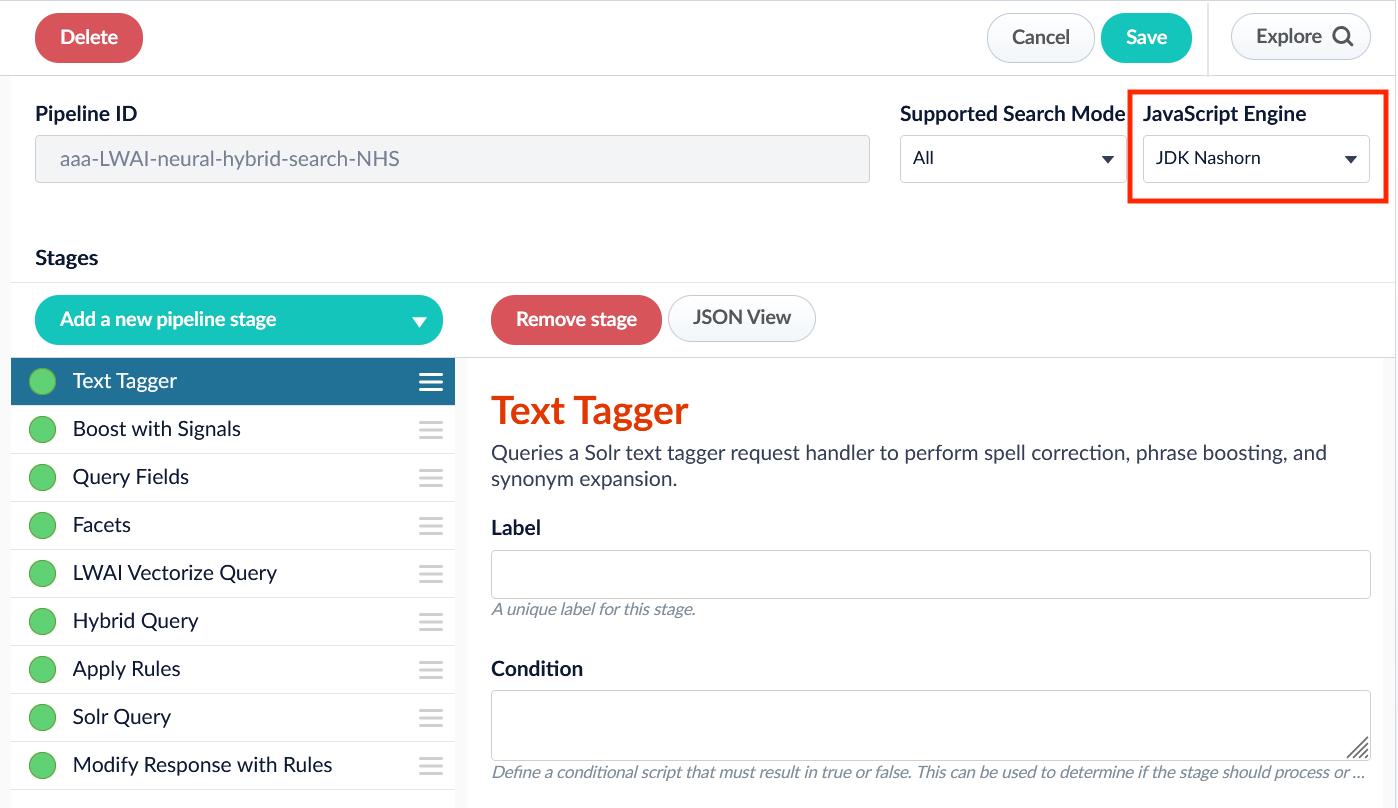
In Fusion 5.9.6 and up, you also have the option to select OpenJDK Nashorn.
While Nashorn is the default option, it is in the process of being deprecated and will eventually be removed, so it is recommended to use OpenJDK Nashorn when possible.
You can select the JavaScript engine in the pipeline views or in the workbenches.
Your JavaScript pipeline stages are interpreted by the selected engine.
## JavaScript Query Stage Global Variables
[JavaScript](http://en.wikipedia.org/wiki/JavaScript) is a lightweight scripting language.
In a JavaScript stage, Fusion uses the Nashorn engine, which implements [ECMAScript](http://en.wikipedia.org/wiki/ECMAScript) version 5.1. Although Nashorn does include some ECMAScript 6 (ES6) features such as `let`, `const`, or template strings, Fusion does not enable ES6 by default, so ES6 support is not guaranteed.
What a JavaScript program can do depends on the container in which it runs.
For a JavaScript Query stage, the container is a Fusion query pipeline.
[ Request for a Regular Query ](https://javadoc.lucidworks.com/fusion-pipeline-javadocs/5.9/com/lucidworks/apollo/pipeline/query/Request.html) The `request` variable contains Solr query information and is referred to as a **regular** request. A regular query request does *not* include Search DSL (domain specific language) parameters.
[ DSL Request ](https://javadoc.lucidworks.com/fusion-pipeline-javadocs/5.9/com/lucidworks/search/dsl/request/DslRequest.html) The `request` variable is also used when the query contains parameters for a Search DSL (domain specific language) request. See [Domain Specific Language](/docs/5/fusion/getting-data-out/query-basics/domain-specific-language) for more information.
[ Response for a Regular Query ](https://javadoc.lucidworks.com/fusion-pipeline-javadocs/5.9/com/lucidworks/apollo/pipeline/query/Response.html) The `response` variable contains Solr response information, and is used to return information from a **regular** request. Because a regular request does *not* include Search DSL (domain specific language) parameters, the response will not return Search DSL results.
[ DSL Response ](https://javadoc.lucidworks.com/fusion-pipeline-javadocs/5.9/com/lucidworks/search/dsl/response/DslResponse.html) The `response` variable is also used to return information from a Search DSL (domain specific language) request. See [Domain Specific Language](/docs/5/fusion/getting-data-out/query-basics/domain-specific-language) for more information.
[ Context ](https://javadoc.lucidworks.com/fusion-pipeline-javadocs/5.9/com/lucidworks/apollo/pipeline/Context.html)
A map that stores miscellaneous data created by each stage of the pipeline.
**Important** Use the `ctx` variable instead of the deprecated `_context` global variable.
The `ctx` variable is used to:
* Pass data from one stage to another
* Store data that needs to be passed from one custom stage to a later custom stage
The data can differ between stages:
* If the previous stage changes the data
* Based on the configuration of each stage
If the data is modified in one stage, it may cause a later stage to function irregularly.
String
The name of the Fusion collection being indexed or queried.
[ BufferingSolrServer ](https://javadoc.lucidworks.com/fusion-pipeline-javadocs/5.9/com/lucidworks/apollo/component/BufferingSolrServer.html) The Solr server instance that manages the pipeline’s default Fusion collection. All indexing and query requests are done by calls to methods on this object. See [solrClient](https://lucene.apache.org/solr/5_2_1/solr-solrj/org/apache/solr/client/solrj/SolrClient.html) for details.
[ SolrClusterComponent ](https://javadoc.lucidworks.com/fusion-pipeline-javadocs/5.9/com/lucidworks/cloud/api/solr/SolrClusterComponent.html)\
The SolrCluster server used for lookups by collection name which returns a Solr server instance for that collection, e.g. `var productsSolr = solrServerFactory.getSolrServer("products");`.
[ QueryRequestAndResponse ](https://javadoc.lucidworks.com/fusion-pipeline-javadocs/5.9/com/lucidworks/apollo/pipeline/query/QueryRequestAndResponse.html) Used to create query pipeline requests and responses.
[ JSONResponse ](https://javadoc.lucidworks.com/fusion-pipeline-javadocs/5.9/com/lucidworks/apollo/solr/response/JSONResponse.html) Returns list of info as a string.
See [Custom JavaScript Query Stage Examples](/docs/5/fusion/reference/example-custom-javascript-stages) for more information.
### Syntax Variants
JavaScript stages can be written using ***function syntax***. With function syntax, global variables are passed as function parameters.
Support for legacy syntax was removed in Fusion 5.8.
#### Function Syntax
```js wrap theme={"dark"}
function(request,response) {
request.addParam("foo", "bar");
}
```
**Important**
*Function syntax* is used for the examples in this document.
### Global variable `logger`
The logs are output to the query service logs for custom query stages. Access the Log Viewer and filter on this service to view the information.
## See also
* [Fusion Pipeline Javadocs](https://javadoc.lucidworks.com/fusion-pipeline-javadocs/5.9/)
* [JavaScript Query Stage](/docs/5/fusion/reference/config-ref/pipeline-stages/query-stages/javascript-query-stage)
* [Custom JavaScript Query Stage Examples](/docs/5/fusion/reference/example-custom-javascript-stages)
* [Custom JavaScript Stages Global Variables](/docs/5/fusion/reference/config-ref/pipeline-stages/custom-javascript-stages-global-variables)
* [Managed JavaScript Query Stage](/docs/5/fusion/reference/config-ref/pipeline-stages/query-stages/managed-javascript-query-stage)
The course for **JavaScript in Fusion** focuses on how to leverage JavaScript in Fusion to build powerful and responsive scripts at index and query time.
 ## JavaScript Query Stage Global Variables
[JavaScript](http://en.wikipedia.org/wiki/JavaScript) is a lightweight scripting language.
In a JavaScript stage, Fusion uses the Nashorn engine, which implements [ECMAScript](http://en.wikipedia.org/wiki/ECMAScript) version 5.1. Although Nashorn does include some ECMAScript 6 (ES6) features such as `let`, `const`, or template strings, Fusion does not enable ES6 by default, so ES6 support is not guaranteed.
What a JavaScript program can do depends on the container in which it runs.
For a JavaScript Query stage, the container is a Fusion query pipeline.
## JavaScript Query Stage Global Variables
[JavaScript](http://en.wikipedia.org/wiki/JavaScript) is a lightweight scripting language.
In a JavaScript stage, Fusion uses the Nashorn engine, which implements [ECMAScript](http://en.wikipedia.org/wiki/ECMAScript) version 5.1. Although Nashorn does include some ECMAScript 6 (ES6) features such as `let`, `const`, or template strings, Fusion does not enable ES6 by default, so ES6 support is not guaranteed.
What a JavaScript program can do depends on the container in which it runs.
For a JavaScript Query stage, the container is a Fusion query pipeline.