> ## Documentation Index
> Fetch the complete documentation index at: https://doc.lucidworks.com/llms.txt
> Use this file to discover all available pages before exploring further.
# Collections
export const LwTemplate = ({title = "Key questions to get you started", icon = "sparkles", cta = "Powered by Agent Studio", linkHref = "https://lucidworks.com/demo/?utm_source=docs&utm_medium=referral&utm_campaign=docs_cta_ai"}) => {
const [isLoaded, setIsLoaded] = useState(false);
useEffect(() => {
const timer = setTimeout(() => {
setIsLoaded(true);
}, 500);
return () => clearTimeout(timer);
}, []);
return
{isLoaded && `
}} />}
Powered by Lucidworks Agent Studio
;
};
[localhost link]: http://localhost:3000/docs/5/fusion/getting-data-in/indexing/collections/overview
[mintlify link]: https://doc.lucidworks.com/docs/5/fusion/getting-data-in/indexing/collections/overview
[old doc.lw link]: https://doc.lucidworks.com/fusion/5.9/8831
Your data is organized into collections. When you create an app, Fusion automatically creates a collection with the same name. You can create additional collections in any app.
A primary collection contains the data that your users will search. Every primary collection is associated with a set of auxiliary collections that contain related data, such as signals, aggregations, and more.
Under the hood, a Fusion collection is a distributed index in Solr, defined by a named configuration stored in ZooKeeper, with these properties:
* **Number of shards.** Documents are distributed across this number of partitions.
* **Document routing strategy.** How documents are assigned to shards.
* **Replication factor.** How many copies of each document in the collection.
* **Replica placement strategy.** Where to place replicas in the cluster.
If your data is already stored in a Solr instance or cluster, you can manage this collection
in Fusion by creating a Fusion collection that imports the existing Solr collection.
Collection names are case-insensitive, but Fusion preserves case when displaying collection names.
## Auxiliary Collections
Every primary collection is associated with a set of auxiliary collections that contain related data, such as signals, aggregations, and more.
Some auxiliary collections are created for every primary collection. Others are created only for the app’s default collection, one per app.
Auxiliary collections are described below:
| | | |
| -------------------------------- | ---------------------------------------------------------------------------------------------------------------------------------------------------------------------------------------------------------------------------------------------------------------------------------------------------------------------------------------------------------------------------------------------------------------------------------------------------------------------------------------------------------------------------------------------------------------------------------------------------------------------------------------------------------------------------------------------------------------- | ---------------- |
| `APP_NAME_job_reports` | Output from Fusion [experiments](/docs/5/fusion/getting-data-out/data-analytics/experiments/overview), [Ranking Metrics jobs](/docs/5/fusion/reference/config-ref/jobs/ranking-metrics), and [Head/Tail Analysis jobs](/docs/5/fusion/reference/config-ref/jobs/head-tail-analysis). | 1 per app |
| `APP_NAME_query_rewrite` | A collection of documents to use for [rewriting queries](/docs/5/fusion/getting-data-out/query-enhancement/query-rewriting), optimized for high-volume traffic. These documents originate from the `COLLECTION_NAME_query_rewrite_staging` collection. Certain Fusion query pipeline stages read from this collection:
● [Modify Response with Rules](/docs/5/fusion/reference/config-ref/pipeline-stages/query-stages/rules-augment-response-query-stage) | 1 per app |
| `APP_NAME_query_rewrite_staging` | A collection of documents created by the Rules Editor or by certain [Fusion jobs](/docs/5/fusion/reference/config-ref/jobs/overview), not optimized for production traffic. Documents move from this collection to the `COLLECTION_NAME_query_rewrite` collection as follows:
● Job output documents with high confidence contain a `review=auto` field and are moved to the `COLLECTION_NAME_query_rewrite` collection automatically.
● Job output documents with low confidence contain a `review=pending` field. When these are approved by a Fusion user, Fusion copies them to the `COLLECTION_NAME_query_rewrite` collection. | 1 per app |
| `COLLECTION_NAME_signals` | A search query logs and signals collection. | 1 per collection |
| `COLLECTION_NAME_signals_aggr` | A collection for aggregated signals. | 1 per collection |
| `APP_NAME_user_prefs` | A collection of data to support App Studio’s social features, such as user-generated tags, bookmarks, comments, ratings, and so on. | 1 per app |
Don’t create primary collections with names that end in the suffixes above; these are reserved for Fusion auxiliary collections, which are created and managed by Fusion directly.
Fusion maintains a set of Solr collections that store Fusion’s own
log files and other internal information.
These are called [System Collections](#system-collections), described below.
Don’t create primary collections named "logs" or beginning with "system\_".
These names are reserved for Fusion system collections.
Fusion uses ZooKeeper to register information about all collections,
and the Fusion components and services related to a collection.
The Fusion components associated with a collection include:
* Datasources
* Pipelines
* Profiles
* Signals and aggregations
* Analytics dashboards
## System Collections
Fusion automatically creates some collections that are used for internal purposes and shared across all apps:
* **system\_autocomplete** stores the content that the Fusion UI displays when you use the search bar.
* **system\_blobs** stores [blobs](/docs/5/fusion/getting-data-in/blob-storage) in Solr. This is used to store model files for the NLP components and other binary files used by Fusion components.
* **system\_history** keeps a record of configuration changes, start and stop times for services and experiments, and more.
* **system\_jobs\_history** keeps a record of Fusion [jobs](/docs/5/fusion/reference/config-ref/jobs/overview), including start/stop times and status.
## Collection Configuration Properties
Collections have properties that you can configure only when you are creating a collection using the
[Collections API](/api-reference/collections/get-collections-service-status).
| Property | Description | Default behavior |
| -------------- | ----------------------------------------------------------------------------------------------------------------------------------------------------------------------------------------------------------------------------------------------------------------------------------------------------------------------------------------- | ----------------------------------------------------------------------------------------------------------------------------------------------------------------------------------------------------------------------------------------------------------------------------------------------------------------------------------------------------------------------------------------------------------------------------------------------------------------------------------- |
| signals\* | The `signals` property determines whether to create auxiliary collections with suffixes `_signals` and `_signals_aggr`. | When you create a collection in the Fusion UI, `signals` defaults to **true**. When you create a collection using the Fusion API, this property defaults to **false**. |
| searchLogs | The `searchLogs` property determines whether to create an auxiliary search query logs collection with suffix `_logs`. | When you create a collection in the Fusion UI, this property defaults to **true**. When you create a collection using the Fusion API, this property defaults to **false**. |
| commitWithin | The `commitWithin` property guarantees that the data is committed and available for searching within the time specified in the value. | The default of `10000` milliseconds saves the data and makes that data available for searching within 10 seconds. The default for signal collections is `1000` milliseconds. |
| autoCommit | The `autoCommit` property (Solr hard commit) is inherited from the collection's `solrconfig.xml`. | By default, this setting is typically set to `15` seconds with `openSearcher=false`. It saves the data, but does not force the search results to refresh immediately. With this setting, search performance is not slowed, but the new data may not show in search results until the next refresh. This property can be used instead of the `commitWithin` property and is set using the [Solr configuration](/api-reference/solr-configuration/replace-a-solr-configuration-file). |
| autoSoftCommit | The `autoSoftCommit` property (Solr soft commit) does not save the data, but makes the data visible to searches almost immediately. If the system crashes, that new data is lost because it has not been saved. This property is set using the [Solr configuration](/api-reference/solr-configuration/replace-a-solr-configuration-file). | The default setting is turned off, and search visibility is managed using the `commitWithin` setting. |
\*Signals are events with timestamps that can be used to improve search results.
For more information about signals in Fusion, see [Signals](/docs/5/fusion/getting-data-out/query-enhancement/signals/overview) in the Fusion documentation.
In schemaless mode, if a document contains a field not currently in the Solr schema, Solr processes the field value to determine what the field type should be defined as, and then adds a new field to the schema with the field name and field type.
This behavior can be convenient during preliminary application development, but it’s rarely appropriate in a production environment.
## Using profiles to associate collections with pipelines
Index pipelines and query pipelines aren’t connected to a specific collection by default. Index profiles and query profiles are configurations that create consistent endpoints for indexing and querying, each with a specific pipeline and collection.
* [Index Profiles](/docs/5/fusion/getting-data-in/indexing/index-pipelines/index-profiles) work with index pipelines for getting content into the system.
* [Query Profiles](/docs/5/fusion/getting-data-out/query-basics/query-pipelines/query-profiles) work with query pipelines for user queries.
## Field Editor UI
The Fields Editor UI allows you to create and configure the schema file directly from Fusion. For instructions, see [Fields Editor UI](/docs/5/fusion/getting-data-in/indexing/collections/fields-editor-ui).
## Learn more
The course for **Fusion Applications and Collections** focuses on how Fusion transforms your siloed data into personalized insights unique to each user.
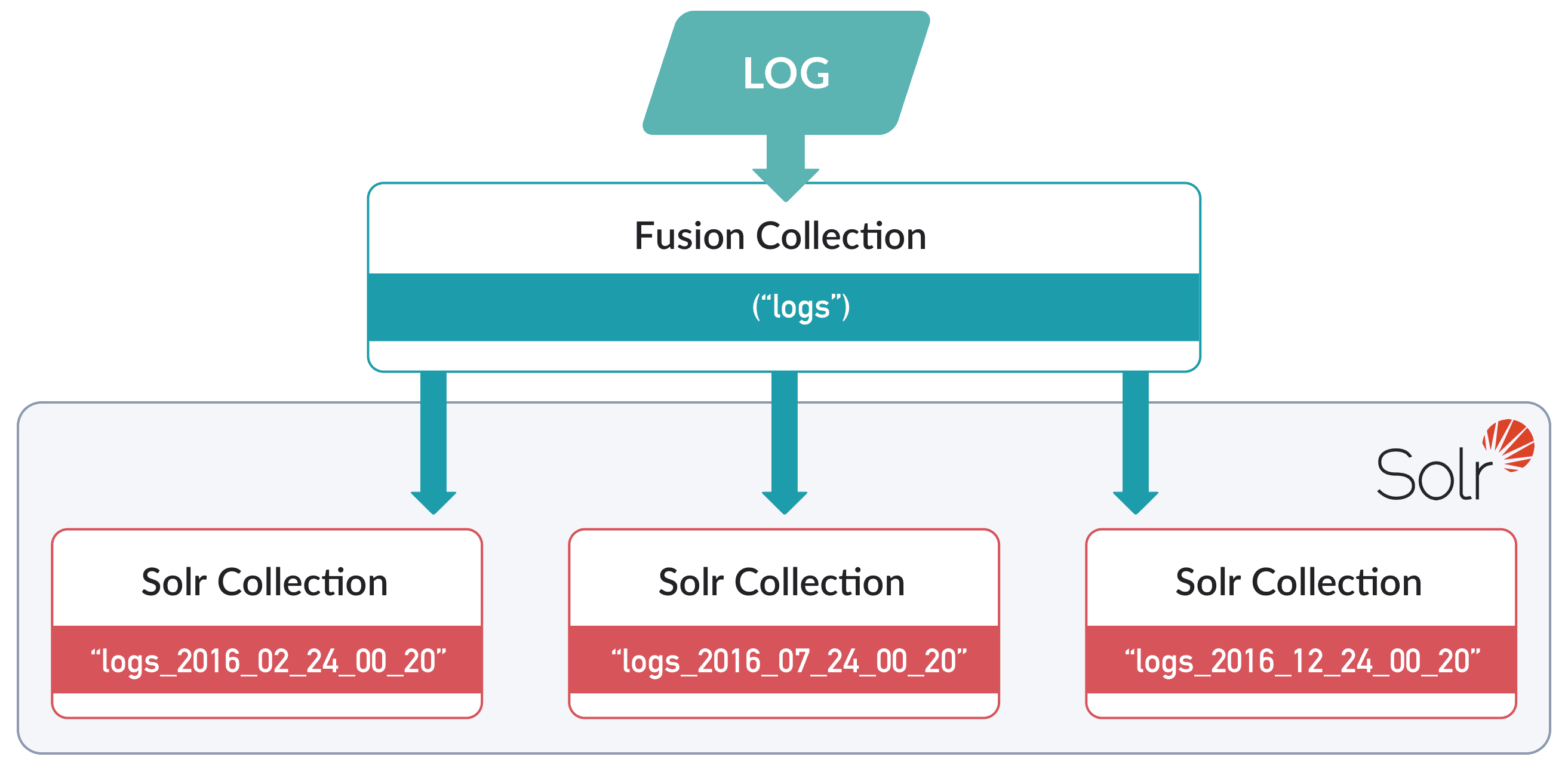
A Fusion collection can be configured to map to multiple Solr collections, known as partitions in this context, where each partition contains data from a specific time range. An example is time-based partitioning for logs:
* In the UI, you can only enable time-based partitioning for *new* collections.
* In the API, you can only enable time-based partitioning for *existing* collections.
## Enablement using the Fusion UI
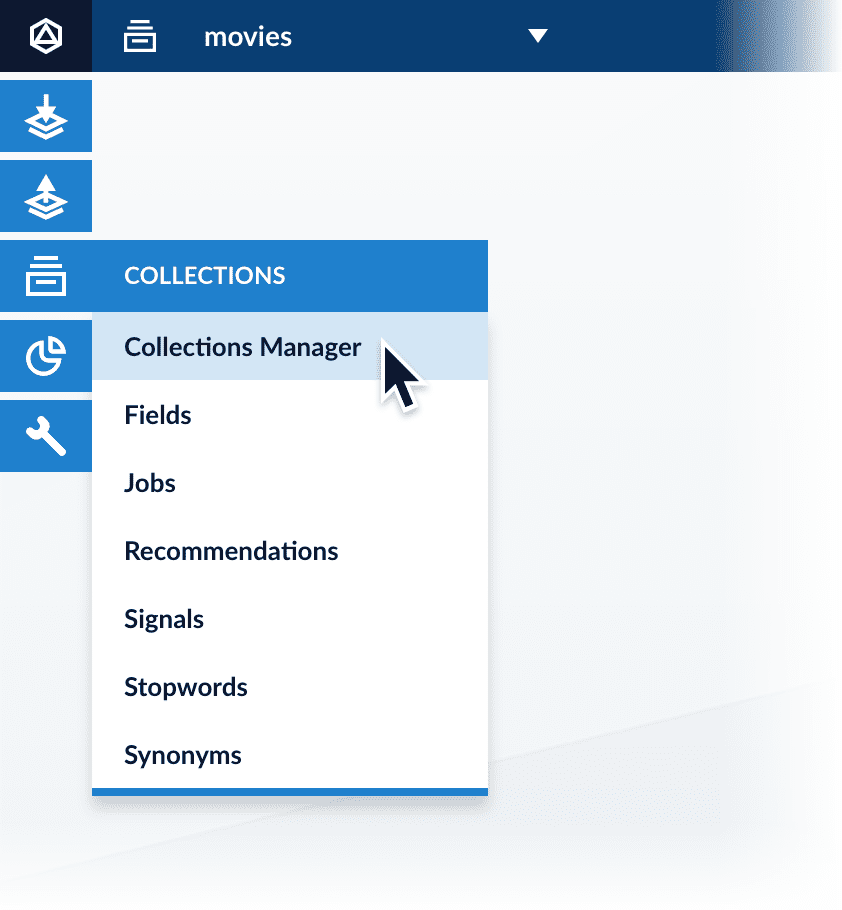
1. Open the Collections Manager:
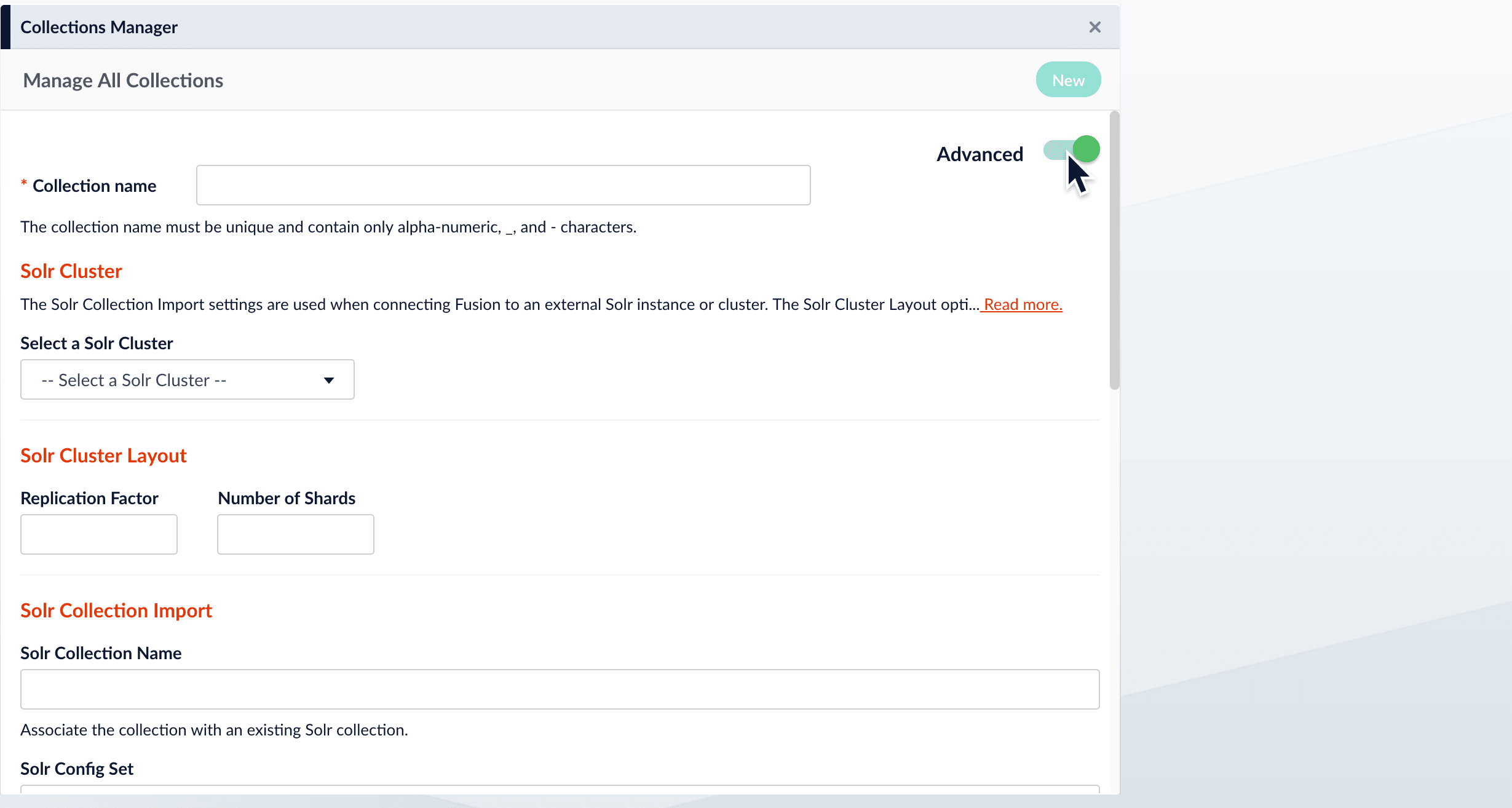
2. Click **New**.\
In the UI, you can only enable time-based partitioning for *new* collections. To enable it for an existing collection, [use the API](#enablement-using-the-api).
3. Click **Advanced**.
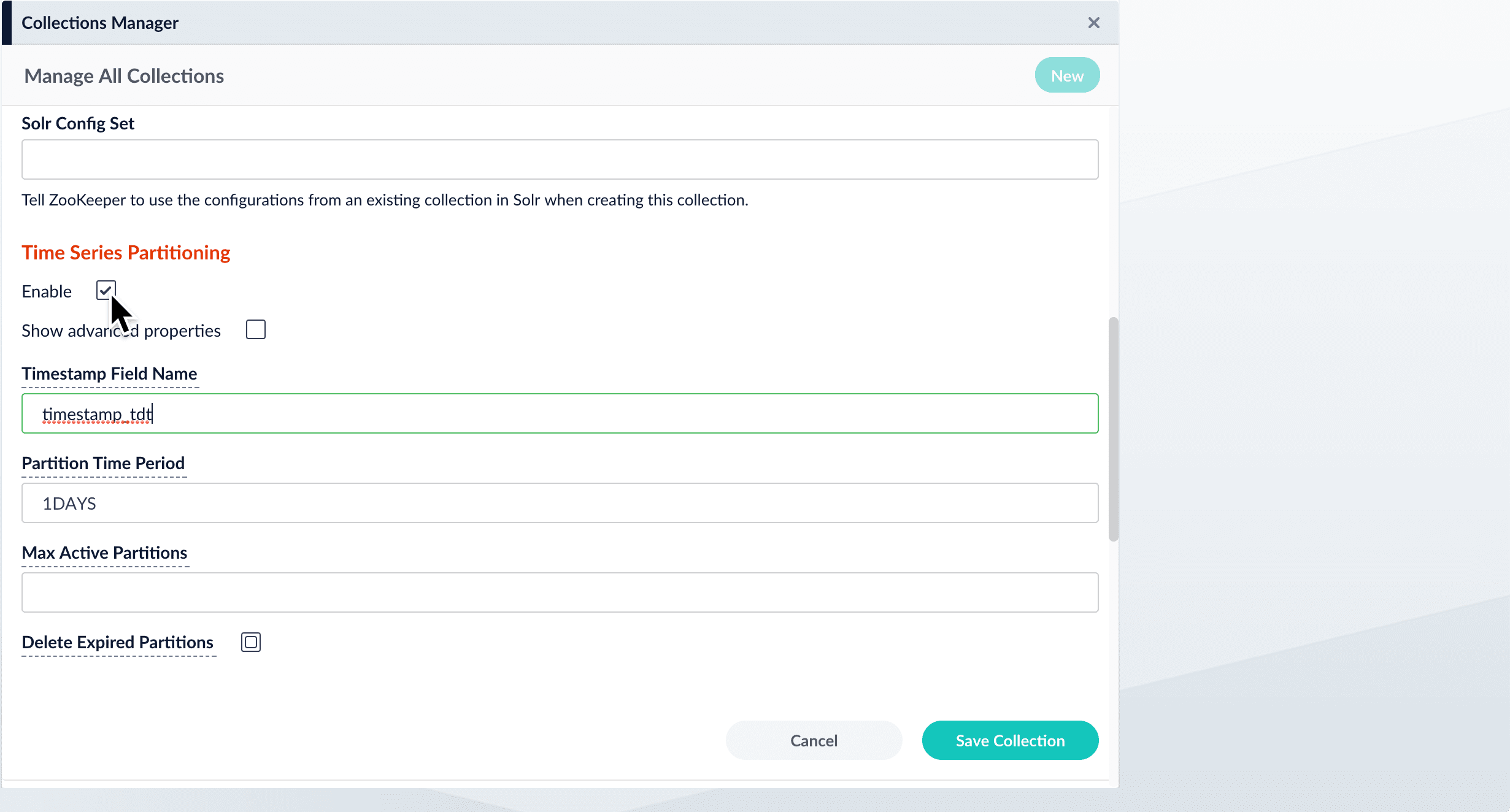
4. Scroll down to "Time Series Partitioning".
5. Click **Enable**.\\
When you enable this option, Fusion displays the time series partitioning configuration options.
6. Save the collection.
## Enablement using the API
Use the Collection Features API to enable time-based partitioning for an existing collection.
**Enable time-based partitioning using the default configuration:**
```bash wrap theme={"dark"}
curl -X PUT -H 'Content-type: application/json' -d '{"enabled": true}' http://localhost:8764/api/collections/COLLECTION_NAME/features/partitionByTime
```
No response is returned.
Submit an empty request to the same endpoint to verify that time-based partitioning is enabled:
```bash wrap theme={"dark"}
curl -X GET http://localhost:8764/api/collections/COLLECTION_NAME/features/partitionByTime
```
Response:
```json theme={"dark"}
{
"name" : "partitionByTime",
"collectionId" : "COLLECTION_NAME",
"params" : { },
"enabled" : true
}
```
 * In the UI, you can only enable time-based partitioning for *new* collections.
* In the API, you can only enable time-based partitioning for *existing* collections.
## Enablement using the Fusion UI
1. Open the Collections Manager:
* In the UI, you can only enable time-based partitioning for *new* collections.
* In the API, you can only enable time-based partitioning for *existing* collections.
## Enablement using the Fusion UI
1. Open the Collections Manager:
 2. Click **New**.\
 4. Scroll down to "Time Series Partitioning".
5. Click **Enable**.\\
4. Scroll down to "Time Series Partitioning".
5. Click **Enable**.\\
 When you enable this option, Fusion displays the time series partitioning configuration options.
6. Save the collection.
## Enablement using the API
Use the Collection Features API to enable time-based partitioning for an existing collection.
**Enable time-based partitioning using the default configuration:**
```bash wrap theme={"dark"}
curl -X PUT -H 'Content-type: application/json' -d '{"enabled": true}' http://localhost:8764/api/collections/COLLECTION_NAME/features/partitionByTime
```
No response is returned.
Submit an empty request to the same endpoint to verify that time-based partitioning is enabled:
```bash wrap theme={"dark"}
curl -X GET http://localhost:8764/api/collections/COLLECTION_NAME/features/partitionByTime
```
Response:
```json theme={"dark"}
{
"name" : "partitionByTime",
"collectionId" : "COLLECTION_NAME",
"params" : { },
"enabled" : true
}
```
When you enable this option, Fusion displays the time series partitioning configuration options.
6. Save the collection.
## Enablement using the API
Use the Collection Features API to enable time-based partitioning for an existing collection.
**Enable time-based partitioning using the default configuration:**
```bash wrap theme={"dark"}
curl -X PUT -H 'Content-type: application/json' -d '{"enabled": true}' http://localhost:8764/api/collections/COLLECTION_NAME/features/partitionByTime
```
No response is returned.
Submit an empty request to the same endpoint to verify that time-based partitioning is enabled:
```bash wrap theme={"dark"}
curl -X GET http://localhost:8764/api/collections/COLLECTION_NAME/features/partitionByTime
```
Response:
```json theme={"dark"}
{
"name" : "partitionByTime",
"collectionId" : "COLLECTION_NAME",
"params" : { },
"enabled" : true
}
```