> ## Documentation Index
> Fetch the complete documentation index at: https://doc.lucidworks.com/llms.txt
> Use this file to discover all available pages before exploring further.
# Workflow and Data Processing Module
export const LwTemplate = ({title = "Key questions to get you started", icon = "sparkles", cta = "Powered by Agent Studio", linkHref = "https://lucidworks.com/demo/?utm_source=docs&utm_medium=referral&utm_campaign=docs_cta_ai"}) => {
const [isLoaded, setIsLoaded] = useState(false);
useEffect(() => {
const timer = setTimeout(() => {
setIsLoaded(true);
}, 500);
return () => clearTimeout(timer);
}, []);
return
{isLoaded && `
}} />}
Powered by Lucidworks Agent Studio
;
};
[old doc.lw link]: https//doc.lucidworks.com/app-studio/4.2/3181
[localhost link]: http://localhost:3000/docs/5/app-studio/reference/modules/workflow-and-data-processing/overview
[mintlify link]: https://doc.lucidworks.com/docs/5/app-studio/reference/modules/workflow-and-data-processing/overview
A workflow processor is an atomic unit of business logic that can modify a query before it is submitted to a search platform, or transform a search response before rendering. This capability is used extensively for doing runtime data cleaning when, for example, it is not feasible to re-index a whole collection to fix issues in the source data.
The workflow module ships with a number of query and response processors for common tasks out of the box and it is easy to hook these or your own ones into the query/response lifecycle. These include, but are not restricted to:
* **Query pattern matching.** Intercept queries for common terms that have no corresponding documents in the index (for example, postal codes, phone numbers, or email addresses).
* **Natural language processing (NLP).** Analyse free-text input typed in by the end-user to provide a structured, more specific search command to the backend engine. For example, given the query "restaurants in new york" the NLP pre-processor might produce a structured query along the lines of `category:restaurant and city:nyc`. Appkit has integration with a number of third-party NLP parsers, including Expert Systems, WolframAlpha and SmartLogic. More commonly, it is also easy to hook in custom natural language parsers, customized for a particular domain.
* **Data augmentation.** Transform and extend existing data on the fly with re-indexing, for example by fetching external linkages (look up latest stock ticker price, perform relational joins, etc.) or perform translation or lookups (replace ontology terms with common name).
* **Remove facet filters by pattern.** The workflow module includes a comprehensive set of runtime data cleansing tools. When re-indexing is not feasible Appkit can remove irrelevant filters from dynamic navigation options based on for example, regular expression patterns.
The figure below illustrates the query-response lifecycle including a pipeline of workflow processing.
**Figure 1**. Sample query-response lifecycle involving the workflow engine.
In this example:
1. A search request is pre-processed before it is translated into an engine-specific command and sent to the search engine (for example, by removing specific forbidden or blacklisted words, applying natural language processing to the free-text portion of the query, etc.).
2. The data that comes back from the search engine is translated into a generic Appkit search response by the platform adapter, and then fed into a post-processing pipeline (which might, for example, apply regular expressions to remove specific terms from data fields, apply date formatting to facet aggregation values, etc.).
3. This produces finally a generic Appkit response that is returned to the search application, for rendering or further processing.
## Workflow processors: building blocks of data transformation
An Appkit workflow processor is a Java class that is invoked and passed a reference to either a query or response object. A query pre-processor rewrites a query before it is submitted to the underlying search platform. Conversely, a response post-processor transforms a search response (both search results and facets) after it gets returned from a search engine (and before rendering). Workflow processors are typically declared in markup using JSP tags. Multiple processor tags can be specified for sequential processing of queries or responses.
## Configuring a workflow pipeline
A workflow pipeline is configured at a platform level. This is useful for example for when you want to reuse processors in several places. This can be done using **Platform Workflow Processors**, chaining processors together along with a platform as a "workflow platform", which then can be referenced like any other platform.
To process and change data on the fly in Appkit, processors are usually added either to modify [queries](/docs/4/app-studio/reference/modules/workflow-and-data-processing/query-processors) or [responses](/docs/4/app-studio/reference/modules/workflow-and-data-processing/response-processors/overview).
This is where the workflow platform comes in. It lets you configure processors through configuration files.
## How to configure a workflow chain (post Appkit v3.0)
There are two steps to follow when configuring a workflow chain:
1. Add the `workflow` attribute to your normal platform configuration. This will point to the workflow processors you want to run on the platform.
2. Add configuration for each workflow processor.
### Platform configuration
The normal platform configuration (for example, `platforms/gsa.conf`) would have a `workflow` attribute, paired with a comma-separated list of workflow processors to run on the platform. For example:
```yaml wrap theme={"dark"}
workflow: processors.response.capitaliseFieldValuesProcessor,processors.response.highlightFieldValuesProcessor,processors.response.copyFieldsProcessor
```
Each processor listed contains the name and folder path to a given processor `.conf` file within the `conf` directory - this can be organized however you want.
### Processor configuration
Each of the processors would be configured with key-value pairs. For example:
#### capitaliseFieldValuesProcessor.conf
This, like all configuration files is made up of key-value pairs. You reference a **name** with the classpath of a given processor (either Appkit’s or your own). You then pass in the attributes of this processor as key-value pairs - in this case **fields**.
```yaml wrap theme={"dark"}
name: twigkit.search.processors.response.CapitaliseFieldValuesProcessor
fields: fieldA,fieldB
```
### Calling the workflow platform
Since the `workflow` attribute is part of the normal platform configuration, there is no must explicitly call the workflow platform. Simply call the normal platform:
```xml wrap theme={"dark"}
```
or
```xml wrap theme={"dark"}
Export
```
Calling the normal platform would automatically run the configured processors at runtime.
## Example configuration
This example would likely be configured using this setup, with each of these broken down below this.
```bash theme={"dark"}
/resources/conf/platforms
/gsa
gsa.conf (your normal GSA conf)
/workflow
workflow.conf
gsaWithProcessing.conf
/resources/conf/processors
/response
/capitaliseFieldValuesProcessor.conf
/highlightFieldValuesProcessor.conf
/copyFieldsProcessor.conf
/processors.conf
```
### Platform configuration
Each of the processors would be configured with key value pairs, like:
#### workflow\.conf
This file indicates to Appkit that this is a workflow configuration, and to trigger processing of that as such.
```yaml theme={"dark"}
name: twigkit.platform.Workflow
```
#### gsaWithProcessing.conf
This is the part that tied together a standard existing platform configuration and one or more processor configurations.
```yaml theme={"dark"}
platform: platforms.solr.excel
workflow: processors.response.capitaliseFieldValuesProcessor,processors.response.highlightFieldValuesProcessor,processors.response.copyFieldsProcessor
```
The processor confs mentioned are the name and folder path to a given processor `.conf` file within the `conf` directory; this can be organized however you want.
### Processor configuration
Each of the processors would be configured with key value pairs, much like you would pass in attributes to a normal processor tag within your JSP for example:
#### capitaliseFieldValuesProcessor.conf
This file, like all `.conf` files, is made up of key value pairs. You reference a **name** with the classpath of a given processor (either Appkit’s or your own). You then pass in the attributes of this processor as key value pairs - in this case as **fields**.
```yaml wrap theme={"dark"}
name: twigkit.search.processors.response.CapitaliseFieldValuesProcessor
fields: fieldA,fieldB
```
### Calling the workflow platform
You just call the workflow platform as you would a normally configured platform for example:
```xml wrap theme={"dark"}
```
Or:
```xml wrap theme={"dark"}
Export
```
The configured processors get run at runtime.
Lucidworks has packaged up a selection of [commonly used response post-processors](/docs/5/fusion/dev-portal/appkit/reference/modules/workflow-and-data-processing/response-processors/overview) for reuse.
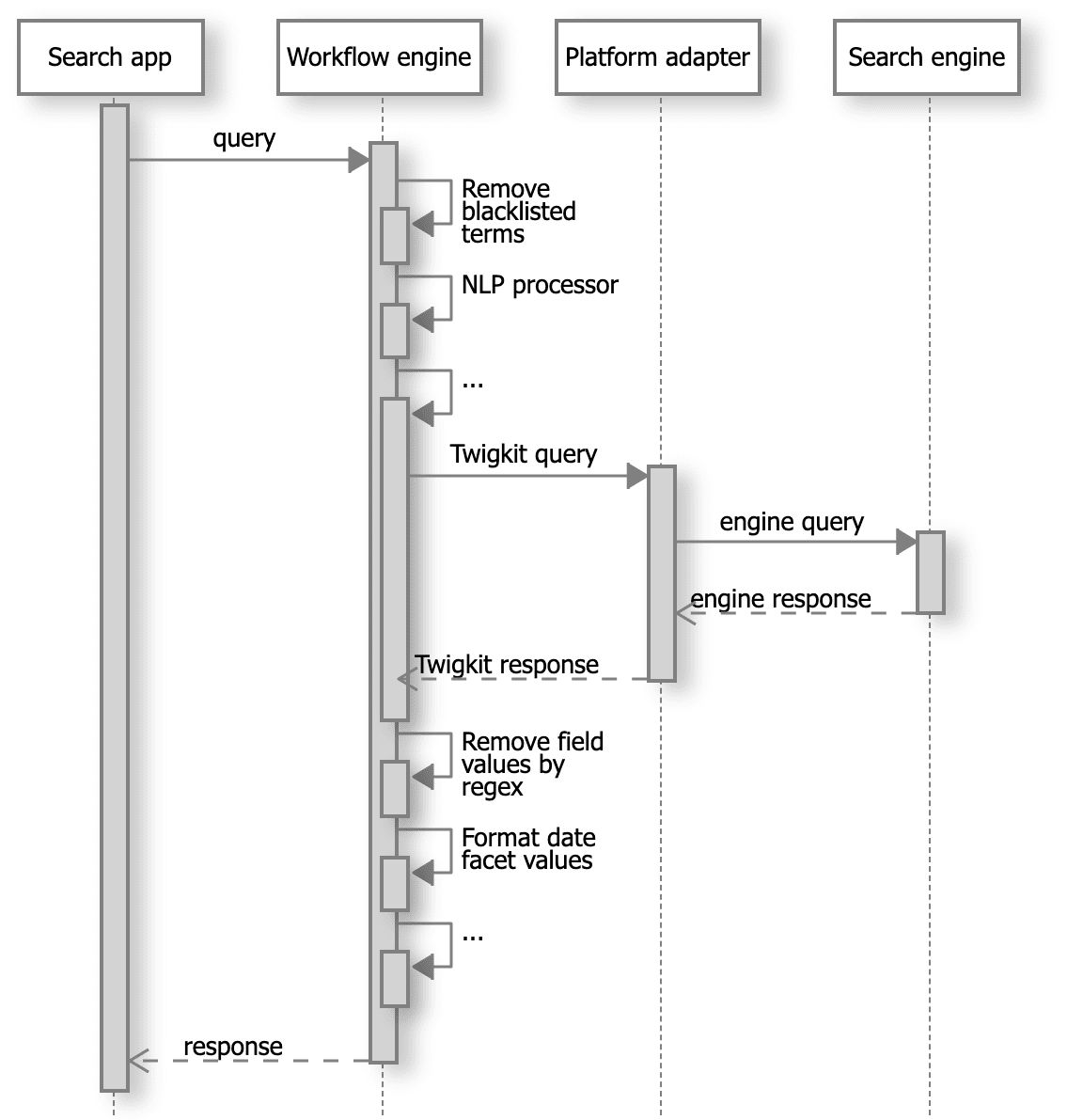 **Figure 1**. Sample query-response lifecycle involving the workflow engine.
In this example:
1. A search request is pre-processed before it is translated into an engine-specific command and sent to the search engine (for example, by removing specific forbidden or blacklisted words, applying natural language processing to the free-text portion of the query, etc.).
2. The data that comes back from the search engine is translated into a generic Appkit search response by the platform adapter, and then fed into a post-processing pipeline (which might, for example, apply regular expressions to remove specific terms from data fields, apply date formatting to facet aggregation values, etc.).
3. This produces finally a generic Appkit response that is returned to the search application, for rendering or further processing.
**Figure 1**. Sample query-response lifecycle involving the workflow engine.
In this example:
1. A search request is pre-processed before it is translated into an engine-specific command and sent to the search engine (for example, by removing specific forbidden or blacklisted words, applying natural language processing to the free-text portion of the query, etc.).
2. The data that comes back from the search engine is translated into a generic Appkit search response by the platform adapter, and then fed into a post-processing pipeline (which might, for example, apply regular expressions to remove specific terms from data fields, apply date formatting to facet aggregation values, etc.).
3. This produces finally a generic Appkit response that is returned to the search application, for rendering or further processing.