> ## Documentation Index
> Fetch the complete documentation index at: https://doc.lucidworks.com/llms.txt
> Use this file to discover all available pages before exploring further.
# Licensing
export const LwTemplate = ({title = "Key questions to get you started", icon = "sparkles", cta = "Powered by Agent Studio", linkHref = "https://lucidworks.com/demo/?utm_source=docs&utm_medium=referral&utm_campaign=docs_cta_ai"}) => {
const [isLoaded, setIsLoaded] = useState(false);
useEffect(() => {
const timer = setTimeout(() => {
setIsLoaded(true);
}, 500);
return () => clearTimeout(timer);
}, []);
return
{isLoaded && `
}} />}
Powered by Lucidworks Agent Studio
;
};
[old doc.lw link]: https//doc.lucidworks.com/app-studio/4.2/3139
[localhost link]: http://localhost:3000/docs/5/app-studio/reference/licensing/overview
[mintlify link]: https://doc.lucidworks.com/docs/5/app-studio/reference/licensing/overview
This article contains basic licensing details.
App Studio is licensed [with Fusion](/docs/5/fusion/overview).
## What is an Appkit license file?
To run an Appkit application, you need an Appkit license file. This is a small encrypted text file that an Appkit application reads on startup. The license file enables the individual Appkit [modules](/docs/5/fusion/dev-portal/appkit/reference/modules/overview) and [search platforms](/docs/5/fusion/dev-portal/appkit/reference/search-platforms/overview) that you need for your application.
## Types of licenses
### Development licenses
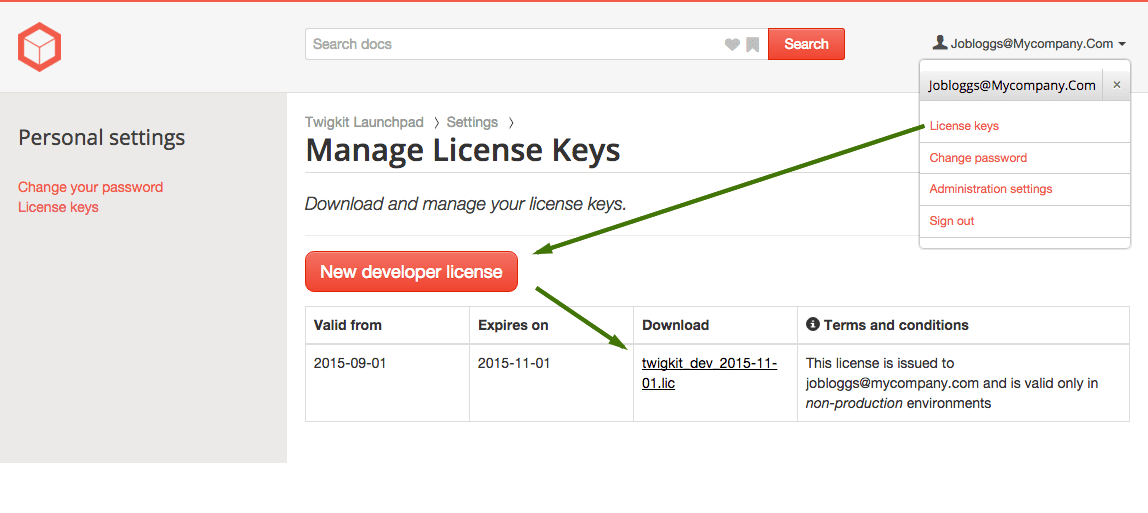
To run an app in **development**, you will need a developer license from us. To generate a development license, go to the [Manage License Keys page](https://dev.twigkit.net/settings/keys/) (accessed via the drop down menu by your logged-in username) and click 'new developer license':
These are usually time-limited, enable all Appkit features, and not tied to any given hostname, so you can run them and develop locally, and try out all Appkit features.
### Production licenses
For **production**, two tiers of licensing are available: *per host* and *enterprise*.
* **Per-host.** The easiest way to get started with Appkit is through our low-cost, host-based licenses. As the name suggests, these licenses are bound to a single machine hostname. The license is purchased to cover an agreed period (usually 1 year). They are bound to specific modules.
* **Enterprise.** Lucidworks also provides enterprise-wide licenses for customers wanting unlimited usage of Appkit throughout their entire organization. These annual licenses include access to source code, greater involvement in our development roadmap, and premium developer support.
For more information on Per-host and Enterprise licensing, [contact Lucidworks](https://lucidworks.com/company/contact/).
## How do I add a license?
License files should be named `app-studio.lic` and stored where the application can read them.
You can specify the location of the license file in the application’s configuration tree - specifically, in `src/main/resources/conf/twigkit.conf` you will find this (default) entry
```
license-file: /app-studio.lic
```
This entry can either be *classpath-relative* (as given above) or given as an *absolute file path* (with a `"file://"` `file:///` prefix, for example, `file:///var/opt/lics/app-studio.lic`).
When the license location is given as a relative path, the application tries to look up the license file on the runtime class path. So you can place the license in for example, the src/main/resources folder in your application, which will work. If no license file is found on the class path, it looks in the home directory of the user that spun up the JVM. The latter is useful for development, by having a single license on the dev workstation.
## License errors and problems
If you are seeing license errors or exceptions (like 'twigkit.license.LicenseException: null at twigkit.license.PLM.isValid'), it could be that you have either mis-configured your license (for example, it is not named `app-studio.lic`), or it is being used on the wrong host or not visible by the application.
[Contact Lucidworks Support](https://support.lucidworks.com/hc/en-us/requests/new) and provide your hostname, license file, and full details of the error in the Appkit logs, and we will be able to advise further.
 These are usually time-limited, enable all Appkit features, and not tied to any given hostname, so you can run them and develop locally, and try out all Appkit features.
### Production licenses
For **production**, two tiers of licensing are available: *per host* and *enterprise*.
* **Per-host.** The easiest way to get started with Appkit is through our low-cost, host-based licenses. As the name suggests, these licenses are bound to a single machine hostname. The license is purchased to cover an agreed period (usually 1 year). They are bound to specific modules.
* **Enterprise.** Lucidworks also provides enterprise-wide licenses for customers wanting unlimited usage of Appkit throughout their entire organization. These annual licenses include access to source code, greater involvement in our development roadmap, and premium developer support.
For more information on Per-host and Enterprise licensing, [contact Lucidworks](https://lucidworks.com/company/contact/).
## How do I add a license?
License files should be named `app-studio.lic` and stored where the application can read them.
You can specify the location of the license file in the application’s configuration tree - specifically, in `src/main/resources/conf/twigkit.conf` you will find this (default) entry
```
license-file: /app-studio.lic
```
This entry can either be *classpath-relative* (as given above) or given as an *absolute file path* (with a `"file://"` `file:///` prefix, for example, `file:///var/opt/lics/app-studio.lic`).
When the license location is given as a relative path, the application tries to look up the license file on the runtime class path. So you can place the license in for example, the src/main/resources folder in your application, which will work. If no license file is found on the class path, it looks in the home directory of the user that spun up the JVM. The latter is useful for development, by having a single license on the dev workstation.
## License errors and problems
If you are seeing license errors or exceptions (like 'twigkit.license.LicenseException: null at twigkit.license.PLM.isValid'), it could be that you have either mis-configured your license (for example, it is not named `app-studio.lic`), or it is being used on the wrong host or not visible by the application.
[Contact Lucidworks Support](https://support.lucidworks.com/hc/en-us/requests/new) and provide your hostname, license file, and full details of the error in the Appkit logs, and we will be able to advise further.
These are usually time-limited, enable all Appkit features, and not tied to any given hostname, so you can run them and develop locally, and try out all Appkit features.
### Production licenses
For **production**, two tiers of licensing are available: *per host* and *enterprise*.
* **Per-host.** The easiest way to get started with Appkit is through our low-cost, host-based licenses. As the name suggests, these licenses are bound to a single machine hostname. The license is purchased to cover an agreed period (usually 1 year). They are bound to specific modules.
* **Enterprise.** Lucidworks also provides enterprise-wide licenses for customers wanting unlimited usage of Appkit throughout their entire organization. These annual licenses include access to source code, greater involvement in our development roadmap, and premium developer support.
For more information on Per-host and Enterprise licensing, [contact Lucidworks](https://lucidworks.com/company/contact/).
## How do I add a license?
License files should be named `app-studio.lic` and stored where the application can read them.
You can specify the location of the license file in the application’s configuration tree - specifically, in `src/main/resources/conf/twigkit.conf` you will find this (default) entry
```
license-file: /app-studio.lic
```
This entry can either be *classpath-relative* (as given above) or given as an *absolute file path* (with a `"file://"` `file:///` prefix, for example, `file:///var/opt/lics/app-studio.lic`).
When the license location is given as a relative path, the application tries to look up the license file on the runtime class path. So you can place the license in for example, the src/main/resources folder in your application, which will work. If no license file is found on the class path, it looks in the home directory of the user that spun up the JVM. The latter is useful for development, by having a single license on the dev workstation.
## License errors and problems
If you are seeing license errors or exceptions (like 'twigkit.license.LicenseException: null at twigkit.license.PLM.isValid'), it could be that you have either mis-configured your license (for example, it is not named `app-studio.lic`), or it is being used on the wrong host or not visible by the application.
[Contact Lucidworks Support](https://support.lucidworks.com/hc/en-us/requests/new) and provide your hostname, license file, and full details of the error in the Appkit logs, and we will be able to advise further.