> ## Documentation Index
> Fetch the complete documentation index at: https://doc.lucidworks.com/llms.txt
> Use this file to discover all available pages before exploring further.

# Form

export const LwTemplate = ({title = "Key questions to get you started", icon = "sparkles", cta = "Powered by Agent Studio", linkHref = "https://lucidworks.com/demo/?utm_source=docs&utm_medium=referral&utm_campaign=docs_cta_ai"}) => {
  const [isLoaded, setIsLoaded] = useState(false);
  useEffect(() => {
    const timer = setTimeout(() => {
      setIsLoaded(true);
    }, 500);
    return () => clearTimeout(timer);
  }, []);
  return <div className="lw-template-container">
      <Card title={title} icon={icon}>
        {isLoaded && <span dangerouslySetInnerHTML={{
    __html: `<lw-template id="a029c1a9-28be-427e-b0e1-5d918920246a"></lw-template
            >`
  }} />}
        <Link href={linkHref} className="agent-studio-link text-left text-gray-600 gap-2 dark:text-gray-400 text-sm font-medium flex flex-row items-center hover:text-primary dark:hover:text-primary-light group-hover:text-primary group-hover:dark:text-primary-light">Powered by Lucidworks Agent Studio</Link>
      </Card>
    </div>;
};

[localhost link]: http://localhost:3000/docs/5/app-studio/reference/gallery/form

[mintlify link]: https://doc.lucidworks.com/docs/5/app-studio/reference/gallery/form

[old doc.lw link]: https://doc.lucidworks.com/app-studio/4.2/1033

<LwTemplate />

## Default Compact Form

<img src="https://mintcdn.com/lucidworks/svjqq6CDiXcpPrjs/assets/images/app-studio/as-examples/gallery/form01.png?fit=max&auto=format&n=svjqq6CDiXcpPrjs&q=85&s=ac65c40ba7572ba9fdcabd009e89b24e" alt="Example" width="1261" height="238" data-path="assets/images/app-studio/as-examples/gallery/form01.png" />

```html wrap  theme={"dark"}
<form styling="form">
    <fieldset>
        <legend>A compact inline form (Default)</legend>

        <input type="email" placeholder="Email">
        <input type="password" placeholder="Password">

        <label for="remember">
            <input id="remember" type="checkbox"> Remember me
        </label>

        <button type="submit" styling="button">Sign in</button>
    </fieldset>
</form>
```

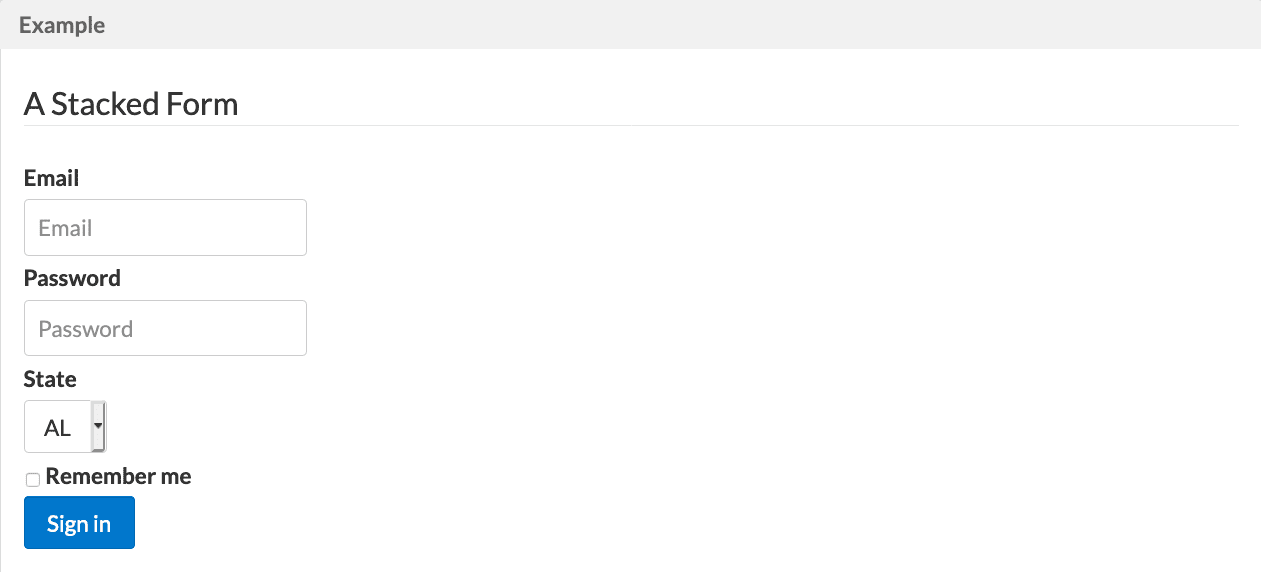
## Stacked

<img src="https://mintcdn.com/lucidworks/svjqq6CDiXcpPrjs/assets/images/app-studio/as-examples/gallery/form02.png?fit=max&auto=format&n=svjqq6CDiXcpPrjs&q=85&s=ae823b932d9ff0d2b61ea375facbf9d6" alt="Example" width="1261" height="572" data-path="assets/images/app-studio/as-examples/gallery/form02.png" />

```html wrap  theme={"dark"}
<form styling="form form-stacked">
    <fieldset>
        <legend>A Stacked Form</legend>

        <label for="email">Email</label>
        <input id="email" type="email" placeholder="Email">

        <label for="password">Password</label>
        <input id="password" type="password" placeholder="Password">

        <label for="state">State</label>
        <select id="state">
            <option>AL</option>
            <option>CA</option>
            <option>IL</option>
        </select>

        <label for="remember" class="pure-checkbox">
            <input id="remember" type="checkbox"> Remember me
        </label>

        <button type="submit" styling="button">Sign in</button>
    </fieldset>
</form>
```

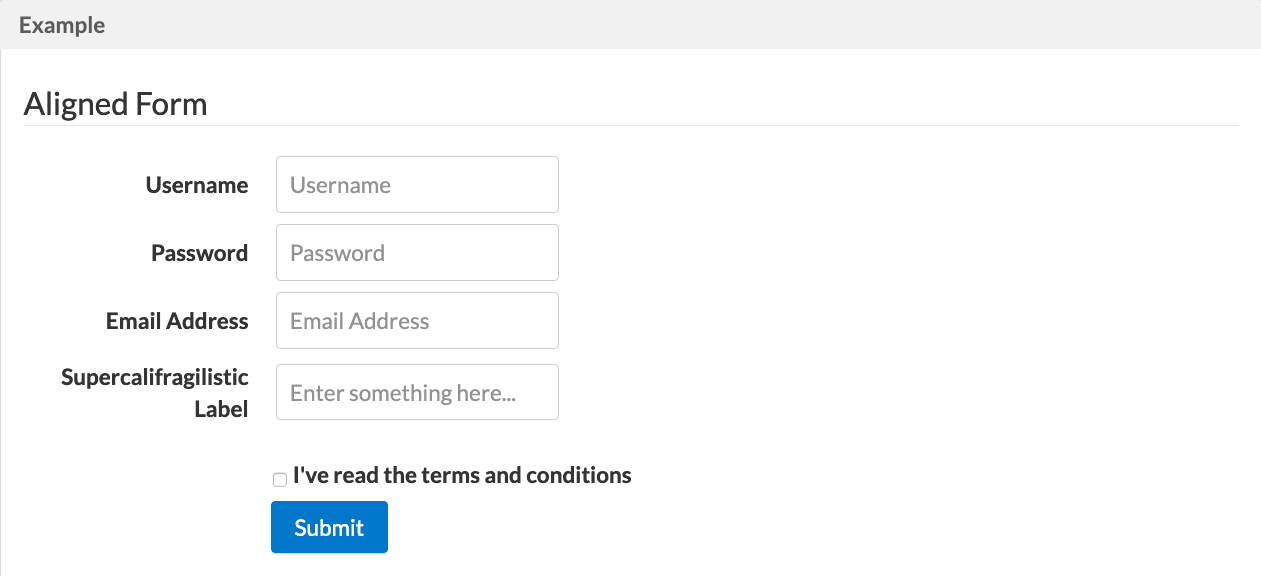
## Aligned Form

<img src="https://mintcdn.com/lucidworks/svjqq6CDiXcpPrjs/assets/images/app-studio/as-examples/gallery/form03.png?fit=max&auto=format&n=svjqq6CDiXcpPrjs&q=85&s=c8622b62a2c9f258a634b2cf9c8177ae" alt="Example" width="1261" height="576" data-path="assets/images/app-studio/as-examples/gallery/form03.png" />

```html wrap  expandable  theme={"dark"}
<form styling="form form-aligned">
    <fieldset>
        <legend>Aligned Form</legend>
        <div styling="control-group">
            <label for="name">Username</label>
            <input id="name" type="text" placeholder="Username">
        </div>

        <div styling="control-group">
            <label for="password">Password</label>
            <input id="password" type="password" placeholder="Password">
        </div>

        <div styling="control-group">
            <label for="email">Email Address</label>
            <input id="email" type="email" placeholder="Email Address">
        </div>

        <div styling="control-group">
            <label for="foo">Supercalifragilistic Label</label>
            <input id="foo" type="text" placeholder="Enter something here...">
        </div>

        <div styling="controls">
            <label for="cb" styling="checkbox">
                <input id="cb" type="checkbox"> I've read the terms and conditions
            </label>

            <button type="submit" styling="button pure-button-primary">Submit</button>
        </div>
    </fieldset>
</form>
```

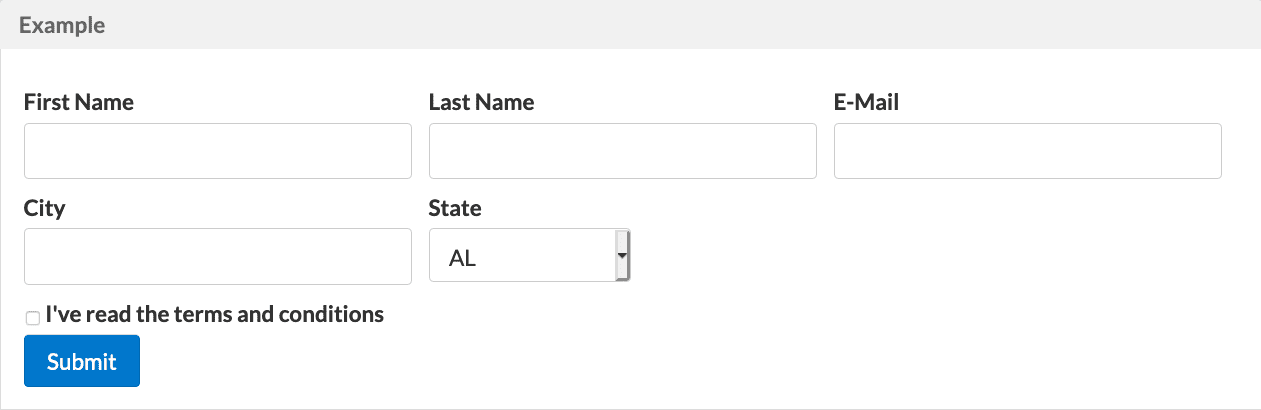
## Multi Column Form (Using Grid)

<img src="https://mintcdn.com/lucidworks/vACLe5BtgzmMoCXX/assets/images/app-studio/as-examples/gallery/form04.png?fit=max&auto=format&n=vACLe5BtgzmMoCXX&q=85&s=3e663b543303fa503a5a2831c5f96593" alt="Example" width="1261" height="410" data-path="assets/images/app-studio/as-examples/gallery/form04.png" />

```html wrap  expandable  theme={"dark"}
<form styling="form form-stacked">
    <fieldset>
        <div class="tk-rgrid-g">
            <div class="tk-rgrid-u-1 tk-rgrid-u-md-1-3">
                <label for="first-name">First Name</label>
                <input id="first-name" class="tk-rgrid-u-23-24" type="text">
            </div>

            <div class="tk-rgrid-u-1 tk-rgrid-u-md-1-3">
                <label for="last-name">Last Name</label>
                <input id="last-name" class="tk-rgrid-u-23-24" type="text">
            </div>

            <div class="tk-rgrid-u-1 tk-rgrid-u-md-1-3">
                <label for="email">E-Mail</label>
                <input id="email" class="tk-rgrid-u-23-24" type="email" required="">
            </div>

            <div class="tk-rgrid-u-1 tk-rgrid-u-md-1-3">
                <label for="city">City</label>
                <input id="city" class="tk-rgrid-u-23-24" type="text">
            </div>

            <div class="tk-rgrid-u-1 tk-rgrid-u-md-1-3">
                <label for="state">State</label>
                <select id="state" styling="input-1-2">
                    <option>AL</option>
                    <option>CA</option>
                    <option>IL</option>
                </select>
            </div>
        </div>

        <label for="terms" styling="checkbox">
            <input id="terms" type="checkbox"> I've read the terms and conditions
        </label>

        <button type="submit" styling="button">Submit</button>
    </fieldset>
</form>
```

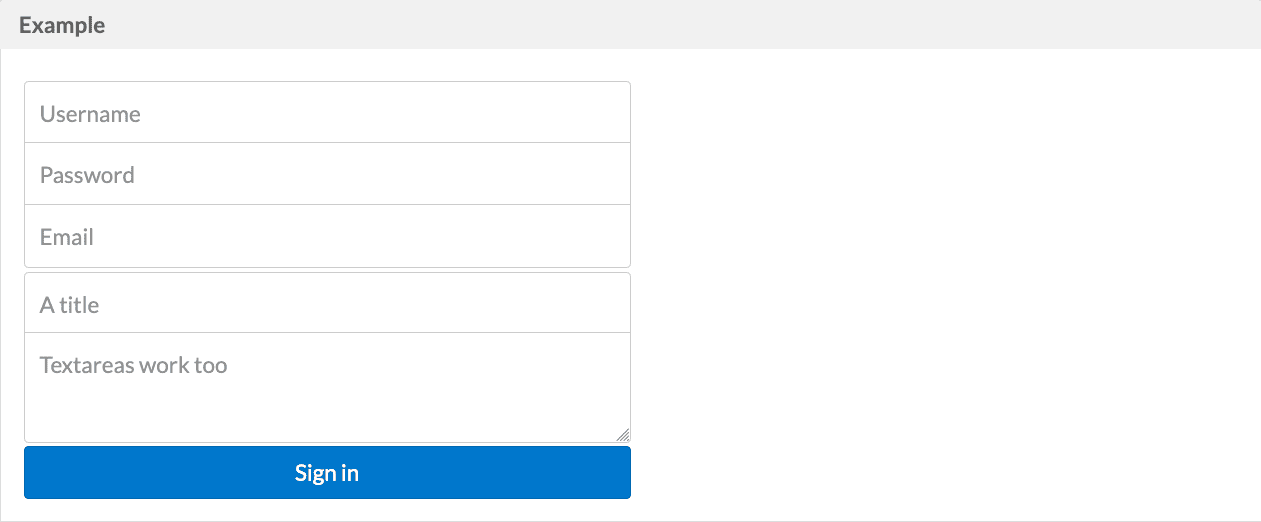
## Grouped Inputs

<img src="https://mintcdn.com/lucidworks/vACLe5BtgzmMoCXX/assets/images/app-studio/as-examples/gallery/form05.png?fit=max&auto=format&n=vACLe5BtgzmMoCXX&q=85&s=9ab46af442fa55c70f434ea90bd9b193" alt="Example" width="1261" height="522" data-path="assets/images/app-studio/as-examples/gallery/form05.png" />

```html wrap  theme={"dark"}
<form styling="form">
    <fieldset styling="group">
        <input type="text" styling="input-1-2" placeholder="Username">
        <input type="text" styling="input-1-2" placeholder="Password">
        <input type="email" styling="input-1-2" placeholder="Email">
    </fieldset>

    <fieldset styling="group">
        <input type="text" styling="input-1-2" placeholder="A title">
        <textarea styling="input-1-2" placeholder="Textareas work too"></textarea>
    </fieldset>

    <button type="submit" styling="button input-1-2">Sign in</button>
</form>
```

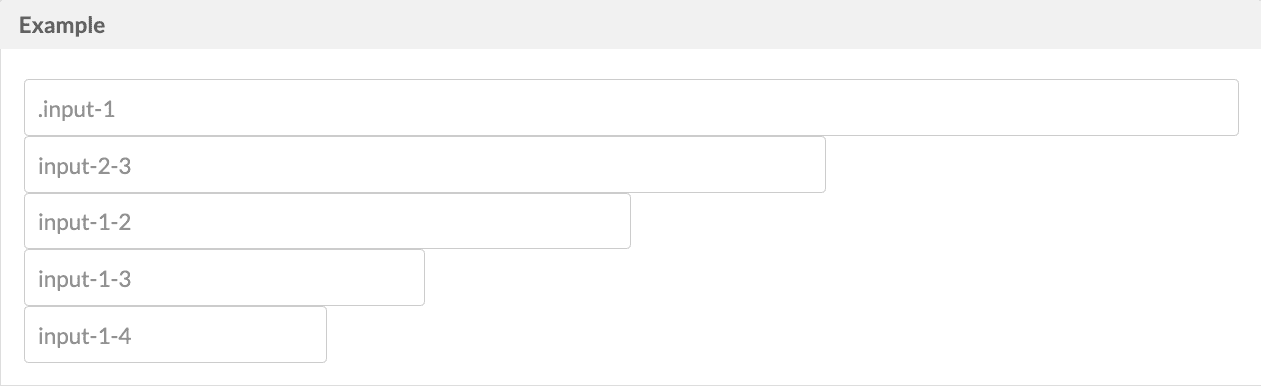
## Input Sizing

<img src="https://mintcdn.com/lucidworks/vACLe5BtgzmMoCXX/assets/images/app-studio/as-examples/gallery/form06.png?fit=max&auto=format&n=vACLe5BtgzmMoCXX&q=85&s=797bf33a0ee26ef253e654e9152ca864" alt="Example" width="1261" height="386" data-path="assets/images/app-studio/as-examples/gallery/form06.png" />

```html wrap  theme={"dark"}
<form styling="form">
    <input styling="input-1" type="text" placeholder="input-1"><br>
    <input styling="input-2-3" type="text" placeholder="input-2-3"><br>
    <input styling="input-1-2" type="text" placeholder="input-1-2"><br>
    <input styling="input-1-3" type="text" placeholder="input-1-3"><br>
    <input styling="input-1-4" type="text" placeholder="input-1-4"><br>
</form>
```

## Rounded Inputs

<img src="https://mintcdn.com/lucidworks/vACLe5BtgzmMoCXX/assets/images/app-studio/as-examples/gallery/form07.png?fit=max&auto=format&n=vACLe5BtgzmMoCXX&q=85&s=29076c1a01a1c78379786a60c534872a" alt="Example" width="1261" height="159" data-path="assets/images/app-studio/as-examples/gallery/form07.png" />

```html wrap  theme={"dark"}
<form styling="form">
    <input type="text" styling="input-rounded">
</form>
```

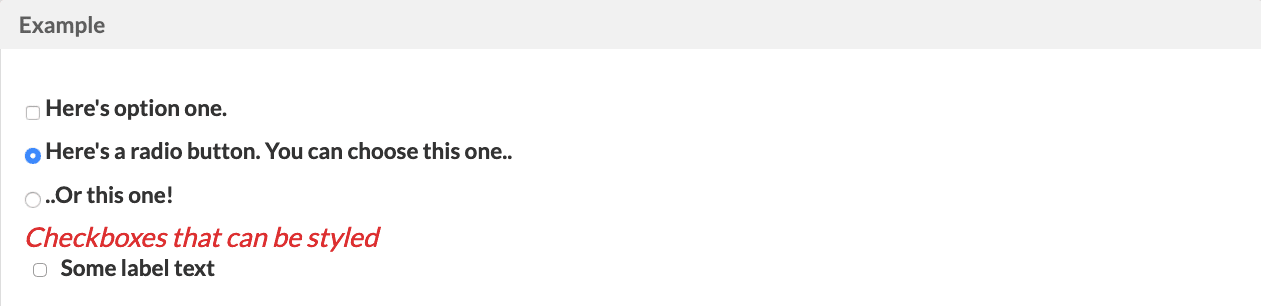
## Checkboxes and Radio Buttons

<img src="https://mintcdn.com/lucidworks/vACLe5BtgzmMoCXX/assets/images/app-studio/as-examples/gallery/form08.png?fit=max&auto=format&n=vACLe5BtgzmMoCXX&q=85&s=c22ba2646b79082427a35962e73f0f66" alt="Example" width="1261" height="306" data-path="assets/images/app-studio/as-examples/gallery/form08.png" />

```html wrap  theme={"dark"}
<form styling="form">
    <label for="option-one" styling="checkbox">
        <input id="option-one" type="checkbox" value="">
        Here's option one.
    </label>

    <label for="option-two" styling="radio">
        <input id="option-two" type="radio" name="optionsRadios" value="option1" checked="">
        Here's a radio button. You can choose this one..
    </label>

    <label for="option-three" styling="radio">
        <input id="option-three" type="radio" name="optionsRadios" value="option2">
        ..Or this one!
    </label>

    <h4>Checkboxes that can be styled</h4>
    <input id="check1" type="checkbox" styling="styled-checkbox">
    <label for="check1">Some label text</label>
</form>
```

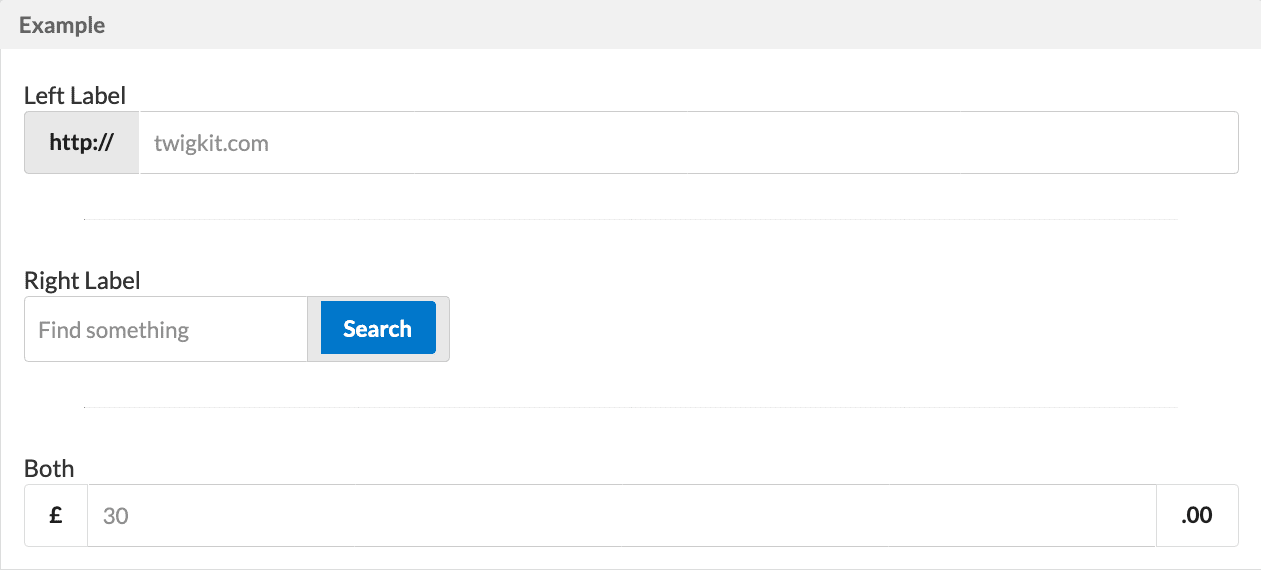
## Labelled Inputs

<img src="https://mintcdn.com/lucidworks/vACLe5BtgzmMoCXX/assets/images/app-studio/as-examples/gallery/form09.png?fit=max&auto=format&n=vACLe5BtgzmMoCXX&q=85&s=1039de592124dfa1d3365fc4e8211e2c" alt="Example" width="1261" height="570" data-path="assets/images/app-studio/as-examples/gallery/form09.png" />

```html wrap  expandable  theme={"dark"}
<p>Left Label</p>
<div styling="labelled-input">
    <div class="label grey">
        <span class="content">http://</span></div>
    <input type="text" placeholder="twigkit.com">
</div>
<hr>

<p>Right Label</p>
<div styling="labelled-input label-right input-1-3">
    <input type="text" placeholder="Find something">
    <div class="label grey">
        <button styling="button">Search</button>
    </div>
</div>
<hr>

<p>Both</p>
<div styling="labelled-input label-right">
    <div class="label basic">
        <span class="content">£</span>
    </div>
    <input type="text" placeholder="30">
    <div class="label basic">
        <span class="content">.00</span>
    </div>
</div>
```