> ## Documentation Index
> Fetch the complete documentation index at: https://doc.lucidworks.com/llms.txt
> Use this file to discover all available pages before exploring further.
# Fusion App Studio
export const LwTemplate = ({title = "Key questions to get you started", icon = "sparkles", cta = "Powered by Agent Studio", linkHref = "https://lucidworks.com/demo/?utm_source=docs&utm_medium=referral&utm_campaign=docs_cta_ai"}) => {
const [isLoaded, setIsLoaded] = useState(false);
useEffect(() => {
const timer = setTimeout(() => {
setIsLoaded(true);
}, 500);
return () => clearTimeout(timer);
}, []);
return
{isLoaded && `
}} />}
Powered by Lucidworks Agent Studio
;
};
[localhost link]: http://localhost:3000/docs/5/fusion/dev-portal/appkit/overview
[mintlify link]: https://doc.lucidworks.com/docs/5/fusion/dev-portal/appkit/overview
[old doc.lw link]: https://doc.lucidworks.com/app-studio/4.2/963
## App Studio
App Studio is a collection of software and resources that helps you [build](/docs/5/fusion/dev-portal/appkit/reference/app-deployment/building-from-source) modern, user-friendly apps to search and visualize your Fusion data. This includes:
[Download](/docs/5/fusion/dev-portal/appkit/concepts/app-studio-enterprise/download)
* [**Appkit**](#appkit) - The framework that drives App Studio Enterprise.
* [**App Studio Enterprise**](#app-studio-enterprise) - The standalone web application which you connect to your Fusion collection.
App Studio requires a running instance of [Fusion](/docs/5/fusion/overview), or access to one of our [supported datasources](/docs/5/fusion/dev-portal/appkit/reference/search-platforms/overview), with one or more collections of indexed data.
### Appkit
The Appkit framework provides a library of search application components encapsulated as simple building blocks that combine to create complex applications for search and information retrieval.
See the [reference docs](/docs/4/app-studio/reference/overview) for more information about the Appkit framework.
#### Modules
Appkit’s suite of search components is modular, which means you are able to get a working solution into place quickly using tried-and-tested components.
[Read more about modules.](/docs/5/fusion/dev-portal/appkit/reference/modules/overview)
#### Tags
The App Studio markup language defines a set of HTML-like elements, or *tags*, for defining search queries to the backend and visualizing the search results and facets, handling all the complexities of connecting to Fusion.
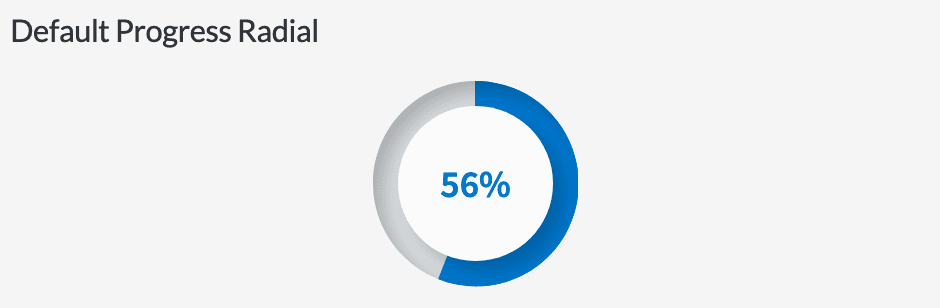
For example, adding a radial progress bar is as simple including the following tag:
```xml wrap theme={"dark"}
```
This results in the following:
Over 150 tags are provided in the Appkit framework.
[Read more about tags.](/docs/5/fusion/dev-portal/appkit/reference/tags/overview)
#### Services
App Studio exposes a number of frontend JavaScript services which encapsulate reusable processes. These services are based on the AngularJS framework. There are also backend Java web services that perform the same functions as many of the frontend services, including platform search endpoints, platform series endpoint, query suggestion/typeahead services, csv/excel export, and facet search.
[Read more about services.](/docs/5/fusion/dev-portal/appkit/reference/services/overview)
#### Search Platforms
Appkit integrates with a number of search engines, data warehouses and web service endpoints, even surfacing information from multiple sources simultaneously. The platform abstraction covers both search and storage sides, meaning that Appkit will implement for each platform the necessary protocols to save or index content for any platform. A number of platform adapters are available out-of-the-box with Appkit, and [adding new ones](/docs/5/fusion/dev-portal/appkit/concepts/extending-appkit/developing-platforms) is a simple exercise.
[Read more about search platforms.](/docs/5/fusion/dev-portal/appkit/reference/search-platforms/overview)
#### Concepts
* [Appkit Concepts](/docs/5/fusion/dev-portal/appkit/concepts/overview/appkit-concepts)
* [Appkit Configuration](/docs/5/fusion/dev-portal/appkit/concepts/configuration/overview)
* [Extending Appkit](/docs/5/fusion/dev-portal/appkit/concepts/extending-appkit/overview)
#### Reference
* [App Studio Versions FAQ](/docs/5/fusion/dev-portal/appkit/reference/faq/versions)
* [Accessing Data](/docs/5/fusion/dev-portal/appkit/reference/accessing-data/overview)
* [App Deployment](/docs/5/fusion/dev-portal/appkit/reference/app-deployment/overview)
* [FAQ](/docs/5/fusion/dev-portal/appkit/reference/faq/versions)
#### How-to
* **Upgrade Appkit in Existing Apps**
When you create an Appkit webapp, it uses a specific version of Appkit. Appkit releases occur independently of App Studio releases.
You can upgrade web apps to use the latest version of Appkit.
**How to upgrade**
1. Stop the app.
2. In the `package.json` file at the root of your project, update the `appkit-ui` dependency to the latest Appkit version, for example:
```json theme={"dark"}
"appkit-ui": "http://appkit.lucidworks.com/repo/4.2.0/appkit-ui.tar.gz",
```
3. In the `pom.xml` file at the root of your project, update the value of the `parent.version` property to the latest Appkit version, for example:
```xml theme={"dark"}
twigkittwigkit.app.js4.2.0
```
4. Upgrade the Appkit Social module, if required.
5. Perform any additional upgrade steps that are required for a specific Appkit upgrade. See the [Appkit Release Notes](/docs/4/app-studio/release-notes/appkit/overview) for more information.
6. Start the app.
### App Studio Enterprise
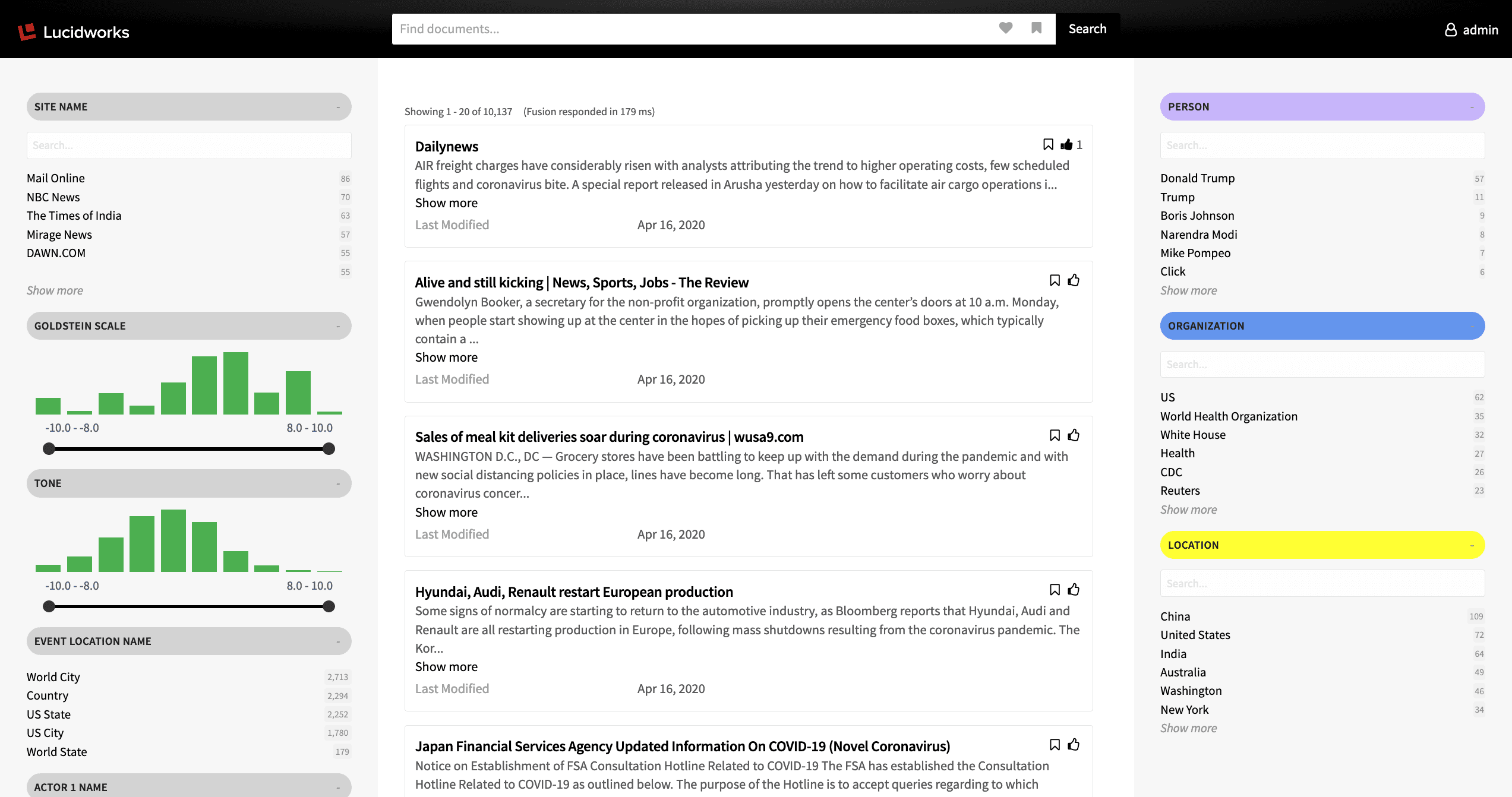
App Studio Enterprise is an Appkit based web application that connects your Fusion instance, or other [datasources](/docs/5/fusion/dev-portal/appkit/reference/search-platforms/overview), to the [Appkit](#appkit) design framework. It comes preloaded with the Appkit framework library and a starter search app template. This allows you to develop and preview your search application using your data before deploying it to a production environment.
Getting started only takes a few minutes and is as simple as [downloading App Studio Enterprise](/docs/5/fusion/dev-portal/appkit/concepts/app-studio-enterprise/download), configuring the application to use your Fusion instance, and launching. See the README file included in the download for full instructions.
#### Concepts
* [App Studio Enterprise Concepts](/docs/5/fusion/dev-portal/appkit/concepts/app-studio-enterprise/overview)
* [App Studio Enterprise Downloads](/docs/5/fusion/dev-portal/appkit/concepts/app-studio-enterprise/download)
* [Getting Started with App Studio Enterprise](/docs/5/fusion/dev-portal/appkit/concepts/app-studio-enterprise/getting-started)
#### Reference
* [App Studio Versions FAQ](/docs/5/fusion/dev-portal/appkit/reference/faq/versions)
* [FAQ](/docs/5/fusion/dev-portal/appkit/reference/faq/versions)
#### How-to
* [Building from Source](/docs/5/fusion/dev-portal/appkit/reference/app-deployment/building-from-source)
* **Deploy App Studio**
This article describes how to deploy [App Studio in Fusion 5](/docs/5/fusion/dev-portal/appkit/concepts/app-studio-enterprise/overview) or [App Studio in Fusion 4](/docs/4/app-studio/concepts/app-studio-enterprise/overview).
Starting in Fusion 5.11.0, Fusion has deprecated the Webapps service. As of Fusion 5.11.0, you should instead deploy App Studio manually.In Fusion 4.x, the default `FUSION_PORT` value is `8764`. In Fusion 5.x, the default value is `6764`.
1. Create UI (create a new App Studio project)
```json theme={"dark"}
curl -v -u USERNAME:PASSWORD -H 'Content-type: application/json' -X POST 'https://FUSION_HOST:FUSION_PORT/api/apps/APP_NAME/webapps' -d '{"id": "UI_ID","name": "UI_NAME","contextPath": "/UI_CONTEXT"}'
```
2. Execute the `command ./app-studio package` to generate the `app-studio-enterprise.war` file. The file is created in the following location:
`/<$Application>/dist/app-studio-enterprise.war`
3. Deploy WAR (upload to webapps service)
```json theme={"dark"}
curl -v -u USERNAME:PASSWORD -X PUT -H 'Content-type: application/zip' 'https://FUSION_HOST:FUSION_PORT/api/apps/APP_NAME/webapps/UI_ID/war' --data-binary @app-studio-enterprise.war
```
4. Go to `https://FUSION_HOST:FUSION_PORT/webapps/UI_CONTEXT/`.
## Versions FAQ
### How are these products versioned?
* **Appkit** is versioned according to updates to the code base.
* **App Studio Enterprise** versions are loosely tied to the version of the Appkit framework it includes. An update from **4.8.0** to **4.9.0** may not include any changes to App Studio Enterprise.
### What about compatibility?
* Any version of **Appkit** can be used with Fusion 4.x. However, only Appkit 4.6.0+ can be used with Fusion 5.y.
* **App Studio Enterprise** can be used with any version of Fusion or Appkit.
### Can these products be updated independently?
* **Appkit** can be **Upgrade Appkit in Existing Apps** independently, assuming there are no version [compatibility](#what-about-compatibility) issues.
* **App Studio Enterprise** is released when a new version of Appkit is released. As a result, App Studio Enterprise itself does not need to be updated. To move to the latest code base, simply update the Appkit version within the project.
When you create an Appkit webapp, it uses a specific version of Appkit. Appkit releases occur independently of App Studio releases.
You can upgrade web apps to use the latest version of Appkit.
**How to upgrade**
1. Stop the app.
2. In the `package.json` file at the root of your project, update the `appkit-ui` dependency to the latest Appkit version, for example:
```json theme={"dark"}
"appkit-ui": "http://appkit.lucidworks.com/repo/4.2.0/appkit-ui.tar.gz",
```
3. In the `pom.xml` file at the root of your project, update the value of the `parent.version` property to the latest Appkit version, for example:
```xml theme={"dark"}
twigkittwigkit.app.js4.2.0
```
4. Upgrade the Appkit Social module, if required.
5. Perform any additional upgrade steps that are required for a specific Appkit upgrade. See the [Appkit Release Notes](/docs/4/app-studio/release-notes/appkit/overview) for more information.
6. Start the app.
See the [FAQ section](/docs/5/fusion/dev-portal/appkit/reference/faq/versions) for more frequently asked questions.
 Over 150 tags are provided in the Appkit framework.
[Read more about tags.](/docs/5/fusion/dev-portal/appkit/reference/tags/overview)
#### Services
App Studio exposes a number of frontend JavaScript services which encapsulate reusable processes. These services are based on the AngularJS framework. There are also backend Java web services that perform the same functions as many of the frontend services, including platform search endpoints, platform series endpoint, query suggestion/typeahead services, csv/excel export, and facet search.
[Read more about services.](/docs/5/fusion/dev-portal/appkit/reference/services/overview)
#### Search Platforms
Appkit integrates with a number of search engines, data warehouses and web service endpoints, even surfacing information from multiple sources simultaneously. The platform abstraction covers both search and storage sides, meaning that Appkit will implement for each platform the necessary protocols to save or index content for any platform. A number of platform adapters are available out-of-the-box with Appkit, and [adding new ones](/docs/5/fusion/dev-portal/appkit/concepts/extending-appkit/developing-platforms) is a simple exercise.
[Read more about search platforms.](/docs/5/fusion/dev-portal/appkit/reference/search-platforms/overview)
#### Concepts
* [Appkit Concepts](/docs/5/fusion/dev-portal/appkit/concepts/overview/appkit-concepts)
* [Appkit Configuration](/docs/5/fusion/dev-portal/appkit/concepts/configuration/overview)
* [Extending Appkit](/docs/5/fusion/dev-portal/appkit/concepts/extending-appkit/overview)
#### Reference
* [App Studio Versions FAQ](/docs/5/fusion/dev-portal/appkit/reference/faq/versions)
* [Accessing Data](/docs/5/fusion/dev-portal/appkit/reference/accessing-data/overview)
* [App Deployment](/docs/5/fusion/dev-portal/appkit/reference/app-deployment/overview)
* [FAQ](/docs/5/fusion/dev-portal/appkit/reference/faq/versions)
#### How-to
* **Upgrade Appkit in Existing Apps**
Over 150 tags are provided in the Appkit framework.
[Read more about tags.](/docs/5/fusion/dev-portal/appkit/reference/tags/overview)
#### Services
App Studio exposes a number of frontend JavaScript services which encapsulate reusable processes. These services are based on the AngularJS framework. There are also backend Java web services that perform the same functions as many of the frontend services, including platform search endpoints, platform series endpoint, query suggestion/typeahead services, csv/excel export, and facet search.
[Read more about services.](/docs/5/fusion/dev-portal/appkit/reference/services/overview)
#### Search Platforms
Appkit integrates with a number of search engines, data warehouses and web service endpoints, even surfacing information from multiple sources simultaneously. The platform abstraction covers both search and storage sides, meaning that Appkit will implement for each platform the necessary protocols to save or index content for any platform. A number of platform adapters are available out-of-the-box with Appkit, and [adding new ones](/docs/5/fusion/dev-portal/appkit/concepts/extending-appkit/developing-platforms) is a simple exercise.
[Read more about search platforms.](/docs/5/fusion/dev-portal/appkit/reference/search-platforms/overview)
#### Concepts
* [Appkit Concepts](/docs/5/fusion/dev-portal/appkit/concepts/overview/appkit-concepts)
* [Appkit Configuration](/docs/5/fusion/dev-portal/appkit/concepts/configuration/overview)
* [Extending Appkit](/docs/5/fusion/dev-portal/appkit/concepts/extending-appkit/overview)
#### Reference
* [App Studio Versions FAQ](/docs/5/fusion/dev-portal/appkit/reference/faq/versions)
* [Accessing Data](/docs/5/fusion/dev-portal/appkit/reference/accessing-data/overview)
* [App Deployment](/docs/5/fusion/dev-portal/appkit/reference/app-deployment/overview)
* [FAQ](/docs/5/fusion/dev-portal/appkit/reference/faq/versions)
#### How-to
* **Upgrade Appkit in Existing Apps**
 #### Concepts
* [App Studio Enterprise Concepts](/docs/5/fusion/dev-portal/appkit/concepts/app-studio-enterprise/overview)
* [App Studio Enterprise Downloads](/docs/5/fusion/dev-portal/appkit/concepts/app-studio-enterprise/download)
* [Getting Started with App Studio Enterprise](/docs/5/fusion/dev-portal/appkit/concepts/app-studio-enterprise/getting-started)
#### Reference
* [App Studio Versions FAQ](/docs/5/fusion/dev-portal/appkit/reference/faq/versions)
* [FAQ](/docs/5/fusion/dev-portal/appkit/reference/faq/versions)
#### How-to
* [Building from Source](/docs/5/fusion/dev-portal/appkit/reference/app-deployment/building-from-source)
* **Deploy App Studio**
#### Concepts
* [App Studio Enterprise Concepts](/docs/5/fusion/dev-portal/appkit/concepts/app-studio-enterprise/overview)
* [App Studio Enterprise Downloads](/docs/5/fusion/dev-portal/appkit/concepts/app-studio-enterprise/download)
* [Getting Started with App Studio Enterprise](/docs/5/fusion/dev-portal/appkit/concepts/app-studio-enterprise/getting-started)
#### Reference
* [App Studio Versions FAQ](/docs/5/fusion/dev-portal/appkit/reference/faq/versions)
* [FAQ](/docs/5/fusion/dev-portal/appkit/reference/faq/versions)
#### How-to
* [Building from Source](/docs/5/fusion/dev-portal/appkit/reference/app-deployment/building-from-source)
* **Deploy App Studio**