> ## Documentation Index
> Fetch the complete documentation index at: https://doc.lucidworks.com/llms.txt
> Use this file to discover all available pages before exploring further.

# NLP Annotator Index Stage

export const schema = {
  "type": "object",
  "title": "NLP Annotator",
  "description": "Annotate text using NLP",
  "required": ["annotatorType", "source"],
  "properties": {
    "skip": {
      "type": "boolean",
      "title": "Skip This Stage",
      "description": "Set to true to skip this stage.",
      "default": false,
      "hints": ["advanced"]
    },
    "label": {
      "type": "string",
      "title": "Label",
      "description": "A unique label for this stage.",
      "hints": ["advanced"],
      "maxLength": 255
    },
    "condition": {
      "type": "string",
      "title": "Condition",
      "description": "Define a conditional script that must result in true or false. This can be used to determine if the stage should process or not.",
      "hints": ["code", "code/javascript", "advanced"]
    },
    "annotatorType": {
      "type": "string",
      "title": "Annotator Type",
      "enum": ["sparknlp", "opennlp"],
      "default": "sparknlp"
    },
    "sparknlpNERModel": {
      "type": "string",
      "title": "Spark NLP NER Model",
      "description": "If Spark NLP annotator is used, specify the blobstore location of the NER model",
      "minLength": 1,
      "reference": "blob",
      "blobType": "model:spark-nlp"
    },
    "sparknlpPOSModel": {
      "type": "string",
      "title": "Spark NLP POS Model",
      "description": "If Spark NLP annotator is used, specify the blobstore location of the POS model",
      "minLength": 1,
      "reference": "blob",
      "blobType": "model:spark-nlp"
    },
    "failOnError": {
      "type": "boolean",
      "title": "Fail on Error",
      "description": "Flag to indicate if this stage should throw an exception if an error occurs while generating a prediction for a document.",
      "default": false
    },
    "config": {
      "type": "string",
      "title": "Model Configuration",
      "description": "Advanced configuration for NLP implementations",
      "default": "{\n  \"opennlp\": {\n    \"posModelLocation\": \"nlp/models/en-pos-maxent.bin\",\n    \"chunkerModelLocation\": \"nlp/models/en-chunker.bin\",\n    \"tokenizerModelLocation\": \"nlp/models/en-token.bin\",\n    \"sentenceModelLocation\": \"nlp/models/en-sent.bin\",\n    \"tokenNameFinderModelLocations\": {\n        \"MONEY\": \"nlp/models/en-ner-money.bin\",\n        \"PERCENT\": \"nlp/models/en-ner-percentage.bin\",\n        \"PERSON\": \"nlp/models/en-ner-person.bin\",\n        \"LOCATION\": \"nlp/models/en-ner-location.bin\",\n        \"TIME\": \"nlp/models/en-ner-time.bin\",\n        \"DATE\": \"nlp/models/en-ner-date.bin\",\n        \"ORG\": \"nlp/models/en-ner-organization.bin\"\n    }\n  }\n}\n",
      "hints": ["code", "hidden"]
    },
    "source": {
      "type": "array",
      "title": "Source Fields",
      "description": "Input fields to annotate",
      "minItems": 1,
      "items": {
        "type": "string"
      }
    },
    "extractorRules": {
      "type": "array",
      "title": "Extractor Rules",
      "description": "Define rules to extract annotated text into separate fields",
      "items": {
        "type": "object",
        "required": ["sourceFieldName", "extractedAnnotationType", "labelPattern", "targetFieldName"],
        "properties": {
          "sourceFieldName": {
            "type": "string",
            "title": "Source Field Name"
          },
          "extractedAnnotationType": {
            "type": "string",
            "title": "Annotation Type to Extract",
            "enum": ["sentence", "named_entity", "part_of_speech", "noun_chunk"],
            "default": "named_entity"
          },
          "labelPattern": {
            "type": "string",
            "title": "Label Pattern",
            "description": "Extract all annotations with labels that match this regular expression",
            "default": ".*",
            "format": "regex"
          },
          "targetFieldName": {
            "type": "string",
            "title": "Target Field Name"
          }
        }
      }
    },
    "indexAnnotations": {
      "type": "boolean",
      "title": "Index Annotations?",
      "description": "Index annotations as overlapping tokens using pre-analyzed fields",
      "default": false,
      "hints": ["advanced", "hidden"]
    }
  },
  "category": "Natural Language Processing",
  "categoryPriority": 5,
  "unsafe": false
};

export const SchemaParamFields = ({schema}) => {
  const sanitize = str => {
    if (typeof str !== "string") return str;
    return str.replace(/^"(.*)"$/s, "$1").replace(/\\/g, "").replace(/"/g, "'");
  };
  const renderMd = str => {
    const s = sanitize(str);
    const text = (/[.!?]\)*$/).test(s) ? s : `${s}.`;
    return text.split(/(\*\*[^*]+\*\*|_[^_]+_|`[^`]+`)/g).map((part, i) => {
      if (part.startsWith("**")) return <strong key={i}>{part.slice(2, -2)}</strong>;
      if (part.startsWith("_")) return <em key={i}>{part.slice(1, -1)}</em>;
      if (part.startsWith("`")) return <code key={i}>{part.slice(1, -1)}</code>;
      return part;
    });
  };
  const {description, properties = {}, required: requiredProps = []} = schema;
  const visibleProps = useMemo(() => Object.entries(properties).filter(([, prop]) => !prop.hints?.includes("hidden")), [properties]);
  const renderProp = ([name, prop]) => {
    const isRequired = requiredProps.includes(name);
    const hasDefault = prop.default !== undefined;
    const rawDefault = prop.default;
    const hints = prop.hints || [];
    const isComplexDefault = hasDefault && (typeof rawDefault === "object" || typeof rawDefault === "string" && (rawDefault.length > 20 || rawDefault.includes('"')));
    const postBadges = [];
    if (prop.title) {
      postBadges.push(<><span className="text-stone-400 dark:text-stone-500">API property: </span>{name}</>);
    }
    const constraints = [];
    if (prop.minimum !== undefined && prop.maximum !== undefined) {
      constraints.push(`Range: ${prop.minimum} – ${prop.maximum}`);
    } else if (prop.minimum !== undefined) {
      constraints.push(`Min: ${prop.minimum}`);
    } else if (prop.maximum !== undefined) {
      constraints.push(`Max: ${prop.maximum}`);
    }
    if (prop.minLength !== undefined && prop.maxLength !== undefined) {
      constraints.push(`Length: ${prop.minLength} – ${prop.maxLength}`);
    } else if (prop.minLength !== undefined) {
      constraints.push(`Min length: ${prop.minLength}`);
    } else if (prop.maxLength !== undefined) {
      constraints.push(`Max length: ${prop.maxLength}`);
    }
    const fieldProps = {
      key: name,
      body: prop.title || name,
      type: prop.type,
      ...postBadges.length > 0 && ({
        post: postBadges
      }),
      ...isRequired && ({
        required: true
      }),
      ...!isComplexDefault && hasDefault ? {
        default: sanitize(String(rawDefault))
      } : {}
    };
    const isObject = prop.type === "object" && prop.properties;
    const isArrayOfObjects = prop.type === "array" && prop.items?.type === "object" && prop.items.properties;
    return <ParamField {...fieldProps}>
        {prop.description && <p>{renderMd(prop.description)}</p>}

        {prop.enum && <p>
            Allowed values: 
            {prop.enum.map((v, i) => <>{i > 0 && ", "}<code key={i}>{String(v)}</code></>)}
          </p>}

        {constraints.length > 0 && <p className="text-stone-500 dark:text-stone-400 text-sm">
            {constraints.join(" · ")}
          </p>}

        {isComplexDefault && <div className="flex">
            <p>
              <strong>Default:</strong>
            </p>
            <pre className="!my-0">
              <code>
                {JSON.stringify(rawDefault, null, 2)}
              </code>
            </pre>
          </div>}

        {isArrayOfObjects && <Expandable title="item properties">
            <SchemaParamFields schema={{
      properties: prop.items.properties,
      required: prop.items.required
    }} />
          </Expandable>}

        {isObject && <Expandable title="properties">
            <SchemaParamFields schema={{
      properties: prop.properties,
      required: prop.required
    }} />
          </Expandable>}
      </ParamField>;
  };
  return <div>
      {description && <p>{renderMd(description)}</p>}

      {visibleProps.map(renderProp)}
    </div>;
};

export const LwTemplate = ({title = "Key questions to get you started", icon = "sparkles", cta = "Powered by Agent Studio", linkHref = "https://lucidworks.com/demo/?utm_source=docs&utm_medium=referral&utm_campaign=docs_cta_ai"}) => {
  const [isLoaded, setIsLoaded] = useState(false);
  useEffect(() => {
    const timer = setTimeout(() => {
      setIsLoaded(true);
    }, 500);
    return () => clearTimeout(timer);
  }, []);
  return <div className="lw-template-container">
      <Card title={title} icon={icon}>
        {isLoaded && <span dangerouslySetInnerHTML={{
    __html: `<lw-template id="a029c1a9-28be-427e-b0e1-5d918920246a"></lw-template
            >`
  }} />}
        <Link href={linkHref} className="agent-studio-link text-left text-gray-600 gap-2 dark:text-gray-400 text-sm font-medium flex flex-row items-center hover:text-primary dark:hover:text-primary-light group-hover:text-primary group-hover:dark:text-primary-light">Powered by Lucidworks Agent Studio</Link>
      </Card>
    </div>;
};

[localhost link]: http://localhost:3000/docs/4/fusion-server/reference/pipeline-stages/indexing/nlp-annotator-index-stage

[mintlify link]: https://doc.lucidworks.com/docs/4/fusion-server/reference/pipeline-stages/indexing/nlp-annotator-index-stage

[old doc.lw link]: https://doc.lucidworks.com/fusion/5.9/204

The NLP Annotator index stage performs [Natural Language Processing](/docs/4/fusion-ai/concepts/nlp) tasks.

You can choose from different NLP libraries, either [OpenNLP](https://opennlp.apache.org/) or the [JohnSnow Lab](https://nlp.johnsnowlabs.com/) library, which runs on Spark. Note: Only the pre-trained NER model is supported. If choosing an NER model, download **NerDLModel** instead of NerCRFModel.

The NLP Annotator supports the following tasks:

* If choosing JohnSnow Lab (recommended for large dataset processing):

  * NER (Name Entity Recognition)

    Fusion AI uses the deep learning pre-trained NER model that JohnSnowLab provides. Currently, the pre-trained extraction model covers the following name entities:

    * ORG (organization)
    * PER (person)
    * LOC (location)

    This means that there are the only three types of entities Fusion will recognize from the source field.
  * Sentence detection
  * POS(Part of Speech) Tagging
* If choosing OpenNLP:

  * NER
  * Sentence detection
  * POS Tagging
  * Shallow Parsing (Chunking)

**Example of how to use NLP Annotator Index stage:**

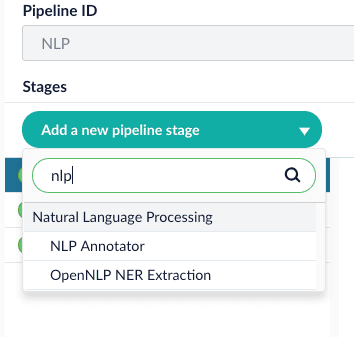
1. Add NLP Annotator index stage.

   <img src="https://mintcdn.com/lucidworks/1R8QVvJzt46cZDT6/assets/images/4.2/nlp_annotator_add_nlp_stage.png?fit=max&auto=format&n=1R8QVvJzt46cZDT6&q=85&s=f74d4b49e9a2d06322f7df7d38c0b98b" alt="add nlp stage" width="354" height="337" data-path="assets/images/4.2/nlp_annotator_add_nlp_stage.png" />
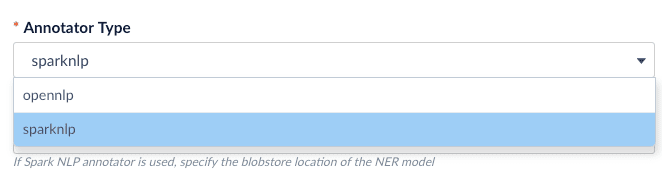
2. Choose the annotator type (OpenNLP or SparkNLP).

   <img src="https://mintcdn.com/lucidworks/1R8QVvJzt46cZDT6/assets/images/4.2/nlp_annotator_which_model.png?fit=max&auto=format&n=1R8QVvJzt46cZDT6&q=85&s=232249f364a4993c592bc15e67374e57" alt="which model" width="662" height="178" data-path="assets/images/4.2/nlp_annotator_which_model.png" />

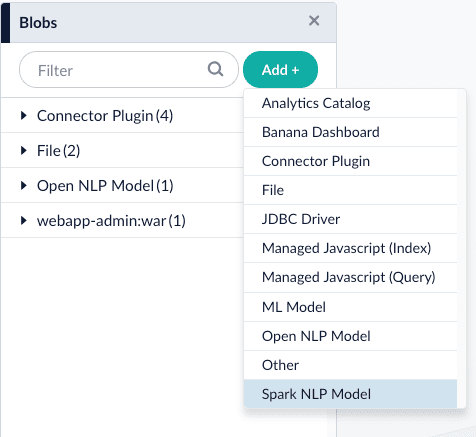
If you select the `sparknlp` model, you need to download and install one or more models:
.. Download the models at [https://github.com/JohnSnowLabs/spark-nlp#models](https://github.com/JohnSnowLabs/spark-nlp#models).
.. Rename the downloaded models to something easy to identify, then upload them to Fusion’s [blob store](/docs/4/fusion-server/concepts/indexing/blob-storage).

*

<img src="https://mintcdn.com/lucidworks/1R8QVvJzt46cZDT6/assets/images/4.2/nlp_annotator_add_blob.png?fit=max&auto=format&n=1R8QVvJzt46cZDT6&q=85&s=5345f1532a44042e1e98625b4863dd37" alt="add_blob" width="476" height="437" data-path="assets/images/4.2/nlp_annotator_add_blob.png" />

3\. Configure the index pipeline stage:

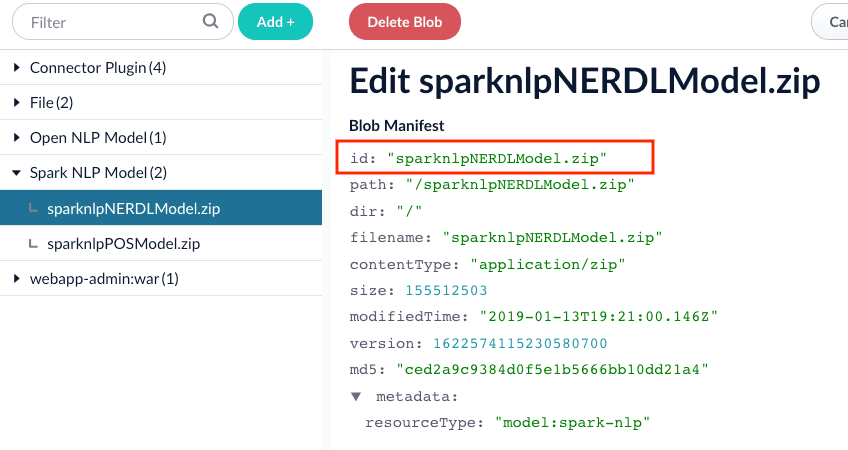
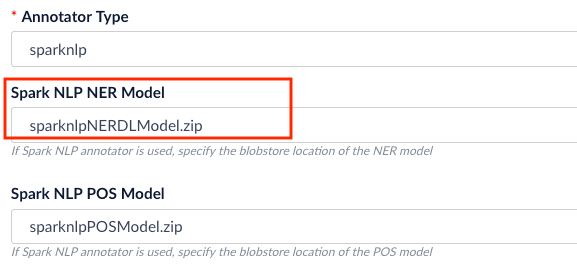
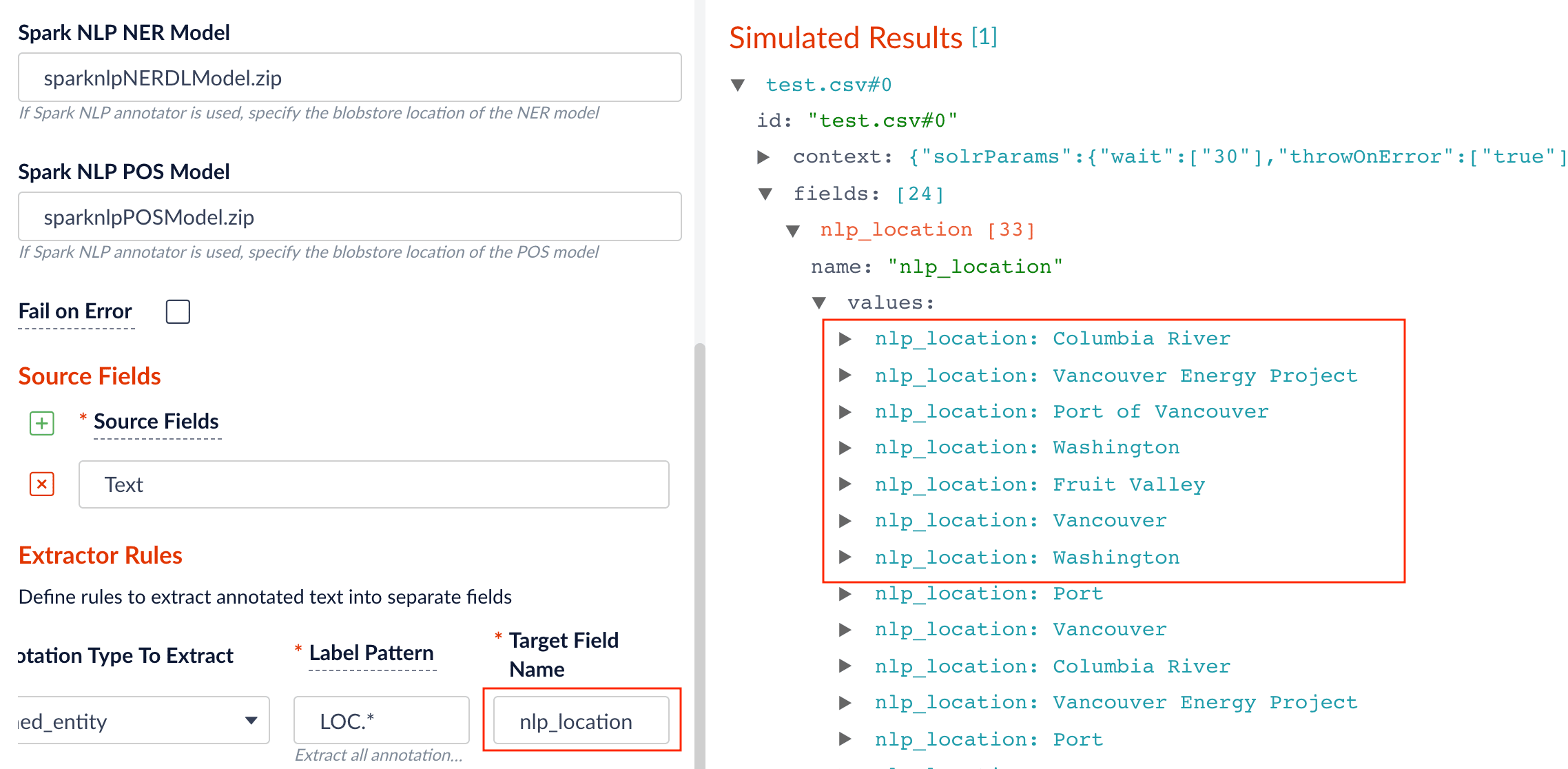
1. Specify the model to use (fill the box with `model id` in the blob store).

   <img src="https://mintcdn.com/lucidworks/1R8QVvJzt46cZDT6/assets/images/4.2/nlp_annotator_model_id_blob.png?fit=max&auto=format&n=1R8QVvJzt46cZDT6&q=85&s=f2b30c290afd895e625c2c9af3a70d74" alt="model_id_blob" width="848" height="450" data-path="assets/images/4.2/nlp_annotator_model_id_blob.png" />

   <img src="https://mintcdn.com/lucidworks/1R8QVvJzt46cZDT6/assets/images/4.2/nlp_annotator_fill_index_stage.png?fit=max&auto=format&n=1R8QVvJzt46cZDT6&q=85&s=6ae14e857b57e07bbcc133899b7cf562" alt="fill_index_stage" width="577" height="273" data-path="assets/images/4.2/nlp_annotator_fill_index_stage.png" />
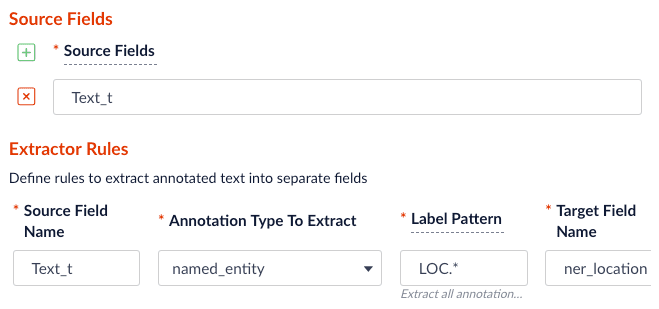
2. Specify the source, label pattern, and target (destination) fields:

   * source field: the raw text with name entities to be extracted.
   * label pattern: regex pattern that matches the NER/POS labels: for example, `PER.` will match extracted name entities with label `PERSON`, while `NN.` will match tagged nouns.
   * target field: the outcome extraction/tagging and so on.

   <img src="https://mintcdn.com/lucidworks/1R8QVvJzt46cZDT6/assets/images/4.2/nlp_annotator_source_target.png?fit=max&auto=format&n=1R8QVvJzt46cZDT6&q=85&s=371e79a0979c51a5b61396879e526738" alt="source_target" width="659" height="309" data-path="assets/images/4.2/nlp_annotator_source_target.png" />

   <img src="https://mintcdn.com/lucidworks/1R8QVvJzt46cZDT6/assets/images/4.2/nlp_annotator_index_result.png?fit=max&auto=format&n=1R8QVvJzt46cZDT6&q=85&s=d4bc41ae67029809eefceaf78bf883e2" alt="result" width="2276" height="1116" data-path="assets/images/4.2/nlp_annotator_index_result.png" />

<LwTemplate />

## Configuration

<Tip>
  When entering configuration values in the UI, use *unescaped* characters, such as `\t` for the tab character. When entering configuration values in the API, use *escaped* characters, such as `\\t` for the tab character.
</Tip>

<SchemaParamFields schema={schema} />