> ## Documentation Index
> Fetch the complete documentation index at: https://doc.lucidworks.com/llms.txt
> Use this file to discover all available pages before exploring further.

# Managed JavaScript Index Stage

export const schema = {
  "type": "object",
  "title": "Managed JavaScript",
  "description": "Run a JavaScript transformation on documents using a script from the Blob Service",
  "required": ["ref"],
  "properties": {
    "skip": {
      "type": "boolean",
      "title": "Skip This Stage",
      "description": "Set to true to skip this stage.",
      "default": false,
      "hints": ["advanced"]
    },
    "label": {
      "type": "string",
      "title": "Label",
      "description": "A unique label for this stage.",
      "hints": ["advanced"],
      "maxLength": 255
    },
    "condition": {
      "type": "string",
      "title": "Condition",
      "description": "Define a conditional script that must result in true or false. This can be used to determine if the stage should process or not.",
      "hints": ["code", "code/javascript", "advanced"]
    },
    "ref": {
      "type": "string",
      "title": "Script Reference",
      "description": "Reference to a Javascript Blob with Blob type file:js-index.",
      "reference": "blob",
      "blobType": "file:js-index"
    }
  },
  "category": "Advanced",
  "categoryPriority": 2,
  "unsafe": false
};

export const SchemaParamFields = ({schema}) => {
  const sanitize = str => {
    if (typeof str !== "string") return str;
    return str.replace(/^"(.*)"$/s, "$1").replace(/\\/g, "").replace(/"/g, "'");
  };
  const formatDescription = str => {
    const s = sanitize(str);
    return (/[.!?]\)*$/).test(s) ? s : `${s}.`;
  };
  const {description, properties = {}, required: requiredProps = []} = schema;
  const visibleProps = useMemo(() => Object.entries(properties).filter(([, prop]) => !prop.hints?.includes("hidden")), [properties]);
  return <div>
      {description && <p>{formatDescription(description)}</p>}

      {visibleProps.map(([name, prop]) => {
    const isRequired = requiredProps.includes(name);
    const hasDefault = prop.default !== undefined;
    const rawDefault = prop.default;
    const isComplexDefault = hasDefault && (typeof rawDefault === "object" || typeof rawDefault === "string" && (rawDefault.length > 20 || rawDefault.includes('"')));
    const fieldProps = {
      key: name,
      body: prop.title || name,
      type: prop.type,
      ...prop.title && ({
        post: [<><span className="text-stone-400 dark:text-stone-500">API property: </span>{name}</>]
      }),
      ...isRequired && ({
        required: true
      }),
      ...!isComplexDefault && hasDefault ? {
        default: sanitize(String(rawDefault))
      } : {}
    };
    const isObject = prop.type === "object" && prop.properties;
    const isArrayOfObjects = prop.type === "array" && prop.items?.type === "object" && prop.items.properties;
    return <ParamField {...fieldProps}>
            {prop.description && <p>{formatDescription(prop.description)}</p>}

            {isComplexDefault && <div className="flex">
                <p>
                  <strong>Default:</strong>
                </p>
                <pre className="!my-0">
                  <code>
                    {JSON.stringify(rawDefault, null, 2)}
                  </code>
                </pre>
              </div>}

            {isArrayOfObjects && <div className="flex">
              <p>
                <strong>Object attributes:</strong>
              </p>
              <pre className="!my-0">
                <code>
                  {'{\n'}
                  {Object.entries(prop.items.properties).map(([iname, iprop]) => <>
                      {`  ${iname}`}
                      {prop.items?.required?.includes(iname) && <span style={{
      color: 'red'
    }}> required</span>}
                      {`: {\n    display name: ${sanitize(iprop.title || '')}\n    type: ${iprop.type}\n  }\n`}
                    </>)}
                  {'}'}
                </code>
              </pre>
              </div>}

            {isObject && <Expandable title="properties">
                <SchemaParamFields schema={{
      properties: prop.properties,
      required: prop.required
    }} />
              </Expandable>}
          </ParamField>;
  })}
    </div>;
};

export const LwTemplate = ({title = "Key questions to get you started", icon = "sparkles", cta = "Powered by Agent Studio", linkHref = "https://lucidworks.com/demo/?utm_source=docs&utm_medium=referral&utm_campaign=docs_cta_ai"}) => {
  const [isLoaded, setIsLoaded] = useState(false);
  useEffect(() => {
    const timer = setTimeout(() => {
      setIsLoaded(true);
    }, 500);
    return () => clearTimeout(timer);
  }, []);
  return <div className="lw-template-container">
      <Card title={title} icon={icon}>
        {isLoaded && <span dangerouslySetInnerHTML={{
    __html: `<lw-template id="a029c1a9-28be-427e-b0e1-5d918920246a"></lw-template
            >`
  }} />}
        <Link href={linkHref} className="agent-studio-link text-left text-gray-600 gap-2 dark:text-gray-400 text-sm font-medium flex flex-row items-center hover:text-primary dark:hover:text-primary-light group-hover:text-primary group-hover:dark:text-primary-light">Powered by Lucidworks Agent Studio</Link>
      </Card>
    </div>;
};

[localhost link]: http://localhost:3000/docs/4/fusion-server/reference/pipeline-stages/indexing/managed-javascript-index-stage

[mintlify link]: https://doc.lucidworks.com/docs/4/fusion-server/reference/pipeline-stages/indexing/managed-javascript-index-stage

[old doc.lw link]: https://doc.lucidworks.com/fusion/5.9/217

This stage runs a JavaScript transformation on documents using a script from the [blob store](/docs/4/fusion-server/concepts/indexing/blob-storage). The script must have the blob type `file:js-index`.

**See also: [Custom JavaScript Stages For Index Pipelines](/docs/4/fusion-server/concepts/indexing/datasources/custom-javascript-indexing-stages).**

<LwTemplate />

## Uploading a JavaScript blob

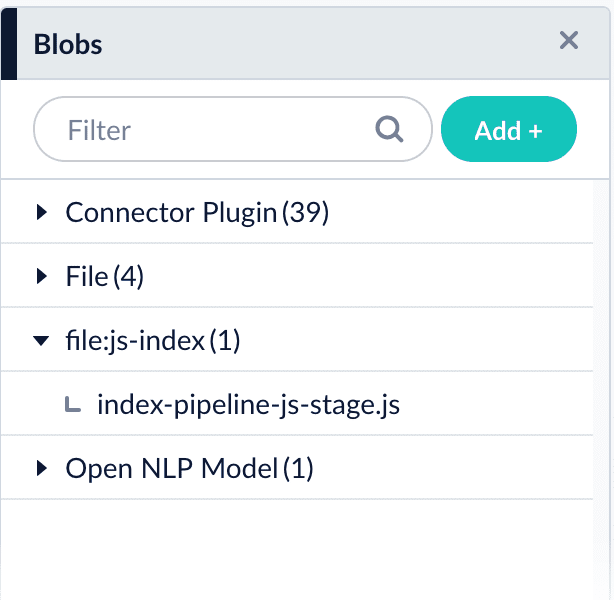
In Fusion 4.2, JavaScript blobs must be uploaded using the [Blob Store API](/docs/4/fusion-server/reference/api/blob-store-api), like this:

```bash wrap  theme={"dark"}
curl -u USERNAME:PASSWORD -X PUT -H 'Content-Type: text/javascript' --data-binary @index-pipeline-js-stage.js http://localhost:8764/api/apps/APP_NAME/blobs/index-pipeline-js-stage.js?resourceType=file:js-index
```

Open the [blob manager](/docs/4/fusion-server/concepts/indexing/blob-storage) to verify that the new blob is present:

<img src="https://mintcdn.com/lucidworks/qCaM85k6rX7hs1DP/assets/images/4.1/known-issue-APOLLO-15672-index.png?fit=max&auto=format&n=qCaM85k6rX7hs1DP&q=85&s=23a4be4a1a7b30ad442d6cd53ee54ded" alt="Uploaded JavaScript blob in the blob manager" width="614" height="600" data-path="assets/images/4.1/known-issue-APOLLO-15672-index.png" />

## Referencing a JavaScript blob

Use any of the following formats for the `ref`/**Script Reference** configuration field:

```bash wrap  theme={"dark"}
index-pipeline-js-stage.js
```

```bash wrap  theme={"dark"}
blob:index-pipeline-js-stage.js
```

```bash wrap  theme={"dark"}
urn:x-fusion:blob:index-pipeline-js-stage.js
```

<Note>
  The examples above use `index-pipeline-js-stage.js` as the blob ID.
</Note>

## Configuration

<Tip>
  When entering configuration values in the UI, use *unescaped* characters, such as `\t` for the tab character. When entering configuration values in the API, use *escaped* characters, such as `\\t` for the tab character.
</Tip>

<SchemaParamFields schema={schema} />