> ## Documentation Index
> Fetch the complete documentation index at: https://doc.lucidworks.com/llms.txt
> Use this file to discover all available pages before exploring further.
# Spark Operations
export const LwTemplate = ({title = "Key questions to get you started", icon = "sparkles", cta = "Powered by Agent Studio", linkHref = "https://lucidworks.com/demo/?utm_source=docs&utm_medium=referral&utm_campaign=docs_cta_ai"}) => {
const [isLoaded, setIsLoaded] = useState(false);
useEffect(() => {
const timer = setTimeout(() => {
setIsLoaded(true);
}, 500);
return () => clearTimeout(timer);
}, []);
return
{isLoaded && `
}} />}
Powered by Lucidworks Agent Studio
;
};
[localhost link]: http://localhost:3000/docs/4/fusion-server/concepts/spark/overview
[mintlify link]: https://doc.lucidworks.com/docs/4/fusion-server/concepts/spark/overview
[old doc.lw link]: https://doc.lucidworks.com/fusion/5.9/189
[Apache Spark](http://spark.apache.org/) is an open source cluster-computing framework that serves as a fast and general execution engine for large-scale data processing jobs that can be decomposed into stepwise tasks, which are distributed across a cluster of networked computers.
Spark improves on previous MapReduce implementations by using resilient distributed datasets (RDDs), a distributed memory abstraction that lets programmers perform in-memory computations on large clusters in a fault-tolerant manner.
## Spark in Fusion On-Prem
These topics provide information about Spark administration in Fusion Server:
* [**Spark Components.**](/docs/4/fusion-server/concepts/spark/spark-components) Spark integration in Fusion, including a diagram
* [**Spark Driver Processes.**](/docs/4/fusion-server/concepts/spark/spark-job-drivers) Fusion jobs run on Spark use a driver process started by the API service
{/* // tag::body[] */}
The public GitHub repository [Fusion Spark Bootcamp](https://github.com/lucidworks/fusion-spark-bootcamp) contains examples and labs for learning how to use Fusion’s Spark features.
In this section, you will walk through some basic concepts of using Spark in Fusion. For more exposure, you should work through the labs in the Fusion Spark Bootcamp.
## Starting the Spark Master and Spark Worker services
The Fusion run script `/opt/fusion/latest.***__x__****/bin/fusion` (on Unix) or `C:\lucidworks\fusion{backslash}latest.****__x__***\bin\fusion.cmd` (on Windows) does not start the `spark-master` and `spark-worker` processes. This reduces the number of Java processes needed to run Fusion and therefore reduces memory and CPU consumption.
Jobs that depend on Spark, for example, aggregations, will still execute in what Spark calls local mode. When in local mode, Spark executes tasks in-process in the driver application JVM. Local mode is intended for jobs that consume/produce small datasets.
One caveat about using local mode is that a persistent Spark UI is not available. But you can access the driver/job application UI at port `:4040` while the local SparkContext is running.
To scale Spark in Fusion to support larger data sets and to speed up processing, you should start the `spark-master` and `spark-worker` services.
**On Unix**:
```
./spark-master start
./spark-worker start
```
**On Windows**:
```
spark-master.cmd start
spark-worker.cmd start
```
Give these commands from the `bin` directory below the Fusion home directory, for example, `/opt/fusion/latest.***__x__****` (on Unix) or `C:\lucidworks\fusion{backslash}latest.****__x__***` (on Windows).
To have the `spark-master` and `spark-worker` processes start and stop with `bin/fusion start` and `bin/fusion stop` (on Unix) or `bin\fusion.cmd start` and `bin\fusion.cmd stop` (on Windows), add them to the `group.default` definition in `fusion.cors` (`fusion.properties` in Fusion 4.x). For example:
**In Fusion 4.1+**
```spark wrap theme={"dark"}
group.default = zookeeper, solr, api, connectors-classic, connectors-rpc, proxy, webapps, admin-ui, log-shipper, spark-master, spark-worker
```
**In Fusion 4.0.x**
```spark wrap theme={"dark"}
group.default = zookeeper, solr, api, connectors-rpc, connectors-classic, admin-ui, proxy, webapps, spark-master, spark-worker
```
## Viewing the Spark Master
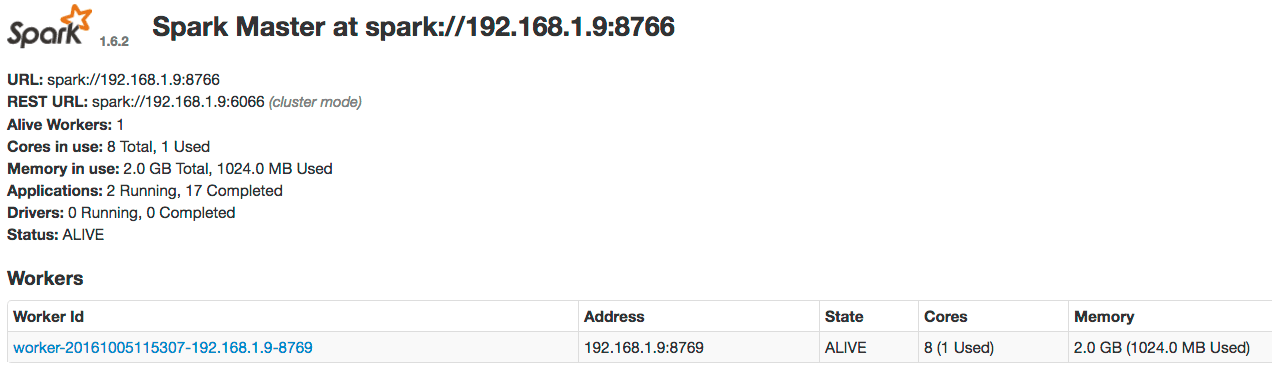
After starting the master and worker services, direct your browser to `http://localhost:8767` to view the Spark master web UI, which should resemble this:
If you do not see the master UI and at least one worker in the ALIVE state, check these logs.
**On Unix**:
```spark wrap theme={"dark"}
/opt/fusion/latest.**__x__**/var/log/spark-master/spark-master.log
/opt/fusion/latest.**__x__**/var/log/spark-worker/spark-worker.log
```
**On Windows**:
```spark wrap theme={"dark"}
C:\lucidworks\fusion{backslash}latest.**__x__**\var\log\spark-master\spark-master.log
C:\lucidworks\fusion{backslash}latest.**__x__**\var\log\spark-worker\spark-worker.log
```
Use this Fusion API request to get the status of the Spark master:
```
curl http://localhost:8764/api/spark/master/status
```
This request should return a response of the form:
```json theme={"dark"}
[ {
"url" : "spark://192.168.1.9:8766",
"status" : "ALIVE",
"workers" : [ {
"id" : "worker-20161005175058-192.168.1.9-8769",
"host" : "192.168.1.9",
"port" : 8769,
"webuiaddress" : "http://192.168.1.9:8770",
"cores" : 8,
"coresused" : 0,
"coresfree" : 8,
"memoryused" : 0,
"memoryfree" : 2048,
"state" : "ALIVE",
"lastheartbeat" : 1475711489460
} ], ...
```
If you have multiple Spark masters running in a Fusion cluster, each will be shown in the status but only one will be ALIVE; the other masters will be in STANDBY mode.
If you are operating a multi-node Spark cluster, we recommend running multiple Spark master processes to achieve high-availability. If the active one fails, the standby will take over.
## Running a job in the Spark shell
After you have started the Spark master and Spark worker, run the Fusion Spark shell.
**On Unix**:
```
./spark-shell
```
**On Windows**:
```
spark-shell.cmd
```
Give these commands from the `bin` directory below the Fusion home directory, for example, `/opt/fusion/latest.***__x__****` (on Unix) or `C:\lucidworks\fusion{backslash}latest.****__x__***` (on Windows).
The shell can take a few minutes to load the first time because the script needs to download the shaded Fusion JAR file from the API service.
If ports are locked down between Fusion nodes, specify the Spark driver and BlockManager ports, for example:
**On Unix**:
```
./spark-shell --conf spark.driver.port=8772 --conf spark.blockManager.port=8788
```
**On Windows**:
```
spark-shell.cmd --conf spark.driver.port=8772 --conf spark.blockManager.port=8788
```
When the Spark shell is initialized, you will see the prompt:
```
scala>
```
Type `:paste` to activate paste mode in the shell and paste in the following Scala code:
```scala theme={"dark"}
val readFromSolrOpts = Map(
"collection" -> "system_logs",
"fields" -> "host_s,level_s,type_s,message_txt,thread_s,timestamp_tdt",
"query" -> "level_s:[* TO *]"
)
val logsDF = spark.read.format("solr").options(readFromSolrOpts).load
logsDF.registerTempTable("fusion_logs")
var sqlDF = spark.sql("""
| SELECT COUNT(*) as num_values, level_s as level
| FROM fusion_logs
| GROUP BY level_s
| ORDER BY num_values desc
| LIMIT 10""".stripMargin)
sqlDF.show(10,false)
```
Press CTRL+D to execute the script. Your results should resemble these results:
```scala expandable theme={"dark"}
scala> :paste
{/* // Entering paste mode (ctrl-D to finish) */}
val readFromSolrOpts = Map(
"collection" -> "system_logs",
"fields" -> "host_s,level_s,type_s,message_txt,thread_s,timestamp_tdt",
"query" -> "level_s:[* TO *]"
)
val logsDF = spark.read.format("solr").options(readFromSolrOpts).load
logsDF.registerTempTable("fusion_logs")
var sqlDF = spark.sql("""
| SELECT COUNT(*) as num_values, level_s as level
| FROM fusion_logs
| GROUP BY level_s
| ORDER BY num_values desc
| LIMIT 10""".stripMargin)
sqlDF.show(10,false)
{/* // Exiting paste mode, now interpreting. */}
warning: there was one deprecation warning; re-run with -deprecation for details
+----------+-----+
|num_values|level|
+----------+-----+
|3960 |INFO |
|257 |WARN |
+----------+-----+
readFromSolrOpts: scala.collection.immutable.Map[String,String] = Map(collection -> system_logs, fields -> host_s,level_s,type_s,message_txt,thread_s,timestamp_tdt, query -> level_s:[* TO *])
logsDF: org.apache.spark.sql.DataFrame = [host_s: string, level_s: string ... 4 more fields]
sqlDF: org.apache.spark.sql.DataFrame = [num_values: bigint, level: string]
```
Do not worry about WARN log messages when running this script. They are benign messages from Spark SQL
Congratulations, you just ran your first Fusion Spark job that reads data from Solr and performs a simple aggregation!
## The Spark master web UI
The Spark master web UI lets you dig into the details of the Spark job. In your browser (`http://localhost:8767`), there should be a job named "Spark shell" under running applications (the application ID will be different than the following screenshot):
Click the application ID, and then click the **Application Detail UI** link. You will see this information about the completed job:
Notice the tabs at the top of the UI that let you dig into details about the running application. Take a moment to explore the UI. It can answer these questions about your application:
* How many tasks were needed to execute this job?
* Which JARs were added to the classpath for this job? (Look under the Environment tab.)
* How many executor processes were used to run this job? Why? (Look at the Spark configuration properties under the Environment tab.)
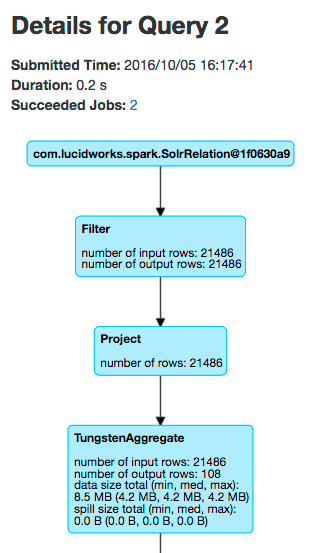
* How many rows were read from Solr for this job? (Look under the SQL tab.)
For the above run, the answers are:
* 205 tasks were needed to execute this job.
* The Environment tab shows that one of the JAR files is named `spark-shaded-*.jar` and was "Added By User".
* It took 2 executor processes to run this job. Each executor has 2 CPUs allocated to it and the `bin/spark-shell` script asked for 4 total CPUs for the shell application.
* This particular job read about 21K rows from Solr, but this number will differ based on how long Fusion has been running.
The key take-away is that you can see how Spark interacts with Solr using the UI.
## Spark job tuning
Returning to the first question, why were 202 tasks needed to execute this job?
The reason is that SparkSQL defaults to using 200 partitions when performing distributed group by operations; see the property `spark.sql.shuffle.partitions`.
Because our data set is so small, let us adjust Spark so that it only uses 4 tasks. In the Spark shell, execute the following Scala:
```
spark.conf.set("spark.sql.shuffle.partitions", "4")
```
You just need to re-execute the final query and `show` command:
```scala expandable theme={"dark"}
val readFromSolrOpts = Map(
"collection" -> "logs",
"fields" -> "host_s,port_s,level_s,message_t,thread_s,timestamp_tdt"
)
val logsDF = spark.read.format("solr").options(readFromSolrOpts).load
logsDF.registerTempTable("fusion_logs")
var sqlDF = spark.sql("""
| SELECT COUNT(*) as num_values, level_s as level
| FROM fusion_logs
| GROUP BY level_s
| ORDER BY num_values desc
| LIMIT 10""".stripMargin)
sqlDF.show(10,false)
```
Now if you look at the Job UI, you will see a new job that executed with only 6 executors! You have just had your first experience with tuning Spark jobs.
{/* // end::body[] */}
{/* // tag::body[] */}
Spark has a number of configuration properties.
In this section, we will cover some of the key settings you will need to use Fusion’s Spark integration.
For the full set of Fusion’s spark-related configuration properties, see the
[Spark Jobs API](/docs/4/fusion-server/reference/api/spark-jobs-api).
## Spark master/worker resource allocation
If you co-locate Spark workers and Solr nodes on the same server,
then be sure to reserve some CPU for Solr to avoid a compute intensive Spark job from starving Solr of CPU resources.
### Number of cores allocated
To change the CPU usage per worker, you need to use the
[Fusion configuration API](/docs/4/fusion-server/reference/api/system-admin-apis/configurations-api)
to update this setting, as in the following example.
```
curl -u USERNAME:PASSWORD -H 'Content-type:application/json' -X PUT -d '6' \
http://localhost:8764/api/configurations/fusion.spark.worker.cores
```
You can also over-allocate cores to a spark-worker, which usually is recommended for hyper-threaded cores by setting the property `spark-worker.envVars` to `SPARK_WORKER_CORES=` in the `fusion.cors` (`fusion.properties` in Fusion 4.x) file on all nodes hosting a spark-worker. For example, a r4.2xlarge instance in EC2 has 8 CPU cores, but the following configuration will improve utilization and performance:
```
spark-worker.envVars=SPARK_WORKER_CORES=16,SPARK_SCALA_VERSION=2.11,SPARK_PUBLIC_DNS=${default.address},SPARK_LOCAL_IP=${default.address}
```
You can obtain the IP address that the Spark master web UI binds to with this API command:
```
curl http:///api/spark/master
```
We encourage you to set the `default.address` property in `fusion.cors` (`fusion.properties` in Fusion 4.x) to ensure that all Spark processes have a consistent address to bind to.
After making this change to your Spark worker nodes, you must restart the spark-worker process
on each.
**On Unix**:
```
./spark-worker restart
```
Give this command from the `bin` directory below the Fusion home directory, for example, `/opt/fusion/latest.***__x__***`.
**On Windows**:
```
spark-worker.cmd restart
```
Give this command from the `bin` directory below the Fusion home directory, for example, `C:\lucidworks\fusion{backslash}latest.***__x__***`.
### Memory allocation
The amount of memory allocated to each worker process is controlled by Fusion property
`fusion.spark.worker.memory` which specifies the total amount of memory available for all executors spun up by that Spark Worker process. This is the quantity seen in the memory column against a worker entry in the Workers table.
The JVM memory setting (`-Xmx`) for the spark-worker process configured in the `fusion.cors` (`fusion.properties` in Fusion 4.x) file controls how much memory the spark-worker needs to manage executors (and not how much memory should be made available to your job(s)). When modifying the `-Xmx` value, use `curl` as follows:
```
curl -u USERNAME:PASSWORD -H 'Content-type:application/json' -X PUT -d '8g' \
http://localhost:8764/api/configurations/fusion.spark.worker.memory
```
Typically, 512m to 1g is sufficient for the spark-worker JVM process.
The Spark worker process manages executors for multiple jobs running concurrently.
For certain types of aggregation jobs you can also configure the per executor memory, but this can impact how many jobs you can run concurrently in your cluster.
Unless explicitly specified using the parameter `spark.executor.memory`, Fusion calculates the amount of memory that can be allocated to the executor
Aggregation Spark jobs always get half the memory of the amount assigned to the workers.
This is controlled by the `fusion.spark.executor.memory.fraction` property, which is set to `0.5` by default.
For example, Spark workers have 4 Gb of memory by default and the executors for aggregator Spark jobs are assigned 2 Gb for each executor.
To let Fusion aggregation jobs use more of the memory of the workers, increase `fusion.spark.executor.memory.fraction` property to `1`.
Use this property instead of the Spark executor memory property.
```
curl -u USERNAME:PASSWORD -H 'Content-type:application/json' -X PUT -d '1' \
http://localhost:8764/api/configurations/fusion.spark.executor.memory.fraction
```
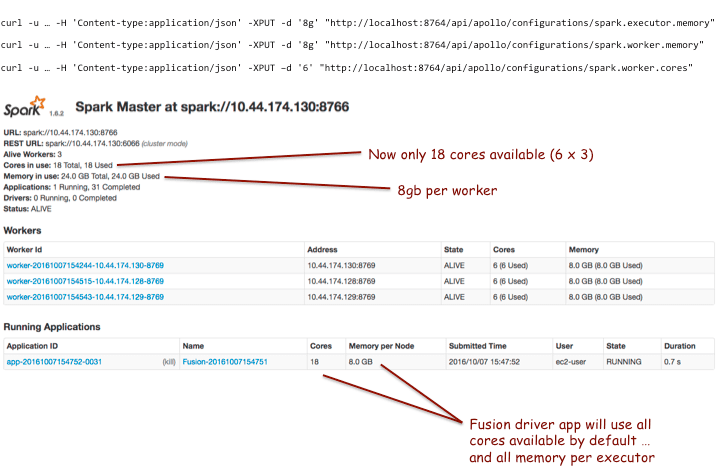
After making these changes and restarting the workers, when we run a Fusion job, we get the following:
### Cores per driver allocation
The configuration property `fusion.spark.cores.fraction` lets you limit the number of cores used by the Fusion driver applications (default and scripted). For example, in the screenshot above, we see 18 total CPUs available.
We set the cores fraction property to 0.5 via the following command:
```
curl -u USERNAME:PASSWORD -H 'Content-type:application/json' -X PUT -d '0.5' \
http://localhost:8764/api/configurations/fusion.spark.cores.fraction
```
This cuts the number of available cores in half, as shown in the following screenshot:
## Ports used by Spark in Fusion
{/* // tag::spark-ports-in-fusion[] */}
This table lists the default port numbers used by Spark processes in Fusion.
| Port number | Process |
| -------------------------------- | ------------------------------------ |
| 4040 | SparkContext web UI |
| 7337 | Shuffle port for Apache Spark worker |
| 8767 | Spark master web UI |
| 8770 | Spark worker web UI |
| 8766 | Spark master listening port |
| 8769 | Spark worker listening port |
| 8772 (`spark.driver.port`) | Spark driver listening port |
| 8788 (`spark.blockManager.port`) | Spark BlockManager port |
If a port is not available, Spark uses the next available port by adding `1` to the assigned port number.
For example, if 4040 is not available, Spark uses 4041 (if available, or 4042, and so forth).
Ensure that the ports in the above table are accessible, as well as a range of up to 16 subsequent ports.
For example, open ports 8772 through 8787, and 8788 through 8804, because a single node can have more than one Spark driver and Spark BlockManager.
{/* // end::spark-ports-in-fusion[] */}
## Spark-related directories and files in Fusion
The following directories and files are for Spark components and logs in Fusion.
### Spark components
These directories and files are for Spark components:
| Path (relative to Fusion home) | Notes |
| --------------------------------- | ------------------------------------------------------------------------------------------------------------------------------------------------------------------------------------------------------- |
| `bin/spark-master` | Script to manage (`start`, `stop`, `status`, etc.) the Spark Master service in Fusion |
| `bin/spark-worker` | Script to manage (`start`, `stop`, `status`, etc.) the Spark Worker service in Fusion |
| `bin/sql` | Script to manage (`start`, `stop`, `status`, etc.) the SQL service in Fusion |
| `bin/spark-shell` | Wrapper script to launch the interactive Spark shell with the Spark Master URL and shaded JAR |
| `apps/spark-dist` | Apache Spark distribution; contains all JAR files needed to run Spark in Fusion |
| `apps/spark/hadoop` | Hadoop home directory used by Spark jobs running in Fusion |
| `apps/spark/driver/lib` | Add custom JAR files to this directory to include in all Spark jobs |
| `apps/spark/lib` | JAR files used to construct the classpath for the `spark-worker`, `spark-master`, and `sql` services in Fusion |
| `var/spark-master` | Working directory for the `spark-master` service |
| `var/spark-worker` | Working directory for the `spark-worker` service; keep an eye on the disk usage under this directory as temporary application data for running Spark jobs is saved here |
| `var/spark-workDir-*` | Temporary work directories are created in when an application is running. They are removed after the driver is shut down or closed. |
| `var/sql` | Working directory for the SQL service |
| `var/api/work/spark-shaded-*.jar` | The shaded JAR built by the API service; contains all classes needed to run Fusion Spark jobs. If one of the jars in the Fusion API has changed, then a new shaded jar is created with an updated name. |
### Spark logs
These directories and files are for configuring and storing Spark logs:
| Path (relative to Fusion home) | Notes 2+ |
| ------------------------------------------------------------------------------------------------------------------------------------------------- | ----------------------------------------------------------------- |
| **Log configuration** | `conf/spark-master-log4j2.xml` |
| Log configuration file for the `spark-master` service | `conf/spark-worker-log4j2.xml` |
| Log configuration file for the `spark-worker` service | `conf/spark-driver-log4j2.xml` |
| Log configuration file for the Spark Driver application launched by Fusion; this file controls the log settings for most Spark jobs run by Fusion | `conf/spark-driver-scripted-log4j.xml` *(Fusion 4.1+ only.)* |
| Log configuration file for custom script jobs and Parallel Bulk Loader (PBL) based jobs | `conf/spark-driver-launcher-log4j2.xml` |
| Log configuration file for jobs built using the Spark Job Workbench | `conf/spark-executor-log4j2.xml` |
| Log configuration file for Spark executors; log messages are sent to STDOUT and can be viewed from the Spark UI | `conf/sql-log4j2.xml` |
| Log configuration file for the Fusion SQL service 2+ | **Logs** |
| `var/log/spark-master/*` | Logs for the `spark-master` service |
| `var/log/spark-worker/*` | Logs for the `spark-worker` service |
| `var/log/sql/*` | Logs for the `sql` service |
| `var/log/api/spark-driver-default.log` | Main log file for built-in Fusion Spark jobs |
| `var/log/api/spark-driver-scripted.log` | Main log file for custom script jobs |
| `var/log/api/spark-driver-launcher.log` | Main log file for custom jobs built using the Spark Job Workbench |
## Connection configurations for an SSL-enabled Solr cluster
You will need to set these Java system properties used by SolrJ:
* `javax.net.ssl.trustStore`
* `javax.net.ssl.trustStorePassword`
* `javax.net.ssl.trustStoreType`
For the following Spark configuration properties:
* `spark.executor.extraJavaOptions`
* `fusion.spark.driver.jvmArgs`
* `spark.driver.extraJavaOptions`
```
> curl -H 'Content-type:application/json' -X PUT \
-d '-Djavax.net.ssl.trustStore=/opt/app/jobs/ssl/solrtrust.jks -Djavax.net.ssl.trustStorePassword=changeit -Djavax.net.ssl.trustStoreType=jks' \
"http://localhost:8764/api/configurations/spark.executor.extraJavaOptions"
> curl -H 'Content-type:application/json' -X PUT \
-d '-Djavax.net.ssl.trustStore=/opt/app/jobs/ssl/solrtrust.jks -Djavax.net.ssl.trustStorePassword=changeit -Djavax.net.ssl.trustStoreType=jks' \
"http://localhost:8764/api/configurations/fusion.spark.driver.jvmArgs"
> curl -H 'Content-type:application/json' -X PUT \
-d '-Djavax.net.ssl.trustStore=/opt/app/jobs/ssl/solrtrust.jks -Djavax.net.ssl.trustStorePassword=changeit -Djavax.net.ssl.trustStoreType=jks' \
"http://localhost:8764/api/configurations/spark.driver.extraJavaOptions"
```
{/* // end::body[] */}
{/* // tag::body[] */}
Consider the process of running a simple aggregation on 130M signals. For an aggregation of this size, it helps to tune your Spark configuration.
## Speed up tasks and avoid timeouts
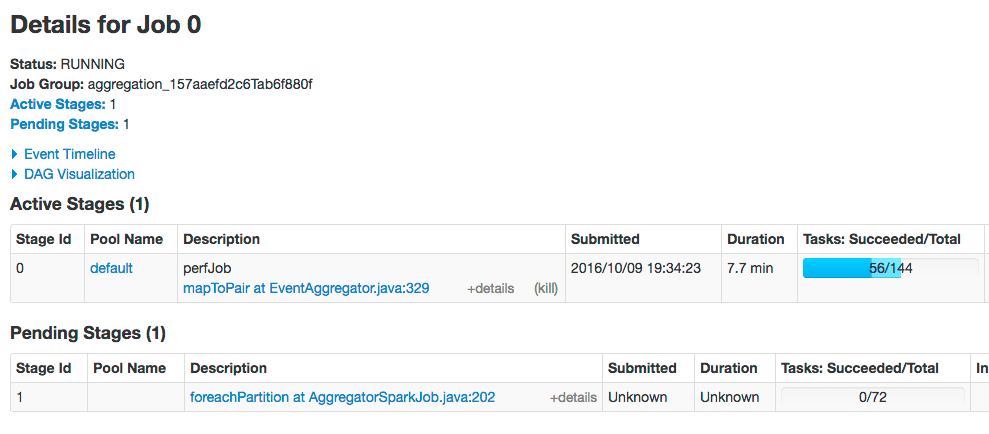
One of the most common issues encountered when running an aggregation job over a large signals data set is task timeout issues in Stage 2 (`foreachPartition`). This is typically due to slowness indexing aggregated jobs back into Solr or due to JavaScript functions.
The solution is to increase the number of partitions of the aggregated RDD (the input to Stage 2). By default, Fusion uses 25 partitions. Here, we increase the number of partitions to 72. Set these configuration properties:
* `spark.default.parallelism`.\* Default number of partitions in RDDs returned by transformations like `join`, `reduceByKey`, and `parallelize` when not specified by the user:
```
curl -u USERNAME:PASSWORD -H 'Content-type:application/json' -X PUT -d '72'
"https://FUSION_HOST:6764/api/configurations/spark.default.parallelism"
```
* `spark.sql.shuffle.partitions`.\* Number of partitions to use when shuffling data for joins or aggregations.
```
curl -u USERNAME:PASSWORD -H 'Content-type:application/json' -X PUT -d '72'
"https://FUSION_HOST:6764/api/configurations/spark.sql.shuffle.partitions"
```
After making these changes, the `foreachPartition` stage of the job will use 72 partitions:
## Increase rows read per page
You can increase the number of rows read per page (the default is 10000) by passing the rows parameter when starting your aggregation job; for example:
```
curl -u USERNAME:PASSWORD -XPOST "https://FUSION_HOST:6764/api/aggregator/jobs/perf_signals/perfJob?rows=20000&sync=false"
```
For example, we were able to read 130M signals from Solr in 18 minutes at \~120K rows/sec using rows=20000 vs. 21 minutes using the default 10000.
## Improve job performance
You can increase performance when reading input data from Solr using the `splits_per_shard` read option, which defaults to 4. This configuration setting governs how many Spark tasks can read from Solr concurrently. Increasing this value can improve job performance but also adds load on Solr.
{/* // end::body[] */}
{/* // tag::body[] */}
This article contains tips and techniques for troubleshooting Spark.
## Begin troubleshooting process
1. First determine if the job is a Spark job. Spark jobs display in the Fusion UI Jobs panel and start with `spark:`. Additionally, a Spark job has a job ID attributed as **SPARK JOB ID** .
View a comprehensive list of spark jobs:
* Fusion 4.x:
* [Spark Jobs](/docs/4/fusion-server/concepts/jobs/spark-jobs)
* [Spark Jobs API](/docs/4/fusion-server/reference/api/spark-jobs-api)
2. Next, check whether Spark services are enabled or if it is a local Spark instance instantiated to run Spark-related jobs.
1. Go to `fusion.properties` and look for `group.default`. The line should have `spark-master` and `spark-worker` in the list, for example
`group.default = zookeeper, solr, api, connectors-classic, connectors-rpc, proxy, webapps, admin-ui, spark-master, spark-worker, log-shipper`.
2. Connect to `spark-client` via shell script by navigating to **fusion\_home/bin/** directory and attempt to start via `./spark-shell`. It should successfully connect with a message, for example "**Launching Spark Shell with Fusion Spark Master: local**". If **spark-shell** fails to connect at all, copy the error message and pass it to Lucidworks support.
3. Try connecting to Apache Spark’s admin URL. It should be accessible via `host:8764`. Check if scheduled jobs are complete or running.
4. Re-confirm the status of Spark services by querying the API endpoint at `http://localhost:8764/api/spark/info`. The API should return `mode` and `masterUrl`. If `mode` and `masterUrl` are **local**, then Spark services are not enabled explicitly or they are in a failure state. If Spark services are enabled then you will see `mode` as **STANDALONE**.
5. If Spark services were enabled but the API endpoint returned `mode` as **LOCAL** then there is an issue with starting Spark services.
1. Restart Fusion with its Spark services as a first option.
2. Check driver default logs via API endpoint and increase the **numbers of rows** param as required, for example`http:///api/spark/log/driver/default?rows=100` OR `http://localhost:8764/api/spark/log/driver/default?rows=100`.
3. If you do not see an error stack trace in detail via the API endpoint, check the server tail Spark driver default logs by navigating to **fusion\_home/var/log/api/** and do `tail -F spark-driver-default.log`, or copy the complete log files under `/fusion_home/var/log/api/` (for example, **spark-driver-default.log**, **spark-driver-scripted.log**, **api.log**, **spark-driver-script-stdout.log**) and share with Lucidworks to troubleshoot the actual issue.
1. Logs required to troubleshoot Spark jobs failure are responses to below endpoints
1. `http://localhost:8764/api/spark/master/config`
2. `http://localhost:8764/api/spark/worker/config`
3. `http://localhost:8764/api/spark/master/status`
4. `https://host:8764/api/spark/info`
5. `https://host:8764/api/spark/configurations`
6. `http://192.168.29.185:8764/api/apollo/configurations`
## Known issues and solutions
1. Standard Fusion setup without Spark services enabled expects the Spark jobs to work in local mode, however they are failing. When Spark services are not configured to start, a local Spark instance is instantiated to run Spark-related jobs. This Spark instance could possibly have issues.
Steps
1. Run the curl command:
```curl wrap theme={"dark"}
curl -u USERNAME:PASSWORD -X POST -H "Content-type:application/json" http://localhost:8764/api/apollo/configurations/fusion.spark.driver.jar.exclusions -d
".*io.grpc.*,.*org.apache.spark.*,.*org.spark-project.*,.*org.apache.hadoop.*,.*org.apache.derby.*,.*spark-assembly.*,.*spark-network.*,.*spark-examples.*,.*\\/hadoop-.*,.*\\/tachyon.*,.*\\/datanucleus.*,.*\\/scala-library.*,.*\\/solr-commons-csv.*,.*\\/spark-csv.*,.*\\/hive-jdbc-shaded.*,.*\\/sis-metadata.*,.*\\/bcprov.*,.*spire.*,.*com.chuusai.*,.*shapeless.*"
curl -u USERNAME:PASSWORD -X POST -H "Content-type: application/json" -d "true" http://host:8764/api/apollo/configurations/spark.sql.caseSensitive
```
2. Remove any shaded jars on file system.
```
find . -name "spark-shaded*jar" -exec rm {} \;
```
3. Restart Fusion, specifically API and spark-worker services (if running).
2. Spark job (script or aggregation) is not getting all the resources available on the workers. By default, each application is only configured to get 0.5 of available memory on the cluster and 0.8 of available cores.
## Other troubleshooting steps
### Log API endpoints for Spark jobs
Log endpoints are useful for debugging Spark jobs on multiple nodes. In a distributed environment, the log endpoints parse the last N log lines from different Spark log files on multiple nodes and output the responses from all nodes as `text/plain` (which renders nicely in browsers) sorted by the timestamp.
The REST API Reference documents [log endpoints for Spark jobs](/docs/4/fusion-server/reference/api/spark-jobs-api). The URIs for the endpoints contain `/api/spark/log`.
The most useful log API endpoint is the `spark/log/job/` endpoint, which goes through all Fusion REST API and Spark logs, filters the logs by the `jobId` (using MDC, the mapped diagnostic context), and merges the output from different files.
For example, to obtain log content for the job `**_jobId_**`:
```
curl -u USERNAME:PASSWORD "https://FUSION_HOST:6764/api/spark/log/job/*_jobId_*"
```
Log endpoints will only output data from log files on nodes on which the API service is running.
#### Specific issues
These are some specific issues you might encounter.
##### Job hung in waiting status
Check the logs for a message that looks like:
```log wrap theme={"dark"}
2016-10-07T11:51:44,800 - WARN [Timer-0:Logging$class@70] - Initial job has not accepted any resources; check your cluster UI to ensure that workers are registered and have sufficient resources
```
If you see this, then it means your job has requested more CPU or memory than is available. For instance, if you ask for 4g but there is only 2g available, then the job will just hang in WAITING status.
##### Lost executor due to heartbeat timeout
If you see errors like the following:
```log wrap theme={"dark"}
2016-10-09T19:56:51,174 - WARN [dispatcher-event-loop-5:Logging$class@70] - Removing executor 1 with no recent heartbeats: 160532 ms exceeds timeout 120000 ms
2016-10-09T19:56:51,175 - ERROR [dispatcher-event-loop-5:Logging$class@74] - Lost executor 1 on ip-10-44-188-82.ec2.internal: Executor heartbeat timed out after 160532 ms
2016-10-09T19:56:51,178 - WARN [dispatcher-event-loop-5:Logging$class@70] - Lost task 22.0 in stage 1.0 (TID 166, ip-10-44-188-82.ec2.internal): ExecutorLostFailure (executor 1 exited caused by one of the running tasks) Reason: Executor heartbeat timed out after 160532 ms
```
This is most likely due to an OOM in the executor JVM (preventing it from maintaining the heartbeat with the application driver). However, we have seen cases where tasks fail, but the job still completes, so you will need to wait it out to see if the job recovers.
Another situation when this can occur is when a shuffle size (incoming data for a particular task) exceeds 2GB. This is hard to predict in advance because it depends on job parallelism and the number of records produced by earlier stages. The solution is to re-submit the job with increased job parallelism.
##### Spark Master will not start on EC2
See [aws-instances-and-java-net-unknownhostexception](http://deploymentzone.com/2014/01/06/aws-instances-and-java-net-unknownhostexception/) for a solution.
{/* // end::body[] */}
Additionally, you can configure and run [Spark jobs](/docs/4/fusion-server/concepts/jobs/spark-jobs) in Fusion, using the [Spark Jobs API](/docs/4/fusion-server/reference/api/spark-jobs-api) or the [Fusion UI](/docs/4/fusion-server/concepts/general-ui-overview).
## Spark with Fusion AI
With a Fusion AI license, you can also use the Spark cluster to [train and compile machine learning models](/docs/4/fusion-ai/concepts/machine-learning/machine-learning-models), as well as to run experiments via the [Fusion UI](/docs/4/fusion-ai/concepts/experiments/overview) or the [Spark Jobs API](/docs/4/fusion-server/reference/api/spark-jobs-api).
## Related concepts
* [Jobs and Schedules](/docs/4/fusion-server/concepts/jobs/overview)
* [Spark Jobs](/docs/4/fusion-server/concepts/jobs/spark-jobs)
## Related reference topics
* [Spark jobs for Fusion AI](/docs/4/fusion-ai/reference/jobs/overview)
## Further Reading
* [Apache Spark Key Terms, Explained](https://databricks.com/blog/2016/06/22/apache-spark-key-terms-explained.html)
* [Apache Spark on Wikipedia](https://en.wikipedia.org/wiki/Apache_Spark)
 If you do not see the master UI and at least one worker in the ALIVE state, check these logs.
**On Unix**:
```spark wrap theme={"dark"}
/opt/fusion/latest.**__x__**/var/log/spark-master/spark-master.log
/opt/fusion/latest.**__x__**/var/log/spark-worker/spark-worker.log
```
**On Windows**:
```spark wrap theme={"dark"}
C:\lucidworks\fusion{backslash}latest.**__x__**\var\log\spark-master\spark-master.log
C:\lucidworks\fusion{backslash}latest.**__x__**\var\log\spark-worker\spark-worker.log
```
Use this Fusion API request to get the status of the Spark master:
```
curl http://localhost:8764/api/spark/master/status
```
This request should return a response of the form:
```json theme={"dark"}
[ {
"url" : "spark://192.168.1.9:8766",
"status" : "ALIVE",
"workers" : [ {
"id" : "worker-20161005175058-192.168.1.9-8769",
"host" : "192.168.1.9",
"port" : 8769,
"webuiaddress" : "http://192.168.1.9:8770",
"cores" : 8,
"coresused" : 0,
"coresfree" : 8,
"memoryused" : 0,
"memoryfree" : 2048,
"state" : "ALIVE",
"lastheartbeat" : 1475711489460
} ], ...
```
If you have multiple Spark masters running in a Fusion cluster, each will be shown in the status but only one will be ALIVE; the other masters will be in STANDBY mode.
If you do not see the master UI and at least one worker in the ALIVE state, check these logs.
**On Unix**:
```spark wrap theme={"dark"}
/opt/fusion/latest.**__x__**/var/log/spark-master/spark-master.log
/opt/fusion/latest.**__x__**/var/log/spark-worker/spark-worker.log
```
**On Windows**:
```spark wrap theme={"dark"}
C:\lucidworks\fusion{backslash}latest.**__x__**\var\log\spark-master\spark-master.log
C:\lucidworks\fusion{backslash}latest.**__x__**\var\log\spark-worker\spark-worker.log
```
Use this Fusion API request to get the status of the Spark master:
```
curl http://localhost:8764/api/spark/master/status
```
This request should return a response of the form:
```json theme={"dark"}
[ {
"url" : "spark://192.168.1.9:8766",
"status" : "ALIVE",
"workers" : [ {
"id" : "worker-20161005175058-192.168.1.9-8769",
"host" : "192.168.1.9",
"port" : 8769,
"webuiaddress" : "http://192.168.1.9:8770",
"cores" : 8,
"coresused" : 0,
"coresfree" : 8,
"memoryused" : 0,
"memoryfree" : 2048,
"state" : "ALIVE",
"lastheartbeat" : 1475711489460
} ], ...
```
If you have multiple Spark masters running in a Fusion cluster, each will be shown in the status but only one will be ALIVE; the other masters will be in STANDBY mode.
 Click the application ID, and then click the **Application Detail UI** link. You will see this information about the completed job:
 Notice the tabs at the top of the UI that let you dig into details about the running application. Take a moment to explore the UI. It can answer these questions about your application:
* How many tasks were needed to execute this job?
* Which JARs were added to the classpath for this job? (Look under the Environment tab.)
* How many executor processes were used to run this job? Why? (Look at the Spark configuration properties under the Environment tab.)
* How many rows were read from Solr for this job? (Look under the SQL tab.)
For the above run, the answers are:
* 205 tasks were needed to execute this job.
* The Environment tab shows that one of the JAR files is named `spark-shaded-*.jar` and was "Added By User".
* It took 2 executor processes to run this job. Each executor has 2 CPUs allocated to it and the `bin/spark-shell` script asked for 4 total CPUs for the shell application.
* This particular job read about 21K rows from Solr, but this number will differ based on how long Fusion has been running.
The key take-away is that you can see how Spark interacts with Solr using the UI.
## Spark job tuning
Returning to the first question, why were 202 tasks needed to execute this job?
Notice the tabs at the top of the UI that let you dig into details about the running application. Take a moment to explore the UI. It can answer these questions about your application:
* How many tasks were needed to execute this job?
* Which JARs were added to the classpath for this job? (Look under the Environment tab.)
* How many executor processes were used to run this job? Why? (Look at the Spark configuration properties under the Environment tab.)
* How many rows were read from Solr for this job? (Look under the SQL tab.)
For the above run, the answers are:
* 205 tasks were needed to execute this job.
* The Environment tab shows that one of the JAR files is named `spark-shaded-*.jar` and was "Added By User".
* It took 2 executor processes to run this job. Each executor has 2 CPUs allocated to it and the `bin/spark-shell` script asked for 4 total CPUs for the shell application.
* This particular job read about 21K rows from Solr, but this number will differ based on how long Fusion has been running.
The key take-away is that you can see how Spark interacts with Solr using the UI.
## Spark job tuning
Returning to the first question, why were 202 tasks needed to execute this job?
 The reason is that SparkSQL defaults to using 200 partitions when performing distributed group by operations; see the property `spark.sql.shuffle.partitions`.
Because our data set is so small, let us adjust Spark so that it only uses 4 tasks. In the Spark shell, execute the following Scala:
```
spark.conf.set("spark.sql.shuffle.partitions", "4")
```
You just need to re-execute the final query and `show` command:
```scala expandable theme={"dark"}
val readFromSolrOpts = Map(
"collection" -> "logs",
"fields" -> "host_s,port_s,level_s,message_t,thread_s,timestamp_tdt"
)
val logsDF = spark.read.format("solr").options(readFromSolrOpts).load
logsDF.registerTempTable("fusion_logs")
var sqlDF = spark.sql("""
| SELECT COUNT(*) as num_values, level_s as level
| FROM fusion_logs
| GROUP BY level_s
| ORDER BY num_values desc
| LIMIT 10""".stripMargin)
sqlDF.show(10,false)
```
Now if you look at the Job UI, you will see a new job that executed with only 6 executors! You have just had your first experience with tuning Spark jobs.
{/* // end::body[] */}
The reason is that SparkSQL defaults to using 200 partitions when performing distributed group by operations; see the property `spark.sql.shuffle.partitions`.
Because our data set is so small, let us adjust Spark so that it only uses 4 tasks. In the Spark shell, execute the following Scala:
```
spark.conf.set("spark.sql.shuffle.partitions", "4")
```
You just need to re-execute the final query and `show` command:
```scala expandable theme={"dark"}
val readFromSolrOpts = Map(
"collection" -> "logs",
"fields" -> "host_s,port_s,level_s,message_t,thread_s,timestamp_tdt"
)
val logsDF = spark.read.format("solr").options(readFromSolrOpts).load
logsDF.registerTempTable("fusion_logs")
var sqlDF = spark.sql("""
| SELECT COUNT(*) as num_values, level_s as level
| FROM fusion_logs
| GROUP BY level_s
| ORDER BY num_values desc
| LIMIT 10""".stripMargin)
sqlDF.show(10,false)
```
Now if you look at the Job UI, you will see a new job that executed with only 6 executors! You have just had your first experience with tuning Spark jobs.
{/* // end::body[] */}
 ### Cores per driver allocation
The configuration property `fusion.spark.cores.fraction` lets you limit the number of cores used by the Fusion driver applications (default and scripted). For example, in the screenshot above, we see 18 total CPUs available.
We set the cores fraction property to 0.5 via the following command:
```
curl -u USERNAME:PASSWORD -H 'Content-type:application/json' -X PUT -d '0.5' \
http://localhost:8764/api/configurations/fusion.spark.cores.fraction
```
This cuts the number of available cores in half, as shown in the following screenshot:
### Cores per driver allocation
The configuration property `fusion.spark.cores.fraction` lets you limit the number of cores used by the Fusion driver applications (default and scripted). For example, in the screenshot above, we see 18 total CPUs available.
We set the cores fraction property to 0.5 via the following command:
```
curl -u USERNAME:PASSWORD -H 'Content-type:application/json' -X PUT -d '0.5' \
http://localhost:8764/api/configurations/fusion.spark.cores.fraction
```
This cuts the number of available cores in half, as shown in the following screenshot:
 ## Ports used by Spark in Fusion
{/* // tag::spark-ports-in-fusion[] */}
This table lists the default port numbers used by Spark processes in Fusion.
| Port number | Process |
| -------------------------------- | ------------------------------------ |
| 4040 | SparkContext web UI |
| 7337 | Shuffle port for Apache Spark worker |
| 8767 | Spark master web UI |
| 8770 | Spark worker web UI |
| 8766 | Spark master listening port |
| 8769 | Spark worker listening port |
| 8772 (`spark.driver.port`) | Spark driver listening port |
| 8788 (`spark.blockManager.port`) | Spark BlockManager port |
If a port is not available, Spark uses the next available port by adding `1` to the assigned port number.
For example, if 4040 is not available, Spark uses 4041 (if available, or 4042, and so forth).
Ensure that the ports in the above table are accessible, as well as a range of up to 16 subsequent ports.
For example, open ports 8772 through 8787, and 8788 through 8804, because a single node can have more than one Spark driver and Spark BlockManager.
{/* // end::spark-ports-in-fusion[] */}
## Spark-related directories and files in Fusion
The following directories and files are for Spark components and logs in Fusion.
### Spark components
These directories and files are for Spark components:
| Path (relative to Fusion home) | Notes |
| --------------------------------- | ------------------------------------------------------------------------------------------------------------------------------------------------------------------------------------------------------- |
| `bin/spark-master` | Script to manage (`start`, `stop`, `status`, etc.) the Spark Master service in Fusion |
| `bin/spark-worker` | Script to manage (`start`, `stop`, `status`, etc.) the Spark Worker service in Fusion |
| `bin/sql` | Script to manage (`start`, `stop`, `status`, etc.) the SQL service in Fusion |
| `bin/spark-shell` | Wrapper script to launch the interactive Spark shell with the Spark Master URL and shaded JAR |
| `apps/spark-dist` | Apache Spark distribution; contains all JAR files needed to run Spark in Fusion |
| `apps/spark/hadoop` | Hadoop home directory used by Spark jobs running in Fusion |
| `apps/spark/driver/lib` | Add custom JAR files to this directory to include in all Spark jobs |
| `apps/spark/lib` | JAR files used to construct the classpath for the `spark-worker`, `spark-master`, and `sql` services in Fusion |
| `var/spark-master` | Working directory for the `spark-master` service |
| `var/spark-worker` | Working directory for the `spark-worker` service; keep an eye on the disk usage under this directory as temporary application data for running Spark jobs is saved here |
| `var/spark-workDir-*` | Temporary work directories are created in when an application is running. They are removed after the driver is shut down or closed. |
| `var/sql` | Working directory for the SQL service |
| `var/api/work/spark-shaded-*.jar` | The shaded JAR built by the API service; contains all classes needed to run Fusion Spark jobs. If one of the jars in the Fusion API has changed, then a new shaded jar is created with an updated name. |
### Spark logs
These directories and files are for configuring and storing Spark logs:
| Path (relative to Fusion home) | Notes 2+ |
| ------------------------------------------------------------------------------------------------------------------------------------------------- | ----------------------------------------------------------------- |
| **Log configuration** | `conf/spark-master-log4j2.xml` |
| Log configuration file for the `spark-master` service | `conf/spark-worker-log4j2.xml` |
| Log configuration file for the `spark-worker` service | `conf/spark-driver-log4j2.xml` |
| Log configuration file for the Spark Driver application launched by Fusion; this file controls the log settings for most Spark jobs run by Fusion | `conf/spark-driver-scripted-log4j.xml` *(Fusion 4.1+ only.)* |
| Log configuration file for custom script jobs and Parallel Bulk Loader (PBL) based jobs | `conf/spark-driver-launcher-log4j2.xml` |
| Log configuration file for jobs built using the Spark Job Workbench | `conf/spark-executor-log4j2.xml` |
| Log configuration file for Spark executors; log messages are sent to STDOUT and can be viewed from the Spark UI | `conf/sql-log4j2.xml` |
| Log configuration file for the Fusion SQL service 2+ | **Logs** |
| `var/log/spark-master/*` | Logs for the `spark-master` service |
| `var/log/spark-worker/*` | Logs for the `spark-worker` service |
| `var/log/sql/*` | Logs for the `sql` service |
| `var/log/api/spark-driver-default.log` | Main log file for built-in Fusion Spark jobs |
| `var/log/api/spark-driver-scripted.log` | Main log file for custom script jobs |
| `var/log/api/spark-driver-launcher.log` | Main log file for custom jobs built using the Spark Job Workbench |
## Connection configurations for an SSL-enabled Solr cluster
You will need to set these Java system properties used by SolrJ:
* `javax.net.ssl.trustStore`
* `javax.net.ssl.trustStorePassword`
* `javax.net.ssl.trustStoreType`
For the following Spark configuration properties:
* `spark.executor.extraJavaOptions`
* `fusion.spark.driver.jvmArgs`
* `spark.driver.extraJavaOptions`
```
> curl -H 'Content-type:application/json' -X PUT \
-d '-Djavax.net.ssl.trustStore=/opt/app/jobs/ssl/solrtrust.jks -Djavax.net.ssl.trustStorePassword=changeit -Djavax.net.ssl.trustStoreType=jks' \
"http://localhost:8764/api/configurations/spark.executor.extraJavaOptions"
> curl -H 'Content-type:application/json' -X PUT \
-d '-Djavax.net.ssl.trustStore=/opt/app/jobs/ssl/solrtrust.jks -Djavax.net.ssl.trustStorePassword=changeit -Djavax.net.ssl.trustStoreType=jks' \
"http://localhost:8764/api/configurations/fusion.spark.driver.jvmArgs"
> curl -H 'Content-type:application/json' -X PUT \
-d '-Djavax.net.ssl.trustStore=/opt/app/jobs/ssl/solrtrust.jks -Djavax.net.ssl.trustStorePassword=changeit -Djavax.net.ssl.trustStoreType=jks' \
"http://localhost:8764/api/configurations/spark.driver.extraJavaOptions"
```
{/* // end::body[] */}
## Ports used by Spark in Fusion
{/* // tag::spark-ports-in-fusion[] */}
This table lists the default port numbers used by Spark processes in Fusion.
| Port number | Process |
| -------------------------------- | ------------------------------------ |
| 4040 | SparkContext web UI |
| 7337 | Shuffle port for Apache Spark worker |
| 8767 | Spark master web UI |
| 8770 | Spark worker web UI |
| 8766 | Spark master listening port |
| 8769 | Spark worker listening port |
| 8772 (`spark.driver.port`) | Spark driver listening port |
| 8788 (`spark.blockManager.port`) | Spark BlockManager port |
If a port is not available, Spark uses the next available port by adding `1` to the assigned port number.
For example, if 4040 is not available, Spark uses 4041 (if available, or 4042, and so forth).
Ensure that the ports in the above table are accessible, as well as a range of up to 16 subsequent ports.
For example, open ports 8772 through 8787, and 8788 through 8804, because a single node can have more than one Spark driver and Spark BlockManager.
{/* // end::spark-ports-in-fusion[] */}
## Spark-related directories and files in Fusion
The following directories and files are for Spark components and logs in Fusion.
### Spark components
These directories and files are for Spark components:
| Path (relative to Fusion home) | Notes |
| --------------------------------- | ------------------------------------------------------------------------------------------------------------------------------------------------------------------------------------------------------- |
| `bin/spark-master` | Script to manage (`start`, `stop`, `status`, etc.) the Spark Master service in Fusion |
| `bin/spark-worker` | Script to manage (`start`, `stop`, `status`, etc.) the Spark Worker service in Fusion |
| `bin/sql` | Script to manage (`start`, `stop`, `status`, etc.) the SQL service in Fusion |
| `bin/spark-shell` | Wrapper script to launch the interactive Spark shell with the Spark Master URL and shaded JAR |
| `apps/spark-dist` | Apache Spark distribution; contains all JAR files needed to run Spark in Fusion |
| `apps/spark/hadoop` | Hadoop home directory used by Spark jobs running in Fusion |
| `apps/spark/driver/lib` | Add custom JAR files to this directory to include in all Spark jobs |
| `apps/spark/lib` | JAR files used to construct the classpath for the `spark-worker`, `spark-master`, and `sql` services in Fusion |
| `var/spark-master` | Working directory for the `spark-master` service |
| `var/spark-worker` | Working directory for the `spark-worker` service; keep an eye on the disk usage under this directory as temporary application data for running Spark jobs is saved here |
| `var/spark-workDir-*` | Temporary work directories are created in when an application is running. They are removed after the driver is shut down or closed. |
| `var/sql` | Working directory for the SQL service |
| `var/api/work/spark-shaded-*.jar` | The shaded JAR built by the API service; contains all classes needed to run Fusion Spark jobs. If one of the jars in the Fusion API has changed, then a new shaded jar is created with an updated name. |
### Spark logs
These directories and files are for configuring and storing Spark logs:
| Path (relative to Fusion home) | Notes 2+ |
| ------------------------------------------------------------------------------------------------------------------------------------------------- | ----------------------------------------------------------------- |
| **Log configuration** | `conf/spark-master-log4j2.xml` |
| Log configuration file for the `spark-master` service | `conf/spark-worker-log4j2.xml` |
| Log configuration file for the `spark-worker` service | `conf/spark-driver-log4j2.xml` |
| Log configuration file for the Spark Driver application launched by Fusion; this file controls the log settings for most Spark jobs run by Fusion | `conf/spark-driver-scripted-log4j.xml` *(Fusion 4.1+ only.)* |
| Log configuration file for custom script jobs and Parallel Bulk Loader (PBL) based jobs | `conf/spark-driver-launcher-log4j2.xml` |
| Log configuration file for jobs built using the Spark Job Workbench | `conf/spark-executor-log4j2.xml` |
| Log configuration file for Spark executors; log messages are sent to STDOUT and can be viewed from the Spark UI | `conf/sql-log4j2.xml` |
| Log configuration file for the Fusion SQL service 2+ | **Logs** |
| `var/log/spark-master/*` | Logs for the `spark-master` service |
| `var/log/spark-worker/*` | Logs for the `spark-worker` service |
| `var/log/sql/*` | Logs for the `sql` service |
| `var/log/api/spark-driver-default.log` | Main log file for built-in Fusion Spark jobs |
| `var/log/api/spark-driver-scripted.log` | Main log file for custom script jobs |
| `var/log/api/spark-driver-launcher.log` | Main log file for custom jobs built using the Spark Job Workbench |
## Connection configurations for an SSL-enabled Solr cluster
You will need to set these Java system properties used by SolrJ:
* `javax.net.ssl.trustStore`
* `javax.net.ssl.trustStorePassword`
* `javax.net.ssl.trustStoreType`
For the following Spark configuration properties:
* `spark.executor.extraJavaOptions`
* `fusion.spark.driver.jvmArgs`
* `spark.driver.extraJavaOptions`
```
> curl -H 'Content-type:application/json' -X PUT \
-d '-Djavax.net.ssl.trustStore=/opt/app/jobs/ssl/solrtrust.jks -Djavax.net.ssl.trustStorePassword=changeit -Djavax.net.ssl.trustStoreType=jks' \
"http://localhost:8764/api/configurations/spark.executor.extraJavaOptions"
> curl -H 'Content-type:application/json' -X PUT \
-d '-Djavax.net.ssl.trustStore=/opt/app/jobs/ssl/solrtrust.jks -Djavax.net.ssl.trustStorePassword=changeit -Djavax.net.ssl.trustStoreType=jks' \
"http://localhost:8764/api/configurations/fusion.spark.driver.jvmArgs"
> curl -H 'Content-type:application/json' -X PUT \
-d '-Djavax.net.ssl.trustStore=/opt/app/jobs/ssl/solrtrust.jks -Djavax.net.ssl.trustStorePassword=changeit -Djavax.net.ssl.trustStoreType=jks' \
"http://localhost:8764/api/configurations/spark.driver.extraJavaOptions"
```
{/* // end::body[] */}
 ## Increase rows read per page
You can increase the number of rows read per page (the default is 10000) by passing the rows parameter when starting your aggregation job; for example:
```
curl -u USERNAME:PASSWORD -XPOST "https://FUSION_HOST:6764/api/aggregator/jobs/perf_signals/perfJob?rows=20000&sync=false"
```
For example, we were able to read 130M signals from Solr in 18 minutes at \~120K rows/sec using rows=20000 vs. 21 minutes using the default 10000.
## Improve job performance
You can increase performance when reading input data from Solr using the `splits_per_shard` read option, which defaults to 4. This configuration setting governs how many Spark tasks can read from Solr concurrently. Increasing this value can improve job performance but also adds load on Solr.
{/* // end::body[] */}
## Increase rows read per page
You can increase the number of rows read per page (the default is 10000) by passing the rows parameter when starting your aggregation job; for example:
```
curl -u USERNAME:PASSWORD -XPOST "https://FUSION_HOST:6764/api/aggregator/jobs/perf_signals/perfJob?rows=20000&sync=false"
```
For example, we were able to read 130M signals from Solr in 18 minutes at \~120K rows/sec using rows=20000 vs. 21 minutes using the default 10000.
## Improve job performance
You can increase performance when reading input data from Solr using the `splits_per_shard` read option, which defaults to 4. This configuration setting governs how many Spark tasks can read from Solr concurrently. Increasing this value can improve job performance but also adds load on Solr.
{/* // end::body[] */}