> ## Documentation Index
> Fetch the complete documentation index at: https://doc.lucidworks.com/llms.txt
> Use this file to discover all available pages before exploring further.
# Collections
export const LwTemplate = ({title = "Key questions to get you started", icon = "sparkles", cta = "Powered by Agent Studio", linkHref = "https://lucidworks.com/demo/?utm_source=docs&utm_medium=referral&utm_campaign=docs_cta_ai"}) => {
const [isLoaded, setIsLoaded] = useState(false);
useEffect(() => {
const timer = setTimeout(() => {
setIsLoaded(true);
}, 500);
return () => clearTimeout(timer);
}, []);
return
{isLoaded && `
}} />}
Powered by Lucidworks Agent Studio
;
};
[localhost link]: http://localhost:3000/docs/4/fusion-server/concepts/indexing/collections/overview
[mintlify link]: https://doc.lucidworks.com/docs/4/fusion-server/concepts/indexing/collections/overview
[old doc.lw link]: https://doc.lucidworks.com/fusion-server/4.2/166
Your data is organized into collections. When you create an app, Fusion automatically creates a collection with the same name. You can create additional collections in any app.
A primary collection contains the data that your users will search. Every primary collection is associated with a set of auxiliary collections that contain related data, such as signals, aggregations, and more.
Under the hood, a Fusion collection is a distributed index in Solr, defined by a named configuration stored in ZooKeeper, with these properties:
* Number of shards\
Documents are distributed across this number of partitions.
* Document routing strategy\
How documents are assigned to shards.
* Replication factor\
How many copies of each document in the collection.
* Replica placement strategy\
Where to place replicas in the cluster.
If your data is already stored in a Solr instance or cluster, you can manage this collection
in Fusion by creating a Fusion collection that imports the existing Solr collection.
These instructions are for an initial installation of Fusion on a single node (computer). To install Fusion on multiple nodes (a *Fusion cluster*), see [Install a Fusion Cluster](/docs/4/fusion-server/concepts/deployment/overview). If you already have a version of Fusion installed and want to upgrade it, see the \[Fusion upgrade instructions.
You can view the application files to download at [Fusion Server 4.x File Download Links](/docs/4/fusion-server/reference/fusion-server-4-x-file-download-links).
Out of the box, Fusion uses the instances of Solr, ZooKeeper, and Spark that are included in the Fusion distribution. See the [Release Notes](/docs/4/fusion-server/release-notes/4.2.0-release-notes) to find out which versions of Solr, Spark, and ZooKeeper are included in each Fusion release.
To use Fusion with an existing Solr deployment, see Integrating with existing Solr instances.
## Ports
This table lists the default port numbers used by Fusion processes. Port settings are defined in the
`:fusion.properties` file in `https://FUSION_HOST:FUSION_PORT/conf/` (on Unix or macOS) or `fusion\4.2.x\conf\` (on Windows).
| Port | Service |
| ----------- | ------------------------------------------------------------------------------------------------------------------------------------------------------------------------------------------------------------------------------------------------------------------------------------------------------------------------------------------------------------------------------------------------------------------------- |
| 8091 | Fusion agent |
| 8763 | Fusion UI service (use port 8764 to access the Fusion UI) |
| 8764 | Fusion proxy This service includes the Fusion Authorization Proxy. |
| 8765 | Fusion API Services |
| 8766 | Spark Master |
| 8769 | Spark Worker |
| 8771 | Connectors RPC Service This service can distribute connector jobs to as many Fusion nodes as you want. It uses HTTP/2 and has an SDK that you can use to [build your own connectors](/docs/fusion-connectors/developers/java-sdk). |
| 8780 | Web Apps This service delivers the UIs of Fusion apps. |
| 8781 | Log shipper Monitoring port that agent uses to check the health of the log shipper process. This port does not need to be accessible from other nodes. |
| 8983 | Solr This is the embedded Solr instance included in the Fusion distribution. |
| 8984 | Connectors Classic Service This service runs nondistributed connector jobs. It uses HTTP/1.1 and has no SDK. |
| 9983 | ZooKeeper The embedded ZooKeeper used by Fusion services. IMPORTANT: The ZooKeeper port is also defined in the configuration file for the embedded ZooKeeper, `https://FUSION_HOST:FUSION_PORT/conf/zookeeper/zoo.cfg` (on Unix or macOS) or `fusion\4.2.x\conf\zookeeper\zoo.cfg` (on Windows). Look for `clientPort`. If you run Fusion with the embedded ZooKeeper, remember to change the port number in both places. |
| 47100-48099 | Apache Ignite TCP communication port range (used by the API, Connectors Classic, Connectors RPC, and Proxy services) |
| 48100-48199 | Apache Ignite shared memory port range (used by the API, Connectors Classic, Connectors RPC, and Proxy services) |
| 49200-49299 | Apache Ignite discovery port range (used by API, Connectors Classic, Connectors RPC, and Proxy services) |
Additional ports might be required. See [Port configuration](/docs/4/fusion-server/reference/directories-files-ports) for more information or to modify the default ports before starting Fusion.
## Unix installation
Fusion for Unix is distributed as a gzipped tar file.
**How to install Fusion on Linux or Mac**
1. Verify that the node on which you plan to install Fusion meets [hardware and software requirements](/docs/4/fusion-server/reference/system-requirements).
2. Download the Fusion tar/zip file for the latest version of Fusion and move it to where you would like it to reside in your filesystem (if you would like to use Upstart for process management, you must install Fusion in `/opt/lucidworks`).
3. Become the user that will run Fusion.
Do not run Fusion as the root user.
4. Change your working directory to the directory in which you placed the `fusion-version.x.tar.gz` file, for example:
`$ cd /opt/lucidworks`
Failures in the Fusion install or startup may occur if the Fusion installation directory name contains a space.
5. Unpack the archive with `tar -xf` (or `tar -xvf`), for example:
`$ tar -xf fusion-version.x.tar.gz`
The resulting directory is named `https://FUSION_HOST:FUSION_PORT`. You can rename this if you wish. This directory is considered your Fusion home directory. See [Directories, Files, and Ports](/docs/4/fusion-server/reference/directories-files-ports) for the contents of the `https://FUSION_HOST:FUSION_PORT` directory.
### Starting Fusion
All Fusion start scripts must be executed by a user who has permissions to read and write to the directories where Fusion is installed. These scripts do not need to be run as root (or sudo), nor should they be. Use a suitable user, or create a new one, and then ensure that it owns the directory where Fusion resides, (for example, `C:\lucidworks`).
Give the commands that follow from the directory `fusion/latest.x/bin`.
Start the required services that are defined in the `group.default` property.
**How to start all required services**
`./fusion start`
This is equivalent to `./fusion start default`. You can omit the group name `default`.
For information about starting groups of services or individual services, see Start and Stop Fusion.
### Running Fusion In The Foreground
To run Fusion or any of its services in the foreground, use the `run` command-line argument in place of `start`.
### Stopping Fusion
To stop Fusion or any of its services, use the `stop` command-line argument in place of `start`.
### Using systemd to manage processes
On Red Hat Enterprise Linux, CentOS 7 and newer, and Ubuntu 15.04 LTS and newer, we support using the operating system-provided `systemd` for process management.
For more information about using `systemd`, see Using systemd to manage processes.
### Using Ubuntu Upstart to manage processes
Under Ubuntu 12.04 LTS through Ubuntu 14.10, we support using Upstart for process management. This requires Fusion to be installed in the `/opt/lucidworks/` directory.
For more information about using Upstart, see Using Ubuntu Upstart to manage processes.
## Windows installation
Fusion for Windows is distributed as a compressed zip file. To unpack the Fusion zip file on Windows, you can use a native compression utility or the freely available [7zip](http://www.7-zip.org) file archiver. Visit the [7zip download page](http://www.7-zip.org/download.html) for the latest version.
**How to install Fusion on Windows**
1. Verify that the node on which you plan to install Fusion meets [hardware and software requirements](/docs/4/fusion-server/reference/system-requirements).
2. Download the zip file for the latest version of Fusion and move it to where you would like Fusion to reside in your filesystem. It will appear as a compressed folder.
3. Unpack the archive. In most cases, you need only right-click and choose "Extract all...". If you do not see this option, check that you have permissions to extract folders on your system.\
The resulting directory is named `fusion\latest.x`. This directory is considered your Fusion home directory. See [Directories, Files, and Ports](/docs/4/fusion-server/reference/directories-files-ports) for the contents of the `fusion\latest.x` directory.
**To install Fusion as a set of Windows services**
1. Run `bin\install-services.cmd`.
2. Enter the name of the windows user that is used to launch this service.\
Remember the username is `COMPUTERNAME\username` or `DOMAIN\username` (if your computer is part of a Windows domain).
3. Enter the user’s password.
4. Enter the path to the directory containing the JDK to use for running the services.
### Starting Fusion
All Fusion start scripts must be executed by a user who has permissions to read and write to the directories where Fusion is installed. Ensure that the user owns the directory where Fusion resides (for example, `C:\lucidworks`).
Give the commands that follow from the directory `fusion\latest.x\bin`.
**How to start all required Fusion services as Java processes**
```bash theme={"dark"}
fusion.cmd start
```
**How to start all required Fusion services as Windows services**
```bash theme={"dark"}
start-services.cmd
```
For information about starting groups of services or individual services, see Start and Stop Fusion.
### Stopping Fusion
To stop Fusion or any of its services, use the `stop` command-line argument in place of `start`.
## Installation with an existing Solr instance or cluster
Before you install Fusion with an existing Solr instance or cluster, confirm that the [Solr version is supported](/docs/4/fusion-server/reference/system-requirements) by Fusion.
If installing Fusion to work with an existing Solr instance, either in SolrCloud mode or standalone, you should install Fusion as described above. You should start each of the services as described above.
Once Fusion installation is complete, you can register your existing Solr installation with Fusion to be able to use the two systems together. For details on how to do that, see the section Integrate Fusion with an Existing Solr Deployment.
## Troubleshooting
For information about problems you might encounter when installing Fusion, and solutions, see Troubleshoot When Installing Fusion.
Collection names are case-insensitive, but Fusion preserves case when displaying collection names.
## Auxiliary Collections
Every primary collection is associated with a set of auxiliary collections that contain related data, such as signals, aggregations, and more.
Some auxiliary collections are created for every primary collection. Others are created only for the app’s default collection, one per app.
Auxiliary collections are described below:
| | | |
| -------------------------------- | -------------------------------------------------------------------------------------------------------------------------------------------------------------------------------------------------------------------------------------------------------------------------------------------------------------------------------------------------------------------------------------------------------------------------------------------------------------------------------------------------------------------------------------------------------------------------------------------------------------------------- | ---------------- |
| `APP_NAME_job_reports` | Output from Fusion AI [experiments](/docs/4/fusion-ai/concepts/experiments/overview), [Ranking Metrics jobs](/docs/4/fusion-ai/reference/jobs/ranking-metrics), and [Head/Tail Analysis jobs](/docs/4/fusion-ai/reference/jobs/head-tail-analysis). | 1 per app |
| `APP_NAME_query_rewrite` | A collection of documents to use for [rewriting queries](/docs/4/fusion-ai/concepts/query-rewriting/overview), optimized for high-volume traffic. These documents originate from the `_query_rewrite_staging` collection. Certain Fusion AI query pipeline stages read from this collection: ● [Text Tagger](/docs/4/fusion-ai/reference/query-pipeline-stages/text-tagger-query-stage) ● [Apply Rules](/docs/4/fusion-ai/reference/query-pipeline-stages/query-rules-query-stage) ● [Modify Response with Rules](/docs/4/fusion-ai/reference/query-pipeline-stages/rules-augment-response-query-stage) | 1 per app |
| `APP_NAME_query_rewrite_staging` | A collection of documents created by the Rules Editor or by certain [Fusion AI jobs](/docs/4/fusion-ai/reference/jobs/overview), not optimized for production traffic. Documents move from this collection to the `_query_rewrite` collection as follows: ● Job output documents with high confidence contain a `review=auto` field and are moved to the `_query_rewrite` collection automatically. ● Job output documents with low confidence contain a `review=pending` field. When these are approved by a Fusion user, Fusion copies them to the `_query_rewrite` collection. | 1 per app |
| `COLLECTION_NAME_signals` | A search query logs and signals collection. | 1 per collection |
| `COLLECTION_NAME_signals_aggr` | A collection for aggregated signals. | 1 per collection |
| `APP_NAME_user_prefs` | A collection of data to support App Studio’s social features, such as user-generated tags, bookmarks, comments, ratings, and so on. | 1 per app |
Do not create primary collections with names that end in the suffixes above; these are reserved for Fusion auxiliary collections, which are created and managed by Fusion directly.
Fusion maintains a set of Solr collections that store Fusion’s own
log files and other internal information.
These are called [System Collections](#system-collections), described below.
Do not create primary collections named "logs" or beginning with "system\_".
These names are reserved for Fusion system collections.
Fusion uses ZooKeeper to register information about all collections,
and the Fusion components and services related to a collection.
The Fusion components associated with a collection include:
* Datasources
* Pipelines
* Profiles
* Signals and aggregations
* Analytics dashboards
## System Collections
Fusion automatically creates some collections that are used for internal purposes and shared across all apps:
* **system\_autocomplete** store the content that the Fusion UI displays when you use the search bar.
* **system\_blobs** stores [blobs](/docs/4/fusion-server/concepts/indexing/blob-storage) in Solr. This is used to store model files for the NLP components and other binary files used by Fusion components.
* **system\_history** keeps a record of configuration changes, start and stop times for services and experiments, and more.
* **system\_jobs\_history** keeps a record of Fusion [jobs](/docs/4/fusion-server/concepts/jobs/overview), including start/stop times and status.
* **system\_logs** stores parsed Java logs from the REST API, connectors-classic component, and other parts of Fusion, like proxy, connectors-rpc, and appkit app insights.\
It also includes http logs and optional gc logs (off by default in Fusion 4.1). Prior to Fusion version 4.1, Java logs were stored in the `logs` collection and HTTP requests were stored in the `audit_logs` collection.
* **system\_messages** is used by Fusion’s [messaging services](/docs/4/fusion-server/concepts/system/monitoring/messaging-services).
* **system\_monitor** stores metrics about Fusion hosts and services. See [System Metrics](/docs/4/fusion-server/reference/system-metrics) and the [DevOps Center](/docs/4/fusion-server/concepts/system/devops-center).
## Collection Configuration Properties
Collections have three properties that you can configure only when you are creating a collection using the
[Collections API](/docs/4/fusion-server/reference/api/collections-api).
| | | |
| -------------------------------- | ------------------------------------------------------------------------------------------------------------------------------------------------------------------------------------------------------------------------------------------------------------------------------------------------------------------------------------------------------------------------------------------------------------------------------------------------------------------------------------------------------------------------------------------------------------------------------------------------------------------------------------ | ---------------- |
| `APP_NAME_job_reports` | Output from Fusion AI [experiments](/docs/4/fusion-ai/concepts/experiments/overview), [Ranking Metrics jobs](/docs/4/fusion-ai/reference/jobs/ranking-metrics), and [Head/Tail Analysis jobs](/docs/4/fusion-ai/reference/jobs/head-tail-analysis). | 1 per app |
| `APP_NAME_query_rewrite` |
A collection of documents to use for [rewriting queries](/docs/4/fusion-ai/concepts/query-rewriting/overview), optimized for high‑volume traffic. These documents originate from the `_query_rewrite_staging` collection. Certain Fusion AI query pipeline stages read from this collection: • [Text Tagger](/docs/4/fusion-ai/reference/query-pipeline-stages/text-tagger-query-stage) • [Apply Rules](/docs/4/fusion-ai/reference/query-pipeline-stages/query-rules-query-stage) • [Modify Response with Rules](/docs/4/fusion-ai/reference/query-pipeline-stages/rules-augment-response-query-stage)
| 1 per app |
| `APP_NAME_query_rewrite_staging` |
A collection of documents created by the Rules Editor or by certain [Fusion AI jobs](/docs/4/fusion-ai/reference/jobs/overview), not optimized for production traffic. Documents move from this collection to the `_query_rewrite` collection as follows: • Job output documents with high confidence contain a `review=auto` field and are moved to the `_query_rewrite` collection automatically. • Job output documents with low confidence contain a `review=pending` field. When these are approved by a Fusion user, Fusion copies them to the `_query_rewrite` collection.
| 1 per app |
| `COLLECTION_NAME_signals` | A search query logs and signals collection. | 1 per collection |
| `COLLECTION_NAME_signals_aggr` | A collection for aggregated signals. | 1 per collection |
| `APP_NAME_user_prefs` | A collection of data to support App Studio’s social features, such as user‑generated tags, bookmarks, comments, ratings, and so on. | 1 per app |
\*Signals are events with timestamps that can be used to improve search results.
For more information about signals in Fusion, see [Signals](/docs/4/fusion-ai/concepts/signals-and-aggregations/signals/overview) in the Fusion AI documentation.
\*\*In schemaless mode, if a document contains a field not currently in the Solr schema, Solr processes the field value to determine what the field type should be defined as, and then adds a new field to the schema with the field name and field type.
This behavior can be convenient during preliminary application development, but it is rarely appropriate in a production environment.
## Using profiles to associate collections with pipelines
Index pipelines and query pipelines are not connected to a specific collection by default. Index profiles and query profiles are configurations that create consistent endpoints for indexing and querying, each with a specific pipeline and collection.
* [Index Profiles](/docs/4/fusion-server/concepts/indexing/datasources/index-profiles) work with index pipelines for getting content into the system.
* [Query Profiles](/docs/4/fusion-server/concepts/querying/pipelines/query-profiles) work with query pipelines for user queries.
## Field Editor UI
The Fusion UI includes a space under Collections to edit Fields. Descriptions for these fields can be found in the Field Type Definitions section of the [Solr Reference Guide](/docs/4/fusion-server/reference/solr-reference-guide/overview) associated with your Fusion release.
Field options displayed in the UI include:
* **Dynamic** checkbox (cannot change via UI)
* **Field Name** (cannot change via UI)
* **Field Type** (a preset value is shown that can be changed using edit mode)
* Checkboxes for **Indexed**, **Stored**, **Multivalued**, **Required**
* Text field to enter a **Default Value**
* **Copy Fields** uses the plus sign to add rows (**static** can copy to `raw_content` or `text`; **dynamic** can copy to any `raw_content`/`text` or any other dynamic field)
* **Advanced** toggles checkboxes for **Doc Values**, **Omit Norms**, **Omit Positions**, **Omit term freq and positions**, **Term Vectors**, **Term Positions**, **Term Offsets**
## Learn more
Federated search lets you query across multiple collections in Fusion. This is useful if you keep separate data collections for security or compliance reasons or maintain different collections based on data type.
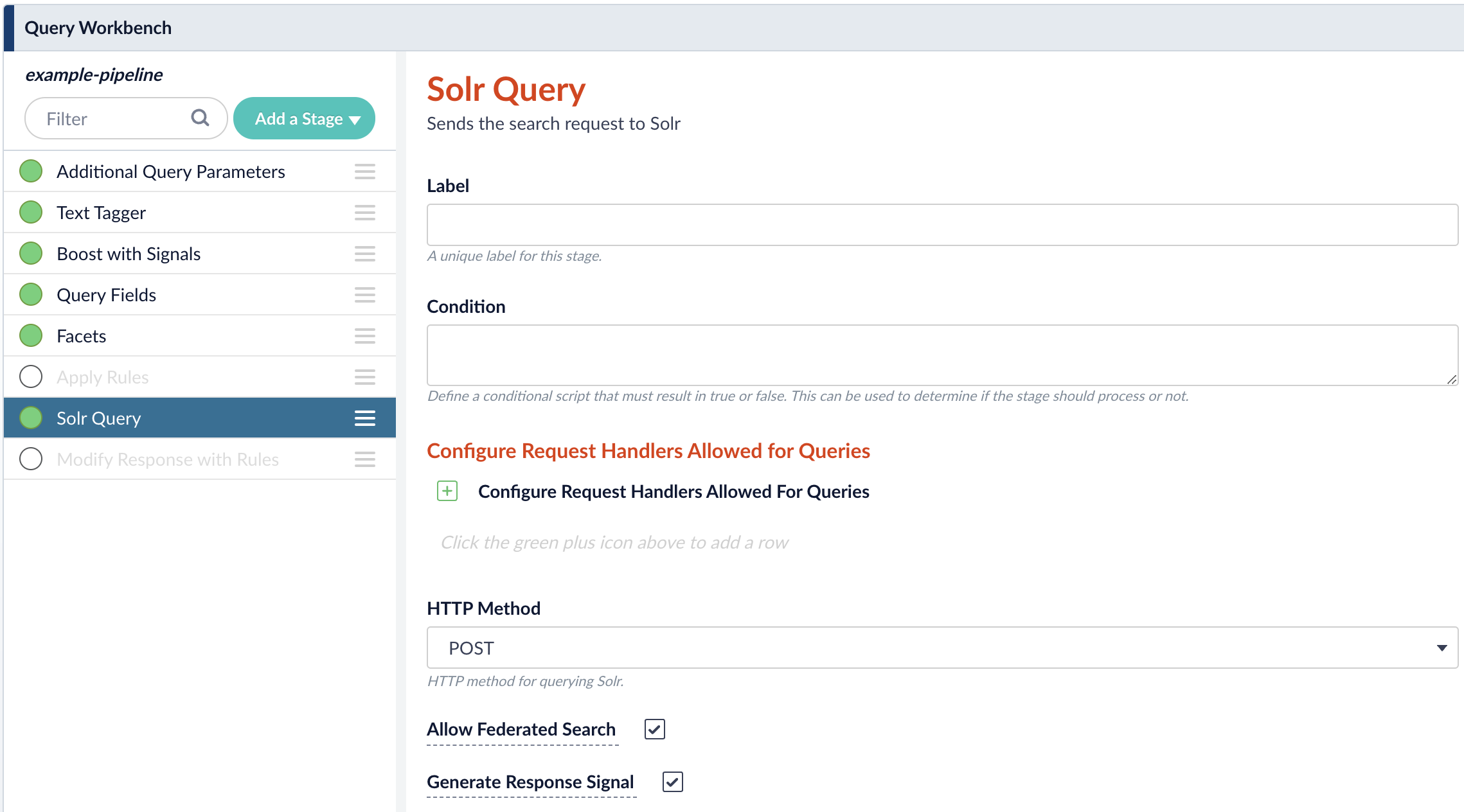
1. In the Fusion workspace, navigate to **Querying > Query Workbench**.
2. Click **Solr Query** to open the Solr Query panel.
3. Enable **Allow Federated Search** then click **Apply**.\\
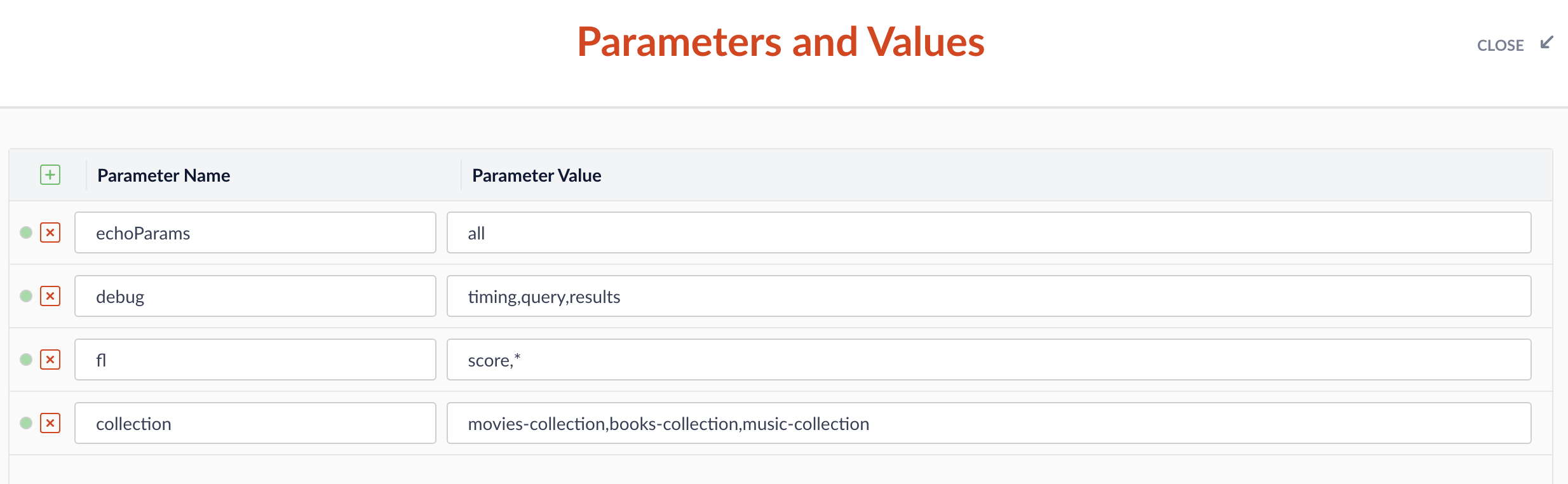
4. In the workbench area, click **Parameters** then click **Edit Parameters**.
5. Click Add to add a parameter. For the **Name**, enter `collection` and for the **Parameter Value**, enter a comma-separated list of collections you want to query. For example, `movies-collection,books-collection,music-collection`.\\
6. Click **Close**.
7. Check that your pipeline is querying documents from all specified collections.\\
 4. In the workbench area, click **Parameters** then click **Edit Parameters**.
5. Click Add
4. In the workbench area, click **Parameters** then click **Edit Parameters**.
5. Click Add  to add a parameter. For the **Name**, enter `collection` and for the **Parameter Value**, enter a comma-separated list of collections you want to query. For example, `movies-collection,books-collection,music-collection`.\\
 6. Click **Close**.
7. Check that your pipeline is querying documents from all specified collections.\\
6. Click **Close**.
7. Check that your pipeline is querying documents from all specified collections.\\
