> ## Documentation Index
> Fetch the complete documentation index at: https://doc.lucidworks.com/llms.txt
> Use this file to discover all available pages before exploring further.
# Machine Learning Models in Fusion
export const LwTemplate = ({title = "Key questions to get you started", icon = "sparkles", cta = "Powered by Agent Studio", linkHref = "https://lucidworks.com/demo/?utm_source=docs&utm_medium=referral&utm_campaign=docs_cta_ai"}) => {
const [isLoaded, setIsLoaded] = useState(false);
useEffect(() => {
const timer = setTimeout(() => {
setIsLoaded(true);
}, 500);
return () => clearTimeout(timer);
}, []);
return
{isLoaded && `
}} />}
Powered by Lucidworks Agent Studio
;
};
[localhost link]: http://localhost:3000/docs/4/fusion-ai/concepts/machine-learning/machine-learning-models
[mintlify link]: https://doc.lucidworks.com/docs/4/fusion-ai/concepts/machine-learning/machine-learning-models
[old doc.lw link]: https://doc.lucidworks.com/fusion/5.9/492
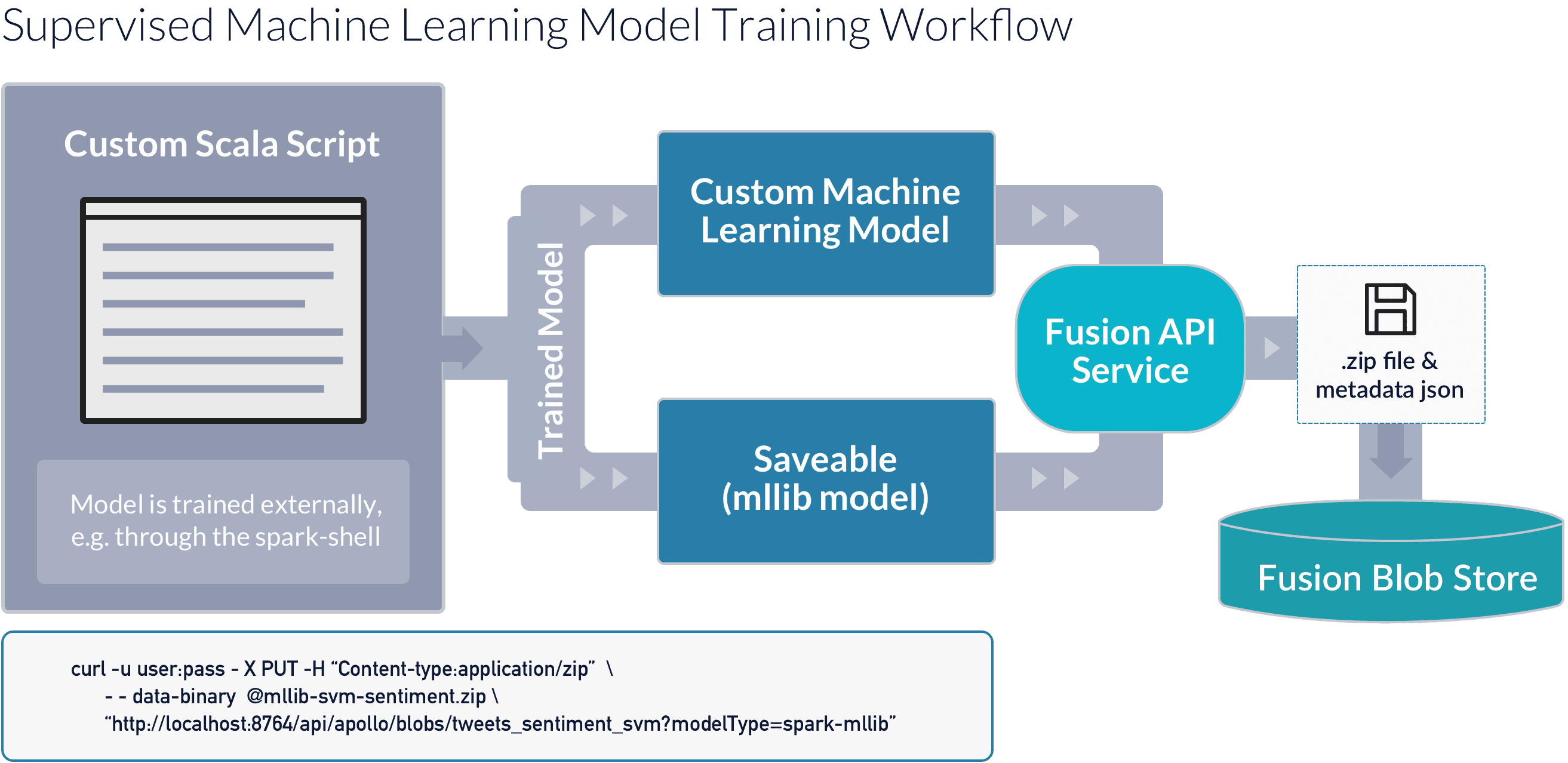
Fusion provides the following tools required for the model training process:
* Solr can easily store all your training data.
* Spark jobs perform the iterative machine learning training tasks.
* Fusion’s blob store makes the final model available for processing new data.
## Training Models
The approach for training models explained in this section still works in Fusion 4.2. An alternative approach introduced in Fusion 3.1 lets you create model-training jobs in the Fusion UI. See [Machine Learning in Lucidworks Fusion](https://lucidworks.com/post/machine-learning-in-lucidworks-fusion/) for more information.
An example Scala script to train an SVM-based sentiment classifier for tweets is provided in the [`spark-solr`](https://github.com/lucidworks/spark-solr/blob/master/src/main/scala/com/lucidworks/spark/example/ml/) repository.
The following diagram depicts this process:
## Model Prediction
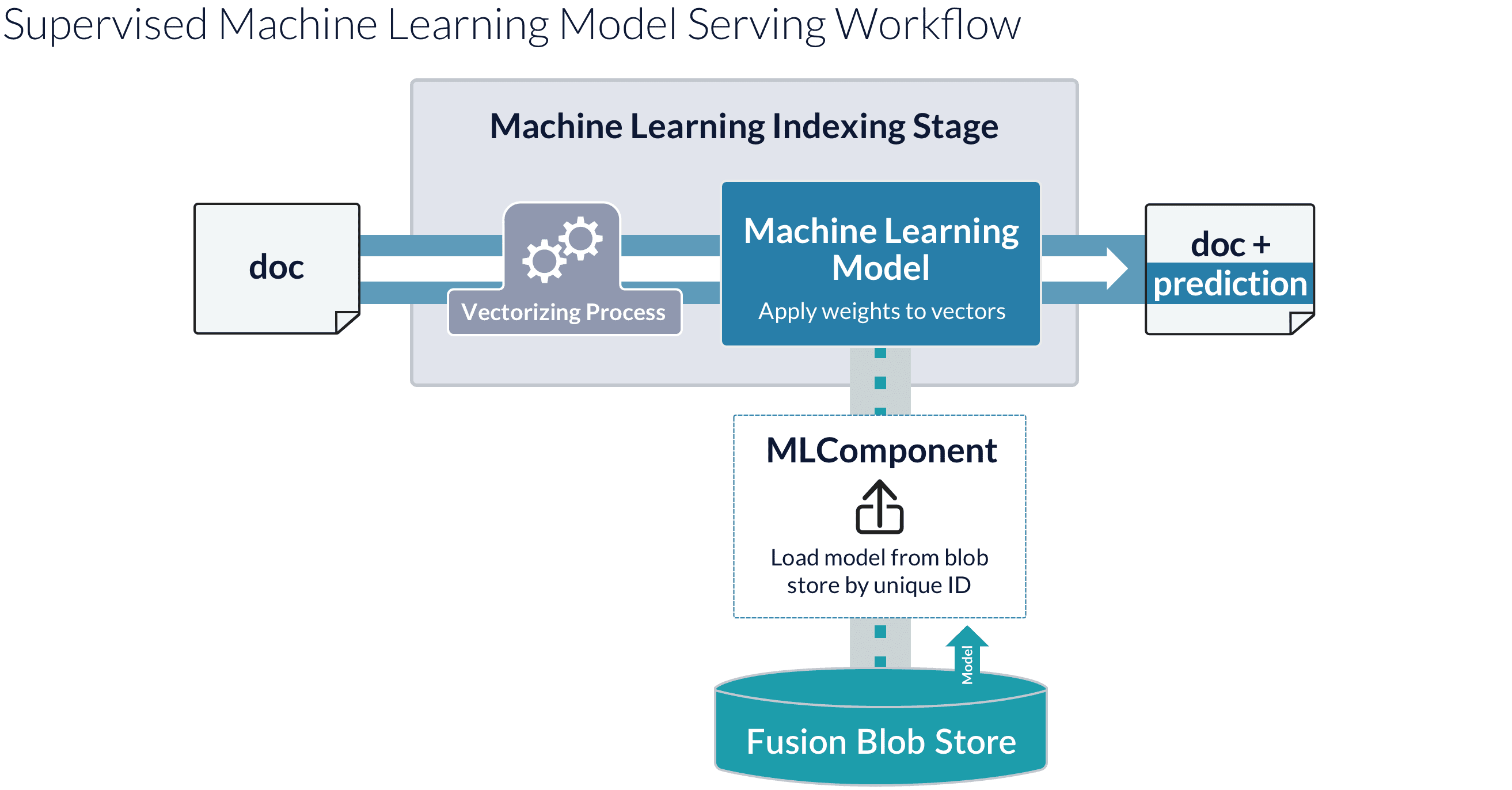
Fusion’s blob store requires all stored objects have a unique ID.
Once the model is stored in the Fusion blobstore, it is available to Fusion’s index and query
Machine Learning pipeline stages, which use the model to make predictions for new data in
pipeline documents and queries.
The following diagram shows how this process works:
## Model Checking
To test the goodness of your model in Fusion,
first create either a document index pipeline
or a query processing pipeline which contains a Machine Learning stage that uses your
model to make predictions on your data,
and then send a document or query through that pipeline
pipeline which contains data for which you know what the predicted value should be.
For example, given a trained sentiment classifier and an index stage configured to use it,
the following document should be classified as a highly positive tweet, with a value of (close to) 1.0 in the "sentiment\_d" field:
```json wrap theme={"dark"}
{ "id":"tweets-2",
"fields": [
{ "name": "tweet_txt",
"value": "I am super excited that spring is finally here, yay! #happy" }
]
}
```
## Metadata file spark-mllib.json
The file `spark-mllib.json` contains metadata about the model implementation. In particular, how the model derives feature vectors from a document or query.
The JSON object has the following attributes:
* `id`. A string label that is used as a unique ID for the Fusion blobstore, for example, `tweets_sentiment_svm`.
* `modelClassName`. The name of the `spark-mllib` class or the custom Java class that implements the `com.lucidworks.spark.ml.MLModel` interface.
* `featureFields`. A list of one or more field names.
* `vectorizer`. Specifies the processing required to derive a vector of features from the contents of the document fields listed in the `featureFields` entry.
The following example shows the `spark-mllib.json` file for the model with id `tweets_sentiment_svm`:
```json wrap theme={"dark"}
{
"id": "tweets_sentiment_svm",
"modelClassName": "org.apache.spark.mllib.classification.SVMModel",
"featureFields": [
"tweet_txt"
],
"vectorizer": [
{
"lucene-analyzer": {
"analyzers": [
{
"name": "std_tok_lower",
"tokenizer": {
"type": "standard"
},
"filters": [
{
"type": "lowercase"
}
]
}
],
"fields": [
{
"regex": ".+",
"analyzer": "std_tok_lower"
}
]
}
},
{
"hashingTF": {
"numFeatures": "1000000"
}
}
]
}
```
The `vectorizer` consists of two steps: a `lucene-analyzer` step followed by a `hashingTF` step. The `lucene-analyzer` step can use any Lucene analyzer to perform text analysis.
Other available vectorizer operations include the MLlib normalizer, the standard scaler, and the ChiSq selector. To see how to use the standard scaler, see the examples in the [`spark-solr`](https://github.com/lucidworks/spark-solr/blob/master/src/main/scala/com/lucidworks/spark/example/ml/) repository.
 ## Model Prediction
Fusion’s blob store requires all stored objects have a unique ID.
Once the model is stored in the Fusion blobstore, it is available to Fusion’s index and query
Machine Learning pipeline stages, which use the model to make predictions for new data in
pipeline documents and queries.
The following diagram shows how this process works:
## Model Prediction
Fusion’s blob store requires all stored objects have a unique ID.
Once the model is stored in the Fusion blobstore, it is available to Fusion’s index and query
Machine Learning pipeline stages, which use the model to make predictions for new data in
pipeline documents and queries.
The following diagram shows how this process works:
 ## Model Checking
To test the goodness of your model in Fusion,
first create either a document index pipeline
or a query processing pipeline which contains a Machine Learning stage that uses your
model to make predictions on your data,
and then send a document or query through that pipeline
pipeline which contains data for which you know what the predicted value should be.
For example, given a trained sentiment classifier and an index stage configured to use it,
the following document should be classified as a highly positive tweet, with a value of (close to) 1.0 in the "sentiment\_d" field:
```json wrap theme={"dark"}
{ "id":"tweets-2",
"fields": [
{ "name": "tweet_txt",
"value": "I am super excited that spring is finally here, yay! #happy" }
]
}
```
## Metadata file spark-mllib.json
The file `spark-mllib.json` contains metadata about the model implementation. In particular, how the model derives feature vectors from a document or query.
The JSON object has the following attributes:
* `id`. A string label that is used as a unique ID for the Fusion blobstore, for example, `tweets_sentiment_svm`.
* `modelClassName`. The name of the `spark-mllib` class or the custom Java class that implements the `com.lucidworks.spark.ml.MLModel` interface.
* `featureFields`. A list of one or more field names.
* `vectorizer`. Specifies the processing required to derive a vector of features from the contents of the document fields listed in the `featureFields` entry.
The following example shows the `spark-mllib.json` file for the model with id `tweets_sentiment_svm`:
```json wrap theme={"dark"}
{
"id": "tweets_sentiment_svm",
"modelClassName": "org.apache.spark.mllib.classification.SVMModel",
"featureFields": [
"tweet_txt"
],
"vectorizer": [
{
"lucene-analyzer": {
"analyzers": [
{
"name": "std_tok_lower",
"tokenizer": {
"type": "standard"
},
"filters": [
{
"type": "lowercase"
}
]
}
],
"fields": [
{
"regex": ".+",
"analyzer": "std_tok_lower"
}
]
}
},
{
"hashingTF": {
"numFeatures": "1000000"
}
}
]
}
```
The `vectorizer` consists of two steps: a `lucene-analyzer` step followed by a `hashingTF` step. The `lucene-analyzer` step can use any Lucene analyzer to perform text analysis.
Other available vectorizer operations include the MLlib normalizer, the standard scaler, and the ChiSq selector. To see how to use the standard scaler, see the examples in the [`spark-solr`](https://github.com/lucidworks/spark-solr/blob/master/src/main/scala/com/lucidworks/spark/example/ml/) repository.
## Model Checking
To test the goodness of your model in Fusion,
first create either a document index pipeline
or a query processing pipeline which contains a Machine Learning stage that uses your
model to make predictions on your data,
and then send a document or query through that pipeline
pipeline which contains data for which you know what the predicted value should be.
For example, given a trained sentiment classifier and an index stage configured to use it,
the following document should be classified as a highly positive tweet, with a value of (close to) 1.0 in the "sentiment\_d" field:
```json wrap theme={"dark"}
{ "id":"tweets-2",
"fields": [
{ "name": "tweet_txt",
"value": "I am super excited that spring is finally here, yay! #happy" }
]
}
```
## Metadata file spark-mllib.json
The file `spark-mllib.json` contains metadata about the model implementation. In particular, how the model derives feature vectors from a document or query.
The JSON object has the following attributes:
* `id`. A string label that is used as a unique ID for the Fusion blobstore, for example, `tweets_sentiment_svm`.
* `modelClassName`. The name of the `spark-mllib` class or the custom Java class that implements the `com.lucidworks.spark.ml.MLModel` interface.
* `featureFields`. A list of one or more field names.
* `vectorizer`. Specifies the processing required to derive a vector of features from the contents of the document fields listed in the `featureFields` entry.
The following example shows the `spark-mllib.json` file for the model with id `tweets_sentiment_svm`:
```json wrap theme={"dark"}
{
"id": "tweets_sentiment_svm",
"modelClassName": "org.apache.spark.mllib.classification.SVMModel",
"featureFields": [
"tweet_txt"
],
"vectorizer": [
{
"lucene-analyzer": {
"analyzers": [
{
"name": "std_tok_lower",
"tokenizer": {
"type": "standard"
},
"filters": [
{
"type": "lowercase"
}
]
}
],
"fields": [
{
"regex": ".+",
"analyzer": "std_tok_lower"
}
]
}
},
{
"hashingTF": {
"numFeatures": "1000000"
}
}
]
}
```
The `vectorizer` consists of two steps: a `lucene-analyzer` step followed by a `hashingTF` step. The `lucene-analyzer` step can use any Lucene analyzer to perform text analysis.
Other available vectorizer operations include the MLlib normalizer, the standard scaler, and the ChiSq selector. To see how to use the standard scaler, see the examples in the [`spark-solr`](https://github.com/lucidworks/spark-solr/blob/master/src/main/scala/com/lucidworks/spark/example/ml/) repository.