> ## Documentation Index
> Fetch the complete documentation index at: https://doc.lucidworks.com/llms.txt
> Use this file to discover all available pages before exploring further.
# Recommendations and Boosting
export const LwTemplate = ({title = "Key questions to get you started", icon = "sparkles", cta = "Powered by Agent Studio", linkHref = "https://lucidworks.com/demo/?utm_source=docs&utm_medium=referral&utm_campaign=docs_cta_ai"}) => {
const [isLoaded, setIsLoaded] = useState(false);
useEffect(() => {
const timer = setTimeout(() => {
setIsLoaded(true);
}, 500);
return () => clearTimeout(timer);
}, []);
return
{isLoaded && `
}} />}
Powered by Lucidworks Agent Studio
;
};
[localhost link]: http://localhost:3000/docs/4/fusion-ai/concepts/boosting/overview
[mintlify link]: https://doc.lucidworks.com/docs/4/fusion-ai/concepts/boosting/overview
[old doc.lw link]: https://doc.lucidworks.com/fusion-ai/4.2/482
[Signals](/docs/4/fusion-ai/concepts/signals-and-aggregations/signals/overview) contain data about how users interact with search results. Once your Fusion app has accumulated a sufficient number of [aggregated signals](/docs/4/fusion-ai/concepts/signals-and-aggregations/aggregations/overview), they become useful for automatically producing recommendations and boosts for better relevance and higher conversion rates.
The same data used to produce recommendations can also be used for automatic boosting. So although recommendations and boosts are different (as explained below), these topics use "recommender data" to refer to the data that can be used for boosting as well as for recommendations.
See also these subtopics:
* [Boost with Signals](/docs/4/fusion-ai/concepts/boosting/boost-with-signals)
* [Getting Started with Recommendations and Boosting](/docs/4/fusion-ai/concepts/boosting/getting-started)
* [Items-for-Item Recommendations](/docs/4/fusion-ai/concepts/boosting/items-for-item)
* [Items-for-Query Recommendations](/docs/4/fusion-ai/concepts/boosting/items-for-query)
* [Items-for-User Recommendations](/docs/4/fusion-ai/concepts/boosting/items-for-user)
* [Queries-for-Query Recommendations](/docs/4/fusion-ai/concepts/boosting/queries-for-query)
* [Methods for Recommendations and Boosting](/docs/4/fusion-ai/concepts/boosting/recommendation-methods)
* [Users-for-Item Recommendations](/docs/4/fusion-ai/concepts/boosting/users-for-item)
## Recommendations vs boosts
Recommendations and boosts are two ways of presenting AI-powered estimations about which items are most likely to interest a user:
Recommendations:
Personalized search results from a special, automatic query, *whether or not the user has performed a query*. Recommendations can be based on a variety of criteria, as in the examples below:
* "Based on your purchase history, you might be interested in these items."
* "People who viewed this item also viewed these items."
* "People who searched for 'ipad' also searched for these items."
Boosts:
Modifications to the *scores* of the items in a query’s search results. The set of search results does not change, but their ranking does. For example:
* Boost the most popular items
* Boost items this user has clicked before
* Boost seasonal items
Boosts can also be configured manually, using the [Query Workbench](/docs/4/fusion-server/concepts/querying/query-workbench), or the [Query Rewriting UI](/docs/4/fusion-ai/concepts/query-rewriting/business-rules). You can also perform boosts within a set of recommendations.
These topics explain how to configure and use recommendations and boosts:
* [Getting Started](/docs/4/fusion-ai/concepts/boosting/getting-started) shows you how to quickly enable the basic feature set and see some results.
* [Recommendation Methods](/docs/4/fusion-ai/concepts/boosting/recommendation-methods) explains the available approaches to recommendations and boosting, including methods that do not rely on signals.
## Recommendations data flow
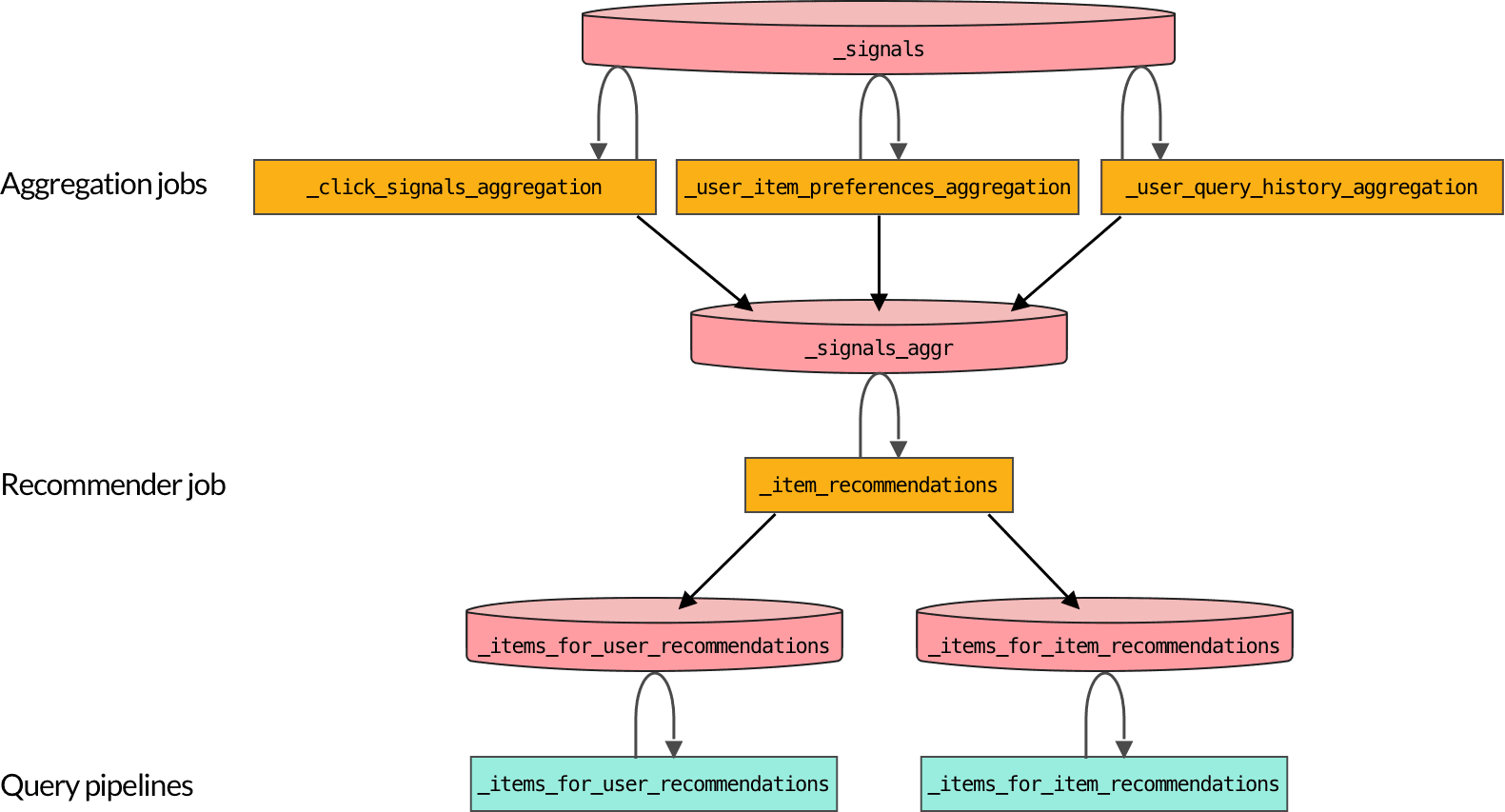
The diagram below shows the flow of data between the [default objects](/docs/4/fusion-ai/concepts/boosting/getting-started#default-objects-for-recommendations) created when you [enable recommendations](/docs/4/fusion-ai/concepts/boosting/getting-started#enable-recommendations). You can create additional object for different [recommendation methods](/docs/4/fusion-ai/concepts/boosting/recommendation-methods).
1. *Signals data* is aggregated into a format that can be consumed by recommender jobs.\
Your search application should be sending [well-formed signals data](/docs/4/fusion-ai/concepts/signals-and-aggregations/signals/overview) to Fusion whenever there is user activity on your site.\
By default, the `_click_signals_aggregation` job runs every 15 minutes while the `_user_item_preferences_aggregation` and `_user_query_history_aggregation` jobs run once per day.\
You can use signals data for boosting, without enabling recommendations, using the [Boost with Signals](/docs/4/fusion-ai/reference/query-pipeline-stages/recommendation-boosting-query-stage) query pipeline stage. The [default query pipeline](/docs/4/fusion-server/concepts/querying/pipelines/query-pipelines) includes this stage.
2. *Recommender data* is produced when recommender jobs analyze aggregated signals.\
The default `_item_recommendations` job must be manually [scheduled](/docs/4/fusion-server/concepts/jobs/overview) or run on demand. Make sure that the `_user_item_preferences_aggregation` job runs first.
3. Query pipelines retrieve recommender data to produce recommendations and boosts.\
When recommendations are enabled, Fusion creates two query pipelines for recommendations:
**`_items_for_user_recommendations`** `_items_for_item_recommendations`
## Recommendations storage requirements
Collaborative recommendations are derived from data generated by Fusion AI [jobs](/docs/4/fusion-ai/concepts/boosting/getting-started) and stored in special collections. You can estimate the required storage for this data if you know the following:
* the number of unique users in the signals collection (`num_users`)\
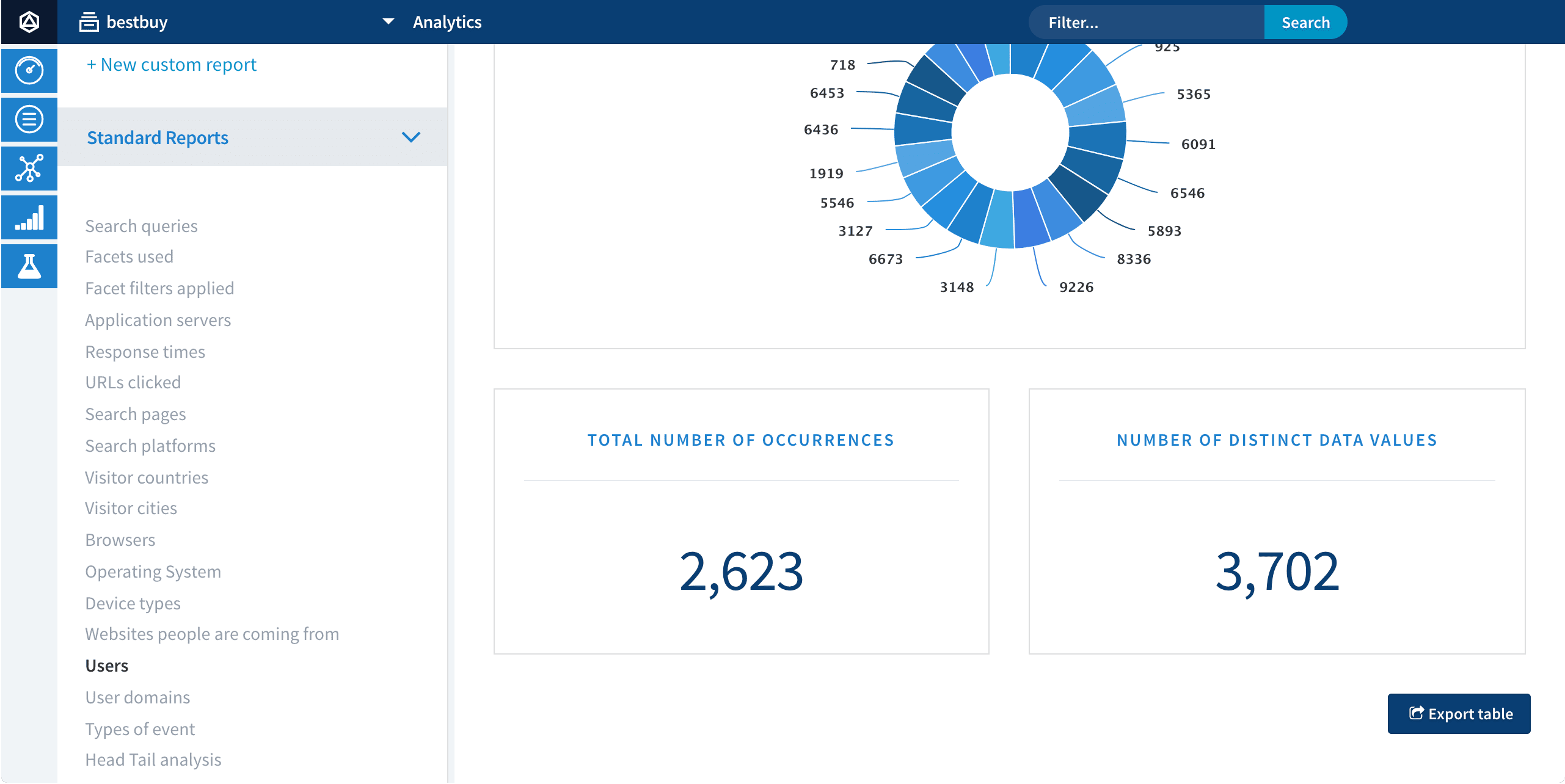
To find the number of unique values of the `user_id` field, navigate to **Analytics** > **App Insights** > **Analytics** > **Users**. The **Number of Distinct Data Values** panel displays the number of unique users:
If no value is displayed here or the value is not accurate, see [Important fields for signals](/docs/4/fusion-ai/concepts/signals-and-aggregations/signals/overview) to verify that your signals data is well-formed.
* the number of unique items in the main collection (`num_items`)\
Navigate to **Collections** > **Collections Manager** to see the total number of documents in your main collection.
* the number of recommendations to be computed per user (`num_recs_per_user`)\
This is a configuration parameter in the recommender job, with a default value of 10.
* the number of item similarities to be computed per item (`num_item_sims`)\
This is a configuration parameter in the [recommender job](/docs/4/fusion-ai/concepts/boosting/getting-started#job-and-schedule), with a default value of 10.
Every time the recommender job runs, this many new recommender documents are created:
```js wrap theme={"dark"}
num_users * num_recs_per_user + num_items * num_item_sims
```
Each of these documents is about 300 bytes. This is the minimum size; they can be larger if you configure the recommender job to pull [item metadata fields](/docs/4/fusion-ai/reference/jobs/als-recommender) from the main collection for inclusion in recommender documents. These fields are useful when displaying recommendations in your front-end search application.
In your recommender jobs, verify that **Delete Old Recommendations** is selected so that only the latest recommender data is stored.
 1. *Signals data* is aggregated into a format that can be consumed by recommender jobs.\
Your search application should be sending [well-formed signals data](/docs/4/fusion-ai/concepts/signals-and-aggregations/signals/overview) to Fusion whenever there is user activity on your site.\
By default, the `_click_signals_aggregation` job runs every 15 minutes while the `_user_item_preferences_aggregation` and `_user_query_history_aggregation` jobs run once per day.\
You can use signals data for boosting, without enabling recommendations, using the [Boost with Signals](/docs/4/fusion-ai/reference/query-pipeline-stages/recommendation-boosting-query-stage) query pipeline stage. The [default query pipeline](/docs/4/fusion-server/concepts/querying/pipelines/query-pipelines) includes this stage.
2. *Recommender data* is produced when recommender jobs analyze aggregated signals.\
The default `_item_recommendations` job must be manually [scheduled](/docs/4/fusion-server/concepts/jobs/overview) or run on demand. Make sure that the `_user_item_preferences_aggregation` job runs first.
3. Query pipelines retrieve recommender data to produce recommendations and boosts.\
When recommendations are enabled, Fusion creates two query pipelines for recommendations:
**`_items_for_user_recommendations`** `_items_for_item_recommendations`
## Recommendations storage requirements
Collaborative recommendations are derived from data generated by Fusion AI [jobs](/docs/4/fusion-ai/concepts/boosting/getting-started) and stored in special collections. You can estimate the required storage for this data if you know the following:
* the number of unique users in the signals collection (`num_users`)\
To find the number of unique values of the `user_id` field, navigate to **Analytics** > **App Insights** > **Analytics** > **Users**. The **Number of Distinct Data Values** panel displays the number of unique users:
1. *Signals data* is aggregated into a format that can be consumed by recommender jobs.\
Your search application should be sending [well-formed signals data](/docs/4/fusion-ai/concepts/signals-and-aggregations/signals/overview) to Fusion whenever there is user activity on your site.\
By default, the `_click_signals_aggregation` job runs every 15 minutes while the `_user_item_preferences_aggregation` and `_user_query_history_aggregation` jobs run once per day.\
You can use signals data for boosting, without enabling recommendations, using the [Boost with Signals](/docs/4/fusion-ai/reference/query-pipeline-stages/recommendation-boosting-query-stage) query pipeline stage. The [default query pipeline](/docs/4/fusion-server/concepts/querying/pipelines/query-pipelines) includes this stage.
2. *Recommender data* is produced when recommender jobs analyze aggregated signals.\
The default `_item_recommendations` job must be manually [scheduled](/docs/4/fusion-server/concepts/jobs/overview) or run on demand. Make sure that the `_user_item_preferences_aggregation` job runs first.
3. Query pipelines retrieve recommender data to produce recommendations and boosts.\
When recommendations are enabled, Fusion creates two query pipelines for recommendations:
**`_items_for_user_recommendations`** `_items_for_item_recommendations`
## Recommendations storage requirements
Collaborative recommendations are derived from data generated by Fusion AI [jobs](/docs/4/fusion-ai/concepts/boosting/getting-started) and stored in special collections. You can estimate the required storage for this data if you know the following:
* the number of unique users in the signals collection (`num_users`)\
To find the number of unique values of the `user_id` field, navigate to **Analytics** > **App Insights** > **Analytics** > **Users**. The **Number of Distinct Data Values** panel displays the number of unique users:
 If no value is displayed here or the value is not accurate, see [Important fields for signals](/docs/4/fusion-ai/concepts/signals-and-aggregations/signals/overview) to verify that your signals data is well-formed.
* the number of unique items in the main collection (`num_items`)\
Navigate to **Collections** > **Collections Manager** to see the total number of documents in your main collection.
* the number of recommendations to be computed per user (`num_recs_per_user`)\
This is a configuration parameter in the recommender job, with a default value of 10.
* the number of item similarities to be computed per item (`num_item_sims`)\
This is a configuration parameter in the [recommender job](/docs/4/fusion-ai/concepts/boosting/getting-started#job-and-schedule), with a default value of 10.
Every time the recommender job runs, this many new recommender documents are created:
```js wrap theme={"dark"}
num_users * num_recs_per_user + num_items * num_item_sims
```
Each of these documents is about 300 bytes. This is the minimum size; they can be larger if you configure the recommender job to pull [item metadata fields](/docs/4/fusion-ai/reference/jobs/als-recommender) from the main collection for inclusion in recommender documents. These fields are useful when displaying recommendations in your front-end search application.
If no value is displayed here or the value is not accurate, see [Important fields for signals](/docs/4/fusion-ai/concepts/signals-and-aggregations/signals/overview) to verify that your signals data is well-formed.
* the number of unique items in the main collection (`num_items`)\
Navigate to **Collections** > **Collections Manager** to see the total number of documents in your main collection.
* the number of recommendations to be computed per user (`num_recs_per_user`)\
This is a configuration parameter in the recommender job, with a default value of 10.
* the number of item similarities to be computed per item (`num_item_sims`)\
This is a configuration parameter in the [recommender job](/docs/4/fusion-ai/concepts/boosting/getting-started#job-and-schedule), with a default value of 10.
Every time the recommender job runs, this many new recommender documents are created:
```js wrap theme={"dark"}
num_users * num_recs_per_user + num_items * num_item_sims
```
Each of these documents is about 300 bytes. This is the minimum size; they can be larger if you configure the recommender job to pull [item metadata fields](/docs/4/fusion-ai/reference/jobs/als-recommender) from the main collection for inclusion in recommender documents. These fields are useful when displaying recommendations in your front-end search application.