> ## Documentation Index
> Fetch the complete documentation index at: https://doc.lucidworks.com/llms.txt
> Use this file to discover all available pages before exploring further.

# url:tabs

export const LwTemplate = ({title = "Key questions to get you started", icon = "sparkles", cta = "Powered by Agent Studio", linkHref = "https://lucidworks.com/demo/?utm_source=docs&utm_medium=referral&utm_campaign=docs_cta_ai"}) => {
  const [isLoaded, setIsLoaded] = useState(false);
  useEffect(() => {
    const timer = setTimeout(() => {
      setIsLoaded(true);
    }, 500);
    return () => clearTimeout(timer);
  }, []);
  return <div className="lw-template-container">
      <Card title={title} icon={icon}>
        {isLoaded && <span dangerouslySetInnerHTML={{
    __html: `<lw-template id="a029c1a9-28be-427e-b0e1-5d918920246a"></lw-template
            >`
  }} />}
        <Link href={linkHref} className="agent-studio-link text-left text-gray-600 gap-2 dark:text-gray-400 text-sm font-medium flex flex-row items-center hover:text-primary dark:hover:text-primary-light group-hover:text-primary group-hover:dark:text-primary-light">Powered by Lucidworks Agent Studio</Link>
      </Card>
    </div>;
};

[localhost link]: http://localhost:3000/docs/4/app-studio/reference/tags/lightning.directive.urlTabs

[mintlify link]: https://doc.lucidworks.com/docs/4/app-studio/reference/tags/lightning.directive.urlTabs

[old doc.lw link]: https://doc.lucidworks.com/app-studio/4.2/1201

<LwTemplate />

## Description

The Url Tabs Directive by clicking on a tab will not add the filter to
the URL it will redirect the user to '/action/tab\_value' if the action
attribute is present on the tag. If not it will just redirect to
'/tab\_value'.

## Usage

as element:

```xml wrap  theme={"dark"}
<url:tabs
       response="{object}"
       tabs="{string}"
       [field-name="{string}"]
       [all-label="{string}"]
       [platform="{string}"]
       [query="{string}"]
       [count-number="{string}"]
       [action="{string}"]>
</url:tabs>
```

### Directive info

* This directive creates new scope.

#### Parameters

| Param                      | Type       | Details                                                                                                                                                                                                                                                                                                          |
| -------------------------- | ---------- | ---------------------------------------------------------------------------------------------------------------------------------------------------------------------------------------------------------------------------------------------------------------------------------------------------------------- |
| response                   | **object** | A response object                                                                                                                                                                                                                                                                                                |
| tabs                       | **string** | The tabs to output. Specified as a comma separated list. When using filter tabs, you can either specify the actual filter name, or the actual filter name with an alternative display name. To substitute actual filter names with alternative display names use the following notation: 'programme=Programmes'. |
| field-name  *(optional)*   | **string** | The field to apply filters to when in 'filter' mode.                                                                                                                                                                                                                                                             |
| all-label  *(optional)*    | **string** | Label for the option to turn off all filters. If this attribute is specified, an additional link will be displayed to show all Results (e.g. not applying a Filter).                                                                                                                                             |
| platform  *(optional)*     | **string** | The Platform to use when submitting the facet without any filters applied. This is used to get the filter counts for the original query after a user clicks on a filter (e.g. drills down).                                                                                                                      |
| query  *(optional)*        | **string** | The name of the query object used to get the count values.                                                                                                                                                                                                                                                       |
| count-number  *(optional)* | **string** | Specify how the number representing the count should be formatted. Optional values are 'plain', 'formatted' and 'rounded'.                                                                                                                                                                                       |
| action  *(optional)*       | **string** | Url to redirect.                                                                                                                                                                                                                                                                                                 |

## Events

### tab\_changed

When the tab is changed on this directive an event called tab\_changed
will be fired with the name of the tab that is now active.

This event can be listened to like so.

```js wrap  theme={"dark"}
$scope.$on('tab_changed', function(e, tab){
     console.log('New Tab = ' + tab);
});
```

#### Type:

broadcast

#### Target:

root scope

## Example

#### Source

```xml wrap  theme={"dark"}
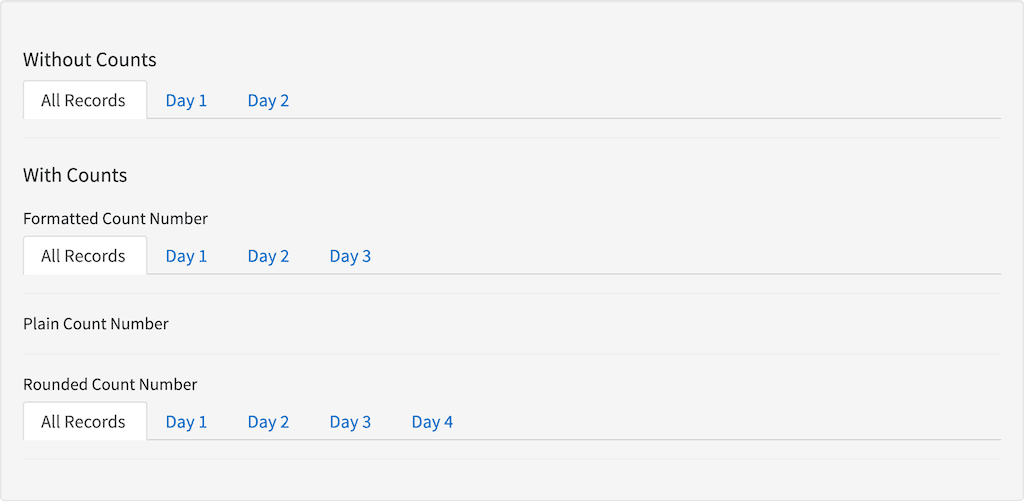
<search:platform var="platform" conf="platforms.test"></search:platform>
<search:query var="query" parameters='*'></search:query>
<h3 id="example_without-counts">Without Counts</h3>
<url:tabs response="response" tabs="Day 1,Day 2" field-name="test1" all-label="All Records"></url:tabs>
<hr />
<h3 id="example_with-counts">With Counts</h3>
<h4 id="example_with-counts_formatted-count-number">Formatted Count Number</h4>
<url:tabs response="response" tabs="Day 1,Day 2,Day 3" field-name="test1" all-label="All Records" platform="platform" query="query" count-number="formatted"></url:tabs>
<hr />
<h4 id="example_with-counts_plain-count-number">Plain Count Number</h4>
<urlrch:tabs response="response" tabs="Day 1,Day 2,Day 3" field-name="test1" all-label="All Records" platform="platform" query="query" count-number="plain"></urlrch:tabs>
<hr />
<h4 id="example_with-counts_rounded-count-number">Rounded Count Number</h4>
<url:tabs response="response" tabs="Day 1,Day 2,Day 3,Day 4" field-name="test1" all-label="All Records" platform="platform" query="query" count-number="rounded"></url:tabs>
<hr />
```

```js wrap  expandable  theme={"dark"}
angular.module('lightning')
.controller('ExampleController', ['$scope','$timeout','ResponseService', function($scope,$timeout,ResponseService) {
            $scope.response = {
                page: 2,
                query: {
                    rpp: 50
                },
                facets: {
                    test1: {
                        id:'test1',
                        display:'test1',
                        field:'test1',
                        filters: [
                            {

                                val: {
                                    dsp: 'Day 1',
                                    act: 'Day 1',

                                },
                                count: 1000,

                            },
                            {

                                val: {
                                    dsp: 'Day 2',
                                    act: 'Day 2',
                                },
                                count: 2000,
                            },
                            {

                                val: {
                                    dsp: 'Day 3',
                                    act: 'Day 3',
                                },
                                count: 2990,
                            },
                            {

                                val: {
                                    dsp: 'Day 4',
                                    act: 'Day 4',
                                },
                                count: 0,
                            }

                        ]
                    },
                    test2: {
                        id:'test2',
                        display:'test2',
                        field:'test2',
                        filters: [
                            {

                                val: {
                                    dsp: 'Day 1',
                                    act: 'Day 1',
                                },
                                count: 10,

                            },
                            {

                                val: {
                                    dsp: 'Day 2',
                                    act: 'Day 2',
                                },
                                count: 20,
                            }

                        ]
                    },
                    empty: {
                        id:'empty',
                        display:'Empty',
                        field:'empty',
                        filters: []
                    },
                },
                results: []
            }

            ResponseService.setResponse('response', $scope.response);
        }]);
```

#### Result

<img src="https://mintcdn.com/lucidworks/ENcE8K39c0iEpL8J/assets/images/app-studio/as-examples/tags/urlTabs.png?fit=max&auto=format&n=ENcE8K39c0iEpL8J&q=85&s=416c15cef32c55b54df02cb6a63a53fb" alt="Result" width="1024" height="501" data-path="assets/images/app-studio/as-examples/tags/urlTabs.png" />
