> ## Documentation Index
> Fetch the complete documentation index at: https://doc.lucidworks.com/llms.txt
> Use this file to discover all available pages before exploring further.
# Architecture and Technology Stack
export const LwTemplate = ({title = "Key questions to get you started", icon = "sparkles", cta = "Powered by Agent Studio", linkHref = "https://lucidworks.com/demo/?utm_source=docs&utm_medium=referral&utm_campaign=docs_cta_ai"}) => {
const [isLoaded, setIsLoaded] = useState(false);
useEffect(() => {
const timer = setTimeout(() => {
setIsLoaded(true);
}, 500);
return () => clearTimeout(timer);
}, []);
return
{isLoaded && `
}} />}
Powered by Lucidworks Agent Studio
;
};
[localhost link]: http://localhost:3000/docs/4/app-studio/concepts/overview/architecture
[old doc.lw link]: https//doc.lucidworks.com/app-studio/4.2/3118
[mintlify link]: https://doc.lucidworks.com/docs/4/app-studio/concepts/overview/architecture
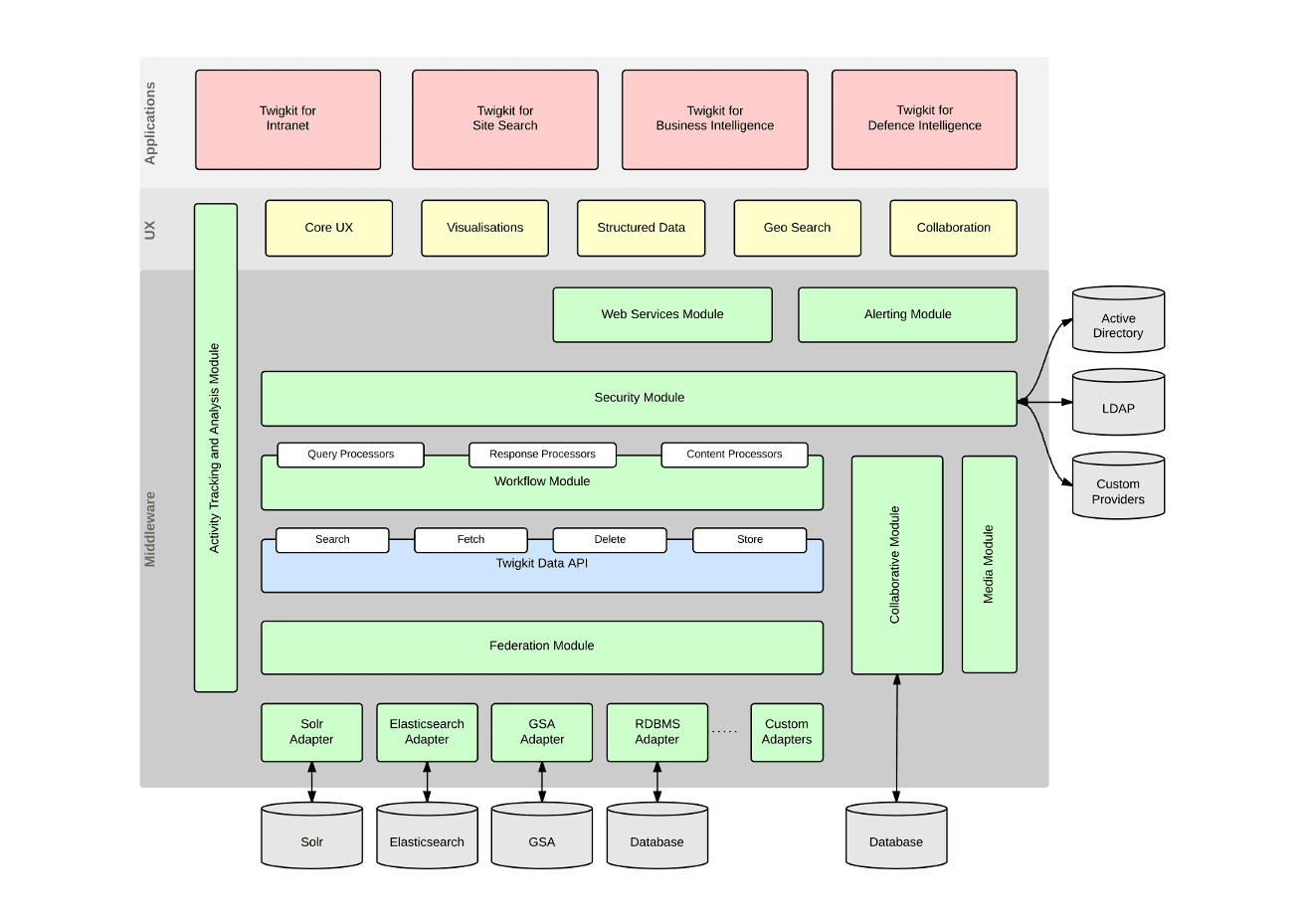
Appkit is a stateless, modular, 100% Java Standard Edition software framework.
## Architecture
Appkit consists of:
* A layer of [data-abstraction middleware](/docs/4/app-studio/concepts/overview/data-sources)
* A collection of functional [modules](/docs/4/app-studio/reference/modules/overview) for data manipulation
* [User interface components](/docs/4/app-studio/concepts/overview/ui-components) for rendering and visualizing the data
An Appkit search application consists of modular building blocks, which are pieced together through the use of special [Appkit tags](/docs/4/app-studio/concepts/overview/appkit-tags), which can be mixed in with standard HTML and JSP code.
## Technology stack
The Appkit stack is designed to be lightweight from the point of view of efficiency and ease of development. No programming or Java code is necessary to build a search application with Appkit.
### Software that Appkit uses
Appkit uses:
* Maven for server side dependencies and build management
* npm 9.0.2 for client side dependencies
* Standard Java 1.8 Servlets and JSPs
* Standards-compliant AngularJS, HTML, CSS, and JavaScript
### What Appkit provides
Appkit provides:
* A self-service application generator for project generation
* AngularJS based tag libraries for all framework components
* Web services to expose all search functionality
* Extension points for custom tags, JavaScript, and CSS
### Deployment options
Appkit applications can be:
* Deployed locally in a development environment using the Maven Jetty plugin
* Built to a standard WAR file for deployment on Tomcat (or any other servlet container/application server)
 ## Technology stack
The Appkit stack is designed to be lightweight from the point of view of efficiency and ease of development. No programming or Java code is necessary to build a search application with Appkit.
### Software that Appkit uses
Appkit uses:
* Maven for server side dependencies and build management
* npm 9.0.2 for client side dependencies
* Standard Java 1.8 Servlets and JSPs
* Standards-compliant AngularJS, HTML, CSS, and JavaScript
### What Appkit provides
Appkit provides:
* A self-service application generator for project generation
* AngularJS based tag libraries for all framework components
* Web services to expose all search functionality
* Extension points for custom tags, JavaScript, and CSS
### Deployment options
Appkit applications can be:
* Deployed locally in a development environment using the Maven Jetty plugin
* Built to a standard WAR file for deployment on Tomcat (or any other servlet container/application server)
## Technology stack
The Appkit stack is designed to be lightweight from the point of view of efficiency and ease of development. No programming or Java code is necessary to build a search application with Appkit.
### Software that Appkit uses
Appkit uses:
* Maven for server side dependencies and build management
* npm 9.0.2 for client side dependencies
* Standard Java 1.8 Servlets and JSPs
* Standards-compliant AngularJS, HTML, CSS, and JavaScript
### What Appkit provides
Appkit provides:
* A self-service application generator for project generation
* AngularJS based tag libraries for all framework components
* Web services to expose all search functionality
* Extension points for custom tags, JavaScript, and CSS
### Deployment options
Appkit applications can be:
* Deployed locally in a development environment using the Maven Jetty plugin
* Built to a standard WAR file for deployment on Tomcat (or any other servlet container/application server)